

Microsoft acknowledged in early May 2026 that Windows 11 File Explorer performance still needs deeper work after criticism of its background preloading experiment, with Windows engineer Tali Roth saying the company is using preloading alongside broader fixes for loading, responsiveness, disk activity, and hangs. That is the important part: Microsoft is no longer pretending that the slowest-feeling parts of Explorer can be solved by making the first window appear sooner. It is also an admission that Windows 11’s most ordinary interface has become a test of Microsoft’s credibility. File Explorer is not a side app; it is the operating system’s handshake.
The argument over preloading sounds, at first, like a classic enthusiast overreaction. Microsoft tries to make File Explorer open faster, users notice that the trick keeps more of Explorer resident in memory, and a familiar cycle begins: “bloat,” “band-aid,” “why is Windows 10 faster?” But the complaint lands because it maps onto something real.
Windows 11 File Explorer often does not merely launch slowly. It can hesitate when opening folders, drawing thumbnails, resolving network paths, expanding cloud-backed locations, rendering context menus, switching tabs, or waking up from whatever state the shell has settled into after boot. Those are not all the same bug, and they are not all fixed by shaving a few hundred milliseconds from the initial window creation path.
That is why Roth’s “and, not or” explanation matters. Preloading may be defensible as one tool in the performance kit, but it is politically toxic if it becomes the headline fix. Users do not experience File Explorer as a process model; they experience it as a promise that local files should feel local.
The Windows team appears to understand that distinction now. The question is whether Microsoft can fix enough of the underlying architecture before Windows 11’s reputation hardens into something Vista-like: not necessarily unusable, not universally broken, but permanently associated with drag.
The problem is that File Explorer occupies a different psychological category. A file manager is supposed to feel elemental. When Microsoft has to keep part of it warm in the background so it opens acceptably, users reasonably ask why the default file browser on a modern SSD-equipped PC needs staging at all.
The reported RAM cost is small in isolation, roughly tens of megabytes rather than hundreds. On a 16GB or 32GB system, that is not the scandal. The scandal is narrative: Windows already feels to many users like an operating system that quietly spends resources on things they did not request, then asks for trust when it wants to preload yet another component.
That makes preloading a technically plausible fix with a public-relations problem. It improves the visible launch path while leaving untouched the delays people notice after the window exists. If the first Explorer frame appears quickly but the folder contents lag, thumbnails crawl, or the context menu arrives like it is negotiating a treaty, the user does not perceive “performance progress.” They perceive sleight of hand.
But Windows 11’s Explorer also became a kind of architectural compromise made visible. Classic Win32 foundations, newer XAML/WinUI pieces, shell extensions, cloud providers, search indexing, thumbnail handlers, context menu bridges, and legacy compatibility all have to coexist inside an interface users expect to behave like a lightweight utility.
That coexistence is expensive. Every right-click can become a negotiation among old shell extensions, modern menu presentation, cloud sync state, security context, and UI composition. Every folder view can involve metadata extraction, thumbnails, grouping, sorting, indexing, and network or cloud path resolution. Every visual flourish has to pay rent in milliseconds.
The cruel part is that Windows 11’s visual modernization raised expectations while sometimes lowering perceived speed. A prettier command bar does not compensate for a folder that takes longer to become usable. A more coherent dark mode does not erase the irritation of a white flash, a frozen pane, or a menu that appears after your train of thought has moved on.
Microsoft’s challenge is not choosing between old and new. It is proving that modern Windows can be modern without feeling padded.
In practice, the context menu became a performance and muscle-memory complaint rolled into one. Users saw fewer options but not always faster behavior. They lost immediate access to some old commands while still encountering delays. That is the worst trade: less control without a clear speed dividend.
Microsoft has since been refining the menu again, moving less common actions into flyouts, rearranging commands, and trying to reduce wasted space without making the interface feel underpowered. That is the right direction, but it reveals the central Windows dilemma. File Explorer is not just a Microsoft interface; it is an ecosystem surface.
Compression tools, cloud sync clients, developer utilities, media apps, security products, version-control tools, and enterprise management agents all want a piece of the right-click menu. Windows has to remain compatible with that ecosystem while preventing it from turning the most common interaction in file management into a blocking event. That is hard engineering, not mere design polish.
The old menu was ugly, but it was familiar. The new menu is cleaner, but it has to be faster to justify itself. A modern shell that makes users reach for registry hacks is not winning the design argument.
That is where Windows 11 Explorer has damaged trust. A folder with a handful of local files should not feel like a remote web app. A right-click should not feel probabilistic. A navigation pane should not pause as if it is waiting on a service in another time zone.
This kind of latency is more corrosive than outright failure because it trains users to distrust every interaction. You click once and wait. You click again because maybe the first click did not register. Then both actions land. The machine is no longer an extension of intent; it is a system to be negotiated with.
For IT pros, that translates into help desk noise. “Explorer is slow” is one of the least satisfying tickets in the world because it can mean almost anything: shell extensions, OneDrive sync, network drives, Quick Access history, thumbnail cache, indexing, antivirus inspection, profile corruption, GPU driver weirdness, or a Windows regression. The user experiences one problem. The admin inherits a decision tree.
Microsoft’s performance push has to reduce that ambiguity. The company does not need every folder to open instantly in every pathological environment. It needs the common path to feel deterministic again.
That comparison is emotionally potent because Windows 10 is not exotic. It ran on the same desks, the same peripherals, the same network shares, and often the same hardware. When a user upgrades and the file manager feels slower, the explanation cannot be waved away as nostalgia.
Windows 10 is also now part of Microsoft’s support-pressure story. With Windows 10’s consumer end of support having arrived in October 2025, Microsoft needs holdouts to see Windows 11 as the safe, modern default. But a core utility that feels worse than the old one gives skeptics a daily reminder that migration is not always upgrade.
This matters in enterprise even when performance differences are small. IT departments do not measure operating systems only by benchmark charts. They measure them by user sentiment, ticket volume, training friction, and the number of little annoyances that accumulate into resistance.
If Windows 11 is going to complete its long transition from “the new OS” to simply “Windows,” File Explorer has to stop being exhibit A for why people stayed behind.
That shift is welcome, but it is also an admission. You do not launch a quality campaign if users already believe quality is handled. You launch one when the brand promise has become unstable.
File Explorer sits at the center of that repair job because it is so ordinary. Nobody needs a keynote to understand whether Explorer feels good. You open a folder, move a file, right-click a document, search for something, extract an archive, or browse photos. The verdict arrives immediately.
This is why Microsoft’s answer cannot be only future-facing. It is not enough to say that the platform is evolving toward AI PCs, Copilot experiences, and richer cross-device workflows. If the local file browser feels labored, those higher-level ambitions become harder to sell. The operating system must first be competent at operating-system things.
There is a lesson here that Microsoft has learned before and forgotten before. Windows users will tolerate change when the fundamentals improve. They revolt when change feels like overhead.
Explorer.exe carries historical weight. It is both user interface and infrastructure. When it stumbles, the whole desktop feels compromised. When it crashes, users do not think “a component failed”; they think Windows hiccuped.
Microsoft’s modern Windows ambitions keep colliding with that legacy role. The company wants cloud presence, OneDrive state, richer search, Gallery views, archive support, tabs, dark mode, mobile-device integration, and eventually more AI-assisted file discovery. Each feature may be useful. Together, they increase the number of things Explorer may need to know before it can simply show a folder.
That does not mean Microsoft should freeze Explorer in 2015. It means every addition to the shell should be judged against an unforgiving standard: does it make the common case slower, less predictable, or harder to troubleshoot? If so, it needs to be isolated, deferred, cached intelligently, or made optional.
The desktop shell is not the place for speculative complexity. It is the place where Microsoft has to be boringly excellent.
The better critique is agency. Users are tired of operating systems making unilateral decisions in the name of convenience, especially when those decisions are attached to features they did not ask for or cannot fully inspect. Preloading File Explorer may be optional, but the default still communicates Microsoft’s priorities.
If the company can show measurable improvements and provide a clear toggle, most users will not care about the memory. If the improvement is narrow and the broader experience remains sluggish, the toggle becomes symbolic. It says Microsoft optimized the demo path rather than the work path.
This is where transparency helps. Microsoft should be specific about which delays it is fixing: launch time, folder enumeration, thumbnail generation, command bar responsiveness, context menu latency, search indexing duplication, cloud provider calls, or shell hangs. The more precise the company is, the less users will assume that “performance improvement” means “we hid the delay somewhere else.”
Performance work is most credible when it names the bottleneck.
A corporate Windows image may include endpoint detection, data-loss prevention, cloud backup, OneDrive Known Folder Move, network drive mappings, SharePoint sync, legacy line-of-business shell extensions, archive tools, PDF handlers, and custom context menu entries. A delay that looks minor on a clean consumer laptop can become a major irritation on a managed device.
That is why Microsoft’s deeper fixes need to account for real-world messiness. It is not enough for Explorer to feel fast on a fresh Insider build with a local SSD and a small Downloads folder. It has to remain responsive when Quick Access points to unavailable network locations, when sync providers are busy, when thumbnails are expensive, and when third-party extensions misbehave.
The company has tools to enforce this. It can isolate slow extensions more aggressively, improve diagnostics, surface performance offenders, defer nonessential metadata work, and give admins policy control over expensive Explorer integrations. Windows already contains sophisticated plumbing; the question is whether Explorer’s user experience benefits from it.
For IT departments, the dream is not merely a faster Explorer. It is an Explorer that fails gracefully. If a network path is dead, the shell should not feel dead with it. If a cloud provider is slow, the folder should not become a hostage. If a shell extension blocks, Windows should make the culprit visible.
File Explorer is suffering from that mismatch. Microsoft can point to tabs, modernized menus, improved archive support, better dark mode coverage, and cloud-aware views. Users point to the moment they clicked and nothing happened.
That moment wins. It always wins. Latency is emotional.
The danger for Microsoft is that Windows 11 becomes associated with a kind of ambient sluggishness that no single update can disprove. Once users believe an OS is “heavy,” every delay confirms the story and every improvement is treated as an exception. That is why the company’s 2026 quality push has to be sustained, not episodic.
A single Patch Tuesday with Explorer fixes will not rewrite the narrative. Months of boring, measurable, user-visible improvements might.
That sounds less glamorous than a redesigned Explorer, but it is exactly the kind of work Windows needs. The fastest interface is often the one that declines to do work until it matters. The most reliable shell is often the one that refuses to let slow dependencies block visible interaction.
Explorer should be ruthless about prioritization. Show the folder first. Let thumbnails arrive progressively. Keep menus interactive. Make cloud state useful but not dominant. Treat network weirdness as expected, not exceptional. Cache intelligently, but do not let the cache become an excuse for expensive defaults.
Microsoft also needs to keep separating perception from instrumentation. Telemetry may say the median launch time improved. Users may still feel the product is slow because the 95th percentile is awful, or because the delay happens after launch, or because a visible animation masks a blocked input path. Good performance engineering measures the path the user actually feels.
That is why the File Explorer fight is healthy. The backlash is not merely complaining. It is user research with profanity removed.
That means the company should prioritize interaction latency over ornamental consistency. It should make right-click menus appear predictably, even if some provider-specific actions populate a fraction later. It should keep local folders local in feel, even when they sit inside a profile tied to cloud services. It should make tab and window creation cheap enough that users stop noticing the distinction.
Microsoft should also be more honest about optionality. If preloading is useful, keep the toggle. If Gallery, Home, Recommended, cloud integrations, or rich metadata views are expensive in certain environments, give admins and power users ways to simplify them without registry archaeology. A fast “boring mode” for Explorer would not be a defeat; it would be a recognition that Windows serves many kinds of machines.
The larger design principle is simple: the shell should be layered. The base layer should be fast, local, and reliable. Richer features should enhance that base without being allowed to compromise it.
That is how Microsoft can turn preloading from a punchline into a footnote.
Source: eTeknix Microsoft Admits Windows 11 File Explorer Is Still Slow, Says Preloading Is Not Enough
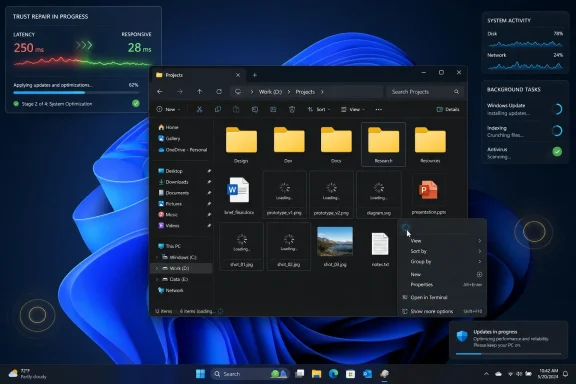 Microsoft’s File Explorer Problem Is Bigger Than a Slow First Click
The argument over preloading sounds, at first, like a classic enthusiast overreaction. Microsoft tries to make File Explorer open faster, users notice that the trick keeps more of Explorer resident in memory, and a familiar cycle begins: “bloat,” “band-aid,” “why is Windows 10 faster?” But the complaint lands because it maps onto something real.Windows 11 File Explorer often does not merely launch slowly. It can hesitate when opening folders, drawing thumbnails, resolving network paths, expanding cloud-backed locations, rendering context menus, switching tabs, or waking up from whatever state the shell has settled into after boot. Those are not all the same bug, and they are not all fixed by shaving a few hundred milliseconds from the initial window creation path.
That is why Roth’s “and, not or” explanation matters. Preloading may be defensible as one tool in the performance kit, but it is politically toxic if it becomes the headline fix. Users do not experience File Explorer as a process model; they experience it as a promise that local files should feel local.
The Windows team appears to understand that distinction now. The question is whether Microsoft can fix enough of the underlying architecture before Windows 11’s reputation hardens into something Vista-like: not necessarily unusable, not universally broken, but permanently associated with drag.
Preloading Is a Symptom Disguised as an Optimization
Preloading is not inherently shameful. Modern operating systems and applications routinely prepare work before the user asks for it. Browsers warm processes, Office has experimented with startup boosting, phone apps cache views, and operating systems have spent decades guessing what the user will need next.The problem is that File Explorer occupies a different psychological category. A file manager is supposed to feel elemental. When Microsoft has to keep part of it warm in the background so it opens acceptably, users reasonably ask why the default file browser on a modern SSD-equipped PC needs staging at all.
The reported RAM cost is small in isolation, roughly tens of megabytes rather than hundreds. On a 16GB or 32GB system, that is not the scandal. The scandal is narrative: Windows already feels to many users like an operating system that quietly spends resources on things they did not request, then asks for trust when it wants to preload yet another component.
That makes preloading a technically plausible fix with a public-relations problem. It improves the visible launch path while leaving untouched the delays people notice after the window exists. If the first Explorer frame appears quickly but the folder contents lag, thumbnails crawl, or the context menu arrives like it is negotiating a treaty, the user does not perceive “performance progress.” They perceive sleight of hand.
Windows 11 Made Explorer Modern, Then Made It Feel Heavy
File Explorer’s Windows 11 redesign was not irrational. Microsoft wanted a shell that looked like the rest of the new OS: softer geometry, simplified commands, cloud integration, tab support, modern surfaces, and visual consistency with the broader Windows design language. The old Windows 10 Explorer was fast in part because it carried fewer modern expectations.But Windows 11’s Explorer also became a kind of architectural compromise made visible. Classic Win32 foundations, newer XAML/WinUI pieces, shell extensions, cloud providers, search indexing, thumbnail handlers, context menu bridges, and legacy compatibility all have to coexist inside an interface users expect to behave like a lightweight utility.
That coexistence is expensive. Every right-click can become a negotiation among old shell extensions, modern menu presentation, cloud sync state, security context, and UI composition. Every folder view can involve metadata extraction, thumbnails, grouping, sorting, indexing, and network or cloud path resolution. Every visual flourish has to pay rent in milliseconds.
The cruel part is that Windows 11’s visual modernization raised expectations while sometimes lowering perceived speed. A prettier command bar does not compensate for a folder that takes longer to become usable. A more coherent dark mode does not erase the irritation of a white flash, a frozen pane, or a menu that appears after your train of thought has moved on.
Microsoft’s challenge is not choosing between old and new. It is proving that modern Windows can be modern without feeling padded.
The Context Menu Became the Case Study
If File Explorer has a single symbol of Windows 11 friction, it is the context menu. Microsoft redesigned it to reduce clutter, emphasize common actions, and move legacy items behind “Show more options.” In theory, this was exactly the kind of cleanup Windows needed.In practice, the context menu became a performance and muscle-memory complaint rolled into one. Users saw fewer options but not always faster behavior. They lost immediate access to some old commands while still encountering delays. That is the worst trade: less control without a clear speed dividend.
Microsoft has since been refining the menu again, moving less common actions into flyouts, rearranging commands, and trying to reduce wasted space without making the interface feel underpowered. That is the right direction, but it reveals the central Windows dilemma. File Explorer is not just a Microsoft interface; it is an ecosystem surface.
Compression tools, cloud sync clients, developer utilities, media apps, security products, version-control tools, and enterprise management agents all want a piece of the right-click menu. Windows has to remain compatible with that ecosystem while preventing it from turning the most common interaction in file management into a blocking event. That is hard engineering, not mere design polish.
The old menu was ugly, but it was familiar. The new menu is cleaner, but it has to be faster to justify itself. A modern shell that makes users reach for registry hacks is not winning the design argument.
The Real Enemy Is Latency You Cannot Explain
Users will forgive a slow file copy if the copy dialog explains what is happening. They will forgive a large folder taking time to populate if the files are on a network share or an aging hard drive. What they do not forgive is latency that appears arbitrary.That is where Windows 11 Explorer has damaged trust. A folder with a handful of local files should not feel like a remote web app. A right-click should not feel probabilistic. A navigation pane should not pause as if it is waiting on a service in another time zone.
This kind of latency is more corrosive than outright failure because it trains users to distrust every interaction. You click once and wait. You click again because maybe the first click did not register. Then both actions land. The machine is no longer an extension of intent; it is a system to be negotiated with.
For IT pros, that translates into help desk noise. “Explorer is slow” is one of the least satisfying tickets in the world because it can mean almost anything: shell extensions, OneDrive sync, network drives, Quick Access history, thumbnail cache, indexing, antivirus inspection, profile corruption, GPU driver weirdness, or a Windows regression. The user experiences one problem. The admin inherits a decision tree.
Microsoft’s performance push has to reduce that ambiguity. The company does not need every folder to open instantly in every pathological environment. It needs the common path to feel deterministic again.
Windows 10 Is the Ghost in Every Explorer Complaint
The most damaging comparison for Windows 11 is not macOS Finder, GNOME Files, or third-party Windows file managers. It is Windows 10. For many users, Windows 10 Explorer simply feels faster.That comparison is emotionally potent because Windows 10 is not exotic. It ran on the same desks, the same peripherals, the same network shares, and often the same hardware. When a user upgrades and the file manager feels slower, the explanation cannot be waved away as nostalgia.
Windows 10 is also now part of Microsoft’s support-pressure story. With Windows 10’s consumer end of support having arrived in October 2025, Microsoft needs holdouts to see Windows 11 as the safe, modern default. But a core utility that feels worse than the old one gives skeptics a daily reminder that migration is not always upgrade.
This matters in enterprise even when performance differences are small. IT departments do not measure operating systems only by benchmark charts. They measure them by user sentiment, ticket volume, training friction, and the number of little annoyances that accumulate into resistance.
If Windows 11 is going to complete its long transition from “the new OS” to simply “Windows,” File Explorer has to stop being exhibit A for why people stayed behind.
Microsoft’s Quality Campaign Is a Trust Repair Job
Microsoft’s recent Windows messaging has shifted toward performance, reliability, and “quality” in a way that feels almost corrective. After years in which Windows 11 headlines were dominated by AI integration, Start menu experiments, advertising-like prompts, Microsoft account nudges, and cloud upsells, the company is now talking more plainly about the basics.That shift is welcome, but it is also an admission. You do not launch a quality campaign if users already believe quality is handled. You launch one when the brand promise has become unstable.
File Explorer sits at the center of that repair job because it is so ordinary. Nobody needs a keynote to understand whether Explorer feels good. You open a folder, move a file, right-click a document, search for something, extract an archive, or browse photos. The verdict arrives immediately.
This is why Microsoft’s answer cannot be only future-facing. It is not enough to say that the platform is evolving toward AI PCs, Copilot experiences, and richer cross-device workflows. If the local file browser feels labored, those higher-level ambitions become harder to sell. The operating system must first be competent at operating-system things.
There is a lesson here that Microsoft has learned before and forgotten before. Windows users will tolerate change when the fundamentals improve. They revolt when change feels like overhead.
The Shell Is Where Microsoft’s Ambitions Collide
File Explorer is not just a file manager. It is part of the Windows shell, tied to the desktop, taskbar, system tray, Start experience, window management, shell extensions, common dialogs, and decades of compatibility assumptions. That is why fixing it is harder than rewriting a standalone app.Explorer.exe carries historical weight. It is both user interface and infrastructure. When it stumbles, the whole desktop feels compromised. When it crashes, users do not think “a component failed”; they think Windows hiccuped.
Microsoft’s modern Windows ambitions keep colliding with that legacy role. The company wants cloud presence, OneDrive state, richer search, Gallery views, archive support, tabs, dark mode, mobile-device integration, and eventually more AI-assisted file discovery. Each feature may be useful. Together, they increase the number of things Explorer may need to know before it can simply show a folder.
That does not mean Microsoft should freeze Explorer in 2015. It means every addition to the shell should be judged against an unforgiving standard: does it make the common case slower, less predictable, or harder to troubleshoot? If so, it needs to be isolated, deferred, cached intelligently, or made optional.
The desktop shell is not the place for speculative complexity. It is the place where Microsoft has to be boringly excellent.
The Memory Argument Is Smaller Than the Agency Argument
The loudest reaction to preloading often focuses on RAM. That is understandable, but it is not the strongest critique. A roughly 35MB increase is not a crisis on modern systems, and Windows has long used idle memory to improve responsiveness.The better critique is agency. Users are tired of operating systems making unilateral decisions in the name of convenience, especially when those decisions are attached to features they did not ask for or cannot fully inspect. Preloading File Explorer may be optional, but the default still communicates Microsoft’s priorities.
If the company can show measurable improvements and provide a clear toggle, most users will not care about the memory. If the improvement is narrow and the broader experience remains sluggish, the toggle becomes symbolic. It says Microsoft optimized the demo path rather than the work path.
This is where transparency helps. Microsoft should be specific about which delays it is fixing: launch time, folder enumeration, thumbnail generation, command bar responsiveness, context menu latency, search indexing duplication, cloud provider calls, or shell hangs. The more precise the company is, the less users will assume that “performance improvement” means “we hid the delay somewhere else.”
Performance work is most credible when it names the bottleneck.
Enterprise IT Will Judge the Fix by Its Worst Day
Home users complain about File Explorer because it is annoying. Enterprise admins worry because Explorer sits in the blast radius of everything else.A corporate Windows image may include endpoint detection, data-loss prevention, cloud backup, OneDrive Known Folder Move, network drive mappings, SharePoint sync, legacy line-of-business shell extensions, archive tools, PDF handlers, and custom context menu entries. A delay that looks minor on a clean consumer laptop can become a major irritation on a managed device.
That is why Microsoft’s deeper fixes need to account for real-world messiness. It is not enough for Explorer to feel fast on a fresh Insider build with a local SSD and a small Downloads folder. It has to remain responsive when Quick Access points to unavailable network locations, when sync providers are busy, when thumbnails are expensive, and when third-party extensions misbehave.
The company has tools to enforce this. It can isolate slow extensions more aggressively, improve diagnostics, surface performance offenders, defer nonessential metadata work, and give admins policy control over expensive Explorer integrations. Windows already contains sophisticated plumbing; the question is whether Explorer’s user experience benefits from it.
For IT departments, the dream is not merely a faster Explorer. It is an Explorer that fails gracefully. If a network path is dead, the shell should not feel dead with it. If a cloud provider is slow, the folder should not become a hostage. If a shell extension blocks, Windows should make the culprit visible.
Microsoft Needs to Stop Treating Responsiveness as Cosmetic
There is a recurring pattern in Windows criticism: Microsoft appears to treat responsiveness as one quality among many, while users treat it as the quality that colors all others. A feature that responds instantly feels polished even if it is simple. A feature that hesitates feels unfinished even if it is technically sophisticated.File Explorer is suffering from that mismatch. Microsoft can point to tabs, modernized menus, improved archive support, better dark mode coverage, and cloud-aware views. Users point to the moment they clicked and nothing happened.
That moment wins. It always wins. Latency is emotional.
The danger for Microsoft is that Windows 11 becomes associated with a kind of ambient sluggishness that no single update can disprove. Once users believe an OS is “heavy,” every delay confirms the story and every improvement is treated as an exception. That is why the company’s 2026 quality push has to be sustained, not episodic.
A single Patch Tuesday with Explorer fixes will not rewrite the narrative. Months of boring, measurable, user-visible improvements might.
The Repair Plan Has to Reach Below the Paint
The encouraging part of Microsoft’s latest position is that it does not frame preloading as sufficient. Roth’s response points toward a more holistic effort: use preloading where it helps, but also improve loading paths, remove unnecessary work, reduce animations or visual overhead where appropriate, cut redundant disk activity, and address freezes.That sounds less glamorous than a redesigned Explorer, but it is exactly the kind of work Windows needs. The fastest interface is often the one that declines to do work until it matters. The most reliable shell is often the one that refuses to let slow dependencies block visible interaction.
Explorer should be ruthless about prioritization. Show the folder first. Let thumbnails arrive progressively. Keep menus interactive. Make cloud state useful but not dominant. Treat network weirdness as expected, not exceptional. Cache intelligently, but do not let the cache become an excuse for expensive defaults.
Microsoft also needs to keep separating perception from instrumentation. Telemetry may say the median launch time improved. Users may still feel the product is slow because the 95th percentile is awful, or because the delay happens after launch, or because a visible animation masks a blocked input path. Good performance engineering measures the path the user actually feels.
That is why the File Explorer fight is healthy. The backlash is not merely complaining. It is user research with profanity removed.
The File Explorer Fixes That Would Actually Change Minds
The path forward is not mysterious. Microsoft has to make Explorer feel fast in the operations people repeat hundreds of times a week, and it has to do so without making the shell feel like a web app wearing a native costume.That means the company should prioritize interaction latency over ornamental consistency. It should make right-click menus appear predictably, even if some provider-specific actions populate a fraction later. It should keep local folders local in feel, even when they sit inside a profile tied to cloud services. It should make tab and window creation cheap enough that users stop noticing the distinction.
Microsoft should also be more honest about optionality. If preloading is useful, keep the toggle. If Gallery, Home, Recommended, cloud integrations, or rich metadata views are expensive in certain environments, give admins and power users ways to simplify them without registry archaeology. A fast “boring mode” for Explorer would not be a defeat; it would be a recognition that Windows serves many kinds of machines.
The larger design principle is simple: the shell should be layered. The base layer should be fast, local, and reliable. Richer features should enhance that base without being allowed to compromise it.
That is how Microsoft can turn preloading from a punchline into a footnote.
The Explorer Admission Gives Windows 11 a Narrow Opening
Microsoft’s acknowledgement gives it a chance to reset the conversation, but only if the next updates make the difference obvious in daily use. Users do not need a manifesto; they need Explorer to stop interrupting them.- Microsoft is treating File Explorer performance as a multi-part engineering problem rather than only a slow-launch problem.
- Background preloading may improve the first-open experience, but it does not solve folder navigation, thumbnail loading, menu latency, or shell hangs by itself.
- The Windows 11 Explorer debate is really about trust, because users compare it directly with the faster-feeling Windows 10 experience on similar hardware.
- Enterprise environments will stress the fix harder than clean consumer PCs because shell extensions, cloud sync, security tools, and network paths all add latency.
- Microsoft’s broader Windows quality push will be judged by ordinary interactions like opening folders and right-clicking files, not by headline features.
Source: eTeknix Microsoft Admits Windows 11 File Explorer Is Still Slow, Says Preloading Is Not Enough
