

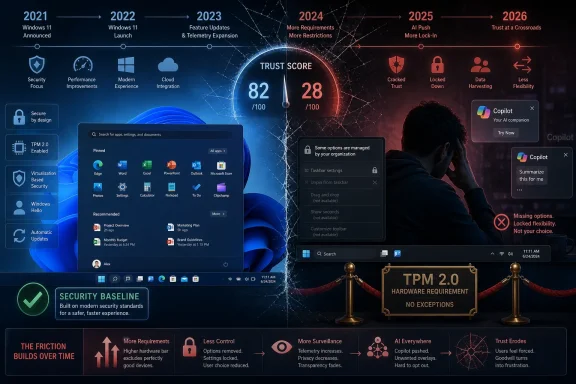
On June 24, 2021, Microsoft announced Windows 11 as the successor to Windows 10, promising a cleaner design, stricter security baseline, and a more modern PC experience before releasing it generally on October 5, 2021. Five years later, the operating system looks less like a bold break with the past than a case study in how not to spend user trust. Windows 11 did not fail in the dramatic, Vista-shaped way that becomes folklore overnight. It did something more awkward: it made Windows feel managed at its users rather than built with them.
Windows 10 was not beloved in the sentimental way Windows XP or Windows 7 became beloved. It was, more importantly, tolerated at scale. For an operating system used in homes, hospitals, factories, classrooms, government offices, and fleets of business laptops, tolerance is not faint praise; it is the whole commercial achievement.
By 2021, Windows 10 had become the platform Microsoft once seemed to want. It was serviced continuously, familiar enough for users, modern enough for administrators, and boring enough for organizations that wanted PCs to disappear into the background. The company had spent years convincing customers that Windows was now a service, not a succession of disruptive monuments.
Then came Windows 11, a product whose first impression was not “here is what this solves,” but “here is what you must give up.” The centered Start menu, rewritten taskbar, softened corners, and simplified context menus were not inherently fatal decisions. The problem was that Microsoft bundled cosmetic conviction with removed muscle memory, and then treated the resulting irritation as resistance to progress.
That is the original sin of Windows 11. It did not merely change the desktop; it implied that the desktop’s long-settled compromises were subordinate to Microsoft’s current sense of taste. For a phone or a game console, that may be survivable. For Windows, it is close to sacrilege.
Windows 11 shipped with a taskbar that looked cleaner and behaved worse for many long-time users. The inability to move it to the top or sides of the display became the most obvious grievance, but it was not the only one. Microsoft had replaced a mature tool with a more restricted one and asked customers to admire the polish.
The company’s defenders had a point when they argued that rewritten components take time. Legacy Windows is famously tangled, and a modernized shell cannot preserve every old behavior on day one without inheriting every old constraint. But that technical explanation did not erase the product judgment. If the missing features mattered enough to restore years later, they mattered enough to avoid cutting without a clearer payoff.
This is why the taskbar has remained a durable Windows 11 complaint. It represents the broader pattern: Microsoft removed choice from a product whose appeal has always depended on accommodating wildly different working styles. A laptop user with one display, a trader with six monitors, and a sysadmin jumping through remote sessions all use “Windows,” but they do not use the same desktop.
Microsoft seemed to rediscover that fact only after spending years telling users, implicitly, that they were holding it wrong.
Windows 11 reopened the wound. Its Start menu was tidy, centered, and visually coherent, but it also felt oddly underpowered. Pinned apps, recommendations, search, and account nudges jostled for attention in a panel that seemed less interested in letting users arrange their computing lives than in providing a Microsoft-approved foyer.
The controversy was not that Microsoft moved the button to the center; that could be changed. The controversy was that the whole interface conveyed a narrowing of acceptable behavior. Windows had long been messy in a way that empowered users. Windows 11’s Start menu was clean in a way that reminded them someone else owned the room.
For ordinary users, this often translated into annoyance. For power users, it translated into third-party tools, registry tweaks, shell replacements, and the sort of low-grade resentment that does not show up cleanly in telemetry. For IT departments, it meant another round of documentation, training, group policy research, and help desk tickets over a change that did not obviously improve business outcomes.
That is the practical cost of aesthetic churn. Microsoft may see a simplified interface. The field sees friction multiplied across millions of habits.
Microsoft had a serious argument. Firmware attacks, credential theft, ransomware, and hardware-rooted security all made the old Windows baseline look increasingly fragile. A modern PC security model depends on assumptions that ancient hardware cannot always satisfy. In enterprise environments, stronger defaults are not marketing fluff; they are the difference between a fleet that can use modern protections consistently and one that cannot.
But the way Microsoft drew the line made the policy feel arbitrary even when the security logic was defensible. The cutoff around Intel’s eighth-generation Core chips and equivalent AMD processors left many users staring at hardware that felt recent, capable, and expensive. Some of Microsoft’s own devices were caught in the blast radius. Workarounds then demonstrated that Windows 11 could run on many unsupported PCs, which reinforced the impression that the requirement was less a hard technical wall than a support policy with a security story attached.
That distinction matters. Microsoft was entitled to say that it would not certify every old PC forever. It was not entitled to expect users to hear that as anything other than enforced obsolescence, especially during a period when pandemic-era budgets, supply chains, and household finances were still unsettled.
The result was predictable: many users stayed on Windows 10. Some did so out of preference, some out of necessity, and some because they had no appetite for replacing working hardware to obtain an operating system they had not asked for. Windows 11 adoption was not merely slowed by inertia. It was slowed by Microsoft turning the upgrade into a hardware compliance event.
Windows 11’s baseline made features such as virtualization-based security, measured boot, BitLocker-adjacent protections, and credential hardening easier to discuss as expectations rather than luxuries. Administrators benefit when the floor rises. So do users who will never knowingly configure a security setting in their lives.
The problem is that Microsoft wrapped this necessary transition inside a product launch that also took away interface options, pushed Microsoft account flows, promoted Edge, inserted recommendations, and later layered on AI branding. That mix contaminated the security argument. Users who might have accepted “your old PC cannot support the future security model” instead heard “buy new hardware so Microsoft can show you a different Start menu and more services.”
This is where Windows 11 became strategically self-defeating. The company needed credibility to sell a hard platform break. It spent that credibility on a redesign that often felt less capable than what came before.
Microsoft could have framed Windows 11 as a security-first enterprise and consumer reset, with continuity everywhere else. Instead, it paired the most controversial hardware cutoff in modern Windows history with visible desktop disruption. That was not bravery. It was product-message congestion.
That distinction should sting in Redmond. A successful Windows version can ride replacement cycles, but it should not depend on them as its main evangelist. Windows 11 grew because time, procurement, and security deadlines pushed the market forward. The operating system may now be dominant, but dominance is not the same as affection.
For enterprises, this was always going to be a managed migration rather than a consumer-style upgrade wave. Hardware refresh plans, application compatibility testing, imaging processes, endpoint management, VPN clients, security agents, and user training all move slower than a marketing keynote. Windows 11’s stricter requirements made that process cleaner for some organizations and more expensive for others.
For consumers, the migration often happened at the cash register. Buy a new PC, get Windows 11. Keep the old PC, stay on Windows 10 until support pressure becomes unavoidable. That is not a disastrous outcome for Microsoft, but it is a revealing one.
Windows remains powerful because it is preinstalled, because businesses standardize on it, because software depends on it, and because alternatives come with their own switching costs. Windows 11 benefited from all of that. It did not create much of it.
But software reputations are comparative. Windows 10 looks better now because Windows 11 exposed the value of things people had stopped noticing. A taskbar that behaved the way users expected became a feature. A Start menu that could be made tolerable became a virtue. Hardware compatibility became a form of respect.
Microsoft should pay attention to that inversion. Users do not always reward restraint in the moment, but they punish its absence over time. Windows 10’s greatest achievement was not that it dazzled people. It let them work.
That is why the “every other Windows release is bad” cliché remains tempting even when it oversimplifies the engineering reality. Windows Vista had deep architectural importance beneath its driver chaos. Windows 8 had legitimate touch-era ideas beneath its desktop hostility. Windows 11 has real security progress beneath its shell regressions and service-promotion clutter.
The pattern is not that Microsoft forgets how to build operating systems every other release. The pattern is that Microsoft periodically mistakes its strategic anxieties for user needs.
But Windows 11 was a poor vessel for that campaign because the trust account was already overdrawn. Users who had watched Microsoft nudge Edge, advertise subscriptions, alter defaults, and remove familiar controls were not primed to see AI as a helpful assistant. They were primed to see it as the next thing being inserted into the operating system for Microsoft’s benefit first.
Recall made that tension impossible to ignore. Even with security revisions and opt-in framing, the idea of a system-level memory that captures user activity landed in a climate of suspicion. Microsoft wanted to talk about productivity and personal context. Security-minded users wanted to talk about data exposure, consent, and whether Windows was becoming too eager to observe.
The broader Copilot branding wave had a similar problem. Microsoft put the name everywhere, then began trimming it back in places where the fit was not convincing. That is not unusual in a platform shift; companies overbrand new strategies all the time. But on Windows, overbranding feels invasive because the operating system is not just another app surface. It is the place users go to run everything else.
AI may yet give Windows a new center of gravity. But Microsoft has to learn that the desktop is not a billboard for corporate priorities. It is leased emotional property, renewed every day by users who can still decide to resent the landlord.
To be fair, the Windows ecosystem is brutally difficult to service. Microsoft ships to an absurd variety of hardware, drivers, peripherals, regional configurations, enterprise policies, security products, and legacy applications. A bug that affects only a subset of users can still represent millions of machines. No other mainstream desktop platform carries quite the same compatibility burden.
Still, users judge the machine in front of them. If File Explorer stutters, if an update breaks printing, if a context menu takes too long to reveal the old options, if a gaming feature conflicts with anti-cheat software, the historical complexity of Windows is not much comfort. The user sees a product that got prettier and less predictable.
The complaint that Microsoft “took its eye off the desktop” is not entirely fair, but it is emotionally accurate. Windows 11 often feels like an operating system whose engineering teams are doing hard maintenance work while the company’s executive narrative points elsewhere: AI, cloud, subscriptions, developer platforms, and security upsells. The desktop is still essential, yet it sometimes feels strategically unfashionable.
That is dangerous. Windows does not need to be the center of Microsoft’s growth story to remain one of Microsoft’s most important trust surfaces. Every bad desktop decision becomes evidence in a larger case about whether the company respects the people who still live there.
Many IT departments wanted the stronger baseline. They did not necessarily mourn unsupported consumer-era hardware, especially where fleets were already on three- to five-year refresh schedules. Standardizing on newer CPUs, TPM 2.0, Secure Boot, and modern management tooling can simplify policy enforcement and reduce exceptions.
But enterprises also had to absorb Microsoft’s consumer-facing ambitions. The same operating system that wants to be a secure managed endpoint also wants to recommend services, integrate cloud accounts, surface AI affordances, and change shell behavior in ways that users notice. Administrators can suppress much of this, but suppression is work. Every toggle has a cost.
This is the split personality of Windows 11 in business. Underneath, it is a more defensible endpoint for the 2020s. On the surface, it can feel like an argument between the Windows team, the Microsoft account business, the Edge business, the security organization, and the AI strategy office.
The best enterprise operating systems reduce the number of internal corporate strategies an administrator has to understand. Windows 11 sometimes makes those strategies visible in the worst possible place: the user’s daily workflow.
Microsoft does need a modern security model. It does need an operating system that can use NPUs, local AI models, passkeys, hardware isolation, and cloud recovery in ways that feel native rather than bolted on. It does need to retire old assumptions eventually, including some that power users cherish.
The lesson of Windows 11 is not that change is forbidden. It is that change must be legible, optional where possible, and ruthlessly focused where it is mandatory. Users will accept a hard break when the benefit is concrete and the rest of the experience feels respectful. They rebel when the hard break is bundled with lost affordances, ads, defaults games, and branding experiments.
Windows 12, whenever Microsoft chooses to make that turn explicit, should be boring in the places where Windows 11 was theatrical. Let the taskbar be flexible. Let the Start menu be useful before it is strategic. Let AI features prove themselves as tools rather than arrive as ambient obligations. Let security requirements be explained as engineering necessities, not hidden inside a lifestyle redesign.
Most of all, Microsoft should remember that Windows is not merely a product line. It is civic infrastructure for computing. People do not want infrastructure to be frozen forever, but they do want it to stop moving the stairs while they are climbing them.
 Microsoft Mistook Stillness for Stagnation
Windows 10 was not beloved in the sentimental way Windows XP or Windows 7 became beloved. It was, more importantly, tolerated at scale. For an operating system used in homes, hospitals, factories, classrooms, government offices, and fleets of business laptops, tolerance is not faint praise; it is the whole commercial achievement.By 2021, Windows 10 had become the platform Microsoft once seemed to want. It was serviced continuously, familiar enough for users, modern enough for administrators, and boring enough for organizations that wanted PCs to disappear into the background. The company had spent years convincing customers that Windows was now a service, not a succession of disruptive monuments.
Then came Windows 11, a product whose first impression was not “here is what this solves,” but “here is what you must give up.” The centered Start menu, rewritten taskbar, softened corners, and simplified context menus were not inherently fatal decisions. The problem was that Microsoft bundled cosmetic conviction with removed muscle memory, and then treated the resulting irritation as resistance to progress.
That is the original sin of Windows 11. It did not merely change the desktop; it implied that the desktop’s long-settled compromises were subordinate to Microsoft’s current sense of taste. For a phone or a game console, that may be survivable. For Windows, it is close to sacrilege.
The Taskbar Became a Symbol Because Microsoft Made It One
The Windows taskbar is not glamorous, but it is among the most valuable pieces of interface real estate in computing. It is where users build rituals: where icons live, where windows are found, where interruptions are triaged, where time is checked, where the operating system becomes tactile. Change it carelessly and people feel the loss before they can articulate it.Windows 11 shipped with a taskbar that looked cleaner and behaved worse for many long-time users. The inability to move it to the top or sides of the display became the most obvious grievance, but it was not the only one. Microsoft had replaced a mature tool with a more restricted one and asked customers to admire the polish.
The company’s defenders had a point when they argued that rewritten components take time. Legacy Windows is famously tangled, and a modernized shell cannot preserve every old behavior on day one without inheriting every old constraint. But that technical explanation did not erase the product judgment. If the missing features mattered enough to restore years later, they mattered enough to avoid cutting without a clearer payoff.
This is why the taskbar has remained a durable Windows 11 complaint. It represents the broader pattern: Microsoft removed choice from a product whose appeal has always depended on accommodating wildly different working styles. A laptop user with one display, a trader with six monitors, and a sysadmin jumping through remote sessions all use “Windows,” but they do not use the same desktop.
Microsoft seemed to rediscover that fact only after spending years telling users, implicitly, that they were holding it wrong.
The Start Menu Lost the Argument Before It Opened
The Start menu has been redesigned so many times that Windows users have developed an immune response to it. Windows 8 turned that response into a corporate emergency. Windows 10 repaired the damage by restoring the Start menu as a negotiable space: familiar enough for traditionalists, live-tile-ish enough for Microsoft’s ambitions, and mostly ignorable for everyone else.Windows 11 reopened the wound. Its Start menu was tidy, centered, and visually coherent, but it also felt oddly underpowered. Pinned apps, recommendations, search, and account nudges jostled for attention in a panel that seemed less interested in letting users arrange their computing lives than in providing a Microsoft-approved foyer.
The controversy was not that Microsoft moved the button to the center; that could be changed. The controversy was that the whole interface conveyed a narrowing of acceptable behavior. Windows had long been messy in a way that empowered users. Windows 11’s Start menu was clean in a way that reminded them someone else owned the room.
For ordinary users, this often translated into annoyance. For power users, it translated into third-party tools, registry tweaks, shell replacements, and the sort of low-grade resentment that does not show up cleanly in telemetry. For IT departments, it meant another round of documentation, training, group policy research, and help desk tickets over a change that did not obviously improve business outcomes.
That is the practical cost of aesthetic churn. Microsoft may see a simplified interface. The field sees friction multiplied across millions of habits.
The Hardware Line Was the Decision Users Never Forgave
If the user interface made Windows 11 annoying, the hardware requirements made it political. Microsoft’s insistence on TPM 2.0, Secure Boot-capable systems, and supported processor generations turned an operating system upgrade into a referendum on perfectly usable PCs. Machines that ran Windows 10 well were suddenly outside the velvet rope.Microsoft had a serious argument. Firmware attacks, credential theft, ransomware, and hardware-rooted security all made the old Windows baseline look increasingly fragile. A modern PC security model depends on assumptions that ancient hardware cannot always satisfy. In enterprise environments, stronger defaults are not marketing fluff; they are the difference between a fleet that can use modern protections consistently and one that cannot.
But the way Microsoft drew the line made the policy feel arbitrary even when the security logic was defensible. The cutoff around Intel’s eighth-generation Core chips and equivalent AMD processors left many users staring at hardware that felt recent, capable, and expensive. Some of Microsoft’s own devices were caught in the blast radius. Workarounds then demonstrated that Windows 11 could run on many unsupported PCs, which reinforced the impression that the requirement was less a hard technical wall than a support policy with a security story attached.
That distinction matters. Microsoft was entitled to say that it would not certify every old PC forever. It was not entitled to expect users to hear that as anything other than enforced obsolescence, especially during a period when pandemic-era budgets, supply chains, and household finances were still unsettled.
The result was predictable: many users stayed on Windows 10. Some did so out of preference, some out of necessity, and some because they had no appetite for replacing working hardware to obtain an operating system they had not asked for. Windows 11 adoption was not merely slowed by inertia. It was slowed by Microsoft turning the upgrade into a hardware compliance event.
Security Was the Right Argument Delivered in the Wrong Register
The uncomfortable truth is that Microsoft’s security case has aged better than many of its interface choices. The PC ecosystem really did need a firmer baseline. A world of phishing kits, kernel-level cheats, supply-chain compromises, and ransomware crews is not the world in which Windows XP grew up. A consumer laptop is now a security endpoint whether its owner thinks of it that way or not.Windows 11’s baseline made features such as virtualization-based security, measured boot, BitLocker-adjacent protections, and credential hardening easier to discuss as expectations rather than luxuries. Administrators benefit when the floor rises. So do users who will never knowingly configure a security setting in their lives.
The problem is that Microsoft wrapped this necessary transition inside a product launch that also took away interface options, pushed Microsoft account flows, promoted Edge, inserted recommendations, and later layered on AI branding. That mix contaminated the security argument. Users who might have accepted “your old PC cannot support the future security model” instead heard “buy new hardware so Microsoft can show you a different Start menu and more services.”
This is where Windows 11 became strategically self-defeating. The company needed credibility to sell a hard platform break. It spent that credibility on a redesign that often felt less capable than what came before.
Microsoft could have framed Windows 11 as a security-first enterprise and consumer reset, with continuity everywhere else. Instead, it paired the most controversial hardware cutoff in modern Windows history with visible desktop disruption. That was not bravery. It was product-message congestion.
Adoption Eventually Arrived, But the Clock Did the Selling
Windows 11 did eventually overtake Windows 10 in usage share, but the timing tells its own story. The crossover did not arrive in the first flush of excitement. It arrived years into the cycle, as new PCs replaced old ones and Windows 10’s October 14, 2025 end-of-support date forced decisions that enthusiasm had not.That distinction should sting in Redmond. A successful Windows version can ride replacement cycles, but it should not depend on them as its main evangelist. Windows 11 grew because time, procurement, and security deadlines pushed the market forward. The operating system may now be dominant, but dominance is not the same as affection.
For enterprises, this was always going to be a managed migration rather than a consumer-style upgrade wave. Hardware refresh plans, application compatibility testing, imaging processes, endpoint management, VPN clients, security agents, and user training all move slower than a marketing keynote. Windows 11’s stricter requirements made that process cleaner for some organizations and more expensive for others.
For consumers, the migration often happened at the cash register. Buy a new PC, get Windows 11. Keep the old PC, stay on Windows 10 until support pressure becomes unavoidable. That is not a disastrous outcome for Microsoft, but it is a revealing one.
Windows remains powerful because it is preinstalled, because businesses standardize on it, because software depends on it, and because alternatives come with their own switching costs. Windows 11 benefited from all of that. It did not create much of it.
Windows 10 Became Better in Memory Because Windows 11 Needed It To
Nostalgia is a poor systems analyst. Windows 10 had its own dark patterns, forced updates, telemetry fights, Start menu experiments, Candy Crush-era consumer nonsense, and years of feature-update anxiety. It was not a pristine compact between Microsoft and its users.But software reputations are comparative. Windows 10 looks better now because Windows 11 exposed the value of things people had stopped noticing. A taskbar that behaved the way users expected became a feature. A Start menu that could be made tolerable became a virtue. Hardware compatibility became a form of respect.
Microsoft should pay attention to that inversion. Users do not always reward restraint in the moment, but they punish its absence over time. Windows 10’s greatest achievement was not that it dazzled people. It let them work.
That is why the “every other Windows release is bad” cliché remains tempting even when it oversimplifies the engineering reality. Windows Vista had deep architectural importance beneath its driver chaos. Windows 8 had legitimate touch-era ideas beneath its desktop hostility. Windows 11 has real security progress beneath its shell regressions and service-promotion clutter.
The pattern is not that Microsoft forgets how to build operating systems every other release. The pattern is that Microsoft periodically mistakes its strategic anxieties for user needs.
AI Arrived Before Windows Had Re-Earned Permission
The later Windows 11 years were shaped by Microsoft’s AI turn. Copilot, Recall, AI-assisted search, generated summaries, and neural processing unit requirements all pushed the PC into a new marketing phase. Some of this work is potentially important. Local AI features may become a genuine reason to buy new hardware, and Windows is a logical place for Microsoft to wire together cloud services, silicon capabilities, and productivity software.But Windows 11 was a poor vessel for that campaign because the trust account was already overdrawn. Users who had watched Microsoft nudge Edge, advertise subscriptions, alter defaults, and remove familiar controls were not primed to see AI as a helpful assistant. They were primed to see it as the next thing being inserted into the operating system for Microsoft’s benefit first.
Recall made that tension impossible to ignore. Even with security revisions and opt-in framing, the idea of a system-level memory that captures user activity landed in a climate of suspicion. Microsoft wanted to talk about productivity and personal context. Security-minded users wanted to talk about data exposure, consent, and whether Windows was becoming too eager to observe.
The broader Copilot branding wave had a similar problem. Microsoft put the name everywhere, then began trimming it back in places where the fit was not convincing. That is not unusual in a platform shift; companies overbrand new strategies all the time. But on Windows, overbranding feels invasive because the operating system is not just another app surface. It is the place users go to run everything else.
AI may yet give Windows a new center of gravity. But Microsoft has to learn that the desktop is not a billboard for corporate priorities. It is leased emotional property, renewed every day by users who can still decide to resent the landlord.
Quality Became the Quiet Part Users Said Out Loud
Windows 11’s reputation has also been shaped by the rhythm of modern Windows servicing. Monthly updates, feature drops, staged rollouts, safeguard holds, known issue pages, and emergency fixes are now part of the operating system’s public life. That transparency is better than silence, but it also makes Windows feel perpetually under repair.To be fair, the Windows ecosystem is brutally difficult to service. Microsoft ships to an absurd variety of hardware, drivers, peripherals, regional configurations, enterprise policies, security products, and legacy applications. A bug that affects only a subset of users can still represent millions of machines. No other mainstream desktop platform carries quite the same compatibility burden.
Still, users judge the machine in front of them. If File Explorer stutters, if an update breaks printing, if a context menu takes too long to reveal the old options, if a gaming feature conflicts with anti-cheat software, the historical complexity of Windows is not much comfort. The user sees a product that got prettier and less predictable.
The complaint that Microsoft “took its eye off the desktop” is not entirely fair, but it is emotionally accurate. Windows 11 often feels like an operating system whose engineering teams are doing hard maintenance work while the company’s executive narrative points elsewhere: AI, cloud, subscriptions, developer platforms, and security upsells. The desktop is still essential, yet it sometimes feels strategically unfashionable.
That is dangerous. Windows does not need to be the center of Microsoft’s growth story to remain one of Microsoft’s most important trust surfaces. Every bad desktop decision becomes evidence in a larger case about whether the company respects the people who still live there.
Enterprise IT Learned to Separate the Baseline from the Baggage
For administrators, Windows 11 is neither a disaster nor a triumph. It is a platform migration with useful security assumptions, predictable lifecycle pressure, and a long tail of user-experience irritants. The enterprise view is colder than the enthusiast view because it has to be.Many IT departments wanted the stronger baseline. They did not necessarily mourn unsupported consumer-era hardware, especially where fleets were already on three- to five-year refresh schedules. Standardizing on newer CPUs, TPM 2.0, Secure Boot, and modern management tooling can simplify policy enforcement and reduce exceptions.
But enterprises also had to absorb Microsoft’s consumer-facing ambitions. The same operating system that wants to be a secure managed endpoint also wants to recommend services, integrate cloud accounts, surface AI affordances, and change shell behavior in ways that users notice. Administrators can suppress much of this, but suppression is work. Every toggle has a cost.
This is the split personality of Windows 11 in business. Underneath, it is a more defensible endpoint for the 2020s. On the surface, it can feel like an argument between the Windows team, the Microsoft account business, the Edge business, the security organization, and the AI strategy office.
The best enterprise operating systems reduce the number of internal corporate strategies an administrator has to understand. Windows 11 sometimes makes those strategies visible in the worst possible place: the user’s daily workflow.
The Windows 12 Lesson Is Not “Undo Everything”
It would be easy to conclude that Microsoft should make Windows 12 look like Windows 10 and call it a day. That would be emotionally satisfying and strategically insufficient. The PC world has changed, and Windows cannot survive as a museum of 2015 compromises.Microsoft does need a modern security model. It does need an operating system that can use NPUs, local AI models, passkeys, hardware isolation, and cloud recovery in ways that feel native rather than bolted on. It does need to retire old assumptions eventually, including some that power users cherish.
The lesson of Windows 11 is not that change is forbidden. It is that change must be legible, optional where possible, and ruthlessly focused where it is mandatory. Users will accept a hard break when the benefit is concrete and the rest of the experience feels respectful. They rebel when the hard break is bundled with lost affordances, ads, defaults games, and branding experiments.
Windows 12, whenever Microsoft chooses to make that turn explicit, should be boring in the places where Windows 11 was theatrical. Let the taskbar be flexible. Let the Start menu be useful before it is strategic. Let AI features prove themselves as tools rather than arrive as ambient obligations. Let security requirements be explained as engineering necessities, not hidden inside a lifestyle redesign.
Most of all, Microsoft should remember that Windows is not merely a product line. It is civic infrastructure for computing. People do not want infrastructure to be frozen forever, but they do want it to stop moving the stairs while they are climbing them.
Five Years Later, the Scorecard Is Written in Friction
Windows 11’s fifth anniversary is not a wake. It is a performance review. The operating system has become the default Windows of the present, but it took longer than Microsoft wanted and cost more goodwill than it should have.- Windows 11 succeeded most clearly where Microsoft treated security as a platform baseline rather than an optional feature.
- Windows 11 stumbled most visibly where Microsoft removed long-standing desktop behaviors without offering improvements users recognized as worth the trade.
- The hardware requirements were defensible as a security policy but damaging as a customer-relations event.
- Windows 10’s end of support did more to accelerate migration than Windows 11’s own appeal.
- Microsoft’s AI push landed harder because Windows 11 had already taught many users to distrust unsolicited changes.
- The next Windows release will be judged less by how new it looks than by how carefully it spends user attention.
References
- Primary source: The Register
Published: Wed, 24 Jun 2026 16:32:50 GMT
Windows 11 turns five, leaving some important lessons for Microsoft
Maybe sometimes users know bestwww.theregister.com - Official source: microsoft.com
Windows 10 Extended Security Updates | Microsoft Windows
Use Windows 10 securely with the Extended Security Updates program. See how it helps protect your PC and find out how to get it.www.microsoft.com - Official source: learn.microsoft.com
Windows 10 - release information | Microsoft Learn
Learn release information for Windows 10 releaseslearn.microsoft.com - Related coverage: windowscentral.com
How to join Windows 10 ESU for extended security updates | Windows Central
Windows 10 Extended Security Updates (ESU) lets PCs get security patches until October 13, 2026, since main support ends October 14. Here's how to enroll.www.windowscentral.com - Related coverage: cuit.columbia.edu

Microsoft Windows 10 End of Support | Columbia University Information Technology
www.cuit.columbia.edu
- Related coverage: windowslatest.com
Windows 11 may finally let you move and resize the taskbar in 2026 as Microsoft responds to user feedback
Microsoft is reportedly bringing back movable taskbar to Windows 11 in 2026, along with taskbar resizing, both of which are long requested. www.windowslatest.com
- Related coverage: pcworld.com
Windows 11 has finally taken over | PCWorld
Data from Statcounter shows that Windows 10 use is dying off in a big way, and leaving Windows 11 as the dominant version of Windows for the first time in history.www.pcworld.com - Related coverage: pureinfotech.com
Windows 10 support has ended as of October 14, 2025 – What happens next? All the answers. - Pureinfotech
Windows 10 support ends October 14, 2025, with the release of the last security updates, and what happens next? Here are all the answers. pureinfotech.com
- Official source: blogs.windows.com
Windows 11 available on October 5
Today, we are thrilled to announce Windows 11 will start to become available on October 5, 2021. On this day, the free upgrade to Windows 11 will begin rolling out to eligible Windows 10 PCs and PCs that come pre-loaded with Windows 11 will start toblogs.windows.com - Related coverage: tomshardware.com
Windows 10 support ends today — here's who's affected and what you need to do | Tom's Hardware
Update if you can, upgrade if you can't, or at least get the extended support license.www.tomshardware.com - Related coverage: alternativeto.net
More than 5 years after launch, Windows 11 is finally bringing back the movable Taskbar | AlternativeTo
Windows 11 is finally bringing back the movable Taskbar years after launch, allowing users to move it to any screen edge. There are also new updates to the Start menu design and Search improvementsalternativeto.net
- Related coverage: as.com
Cómo seguir usando Windows 10 después del fin del soporte en octubre de 2025: así funciona el programa ESU de Microsoft - Meristation
Microsoft continuará ofreciendo una alternativa para los usuarios de Windows 10 tras el cese del soporte oficial. Así funciona el programa ESU de W10.as.com - Related coverage: atomicdata.com
- Related coverage: cincodias.elpais.com
Cómo conseguir el soporte extendido para tu ordenador con Windows 10 | Lifestyle | SmartLife | Cinco Días
Es muy fácilcincodias.elpais.com - Related coverage: transparity.com
- Related coverage: aha.org
</rdf:Alt> </dc:title> <dc:description> <rdf:Alt> <rdf:li xml:lang="x-default"/> </rdf:Alt> </dc:description> <dc:creator> <rdf:Seq> <rdf:li>Katheri
</rdf:Alt> </dc:description> <dc:creator> <rdf:Seq> <rdf:li>Katherine Higgins (SLALOM INC)www.aha.org
- Official source: download.microsoft.com
