

Microsoft’s Windows 11 hotpatch is not a universal “no more reboots” switch. It is a restart-reduction path for eligible Windows 11 devices that are managed through Intune/Windows Autopatch quality update policy, meet Microsoft’s hotpatch prerequisites, and stay on the quarterly baseline cadence. Start now by building a pilot from devices that already meet the gates, then measure four separate outcomes: targeted, eligible, hotpatched, and standard LCU fallback.
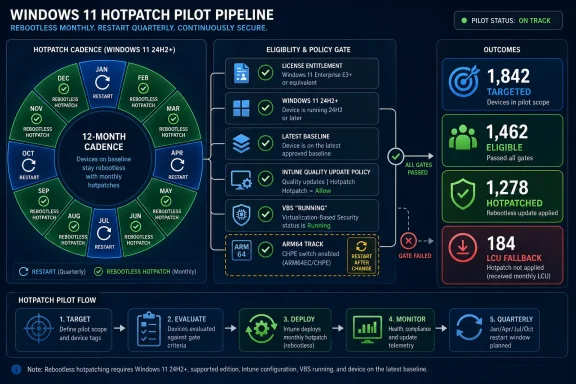
The rollout constraint is the baseline cycle. Microsoft’s own rule is simple: January, April, July, and October are baseline months that require a restart; February/March, May/June, August/September, and November/December are hotpatch months that can apply qualifying security updates without a restart, provided the device is already on the latest baseline. If a device is hotpatch-enabled but misses the latest baseline, Microsoft says it receives the baseline update and the hotpatch update during the hotpatch month, and the baseline still requires a restart. See Microsoft’s Hotpatch updates documentation for the current prerequisite and release-cycle language.
Treat hotpatch eligibility as one combined gate:
The WindowsForum angle is operational: hotpatch readiness should be managed as a fleet classification program, not as a policy assignment. A device should move through four labels before it ever appears in an executive rollout number:
This distinction should change the rollout calendar. Do not launch a pilot by enabling hotpatch in the middle of a hotpatch month across devices whose baseline state is unknown. Run the readiness export first, clean up the baseline gaps, then let the next hotpatch month test the restartless path.
In the forum’s coverage of Windows 11 setup, readers focused on Microsoft’s Microsoft-account and internet requirements because a nominally supported Windows 11 install can still be blocked or complicated by an onboarding rule. In the Copilot+ PC reports, the issue was not whether a machine could run Windows 11; it was whether the device had the supported processor and NPU capability needed for Microsoft’s newer on-device AI features. Gaming requirement reports made the same point from the consumer side: Cyberpunk 2077’s Windows support baseline shifted toward Windows 11 after Windows 10’s mainstream support exit, while The Witcher 3’s 2027 expansion coverage highlighted Windows 11, DirectX 12, RAM, and SSD requirements. The 007 First Light reports showed another version of the same split: Windows 10 and 11 support could coexist with SSD, GPU-tier, DLSS, and performance-target requirements.
Hotpatch is the enterprise-servicing version of that story. “Runs Windows 11” is not the operational answer. The answer is whether that exact endpoint is eligible for this exact servicing model in this exact monthly cycle.
That is the WindowsForum spine for planners: stop asking whether the estate is “Windows 11 ready.” Ask which devices are hotpatch-sustainable.
The export should include:
This taxonomy is more useful than a single readiness percentage. A 70% ready result is not actionable unless the remaining 30% is split by cause.
Hotpatch should make endpoint servicing cleaner. If the pilot makes the reporting muddier, slow down.
CHPE exists to improve 32-bit x86 application behavior on Arm64 Windows. Microsoft’s hotpatch page says the requirement applies only to Arm64 CPU devices using hotpatch updates, and that hotpatch updates are not compatible with servicing CHPE OS binaries in
That makes Arm64 a separate readiness track:
That wording matters. “Supported by hardware” is not enough. “Enabled by policy” is not enough. “Expected after the next reboot” is not enough. The pilot should count a device as VBS-ready only when the device reports VBS running.
If VBS is not running, classify the cause:
For the hotpatch-specific view, go to Reports > Windows Autopatch > Windows quality updates, select the Reports tab, then select Hotpatch quality updates. Microsoft’s Hotpatch quality update report documentation lists the default columns as Quality update policy, Device name, Up to date, Hotpatched, Not up to Date, In progress, % with the latest quality update, Not ready, and Paused. It also says the report provides a per-policy view and that the data refreshes every four hours with data received from Windows Autopatch managed devices.
For the device-level quality update view, use Reports > Windows Autopatch > Windows quality updates, select the Reports tab, then select Quality update status. Microsoft’s Quality update status report documentation lists default columns including Device name, Deployment ring, Update status, Pause status, Current version, Readiness, and Alerts. Optional columns include Microsoft Entra device ID, Serial number, Intune last check-in time, Service State, Service Substate, Client State, Client Substate, Servicing Channel, User Last Logged On, Primary User UPN, Hex Error Code, Cadence Type, Quality update Installed Time, and Extended Security. Microsoft notes that several service/client state fields and the hex error code are supplemental and might not display for all devices.
For the tenant-wide management view, use Devices, then under Overview or Windows updates > Monitor, select Autopatch management status. Microsoft’s Windows Autopatch management status report describes fields including Managed for quality updates, Managed for feature updates, Driver updates (enrollment status), Assigned to update rings count, Other, Total number of devices, Hotpatch enrolled, Update types enrolled in cloud policies, Assigned to update rings, and Alerts. The Hotpatch enrolled field is especially useful because it identifies devices that are part of a Windows quality update policy with the Allow rebootless updates toggle enabled, but it still should not be treated as proof that the device successfully hotpatched.
On a sample of devices, validate locally:
Microsoft says devices that do not meet one or more prerequisites automatically receive the Latest Cumulative Update instead. The LCU path keeps devices secure and compliant, but it requires the standard restart behavior. Microsoft also states that the LCU keeps configured update ring settings and does not change those settings.
That is why the pilot must separate these two statements:
This matters most for devices where restarts hurt: frontline endpoints, shared workstations, executive laptops, kiosks, lab machines, and systems with narrow maintenance windows. Those are also the devices most likely to have local exceptions. Hotpatch can help them, but only if the exceptions are visible before rollout.
The rollout constraint is the baseline cycle. Microsoft’s own rule is simple: January, April, July, and October are baseline months that require a restart; February/March, May/June, August/September, and November/December are hotpatch months that can apply qualifying security updates without a restart, provided the device is already on the latest baseline. If a device is hotpatch-enabled but misses the latest baseline, Microsoft says it receives the baseline update and the hotpatch update during the hotpatch month, and the baseline still requires a restart. See Microsoft’s Hotpatch updates documentation for the current prerequisite and release-cycle language.
 The Eligibility Framework: One Gate, Not Ten Repeated Checklists
Treat hotpatch eligibility as one combined gate:- Entitlement: the device or user must be covered by one of Microsoft’s listed eligible subscriptions: Windows 11 Enterprise E3 or E5, Microsoft 365 F3, Windows 11 Education A3 or A5, Microsoft 365 Business Premium, or Windows 365 Enterprise.
- OS level: the device must run Windows 11 version 24H2 or later.
- Baseline state: the device must be on the latest baseline release version for the active hotpatch cycle.
- Management path: Microsoft Intune must manage hotpatch deployment through a Windows quality update policy with hotpatch turned on.
- Security configuration: Virtualization-based security must be turned on; Microsoft’s troubleshooting steps tell admins to confirm that Virtualization-based security shows Running in System Information.
- Arm64 handling: Arm64 devices are not excluded, but CHPE must be disabled and the device must restart after the change. Microsoft says hotpatch is not compatible with servicing CHPE OS binaries, and it states there are no plans to support hotpatch on Arm64 devices with CHPE enabled.
The WindowsForum angle is operational: hotpatch readiness should be managed as a fleet classification program, not as a policy assignment. A device should move through four labels before it ever appears in an executive rollout number:
- Candidate: appears technically plausible for hotpatch based on OS version, management path, license, and hardware.
- Ready: passes the full eligibility framework before the update window.
- Proven: successfully receives a hotpatch update in a hotpatch month and remains healthy afterward.
- Sustained: survives the next baseline month restart and returns to the hotpatch cadence in the following two months.
Baseline Rule: How to Explain the Calendar
Use this operational rule with service owners:A dated example makes the rule easier to act on:Every quarter starts with a baseline restart. The next two months can be hotpatch months only for devices that are already on that baseline.
- April baseline month: devices receive the quarterly baseline cumulative update and restart.
- May hotpatch month: devices that installed the April baseline and still meet the hotpatch gate can receive the hotpatch security update without an update-driven restart.
- June hotpatch month: those same devices can remain on the hotpatch path.
- July baseline month: the cycle resets with another baseline cumulative update and restart.
This distinction should change the rollout calendar. Do not launch a pilot by enabling hotpatch in the middle of a hotpatch month across devices whose baseline state is unknown. Run the readiness export first, clean up the baseline gaps, then let the next hotpatch month test the restartless path.
WindowsForum’s Pattern: “Windows 11” Is No Longer a Sufficient Answer
WindowsForum readers have been reporting the same platform pattern from multiple angles: the name on the box is no longer enough to predict feature eligibility.In the forum’s coverage of Windows 11 setup, readers focused on Microsoft’s Microsoft-account and internet requirements because a nominally supported Windows 11 install can still be blocked or complicated by an onboarding rule. In the Copilot+ PC reports, the issue was not whether a machine could run Windows 11; it was whether the device had the supported processor and NPU capability needed for Microsoft’s newer on-device AI features. Gaming requirement reports made the same point from the consumer side: Cyberpunk 2077’s Windows support baseline shifted toward Windows 11 after Windows 10’s mainstream support exit, while The Witcher 3’s 2027 expansion coverage highlighted Windows 11, DirectX 12, RAM, and SSD requirements. The 007 First Light reports showed another version of the same split: Windows 10 and 11 support could coexist with SSD, GPU-tier, DLSS, and performance-target requirements.
Hotpatch is the enterprise-servicing version of that story. “Runs Windows 11” is not the operational answer. The answer is whether that exact endpoint is eligible for this exact servicing model in this exact monthly cycle.
That is the WindowsForum spine for planners: stop asking whether the estate is “Windows 11 ready.” Ask which devices are hotpatch-sustainable.
Do This / Don’t Do This for Planners
Do this first
Pilot hotpatch on boring devices:- Standard corporate x64 laptops with known firmware settings.
- Windows 11 24H2 or later devices already current on the latest baseline.
- Devices with VBS confirmed as Running, not merely intended by policy.
- Devices with clean Intune check-in behavior.
- Devices covered by the eligible license set.
- Devices assigned to a Windows quality update policy where When available, apply without restarting the device ("Hotpatch") is set to Allow.
- Devices with no known monthly update instability, no unusual maintenance lockouts, and no critical local-only applications that would turn a servicing test into an application incident.
Don’t start here
Do not begin with:- Executive laptops whose update behavior is politically sensitive.
- Shared clinical, retail, manufacturing, lab, or kiosk devices with narrow maintenance windows unless you already know their baseline and VBS state.
- Arm64 devices that still depend on 32-bit Office components or legacy x86 applications.
- Devices with stale Intune check-ins.
- Devices managed through overlapping or unclear update policies.
- Devices that are behind on baseline cumulative updates.
- Devices where firmware, virtualization settings, or old drivers prevent VBS from running.
- Any group where the only proof of readiness is “the policy was assigned.”
Hard stops
Stop expansion if any of these are true:- You cannot separate hotpatched devices from devices that received the standard Latest Cumulative Update.
- The Hotpatch quality update report shows a large Not ready population and the team cannot explain the blockers.
- Baseline drift is not measured before the hotpatch month begins.
- VBS state is unknown or only inferred from policy intent.
- Arm64 CHPE status is unknown.
- Help desk tickets show application failures after CHPE disablement or baseline installation.
- The team cannot reconcile Intune policy assignment with device-level update status.
- Reporting latency is being mistaken for success or failure before the Microsoft reporting window has had time to update.
Operator-First Pilot Plan
A practical pilot has five phases.Phase 1: Build the denominator
Export the devices that might be candidates. Do not start with a giant dynamic group and hope reports explain the fallout later.The export should include:
- Device name.
- Serial number.
- Microsoft Entra device ID.
- Intune device ID if your internal reporting uses it.
- Primary User UPN.
- User Last Logged On.
- Intune last check-in time.
- Windows edition, version, OS build, and current quality update state.
- Architecture: x64 or Arm64.
- VBS state, with a separate field for Running.
- License mapping to Microsoft’s eligible set.
- Windows quality update policy assignment.
- Whether hotpatch is allowed in that policy.
- Current baseline status for the active cycle.
- For Arm64, CHPE disablement status and restart-after-change status.
- Known 32-bit x86 Office, VBA, COM add-in, or legacy app dependency.
Phase 2: Classify blockers
Use a failure-rate taxonomy before assigning the policy widely:| Bucket | Meaning | Action |
|---|---|---|
| Ready | Meets the full eligibility framework before the update window | Include in first pilot |
| Baseline drift | Not on the latest quarterly baseline | Bring current, then retest |
| VBS blocked | VBS not running or cannot be confirmed | Remediate firmware, driver, virtualization, or policy issue |
| Policy gap | Not enrolled in the right Windows quality update policy or hotpatch not allowed | Fix Intune assignment |
| License gap | Not covered by Microsoft’s eligible license set | Resolve entitlement or exclude |
| Arm64 CHPE blocker | CHPE enabled, restart not completed, or app dependency prevents disablement | Run Arm64 app validation or keep on standard LCU |
| Reporting gap | Stale check-in or insufficient device data | Fix device management health before pilot |
| Excluded by design | Business reason to remain on standard LCU | Document and remove from hotpatch success denominator |
Phase 3: Pilot in a baseline-aware sequence
Run the first cycle like this:- Two weeks before a baseline month: export candidates, classify blockers, and remediate obvious VBS, license, and policy gaps.
- Baseline month: install the baseline cumulative update, allow the required restart, and confirm that the pilot devices return healthy.
- First hotpatch month: apply the hotpatch-enabled Windows quality update policy only to the Ready group. Watch the Hotpatch quality update report and the Quality update status report.
- Second hotpatch month: keep the same devices in scope and measure whether success repeats.
- Next baseline month: confirm the devices accept the next baseline and restart cleanly. Only then promote them from Proven to Sustained.
Phase 4: Measure the right outcomes
Your pilot report should show:- Targeted by hotpatch policy: devices assigned to the hotpatch-enabled quality update policy.
- Eligible before update window: devices that passed the full eligibility framework before the monthly update was offered.
- Successfully hotpatched: devices counted as Hotpatched in the Hotpatch quality update report.
- Received standard LCU instead: devices that remained protected through the Latest Cumulative Update path but did not achieve the restartless hotpatch outcome.
- Not ready: devices reporting Not ready and the known blocker category.
- Not up to Date: devices that did not reach current update state.
- In progress: devices still moving through the update process.
- Paused: devices affected by a customer-initiated pause.
- Restart impact: devices that avoided an update-driven restart in the hotpatch month versus devices that restarted because of baseline or LCU behavior.
- Support impact: incidents, app issues, failed installs, user disruption, and remediation time.
Those numbers are placeholders for the shape of the report, not facts to reuse. The point is to force the organization to distinguish protection from restart reduction. LCU fallback is a security success, but it is not a hotpatch success.“5,000 devices were targeted; 3,900 were eligible before the window; 3,650 successfully hotpatched; 250 remained eligible but failed or stayed in progress; 1,100 received standard LCU instead, mostly because of baseline drift, VBS not running, license mismatch, stale check-in, or Arm64 CHPE status.”
Phase 5: Decide expansion by blocker, not by enthusiasm
Expand only after the pilot produces a remediation plan for each blocker bucket. A fleet with 15% baseline drift needs a baseline-compliance project. A fleet with VBS failures needs firmware, driver, virtualization, and security-baseline work. A fleet with Arm64 CHPE blockers needs application modernization or a conscious decision to keep those devices on standard cumulative updates.Hotpatch should make endpoint servicing cleaner. If the pilot makes the reporting muddier, slow down.
Arm64: Eligible, But Not Simple
The old shorthand that hotpatch is only for x64 is not the right operating assumption for current planning. Microsoft’s hotpatch documentation includes Arm64-specific requirements rather than excluding Arm64 outright. The catch is CHPE.CHPE exists to improve 32-bit x86 application behavior on Arm64 Windows. Microsoft’s hotpatch page says the requirement applies only to Arm64 CPU devices using hotpatch updates, and that hotpatch updates are not compatible with servicing CHPE OS binaries in
%SystemRoot%\SyChpe32. To disable CHPE, Microsoft documents the DisableCHPE system policy CSP and also the registry path HKLM\SYSTEM\CurrentControlSet\Control\Session Manager\Memory Management with the DWORD value HotPatchRestrictions=1. A restart is required after setting the flag.That makes Arm64 a separate readiness track:
- Confirm the device otherwise passes the same eligibility framework.
- Identify 32-bit Office, VBA Declare statements, 32-bit COM add-ins, and legacy x86 apps.
- Disable CHPE only on test devices first.
- Restart after the change.
- Validate business applications.
- Only then assign the device to the hotpatch pilot group.
VBS: A Security Control Becomes a Servicing Gate
VBS is not just a security-baseline discussion in this rollout. It is a hotpatch gate. Microsoft says VBS must be turned on for a device to be offered hotpatch updates, and its troubleshooting steps specifically tell admins to check System Information and confirm that the value for Virtualization-based security is Running.That wording matters. “Supported by hardware” is not enough. “Enabled by policy” is not enough. “Expected after the next reboot” is not enough. The pilot should count a device as VBS-ready only when the device reports VBS running.
If VBS is not running, classify the cause:
- Firmware or BIOS setting.
- Driver incompatibility.
- Virtualization conflict.
- Security policy gap.
- Device not restarted after configuration.
- Business exception.
Where to Check in Intune
Use first-party reporting surfaces and keep the names exact.For the hotpatch-specific view, go to Reports > Windows Autopatch > Windows quality updates, select the Reports tab, then select Hotpatch quality updates. Microsoft’s Hotpatch quality update report documentation lists the default columns as Quality update policy, Device name, Up to date, Hotpatched, Not up to Date, In progress, % with the latest quality update, Not ready, and Paused. It also says the report provides a per-policy view and that the data refreshes every four hours with data received from Windows Autopatch managed devices.
For the device-level quality update view, use Reports > Windows Autopatch > Windows quality updates, select the Reports tab, then select Quality update status. Microsoft’s Quality update status report documentation lists default columns including Device name, Deployment ring, Update status, Pause status, Current version, Readiness, and Alerts. Optional columns include Microsoft Entra device ID, Serial number, Intune last check-in time, Service State, Service Substate, Client State, Client Substate, Servicing Channel, User Last Logged On, Primary User UPN, Hex Error Code, Cadence Type, Quality update Installed Time, and Extended Security. Microsoft notes that several service/client state fields and the hex error code are supplemental and might not display for all devices.
For the tenant-wide management view, use Devices, then under Overview or Windows updates > Monitor, select Autopatch management status. Microsoft’s Windows Autopatch management status report describes fields including Managed for quality updates, Managed for feature updates, Driver updates (enrollment status), Assigned to update rings count, Other, Total number of devices, Hotpatch enrolled, Update types enrolled in cloud policies, Assigned to update rings, and Alerts. The Hotpatch enrolled field is especially useful because it identifies devices that are part of a Windows quality update policy with the Allow rebootless updates toggle enabled, but it still should not be treated as proof that the device successfully hotpatched.
On a sample of devices, validate locally:
- Settings > Windows Update > Advanced options > Configured update policies should show Enable hotpatching when available.
- System Information should show Virtualization-based security as Running.
- Event Viewer can be filtered for AllowRebootlessUpdates; Microsoft documents
Update/AllowRebootlessUpdatesas the policy indicator. - Event Viewer can also be searched for hotpatch to review hotpatch monitor errors. Microsoft says if the monitor service detects a critical error, the device installs the standard LCU to remain secure.
Ineligible Devices Still Patch
This point should be written into the help-desk script and the executive briefing: hotpatch ineligibility does not mean the device is abandoned.Microsoft says devices that do not meet one or more prerequisites automatically receive the Latest Cumulative Update instead. The LCU path keeps devices secure and compliant, but it requires the standard restart behavior. Microsoft also states that the LCU keeps configured update ring settings and does not change those settings.
That is why the pilot must separate these two statements:
- “The device received security updates.”
- “The device received a hotpatch update without an update-driven restart.”
Hardware Refresh Needs a Hotpatch Column
WindowsForum’s requirement stories point to a procurement problem: hardware refresh plans often say “Windows 11 capable” when the business question is more specific. For hotpatch, the purchasing and lifecycle tag should be one of four values:- Hotpatch ready
- Hotpatch ready after remediation
- Standard LCU only
- Excluded by design
This matters most for devices where restarts hurt: frontline endpoints, shared workstations, executive laptops, kiosks, lab machines, and systems with narrow maintenance windows. Those are also the devices most likely to have local exceptions. Hotpatch can help them, but only if the exceptions are visible before rollout.
Field Checklist
Use this checklist before expanding beyond the pilot:- Confirm Windows 11 version 24H2 or later.
- Confirm the latest quarterly baseline release is installed for the active cycle.
- Confirm the license is in Microsoft’s eligible set: Windows 11 Enterprise E3 or E5, Microsoft 365 F3, Windows 11 Education A3 or A5, Microsoft 365 Business Premium, or Windows 365 Enterprise.
- Confirm Microsoft Intune manages the device.
- Confirm the device is assigned to a Windows quality update policy.
- Confirm the hotpatch setting in that policy is set to Allow.
- Confirm VBS is Running.
- For Arm64, confirm CHPE is disabled, the restart after disablement has completed, and 32-bit x86 application dependencies have been tested.
- Check Hotpatch quality updates for Hotpatched, Not ready, Not up to Date, In progress, and Paused.
- Check Quality update status for Current version, Readiness, Alerts, service/client state fields where available, Hex Error Code, Cadence Type, Quality update Installed Time, and Intune last check-in time.
- Use Autopatch management status to confirm whether the device is actually managed for quality updates and hotpatch enrolled.
- Count LCU fallback devices as protected, but not as hotpatch successes.
- Recheck the same devices through the next baseline month before expanding.
References
- Primary source: learn.microsoft.com
Windows Autopatch - Frequently Asked Questions (FAQ) | Microsoft Learn
Answers to frequently asked questions about Windows Autopatch.learn.microsoft.com
