

Microsoft is moving quickly in 2026 to test visible Windows 11 improvements, but the changes users most often romanticize—no ads, easy local setup, lean installs, hard privacy switches, and a finished interface—remain outside the company’s current comfort zone. That gap matters more than any single Insider build. Windows 11 is not suffering from a shortage of engineering attention; it is suffering from a credibility problem about who the PC is really for. The more Microsoft fixes around the edges, the more obvious the untouched center becomes.
There is no denying that Windows 11 feels like a product under active repair again. After years of complaints about the Start menu, the taskbar, slow migrations from old control surfaces, and the general sense that Windows 11 was designed more around Microsoft’s service ambitions than users’ muscle memory, the company has been unusually willing to talk about rough edges and move changes into public testing.
That matters. Windows is too large, too old, and too entangled with third-party hardware to be turned around by vibes alone. When Microsoft improves driver handling, revisits Windows Update behavior, experiments with Start menu personalization, and acknowledges performance complaints, it is doing the hard, unglamorous work operating systems require.
But the TechRadar wishlist gets at something more interesting than a normal “five features I want” column. The recurring theme is not that Windows 11 lacks polish. It is that Windows 11 often feels like it withholds control from the person sitting in front of the machine.
That is why the list lands. Advertising, Microsoft account pressure, bundled apps, diagnostic data, and unfinished legacy surfaces all look like separate irritants. In practice, they tell the same story: Windows 11 is improving, but it still behaves as if the user is borrowing space inside Microsoft’s ecosystem rather than owning the computer.
The Start menu is the most obvious battleground because it is symbolic. It is not a web page, a store shelf, or a media feed. It is the front door of the operating system. When that space recommends apps or pushes Microsoft services, even lightly, the reaction is more visceral than the same promotion inside a browser tab.
Microsoft’s defense is not entirely absurd. Some users do benefit from tips. Some may genuinely want OneDrive reminders, Game Pass offers, Microsoft Store discovery, or Edge integration. A modern OS also has to teach itself to people who do not read changelogs, and the line between helpful suggestion and commercial nudge can be blurry.
The problem is that Microsoft has spent years blurring that line in its own favor. A recommendation to back up files with OneDrive is technically a feature prompt, but it is also a funnel into a paid cloud service once storage limits become relevant. A suggestion to use Edge may be framed as continuity or security, but it also protects Microsoft’s browser strategy. Search integration can be described as convenience while still serving Bing’s distribution needs.
What users are asking for, then, is not merely fewer pop-ups. They want a single, honest switch: do not use the operating system shell to promote Microsoft products, third-party apps, subscriptions, or web services. Such a switch would be easy to understand and hard to misinterpret.
The reason it probably does not exist is also easy to understand. Windows is no longer just a boxed operating system business. It is a distribution platform for Microsoft 365, OneDrive, Copilot, Edge, Bing, Game Pass, the Microsoft Store, and whatever cloud identity layer Microsoft wants consumers and small businesses to adopt next. Every clean surface in Windows is also potential real estate.
That is the tension. Microsoft can make Windows 11 calmer without making it neutral. It can reduce the most annoying prompts while preserving the strategic architecture that produces them. And for many users, that will still feel like a company promising to stop shouting while keeping one hand on the megaphone.
For many people, that is convenient. Buy a laptop, sign in, restore settings, recover files, install apps, and move on. Apple and Google have trained the consumer market to expect operating systems that begin with cloud identity. Microsoft is not inventing the trend.
But the PC has never been only a consumer appliance. It is also a lab machine, a gaming rig, a workshop computer, a domain-joined endpoint, a kiosk, a test bench, a privacy-conscious workstation, a refurb project, and sometimes a machine that is deliberately kept offline. The insistence on an online account during setup collides with the PC’s historical flexibility.
That is why the workaround cat-and-mouse has irritated power users so much. Microsoft did not simply make the local account path less prominent; over time, it has removed or broken known bypasses in setup flows, especially in consumer scenarios. The exact state of the workaround landscape changes by build, edition, and deployment method, but the direction of travel has been clear enough: Microsoft wants Windows 11 setup to begin with Microsoft identity.
For sysadmins, the issue is not nostalgia. It is process. There are legitimate reasons to stage machines before they touch a user account, build local admin profiles for testing, configure systems in constrained network environments, or avoid tying early setup to a personal Microsoft account. Enterprise deployment tools and domain workflows solve some of this, but Windows is not used only by enterprises with perfect tooling.
For home users, the issue is consent. A local account says: this machine can function as a general-purpose computer before it becomes a node in a cloud ecosystem. A mandatory Microsoft account says: the cloud relationship comes first, and local autonomy is an exception.
Microsoft may yet soften this. There have been periodic reports and rumors of internal disagreement about the hard line on Microsoft accounts, and user backlash has been consistent. But the company’s incentives still point the other way. Account sign-in is not just login; it is the root system for services, telemetry context, subscription conversion, cross-device sync, and AI features that assume a persistent user identity.
That makes the local account request both modest and radical. Modest, because all users are asking for is a visible offline option during setup. Radical, because granting it would mean Microsoft publicly accepting that a fully legitimate Windows 11 experience can start outside Microsoft’s account graph.
Still, the bloat complaint persists because it is grounded in a real mismatch. Microsoft sees the default install as an onboarding canvas. Enthusiasts see it as a workspace they must clean before using. IT departments see it as a baseline they must standardize before support costs begin multiplying.
That is why stripped-down projects such as Tiny11 attract attention despite the obvious risks of trusting unofficial Windows images or modification scripts. They represent demand for something Microsoft does not want to productize: Windows without the consumer-growth layer. Not Windows Server. Not Windows Enterprise with management policies. Just a normal desktop OS that starts quiet.
A cleaner installer would not have to be extreme. Microsoft could present app bundles during setup in plain language. It could separate core system components from optional consumer experiences. It could allow users to decline entertainment apps, trialware-like recommendations, cloud backup prompts, and secondary communication tools without resorting to PowerShell, provisioning packages, or post-install cleanup scripts.
The objection is that ordinary users do not want setup complexity. That is partly true. Nobody wants a 1990s-style installer with dozens of cryptic checkboxes. But this is a design problem, not a law of nature. A simple “standard” versus “minimal” installation choice would satisfy many advanced users without confusing everyone else.
The deeper problem is that “minimal Windows” would expose the commercial function of the standard image. Once Microsoft gives users a supported way to skip promotional apps and service tie-ins, every included component becomes a choice the company must defend. That is not how platform vendors prefer to operate.
There is also a support angle. Microsoft wants predictable baselines. Developers want APIs and app assumptions to hold. Support teams do not want to diagnose machines where users removed pieces they later need. But Windows already contains optional features, edition differences, language packs, capabilities on demand, and enterprise policy controls. The operating system is not as monolithic in practice as the consumer setup experience implies.
A clean install option would therefore be less a technical breakthrough than a cultural concession. It would say that Microsoft trusts some users to know what they do not want. In the Windows world, that should not be controversial. The fact that it feels controversial is the point.
That distinction is real. Crash reports, update failure data, device health signals, driver problems, and compatibility information are not imaginary privacy villains. At Windows scale, Microsoft cannot maintain quality across a vast hardware and software ecosystem by waiting for angry forum posts. Some telemetry is the nervous system of a modern operating system.
But the user objection is not only about packet contents. It is about asymmetry. Microsoft knows what is collected, how it is processed, how long it is retained, what internal teams can use it, and how definitions change over time. The average user sees a privacy settings page and must trust that the labels mean what they appear to mean.
That trust has been weakened by the rest of the Windows experience. If the OS uses setup to push accounts, the Start menu to promote apps, search to surface web services, and notifications to recommend subscriptions, users become less inclined to grant Microsoft the benefit of the doubt on diagnostic collection. Privacy skepticism does not emerge in isolation; it is reinforced by every moment that makes Windows feel commercially opportunistic.
The TechRadar proposal is not to disable literally every signal under every circumstance. Even privacy advocates often accept that security-critical communication, update validation, and licensing checks may exist. The demand is for a consumer-accessible switch that takes telemetry down to the narrowest defensible minimum without registry edits, third-party tools, or edition-specific policy gymnastics.
Microsoft is unlikely to offer that in Windows 11 Home because consumer telemetry is valuable not only for engineering but for product direction. Data tells Microsoft which features are used, which defaults stick, which prompts convert, which paths fail, and where friction appears. In a company reorganizing Windows around services and AI, telemetry is not a side channel. It is a steering wheel.
Enterprise customers get more knobs because they have leverage, compliance requirements, and procurement power. Consumers get explanations. That imbalance is exactly why the issue remains politically charged among enthusiasts.
The irony is that a stronger privacy switch might improve trust even if most users never touched it. A visible limit communicates confidence. It tells users that Microsoft believes Windows can stand on its merits without needing to keep every diagnostic door half open. Refusing to provide that limit communicates something too.
Dark mode is the most visible offender. Windows 11 can look elegant in a carefully staged screenshot, but the illusion breaks when a legacy dialog or white panel flashes open at night. Users do not need every ancient utility to become a design showcase. They do need the system not to lurch between eras.
The Settings app has a similar problem. Microsoft has spent years moving Control Panel functions into Settings, but the migration remains incomplete. Sometimes Settings is the front end. Sometimes it is a corridor leading to an old dialog. Sometimes the old interface still exposes options the modern one lacks. For ordinary users, this is confusing. For IT pros, it is a sign that Windows’ management model still rests on sedimentary layers of history.
To be fair, this is hard. The Control Panel is not just a collection of screens; it is a map of decades of Windows compatibility. Hardware vendors, administrative tools, legacy documentation, scripts, and user habits all attach to pieces of it. Removing or replacing those pieces risks breaking workflows that may be invisible to Microsoft until they fail.
But “hard” is not the same as “acceptable forever.” Windows 11 was announced as a modern version of Windows, with strict hardware requirements and a cleaner design language. That pitch creates an expectation that the operating system should feel coherent. Every legacy island undermines it.
PowerToys’ Light Switch-style automatic theme switching is a smaller but revealing example. If enthusiasts can identify and fill a daily usability gap through a Microsoft-adjacent utility, the question naturally follows: why is this not just part of Windows? macOS has long made automatic light and dark appearance changes feel ordinary. Windows still often treats such polish as an optional extra.
The unfinished-interface complaint is not only about aesthetics. Coherence affects confidence. Admins trust systems that behave predictably. Users trust settings they can find. Developers trust platforms whose design patterns settle rather than drift. A half-modern Windows tells everyone that the future is coming, but not necessarily on schedule.
In other words, the very things enthusiasts are complaining about are the same things Microsoft needs for its next platform bet. A local-first, ad-free, telemetry-minimized, minimal-install Windows is emotionally attractive to power users. It is not obviously aligned with Microsoft’s plan to make Windows a service-connected AI endpoint.
This does not mean every Windows 11 improvement is a trick. Microsoft can genuinely make the OS faster, more customizable, and less annoying while also pursuing a cloud-and-AI strategy. Large software companies contain competing priorities. The Windows team can care about user feedback while the business side cares about engagement, subscriptions, and identity.
But the collision is becoming harder to hide. If Copilot features require a Microsoft account, users who dislike mandatory sign-in will see AI as another justification for the account requirement. If AI experiences depend on diagnostic and usage signals, privacy skeptics will see telemetry as more expansive than ever. If the Start menu and taskbar become launch points for AI suggestions, users already annoyed by recommendations will see a new generation of ads with better branding.
That is why Microsoft’s “fix Windows 11” campaign has to be judged on more than feature velocity. The company can ship useful changes and still fail to address the power dynamic that frustrates its most loyal users. A faster Windows Update experience is welcome. A better Start menu is welcome. But neither answers the question: can Windows still be a user-controlled environment in an era when Microsoft wants it to be an intelligent service surface?
For WindowsForum readers, this is not abstract. Many of you are the people relatives call when setup demands an account, when OneDrive moves folders unexpectedly, when search behaves like the web, when a driver update goes sideways, or when privacy settings read like diplomacy instead of control. You experience Microsoft’s strategy as support tickets.
That is the cynical reading, but it is not the whole reading. Microsoft also has legitimate security, support, and usability reasons for some of its choices. Online accounts can help recovery. Bundled apps can reduce first-run friction. Diagnostic data can improve update quality. Unified Settings can take years because compatibility matters. Recommendations can help less technical users discover features they might otherwise miss.
The problem is that Microsoft tends to treat its preferred outcome as the default and user autonomy as a concession. That posture is what turns defensible product decisions into culture-war material. A cloud backup prompt is not offensive by itself. A cloud backup prompt inside an OS that repeatedly steers users toward Microsoft services becomes part of a pattern.
Windows’ greatest strength has always been its breadth. It runs on cheap laptops, boutique desktops, corporate fleets, gaming handhelds, lab instruments, classroom machines, and industrial systems. That breadth requires compromise, but it also requires humility. Microsoft cannot design every Windows experience around the median consumer without alienating the advanced users who keep the ecosystem alive when things break.
There is a practical danger here. If Microsoft keeps pushing enthusiasts toward scripts, debloat tools, registry hacks, unofficial images, and bypass utilities, it creates a shadow configuration culture. Users will keep reclaiming control, but they will do it through methods that are harder to support, harder to secure, and easier to get wrong. A supported toggle is almost always safer than an underground workaround.
That should matter to Microsoft. The company does not need to give every user a kernel engineer’s cockpit. It does need to stop pretending that hiding choices makes them disappear.
That may be why they feel so unlikely. Microsoft is often willing to add. It is less willing to remove a funnel, narrow a data path, or give users a clean refusal. The future of Windows 11 will be judged not only by what Microsoft builds next, but by what it finally allows users to turn off.
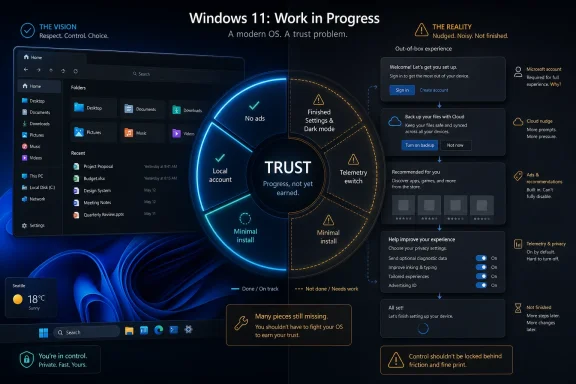 Microsoft Has Found the Fix-It Button, But Not the Trust Button
There is no denying that Windows 11 feels like a product under active repair again. After years of complaints about the Start menu, the taskbar, slow migrations from old control surfaces, and the general sense that Windows 11 was designed more around Microsoft’s service ambitions than users’ muscle memory, the company has been unusually willing to talk about rough edges and move changes into public testing.That matters. Windows is too large, too old, and too entangled with third-party hardware to be turned around by vibes alone. When Microsoft improves driver handling, revisits Windows Update behavior, experiments with Start menu personalization, and acknowledges performance complaints, it is doing the hard, unglamorous work operating systems require.
But the TechRadar wishlist gets at something more interesting than a normal “five features I want” column. The recurring theme is not that Windows 11 lacks polish. It is that Windows 11 often feels like it withholds control from the person sitting in front of the machine.
That is why the list lands. Advertising, Microsoft account pressure, bundled apps, diagnostic data, and unfinished legacy surfaces all look like separate irritants. In practice, they tell the same story: Windows 11 is improving, but it still behaves as if the user is borrowing space inside Microsoft’s ecosystem rather than owning the computer.
The Ads Are Not the Annoyance; The Presumption Is
Microsoft rarely calls its Windows promotions “ads.” They are recommendations, tips, suggestions, personalized offers, app promotions, account prompts, or service nudges. The vocabulary changes depending on the screen, but the user experience is simple enough: Windows increasingly treats system surfaces as places to steer behavior.The Start menu is the most obvious battleground because it is symbolic. It is not a web page, a store shelf, or a media feed. It is the front door of the operating system. When that space recommends apps or pushes Microsoft services, even lightly, the reaction is more visceral than the same promotion inside a browser tab.
Microsoft’s defense is not entirely absurd. Some users do benefit from tips. Some may genuinely want OneDrive reminders, Game Pass offers, Microsoft Store discovery, or Edge integration. A modern OS also has to teach itself to people who do not read changelogs, and the line between helpful suggestion and commercial nudge can be blurry.
The problem is that Microsoft has spent years blurring that line in its own favor. A recommendation to back up files with OneDrive is technically a feature prompt, but it is also a funnel into a paid cloud service once storage limits become relevant. A suggestion to use Edge may be framed as continuity or security, but it also protects Microsoft’s browser strategy. Search integration can be described as convenience while still serving Bing’s distribution needs.
What users are asking for, then, is not merely fewer pop-ups. They want a single, honest switch: do not use the operating system shell to promote Microsoft products, third-party apps, subscriptions, or web services. Such a switch would be easy to understand and hard to misinterpret.
The reason it probably does not exist is also easy to understand. Windows is no longer just a boxed operating system business. It is a distribution platform for Microsoft 365, OneDrive, Copilot, Edge, Bing, Game Pass, the Microsoft Store, and whatever cloud identity layer Microsoft wants consumers and small businesses to adopt next. Every clean surface in Windows is also potential real estate.
That is the tension. Microsoft can make Windows 11 calmer without making it neutral. It can reduce the most annoying prompts while preserving the strategic architecture that produces them. And for many users, that will still feel like a company promising to stop shouting while keeping one hand on the megaphone.
The Local Account Fight Is Really About Ownership
The Microsoft account requirement during Windows 11 setup has become one of those arguments that sounds technical but is actually philosophical. On paper, Microsoft can make a reasonable case for online accounts. They simplify license association, sync settings, enable device recovery, integrate with Microsoft Store purchases, support OneDrive backup, and make consumer PCs behave more like managed endpoints.For many people, that is convenient. Buy a laptop, sign in, restore settings, recover files, install apps, and move on. Apple and Google have trained the consumer market to expect operating systems that begin with cloud identity. Microsoft is not inventing the trend.
But the PC has never been only a consumer appliance. It is also a lab machine, a gaming rig, a workshop computer, a domain-joined endpoint, a kiosk, a test bench, a privacy-conscious workstation, a refurb project, and sometimes a machine that is deliberately kept offline. The insistence on an online account during setup collides with the PC’s historical flexibility.
That is why the workaround cat-and-mouse has irritated power users so much. Microsoft did not simply make the local account path less prominent; over time, it has removed or broken known bypasses in setup flows, especially in consumer scenarios. The exact state of the workaround landscape changes by build, edition, and deployment method, but the direction of travel has been clear enough: Microsoft wants Windows 11 setup to begin with Microsoft identity.
For sysadmins, the issue is not nostalgia. It is process. There are legitimate reasons to stage machines before they touch a user account, build local admin profiles for testing, configure systems in constrained network environments, or avoid tying early setup to a personal Microsoft account. Enterprise deployment tools and domain workflows solve some of this, but Windows is not used only by enterprises with perfect tooling.
For home users, the issue is consent. A local account says: this machine can function as a general-purpose computer before it becomes a node in a cloud ecosystem. A mandatory Microsoft account says: the cloud relationship comes first, and local autonomy is an exception.
Microsoft may yet soften this. There have been periodic reports and rumors of internal disagreement about the hard line on Microsoft accounts, and user backlash has been consistent. But the company’s incentives still point the other way. Account sign-in is not just login; it is the root system for services, telemetry context, subscription conversion, cross-device sync, and AI features that assume a persistent user identity.
That makes the local account request both modest and radical. Modest, because all users are asking for is a visible offline option during setup. Radical, because granting it would mean Microsoft publicly accepting that a fully legitimate Windows 11 experience can start outside Microsoft’s account graph.
A Clean Install Would Admit What Power Users Already Know
The wish for a lean Windows 11 installer is the most practical item on the list and perhaps the least likely to arrive in the form enthusiasts imagine. Windows includes a lot because Windows serves a lot of people. Mail, media, notes, Xbox components, Clipchamp, Teams hooks, widgets, cloud backup prompts, Store apps, accessibility tools, legacy utilities, modern inbox apps, and regional requirements all have constituencies, internal owners, or regulatory justifications.Still, the bloat complaint persists because it is grounded in a real mismatch. Microsoft sees the default install as an onboarding canvas. Enthusiasts see it as a workspace they must clean before using. IT departments see it as a baseline they must standardize before support costs begin multiplying.
That is why stripped-down projects such as Tiny11 attract attention despite the obvious risks of trusting unofficial Windows images or modification scripts. They represent demand for something Microsoft does not want to productize: Windows without the consumer-growth layer. Not Windows Server. Not Windows Enterprise with management policies. Just a normal desktop OS that starts quiet.
A cleaner installer would not have to be extreme. Microsoft could present app bundles during setup in plain language. It could separate core system components from optional consumer experiences. It could allow users to decline entertainment apps, trialware-like recommendations, cloud backup prompts, and secondary communication tools without resorting to PowerShell, provisioning packages, or post-install cleanup scripts.
The objection is that ordinary users do not want setup complexity. That is partly true. Nobody wants a 1990s-style installer with dozens of cryptic checkboxes. But this is a design problem, not a law of nature. A simple “standard” versus “minimal” installation choice would satisfy many advanced users without confusing everyone else.
The deeper problem is that “minimal Windows” would expose the commercial function of the standard image. Once Microsoft gives users a supported way to skip promotional apps and service tie-ins, every included component becomes a choice the company must defend. That is not how platform vendors prefer to operate.
There is also a support angle. Microsoft wants predictable baselines. Developers want APIs and app assumptions to hold. Support teams do not want to diagnose machines where users removed pieces they later need. But Windows already contains optional features, edition differences, language packs, capabilities on demand, and enterprise policy controls. The operating system is not as monolithic in practice as the consumer setup experience implies.
A clean install option would therefore be less a technical breakthrough than a cultural concession. It would say that Microsoft trusts some users to know what they do not want. In the Windows world, that should not be controversial. The fact that it feels controversial is the point.
Telemetry Is Where Microsoft’s Explanation Meets User Suspicion
Windows diagnostic data is one of the most misunderstood parts of the modern OS debate, and Microsoft has not helped itself by mixing necessary engineering telemetry with broader personalization and service logic. The company’s official framing is that required diagnostic data helps keep Windows secure, updated, reliable, and compatible. Optional diagnostic data expands what Microsoft receives to improve products and troubleshoot more deeply.That distinction is real. Crash reports, update failure data, device health signals, driver problems, and compatibility information are not imaginary privacy villains. At Windows scale, Microsoft cannot maintain quality across a vast hardware and software ecosystem by waiting for angry forum posts. Some telemetry is the nervous system of a modern operating system.
But the user objection is not only about packet contents. It is about asymmetry. Microsoft knows what is collected, how it is processed, how long it is retained, what internal teams can use it, and how definitions change over time. The average user sees a privacy settings page and must trust that the labels mean what they appear to mean.
That trust has been weakened by the rest of the Windows experience. If the OS uses setup to push accounts, the Start menu to promote apps, search to surface web services, and notifications to recommend subscriptions, users become less inclined to grant Microsoft the benefit of the doubt on diagnostic collection. Privacy skepticism does not emerge in isolation; it is reinforced by every moment that makes Windows feel commercially opportunistic.
The TechRadar proposal is not to disable literally every signal under every circumstance. Even privacy advocates often accept that security-critical communication, update validation, and licensing checks may exist. The demand is for a consumer-accessible switch that takes telemetry down to the narrowest defensible minimum without registry edits, third-party tools, or edition-specific policy gymnastics.
Microsoft is unlikely to offer that in Windows 11 Home because consumer telemetry is valuable not only for engineering but for product direction. Data tells Microsoft which features are used, which defaults stick, which prompts convert, which paths fail, and where friction appears. In a company reorganizing Windows around services and AI, telemetry is not a side channel. It is a steering wheel.
Enterprise customers get more knobs because they have leverage, compliance requirements, and procurement power. Consumers get explanations. That imbalance is exactly why the issue remains politically charged among enthusiasts.
The irony is that a stronger privacy switch might improve trust even if most users never touched it. A visible limit communicates confidence. It tells users that Microsoft believes Windows can stand on its merits without needing to keep every diagnostic door half open. Refusing to provide that limit communicates something too.
The Unfinished Windows Interface Has Become Its Own Argument
The last item on the wishlist—finish dark mode and finish the Settings migration—sounds cosmetic until you live with Windows long enough. Then it becomes a daily reminder that Windows 11 is modern in layers. The shell may be rounded, translucent, centered, and animated, but enough old panels remain to make the whole OS feel like a renovated airport built around terminals nobody had the budget to demolish.Dark mode is the most visible offender. Windows 11 can look elegant in a carefully staged screenshot, but the illusion breaks when a legacy dialog or white panel flashes open at night. Users do not need every ancient utility to become a design showcase. They do need the system not to lurch between eras.
The Settings app has a similar problem. Microsoft has spent years moving Control Panel functions into Settings, but the migration remains incomplete. Sometimes Settings is the front end. Sometimes it is a corridor leading to an old dialog. Sometimes the old interface still exposes options the modern one lacks. For ordinary users, this is confusing. For IT pros, it is a sign that Windows’ management model still rests on sedimentary layers of history.
To be fair, this is hard. The Control Panel is not just a collection of screens; it is a map of decades of Windows compatibility. Hardware vendors, administrative tools, legacy documentation, scripts, and user habits all attach to pieces of it. Removing or replacing those pieces risks breaking workflows that may be invisible to Microsoft until they fail.
But “hard” is not the same as “acceptable forever.” Windows 11 was announced as a modern version of Windows, with strict hardware requirements and a cleaner design language. That pitch creates an expectation that the operating system should feel coherent. Every legacy island undermines it.
PowerToys’ Light Switch-style automatic theme switching is a smaller but revealing example. If enthusiasts can identify and fill a daily usability gap through a Microsoft-adjacent utility, the question naturally follows: why is this not just part of Windows? macOS has long made automatic light and dark appearance changes feel ordinary. Windows still often treats such polish as an optional extra.
The unfinished-interface complaint is not only about aesthetics. Coherence affects confidence. Admins trust systems that behave predictably. Users trust settings they can find. Developers trust platforms whose design patterns settle rather than drift. A half-modern Windows tells everyone that the future is coming, but not necessarily on schedule.
Copilot Raises the Stakes for Every Old Grievance
The most important context for this wishlist is not the Start menu or Control Panel. It is AI. Microsoft is trying to make Copilot and related AI features feel native to Windows, not merely bolted on. That strategy depends on identity, data, cloud services, system integration, and prominent placement inside the user experience.In other words, the very things enthusiasts are complaining about are the same things Microsoft needs for its next platform bet. A local-first, ad-free, telemetry-minimized, minimal-install Windows is emotionally attractive to power users. It is not obviously aligned with Microsoft’s plan to make Windows a service-connected AI endpoint.
This does not mean every Windows 11 improvement is a trick. Microsoft can genuinely make the OS faster, more customizable, and less annoying while also pursuing a cloud-and-AI strategy. Large software companies contain competing priorities. The Windows team can care about user feedback while the business side cares about engagement, subscriptions, and identity.
But the collision is becoming harder to hide. If Copilot features require a Microsoft account, users who dislike mandatory sign-in will see AI as another justification for the account requirement. If AI experiences depend on diagnostic and usage signals, privacy skeptics will see telemetry as more expansive than ever. If the Start menu and taskbar become launch points for AI suggestions, users already annoyed by recommendations will see a new generation of ads with better branding.
That is why Microsoft’s “fix Windows 11” campaign has to be judged on more than feature velocity. The company can ship useful changes and still fail to address the power dynamic that frustrates its most loyal users. A faster Windows Update experience is welcome. A better Start menu is welcome. But neither answers the question: can Windows still be a user-controlled environment in an era when Microsoft wants it to be an intelligent service surface?
For WindowsForum readers, this is not abstract. Many of you are the people relatives call when setup demands an account, when OneDrive moves folders unexpectedly, when search behaves like the web, when a driver update goes sideways, or when privacy settings read like diplomacy instead of control. You experience Microsoft’s strategy as support tickets.
The Business Case Keeps Beating the Enthusiast Case
The reason these five wishes remain wishes is not that Microsoft lacks engineers. It is that each request cuts against a measurable business incentive. Remove promotions, and Microsoft loses distribution leverage. Restore local account setup, and it weakens identity capture. Offer minimal installs, and it reduces service placement. Provide a hard telemetry floor, and it limits product intelligence. Finish legacy migrations, and it burns resources on work that may not drive revenue.That is the cynical reading, but it is not the whole reading. Microsoft also has legitimate security, support, and usability reasons for some of its choices. Online accounts can help recovery. Bundled apps can reduce first-run friction. Diagnostic data can improve update quality. Unified Settings can take years because compatibility matters. Recommendations can help less technical users discover features they might otherwise miss.
The problem is that Microsoft tends to treat its preferred outcome as the default and user autonomy as a concession. That posture is what turns defensible product decisions into culture-war material. A cloud backup prompt is not offensive by itself. A cloud backup prompt inside an OS that repeatedly steers users toward Microsoft services becomes part of a pattern.
Windows’ greatest strength has always been its breadth. It runs on cheap laptops, boutique desktops, corporate fleets, gaming handhelds, lab instruments, classroom machines, and industrial systems. That breadth requires compromise, but it also requires humility. Microsoft cannot design every Windows experience around the median consumer without alienating the advanced users who keep the ecosystem alive when things break.
There is a practical danger here. If Microsoft keeps pushing enthusiasts toward scripts, debloat tools, registry hacks, unofficial images, and bypass utilities, it creates a shadow configuration culture. Users will keep reclaiming control, but they will do it through methods that are harder to support, harder to secure, and easier to get wrong. A supported toggle is almost always safer than an underground workaround.
That should matter to Microsoft. The company does not need to give every user a kernel engineer’s cockpit. It does need to stop pretending that hiding choices makes them disappear.
The Five Missing Fixes Define the Windows 11 Trust Gap
The useful thing about this wishlist is that it separates welcome progress from unresolved trust. Microsoft can keep improving Windows 11 and still leave the biggest philosophical complaints untouched. For users and administrators watching the 2026 repair push, these are the concrete signals to look for.- Microsoft can reduce promotional clutter, but a real shift would require one central control that disables operating-system-level product nudges across Windows 11.
- Microsoft can keep encouraging Microsoft accounts, but trust would improve if local account setup returned as a visible, supported path rather than a workaround contest.
- Microsoft can continue bundling consumer apps, but a credible minimal install option would acknowledge that not every PC should begin life as a services showcase.
- Microsoft can explain diagnostic data more clearly, but privacy-minded users will remain skeptical until the narrowest telemetry mode is available to ordinary consumers in Settings.
- Microsoft can modernize Windows piece by piece, but unfinished dark mode and lingering Control Panel dependencies will keep making Windows 11 feel older than its design language claims.
That may be why they feel so unlikely. Microsoft is often willing to add. It is less willing to remove a funnel, narrow a data path, or give users a clean refusal. The future of Windows 11 will be judged not only by what Microsoft builds next, but by what it finally allows users to turn off.
References
- Primary source: TechRadar
Published: Mon, 25 May 2026 11:00:00 GMT
5 things Microsoft isn't fixing with Windows 11 that I'd love to see happen | TechRadar
Dump all the ads, the telemetry, and bring back local installswww.techradar.com - Related coverage: pcgamer.com
Microsoft announces plans to give you more control over the Windows 11 taskbar and Start menu | PC Gamer
Top, bottom, left and right.www.pcgamer.com - Related coverage: windowscentral.com
The 13 biggest Windows 11 changes from early May — and why these updates matter for how the OS evolves through the rest of 2026 | Windows Central
Microsoft is reshaping Windows 11 with practical fixes users have wanted for years.www.windowscentral.com - Official source: learn.microsoft.com
Optional diagnostic data for Windows 11 and Windows 10 - Windows Privacy | Microsoft Learn
Use this article to learn about the types of optional diagnostic data that is collected.learn.microsoft.com - Official source: support.microsoft.com
Diagnostics, feedback, and privacy in Windows | Microsoft Support
Learn how Microsoft collects and uses different kinds of diagnostic information to help fix problems quickly and improve your Windows experience, and how to control the data you share.support.microsoft.com - Related coverage: tomshardware.com
Door slammed on last remaining easy Windows 11 local account setup workaround | Tom's Hardware
[email protected] is redundant but Shift + F10 OOBE/BYPASSNRO comes to the rescue.www.tomshardware.com
- Related coverage: howtogeek.com
Windows 11 Just Killed a Local Account Setup Workaround
There are still other ways to skip a Microsoft account during PC setup, though. www.howtogeek.com
- Related coverage: pcworld.com
How to turn off Windows 11's new Start Menu ads | PCWorld
Microsoft is starting to display annoying ads in the Windows 11 start menu. How to switch them off immediately.www.pcworld.com - Related coverage: mikenation.net
- Related coverage: askwoody.com
- Related coverage: calendarhouse.org
