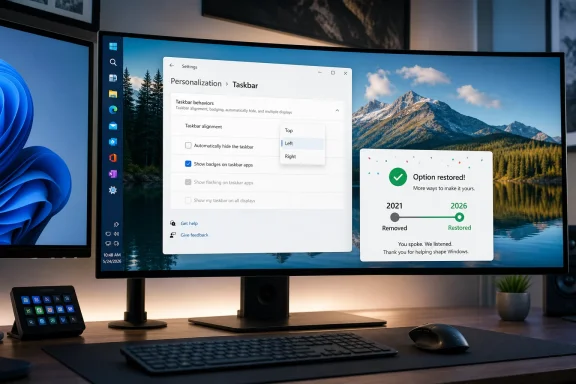
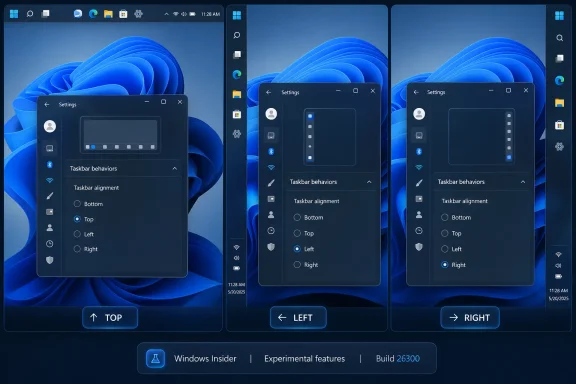
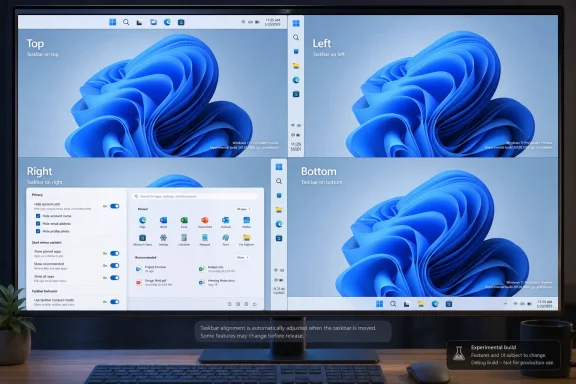
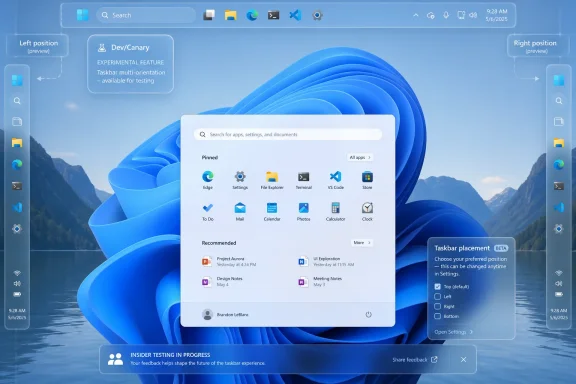
Microsoft began testing a movable Windows 11 taskbar on May 15, 2026, in Insider Experimental Preview Build 26300.8493, letting eligible Windows Insiders place the taskbar on the bottom, top, left, or right edge through Settings rather than registry hacks or third-party shells. That is the plain answer to a request Windows 11 users have been making since the operating system’s launch. It is also a revealing moment for a product that spent nearly five years treating a familiar desktop behavior as technical debt. The taskbar’s return to motion is small in pixels and large in symbolism: Microsoft is rediscovering that Windows is not just an interface to be simplified, but a workspace to be negotiated.
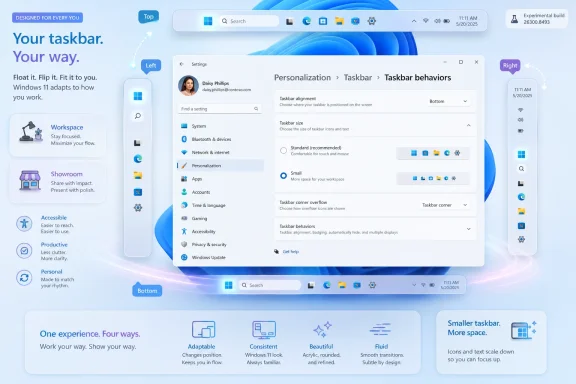
The change arrives in the new Experimental channel, formerly known as Dev for many Insiders, as part of Windows 11 build 26300.8493. Microsoft says the option lives under Settings, then Personalization, then Taskbar, then Taskbar behaviors. From there, users can choose bottom, top, left, or right placement.
That phrasing matters because this is not just a hidden prototype accidentally exposed in a screenshot or a registry switch with caveats. Microsoft is presenting alternate taskbar position as a first-class setting, even if the company is still careful to wrap it in preview-channel language. Tooltips, flyouts, animations, small taskbar mode, and “never combine” behavior are supposed to work across locations.
The limitations are equally important. Microsoft says touch gestures, the Search box, and Ask Copilot support in alternate positions are still in progress. Auto-hidden taskbar and touch-optimized taskbar are not yet supported in these placements. In other words, Windows 11 has regained the outline of a classic desktop feature before it has regained the full muscle memory around it.
Still, the direction of travel is unmistakable. For years, the locked-down Windows 11 taskbar represented one of the most visible ways Microsoft traded user agency for visual consistency. Now the company is making the opposite bet: that a little more complexity is worth the goodwill.
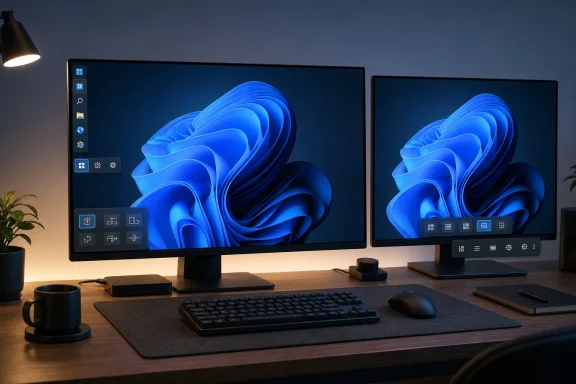
Taskbar placement is not decoration. On ultrawide monitors, a vertical taskbar can make better use of horizontal real estate. On compact laptops, a smaller or side-mounted taskbar can reclaim precious vertical pixels. On multi-monitor setups, muscle memory and screen geometry matter more than whatever arrangement photographs best in a launch video.
The old Windows taskbar was an object users could shape around their work. It could sit at the top for those who thought in browser-tab metaphors, on the left for those with wide monitors, or on the right for the contrarian few who had a reason and did not need Redmond’s permission. Windows 11 arrived with a different philosophy: the taskbar was part of the brand, and the brand sat at the bottom.
That choice may have made the operating system look cleaner in screenshots. It also made Windows 11 feel oddly less Windows-like to the people who notice friction not because they are sentimental, but because they spend all day inside the OS.
The taskbar became the poster child for that trade-off. Moving it was gone. Drag-and-drop support was missing at launch. Combining and labeling behaviors were reduced before being clawed back later. Multi-monitor behavior took time to mature. Even users who liked the Windows 11 look could reasonably ask why modernization had to mean subtraction.
This is the pattern that made the movable taskbar disproportionately important. It was not simply one missing checkbox. It was evidence that Microsoft had rebuilt a core part of the desktop with too narrow a definition of what counted as real use.
That is why the return feels less like a feature announcement than a correction. Microsoft is not inventing a new productivity paradigm here. It is restoring something users had before, removing it, absorbing the backlash, and finally engineering its way back to parity.
Build 26300.8493 is based on Windows 11 version 25H2 through an enablement package, according to Microsoft’s release notes. That does not mean every 25H2 user will receive a movable taskbar on day one, or that the implementation in this preview is the final public behavior. Microsoft explicitly warns Insiders that features in these builds can change, disappear, or never ship outside preview.
For administrators, this distinction is not pedantry. A feature in Experimental is not a deployment plan. It is a signal of product intent. The practical question is not whether a sysadmin should start documenting a vertical taskbar policy tomorrow, but whether Microsoft is finally rebuilding the Windows 11 shell with enterprise and power-user flexibility in mind.
That signal is encouraging. It is also incomplete. The taskbar may move in preview, but the real test is whether it arrives in stable Windows with policy controls, accessibility polish, predictable multi-monitor behavior, and a support story that does not boil down to “wait for the next cumulative update.”
This is a quieter change, but arguably just as telling. Windows 11 has often behaved as if visual spaciousness were the same thing as usability. That is true on some devices and maddening on others. A 14-inch laptop, a 32-inch monitor, and a handheld gaming PC do not all benefit from the same taskbar proportions.
The smaller taskbar is Microsoft acknowledging that density is not the enemy of design. For many users, density is design. The ability to see more of a spreadsheet, terminal, browser viewport, or remote desktop session is not a vanity preference; it is the difference between an interface that serves the work and one that keeps interrupting it.
There is a larger shift happening here. After years of pushing Windows 11 toward a single opinionated desktop, Microsoft is making room for context again. The company is not abandoning its default look. It is finally admitting that the default cannot be the whole product.
That has been the shadow over Windows 11 from the beginning. The OS has real strengths: better window snapping, a more coherent Settings app in many areas, stronger security defaults on supported hardware, and a design language that can look polished when it is consistent. But the product has repeatedly asked users to accept regressions as the price of modernization.
The taskbar rollback shows the danger of that bargain. When a new version removes familiar capabilities, users do not judge each change in isolation. They build a theory of the vendor. In Windows 11’s case, that theory became simple and damaging: Microsoft values its vision of a clean desktop more than the way people actually use PCs.
Restoring taskbar movement will not erase that history. But it does weaken the theory. It suggests Microsoft has heard enough feedback, measured enough friction, or encountered enough internal resistance to reconsider the boundaries of simplification.
That is not a contradiction. It is a warning. The more Microsoft loads into Windows, the more users need control over the shell that contains it. A desktop crowded with widgets, search surfaces, badges, recommendations, agents, and AI affordances cannot also be rigid about the basics.
The build’s other taskbar-adjacent tweaks reinforce the point. Microsoft is toning down widget badging so it can match the Windows accent color instead of always shouting in red. It is testing ways to quiet the experience for users who do not engage with Widgets. It is improving Windows Search relevance so files and apps appear ahead of web suggestions when they are the stronger match.
Those are not glamorous changes, but they share a theme: Windows has become too noisy for too many people. Moving the taskbar is the most symbolic fix, but the deeper project is restoring proportionality. Not every surface needs to advertise itself. Not every feature needs to demand attention. Not every default should be treated as destiny.
That bundle is worth noting because it places taskbar flexibility inside a broader Windows 11 repair campaign. Microsoft has spent much of the past year acknowledging, directly and indirectly, that Windows 11 needs to feel faster, calmer, and more reliable. A prettier shell does not help much if Explorer stutters, the taskbar glitches, or updates leave users wondering whether their machine is asleep, stuck, or simply thinking.
The company’s language around measurement is also important. Microsoft says it plans to flight logon optimizations, measure real impact, and use that data to drive further work. That is the right posture, especially for a platform where perceived performance is often as important as benchmark performance.
Still, users should be skeptical in the healthy way Windows users have earned. Preview notes are intentions. Stable-channel behavior is evidence. The movable taskbar is exciting because it is visible; the quality work will matter more because it is cumulative.
Most enterprises will not rush to standardize alternate taskbar placement. The Windows desktop in managed environments tends to prize predictability over individuality, especially where frontline, shared, kiosk, or regulated systems are involved. A bottom taskbar is easier to document, easier to support, and less likely to confuse users who move between machines.
But IT pros should resist dismissing the feature as consumer fluff. Developers, analysts, designers, traders, administrators, and engineers often build highly specific workflows around screen layout. For those users, a vertical taskbar or compact taskbar can reduce friction all day long. In high-skill environments, forcing everyone into the same shell layout is not always efficiency; sometimes it is bureaucracy masquerading as simplicity.
The policy question will matter. If Microsoft exposes clean administrative controls, organizations can allow flexibility where it helps and restrict it where consistency matters. If the feature arrives as a consumer-facing setting without adequate management hooks, IT will do what it always does: tolerate it, script around it, or disable what it can.
The unfinished pieces are therefore significant. Microsoft says touch gestures are still in progress for alternate placements, and the touch-optimized taskbar is not yet supported. That matters on convertibles, tablets, and accessibility setups where touch is not secondary. A movable taskbar that works best only for mouse-and-keyboard desktop users is a start, not the finish line.
Search and Copilot behavior also need scrutiny. If those surfaces disappear, shrink awkwardly, or behave inconsistently in vertical modes, Microsoft risks recreating the old problem in a new form: offering customization that becomes second-class as soon as users leave the default. The test is not whether the taskbar can sit on the left edge in a screenshot. The test is whether Windows behaves as though that choice is legitimate.
Good accessibility work often looks like ordinary flexibility. Let users change size, position, density, animation, urgency, and input behavior. Do not make them justify it. The movable taskbar fits that philosophy precisely because it is mundane.
That ecosystem is part of Windows’ strength, but it is also a rebuke. When a large number of users install tools to restore old operating-system behavior, the vendor should ask whether it has outsourced common sense. The answer in this case was yes.
Microsoft does not need to clone every third-party customization utility. Windows would become unmanageable if every shell preference became a supported control. But taskbar placement was never an obscure flourish. It was a mainstream feature with decades of precedent and obvious ergonomic value.
Bringing it back narrows the gap between Windows 11 and the practical expectations of Windows users. It also reduces the number of people who need to modify the shell just to feel at home on a supported operating system. That is good for reliability, security, and user trust.
The more interesting question is why it took so long. Rebuilding the taskbar for Windows 11 was not trivial, and supporting multiple orientations across flyouts, animations, touch behaviors, search, accessibility, multi-monitor setups, and localization is real engineering work. The locked taskbar may have reflected not only design preference but also the cost of reimplementing decades of shell assumptions in a modernized stack.
That explanation deserves some sympathy, but not unlimited patience. If the replacement shell could not support a long-standing workflow, Microsoft needed either a clearer migration story or a more modest launch posture. Users are rarely comforted by learning that the missing thing was hard to rebuild after it was removed.
The return of the movable taskbar therefore lands as both progress and indictment. It shows Microsoft can do the work. It also reminds everyone that Windows 11 shipped without enough of it.
The mistake is treating default behavior as an argument against configurability. A feature used by a minority can still be essential to that minority, especially on a platform as broad as Windows. The PC market contains gamers, accountants, sysadmins, students, accessibility users, developers, kiosk operators, home-office workers, and people still running workflows older than some of Microsoft’s product managers.
Windows succeeds when it lets those groups coexist. It struggles when it tries to sand them into a single idealized user. The movable taskbar is a small restoration of pluralism.
This is why enthusiasts have reacted so strongly. They are not celebrating because moving a taskbar is revolutionary. They are celebrating because Microsoft appears to be remembering the social contract of the PC: the machine is yours after you buy it, and the interface should have enough give to reflect that.
A vertical taskbar must handle pinned apps, overflow, badges, clock and tray elements, notifications, jump lists, virtual desktops, multiple monitors, scaling, right-to-left languages, accessibility tools, keyboard navigation, and remote sessions. It must also behave predictably when users dock and undock laptops, rotate screens, connect projectors, or move between touch and non-touch modes. Every edge case becomes visible because the taskbar is the edge.
Microsoft’s release notes suggest the company knows the work is not done. The unsupported pieces are named, not hidden. That transparency is useful, but it also sets expectations: do not ship the feature broadly until the alternate placements feel native rather than tolerated.
Windows users have long memories for half-finished shell changes. If the movable taskbar returns with glitches, missing Search behavior, or broken auto-hide expectations, the narrative will flip quickly from “Microsoft listened” to “Microsoft still cannot finish Windows 11.” The opportunity is real, but so is the reputational risk.
That matters because trust in an operating system is built through hundreds of small interactions. A user who sees Microsoft restore a missing preference may be more willing to believe the next quality promise. An admin who sees configurable behavior return may be more patient with a rollout. An enthusiast who feels heard may become a critic again rather than an exile.
The change also gives Microsoft a better story for Windows 11 adoption as Windows 10’s support era recedes further into the rearview mirror. Users asked to move from a familiar platform to a newer one need more than security warnings and upgrade banners. They need evidence that the newer platform will not casually discard the habits that made the older one productive.
Taskbar movement is exactly that kind of evidence. It is modest, visible, and emotionally resonant. Sometimes the small features carry the largest migration politics.
 Microsoft Moves the Taskbar and Admits the Desktop Still Matters
The change arrives in the new Experimental channel, formerly known as Dev for many Insiders, as part of Windows 11 build 26300.8493. Microsoft says the option lives under Settings, then Personalization, then Taskbar, then Taskbar behaviors. From there, users can choose bottom, top, left, or right placement.That phrasing matters because this is not just a hidden prototype accidentally exposed in a screenshot or a registry switch with caveats. Microsoft is presenting alternate taskbar position as a first-class setting, even if the company is still careful to wrap it in preview-channel language. Tooltips, flyouts, animations, small taskbar mode, and “never combine” behavior are supposed to work across locations.
The limitations are equally important. Microsoft says touch gestures, the Search box, and Ask Copilot support in alternate positions are still in progress. Auto-hidden taskbar and touch-optimized taskbar are not yet supported in these placements. In other words, Windows 11 has regained the outline of a classic desktop feature before it has regained the full muscle memory around it.
Still, the direction of travel is unmistakable. For years, the locked-down Windows 11 taskbar represented one of the most visible ways Microsoft traded user agency for visual consistency. Now the company is making the opposite bet: that a little more complexity is worth the goodwill.
The Missing Feature Was Never Just About the Bottom Edge
The outcry over the Windows 11 taskbar was always easy to caricature as nostalgia. A small group of power users wanted the old thing because it was old, the argument went, while everyone else was perfectly happy with a centered, simplified, tablet-flavored desktop. There was some truth in that, but not enough to carry the decision for nearly half a decade.Taskbar placement is not decoration. On ultrawide monitors, a vertical taskbar can make better use of horizontal real estate. On compact laptops, a smaller or side-mounted taskbar can reclaim precious vertical pixels. On multi-monitor setups, muscle memory and screen geometry matter more than whatever arrangement photographs best in a launch video.
The old Windows taskbar was an object users could shape around their work. It could sit at the top for those who thought in browser-tab metaphors, on the left for those with wide monitors, or on the right for the contrarian few who had a reason and did not need Redmond’s permission. Windows 11 arrived with a different philosophy: the taskbar was part of the brand, and the brand sat at the bottom.
That choice may have made the operating system look cleaner in screenshots. It also made Windows 11 feel oddly less Windows-like to the people who notice friction not because they are sentimental, but because they spend all day inside the OS.
Windows 11’s Original Sin Was Simplification Without Escape Hatches
Windows 11 launched in 2021 as an aesthetic reset. Rounded corners, centered icons, a calmer Start menu, and stricter hardware requirements all signaled a break from Windows 10’s sprawling pragmatism. But the redesign also removed or delayed a surprising number of behaviors users had come to rely on.The taskbar became the poster child for that trade-off. Moving it was gone. Drag-and-drop support was missing at launch. Combining and labeling behaviors were reduced before being clawed back later. Multi-monitor behavior took time to mature. Even users who liked the Windows 11 look could reasonably ask why modernization had to mean subtraction.
This is the pattern that made the movable taskbar disproportionately important. It was not simply one missing checkbox. It was evidence that Microsoft had rebuilt a core part of the desktop with too narrow a definition of what counted as real use.
That is why the return feels less like a feature announcement than a correction. Microsoft is not inventing a new productivity paradigm here. It is restoring something users had before, removing it, absorbing the backlash, and finally engineering its way back to parity.
The Experimental Channel Is a Promise, Not a Shipping Date
The feature is available only to users in the relevant Insider preview flow, and even there it may not appear for everyone at once. Microsoft continues to rely on controlled feature rollouts, which means two people on the same nominal build can see different capabilities depending on rollout state, flags, and account targeting. That makes the headline “you can try it now” true, but with the usual Windows Insider asterisk.Build 26300.8493 is based on Windows 11 version 25H2 through an enablement package, according to Microsoft’s release notes. That does not mean every 25H2 user will receive a movable taskbar on day one, or that the implementation in this preview is the final public behavior. Microsoft explicitly warns Insiders that features in these builds can change, disappear, or never ship outside preview.
For administrators, this distinction is not pedantry. A feature in Experimental is not a deployment plan. It is a signal of product intent. The practical question is not whether a sysadmin should start documenting a vertical taskbar policy tomorrow, but whether Microsoft is finally rebuilding the Windows 11 shell with enterprise and power-user flexibility in mind.
That signal is encouraging. It is also incomplete. The taskbar may move in preview, but the real test is whether it arrives in stable Windows with policy controls, accessibility polish, predictable multi-monitor behavior, and a support story that does not boil down to “wait for the next cumulative update.”
The Smaller Taskbar Tells the Same Story in Fewer Pixels
Microsoft is pairing movable placement with another long-requested change: a smaller taskbar. The new setting reduces icon size and taskbar height while keeping core elements such as Start, Search, and the system tray aligned. The default remains unchanged, but users who want a denser desktop can choose one.This is a quieter change, but arguably just as telling. Windows 11 has often behaved as if visual spaciousness were the same thing as usability. That is true on some devices and maddening on others. A 14-inch laptop, a 32-inch monitor, and a handheld gaming PC do not all benefit from the same taskbar proportions.
The smaller taskbar is Microsoft acknowledging that density is not the enemy of design. For many users, density is design. The ability to see more of a spreadsheet, terminal, browser viewport, or remote desktop session is not a vanity preference; it is the difference between an interface that serves the work and one that keeps interrupting it.
There is a larger shift happening here. After years of pushing Windows 11 toward a single opinionated desktop, Microsoft is making room for context again. The company is not abandoning its default look. It is finally admitting that the default cannot be the whole product.
The Ghost of Windows 10 Still Haunts Every Windows 11 Improvement
The awkward part for Microsoft is that much of the praise for this work sounds like praise for putting back what Windows 10 already did. A movable taskbar was not an exotic enthusiast demand in the previous generation of Windows. It was ordinary operating-system furniture. Losing it made Windows 11 feel less like a successor and more like a selective rewrite.That has been the shadow over Windows 11 from the beginning. The OS has real strengths: better window snapping, a more coherent Settings app in many areas, stronger security defaults on supported hardware, and a design language that can look polished when it is consistent. But the product has repeatedly asked users to accept regressions as the price of modernization.
The taskbar rollback shows the danger of that bargain. When a new version removes familiar capabilities, users do not judge each change in isolation. They build a theory of the vendor. In Windows 11’s case, that theory became simple and damaging: Microsoft values its vision of a clean desktop more than the way people actually use PCs.
Restoring taskbar movement will not erase that history. But it does weaken the theory. It suggests Microsoft has heard enough feedback, measured enough friction, or encountered enough internal resistance to reconsider the boundaries of simplification.
The Copilot Era Makes Old-School Customization More Important, Not Less
There is an irony in the timing. Microsoft is trying to make Windows the front door for AI assistance, Copilot workflows, local models, agentic features, and cloud-connected productivity. At the same time, one of its most warmly received changes is the return of a taskbar you can drag, shrink, and park somewhere else.That is not a contradiction. It is a warning. The more Microsoft loads into Windows, the more users need control over the shell that contains it. A desktop crowded with widgets, search surfaces, badges, recommendations, agents, and AI affordances cannot also be rigid about the basics.
The build’s other taskbar-adjacent tweaks reinforce the point. Microsoft is toning down widget badging so it can match the Windows accent color instead of always shouting in red. It is testing ways to quiet the experience for users who do not engage with Widgets. It is improving Windows Search relevance so files and apps appear ahead of web suggestions when they are the stronger match.
Those are not glamorous changes, but they share a theme: Windows has become too noisy for too many people. Moving the taskbar is the most symbolic fix, but the deeper project is restoring proportionality. Not every surface needs to advertise itself. Not every feature needs to demand attention. Not every default should be treated as destiny.
The Insider Build Is Also a Quality Pledge
Build 26300.8493 is not only about taskbar placement. Microsoft also mentions the first in a set of logon performance optimizations expected to flight over the coming months. It lists reliability improvements for switching between multiple desktops, Simple Service Discovery Protocol notifications, DISM restore-health operations, and sleep behavior after updates.That bundle is worth noting because it places taskbar flexibility inside a broader Windows 11 repair campaign. Microsoft has spent much of the past year acknowledging, directly and indirectly, that Windows 11 needs to feel faster, calmer, and more reliable. A prettier shell does not help much if Explorer stutters, the taskbar glitches, or updates leave users wondering whether their machine is asleep, stuck, or simply thinking.
The company’s language around measurement is also important. Microsoft says it plans to flight logon optimizations, measure real impact, and use that data to drive further work. That is the right posture, especially for a platform where perceived performance is often as important as benchmark performance.
Still, users should be skeptical in the healthy way Windows users have earned. Preview notes are intentions. Stable-channel behavior is evidence. The movable taskbar is exciting because it is visible; the quality work will matter more because it is cumulative.
Enterprise IT Will See Relief, Then Risk
For corporate environments, the movable taskbar is both welcome and potentially annoying. On one hand, it gives power users and accessibility-driven workflows more flexibility. On the other, any new shell option can become another variable for help desks, screenshots, training materials, and remote support sessions.Most enterprises will not rush to standardize alternate taskbar placement. The Windows desktop in managed environments tends to prize predictability over individuality, especially where frontline, shared, kiosk, or regulated systems are involved. A bottom taskbar is easier to document, easier to support, and less likely to confuse users who move between machines.
But IT pros should resist dismissing the feature as consumer fluff. Developers, analysts, designers, traders, administrators, and engineers often build highly specific workflows around screen layout. For those users, a vertical taskbar or compact taskbar can reduce friction all day long. In high-skill environments, forcing everyone into the same shell layout is not always efficiency; sometimes it is bureaucracy masquerading as simplicity.
The policy question will matter. If Microsoft exposes clean administrative controls, organizations can allow flexibility where it helps and restrict it where consistency matters. If the feature arrives as a consumer-facing setting without adequate management hooks, IT will do what it always does: tolerate it, script around it, or disable what it can.
Accessibility Is the Quiet Argument for Letting the Shell Bend
Taskbar movement is often framed as a productivity preference, but accessibility belongs in the same conversation. Users with motor limitations, visual constraints, attention differences, or specialized input devices may have good reasons to place persistent controls closer to where they work. A bottom-only taskbar assumes a body, a display, and a workflow that not everyone has.The unfinished pieces are therefore significant. Microsoft says touch gestures are still in progress for alternate placements, and the touch-optimized taskbar is not yet supported. That matters on convertibles, tablets, and accessibility setups where touch is not secondary. A movable taskbar that works best only for mouse-and-keyboard desktop users is a start, not the finish line.
Search and Copilot behavior also need scrutiny. If those surfaces disappear, shrink awkwardly, or behave inconsistently in vertical modes, Microsoft risks recreating the old problem in a new form: offering customization that becomes second-class as soon as users leave the default. The test is not whether the taskbar can sit on the left edge in a screenshot. The test is whether Windows behaves as though that choice is legitimate.
Good accessibility work often looks like ordinary flexibility. Let users change size, position, density, animation, urgency, and input behavior. Do not make them justify it. The movable taskbar fits that philosophy precisely because it is mundane.
Third-Party Shell Tools Won Because Microsoft Left the Door Closed
The years without a movable Windows 11 taskbar created space for third-party utilities, shell replacements, registry hacks, and enthusiast workarounds. Some users relied on these tools happily. Others used them reluctantly, accepting compatibility risk because Microsoft had removed a basic choice.That ecosystem is part of Windows’ strength, but it is also a rebuke. When a large number of users install tools to restore old operating-system behavior, the vendor should ask whether it has outsourced common sense. The answer in this case was yes.
Microsoft does not need to clone every third-party customization utility. Windows would become unmanageable if every shell preference became a supported control. But taskbar placement was never an obscure flourish. It was a mainstream feature with decades of precedent and obvious ergonomic value.
Bringing it back narrows the gap between Windows 11 and the practical expectations of Windows users. It also reduces the number of people who need to modify the shell just to feel at home on a supported operating system. That is good for reliability, security, and user trust.
A Small Setting Carries a Large Apology
No Microsoft executive is likely to describe this as an apology. Product teams rarely use that word, especially when a change can be framed as iteration, feedback response, or design evolution. But users understand the subtext. Windows 11 took something away, and now Microsoft is giving it back.The more interesting question is why it took so long. Rebuilding the taskbar for Windows 11 was not trivial, and supporting multiple orientations across flyouts, animations, touch behaviors, search, accessibility, multi-monitor setups, and localization is real engineering work. The locked taskbar may have reflected not only design preference but also the cost of reimplementing decades of shell assumptions in a modernized stack.
That explanation deserves some sympathy, but not unlimited patience. If the replacement shell could not support a long-standing workflow, Microsoft needed either a clearer migration story or a more modest launch posture. Users are rarely comforted by learning that the missing thing was hard to rebuild after it was removed.
The return of the movable taskbar therefore lands as both progress and indictment. It shows Microsoft can do the work. It also reminds everyone that Windows 11 shipped without enough of it.
The Real Test Is Whether Microsoft Stops Confusing Defaults With Decisions
A good default is one of the most powerful tools in software design. Most users never change it, and that is fine. The bottom taskbar, centered icons, standard height, quiet widget badges, and Microsoft’s chosen Search layout can remain the mainstream Windows experience without being imposed as the only serious one.The mistake is treating default behavior as an argument against configurability. A feature used by a minority can still be essential to that minority, especially on a platform as broad as Windows. The PC market contains gamers, accountants, sysadmins, students, accessibility users, developers, kiosk operators, home-office workers, and people still running workflows older than some of Microsoft’s product managers.
Windows succeeds when it lets those groups coexist. It struggles when it tries to sand them into a single idealized user. The movable taskbar is a small restoration of pluralism.
This is why enthusiasts have reacted so strongly. They are not celebrating because moving a taskbar is revolutionary. They are celebrating because Microsoft appears to be remembering the social contract of the PC: the machine is yours after you buy it, and the interface should have enough give to reflect that.
The Rebuilt Taskbar Still Has to Survive Contact With Reality
Preview builds are forgiving territory. Users expect bugs, missing pieces, and inconsistent behavior. Stable Windows is a different arena, and the taskbar is one of the least forgiving components in the operating system because it is always there.A vertical taskbar must handle pinned apps, overflow, badges, clock and tray elements, notifications, jump lists, virtual desktops, multiple monitors, scaling, right-to-left languages, accessibility tools, keyboard navigation, and remote sessions. It must also behave predictably when users dock and undock laptops, rotate screens, connect projectors, or move between touch and non-touch modes. Every edge case becomes visible because the taskbar is the edge.
Microsoft’s release notes suggest the company knows the work is not done. The unsupported pieces are named, not hidden. That transparency is useful, but it also sets expectations: do not ship the feature broadly until the alternate placements feel native rather than tolerated.
Windows users have long memories for half-finished shell changes. If the movable taskbar returns with glitches, missing Search behavior, or broken auto-hide expectations, the narrative will flip quickly from “Microsoft listened” to “Microsoft still cannot finish Windows 11.” The opportunity is real, but so is the reputational risk.
This Is the Windows 11 Course Correction Users Were Waiting For
The movable taskbar’s return does not solve every Windows 11 complaint. It does not remove unwanted prompts, settle the Microsoft account debate, fix every File Explorer performance issue, or answer every concern about AI features surfacing in the shell. But it is a concrete, user-facing sign that Microsoft’s Windows team is willing to reverse a bad call.That matters because trust in an operating system is built through hundreds of small interactions. A user who sees Microsoft restore a missing preference may be more willing to believe the next quality promise. An admin who sees configurable behavior return may be more patient with a rollout. An enthusiast who feels heard may become a critic again rather than an exile.
The change also gives Microsoft a better story for Windows 11 adoption as Windows 10’s support era recedes further into the rearview mirror. Users asked to move from a familiar platform to a newer one need more than security warnings and upgrade banners. They need evidence that the newer platform will not casually discard the habits that made the older one productive.
Taskbar movement is exactly that kind of evidence. It is modest, visible, and emotionally resonant. Sometimes the small features carry the largest migration politics.
The Taskbar Finally Moves, and So Does Microsoft’s Posture
The immediate lesson from build 26300.8493 is practical: Insiders in the Experimental channel may now see settings for alternate taskbar placement and a smaller taskbar, while everyone else should wait for Microsoft to test, expand, and stabilize the work. The broader lesson is cultural: Windows 11 is better when Microsoft treats user preference as a design input rather than a legacy burden.- Microsoft is testing taskbar placement on the bottom, top, left, and right edges in Windows 11 Insider Experimental Preview Build 26300.8493.
- The feature is still incomplete because touch gestures, the Search box, Ask Copilot, auto-hide, and touch-optimized taskbar support are not fully ready for alternate positions.
- The smaller taskbar option is part of the same shift toward letting users reclaim space and tune density for their actual hardware.
- Controlled feature rollout means not every Insider on the build will necessarily see the same options immediately.
- Enterprise adoption will depend on stable behavior, management controls, accessibility quality, and predictable multi-monitor support.
- The symbolic importance is larger than the setting itself because Microsoft is restoring a capability Windows 11 removed at launch.
References
- Primary source: ZDNET
Published: Mon, 18 May 2026 15:16:00 GMT
Microsoft is finally bringing the movable taskbar to Windows 11 - here's who can try it now
Thanks to an update rolling out to Windows 11 insiders, you'll be able to move the taskbar to the top, bottom, left, or right. Start menu changes are coming soon, too.www.zdnet.com - Independent coverage: The Register
Published: Mon, 18 May 2026 13:45:00 GMT
Microsoft remembers that taskbars used to move
Experimental Windows 11 build restores some old favorites, though the rough edges are still showingwww.theregister.com - Related coverage: windowscentral.com
Microsoft finally begins testing movable and resizable Taskbar on Windows 11, restoring key customization features many users missed | Windows Central
Microsoft is now testing the option to move the Taskbar to the side of your screen on Windows 11.www.windowscentral.com - Official source: learn.microsoft.com
Experimental Preview Build 26300.8493 - Windows Insider Program | Microsoft Learn
Release notes for Experimental Preview Build 26300.8493learn.microsoft.com - Related coverage: windowslatest.com
Microsoft rolls out Windows 11's movable and smaller taskbar 5 years after killing it (hands on experience)
Microsoft is finally rolling out two of the most requested features in Windows 11: the ability to move the taskbar and make it smaller. www.windowslatest.com
- Related coverage: notebookcheck.net
Microsoft brings back Windows 10 taskbar customizations to Windows 11 - Notebookcheck News
Microsoft is finally giving Windows 11 users more control over the taskbar again, including full screen-edge placement and a smaller, more compact mode. The update also improves how menus and window labels behave depending on the taskbar position. www.notebookcheck.net
- Related coverage: windowsreport.com
Windows 11 finally gets movable taskbar, Microsoft says "The Choice is Yours"
Microsoft finally brings movable taskbar to Windows 11, alongside smaller taskbar support and Start menu resizing options. windowsreport.com
- Related coverage: pcworld.com
Windows 11 dev accidentally leaks video of the new movable taskbar | PCWorld
In a video that has since been taken down, we see a movable Windows 11 taskbar in testing, with options to dock it top, bottom, left, or right.www.pcworld.com - Official source: blogs.windows.com
Announcing Windows 11 Insider Preview Build 28020.1673 (Canary Channel)
Hello Windows Insiders, today we are releasing Windows 11 Insider Preview Build 28020.1673 to the Canary Channel. (KB 5077240) What’s new in Canary Build 28020.1673 Changes and Improvements gblogs.windows.com - Related coverage: techrepublic.com
Windows 11 Start Menu, Taskbar Are Getting More Customization
Microsoft is testing Windows 11 taskbar and Start menu updates, including movable taskbar positions, cleaner Start controls, and compact layout options.www.techrepublic.com
- Related coverage: techradar.com
Microsoft continues the good work on Windows 11, with tweaks to 'quiet' ads — and that big taskbar change is 'coming soon' | TechRadar
Useful changes for the widgets panel are in testingwww.techradar.com - Related coverage: tomshardware.com
Microsoft simplifies Windows Insider program — fewer channels, and switching without wiping your device | Tom's Hardware
The company will also make it easier to ensure you get all of the latest features.www.tomshardware.com