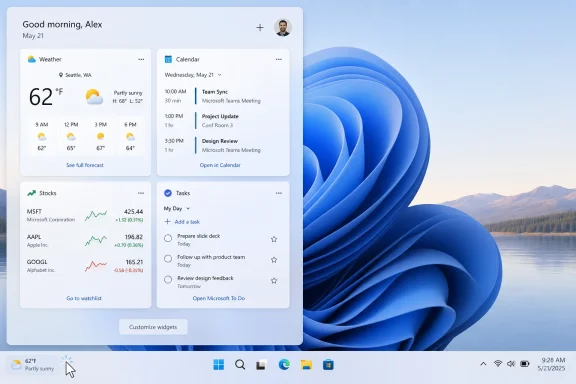
Microsoft confirmed on May 1, 2026, that new Windows 11 Insider Preview builds will make the Widgets board quieter by default, opening first to user-selected widgets instead of the MSN-powered feed and disabling hover launches, taskbar badges, and some alerts. That sounds like a small settings change. It is not. It is Microsoft admitting, in the language of defaults rather than apology, that Windows 11 has spent too much time behaving like a distribution surface and not enough like an operating system.
The move arrives in preview, not general release, and therefore still lives in the familiar purgatory between “Microsoft is testing this” and “your parents’ laptop will actually behave differently.” But the direction matters because defaults are policy. When Microsoft changes what Windows does before the user touches a setting, it is changing the commercial contract between Redmond and the people who merely wanted to check the weather.
The Windows 11 Widgets board has always been an awkward compromise. It borrowed the visual language of glanceable information — weather, calendar, watchlist, to-do items — and then used the most visible real estate to funnel users toward a feed of MSN stories, promotions, and algorithmic filler. The product was called Widgets, but for many users it behaved more like a news portal that happened to have a widget drawer attached.
Microsoft’s new preview behavior inverts that relationship. The board is supposed to open first to the widgets experience, while the feed recedes from the default path. The company says it wants Widgets to feel “less distracting and overwhelming,” which is a polite way of acknowledging what Windows users have been saying for years in less polite language.
This is not the death of MSN inside Windows. Users who want a more proactive, feed-heavy experience will still be able to turn pieces of it back on. The difference is that Windows will no longer assume that the first thing a user wants from a taskbar weather click is a stream of headlines and monetized attention.
That distinction is the story. Microsoft is not removing the commercial machinery. It is moving it from default behavior to elective behavior, and that is a meaningful retreat.
A user clicking on weather expects weather. A user opening a widgets surface expects their chosen information modules. Instead, Windows often treated that gesture as permission to open a content feed, complete with badges, alerts, hover behavior, and stories that felt wildly out of place on a desktop productivity machine.
That is why the backlash stuck. The problem was not simply that some users disliked MSN. It was that Windows increasingly felt willing to convert small moments of attention into inventory. A taskbar icon stopped feeling like a control and started feeling like a trapdoor.
The same complaint has followed other corners of Windows 11: suggested content in Start, setup prompts that nudge users toward services, Copilot placements that arrived before users had asked for them, and notifications that blur the line between help and promotion. The Widgets panel was just the loudest offender because it opened directly into the attention economy.
Defaults carry moral weight in software design. They tell users what the vendor believes the product is for. A default that opens a news feed says the desktop is a channel. A default that opens chosen widgets says the desktop is a tool.
Microsoft’s preview changes go beyond hiding the feed on first launch. The company is also disabling “Open on hover” by default, turning off taskbar badging by default, and limiting taskbar alerts until the user opens and engages with Widgets. Those are not cosmetic adjustments. They target the mechanics of interruption.
Hover-to-open was especially revealing. It made the Widgets board feel less like a deliberate destination and more like something that could ambush the cursor. Taskbar badges and alerts similarly trained the eye toward Microsoft’s surface, whether or not the user had expressed interest. Turning those behaviors off by default is a rare case of Windows choosing restraint over engagement metrics.
For years, Windows 11 criticism has had two overlapping tracks. One is technical: File Explorer latency, inconsistent UI surfaces, hardware requirements, update friction, and memory footprint. The other is philosophical: Windows feels like it is increasingly optimized for Microsoft’s services rather than the user’s machine.
K2, if it is to mean anything, has to attack both. A faster File Explorer is welcome, but it will not fix the feeling that the OS is constantly asking for more attention, more account integration, more cloud attachment, more AI, more feed consumption. Quieting Widgets is therefore small but strategically useful. It hits the trust problem directly.
The danger for Microsoft is that “less noisy” can become another marketing phrase if it is not followed through across the shell. Users have long memories for desktop annoyances. If Widgets gets quieter while Start, Search, Edge, setup flows, and notifications continue to push the same old patterns, this will look less like reform and more like moving furniture around a crowded room.
Widgets should be personal utilities. They should be modular, predictable, and boring in the best sense of the word. Weather should show weather. Calendar should show appointments. OneDrive should show sync or file context. Stocks should show tickers because the user asked for them, not because the OS wants another reason to animate the taskbar.
The MSN feed violated that expectation because it imported the rhythms of the web into the operating system shell. Headlines changed. Badges appeared. Alerts nudged. The surface competed for attention rather than serving it. Even when the content was legitimate, the placement made it feel invasive.
Microsoft’s preview design implicitly concedes that the feed belongs behind a choice. That is the right model. A desktop operating system can host content services, but it should not smuggle them into primary workflows under the cover of utility.
A noisy shell increases support burden. Users ask why news is appearing. They ask why icons are badged. They accidentally open panels. They assume something is wrong or malicious because a work machine is suddenly presenting consumer content. None of that is catastrophic, but at scale it becomes the kind of low-grade friction IT departments despise.
Microsoft knows this. Windows succeeds in organizations because it is boring, governable, and compatible. The more Windows behaves like a consumer engagement platform, the more it complicates the mental model administrators want: the OS should launch apps, secure identity, manage devices, and stay out of the way.
The Widgets default shift is therefore a useful correction even if many enterprises already disable or control these surfaces. It suggests Microsoft understands that noise is not merely an aesthetic complaint. It is operational cost.
The same principle applies to MSN, Copilot, recommendations, and cloud prompts: user consent matters more when a feature is ambient. If a person opens an app dedicated to AI assistance, the context is clear. If AI affordances, service nudges, or content feeds appear in the shell by default, the user experiences them as pressure.
Windows is not a website. It is the base layer of the PC. That gives Microsoft enormous power over attention, and it also imposes a higher standard. The OS should be conservative about interruptions because users cannot simply close the browser tab on Windows itself.
Quiet-by-default design is not anti-AI, anti-news, or anti-services. It is pro-agency. Microsoft can still build ambitious experiences, but it has to earn engagement rather than extracting it from defaults.
That caveat matters because Windows users have seen “we heard your feedback” before. Microsoft often tests more user-friendly behavior before shipping a compromised version, or ships a setting that later gets buried, renamed, reset, or counterbalanced by another prompt elsewhere. The credibility test will be what happens when these defaults reach mainstream Windows 11 installations.
The company also needs to clarify how this interacts with regional rules, account types, managed devices, and existing widget configurations. A clean first-run experience is good. A predictable upgrade experience is better. Users who have already customized Widgets should not have to fight the board again after a feature update.
Still, preview is where Windows culture changes begin. If Microsoft is measuring success by fewer accidental opens, fewer dismissals, and higher satisfaction rather than raw feed impressions, then this could be more than a temporary concession. It could mark a shift in what the Windows team is rewarded for optimizing.
That is why disabling hover behavior by default is arguably as important as hiding the MSN feed. It restores intention to the gesture. Click means open. Hover means nothing unless the user asks otherwise. This is basic interface manners, and Windows forgot them in pursuit of “engagement.”
Badging is another subtle but important piece. A badge on the taskbar carries urgency. It implies the user should look. When the badge points to content rather than system state, the OS borrows the visual grammar of importance for something that may not be important at all.
The new defaults do not make Widgets perfect. They make the taskbar less needy. For an operating system used during work, study, gaming, troubleshooting, and everything in between, less needy is not a small achievement.
Hiding the feed by default likely reduces casual exposure. That is the point from the user’s perspective and the cost from Microsoft’s. The only way this becomes a true philosophical shift is if Microsoft accepts that a better Windows may sometimes mean fewer accidental clicks into Microsoft-owned surfaces.
That is difficult for any platform owner. Apple, Google, Amazon, and Meta all use defaults to advantage their ecosystems. Microsoft is not uniquely guilty. But Windows occupies a distinctive place because it remains the general-purpose desktop for hundreds of millions of people and countless organizations. Users do not experience Windows as one app among many; they experience it as the room in which their apps live.
A room that constantly advertises becomes exhausting. A room that quietly supports the user becomes valuable. Microsoft’s challenge is to remember which business it is in when it designs the shell.
Start should prioritize what users installed and opened, not what Microsoft thinks they might subscribe to. Search should distinguish local intent from web monetization with more humility. Setup should make account and service choices clear without treating every skipped offer as an unfinished chore. Copilot should appear where it is useful, not where a growth team needs inventory.
The point is not to turn Windows into a sterile enterprise image for everyone. Consumer Windows can be friendly, dynamic, and connected. But there is a difference between a helpful surface and a hungry one. Windows 11 has too often felt hungry.
The Widgets change works because it starts from a simple premise: the user’s chosen information comes first. That principle scales. If Microsoft applies it broadly, Windows 11 can become less defensive to use — not because every controversial feature disappears, but because fewer of them presume entitlement to the user’s attention.
That is how mature platform design should work. The powerful defaults should be calm, and the louder behaviors should be chosen. Microsoft does not need to abolish every feed, badge, recommendation, or AI entry point to make Windows feel better. It needs to stop making the busiest option the default.
The most concrete lessons are already visible:
Source: Windows Central Microsoft confirms it's hiding ads by default in Windows 11's widget panel
The move arrives in preview, not general release, and therefore still lives in the familiar purgatory between “Microsoft is testing this” and “your parents’ laptop will actually behave differently.” But the direction matters because defaults are policy. When Microsoft changes what Windows does before the user touches a setting, it is changing the commercial contract between Redmond and the people who merely wanted to check the weather.
 Microsoft Finally Discovers That Silence Is a Feature
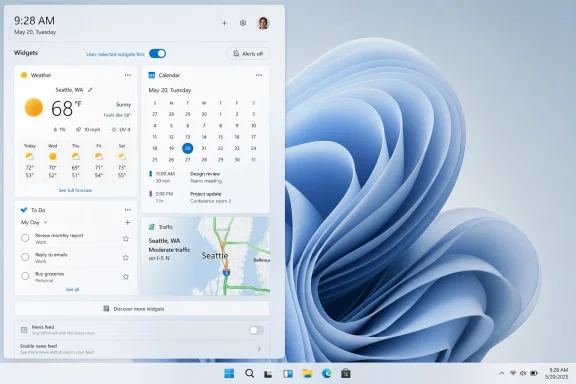
The Windows 11 Widgets board has always been an awkward compromise. It borrowed the visual language of glanceable information — weather, calendar, watchlist, to-do items — and then used the most visible real estate to funnel users toward a feed of MSN stories, promotions, and algorithmic filler. The product was called Widgets, but for many users it behaved more like a news portal that happened to have a widget drawer attached.Microsoft’s new preview behavior inverts that relationship. The board is supposed to open first to the widgets experience, while the feed recedes from the default path. The company says it wants Widgets to feel “less distracting and overwhelming,” which is a polite way of acknowledging what Windows users have been saying for years in less polite language.
This is not the death of MSN inside Windows. Users who want a more proactive, feed-heavy experience will still be able to turn pieces of it back on. The difference is that Windows will no longer assume that the first thing a user wants from a taskbar weather click is a stream of headlines and monetized attention.
That distinction is the story. Microsoft is not removing the commercial machinery. It is moving it from default behavior to elective behavior, and that is a meaningful retreat.
The Widget Board Became a Symbol of Windows 11’s Worst Instincts
Windows 11’s Widgets panel was never the largest problem in the operating system. It did not break enterprise deployment, sabotage gaming performance, or make File Explorer feel sluggish by itself. But it became a perfect symbol of the Windows 11 trust gap because it placed Microsoft’s business incentives so visibly ahead of user intent.A user clicking on weather expects weather. A user opening a widgets surface expects their chosen information modules. Instead, Windows often treated that gesture as permission to open a content feed, complete with badges, alerts, hover behavior, and stories that felt wildly out of place on a desktop productivity machine.
That is why the backlash stuck. The problem was not simply that some users disliked MSN. It was that Windows increasingly felt willing to convert small moments of attention into inventory. A taskbar icon stopped feeling like a control and started feeling like a trapdoor.
The same complaint has followed other corners of Windows 11: suggested content in Start, setup prompts that nudge users toward services, Copilot placements that arrived before users had asked for them, and notifications that blur the line between help and promotion. The Widgets panel was just the loudest offender because it opened directly into the attention economy.
Defaults Are Where Microsoft’s Intentions Become Real
Power users have always been able to tame much of Windows with settings, Group Policy, registry edits, third-party tools, or sheer stubbornness. That misses the point. The fight over Windows 11 has never been only about whether something can be disabled; it has been about why the user must disable it in the first place.Defaults carry moral weight in software design. They tell users what the vendor believes the product is for. A default that opens a news feed says the desktop is a channel. A default that opens chosen widgets says the desktop is a tool.
Microsoft’s preview changes go beyond hiding the feed on first launch. The company is also disabling “Open on hover” by default, turning off taskbar badging by default, and limiting taskbar alerts until the user opens and engages with Widgets. Those are not cosmetic adjustments. They target the mechanics of interruption.
Hover-to-open was especially revealing. It made the Widgets board feel less like a deliberate destination and more like something that could ambush the cursor. Taskbar badges and alerts similarly trained the eye toward Microsoft’s surface, whether or not the user had expressed interest. Turning those behaviors off by default is a rare case of Windows choosing restraint over engagement metrics.
Windows K2 Looks Like a Trust-Rebuilding Campaign, Not a Feature Wave
Windows Central frames this change as part of Microsoft’s broader Windows K2 effort, a reported internal push to address Windows 11’s most common user complaints: performance, clutter, ads, AI overreach, and general product trust. That matters because the Widgets change is too specific to be dismissed as a random tweak.For years, Windows 11 criticism has had two overlapping tracks. One is technical: File Explorer latency, inconsistent UI surfaces, hardware requirements, update friction, and memory footprint. The other is philosophical: Windows feels like it is increasingly optimized for Microsoft’s services rather than the user’s machine.
K2, if it is to mean anything, has to attack both. A faster File Explorer is welcome, but it will not fix the feeling that the OS is constantly asking for more attention, more account integration, more cloud attachment, more AI, more feed consumption. Quieting Widgets is therefore small but strategically useful. It hits the trust problem directly.
The danger for Microsoft is that “less noisy” can become another marketing phrase if it is not followed through across the shell. Users have long memories for desktop annoyances. If Widgets gets quieter while Start, Search, Edge, setup flows, and notifications continue to push the same old patterns, this will look less like reform and more like moving furniture around a crowded room.
The MSN Feed Was Always the Wrong Default for a Desktop OS
There is nothing inherently wrong with a news feed. Many users like glanceable headlines, sports updates, market movement, and entertainment stories. The failure was Microsoft’s insistence on placing that experience at the center of a panel whose name promised something else.Widgets should be personal utilities. They should be modular, predictable, and boring in the best sense of the word. Weather should show weather. Calendar should show appointments. OneDrive should show sync or file context. Stocks should show tickers because the user asked for them, not because the OS wants another reason to animate the taskbar.
The MSN feed violated that expectation because it imported the rhythms of the web into the operating system shell. Headlines changed. Badges appeared. Alerts nudged. The surface competed for attention rather than serving it. Even when the content was legitimate, the placement made it feel invasive.
Microsoft’s preview design implicitly concedes that the feed belongs behind a choice. That is the right model. A desktop operating system can host content services, but it should not smuggle them into primary workflows under the cover of utility.
The Enterprise Lesson Is Bigger Than Widgets
For sysadmins, this change is less about whether the weather icon behaves itself and more about what it signals for fleet management. Consumer-facing clutter has a way of becoming enterprise noise when defaults leak into managed environments, training materials, help desk tickets, and user complaints.A noisy shell increases support burden. Users ask why news is appearing. They ask why icons are badged. They accidentally open panels. They assume something is wrong or malicious because a work machine is suddenly presenting consumer content. None of that is catastrophic, but at scale it becomes the kind of low-grade friction IT departments despise.
Microsoft knows this. Windows succeeds in organizations because it is boring, governable, and compatible. The more Windows behaves like a consumer engagement platform, the more it complicates the mental model administrators want: the OS should launch apps, secure identity, manage devices, and stay out of the way.
The Widgets default shift is therefore a useful correction even if many enterprises already disable or control these surfaces. It suggests Microsoft understands that noise is not merely an aesthetic complaint. It is operational cost.
Microsoft Is Learning the Difference Between AI Ambition and User Consent
The Widgets change also lands in the middle of a broader reckoning over AI in Windows. Microsoft has spent the last several years trying to make Copilot and AI features feel inevitable across its products. Sometimes that has produced genuinely useful capabilities. Sometimes it has made Windows feel like a billboard for a strategy deck.The same principle applies to MSN, Copilot, recommendations, and cloud prompts: user consent matters more when a feature is ambient. If a person opens an app dedicated to AI assistance, the context is clear. If AI affordances, service nudges, or content feeds appear in the shell by default, the user experiences them as pressure.
Windows is not a website. It is the base layer of the PC. That gives Microsoft enormous power over attention, and it also imposes a higher standard. The OS should be conservative about interruptions because users cannot simply close the browser tab on Windows itself.
Quiet-by-default design is not anti-AI, anti-news, or anti-services. It is pro-agency. Microsoft can still build ambitious experiences, but it has to earn engagement rather than extracting it from defaults.
Preview Builds Are Promises Written in Pencil
There is a familiar trap in Windows coverage: treating every Insider build as destiny. Preview behavior can change, rollouts can be staged, features can arrive unevenly, and Microsoft can reverse course when telemetry or business pressure says otherwise. The May 1 builds are a signal, not a guarantee.That caveat matters because Windows users have seen “we heard your feedback” before. Microsoft often tests more user-friendly behavior before shipping a compromised version, or ships a setting that later gets buried, renamed, reset, or counterbalanced by another prompt elsewhere. The credibility test will be what happens when these defaults reach mainstream Windows 11 installations.
The company also needs to clarify how this interacts with regional rules, account types, managed devices, and existing widget configurations. A clean first-run experience is good. A predictable upgrade experience is better. Users who have already customized Widgets should not have to fight the board again after a feature update.
Still, preview is where Windows culture changes begin. If Microsoft is measuring success by fewer accidental opens, fewer dismissals, and higher satisfaction rather than raw feed impressions, then this could be more than a temporary concession. It could mark a shift in what the Windows team is rewarded for optimizing.
The Real Victory Is Making the Taskbar Boring Again
The taskbar should be one of the least surprising parts of Windows. It is the launchpad, the status strip, the place where running apps and system signals live. When it becomes a stage for content alerts, promotional badges, or accidental flyouts, the entire desktop feels less stable.That is why disabling hover behavior by default is arguably as important as hiding the MSN feed. It restores intention to the gesture. Click means open. Hover means nothing unless the user asks otherwise. This is basic interface manners, and Windows forgot them in pursuit of “engagement.”
Badging is another subtle but important piece. A badge on the taskbar carries urgency. It implies the user should look. When the badge points to content rather than system state, the OS borrows the visual grammar of importance for something that may not be important at all.
The new defaults do not make Widgets perfect. They make the taskbar less needy. For an operating system used during work, study, gaming, troubleshooting, and everything in between, less needy is not a small achievement.
Microsoft Still Has to Prove It Can Leave Money on the Table
The business tension here is obvious. MSN traffic has value. Edge traffic has value. Microsoft account sign-ins have value. Copilot usage has value. Windows is both a product and a distribution channel for other Microsoft products, and the company has repeatedly struggled to keep those roles separate.Hiding the feed by default likely reduces casual exposure. That is the point from the user’s perspective and the cost from Microsoft’s. The only way this becomes a true philosophical shift is if Microsoft accepts that a better Windows may sometimes mean fewer accidental clicks into Microsoft-owned surfaces.
That is difficult for any platform owner. Apple, Google, Amazon, and Meta all use defaults to advantage their ecosystems. Microsoft is not uniquely guilty. But Windows occupies a distinctive place because it remains the general-purpose desktop for hundreds of millions of people and countless organizations. Users do not experience Windows as one app among many; they experience it as the room in which their apps live.
A room that constantly advertises becomes exhausting. A room that quietly supports the user becomes valuable. Microsoft’s challenge is to remember which business it is in when it designs the shell.
The Widgets Retreat Should Become a Template
If Microsoft wants to rebuild Windows 11’s reputation, the Widgets decision should not stand alone. The same quiet-by-default logic should apply across the OS, especially in places where Microsoft has blurred utility and promotion.Start should prioritize what users installed and opened, not what Microsoft thinks they might subscribe to. Search should distinguish local intent from web monetization with more humility. Setup should make account and service choices clear without treating every skipped offer as an unfinished chore. Copilot should appear where it is useful, not where a growth team needs inventory.
The point is not to turn Windows into a sterile enterprise image for everyone. Consumer Windows can be friendly, dynamic, and connected. But there is a difference between a helpful surface and a hungry one. Windows 11 has too often felt hungry.
The Widgets change works because it starts from a simple premise: the user’s chosen information comes first. That principle scales. If Microsoft applies it broadly, Windows 11 can become less defensive to use — not because every controversial feature disappears, but because fewer of them presume entitlement to the user’s attention.
A Quieter Widget Board Gives Microsoft Its Cleanest Test Yet
The May 1 preview builds give Microsoft a tidy experiment in whether restraint can improve Windows without making it feel diminished. Users who like proactive updates can still re-enable them. Users who never wanted the feed are no longer treated as if they forgot to opt out.That is how mature platform design should work. The powerful defaults should be calm, and the louder behaviors should be chosen. Microsoft does not need to abolish every feed, badge, recommendation, or AI entry point to make Windows feel better. It needs to stop making the busiest option the default.
The most concrete lessons are already visible:
- Microsoft is testing a Widgets board that opens first to the user’s widgets rather than the MSN-powered feed.
- The new default behavior disables hover-to-open, which should reduce accidental panel launches from the taskbar.
- Taskbar badging and some alerts are being turned off by default until users engage with the Widgets experience.
- The change is currently tied to Windows Insider preview builds, so mainstream availability is not guaranteed on the same timetable.
- The move fits a broader effort to make Windows 11 feel less cluttered, less promotional, and more responsive to user complaints.
- The credibility test will be whether Microsoft applies the same restraint to Start, Search, Copilot, setup prompts, and other parts of the shell.
Source: Windows Central Microsoft confirms it's hiding ads by default in Windows 11's widget panel