

Microsoft released KB5083631 on April 30, 2026, an optional non-security preview update for Windows 11 versions 24H2 and 25H2 that targets File Explorer reliability, startup performance, storage handling, enterprise app removal, batch-file hardening, and a new taskbar surface for AI agent progress. That makes it the first substantial Windows servicing moment after Satya Nadella’s public promise to “win back fans” across Microsoft’s consumer businesses. It is not a revolution, and it does not pretend to be one. But it is a revealing correction of emphasis: after years of Windows feeling like a delivery vehicle for Microsoft’s strategy, this update tries to make Windows feel more like a product again.
The most important thing about KB5083631 is not that it contains a glamorous feature. It is that so many of its fixes sit in the unglamorous plumbing of Windows: explorer.exe reliability, taskbar tray loading, startup app launch performance, Microsoft Store installation errors, Windows Hello persistence, and large-volume storage views. These are the parts of Windows that users do not praise when they work, but curse daily when they do not.
That matters because Windows 11’s reputation problem has never been only about one bad button, one missing taskbar option, or one unwanted Copilot affordance. It has been cumulative. The complaint from enthusiasts and admins has been that Microsoft kept adding surfaces while the old ones felt more fragile, more animated, more network-dependent, and less respectful of muscle memory.
File Explorer sits at the center of that grievance. It is the thing people use to touch the file system, launch work, move projects, rename assets, browse network shares, and recover from their own mistakes. When Explorer flashes white in dark mode, leaks processes, forgets folder view preferences, or stumbles at sign-in, the operating system does not merely look unpolished. It feels unreliable at the exact point where users expect Windows to be boring.
So it is significant that this release spends real effort on Explorer. Microsoft says the update improves the reliability of relevant explorer.exe processes so they stop after File Explorer windows close, preserves view and sort preferences in common folders when apps open Explorer directly, removes a white flash in dark mode, and improves explorer.exe behavior at sign-in, around taskbar menus, Task View, and Quick Access unpinning. That is not keynote material. It is, however, precisely the kind of maintenance work that Windows users have been asking to see treated as product work rather than janitorial cleanup.
But the phrase also risks being misunderstood. Windows does not need “fans” in the same way Xbox does. Most people do not use Windows because they are emotionally invested in its brand; they use it because their applications, workflows, employers, games, peripherals, and habits live there. The danger for Microsoft is not that Windows users become anti-fans. It is that they become resigned.
Resignation is worse than anger in a platform business. Angry users still care enough to complain about the Start menu, the taskbar, local accounts, default apps, search, telemetry, ads, Edge nudges, Copilot buttons, and half-finished Settings migrations. Resigned users quietly stop recommending Windows, stop upgrading unless forced, and increasingly treat the operating system as an unavoidable tax between the hardware they bought and the software they want to run.
That is the context in which this update should be read. KB5083631 does not win anyone back by itself. But it suggests Microsoft understands that the repair job has to begin below the marketing layer, in the parts of Windows that determine whether a machine feels quick, coherent, and predictable on an ordinary Tuesday.
That is why Microsoft’s emphasis on Explorer reliability is more than a bug-fix note. The company is addressing a component whose failures are disproportionately visible. A hung taskbar after login, a broken context menu, a window that lingers after closing, or a flaky Quick Access interaction makes the whole OS feel less mature, even if the kernel, driver stack, and security model are doing heroic work in the background.
Windows 11 has carried a particular Explorer burden because Microsoft has been modernizing it in public. Tabs, redesigned command bars, cloud hooks, archive handling, richer previews, and visual refreshes have all arrived over time. Some of those changes are useful, but the combined experience has often felt like a renovation where users are still expected to live in the house.
The April 30 update does not solve every Explorer complaint. It does not restore every Windows 10-era workflow, nor does it eliminate every performance concern. But it does signal that Microsoft is willing to spend a release fixing the doors, windows, and hinges rather than merely repainting the hallway.
That is exactly why it matters. Operating systems accumulate barnacles. Some are technical debt, some are compatibility compromises, and some are just old decisions that nobody revisits because nobody owns the user irritation they cause. Raising the FAT32 formatting limit is a reminder that not every improvement needs a cloud service, subscription funnel, or AI model attached.
For IT pros, FAT32 still appears in firmware updates, removable media, boot environments, embedded workflows, cameras, appliances, and oddball cross-platform scenarios. The modern Windows user may not format 2TB FAT32 volumes every week, but the admin who needs to do it no longer has to reach for a third-party tool or a workaround just because Windows decided, decades ago, to be unhelpful.
The symbolic value is larger than the practical one. When Microsoft fixes something that looks small but has irritated power users for years, it sends a message that the company is listening at a different frequency. Not just to telemetry. Not just to enterprise procurement. To the people who know exactly which little absurdities have been living rent-free in Windows for too long.
That distinction is important. The backlash against Copilot in Windows was never simply “AI bad.” It was that AI appeared in places where users had not asked for it, sometimes in ways that made mature applications feel like marketing surfaces. A Copilot prompt in a productivity workflow may be useful. A Copilot entry point wedged into every corner of the OS can feel like a sales department discovered the registry.
Pavan Davuluri’s earlier promise to reduce unnecessary Copilot entry points in apps such as Snipping Tool, Photos, Widgets, and Notepad was therefore a necessary concession. Windows users can tolerate optional AI. They are far less tolerant of AI that behaves like an invasive species, colonizing utilities whose virtue used to be simplicity.
The new taskbar agent progress surface is a more defensible approach, at least in theory. If an app is doing background work on a user’s behalf, especially a long-running agent task, the taskbar is a logical place to show progress. Windows has always had a role as the coordinator of application state. The danger is that “agent progress” becomes another system-level entitlement for Microsoft 365 first and a genuine platform feature second.
The policy-based removal improvement is not glamorous, but it is a nod toward reality. Enterprises do not want every default consumer app, and they do not want to keep rebuilding their app-removal logic every time Microsoft changes a package family name or adjusts the Windows image. Giving administrators more formal mechanisms to remove preinstalled MSIX and APPX packages is the kind of control Windows needs if Microsoft wants IT departments to see the platform as governable rather than merely negotiable.
The batch-file hardening change is also notable. Administrators and Application Control for Business policy authors can enable a more secure processing mode that prevents batch files from changing during execution. That is an old-school attack-surface concern meeting a modern policy framework, and it reflects the fact that Windows security still lives partly in places that predate PowerShell, cloud identity, and endpoint detection dashboards.
There is a broader pattern here. Microsoft is trying to reconcile two versions of Windows: the consumer platform that wants to look modern and intelligent, and the enterprise platform that must be stable, controllable, and boring. KB5083631 works best when it serves the second version, because that discipline tends to benefit everyone.
The known issue in KB5083631 illustrates that risk. Microsoft says some devices with an unrecommended BitLocker Group Policy configuration may be asked for the BitLocker recovery key on the first restart after installing the update. The affected scenario is specific and mostly enterprise-shaped, involving BitLocker on the OS drive, explicit PCR7 validation profile configuration, PCR7 binding reported as not possible, eligibility for the 2023-signed Windows Boot Manager, and not already running that boot manager.
For home users, that may sound remote. For admins, it is a reminder that “optional preview update” does not mean “casual experiment.” A single unexpected BitLocker recovery prompt across a fleet can become a support event, especially when recovery key escrow, help desk processes, and user communications are imperfect.
This is the tension Microsoft has to manage. The company wants to move faster on quality and security, but Windows is installed across an almost comically diverse hardware and policy universe. Every servicing improvement is also a compatibility negotiation with years of OEM firmware decisions, Group Policy choices, driver histories, and deployment habits.
That model only works when optional previews are boring in the right way. If preview updates regularly need out-of-band repairs, they stop feeling like a confidence-building mechanism and start feeling like a public beta channel with better branding. The Register’s warning is apt: the goodwill from a meaningful quality update evaporates quickly if it is followed by a rushed fix for the fix.
Microsoft already had a recent reminder of this dynamic when the March 2026 non-security preview update for Windows 11 versions 24H2 and 25H2 was replaced by an out-of-band update to address an installation issue. That does not mean April’s update is doomed. It does mean that Microsoft’s renewed emphasis on fundamentals will be judged not only by what it fixes, but by whether it avoids creating new operational drag.
For IT departments, the sane posture remains measured optimism. Test the update on representative hardware. Pay attention to BitLocker policy exposure. Watch for Explorer regressions, taskbar weirdness, and application compatibility issues. Then decide whether the fixes justify early adoption or whether waiting for the next security release is the better risk tradeoff.
That is why KB5083631 should be read as a down payment rather than a victory lap. It contains the right kinds of fixes, but the Windows community has seen enough “we’re listening” moments to know that momentum matters more than messaging. A quality reset is only real if the next several releases keep choosing polish over novelty when those priorities conflict.
There is also a product strategy question Microsoft still has not fully answered. Windows 11 is being asked to be the best platform for local PC work, cloud-connected productivity, gaming, enterprise management, security hardening, and AI orchestration. Those goals can coexist, but they do not automatically align. The more Windows becomes a surface for Microsoft 365 and Copilot, the more important it becomes that the base OS feels impartial, fast, and user-controlled.
That may be the real lesson of this update. Microsoft does not need to stop building AI into Windows. It needs to stop making users suspect that every Windows decision is downstream of AI engagement metrics. Stability, performance, and control have to become first-class product goals again, not apology notes attached to the next wave of assistant features.
Source: theregister.com First big Microsoft update after vow to 'win back fans'
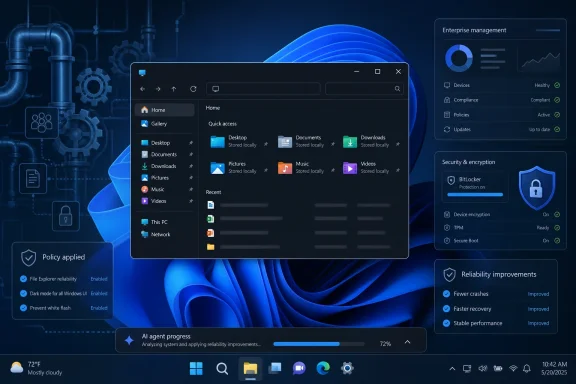 Microsoft Finally Ships the Kind of Update Users Actually Notice
The most important thing about KB5083631 is not that it contains a glamorous feature. It is that so many of its fixes sit in the unglamorous plumbing of Windows: explorer.exe reliability, taskbar tray loading, startup app launch performance, Microsoft Store installation errors, Windows Hello persistence, and large-volume storage views. These are the parts of Windows that users do not praise when they work, but curse daily when they do not.That matters because Windows 11’s reputation problem has never been only about one bad button, one missing taskbar option, or one unwanted Copilot affordance. It has been cumulative. The complaint from enthusiasts and admins has been that Microsoft kept adding surfaces while the old ones felt more fragile, more animated, more network-dependent, and less respectful of muscle memory.
File Explorer sits at the center of that grievance. It is the thing people use to touch the file system, launch work, move projects, rename assets, browse network shares, and recover from their own mistakes. When Explorer flashes white in dark mode, leaks processes, forgets folder view preferences, or stumbles at sign-in, the operating system does not merely look unpolished. It feels unreliable at the exact point where users expect Windows to be boring.
So it is significant that this release spends real effort on Explorer. Microsoft says the update improves the reliability of relevant explorer.exe processes so they stop after File Explorer windows close, preserves view and sort preferences in common folders when apps open Explorer directly, removes a white flash in dark mode, and improves explorer.exe behavior at sign-in, around taskbar menus, Task View, and Quick Access unpinning. That is not keynote material. It is, however, precisely the kind of maintenance work that Windows users have been asking to see treated as product work rather than janitorial cleanup.
The “Win Back Fans” Line Was a Confession, Not a Slogan
Nadella’s “win back fans” phrasing landed because it sounded unusually candid for Microsoft. Companies usually talk about engagement, customer love, and momentum. They do not often admit, even obliquely, that fans have drifted away.But the phrase also risks being misunderstood. Windows does not need “fans” in the same way Xbox does. Most people do not use Windows because they are emotionally invested in its brand; they use it because their applications, workflows, employers, games, peripherals, and habits live there. The danger for Microsoft is not that Windows users become anti-fans. It is that they become resigned.
Resignation is worse than anger in a platform business. Angry users still care enough to complain about the Start menu, the taskbar, local accounts, default apps, search, telemetry, ads, Edge nudges, Copilot buttons, and half-finished Settings migrations. Resigned users quietly stop recommending Windows, stop upgrading unless forced, and increasingly treat the operating system as an unavoidable tax between the hardware they bought and the software they want to run.
That is the context in which this update should be read. KB5083631 does not win anyone back by itself. But it suggests Microsoft understands that the repair job has to begin below the marketing layer, in the parts of Windows that determine whether a machine feels quick, coherent, and predictable on an ordinary Tuesday.
Explorer.exe Is the Reputation Layer
It is easy to treat explorer.exe as just another process, but in Windows it is closer to a reputation layer. It draws the desktop shell, mediates the taskbar experience, anchors File Explorer, and influences the first impression after sign-in. If Explorer stutters, users do not say “one component is behaving poorly.” They say Windows is slow.That is why Microsoft’s emphasis on Explorer reliability is more than a bug-fix note. The company is addressing a component whose failures are disproportionately visible. A hung taskbar after login, a broken context menu, a window that lingers after closing, or a flaky Quick Access interaction makes the whole OS feel less mature, even if the kernel, driver stack, and security model are doing heroic work in the background.
Windows 11 has carried a particular Explorer burden because Microsoft has been modernizing it in public. Tabs, redesigned command bars, cloud hooks, archive handling, richer previews, and visual refreshes have all arrived over time. Some of those changes are useful, but the combined experience has often felt like a renovation where users are still expected to live in the house.
The April 30 update does not solve every Explorer complaint. It does not restore every Windows 10-era workflow, nor does it eliminate every performance concern. But it does signal that Microsoft is willing to spend a release fixing the doors, windows, and hinges rather than merely repainting the hallway.
The FAT32 Change Is Small, Petty, and Oddly Symbolic
The command-line FAT32 formatting limit rising from 32GB to 2TB is the kind of change that makes longtime Windows users laugh before they applaud. It is not a breakthrough in file systems. It is not a reason to deploy Windows 11. It is a small quality-of-life fix to a long-standing artificial limitation that had become one of those “why is this still like this?” annoyances.That is exactly why it matters. Operating systems accumulate barnacles. Some are technical debt, some are compatibility compromises, and some are just old decisions that nobody revisits because nobody owns the user irritation they cause. Raising the FAT32 formatting limit is a reminder that not every improvement needs a cloud service, subscription funnel, or AI model attached.
For IT pros, FAT32 still appears in firmware updates, removable media, boot environments, embedded workflows, cameras, appliances, and oddball cross-platform scenarios. The modern Windows user may not format 2TB FAT32 volumes every week, but the admin who needs to do it no longer has to reach for a third-party tool or a workaround just because Windows decided, decades ago, to be unhelpful.
The symbolic value is larger than the practical one. When Microsoft fixes something that looks small but has irritated power users for years, it sends a message that the company is listening at a different frequency. Not just to telemetry. Not just to enterprise procurement. To the people who know exactly which little absurdities have been living rent-free in Windows for too long.
AI Is Still There, Just Wearing a Better Suit
The catch, because there is always one, is that KB5083631 is not an anti-AI update. It includes updated AI components and introduces a taskbar mechanism for showing progress from AI agents, with Researcher in the Microsoft 365 Copilot app as the first adopter. Microsoft is not retreating from AI in Windows. It is trying to make AI feel less like graffiti on the shell and more like infrastructure for applications.That distinction is important. The backlash against Copilot in Windows was never simply “AI bad.” It was that AI appeared in places where users had not asked for it, sometimes in ways that made mature applications feel like marketing surfaces. A Copilot prompt in a productivity workflow may be useful. A Copilot entry point wedged into every corner of the OS can feel like a sales department discovered the registry.
Pavan Davuluri’s earlier promise to reduce unnecessary Copilot entry points in apps such as Snipping Tool, Photos, Widgets, and Notepad was therefore a necessary concession. Windows users can tolerate optional AI. They are far less tolerant of AI that behaves like an invasive species, colonizing utilities whose virtue used to be simplicity.
The new taskbar agent progress surface is a more defensible approach, at least in theory. If an app is doing background work on a user’s behalf, especially a long-running agent task, the taskbar is a logical place to show progress. Windows has always had a role as the coordinator of application state. The danger is that “agent progress” becomes another system-level entitlement for Microsoft 365 first and a genuine platform feature second.
Enterprise Admins Get a More Interesting Update Than Consumers Realize
For enterprise administrators, the April 30 update contains changes that deserve more attention than the consumer-facing headlines. Enterprise State Roaming can now be managed through Windows Backup for Organizations policies, and Windows Enterprise and Education gain support for a dynamic app removal list tied to the “Remove Default Microsoft Store packages” policy. That latter change speaks directly to one of the longest-running complaints from managed environments: Microsoft ships inbox apps, and admins spend time removing or suppressing them.The policy-based removal improvement is not glamorous, but it is a nod toward reality. Enterprises do not want every default consumer app, and they do not want to keep rebuilding their app-removal logic every time Microsoft changes a package family name or adjusts the Windows image. Giving administrators more formal mechanisms to remove preinstalled MSIX and APPX packages is the kind of control Windows needs if Microsoft wants IT departments to see the platform as governable rather than merely negotiable.
The batch-file hardening change is also notable. Administrators and Application Control for Business policy authors can enable a more secure processing mode that prevents batch files from changing during execution. That is an old-school attack-surface concern meeting a modern policy framework, and it reflects the fact that Windows security still lives partly in places that predate PowerShell, cloud identity, and endpoint detection dashboards.
There is a broader pattern here. Microsoft is trying to reconcile two versions of Windows: the consumer platform that wants to look modern and intelligent, and the enterprise platform that must be stable, controllable, and boring. KB5083631 works best when it serves the second version, because that discipline tends to benefit everyone.
The Secure Boot Clock Keeps Ticking Behind the Quality Story
The update also arrives with a reminder that Windows servicing in 2026 is carrying heavier machinery than users may realize. Microsoft continues to warn about Secure Boot certificate expiration beginning in June 2026, and recent updates have included targeting data to move eligible devices toward updated certificates. In plain English: some of the reliability story is happening in the shadow of a boot-trust transition that could become painful if mishandled.The known issue in KB5083631 illustrates that risk. Microsoft says some devices with an unrecommended BitLocker Group Policy configuration may be asked for the BitLocker recovery key on the first restart after installing the update. The affected scenario is specific and mostly enterprise-shaped, involving BitLocker on the OS drive, explicit PCR7 validation profile configuration, PCR7 binding reported as not possible, eligibility for the 2023-signed Windows Boot Manager, and not already running that boot manager.
For home users, that may sound remote. For admins, it is a reminder that “optional preview update” does not mean “casual experiment.” A single unexpected BitLocker recovery prompt across a fleet can become a support event, especially when recovery key escrow, help desk processes, and user communications are imperfect.
This is the tension Microsoft has to manage. The company wants to move faster on quality and security, but Windows is installed across an almost comically diverse hardware and policy universe. Every servicing improvement is also a compatibility negotiation with years of OEM firmware decisions, Group Policy choices, driver histories, and deployment habits.
Optional Preview Updates Are Microsoft’s Trust Laboratory
KB5083631 is an optional non-security preview update, which means it is both a product release and a test of confidence. Enthusiasts often install these updates early because they want fixes now. Enterprises often watch them because they preview what is likely to appear in the next security update. Microsoft, meanwhile, uses the channel to stage quality improvements before the broader Patch Tuesday audience receives them.That model only works when optional previews are boring in the right way. If preview updates regularly need out-of-band repairs, they stop feeling like a confidence-building mechanism and start feeling like a public beta channel with better branding. The Register’s warning is apt: the goodwill from a meaningful quality update evaporates quickly if it is followed by a rushed fix for the fix.
Microsoft already had a recent reminder of this dynamic when the March 2026 non-security preview update for Windows 11 versions 24H2 and 25H2 was replaced by an out-of-band update to address an installation issue. That does not mean April’s update is doomed. It does mean that Microsoft’s renewed emphasis on fundamentals will be judged not only by what it fixes, but by whether it avoids creating new operational drag.
For IT departments, the sane posture remains measured optimism. Test the update on representative hardware. Pay attention to BitLocker policy exposure. Watch for Explorer regressions, taskbar weirdness, and application compatibility issues. Then decide whether the fixes justify early adoption or whether waiting for the next security release is the better risk tradeoff.
Windows Quality Cannot Be Marketed Back Into Existence
The hard part for Microsoft is that Windows trust is not restored by a single good cumulative update. Trust in an operating system is accretive. It is built through months of uneventful boots, predictable updates, responsive UI, stable drivers, and the absence of surprise reconfiguration after a restart.That is why KB5083631 should be read as a down payment rather than a victory lap. It contains the right kinds of fixes, but the Windows community has seen enough “we’re listening” moments to know that momentum matters more than messaging. A quality reset is only real if the next several releases keep choosing polish over novelty when those priorities conflict.
There is also a product strategy question Microsoft still has not fully answered. Windows 11 is being asked to be the best platform for local PC work, cloud-connected productivity, gaming, enterprise management, security hardening, and AI orchestration. Those goals can coexist, but they do not automatically align. The more Windows becomes a surface for Microsoft 365 and Copilot, the more important it becomes that the base OS feels impartial, fast, and user-controlled.
That may be the real lesson of this update. Microsoft does not need to stop building AI into Windows. It needs to stop making users suspect that every Windows decision is downstream of AI engagement metrics. Stability, performance, and control have to become first-class product goals again, not apology notes attached to the next wave of assistant features.
The April Build Gives Microsoft a Narrow Opening
The practical readout from KB5083631 is refreshingly concrete. It gives Windows 11 users and admins several things to test, several annoyances to watch for, and one larger signal about where Microsoft claims to be steering the platform.- KB5083631 is an optional April 30, 2026 preview update for Windows 11 versions 24H2 and 25H2, bringing OS builds 26100.8328 and 26200.8328.
- The most credibility-building fixes are in File Explorer and explorer.exe reliability, because shell instability damages the entire Windows experience.
- The FAT32 command-line formatting limit increase from 32GB to 2TB is small but meaningful for power users, admins, and device-preparation workflows.
- Microsoft is not removing AI from Windows; it is trying to make AI features less intrusive and more platform-like, including taskbar progress for agents.
- Enterprise admins should look closely at policy-based inbox app removal, Enterprise State Roaming management, batch-file hardening, and the BitLocker known issue.
- The update’s reputation will depend on whether it remains a quality release or becomes another preview that needs an emergency correction.
Source: theregister.com First big Microsoft update after vow to 'win back fans'
