

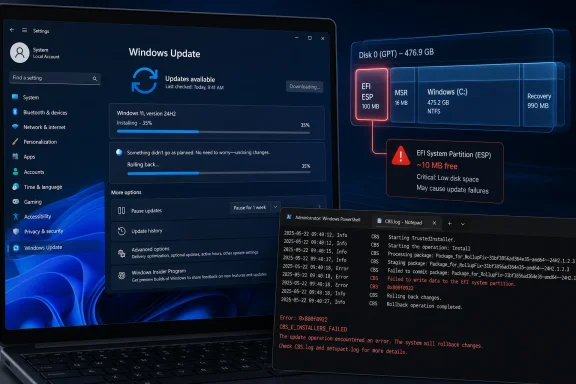
Microsoft confirmed on May 15, 2026, that Windows 11 security update KB5089549 can fail to install on some version 24H2 and 25H2 devices when the hidden EFI System Partition has roughly 10MB or less of free space available. The failure usually appears during the reboot phase, around 35 to 36 percent, before Windows rolls back with the familiar “Something didn’t go as planned” message and error 0x800f0922. The bug is narrow, but the lesson is broad: Windows servicing is now colliding with the small, neglected partitions that most users never see and many administrators rarely audit.
The awkward part of this update failure is that the machine can look healthy from every ordinary angle. File Explorer may show hundreds of gigabytes free on the main Windows volume, while Settings may report no storage pressure at all. The failing component is not C: drive space; it is the EFI System Partition, the tiny boot partition created during installation and usually hidden from view.
That distinction matters because users tend to understand storage as one big bucket. Windows, however, is a stack of compartments, and modern servicing increasingly needs to touch boot components as well as the operating system files that live in plain sight. When that hidden partition is too cramped, the update can get most of the way through staging, reboot, try to service boot files, and then trip over a few missing megabytes.
Microsoft’s documentation says affected devices may log messages in
The result is a very modern Windows failure: technically precise, visually vague, and easy to misdiagnose. Error 0x800f0922 has appeared in multiple Windows Update contexts over the years, so its presence alone does not tell an administrator “your ESP is nearly full.” The real diagnosis lives in logs most home users will never open.
That breadth is the core of the story. Windows updates used to be imagined as patches laid over the operating system. Increasingly, they are interventions into the boot chain, the recovery environment, the trust model, the servicing stack, and the security posture of the device before Windows has even finished starting.
Microsoft has good reasons for this. Secure Boot certificate transitions, BitLocker recovery regressions, TPM validation behavior, and startup reliability all sit at the intersection of firmware, boot files, and Windows policy. If Windows Update cannot safely maintain that territory, then modern platform security becomes a museum piece: present in architecture diagrams, but brittle in the field.
But every move into that territory increases the cost of messy historical installs. A desktop upgraded from Windows 10, cloned across drives, touched by OEM tooling, resized by third-party partition software, and then upgraded to Windows 11 24H2 or 25H2 is not the clean-room device Microsoft models in a servicing diagram. It is a fossil record with a keyboard.
That quietness is also why it can feel unsatisfying. A user sees an update fail, watches Windows undo changes, searches the error code, and finds a fix that may already be rolling toward the machine through the background plumbing of Windows Update. There is no big red banner saying, “The bad servicing behavior has been rolled back; please try again.”
For unmanaged PCs, that is probably the right trade-off. Most users should not be resizing EFI partitions, editing boot structures, or spelunking through CBS logs because one cumulative update failed. If KIR does its job, the safest fix is the least theatrical one: restart, wait, retry.
Enterprise administrators live in a less forgiving world. Managed devices do not always receive KIR behavior automatically in the same way consumer devices do, and Microsoft’s guidance points organizations toward a special Group Policy package for Windows 11 24H2 and 25H2. That is not a scandal; it is how controlled fleets are supposed to behave. But it does mean IT teams need to recognize the issue, deploy the right policy, and restart affected systems before compliance dashboards turn red.
That fix is useful, but it should not be mistaken for a casual tweak. Registry edits are not magic incantations; they are configuration changes aimed at a specific servicing behavior. Used on the right machine, with the right symptoms, they may get the update through. Used blindly, they add one more unexplained change to a system that may already have a complicated boot layout.
For enthusiasts, the temptation is obvious. A one-line command feels cleaner than waiting for Windows Update to sort itself out. But the presence of an official command does not mean every failed KB5089549 installation has the same root cause, and it certainly does not mean every user should start manipulating boot-servicing parameters after one failed attempt.
The more responsible sequence is boring. Reboot first. Check Windows Update again. Confirm the device is actually on Windows 11 24H2 or 25H2 and actually failing KB5089549 with 0x800f0922. If the problem repeats, inspect the CBS log or use administrative tooling to check EFI partition free space. Only then does the registry workaround belong in the conversation.
Reality has been less tidy. OEM diagnostics, recovery components, firmware update helpers, third-party boot managers, and multi-boot configurations can all leave artifacts there. Some may be necessary. Some may be stale. Most are opaque to the average owner.
This is where Microsoft’s wording about third-party or OEM files outside Microsoft boot directories becomes more than a log message. It hints at an ecosystem problem. Windows owns the update experience in the user’s eyes, but it does not always own the historical contents of the partition that the update now needs to use.
The industry has seen this pattern before. A reserved partition that looked generously sized in one era becomes cramped in the next because security requirements changed, servicing became more sophisticated, or hardware vendors used the space differently than expected. The users who pay the price are not doing anything exotic. They are running ordinary machines that accumulated ordinary vendor choices over time.
Microsoft is not alone in softening technical errors into friendly language. Apple does it, Android does it, browser vendors do it. But Windows Update occupies a different role in business environments, where a vague rollback is not just a user annoyance but a patch-management event.
A better experience would not dump raw CBS log lines onto the screen. It would identify the class of problem after rollback and point users toward a safe next step. If Windows can detect insufficient EFI partition space in logs, it should be able to surface a meaningful diagnosis in Windows Update history or Reliability Monitor.
This matters because vague update failures create bad folk medicine. Users will run random cleanup tools, delete SoftwareDistribution folders, disable antivirus, uninstall drivers, or try offline installers without knowing whether any of those steps addresses the actual constraint. The machine may eventually update, but nobody learns why it failed.
That is why this issue is more serious than its apparent narrowness. A failure condition tied to 10MB of hidden partition space sounds niche until it intersects with compliance, vulnerability management, and remote users who only appear on VPN intermittently. A few hundred noncompliant endpoints in a large fleet can become a noisy operational problem.
There is also a sequencing risk. Cumulative updates simplify the patch model by bundling fixes together, but they also mean one blocking condition can hold back everything in the package. The user does not get to install the easy parts and skip the boot-servicing part. The package succeeds or it rolls back.
That all-or-nothing model is defensible for system integrity, but it increases the value of preflight checks. Windows Update already evaluates prerequisites. The next step is making those checks more legible and more proactive, especially for partitions that users cannot reasonably monitor themselves.
That does not mean unsupported hacks are the only danger zone. Perfectly legitimate PCs can carry legacy partition layouts because Windows has spent years promising in-place upgrades as a virtue. The ability to bring a system forward from one release to the next is one of Windows’ strengths, but it leaves behind infrastructure decisions made for earlier servicing realities.
For IT departments, the lesson is to treat the EFI partition as part of endpoint health. That is not glamorous work. It will not appear in a keynote. But as Microsoft continues to update boot components, Secure Boot material, and recovery behavior through monthly servicing, the ESP becomes operationally relevant.
For enthusiasts, the lesson is more personal. If you have cloned your Windows install across multiple SSDs, experimented with Linux bootloaders, used vendor recovery tools, or upgraded through several Windows generations, your hidden partitions may deserve a look before the next failure forces the issue.
That strategy is coherent. It is also less tolerant of the chaotic diversity that made Windows so durable. The same ecosystem that lets a user upgrade an old desktop, dual-boot Linux, replace a drive, install OEM utilities, and keep moving for years is the ecosystem that produces hidden partitions with barely enough room for the next security maneuver.
The KB5089549 issue is therefore not a freak accident. It is a symptom of Windows trying to modernize the basement while people are still living upstairs. Microsoft can mitigate the immediate failure with KIR and a future update, but the structural tension remains.
The company’s strongest argument is that boot security and servicing reliability are too important to leave untouched. Its weakest position is expecting users to understand failures in spaces Windows deliberately hides from them. If the platform now depends on a healthy EFI partition, Windows needs to inspect it, explain it, and in some cases repair it with the same seriousness it applies to the main OS volume.
For administrators, the job is more systematic. Identify Windows 11 24H2 and 25H2 devices failing KB5089549, separate 0x800f0922 cases from unrelated install failures, and look for CBS log evidence of EFI space pressure. Then decide whether the KIR Group Policy, the registry setting, or a more durable partition remediation process belongs in the fleet.
The worst response is indiscriminate troubleshooting. Clearing update caches, retrying offline installers, or rebuilding Windows Update components may be familiar muscle memory, but they miss the point if the boot partition cannot satisfy the servicing operation. A precise bug deserves a precise response.
There is a reputational layer here, too. Every cumulative update failure reinforces the perception that Patch Tuesday is a monthly gamble. Microsoft has improved update rollback, telemetry, and mitigation tooling considerably, but those improvements are invisible when the user-facing experience is still a cryptic failure at 35 percent.
A preflight warning would be far less disruptive than a failed reboot. Windows could detect the condition before installation, delay the update, apply a mitigation, or at least provide a plain-language explanation. Administrators could receive a reportable signal through management tooling instead of discovering the issue through failures after the maintenance window has already begun.
That kind of polish is not flashy, but it is exactly what separates mature servicing from heroic recovery. KIR is valuable because it reduces blast radius after a problem appears. The next frontier is reducing the number of machines that ever reach the failure path.
Microsoft’s challenge is that Windows must serve two audiences at once. Consumers need fewer knobs and clearer messages. IT pros need more visibility and deterministic controls. The EFI partition sits awkwardly between those worlds: too dangerous for casual users, too important for administrators to ignore.
 The Failure Is Small, Hidden, and Perfectly Windows
The awkward part of this update failure is that the machine can look healthy from every ordinary angle. File Explorer may show hundreds of gigabytes free on the main Windows volume, while Settings may report no storage pressure at all. The failing component is not C: drive space; it is the EFI System Partition, the tiny boot partition created during installation and usually hidden from view.That distinction matters because users tend to understand storage as one big bucket. Windows, however, is a stack of compartments, and modern servicing increasingly needs to touch boot components as well as the operating system files that live in plain sight. When that hidden partition is too cramped, the update can get most of the way through staging, reboot, try to service boot files, and then trip over a few missing megabytes.
Microsoft’s documentation says affected devices may log messages in
C:\Windows\Logs\CBS\CBS.log pointing to insufficient free space, failed boot file servicing, and third-party or OEM files outside Microsoft boot directories. That last clue is important. This is not simply a case of Microsoft shipping an oversized package; it is also a reminder that OEMs, recovery tools, security products, Linux dual-boot setups, and vendor utilities have all treated the EFI partition as convenient real estate.The result is a very modern Windows failure: technically precise, visually vague, and easy to misdiagnose. Error 0x800f0922 has appeared in multiple Windows Update contexts over the years, so its presence alone does not tell an administrator “your ESP is nearly full.” The real diagnosis lives in logs most home users will never open.
Patch Tuesday Is Now a Boot Chain Event
KB5089549 is not just another monthly bundle of operating system files. Microsoft lists it as the May 12, 2026 cumulative update for Windows 11 versions 24H2 and 25H2, advancing systems to OS builds 26100.8457 and 26200.8457. It includes security fixes, prior preview improvements, servicing stack changes, Secure Boot-related work, and boot manager servicing improvements.That breadth is the core of the story. Windows updates used to be imagined as patches laid over the operating system. Increasingly, they are interventions into the boot chain, the recovery environment, the trust model, the servicing stack, and the security posture of the device before Windows has even finished starting.
Microsoft has good reasons for this. Secure Boot certificate transitions, BitLocker recovery regressions, TPM validation behavior, and startup reliability all sit at the intersection of firmware, boot files, and Windows policy. If Windows Update cannot safely maintain that territory, then modern platform security becomes a museum piece: present in architecture diagrams, but brittle in the field.
But every move into that territory increases the cost of messy historical installs. A desktop upgraded from Windows 10, cloned across drives, touched by OEM tooling, resized by third-party partition software, and then upgraded to Windows 11 24H2 or 25H2 is not the clean-room device Microsoft models in a servicing diagram. It is a fossil record with a keyboard.
Microsoft’s Mitigation Shows the Power and Limits of KIR
Microsoft says the issue has already been mitigated through Known Issue Rollback for consumer devices and unmanaged business devices. In practice, that means many users may never need to do anything more dramatic than reboot and check for updates again. KIR is one of the quiet successes of modern Windows servicing: it lets Microsoft disable certain problematic non-security changes without forcing a full new update package onto every machine.That quietness is also why it can feel unsatisfying. A user sees an update fail, watches Windows undo changes, searches the error code, and finds a fix that may already be rolling toward the machine through the background plumbing of Windows Update. There is no big red banner saying, “The bad servicing behavior has been rolled back; please try again.”
For unmanaged PCs, that is probably the right trade-off. Most users should not be resizing EFI partitions, editing boot structures, or spelunking through CBS logs because one cumulative update failed. If KIR does its job, the safest fix is the least theatrical one: restart, wait, retry.
Enterprise administrators live in a less forgiving world. Managed devices do not always receive KIR behavior automatically in the same way consumer devices do, and Microsoft’s guidance points organizations toward a special Group Policy package for Windows 11 24H2 and 25H2. That is not a scandal; it is how controlled fleets are supposed to behave. But it does mean IT teams need to recognize the issue, deploy the right policy, and restart affected systems before compliance dashboards turn red.
The Registry Workaround Is a Scalpel, Not a Consumer Ritual
Microsoft also describes a direct workaround involving theEspPaddingPercent registry value under HKLM\SYSTEM\CurrentControlSet\Control\Bfsvc. The command sets that value to zero, reducing the reserved padding Windows uses in the EFI partition during servicing. After a restart, the affected system can retry KB5089549.That fix is useful, but it should not be mistaken for a casual tweak. Registry edits are not magic incantations; they are configuration changes aimed at a specific servicing behavior. Used on the right machine, with the right symptoms, they may get the update through. Used blindly, they add one more unexplained change to a system that may already have a complicated boot layout.
For enthusiasts, the temptation is obvious. A one-line command feels cleaner than waiting for Windows Update to sort itself out. But the presence of an official command does not mean every failed KB5089549 installation has the same root cause, and it certainly does not mean every user should start manipulating boot-servicing parameters after one failed attempt.
The more responsible sequence is boring. Reboot first. Check Windows Update again. Confirm the device is actually on Windows 11 24H2 or 25H2 and actually failing KB5089549 with 0x800f0922. If the problem repeats, inspect the CBS log or use administrative tooling to check EFI partition free space. Only then does the registry workaround belong in the conversation.
The EFI Partition Has Become the Junk Drawer of the PC
The EFI System Partition was supposed to be infrastructure: small, specialized, and mostly invisible. It stores bootloaders and related files that firmware uses to start operating systems. On many Windows PCs, it is measured in hundreds of megabytes, not gigabytes, because it was never meant to become a general-purpose storage area.Reality has been less tidy. OEM diagnostics, recovery components, firmware update helpers, third-party boot managers, and multi-boot configurations can all leave artifacts there. Some may be necessary. Some may be stale. Most are opaque to the average owner.
This is where Microsoft’s wording about third-party or OEM files outside Microsoft boot directories becomes more than a log message. It hints at an ecosystem problem. Windows owns the update experience in the user’s eyes, but it does not always own the historical contents of the partition that the update now needs to use.
The industry has seen this pattern before. A reserved partition that looked generously sized in one era becomes cramped in the next because security requirements changed, servicing became more sophisticated, or hardware vendors used the space differently than expected. The users who pay the price are not doing anything exotic. They are running ordinary machines that accumulated ordinary vendor choices over time.
The Error Message Still Refuses to Tell the Truth
“Something didn’t go as planned. Undoing changes.” is the kind of message that proves Windows can recover while still failing to communicate. It is reassuring in the narrow sense that the system is not bricked. It is maddening in the broader sense because it hides the one fact the user needs: this failure may involve a hidden boot partition, not normal disk space.Microsoft is not alone in softening technical errors into friendly language. Apple does it, Android does it, browser vendors do it. But Windows Update occupies a different role in business environments, where a vague rollback is not just a user annoyance but a patch-management event.
A better experience would not dump raw CBS log lines onto the screen. It would identify the class of problem after rollback and point users toward a safe next step. If Windows can detect insufficient EFI partition space in logs, it should be able to surface a meaningful diagnosis in Windows Update history or Reliability Monitor.
This matters because vague update failures create bad folk medicine. Users will run random cleanup tools, delete SoftwareDistribution folders, disable antivirus, uninstall drivers, or try offline installers without knowing whether any of those steps addresses the actual constraint. The machine may eventually update, but nobody learns why it failed.
Security Updates Cannot Depend on Partition Archaeology
The uncomfortable part for administrators is that KB5089549 is a security update. It is not an optional feature drop that can be ignored until the next maintenance window. If a device repeatedly rolls back the May 2026 cumulative update, it is not merely missing a cosmetic improvement; it may be missing security fixes and servicing changes Microsoft expects current Windows 11 systems to have.That is why this issue is more serious than its apparent narrowness. A failure condition tied to 10MB of hidden partition space sounds niche until it intersects with compliance, vulnerability management, and remote users who only appear on VPN intermittently. A few hundred noncompliant endpoints in a large fleet can become a noisy operational problem.
There is also a sequencing risk. Cumulative updates simplify the patch model by bundling fixes together, but they also mean one blocking condition can hold back everything in the package. The user does not get to install the easy parts and skip the boot-servicing part. The package succeeds or it rolls back.
That all-or-nothing model is defensible for system integrity, but it increases the value of preflight checks. Windows Update already evaluates prerequisites. The next step is making those checks more legible and more proactive, especially for partitions that users cannot reasonably monitor themselves.
Older and Upgraded PCs Are the Canary
Fresh Windows 11 installations on modern hardware are less likely to be the problem case. Their partitions were created by recent setup logic, their boot configuration is cleaner, and their OEM image assumptions are closer to the world Microsoft is currently servicing. The risk rises with older systems, upgraded systems, cloned drives, and machines that have had multiple operating systems or recovery environments installed over their lifetime.That does not mean unsupported hacks are the only danger zone. Perfectly legitimate PCs can carry legacy partition layouts because Windows has spent years promising in-place upgrades as a virtue. The ability to bring a system forward from one release to the next is one of Windows’ strengths, but it leaves behind infrastructure decisions made for earlier servicing realities.
For IT departments, the lesson is to treat the EFI partition as part of endpoint health. That is not glamorous work. It will not appear in a keynote. But as Microsoft continues to update boot components, Secure Boot material, and recovery behavior through monthly servicing, the ESP becomes operationally relevant.
For enthusiasts, the lesson is more personal. If you have cloned your Windows install across multiple SSDs, experimented with Linux bootloaders, used vendor recovery tools, or upgraded through several Windows generations, your hidden partitions may deserve a look before the next failure forces the issue.
The May Patch Exposes a Bigger Design Tension
Microsoft has spent the Windows 11 era tightening the relationship between hardware, firmware, identity, encryption, and updates. TPM requirements, Secure Boot expectations, virtualization-based security, and cloud-driven servicing all point in the same direction: Windows is no longer just an operating system that happens to run on a PC. It is a managed platform whose trust story begins before the kernel loads.That strategy is coherent. It is also less tolerant of the chaotic diversity that made Windows so durable. The same ecosystem that lets a user upgrade an old desktop, dual-boot Linux, replace a drive, install OEM utilities, and keep moving for years is the ecosystem that produces hidden partitions with barely enough room for the next security maneuver.
The KB5089549 issue is therefore not a freak accident. It is a symptom of Windows trying to modernize the basement while people are still living upstairs. Microsoft can mitigate the immediate failure with KIR and a future update, but the structural tension remains.
The company’s strongest argument is that boot security and servicing reliability are too important to leave untouched. Its weakest position is expecting users to understand failures in spaces Windows deliberately hides from them. If the platform now depends on a healthy EFI partition, Windows needs to inspect it, explain it, and in some cases repair it with the same seriousness it applies to the main OS volume.
The Fix Is Not the Same as the Lesson
For most home users, the practical advice is restrained: do not panic, do not start deleting files from hidden partitions, and do not assume free space on C: means anything here. Restart the PC, retry Windows Update, and let Microsoft’s rollback mitigation reach the machine. If the update continues to fail, then the official registry workaround may be appropriate, ideally after a backup and some confirmation that the EFI partition is the culprit.For administrators, the job is more systematic. Identify Windows 11 24H2 and 25H2 devices failing KB5089549, separate 0x800f0922 cases from unrelated install failures, and look for CBS log evidence of EFI space pressure. Then decide whether the KIR Group Policy, the registry setting, or a more durable partition remediation process belongs in the fleet.
The worst response is indiscriminate troubleshooting. Clearing update caches, retrying offline installers, or rebuilding Windows Update components may be familiar muscle memory, but they miss the point if the boot partition cannot satisfy the servicing operation. A precise bug deserves a precise response.
There is a reputational layer here, too. Every cumulative update failure reinforces the perception that Patch Tuesday is a monthly gamble. Microsoft has improved update rollback, telemetry, and mitigation tooling considerably, but those improvements are invisible when the user-facing experience is still a cryptic failure at 35 percent.
The 10MB Warning Microsoft Should Have Surfaced Earlier
The concrete lesson from KB5089549 is not that users should become partition engineers. It is that Windows Update needs better guardrails before it reaches the reboot phase. A device with 10MB or less free on the ESP is not merely low on space; it is a predictable servicing risk.A preflight warning would be far less disruptive than a failed reboot. Windows could detect the condition before installation, delay the update, apply a mitigation, or at least provide a plain-language explanation. Administrators could receive a reportable signal through management tooling instead of discovering the issue through failures after the maintenance window has already begun.
That kind of polish is not flashy, but it is exactly what separates mature servicing from heroic recovery. KIR is valuable because it reduces blast radius after a problem appears. The next frontier is reducing the number of machines that ever reach the failure path.
Microsoft’s challenge is that Windows must serve two audiences at once. Consumers need fewer knobs and clearer messages. IT pros need more visibility and deterministic controls. The EFI partition sits awkwardly between those worlds: too dangerous for casual users, too important for administrators to ignore.
The Practical Read From This Particular Patch
KB5089549 is likely to become one of those updates remembered less for what it fixed than for where it failed. The issue is not universal, and Microsoft’s mitigation means many devices will simply move past it. But for the systems that do hit it, the failure tells administrators something useful about the machine’s boot environment.- KB5089549 applies to Windows 11 versions 24H2 and 25H2 and was released as the May 12, 2026 cumulative security update.
- The confirmed installation failure is tied to limited free space on the EFI System Partition, especially when roughly 10MB or less is available.
- The visible failure typically occurs during the restart phase around 35 to 36 percent, after which Windows rolls back the update.
- Microsoft has mitigated the issue with Known Issue Rollback for consumer and unmanaged business devices, while managed fleets may need a special Group Policy.
- The registry workaround targets Windows boot-file servicing behavior and should be treated as a specific fix for confirmed cases, not as general update hygiene.
- The episode is a reminder that hidden boot partitions are now part of the Windows servicing risk surface.
References
- Primary source: Windows Central
Published: Wed, 20 May 2026 13:15:14 GMT
Microsoft confirms Windows 11’s May 2026 update is failing to install with error 0x800f0922 and outlines a mitigation for affected PCs | Windows Central
Windows 11 May 2026 update fails on some PCs, but Microsoft has already shipped a workaround, and it's working on a permanent fix.www.windowscentral.com - Official source: support.microsoft.com
May 12, 2026—KB5089549 (OS Builds 26200.8457 and 26100.8457) - Microsoft Support
 support.microsoft.com
- Related coverage: windowslatest.com
Windows 11 KB5089549 out with faster performance, direct download links for offline installer (.msu)
Microsoft is rolling out Windows 11 KB5089549 with a new immersive Xbox Mode, major File Explorer bug fixes, and native 2TB FAT32 support. www.windowslatest.com
- Related coverage: cryptika.com
- Related coverage: scworld.com
Windows 11 update KB5089549 causes installation errors due to low EFI partition space | brief | SC Media
The installation failure occurs when the EFI System Partition has 10 MB or less of available space.www.scworld.com - Related coverage: windowspower.de
Fehler 0x800f0922: KB5089549 installiert nicht – EFI-Partition voll beheben
Fehler 0x800f0922 bei KB5089549? Update bricht bei 35 % ab – wir zeigen 3 Lösungen für die volle EFI-Partition. Getestet auf Windows 11 24H2/25H2, Mai 2026www.windowspower.de

- Related coverage: techrepublic.com
Microsoft Confirms Windows Update Bug Blocking Security Fixes
Microsoft confirmed that KB5089549 can fail with error 0x800f0922 on Windows 11 devices with low EFI partition space, and shared workarounds are available.www.techrepublic.com
- Related coverage: hoploninfosec.com
Windows 11 KB5089549 Update Fixes BitLocker & 120 Bugs
Microsoft released Windows 11 KB5089549 on May 12, 2026, fixing BitLocker recovery loops, 120 security flaws, and boosting AI features in 25H2/24H2.hoploninfosec.com - Related coverage: yorkcomputerrepair.com
Windows 11 May Update Fails to Install? Microsoft Confirms an EFI Partition Bug — Emergency Fix Rolling Out | York Computer Repair
Microsoft confirmed Windows 11 KB5089549 is failing to install on PCs with low EFI partition space. A server-side fix is rolling out now. What York PC owners should do.yorkcomputerrepair.com - Related coverage: windowsforum.com
KB5089549 Update Fails on Windows 11 24H2/25H2: EFI Space Error 0x800f0922 | Windows Forum
Microsoft confirmed on May 15, 2026, that Windows 11 security update KB5089549 can fail to install on version 24H2 and 25H2 systems when the EFI System...windowsforum.com - Related coverage: windows.gadgethacks.com
Windows 11 May 2026 Update Fails for Some PCs: What the EFI Partition Error Means << Windows Tips :: Gadget Hacks
The May 2026 Patch Tuesday update is failing to install on a subset of Windows 11 machines, stalling mid-reboot at roughly 35–36% completion and rolling... windows.gadgethacks.com
- Related coverage: bleepingcomputer.com
Microsoft confirms Windows 11 security update install issues
Microsoft has confirmed that the May 2026 Windows 11 security update (KB5089549) fails to install on some systems and triggers 0x800f0922 errors.www.bleepingcomputer.com
