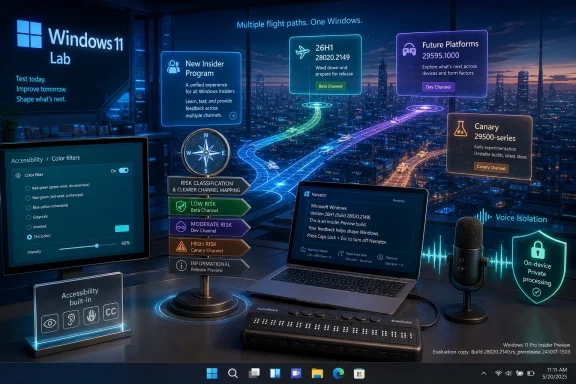
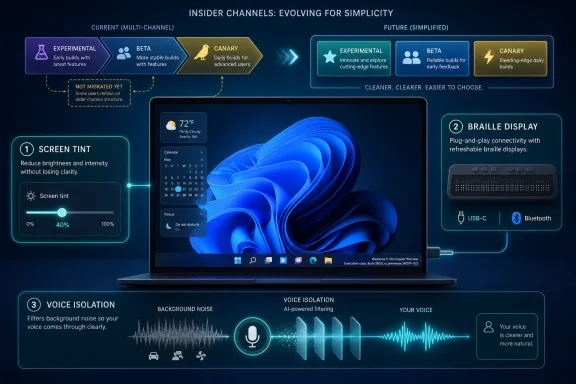
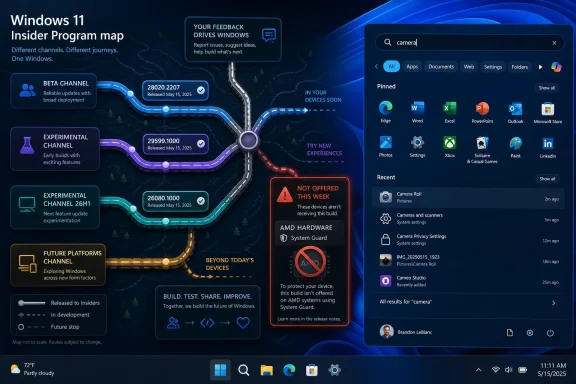
Microsoft on May 22, 2026, released Windows 11 Insider Preview builds 26220.8491, 26300.8497, 28020.2149, and 29595.1000 across its Beta, Experimental, Experimental (26H1), and Experimental (Future Platforms) channels, while continuing a staged migration to its redesigned Windows Insider Program experience for already-announced device groups. The builds are less about one flashy Windows feature than about Microsoft tightening the machinery that decides who sees what, when, and under which label. That matters because the Insider Program has become both a proving ground for accessibility work and a stress test for Microsoft’s ability to explain Windows development without burying users in channel archaeology. This week’s headline is simple: Microsoft is trying to make Windows previews more deliberate, but the transition is still visibly mid-flight.
The most important sentence in Microsoft’s announcement is not the build list. It is the reminder that all Insiders can find release notes “based on the new channel system,” even if their own PC has not yet moved to the new experience.
That sounds like housekeeping, but it is really the story of the 2026 Insider overhaul. Microsoft is asking testers to think in the language of Beta, Experimental, Experimental (26H1), and Experimental (Future Platforms) before every enrolled machine reflects that new taxonomy in Settings. The labels are being normalized faster than the estate is being migrated.
For veteran Insiders, this is familiar territory. The program has always had a mismatch between marketing names, internal build branches, enablement packages, and the lived experience of a PC that either does or does not get a feature after reboot. What is different now is that Microsoft is trying to make the mismatch explicit rather than pretending the channel name tells the whole story.
This week’s post says the company is still expanding rollout of the new Windows Insider Program changes to devices in channels already announced. It also says Microsoft has not yet begun moving devices in the Canary 29500 Series Channel to the new WIP experience. That means the 29595.1000 build is being published under the new “Experimental (Future Platforms)” label, while the machines receiving it may still be living with the older Canary-era interface.
That is awkward, but not necessarily bad. A staged transition is preferable to a hard cutover that strands testers or forces reinstall decisions. The trade-off is that Microsoft must be much clearer than usual, because build numbers now carry more truth than channel names alone.
That split is healthier than the old habit of treating “Canary” as a single bucket for everything from near-term plumbing to distant architecture. Canary became a brand for risk, but risk was not granular enough. A bug in an accessibility feature, a kernel-adjacent platform change, and a UI experiment are not the same kind of risk for the same kind of tester.
The new names try to separate those audiences. Beta is for users who want to preview changes closer to release. Experimental is for users who actively want early experiences and feature flags. Experimental (26H1) is for machines tracking the next platform-support wave. Experimental (Future Platforms) is the deepest end of the pool.
But Microsoft’s challenge is that the public still reads builds like horoscopes. If a feature appears in a higher-numbered build, some users assume it is “newer” in a consumer sense. If it appears in Beta first, others assume it is almost done. In reality, Windows development is now less linear than that. Features can move sideways, skip branches, vanish behind server-side rollout controls, or arrive in one channel as a usability experiment while another channel carries more consequential platform work.
That is why the May 22 announcement’s reminder about the desktop watermark matters. Microsoft is effectively telling Insiders: do not rely only on the channel badge; know your build number. For forum readers troubleshooting regressions, filing Feedback Hub items, or comparing screenshots, that is not trivia. It is the difference between useful signal and noise.
That makes this more than a grab bag. Microsoft is treating accessibility not as a compliance checklist, but as a place where Windows can feel materially less hostile during long sessions. The company has said the new screen tint setting applies a color overlay across the entire display to soften intensity, with the goal of helping users who find bright or saturated screens tiring.
This is not the same as Night Light, at least in framing. Night Light is about color temperature and evening use. Screen tint is positioned as a broader comfort layer for people who experience sensitivity or fatigue throughout the day. If Microsoft implements it well, it could become one of those features that begins as accessibility and quietly becomes mainstream.
Windows has a long history of features that followed that path. Keyboard shortcuts, captions, speech input, contrast themes, and focus tools are all more useful when they are not treated as niche accommodations. The best accessibility features reduce friction for people with specific needs and then reveal how much friction everyone else had been tolerating.
Screen tint also fits the reality of modern work. Many Windows users are not spending an hour at a desktop; they are spending eight or ten, often moving between HDR-capable displays, laptop panels with aggressive color profiles, web apps with bright canvases, and collaboration tools that were designed as if glare did not exist. A system-level overlay is a blunt instrument, but blunt instruments are sometimes exactly what users need when individual apps refuse to behave.
The important word is standard. Assistive hardware has too often required drivers, vendor utilities, awkward setup flows, or institutional knowledge passed between users because the platform did not make the obvious thing easy. Plug-and-play is boring when it works for a mouse. It is liberating when the device is how you read your computer.
This also shows why accessibility work belongs in Insider builds. Braille display support is not something Microsoft can validate by running a few automated tests and calling it done. The combinations of devices, firmware, connection types, languages, workflows, and user preferences are too varied. Insiders who rely on this hardware can find the breakage that a lab will miss.
There is a risk, of course, in shipping assistive technology changes through preview channels. A broken Narrator path is not an inconvenience for a user who depends on it; it can be a lockout. That is why Microsoft needs to be cautious about defaults and escape hatches. Experimental channels are valuable for early validation, but accessibility regressions have a higher moral cost than a broken animation or flaky widget.
Still, the direction is right. Windows should treat assistive devices as first-class peripherals, not as exceptions. HID support moves the platform toward that model, and it gives hardware makers a clearer target.
That last clause is doing a lot of work. Speech features are increasingly powerful, but users and administrators are increasingly skeptical of anything that sounds like always-listening cloud analysis. By saying processing happens on-device, Microsoft is positioning Voice Isolation as both a usability feature and a privacy-preserving one.
The use cases are easy to imagine because they are not contrived. A shared office. A family room. A lab. A help desk. A classroom. Voice Access is far less useful if it only works in the acoustic fantasyland of a silent room and a studio microphone.
This is also where accessibility and AI-adjacent signal processing begin to blur. Microsoft does not need to call this an AI feature for it to benefit from the same broad trend: Windows increasingly has to understand context locally, quickly, and without sending every ambiguous sound or interaction to a remote service. If the operating system is going to mediate voice control, live captions, translation, recall-like memory features, and meetings, it needs a credible local processing story.
For IT pros, the question will be manageability. On-device processing is reassuring, but enterprises will want to know whether Voice Isolation can be governed, audited, disabled, or configured through policy if necessary. Accessibility features should not be arbitrarily locked down, yet corporate environments still need predictable behavior, especially in regulated workplaces.
The more Windows becomes a sensory operating system — listening, captioning, tinting, adapting — the more Microsoft will need to publish crisp controls for administrators. Privacy claims are welcome. Policy surfaces are what make them deployable.
The new Experimental channel’s feature flags are supposed to address that frustration. Instead of simply hoping the feature shows up, testers get a more explicit mechanism to enable certain new experiences before they roll out broadly. That is a meaningful shift from passive previewing to more intentional testing.
It also changes the bargain between Microsoft and Insiders. If users can choose experimental features more directly, Microsoft can gather cleaner feedback about those features from people who knowingly turned them on. That beats the old model where half the comments under a build post were variations of “I installed it and still don’t have this.”
But feature flags are not magic. They can become another layer of confusion if Microsoft does not document dependencies, rollout limits, and known conflicts. A toggle that appears only for some users can be as frustrating as a feature that appears only for some users. The interface may be new, but the underlying discipline is still communication.
This week’s release shows the transition in action. The announcement points users to release notes under the new channel system even as some machines have not yet moved. That may be unavoidable during migration, but it makes the documentation hub and build-specific release notes more important than the short blog post. The blog is now the front door. The release notes are the map.
The 29500-series track represents the furthest-ahead public Windows work. Under the new naming scheme, it is Experimental (Future Platforms), a label that communicates more meaning than Canary did. “Future Platforms” tells users that they are testing foundational work that may not correspond neatly to the next Windows feature update.
But Microsoft is still carrying the old Canary reality underneath. Some users in that branch are receiving builds that are labeled in release notes according to the new model while their local program experience has not caught up. That creates a temporary split-brain state: the documentation says one thing, the machine may say another, and the build number is the authoritative clue.
For enthusiasts, that is tolerable. For less obsessive testers, it is a footgun. A user who joined Canary because it sounded exciting may not fully understand that a 29595 build sits in a future-platform lane with a different risk profile than a Beta build. Microsoft’s new labels help, but only once they are visible everywhere users make decisions.
The company deserves credit for not hiding the fact that migration is incomplete. Still, the longer that state persists, the more the new Insider Program risks inheriting the confusion it was designed to fix. The transition does not need to be instant, but it does need to be brief and well-signposted.
Windows users are trained to think of version numbers as feature bundles. 22H2, 23H2, 24H2, 25H2: the rhythm implies consumer-facing change. But platform support releases can exist for reasons that have little to do with the visible desktop. They may be about silicon enablement, drivers, hardware abstraction, power management, security primitives, or compatibility scaffolding.
That is uncomfortable for a public preview program because enthusiasts naturally ask, “What’s new?” Sometimes the honest answer is that the important work is beneath the surface, or relevant only to a class of hardware that most testers do not own. Microsoft’s decision to label this lane Experimental (26H1) is therefore useful, but it also risks overpromising if users interpret 26H1 as the next general Windows milestone.
For OEMs, driver developers, and administrators planning hardware fleets, these builds may be highly relevant. For a home Insider on a current desktop, they may be less interesting than a Beta build with visible UI changes. That is not a hierarchy of importance; it is a difference in audience.
The healthiest version of the Insider Program is one where users can choose the kind of risk they are actually equipped to evaluate. If Microsoft can make that choice clearer, fewer people will install deep platform builds expecting daily-driver polish.
Screen tint, Voice Isolation, and HID braille support are user-facing changes that must work across hardware diversity. Display overlays interact with color management, HDR behavior, multi-monitor setups, screenshots, remote sessions, and graphics drivers. Voice filtering interacts with microphones, audio drivers, noise suppression stacks, Bluetooth headsets, and privacy settings. Braille support touches USB, Bluetooth, device standards, Narrator, and the lived workflows of blind users.
In other words, these are not cosmetic switches. They cut across subsystems. That is exactly why they belong in preview, and exactly why Microsoft must treat feedback from affected users as more than telemetry.
There is a broader editorial point here: accessibility quality is Windows quality. A screen tint feature that fails on an HDR monitor is a display bug. A braille display that disconnects after sleep is a power-management or device-stack bug. Voice Access that mishears commands in a normal office is an input reliability bug. These are not special-interest defects; they are operating-system defects.
If Microsoft wants to rebuild trust in Windows, this is a good place to do it. Not because accessibility is good public relations, but because accessibility work forces engineering discipline. It exposes assumptions. It punishes sloppy state management. It reveals whether the platform is coherent or merely patched together.
If you are testing app compatibility for a business, Beta remains the saner place to start. If you are chasing upcoming Windows experiences and willing to file feedback on half-finished features, Experimental is the more appropriate lane. If you are validating hardware or platform behavior tied to the 26H1 line, Experimental (26H1) has a purpose. If you are comfortable with deep future-platform churn, Experimental (Future Platforms) is where Microsoft is putting the far edge.
That sounds obvious until a new build appears and the old reflex kicks in. Enthusiasts like novelty. Sysadmins like early warning. Developers like seeing what is coming. But a preview build is a tool, and using the wrong tool produces bad conclusions.
A Beta bug may indicate something Microsoft needs to fix before mainstream release. A Future Platforms bug may indicate a branch-level instability that has no near-term consumer implication. A missing feature may be a rollout state, a feature-flag issue, a hardware gate, or simply not in your branch. Treating all of those as the same kind of failure makes the feedback worse.
The build watermark is therefore not just decoration. It is the first diagnostic fact. Before posting a complaint, comparing notes, or assuming Microsoft pulled a feature, know the build, channel label, and whether your device has actually migrated to the new WIP experience.
That is a more accurate model for Windows as it exists today. It is also harder to explain. Microsoft can no longer rely on users understanding that “Canary” means risky, “Dev” means early, and “Beta” means safer. The new labels are better, but they demand better documentation and more consistent UI.
The accessibility features are the proof point. They show why early testing matters, because real users with real hardware can validate things Microsoft cannot simulate at scale. They also show why channel confusion is harmful, because the users most qualified to test a feature need to know where that feature actually lives.
This week’s announcement also underscores a subtle shift in Microsoft’s communication style. The blog post is short, but it points outward to release notes organized under the new channel system. That suggests the blog is becoming a weekly routing layer rather than the definitive technical record. For casual readers, that is cleaner. For serious testers, it means the documentation hub becomes required reading.
Microsoft’s May 22 builds are a modest weekly flight with an outsized message: the future of Windows testing is less about chasing the highest build number and more about understanding the lane you are in. If the company can finish the Insider migration cleanly, keep feature flags intelligible, and treat accessibility feedback as core platform feedback, this overhaul could make previews more useful for everyone from hobbyists to enterprise admins. If it lets old confusion survive under new names, the build numbers will keep doing the explaining that the program itself should have done.
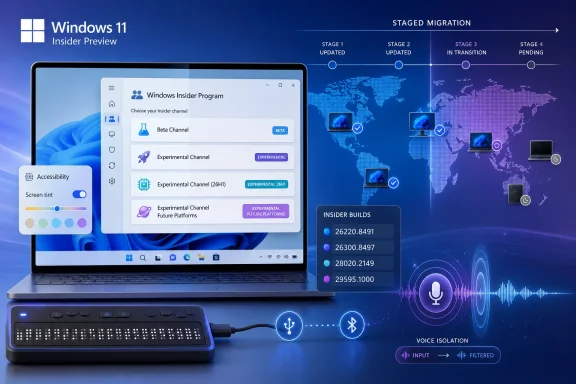 Microsoft Is Rebuilding the Map While Insiders Are Still Driving on It
The most important sentence in Microsoft’s announcement is not the build list. It is the reminder that all Insiders can find release notes “based on the new channel system,” even if their own PC has not yet moved to the new experience.That sounds like housekeeping, but it is really the story of the 2026 Insider overhaul. Microsoft is asking testers to think in the language of Beta, Experimental, Experimental (26H1), and Experimental (Future Platforms) before every enrolled machine reflects that new taxonomy in Settings. The labels are being normalized faster than the estate is being migrated.
For veteran Insiders, this is familiar territory. The program has always had a mismatch between marketing names, internal build branches, enablement packages, and the lived experience of a PC that either does or does not get a feature after reboot. What is different now is that Microsoft is trying to make the mismatch explicit rather than pretending the channel name tells the whole story.
This week’s post says the company is still expanding rollout of the new Windows Insider Program changes to devices in channels already announced. It also says Microsoft has not yet begun moving devices in the Canary 29500 Series Channel to the new WIP experience. That means the 29595.1000 build is being published under the new “Experimental (Future Platforms)” label, while the machines receiving it may still be living with the older Canary-era interface.
That is awkward, but not necessarily bad. A staged transition is preferable to a hard cutover that strands testers or forces reinstall decisions. The trade-off is that Microsoft must be much clearer than usual, because build numbers now carry more truth than channel names alone.
The Build Numbers Tell a More Honest Story Than the Channel Names
The four builds released on May 22 occupy very different places in the Windows pipeline. Beta build 26220.8491 and Experimental build 26300.8497 sit in the Windows 11 version 25H2 family, where Microsoft has been using enablement-style build increments to separate more conservative testing from more adventurous feature work. Experimental (26H1) build 28020.2149 belongs to the 26H1 line, which Microsoft has described as platform work for specific silicon rather than a conventional feature update. Experimental (Future Platforms) build 29595.1000 is further out, the place where Windows engineering can validate platform changes without pretending they are bound to the next consumer release.That split is healthier than the old habit of treating “Canary” as a single bucket for everything from near-term plumbing to distant architecture. Canary became a brand for risk, but risk was not granular enough. A bug in an accessibility feature, a kernel-adjacent platform change, and a UI experiment are not the same kind of risk for the same kind of tester.
The new names try to separate those audiences. Beta is for users who want to preview changes closer to release. Experimental is for users who actively want early experiences and feature flags. Experimental (26H1) is for machines tracking the next platform-support wave. Experimental (Future Platforms) is the deepest end of the pool.
But Microsoft’s challenge is that the public still reads builds like horoscopes. If a feature appears in a higher-numbered build, some users assume it is “newer” in a consumer sense. If it appears in Beta first, others assume it is almost done. In reality, Windows development is now less linear than that. Features can move sideways, skip branches, vanish behind server-side rollout controls, or arrive in one channel as a usability experiment while another channel carries more consequential platform work.
That is why the May 22 announcement’s reminder about the desktop watermark matters. Microsoft is effectively telling Insiders: do not rely only on the channel badge; know your build number. For forum readers troubleshooting regressions, filing Feedback Hub items, or comparing screenshots, that is not trivia. It is the difference between useful signal and noise.
Accessibility Is the Week’s Real Product Story
The May 22 feature set is unusually coherent. Screen tint, HID braille display support in Narrator, and Voice Isolation in Voice Access all live under the broad umbrella of accessibility, but they address three very different failure modes: visual strain, hardware friction, and speech recognition in messy environments.That makes this more than a grab bag. Microsoft is treating accessibility not as a compliance checklist, but as a place where Windows can feel materially less hostile during long sessions. The company has said the new screen tint setting applies a color overlay across the entire display to soften intensity, with the goal of helping users who find bright or saturated screens tiring.
This is not the same as Night Light, at least in framing. Night Light is about color temperature and evening use. Screen tint is positioned as a broader comfort layer for people who experience sensitivity or fatigue throughout the day. If Microsoft implements it well, it could become one of those features that begins as accessibility and quietly becomes mainstream.
Windows has a long history of features that followed that path. Keyboard shortcuts, captions, speech input, contrast themes, and focus tools are all more useful when they are not treated as niche accommodations. The best accessibility features reduce friction for people with specific needs and then reveal how much friction everyone else had been tolerating.
Screen tint also fits the reality of modern work. Many Windows users are not spending an hour at a desktop; they are spending eight or ten, often moving between HDR-capable displays, laptop panels with aggressive color profiles, web apps with bright canvases, and collaboration tools that were designed as if glare did not exist. A system-level overlay is a blunt instrument, but blunt instruments are sometimes exactly what users need when individual apps refuse to behave.
Narrator’s Braille Upgrade Is Small Only If You Never Needed It
Narrator’s new support for HID-standard refreshable braille displays is the kind of change that can sound modest in a changelog and profound in practice. Microsoft says compatible displays can connect over USB and work without additional setup, while Bluetooth devices can be paired through Settings like other accessories.The important word is standard. Assistive hardware has too often required drivers, vendor utilities, awkward setup flows, or institutional knowledge passed between users because the platform did not make the obvious thing easy. Plug-and-play is boring when it works for a mouse. It is liberating when the device is how you read your computer.
This also shows why accessibility work belongs in Insider builds. Braille display support is not something Microsoft can validate by running a few automated tests and calling it done. The combinations of devices, firmware, connection types, languages, workflows, and user preferences are too varied. Insiders who rely on this hardware can find the breakage that a lab will miss.
There is a risk, of course, in shipping assistive technology changes through preview channels. A broken Narrator path is not an inconvenience for a user who depends on it; it can be a lockout. That is why Microsoft needs to be cautious about defaults and escape hatches. Experimental channels are valuable for early validation, but accessibility regressions have a higher moral cost than a broken animation or flaky widget.
Still, the direction is right. Windows should treat assistive devices as first-class peripherals, not as exceptions. HID support moves the platform toward that model, and it gives hardware makers a clearer target.
Voice Access Gets a Feature Built for Real Rooms, Not Demo Rooms
Voice Isolation in Voice Access may be the most obviously modern feature in the batch. Microsoft says it helps the system focus on the user’s voice when others are speaking nearby, filtering out other voices and background noise, with processing happening privately on the device.That last clause is doing a lot of work. Speech features are increasingly powerful, but users and administrators are increasingly skeptical of anything that sounds like always-listening cloud analysis. By saying processing happens on-device, Microsoft is positioning Voice Isolation as both a usability feature and a privacy-preserving one.
The use cases are easy to imagine because they are not contrived. A shared office. A family room. A lab. A help desk. A classroom. Voice Access is far less useful if it only works in the acoustic fantasyland of a silent room and a studio microphone.
This is also where accessibility and AI-adjacent signal processing begin to blur. Microsoft does not need to call this an AI feature for it to benefit from the same broad trend: Windows increasingly has to understand context locally, quickly, and without sending every ambiguous sound or interaction to a remote service. If the operating system is going to mediate voice control, live captions, translation, recall-like memory features, and meetings, it needs a credible local processing story.
For IT pros, the question will be manageability. On-device processing is reassuring, but enterprises will want to know whether Voice Isolation can be governed, audited, disabled, or configured through policy if necessary. Accessibility features should not be arbitrarily locked down, yet corporate environments still need predictable behavior, especially in regulated workplaces.
The more Windows becomes a sensory operating system — listening, captioning, tinting, adapting — the more Microsoft will need to publish crisp controls for administrators. Privacy claims are welcome. Policy surfaces are what make them deployable.
The New Insider Program Is a Bet Against Feature Roulette
Microsoft’s 2026 Insider changes are partly an admission that the old preview model produced too much feature roulette. Users would read a blog post, install a build, reboot, and discover that the advertised feature was not on their machine. Sometimes the reason was gradual rollout. Sometimes it was A/B testing. Sometimes it was geography, hardware, account type, or a hidden enablement state.The new Experimental channel’s feature flags are supposed to address that frustration. Instead of simply hoping the feature shows up, testers get a more explicit mechanism to enable certain new experiences before they roll out broadly. That is a meaningful shift from passive previewing to more intentional testing.
It also changes the bargain between Microsoft and Insiders. If users can choose experimental features more directly, Microsoft can gather cleaner feedback about those features from people who knowingly turned them on. That beats the old model where half the comments under a build post were variations of “I installed it and still don’t have this.”
But feature flags are not magic. They can become another layer of confusion if Microsoft does not document dependencies, rollout limits, and known conflicts. A toggle that appears only for some users can be as frustrating as a feature that appears only for some users. The interface may be new, but the underlying discipline is still communication.
This week’s release shows the transition in action. The announcement points users to release notes under the new channel system even as some machines have not yet moved. That may be unavoidable during migration, but it makes the documentation hub and build-specific release notes more important than the short blog post. The blog is now the front door. The release notes are the map.
Canary’s 29500 Series Is the Loose End Microsoft Cannot Ignore
The explicit note that Canary 29500 Series devices have not yet begun moving to the new WIP experience is not a throwaway. It is the sharp edge of the transition.The 29500-series track represents the furthest-ahead public Windows work. Under the new naming scheme, it is Experimental (Future Platforms), a label that communicates more meaning than Canary did. “Future Platforms” tells users that they are testing foundational work that may not correspond neatly to the next Windows feature update.
But Microsoft is still carrying the old Canary reality underneath. Some users in that branch are receiving builds that are labeled in release notes according to the new model while their local program experience has not caught up. That creates a temporary split-brain state: the documentation says one thing, the machine may say another, and the build number is the authoritative clue.
For enthusiasts, that is tolerable. For less obsessive testers, it is a footgun. A user who joined Canary because it sounded exciting may not fully understand that a 29595 build sits in a future-platform lane with a different risk profile than a Beta build. Microsoft’s new labels help, but only once they are visible everywhere users make decisions.
The company deserves credit for not hiding the fact that migration is incomplete. Still, the longer that state persists, the more the new Insider Program risks inheriting the confusion it was designed to fix. The transition does not need to be instant, but it does need to be brief and well-signposted.
26H1 Is a Reminder That Not Every Windows Release Is for You
The Experimental (26H1) build, 28020.2149, is another important piece of the puzzle because 26H1 has already been framed by Microsoft as platform work for specific silicon rather than a traditional feature update. That distinction matters.Windows users are trained to think of version numbers as feature bundles. 22H2, 23H2, 24H2, 25H2: the rhythm implies consumer-facing change. But platform support releases can exist for reasons that have little to do with the visible desktop. They may be about silicon enablement, drivers, hardware abstraction, power management, security primitives, or compatibility scaffolding.
That is uncomfortable for a public preview program because enthusiasts naturally ask, “What’s new?” Sometimes the honest answer is that the important work is beneath the surface, or relevant only to a class of hardware that most testers do not own. Microsoft’s decision to label this lane Experimental (26H1) is therefore useful, but it also risks overpromising if users interpret 26H1 as the next general Windows milestone.
For OEMs, driver developers, and administrators planning hardware fleets, these builds may be highly relevant. For a home Insider on a current desktop, they may be less interesting than a Beta build with visible UI changes. That is not a hierarchy of importance; it is a difference in audience.
The healthiest version of the Insider Program is one where users can choose the kind of risk they are actually equipped to evaluate. If Microsoft can make that choice clearer, fewer people will install deep platform builds expecting daily-driver polish.
The Accessibility Push Also Tests Microsoft’s Quality Pledge
Microsoft has spent much of the past year trying to convince users that Windows quality is improving. Insider builds are central to that pitch because they are where problems should be found before they reach the broader base. Accessibility features make that pledge more concrete and more demanding.Screen tint, Voice Isolation, and HID braille support are user-facing changes that must work across hardware diversity. Display overlays interact with color management, HDR behavior, multi-monitor setups, screenshots, remote sessions, and graphics drivers. Voice filtering interacts with microphones, audio drivers, noise suppression stacks, Bluetooth headsets, and privacy settings. Braille support touches USB, Bluetooth, device standards, Narrator, and the lived workflows of blind users.
In other words, these are not cosmetic switches. They cut across subsystems. That is exactly why they belong in preview, and exactly why Microsoft must treat feedback from affected users as more than telemetry.
There is a broader editorial point here: accessibility quality is Windows quality. A screen tint feature that fails on an HDR monitor is a display bug. A braille display that disconnects after sleep is a power-management or device-stack bug. Voice Access that mishears commands in a normal office is an input reliability bug. These are not special-interest defects; they are operating-system defects.
If Microsoft wants to rebuild trust in Windows, this is a good place to do it. Not because accessibility is good public relations, but because accessibility work forces engineering discipline. It exposes assumptions. It punishes sloppy state management. It reveals whether the platform is coherent or merely patched together.
The Practical Advice Is to Test With Intent, Not Curiosity Alone
For WindowsForum readers, the practical lesson from the May 22 builds is not “install the newest one.” It is to match the channel to the job.If you are testing app compatibility for a business, Beta remains the saner place to start. If you are chasing upcoming Windows experiences and willing to file feedback on half-finished features, Experimental is the more appropriate lane. If you are validating hardware or platform behavior tied to the 26H1 line, Experimental (26H1) has a purpose. If you are comfortable with deep future-platform churn, Experimental (Future Platforms) is where Microsoft is putting the far edge.
That sounds obvious until a new build appears and the old reflex kicks in. Enthusiasts like novelty. Sysadmins like early warning. Developers like seeing what is coming. But a preview build is a tool, and using the wrong tool produces bad conclusions.
A Beta bug may indicate something Microsoft needs to fix before mainstream release. A Future Platforms bug may indicate a branch-level instability that has no near-term consumer implication. A missing feature may be a rollout state, a feature-flag issue, a hardware gate, or simply not in your branch. Treating all of those as the same kind of failure makes the feedback worse.
The build watermark is therefore not just decoration. It is the first diagnostic fact. Before posting a complaint, comparing notes, or assuming Microsoft pulled a feature, know the build, channel label, and whether your device has actually migrated to the new WIP experience.
The May 22 Builds Make the Insider Contract More Explicit
Microsoft’s latest Insider drop is not a revolution, but it clarifies the new contract the company is trying to write with testers. The program is moving away from a simple ladder of stability and toward a matrix of intent: release proximity, feature experimentation, platform support, and future architecture.That is a more accurate model for Windows as it exists today. It is also harder to explain. Microsoft can no longer rely on users understanding that “Canary” means risky, “Dev” means early, and “Beta” means safer. The new labels are better, but they demand better documentation and more consistent UI.
The accessibility features are the proof point. They show why early testing matters, because real users with real hardware can validate things Microsoft cannot simulate at scale. They also show why channel confusion is harmful, because the users most qualified to test a feature need to know where that feature actually lives.
This week’s announcement also underscores a subtle shift in Microsoft’s communication style. The blog post is short, but it points outward to release notes organized under the new channel system. That suggests the blog is becoming a weekly routing layer rather than the definitive technical record. For casual readers, that is cleaner. For serious testers, it means the documentation hub becomes required reading.
This Week’s Builds Reward the Insiders Who Read the Fine Print
The concrete story of May 22 is easy to lose in channel jargon, so it is worth pinning down what actually changed. Microsoft shipped multiple builds, continued the WIP migration, held back the Canary 29500 Series transition for now, and used the week to preview accessibility features that deserve more attention than the build numbers.- Microsoft released Beta build 26220.8491, Experimental build 26300.8497, Experimental (26H1) build 28020.2149, and Experimental (Future Platforms) build 29595.1000 on May 22, 2026.
- The new Windows Insider Program labels now appear in release-note routing even for some devices that have not yet moved locally to the redesigned experience.
- Canary 29500 Series devices have not yet begun moving to the new WIP experience, even though their build lane is now described as Experimental (Future Platforms).
- Screen tint is being introduced as a system-wide accessibility setting aimed at reducing display intensity and visual fatigue.
- Narrator is gaining plug-and-play support for HID-standard refreshable braille displays over USB, with Bluetooth pairing through Windows Settings.
- Voice Isolation in Voice Access is designed to filter nearby speech and background noise while keeping processing on the device.
Microsoft’s May 22 builds are a modest weekly flight with an outsized message: the future of Windows testing is less about chasing the highest build number and more about understanding the lane you are in. If the company can finish the Insider migration cleanly, keep feature flags intelligible, and treat accessibility feedback as core platform feedback, this overhaul could make previews more useful for everyone from hobbyists to enterprise admins. If it lets old confusion survive under new names, the build numbers will keep doing the explaining that the program itself should have done.
References
- Primary source: Microsoft - Windows Insiders Blog
Published: Fri, 22 May 2026 17:10:30 +0000
Announcing new builds for 22 May 2026
Hello Windows Insiders, Today, we continue to expand the rollout of the new Windows Insider Program changes to devices in channels already announced. As a reminder, we have not yet begun moving devices in the Canary 29500 Series Channelblogs.windows.com - Related coverage: windowscentral.com
The 13 biggest Windows 11 changes from early May — and why these updates matter for how the OS evolves through the rest of 2026 | Windows Central
Microsoft is reshaping Windows 11 with practical fixes users have wanted for years.www.windowscentral.com - Related coverage: tomshardware.com
Microsoft simplifies Windows Insider program — fewer channels, and switching without wiping your device | Tom's Hardware
The company will also make it easier to ensure you get all of the latest features.www.tomshardware.com - Related coverage: techradar.com
It seems Microsoft just started work on Windows 11 27H2 — and this could be the update that saves the OS... or dooms it | TechRadar
We're seeing multiple signs that work on fixing the fundamentals of Windows 11 has begunwww.techradar.com - Official source: download.microsoft.com