

Windows 11’s setup experience still asks new PC owners to make privacy choices about location, Find My Device, diagnostic data, tailored experiences, and advertising ID during the out-of-box experience, with Microsoft documenting those controls as part of the privacy settings shown during device setup. That one screen is both useful and misleading. It gives users a moment of agency before the desktop appears, but it also compresses a sprawling data economy into a handful of friendly toggles. The result is a privacy ritual that looks like consent, while leaving the real work for later.
The out-of-box experience, or OOBE, is where Windows 11 tries to turn a box of hardware into a Microsoft-connected device. It asks for region, keyboard, network, account, backup, personalization, and service preferences. Somewhere in that procession comes the privacy page: a small checkpoint where users decide whether Windows and apps can use location, whether the device can be found if lost, whether optional diagnostic data goes to Microsoft, whether that data can personalize recommendations, and whether apps can use an advertising ID.
That placement matters. Microsoft is not hiding these controls in the registry or pretending they do not exist. It is putting them in front of users at first run, and that is better than the bad old days of burying telemetry and advertising preferences behind vague defaults.
But OOBE is also a terrible environment for meaningful privacy decisions. The user is usually trying to get to the desktop, finish a laptop setup at the kitchen table, or provision a machine before a meeting. Privacy choices are presented as a speed bump in a setup flow whose emotional logic is “continue, continue, continue.”
This is the heart of the Windows 11 privacy problem. Microsoft can truthfully say it asks. Users can truthfully say they were not in a position to understand the consequences.
None of these is imaginary. Turning off optional diagnostic data is different from leaving it on. Disabling advertising ID changes what apps can do with that identifier. Refusing tailored experiences should reduce one pathway by which Windows turns telemetry into recommendations and promotional nudges.
The problem is that the screen suggests these choices are the Windows privacy model. They are not. They are the front door.
Windows 11 has privacy-adjacent controls spread across Settings, Microsoft account pages, Edge, Search, Widgets, Start menu recommendations, Microsoft Store app permissions, OneDrive, Windows Backup, Copilot-era experiences, and enterprise management policy. A user can reject advertising ID during setup and still encounter promoted content elsewhere. They can reduce diagnostics and still use cloud-backed features that require account-linked data. They can disable location for Windows and still have apps, websites, and Microsoft services asking for their own permissions later.
That does not make the OOBE privacy screen fraudulent. It makes it incomplete in a way that benefits Microsoft’s service strategy.
That sequencing shapes behavior. People are more likely to accept recommended settings when they are tired, uncertain, or worried that saying no will break something. Microsoft’s language often emphasizes benefits: better experiences, more relevant suggestions, faster problem solving, recovery of a lost device. Those benefits are real enough, but they are not neutral.
“Optional diagnostic data” is a particularly revealing phrase. It sounds technical and harmless. Microsoft says required data keeps Windows secure and working, while optional data helps improve products and services. For an enthusiast or admin, that distinction is legible. For a normal buyer setting up a PC, the word “optional” may be the only clue that this is not necessary.
The same goes for tailored experiences. The phrase sounds like personalization, not advertising. Yet Microsoft’s own descriptions have long tied tailored experiences to tips, ads, and recommendations. The user is not merely choosing whether Windows should be helpful; they are choosing whether diagnostic signals should feed a recommendation system.
This is where the privacy debate shifts from data collection to product design. Microsoft’s disclosures may be accurate, but the interface turns a complicated exchange into a quick yes-or-no moment.
That does not mean every data flow is nefarious. Cloud backup needs account identity. Find My Device needs location. Store apps need permission boundaries. Diagnostic data can help Microsoft spot driver crashes, rollout failures, compatibility issues, and update regressions across a hardware ecosystem that Apple does not have to manage at the same scale.
But Windows 11 increasingly blurs maintenance, personalization, advertising, and upsell into the same user experience. Recommendations can be useful or promotional. Tips can be help or marketing. Account prompts can be security hardening or funnel management. The distinction depends less on the toggle and more on how Microsoft chooses to use the channel.
That is why privacy-minded users distrust the defaults. They are not only worried about the data. They are worried that each permission becomes a beachhead for future product behavior.
The company’s defenders will argue that Windows remains configurable, especially on Pro, Enterprise, and Education editions. That is true. Group Policy, Intune, provisioning packages, registry settings, and Microsoft’s own privacy documentation give organizations significant control. But consumer Windows is where the tone is set, and consumer Windows increasingly treats Microsoft services as the gravitational center of the PC.
That is why enterprises often suppress or preconfigure parts of OOBE through deployment tooling. Autopilot, Intune, provisioning profiles, and policy baselines exist precisely because setup-time consent does not scale. An organization has to decide what diagnostic level is acceptable, whether location is allowed, how advertising ID is handled, whether consumer experiences are blocked, and which Microsoft cloud features are part of the managed environment.
The consumer privacy screen is therefore a poor model for business privacy. It is user-centered, but not governance-centered. It asks “what do you want?” when an organization needs “what is permitted under policy, compliance, and risk appetite?”
There is also a support dimension. If a fleet has inconsistent privacy settings because users clicked different OOBE options, troubleshooting becomes harder. Some machines may send more diagnostics than others. Some may have location-enabled features available; others may not. Some may surface promotional experiences that the help desk then has to explain.
For admins, the ideal privacy experience is not a prettier OOBE page. It is a predictable configuration state.
The Privacy & security section is the obvious first stop, but it is not the whole map. Diagnostics & feedback, Activity history, Location, Camera, Microphone, Speech, Inking & typing personalization, App permissions, and General privacy settings all matter. So do Start menu recommendations, Search permissions, cloud content search, Windows Backup, OneDrive sync, Edge privacy settings, Microsoft account privacy controls, and notification suggestions.
This sprawl is not accidental in the sense of being random. It reflects the way Windows itself has evolved. Privacy is no longer a single subsystem. It is an attribute of search, ads, identity, app permissions, diagnostics, recovery, personalization, and cloud services.
The user experience has not caught up. Microsoft still offers a privacy screen that looks like a compact consent form, while the operating system behaves like a federation of services. That gap is what fuels the “de-enshittify Windows” genre of guides, scripts, and forum threads. Users are not merely changing settings; they are trying to impose a coherent philosophy on a product that no longer has one obvious center.
There is a danger in that ecosystem too. Third-party debloat scripts can overreach, break features, or make future troubleshooting harder. But their popularity is a symptom of Microsoft’s design failure. When users need a scavenger hunt to make a PC feel quiet, local, and respectful, someone will automate the scavenger hunt.
The weakness is that these arguments are strongest one at a time. Taken together, they describe a PC that is constantly encouraged to report, personalize, suggest, recover, identify, sync, and recommend. Each feature asks for a little trust. The platform asks for a lot.
That cumulative burden is what Microsoft underestimates. Privacy fatigue does not come only from hidden collection. It comes from being asked to evaluate too many small bargains whose long-term consequences are unclear.
A better Windows privacy model would be tiered around user intent. One mode could be local-first and minimal by default. Another could be Microsoft-account integrated, with sync and recovery features explained plainly. A third could be fully personalized, with diagnostics and recommendations enabled. Instead, users get a series of individual toggles without a strong explanation of the overall posture they are choosing.
That is why calls for a single privacy switch resonate, even if a literal master toggle would oversimplify the system. People do not want fewer facts. They want a coherent choice.
Microsoft is not alone here. Apple, Google, and every major platform vendor have turned setup into a consent ceremony. The difference is that Windows carries decades of cultural baggage as the open, general-purpose PC operating system. Users tolerate cloud-first assumptions on phones because phones were born into that world. Many still expect Windows to behave differently.
Windows 11 often does not. It increasingly behaves like a Microsoft services client with a desktop attached. That may be commercially rational, especially as AI features, cloud backup, account identity, and subscription services become more central to Microsoft’s consumer strategy. But it also makes every privacy toggle feel like part of a larger negotiation over who the PC is really for.
The more Microsoft adds Copilot and cloud intelligence into Windows, the more this tension will sharpen. AI features tend to need context. Context tends to mean data. Data requires trust. Trust requires restraint.
If Microsoft wants users to accept smarter Windows experiences, it cannot treat privacy as a setup hurdle. It has to make privacy legible after setup, durable across updates, and consistent across the shell, apps, account services, and cloud features.
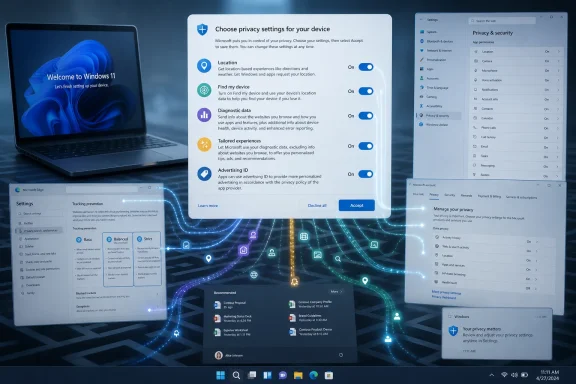 Microsoft Puts the Privacy Conversation Before the Desktop Appears
The out-of-box experience, or OOBE, is where Windows 11 tries to turn a box of hardware into a Microsoft-connected device. It asks for region, keyboard, network, account, backup, personalization, and service preferences. Somewhere in that procession comes the privacy page: a small checkpoint where users decide whether Windows and apps can use location, whether the device can be found if lost, whether optional diagnostic data goes to Microsoft, whether that data can personalize recommendations, and whether apps can use an advertising ID.That placement matters. Microsoft is not hiding these controls in the registry or pretending they do not exist. It is putting them in front of users at first run, and that is better than the bad old days of burying telemetry and advertising preferences behind vague defaults.
But OOBE is also a terrible environment for meaningful privacy decisions. The user is usually trying to get to the desktop, finish a laptop setup at the kitchen table, or provision a machine before a meeting. Privacy choices are presented as a speed bump in a setup flow whose emotional logic is “continue, continue, continue.”
This is the heart of the Windows 11 privacy problem. Microsoft can truthfully say it asks. Users can truthfully say they were not in a position to understand the consequences.
The Toggles Are Real, but the Frame Is Too Small
The privacy screen generally covers five categories that are easy to explain and hard to fully evaluate. Location services allow Windows and apps to determine where the device is. Find My Device depends on location data to help locate a missing PC. Diagnostic data governs how much information about system behavior and usage is sent to Microsoft. Tailored experiences use diagnostic signals to shape tips, ads, and recommendations. Advertising ID lets apps associate activity with a user-specific identifier for more personalized ads.None of these is imaginary. Turning off optional diagnostic data is different from leaving it on. Disabling advertising ID changes what apps can do with that identifier. Refusing tailored experiences should reduce one pathway by which Windows turns telemetry into recommendations and promotional nudges.
The problem is that the screen suggests these choices are the Windows privacy model. They are not. They are the front door.
Windows 11 has privacy-adjacent controls spread across Settings, Microsoft account pages, Edge, Search, Widgets, Start menu recommendations, Microsoft Store app permissions, OneDrive, Windows Backup, Copilot-era experiences, and enterprise management policy. A user can reject advertising ID during setup and still encounter promoted content elsewhere. They can reduce diagnostics and still use cloud-backed features that require account-linked data. They can disable location for Windows and still have apps, websites, and Microsoft services asking for their own permissions later.
That does not make the OOBE privacy screen fraudulent. It makes it incomplete in a way that benefits Microsoft’s service strategy.
Consent Becomes a Setup Chore
The privacy page arrives at the worst possible time: after the user has already accepted the premise of the setup flow. By then, Windows has established that a Microsoft account is preferred, an internet connection is expected, cloud restore is convenient, and services are part of the default experience. Privacy appears not as a philosophy but as a checklist.That sequencing shapes behavior. People are more likely to accept recommended settings when they are tired, uncertain, or worried that saying no will break something. Microsoft’s language often emphasizes benefits: better experiences, more relevant suggestions, faster problem solving, recovery of a lost device. Those benefits are real enough, but they are not neutral.
“Optional diagnostic data” is a particularly revealing phrase. It sounds technical and harmless. Microsoft says required data keeps Windows secure and working, while optional data helps improve products and services. For an enthusiast or admin, that distinction is legible. For a normal buyer setting up a PC, the word “optional” may be the only clue that this is not necessary.
The same goes for tailored experiences. The phrase sounds like personalization, not advertising. Yet Microsoft’s own descriptions have long tied tailored experiences to tips, ads, and recommendations. The user is not merely choosing whether Windows should be helpful; they are choosing whether diagnostic signals should feed a recommendation system.
This is where the privacy debate shifts from data collection to product design. Microsoft’s disclosures may be accurate, but the interface turns a complicated exchange into a quick yes-or-no moment.
Windows 11’s Privacy Model Is Now Entangled With Its Business Model
Windows used to be a product you bought, installed, patched, and occasionally upgraded. Windows 11 is still that, but it is also a surface for Microsoft 365, OneDrive, Bing, Edge, Game Pass, Copilot, Store apps, widgets, cloud backup, and account-based continuity. Privacy settings now sit in the middle of a larger strategy: keep users signed in, synchronized, discoverable, measurable, and reachable.That does not mean every data flow is nefarious. Cloud backup needs account identity. Find My Device needs location. Store apps need permission boundaries. Diagnostic data can help Microsoft spot driver crashes, rollout failures, compatibility issues, and update regressions across a hardware ecosystem that Apple does not have to manage at the same scale.
But Windows 11 increasingly blurs maintenance, personalization, advertising, and upsell into the same user experience. Recommendations can be useful or promotional. Tips can be help or marketing. Account prompts can be security hardening or funnel management. The distinction depends less on the toggle and more on how Microsoft chooses to use the channel.
That is why privacy-minded users distrust the defaults. They are not only worried about the data. They are worried that each permission becomes a beachhead for future product behavior.
The company’s defenders will argue that Windows remains configurable, especially on Pro, Enterprise, and Education editions. That is true. Group Policy, Intune, provisioning packages, registry settings, and Microsoft’s own privacy documentation give organizations significant control. But consumer Windows is where the tone is set, and consumer Windows increasingly treats Microsoft services as the gravitational center of the PC.
Administrators See a Control Surface, Not a Comforting Screen
For IT departments, the OOBE privacy page is less about personal preference and more about governance. A corporate device should not depend on a new employee making good privacy decisions while unboxing a laptop. It should arrive with policy.That is why enterprises often suppress or preconfigure parts of OOBE through deployment tooling. Autopilot, Intune, provisioning profiles, and policy baselines exist precisely because setup-time consent does not scale. An organization has to decide what diagnostic level is acceptable, whether location is allowed, how advertising ID is handled, whether consumer experiences are blocked, and which Microsoft cloud features are part of the managed environment.
The consumer privacy screen is therefore a poor model for business privacy. It is user-centered, but not governance-centered. It asks “what do you want?” when an organization needs “what is permitted under policy, compliance, and risk appetite?”
There is also a support dimension. If a fleet has inconsistent privacy settings because users clicked different OOBE options, troubleshooting becomes harder. Some machines may send more diagnostics than others. Some may have location-enabled features available; others may not. Some may surface promotional experiences that the help desk then has to explain.
For admins, the ideal privacy experience is not a prettier OOBE page. It is a predictable configuration state.
The Real Privacy Dashboard Is Scattered Across the Operating System
A serious Windows 11 privacy pass does not end after setup. It begins there. Users who want to reduce data sharing and promotional surfaces have to keep moving through Settings and account pages after the desktop appears.The Privacy & security section is the obvious first stop, but it is not the whole map. Diagnostics & feedback, Activity history, Location, Camera, Microphone, Speech, Inking & typing personalization, App permissions, and General privacy settings all matter. So do Start menu recommendations, Search permissions, cloud content search, Windows Backup, OneDrive sync, Edge privacy settings, Microsoft account privacy controls, and notification suggestions.
This sprawl is not accidental in the sense of being random. It reflects the way Windows itself has evolved. Privacy is no longer a single subsystem. It is an attribute of search, ads, identity, app permissions, diagnostics, recovery, personalization, and cloud services.
The user experience has not caught up. Microsoft still offers a privacy screen that looks like a compact consent form, while the operating system behaves like a federation of services. That gap is what fuels the “de-enshittify Windows” genre of guides, scripts, and forum threads. Users are not merely changing settings; they are trying to impose a coherent philosophy on a product that no longer has one obvious center.
There is a danger in that ecosystem too. Third-party debloat scripts can overreach, break features, or make future troubleshooting harder. But their popularity is a symptom of Microsoft’s design failure. When users need a scavenger hunt to make a PC feel quiet, local, and respectful, someone will automate the scavenger hunt.
Microsoft’s Best Defense Is Also Its Weakness
Microsoft can make a reasonable case for every major toggle on the OOBE page. Location improves weather, maps, time zone behavior, and device recovery. Find My Device is useful for portable PCs. Diagnostic data helps diagnose crashes and improve Windows across an enormous range of hardware. Tailored experiences can surface relevant features. Advertising ID gives apps a more controlled identifier than uglier tracking alternatives.The weakness is that these arguments are strongest one at a time. Taken together, they describe a PC that is constantly encouraged to report, personalize, suggest, recover, identify, sync, and recommend. Each feature asks for a little trust. The platform asks for a lot.
That cumulative burden is what Microsoft underestimates. Privacy fatigue does not come only from hidden collection. It comes from being asked to evaluate too many small bargains whose long-term consequences are unclear.
A better Windows privacy model would be tiered around user intent. One mode could be local-first and minimal by default. Another could be Microsoft-account integrated, with sync and recovery features explained plainly. A third could be fully personalized, with diagnostics and recommendations enabled. Instead, users get a series of individual toggles without a strong explanation of the overall posture they are choosing.
That is why calls for a single privacy switch resonate, even if a literal master toggle would oversimplify the system. People do not want fewer facts. They want a coherent choice.
The OOBE Page Tells Us Where Windows Is Going
The privacy screen is not just a setup artifact. It is a miniature of modern Windows. It shows a company trying to balance regulatory pressure, user suspicion, product improvement, advertising economics, cloud integration, and the legacy expectation that a PC should be personal property first and service endpoint second.Microsoft is not alone here. Apple, Google, and every major platform vendor have turned setup into a consent ceremony. The difference is that Windows carries decades of cultural baggage as the open, general-purpose PC operating system. Users tolerate cloud-first assumptions on phones because phones were born into that world. Many still expect Windows to behave differently.
Windows 11 often does not. It increasingly behaves like a Microsoft services client with a desktop attached. That may be commercially rational, especially as AI features, cloud backup, account identity, and subscription services become more central to Microsoft’s consumer strategy. But it also makes every privacy toggle feel like part of a larger negotiation over who the PC is really for.
The more Microsoft adds Copilot and cloud intelligence into Windows, the more this tension will sharpen. AI features tend to need context. Context tends to mean data. Data requires trust. Trust requires restraint.
If Microsoft wants users to accept smarter Windows experiences, it cannot treat privacy as a setup hurdle. It has to make privacy legible after setup, durable across updates, and consistent across the shell, apps, account services, and cloud features.
The Practical Reading of a Small Setup Screen
The OOBE privacy page is worth taking seriously precisely because it is not enough. It gives users a chance to make several important choices before Windows 11 is fully operational, but it should not be mistaken for a complete privacy strategy. The concrete lesson is simple: the first-run screen sets the tone, while the real privacy posture is determined after setup.- Users who want the quietest Windows 11 experience should decline optional diagnostics, tailored experiences, advertising ID, and unnecessary location access during setup.
- Laptop owners who value recovery more than location minimization may reasonably keep Find My Device enabled, especially on portable machines.
- Anyone configuring Windows 11 for another person should revisit Privacy & security after setup rather than assuming OOBE choices covered everything.
- Administrators should control these settings through deployment and policy instead of relying on end-user setup decisions.
- Microsoft should replace scattered privacy choices with a clearer posture-based model that explains what kind of Windows experience the user is selecting.
References
- Primary source: thurrott.com
Published: 2026-06-15T22:57:32.874354
privacy-oobe - Thurrott.com
 www.thurrott.com
- Official source: support.microsoft.com
General privacy settings in Windows - Microsoft Support
Get a detailed description of each of the general privacy settings in Windows.support.microsoft.com - Official source: learn.microsoft.com
Windows Privacy Compliance Guide - Windows Privacy | Microsoft Learn
This article provides information to help IT and compliance professionals understand the personal data policies as related to Windows.learn.microsoft.com - Related coverage: windowscentral.com
Windows 11 needs a master privacy switch | Windows Central
Configuring privacy on Windows 11 feels like solving a maze, and a single master switch is needed to end the chaos.www.windowscentral.com - Related coverage: allthings.how
How to Customize Privacy Settings in Windows 11
Here are 15 settings you should change to protect your privacy in Windows 11.allthings.how - Official source: microsoft.com
Data collection summary for Windows
www.microsoft.com
- Related coverage: windowslatest.com
Windows 11 OOBE is a cluttered, ad-filled mess, and Microsoft is finally trying to fix it
Windows 11 OOBE is slow and filled with ads. Microsoft promises a faster setup, but can it ever match macOS’s clean onboarding experience? www.windowslatest.com
- Related coverage: government.nl
- Related coverage: actsmartit.com
- Related coverage: makeuseof.com
- Related coverage: pcministry.com
