

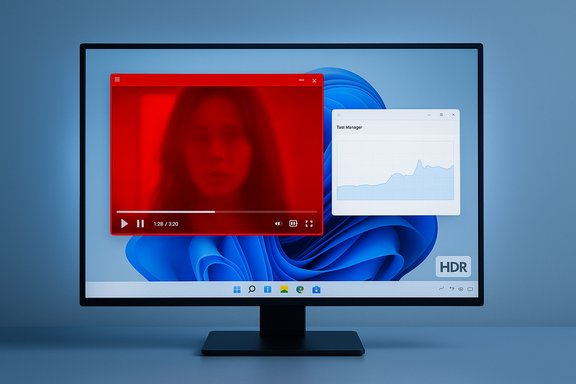
A recent Windows 11 servicing regression left a small but visible slice of users seeing a persistent red cast across certain videos and games, and Microsoft has acknowledged the problem, staged a fix in an October preview release (KB5067036) and plans wider remediation in upcoming cumulative updates — but the episode also exposed ripple effects, including a separate repaint/regression and a Task Manager bug introduced by the same preview.
Microsoft shipped an optional, non-security preview servicing update in late August delivered as KB5064081; shortly after that rollout users began reporting visual anomalies in a subset of scenarios — most notably a red tint on some games and videos and cases where other apps failed to repaint correctly when a full‑screen app was active. On October 28, 2025 Microsoft published an October preview cumulative (KB5067036) that lists fixes for both the red‑tint symptom and the partial‑screen repaint issue and notes that fixes may be staged or rolled out gradually to devices. The preview also included other improvements and new features, but community testing showed the preview itself introduced a separate Task Manager closing/duplication issue for some users. This feature‑and‑fix cadence — optional preview updates, Release Preview validation, and phased rollouts — is standard for Windows servicing, but the visible nature of these regressions (color, playback, UI repainting, and system utilities) made the incident notable across enthusiast and mainstream outlets.
Despite the fix, the preview package introduced a new usability issue with Task Manager duplication; outlets and community threads documented the symptom and recommended temporary mitigations while Microsoft prepared a fix to be included in an upcoming cumulative.
Staged previews and Release Preview channels are the right approach — they allow Microsoft to validate fixes in a controlled way. But users and administrators must remain aware that preview packages can both fix and, occasionally, introduce issues; prudent update management and clear communication remain essential to protect production environments.
Source: PCWorld Major bug in Windows 11 has users suddenly seeing red
 Background / Overview
Microsoft shipped an optional, non-security preview servicing update in late August delivered as KB5064081; shortly after that rollout users began reporting visual anomalies in a subset of scenarios — most notably a red tint on some games and videos and cases where other apps failed to repaint correctly when a full‑screen app was active. On October 28, 2025 Microsoft published an October preview cumulative (KB5067036) that lists fixes for both the red‑tint symptom and the partial‑screen repaint issue and notes that fixes may be staged or rolled out gradually to devices. The preview also included other improvements and new features, but community testing showed the preview itself introduced a separate Task Manager closing/duplication issue for some users. This feature‑and‑fix cadence — optional preview updates, Release Preview validation, and phased rollouts — is standard for Windows servicing, but the visible nature of these regressions (color, playback, UI repainting, and system utilities) made the incident notable across enthusiast and mainstream outlets.What happened: symptom summary
The “red cast” — concise but ambiguous
Microsoft’s release notes use the phrase: “After you install KB5064081, some videos and games might be unexpectedly red.” That line is brief and deliberately non‑technical; it confirms a color‑rendering regression without specifying which color paths, containers, players, renderers, or hardware combinations are implicated. Community reports and independent testing expanded the picture: for some users the effect was a clear shift toward red across the image; for others the issue manifested as incorrect HDR tone‑mapping or oversaturation when Windows attempted to apply HDR or Auto HDR conversions. Turning off HDR/Auto HDR or temporarily rolling back GPU drivers reduced symptoms for some users — but these workarounds were inconsistent, implying the problem sits at a platform/interaction level rather than in a single app or GPU driver.Partial repaint / stuck content
A second, distinct symptom was that apps and browsers could display partially unresponsive onscreen content — for example, only parts of a page would repaint while scrolling if a full‑screen game or app was updating in the background. Microsoft listed this as a fixed item in the October preview, and community reproductions matched Microsoft’s description.New issue introduced by the preview: Task Manager duplication
After Microsoft rolled out KB5067036 to preview channels, users and reporting outlets found that Task Manager could spawn lingering background instances after closing, causing multiple taskmgr.exe processes to accumulate and, in long sessions, measurable resource use. Several outlets confirmed the symptom and recommended simple workarounds while Microsoft prepared a follow‑up fix.Timeline and affected updates
- August (optional preview): Microsoft published KB5064081 (an optional, non‑security preview for Windows 11 24H2/25H2) — community reports tied the earliest red‑tint cases to this update.
- September: KB5064081 content folded into later cumulative servicing for some devices; reports continued.
- October 28, 2025: Microsoft released preview cumulative KB5067036, which explicitly lists fixes for the red tint and partial repaint issues; this package was published as a preview and in many cases deployed gradually.
- November Patch Tuesday (scheduled rollout window): Microsoft signaled intent to include the fix in the broader cumulative rollout for all affected devices. Because Microsoft stages feature and fix availability, not every device receives every listed change immediately on download — some fixes are toggled on later as part of a phased rollout.
Technical analysis: why a color regression can appear and why it’s hard to nail down
Windows’ video and compositor stacks involve multiple layers: application renderers, Media Foundation, the Enhanced Video Renderer (EVR) and other legacy renderers, the Desktop Window Manager (DWM), GPU drivers, HDR/Auto HDR tone‑mapping code, EDID and monitor firmware, and platform DRM/HDCP negotiation for protected playback.- HDR and Auto HDR convert and remap color and luminance ranges; a change in the OS-level tone‑mapping or a timing/handshake change with GPU drivers and EDIDs can produce visible colour shifts. Because HDR processing is split across OS, driver, and display, a small change in one component can produce large, visible differences at the pixel level.
- Legacy renderers like EVR participate in protected presentation paths for DRM/HDCP content. If platform changes affect secure‑path handshakes, apps that rely on those paths can fail or “fail closed,” which looks like freezes or black screens rather than artifacting. Those behaviors were observed in other update regressions tied to KB5064081.
- The partial repaint regression has the fingerprints of a compositor scheduling or buffer‑flip interaction problem: when a full‑screen app is actively presenting frames, other windows require timely repaints; if the OS changes the way compositions are scheduled or the DWM coordinate with driver surface updates, windows can stop redrawing reliably. Community reproductions matched this symptom.
What Microsoft did (and how they communicated it)
Microsoft’s official support page for the October 28 preview explicitly lists the two display issues as fixed items in KB5067036 and notes other quality improvements; the entry also clarifies preview release cadence and that feature/fix availability can depend on device and market. The vendor used staged channels — Release Preview and the optional preview cumulative — to validate fixes before broad distribution. In parallel, Microsoft and third‑party driver vendors advised users to avoid forcing optional or preview updates on production machines and to follow Release Health guidance when managing patching.Despite the fix, the preview package introduced a new usability issue with Task Manager duplication; outlets and community threads documented the symptom and recommended temporary mitigations while Microsoft prepared a fix to be included in an upcoming cumulative.
Practical mitigation: step‑by‑step guidance for affected users
If you encounter any of these symptoms, these are practical, safe steps to limit impact and gather information for troubleshooting.- Temporarily disable HDR and Auto HDR.
- Go to Settings > System > Display > HDR (or Graphics settings) and turn off Auto HDR or HDR presentation. This often reverts rendering to SDR and reduces or eliminates the red‑cast symptom for affected users. This is a diagnostic step, not a permanent cure.
- Roll back the optional/preview update if you installed it recently and need an immediate cure.
- Use Settings > Windows Update > Update history > Uninstall updates and remove KB5067036 (or KB5064081) if necessary. Reboot and verify symptoms are gone. Note: uninstall paths differ between LCU/SSU packaging, so validate in your environment.
- For Task Manager duplication: use “End task” or force‑kill processes.
- If Task Manager spawns lingering background processes after closing, select the visible Task Manager instance and use End task on the Apps list, or run taskkill /im taskmgr.exe /f from an elevated command prompt to terminate stuck instances. Avoid repeatedly clicking the window Close (X) until a permanent fix is published.
- Avoid installing optional preview packages on production or content‑critical machines.
- Optional preview updates are for validation and early testing; defer them on machines where uninterrupted playback, broadcast, or stable gaming matters. Microsoft’s staged rollout approach is designed to catch these edge regressions before broad distribution.
- If you depend on protected playback (Blu‑ray/DVD/tuner apps), test after patching and consider blocking the optional servicing wave until Microsoft confirms a fix for your specific scenario. Legacy playback paths remain sensitive to platform changes.
- Collect diagnostic data for vendor escalation: GPU driver versions, monitor EDID, exact Windows build (winver), and a short reproducible test case (app + video file / game + steps). This speeds vendor and Microsoft investigation.
Risks, trade-offs, and the broader implications
Strengths in Microsoft’s handling
- Microsoft acknowledged the regression in official KB notes and used preview channels and Release Preview channels to stage fixes, demonstrating adherence to the staged‑rollout model that reduces exposure to the widest audience.
- The October preview package lists distinct, testable fixes: red tint and partial repaint — clear markers that engineering identified the problem and targeted the display/compositor stack.
Weaknesses and risks
- Messaging was minimal: “unexpectedly red” leaves important technical questions unanswered for end users and admins trying to triage or preempt the problem. This kind of terse wording can frustrate power users and administrators who need to assess impact across fleets.
- The preview that fixed one set of regressions introduced another visible bug (Task Manager duplication). That trade‑off risks eroding trust in optional preview packages and emphasizes that fixes must be validated across a broad matrix of user workflows.
- Because HDR behavior depends on OS, drivers, and display firmware, users who rely on high‑fidelity playback (HTPCs, content creators, gamers) face a higher impact profile and should treat optional previews cautiously.
Operational impact
- For gamers: Auto HDR and HDR toggles are central. If the OS remaps tone‑mapping incorrectly, visual fidelity is impaired; in some cases, games crash or freeze. Gamers should disable Auto HDR until fixes are fully rolled out and validated.
- For media centers/HTPCs: Protected playback paths (EVR + HDCP) can break, rendering purchased content unplayable. That is a material user impact for a focused subset of customers and could require targeted remediation.
- For enterprises: While most business workflows won’t exercise HDR/Auto HDR pipelines, the partial repaint and Task Manager regressions can affect developer productivity or kiosk/immersion scenarios; administrators should pilot updates and monitor Release Health guidance.
Recommendations by user group
Home users and gamers
- If you’ve already installed the October preview and see the red tint or other visual issues, disable Auto HDR immediately and test. If disabling resolves it, wait for the November cumulative that includes the fix for broader distribution before re‑enabling.
- If you haven’t installed the preview or optional updates, defer optional previews on your primary gaming machine until Microsoft declares the fix broadly available.
Power users and HTPC owners
- Don’t force optional previews on content systems that rely on EVR or legacy DRM pipelines. Test the Release Preview remediation packages in a controlled environment before deploying to production. Collect logs and be prepared to roll back if playback or capture workflows are affected.
IT administrators and fleet managers
- Pilot KB5067036 in a small, representative test group that includes any machines used for graphics, multimedia capture, or HDR displays.
- Apply a compatibility hold via existing update tooling for systems used in content production or where downtime from a visual regression is unacceptable.
- Monitor Microsoft’s Release Health dashboard and vendor GPU driver advisories for coordinated driver/firmware updates that may affect remediation timelines.
Why this matters: trust, validation, and the cost of staged fixes
Operating‑system servicing must balance security, stability, and feature delivery across an enormous variety of hardware and workloads. When a change touches low‑level media, display, or compositor code, the surface area for regressions multiplies. The red‑tint incident shows how a narrowly scoped regression (color tone mapping or compositor scheduling) becomes highly visible to end users.Staged previews and Release Preview channels are the right approach — they allow Microsoft to validate fixes in a controlled way. But users and administrators must remain aware that preview packages can both fix and, occasionally, introduce issues; prudent update management and clear communication remain essential to protect production environments.
Closing analysis: what to watch next
- Confirmed fixes: Microsoft’s October preview lists fixes for both the red tint and partial repaint issues and marks an intention to include those fixes in wider rollouts. Watch for the November Patch Tuesday cumulative for broader availability.
- Secondary regressions: Expect follow‑up updates to correct the Task Manager duplication bug reported after KB5067036; until then, use the End task or taskkill workarounds.
- Vendor coordination: Keep an eye on GPU driver advisories from NVIDIA, AMD, and Intel — coordinated driver updates sometimes accompany OS fixes for display‑related regressions. If you experience lingering issues after the Microsoft cumulative, test with the latest vendor‑supplied drivers.
- Verification gap: Microsoft’s short KB wording means some technical details (exact rendering path or the specific test cases that failed) remain unconfirmed publicly; treat any claims about which games or exactly why they were affected as provisional until a post‑mortem or engineering statement provides definitive root‑cause analysis.
Source: PCWorld Major bug in Windows 11 has users suddenly seeing red
