

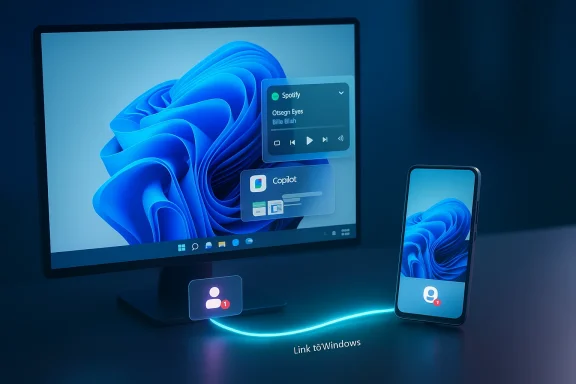
Microsoft’s latest Windows 11 Release Preview build quietly but meaningfully stretches its Cross‑Device Resume feature beyond the narrow OneDrive handoff we saw in 2025 — now promising to surface activities from select Android apps (Spotify, Microsoft 365 files opened in the Copilot mobile app, and browsing sessions from some OEM browsers) on the Windows taskbar so you can “pick up where you left off” on a PC with a single click.
Cross‑Device Resume is Microsoft’s answer to a long‑running continuity problem: how to make activity on a phone feel native and immediate when you switch to a PC. The feature first appeared as a limited convenience in a May 2025 cumulative update, when Windows started offering a quick resume notification for OneDrive documents that had been opened on a phone within a short time window. That early version was useful but narrow — it depended on cloud‑backed OneDrive metadata and a tight timing window.
The build rolling through the Release Preview channel in late January 2026 broadens the scope. Instead of relying only on OneDrive state, Microsoft added pathways for Android apps and OEM ecosystems to publish compact “resume” metadata to Windows. That metadata is consumed by Windows, which then maps the activity to the most appropriate desktop handler — a native app if present, or a browser fallback if not — and surfaces a small taskbar alert for one‑click continuation.
This is not a streamed-phone UI nor a full remote control experience. The design is explicitly metadata‑driven: apps provide context (what activity, what item, a short preview) and Windows handles the rest. For power users, that distinction matters; it keeps the operation lightweight and quick while limiting bandwidth and privacy exposure compared with streaming a phone screen.
However, the update’s initial app list — Spotify and Microsoft 365 via Copilot — will make many readers raise an eyebrow because those services already offer mature sync experiences. The real value proposition is not replacement but consolidation: Microsoft wants to make resuming phone activity feel native on Windows, and in certain workflows (like Copilot mobile to Word desktop) that can be genuinely helpful.
For now, this is an incremental convenience aimed at users who switch between Android phones and Windows PCs frequently and who use the supported apps and OEMs. The feature’s ultimate success will hinge on broad developer adoption, clearer UX expectations, and consistent OEM behavior. If Microsoft can turn Cross‑Device Resume into a predictable, low‑friction experience across a wide app ecosystem, then this metadata‑driven handoff could become an invisible productivity booster. Until then, it’s a promising step — useful in pockets, redundant in others, and worth watching closely as it moves from Release Preview to general availability.
Source: T3 Windows may have ditched Android apps, but now it wants to sync with them
 Background / Overview
Cross‑Device Resume is Microsoft’s answer to a long‑running continuity problem: how to make activity on a phone feel native and immediate when you switch to a PC. The feature first appeared as a limited convenience in a May 2025 cumulative update, when Windows started offering a quick resume notification for OneDrive documents that had been opened on a phone within a short time window. That early version was useful but narrow — it depended on cloud‑backed OneDrive metadata and a tight timing window.The build rolling through the Release Preview channel in late January 2026 broadens the scope. Instead of relying only on OneDrive state, Microsoft added pathways for Android apps and OEM ecosystems to publish compact “resume” metadata to Windows. That metadata is consumed by Windows, which then maps the activity to the most appropriate desktop handler — a native app if present, or a browser fallback if not — and surfaces a small taskbar alert for one‑click continuation.
This is not a streamed-phone UI nor a full remote control experience. The design is explicitly metadata‑driven: apps provide context (what activity, what item, a short preview) and Windows handles the rest. For power users, that distinction matters; it keeps the operation lightweight and quick while limiting bandwidth and privacy exposure compared with streaming a phone screen.
What changed in the Release Preview
The recent Release Preview update (delivered in specific builds for current Windows 11 channels) brings a few practical, user‑facing expansions:- Resume Spotify playback started on an Android phone and continue it on the PC; Windows can prompt to install the Spotify desktop client if it’s not present.
- Resume Microsoft 365 files that were opened in the Copilot mobile app on supported OEM phones — Word, Excel, and PowerPoint documents open in the desktop apps if installed, or in the browser as a fallback.
- Resume browsing sessions from some OEM browsers (the update specifically calls out the vivo browser as an example) so an active tab on a phone can be reopened on the PC.
- A developer pathway (the Continuity SDK) and a compact metadata schema (the AppContext) let third‑party apps participate without shipping whole UI streams.
How Cross‑Device Resume actually works (the technical plumbing)
If you want to understand why this is different from screen mirroring or casting, the technical detail is helpful:- The phone and PC must be connected via the Link to Windows (LTW) bridge and be signed into the account that’s permitted to publish and receive resume events. The phone also needs to allow the LTW companion app to run in the background.
- Android apps that want to support resume integrate Microsoft’s Continuity SDK. That SDK lets an app construct and send an AppContext — a small metadata packet describing the activity (contextId, title, intent URI or weblink, optional preview bytes, createTime, lifetime, etc.).
- Windows receives the AppContext, maps it to a desktop handler (prefer native app, otherwise web fallback), and surfaces a resume alert on the taskbar annotated with a phone badge.
- When you click the alert, Windows launches the desktop app (or web page) and passes the context (for example: open this document, seek to this track, open this tab).
- The AppContext lifetime is short by design (the default and maximum lifetime parameters are controlled by the schema and implementations), so resume entries tend to be ephemeral. This prevents large queues of stale activities and limits exposure of long‑lived telemetries.
Confirmed prerequisites and limits (what actually works today)
- Operating system: Windows 11 (current supported builds).
- Phone OS: Android 10 or later (phone must support Link to Windows / LTW).
- Phone‑to‑PC link: Link to Windows must be set up, LTW companion app allowed to run in the background, and the phone must be listed in your PC’s Mobile devices settings.
- Account & connectivity: Both devices must be online and, in many cases, signed into the same Microsoft account or permitted through LTW pairing.
- File scope: The Copilot mobile app handoff supports online M365 files (not local offline‑only files residing only on the phone).
- OEM support: The first wave of OEM‑side integration lists phones from specific manufacturers (Samsung, Honor, Oppo, Vivo, Xiaomi appear in early notes) and some OEM browsers (explicitly vivo browser in initial examples). Device coverage is patchy at first and depends on OEMs and the apps you use adopting the SDK.
Developer view: Continuity SDK and AppContext explained
For app developers, Microsoft provided a formal integration path:- The Continuity SDK exposes APIs to initialize a session, handle AppContext lifecycle callbacks, and send or delete AppContext entries.
- The AppContext schema is intentionally compact and generic. Required fields include a unique contextId, the app package name (appId), a title for display, createTime, and a context type flag. Optional fields include intentUri (to indicate the native app action), weblink (fallback web URL), preview image bytes, and a lifetime value (defaulting to brief time windows; implementations typically cap this to a few minutes).
- Validation steps exist to confirm a successful integration (callbacks for connection status, success or error responses when sending AppContext, and reconnection handling).
How this compares with the existing sync ecosystem
Microsoft is not inventing cross‑device continuity — several mature solutions already solve pieces of the problem:- Spotify Connect (a long‑established system) already lets you switch playback endpoints and control where music plays without requiring a metadata handoff; your devices act as remote controllers or targets for playback. Resume on Windows via Spotify is functionally redundant for many users who already use Spotify Connect to change playback targets.
- Browser sync (Chrome, Edge, Firefox) has long allowed users to reopen open tabs and tab groups from another signed‑in device. The experience of “open tabs on other devices” is already baked into modern browsers.
- OneDrive and cloud document syncing already enable you to open and resume editing cloud‑stored documents on any device that has the right client or web access.
- Apple’s Handoff provides a native, end‑to‑end experience among Apple devices that often feels more seamless because of tighter hardware/software integration.
Practical scenarios where the feature makes sense
- You’re listening to a podcast on your phone and want to continue on the laptop without hunting for the episode — a resume alert can launch the desktop app and continue playback.
- You open a Word document in the Copilot mobile app on a supported phone and want to finish it on the desktop. Clicking the taskbar alert opens Word (desktop) to the same document.
- You’re reading an article in an OEM browser on your phone and want to continue on your PC; the resume alert will open the page in your desktop browser.
Security, privacy, and enterprise considerations
Cross‑Device Resume raises reasonable questions — and Microsoft’s design addresses many of them, but not all:- Minimal metadata, not full UI streams: The AppContext payload is intentionally small. It carries identifiers, titles, optional previews, and URIs, rather than raw screen pixels or complete UI dumps. That reduces data leakage risk when resuming between devices.
- Short lifetimes: AppContext entries are time‑bounded (defaults are short and lifetimes are capped). This reduces the persistence of potentially sensitive resume alerts.
- Control and opt‑out: Windows users can toggle Cross‑Device Resume at the system level and manage which apps are allowed to publish resume contexts. IT admins can likewise treat this as a policy in managed environments — disabling or gating features for enterprise endpoints remains possible.
- Account and pairing trust: Resume inherently requires a link between phone and PC (LTW). That pairing process is the primary trust boundary; ensure you only pair devices you control.
- Data jurisdiction and Copilot: Some Copilot features and on‑device AI work are gated by hardware and regional rules. Enterprises with strict data residency or compliance needs should test how Copilot mobile handoffs behave in their context.
Realistic criticisms and weaknesses
No feature ships in a vacuum, and Cross‑Device Resume has several real limits that temper the marketing gloss:- Redundancy with existing services: For many users, the practical value is limited because services like Spotify Connect and browser tab sync already handle key scenarios well. Cross‑Device Resume may feel like plumbing that duplicates functionality in mature ecosystems.
- Patchwork OEM support: Early examples call out a handful of phone makers and the vivo browser specifically. That means many phones (notably Google Pixel in early notes) won’t participate at first — leading to uneven, confusing user experiences.
- Online‑only constraint: Copilot‑driven document handoffs require online files; locally stored, offline‑only files on a phone won’t resume to a PC.
- Gradual rollout and server gating: Even after installing the preview builds, users may not see the feature immediately — Microsoft stages enablement. That makes testing and coverage unpredictable.
- Dependency on LTW and background permissions: If Link to Windows is disabled or the phone’s background restrictions are strict, resume won’t be reliable. Power users who restrict background workers or use battery savers may find the experience brittle.
- Not a universal fix for cross‑platform workflows: The mapping model is pragmatic but limited: if the desktop handler can’t perfectly accept the context, the result may be a browser fallback or an installer prompt — useful but not magical.
How to try it today (quick checklist)
- Join the Windows Insider Program and opt into the Release Preview channel if you want early access to the expanded resume functionality.
- Update Windows 11 to the Release Preview build that includes the Cross‑Device Resume expansion, and update the Link to Windows companion on your Android phone.
- Pair the phone and PC, then enable “Allow this PC to access your mobile devices” in the PC’s Mobile devices settings.
- Keep the Link to Windows app running in the background and ensure required permissions (notifications, background activity) are granted.
- Install the apps you want to resume (Spotify, Microsoft 365 desktop apps) on the PC if you want native handlers instead of web fallbacks.
- Visit Settings > Apps > Resume to manage which apps are allowed to show resume alerts; toggle globally as needed.
What Microsoft should do next (and what to watch for)
- Broaden OEM and developer adoption by making the Continuity SDK simple and well‑documented, and by offering incentives or templates that make integration low friction.
- Provide clearer user education and settings: explain when resume will appear versus when a browser fallback or installer will activate.
- Extend offline/nearby device scenarios for local transfers (e.g., BLE/UWB handoffs) to cover situations where internet connectivity is limited.
- Improve enterprise controls and auditing for organizations that need to manage cross‑device app interactions more strictly.
- Monitor and tighten privacy defaults: make ephemeral previews opt‑in for sensitive apps, and surface clear consent flows for user data that accompanies AppContext.
Final assessment: useful, but incremental
Cross‑Device Resume’s expansion is a practical and technically neat step forward for Windows continuity. The Continuity SDK and AppContext model are sensible engineering decisions: they offer an extensible pathway for developers and OEMs to publish resumeable activities without imposing heavy bandwidth or privacy costs.However, the update’s initial app list — Spotify and Microsoft 365 via Copilot — will make many readers raise an eyebrow because those services already offer mature sync experiences. The real value proposition is not replacement but consolidation: Microsoft wants to make resuming phone activity feel native on Windows, and in certain workflows (like Copilot mobile to Word desktop) that can be genuinely helpful.
For now, this is an incremental convenience aimed at users who switch between Android phones and Windows PCs frequently and who use the supported apps and OEMs. The feature’s ultimate success will hinge on broad developer adoption, clearer UX expectations, and consistent OEM behavior. If Microsoft can turn Cross‑Device Resume into a predictable, low‑friction experience across a wide app ecosystem, then this metadata‑driven handoff could become an invisible productivity booster. Until then, it’s a promising step — useful in pockets, redundant in others, and worth watching closely as it moves from Release Preview to general availability.
Source: T3 Windows may have ditched Android apps, but now it wants to sync with them
