

Verdict: do not upgrade a primary PC just to get Screen tint today; stay on Windows 11 Insider Beta 26H1 only if you are already testing pre-release builds, need the accessibility overlay now, and can tolerate Controlled Feature Rollout behavior. Microsoft shipped Screen tint in Windows 11 Insider Beta 26H1 Build 28020.2298 on June 12, 2026, but its staged rollout means some eligible testers may install the build and still not see the toggle immediately. The practical path is simple: check Settings > Accessibility, or press Win + U, look under the Vision section for Screen tint, and if it is present, choose a preset or custom color and adjust the strength slider.
That answer matters because Screen tint is not another cosmetic Windows tweak. It is one of those small accessibility features that could become a daily quality-of-life setting for people who find modern displays too bright, saturated, or fatiguing during long sessions. But it is also still an Insider feature, and Microsoft’s own preview rules apply: it can change, disappear, or fail to ship broadly.
Screen tint does one thing Windows has oddly lacked as a first-party control: it applies a color overlay across the entire display to soften screen intensity. Microsoft describes it as an accessibility setting for users whose eyes feel tired or sensitive after long sessions with bright, saturated screens. That is a narrower and more practical goal than the usual display-color marketing language.
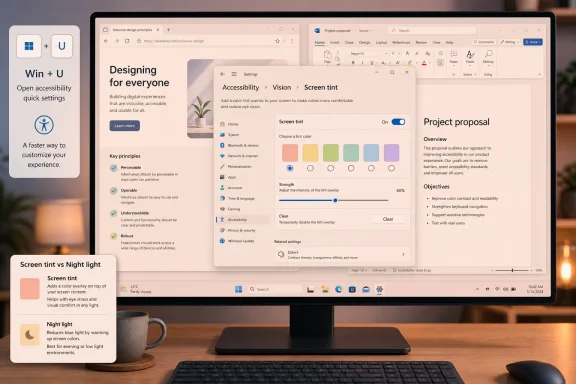
The setting lives in Settings > Accessibility under Vision, and Microsoft says users can also open Accessibility quickly with Win + U. From there, Screen tint offers six preset colors, a custom color option, and a strength slider that ranges from a subtle wash to a much stronger overlay. That makes it less like a binary dark-mode switch and more like an adjustable comfort layer.
The important distinction is that Screen tint is not Night light under a new name. Night light warms the display to reduce blue light that may interfere with sleep; Screen tint is aimed at reducing overall screen intensity and easing eye fatigue during the day. Microsoft says the two can be used together, one handling warmth and the other handling intensity.
That distinction is why this feature deserves attention from WindowsForum readers. A lot of Windows display features are framed around style, battery life, HDR, or sleep hygiene. Screen tint is more directly about sustained usability — the late-afternoon spreadsheet session, the long remote-admin window, the developer staring at bright documentation, the student working under harsh lighting.
If you are already on Windows 11 Insider Beta 26H1, the decision is different. Build 28020.2298 is the first verified Beta 26H1 build to include Screen tint, and the feature is worth testing if eye comfort matters to you. The correct move is to update, check Accessibility, and give Feedback Hub data if the setting helps, misbehaves, conflicts with your display setup, or fails to appear.
The complication is Controlled Feature Rollout, or CFR. Microsoft’s Insider model has long used staged feature exposure, and the company has acknowledged that this creates the maddening experience where a build is installed but the announced feature is not visible on every device. In plain English: having the right build number is necessary, but it may not be sufficient on the day you update.
That is the core of the upgrade-now question. Screen tint is real. It is not rumorware. But the access model is still messy enough that joining or remaining in Beta solely for this one toggle is a bet on Microsoft’s rollout machinery, not just on the feature itself.
That also gives the feature a clearer audience. Some users need high contrast. Some rely on color filters. Some need magnification. Others do not need a full assistive workflow but do need a less punishing screen after eight or ten hours. Screen tint sits in that middle territory where accessibility and comfort overlap.
That middle territory is often underserved in operating systems. A feature can be accessibility-relevant without being a medical claim or a specialized assistive device. Microsoft is careful to describe Screen tint as softening intensity and helping with tired or sensitive eyes, not as a cure for anything. That restraint is useful because it keeps the feature grounded in observable user experience.
The strongest argument for Screen tint is not that it replaces third-party utilities or monitor calibration tools. It is that Windows itself should have a basic, system-wide way to make the screen less visually aggressive. For a platform used in schools, offices, call centers, labs, and home offices, that is not a luxury.
The difference matters most during daytime use. Night light is typically framed around evening routines and sleep. Screen tint is useful in the middle of a workday, especially when brightness alone does not solve the problem. Anyone who has lowered display brightness and still found a white-heavy interface visually harsh already understands the gap this feature is trying to fill.
There is another subtle point: brightness controls are hardware- and environment-dependent. A laptop panel, external monitor, HDR display, and virtual desktop session may each behave differently. A system-level overlay gives Windows a consistent software lever, even if it is not a substitute for proper monitor settings.
That does not mean Screen tint is universally harmless. Users doing photo editing, color grading, design work, medical imaging, or anything color-critical should treat it as a comfort mode, not a work mode. The setting is supposed to alter what you see. That is the point, and it is also the caveat.
For users who rely on Color filters for color vision support, Screen tint may be a nonstarter unless Microsoft changes the interaction later. It is possible to imagine future versions offering more nuanced coexistence, but the verified behavior today is mutually exclusive. IT desks should not tell users to “just enable both” because Windows does not allow that pairing.
This is where enterprise support teams need to be careful. Accessibility features are often personal, and a well-meaning support script can break a user’s established setup. If a user already depends on Color filters, Screen tint should be introduced as an alternative to test, not a simple improvement to enable.
The practical support note is simple: ask before changing Vision settings. A user who needs color filters has a different baseline from a user who simply wants a softer display. Windows now appears to be treating these as separate visual transformation modes, and support guidance should mirror that.
That is not necessarily bad. Seeing the feature across more than one branch can suggest Microsoft is widening the test surface rather than trapping the work in a single channel. But it complicates the reader’s decision because it blurs the clean mental model: Beta for near-term features, Experimental for early work.
CFR is the reason this feels less deterministic than the old “install build, get feature” equation. Microsoft has acknowledged that gradual rollouts are used to measure quality before broader release. That makes engineering sense, but it creates user confusion when headlines, release notes, and Settings pages do not line up on the same day.
For enthusiasts, this is annoying. For IT pros, it is a reminder that Insider testing is not a reliable deployment model. A feature that is present on one test machine and absent on another with the same build can be real, intentional, and unsupported as a fleet assumption all at once.
If your PC is on retail Windows 11, joining Beta for Screen tint alone is harder to justify. The feature is promising, but it is still a preview feature. Microsoft explicitly warns that Insider features may change, be removed, or never ship beyond Insider builds. That warning is boilerplate until it applies to the feature you cared about.
There is also a deployment asymmetry. Moving into a preview channel is psychologically easy because it promises a new setting. Living with the consequences is less glamorous: watermarking, pre-release quirks, incomplete localization, and feature availability that may not match the blog post. None of those are shocking for Insiders, but they are overkill for a comfort toggle on a production PC.
The better retail-user strategy is to wait. If Screen tint is important enough that you are tempted by Beta, document what you want from it now: which apps bother you, which lighting conditions are worst, whether Night light helps, and whether color filters are already in use. Then you will be ready to evaluate it properly when it reaches a broader audience.
But the feature is still worth watching because it speaks to where Windows accessibility is moving. Microsoft is not only adding specialist assistive features; it is also adding settings that make the default computing environment more tolerable for long sessions. That matters in workplaces where screen fatigue is not an edge case.
For help desks, the near-term playbook is educational. If users ask why they cannot find Screen tint, the answer may not be that they are doing something wrong. They may not be on the right build, they may not be in the right Insider branch, or CFR may simply not have exposed the feature on their device yet.
For endpoint managers, the sensible move is to wait for clearer production documentation before building guidance around it. If Screen tint ships broadly, organizations will need to decide whether it belongs in accessibility onboarding, wellness guidance, VDI notes, or display troubleshooting. Today, it belongs in the watchlist.
Test it with white-heavy apps, dark mode, browser tabs, terminal windows, Office documents, Settings, and video playback. Try it with Night light on and off. If you use multiple monitors, pay attention to whether the experience feels consistent across panels, but avoid inventing universal conclusions from one setup.
The most important test is conflict behavior. If you use Color filters, Screen tint is not simply another layer. Microsoft says the two disable each other. That interaction should be front and center in Feedback Hub because it determines whether Screen tint expands accessibility choice or forces some users to choose between two imperfect modes.
This is also why WindowsForum’s existing coverage of Build 28020.2298 and the later Experimental appearance is useful context rather than a final answer. The story is not only that Microsoft added a toggle. The story is that Microsoft is trying to land a daily-use accessibility feature inside a rollout system that still makes feature availability harder to explain than it should be.
But retail Windows users should keep the hierarchy straight. Stable machines should stay stable. Insider channels are for testing, feedback, and early access, not for chasing one comfort setting unless the user consciously accepts the tradeoff. That is especially true when Microsoft has not promised that Screen tint will ship unchanged outside Insider builds.
There is a second reason to wait: Microsoft may still refine the experience. The mutual exclusion with Color filters, the exact location in Settings, the wording, the presets, and the rollout behavior could all change before retail. A preview feature is evidence of intent, not a contract.
If Screen tint is eventually promoted into mainstream Windows 11, the adoption story will be easy. Users will enable it from Accessibility, tune strength, and decide whether it works better alone or alongside Night light. Until then, the feature is best treated as a promising preview with unusually practical upside.
That answer matters because Screen tint is not another cosmetic Windows tweak. It is one of those small accessibility features that could become a daily quality-of-life setting for people who find modern displays too bright, saturated, or fatiguing during long sessions. But it is also still an Insider feature, and Microsoft’s own preview rules apply: it can change, disappear, or fail to ship broadly.
 Microsoft’s New Accessibility Toggle Is Useful, but It Is Not Yet a Retail Promise
Screen tint does one thing Windows has oddly lacked as a first-party control: it applies a color overlay across the entire display to soften screen intensity. Microsoft describes it as an accessibility setting for users whose eyes feel tired or sensitive after long sessions with bright, saturated screens. That is a narrower and more practical goal than the usual display-color marketing language.The setting lives in Settings > Accessibility under Vision, and Microsoft says users can also open Accessibility quickly with Win + U. From there, Screen tint offers six preset colors, a custom color option, and a strength slider that ranges from a subtle wash to a much stronger overlay. That makes it less like a binary dark-mode switch and more like an adjustable comfort layer.
The important distinction is that Screen tint is not Night light under a new name. Night light warms the display to reduce blue light that may interfere with sleep; Screen tint is aimed at reducing overall screen intensity and easing eye fatigue during the day. Microsoft says the two can be used together, one handling warmth and the other handling intensity.
That distinction is why this feature deserves attention from WindowsForum readers. A lot of Windows display features are framed around style, battery life, HDR, or sleep hygiene. Screen tint is more directly about sustained usability — the late-afternoon spreadsheet session, the long remote-admin window, the developer staring at bright documentation, the student working under harsh lighting.
The Real Decision Is Not “Can I Turn It On?” but “Should I Chase It?”
If you are on a stable retail build of Windows 11, the answer is easy: do not move to Insider Beta just for Screen tint unless you are comfortable running preview software. This is not a security fix, not a compatibility requirement, and not a business-critical feature that justifies changing the servicing risk profile of a machine you depend on.If you are already on Windows 11 Insider Beta 26H1, the decision is different. Build 28020.2298 is the first verified Beta 26H1 build to include Screen tint, and the feature is worth testing if eye comfort matters to you. The correct move is to update, check Accessibility, and give Feedback Hub data if the setting helps, misbehaves, conflicts with your display setup, or fails to appear.
The complication is Controlled Feature Rollout, or CFR. Microsoft’s Insider model has long used staged feature exposure, and the company has acknowledged that this creates the maddening experience where a build is installed but the announced feature is not visible on every device. In plain English: having the right build number is necessary, but it may not be sufficient on the day you update.
That is the core of the upgrade-now question. Screen tint is real. It is not rumorware. But the access model is still messy enough that joining or remaining in Beta solely for this one toggle is a bet on Microsoft’s rollout machinery, not just on the feature itself.
Screen Tint Belongs in Accessibility, Not Display Fashion
The placement under Accessibility is the right call. Windows already has display controls scattered across Settings, graphics drivers, monitor OSDs, HDR pages, color profiles, Night light, and theme settings. Putting Screen tint under Vision tells users that this is not mainly about achieving accurate color or making the desktop look nicer.That also gives the feature a clearer audience. Some users need high contrast. Some rely on color filters. Some need magnification. Others do not need a full assistive workflow but do need a less punishing screen after eight or ten hours. Screen tint sits in that middle territory where accessibility and comfort overlap.
That middle territory is often underserved in operating systems. A feature can be accessibility-relevant without being a medical claim or a specialized assistive device. Microsoft is careful to describe Screen tint as softening intensity and helping with tired or sensitive eyes, not as a cure for anything. That restraint is useful because it keeps the feature grounded in observable user experience.
The strongest argument for Screen tint is not that it replaces third-party utilities or monitor calibration tools. It is that Windows itself should have a basic, system-wide way to make the screen less visually aggressive. For a platform used in schools, offices, call centers, labs, and home offices, that is not a luxury.
The Night Light Comparison Is Where Users Will Get Misled
Many users will initially assume Screen tint is just Night light with a different label. That assumption will lead to bad advice. Night light changes warmth; Screen tint changes perceived intensity through an overlay. They can coexist because they are solving different problems.The difference matters most during daytime use. Night light is typically framed around evening routines and sleep. Screen tint is useful in the middle of a workday, especially when brightness alone does not solve the problem. Anyone who has lowered display brightness and still found a white-heavy interface visually harsh already understands the gap this feature is trying to fill.
There is another subtle point: brightness controls are hardware- and environment-dependent. A laptop panel, external monitor, HDR display, and virtual desktop session may each behave differently. A system-level overlay gives Windows a consistent software lever, even if it is not a substitute for proper monitor settings.
That does not mean Screen tint is universally harmless. Users doing photo editing, color grading, design work, medical imaging, or anything color-critical should treat it as a comfort mode, not a work mode. The setting is supposed to alter what you see. That is the point, and it is also the caveat.
The Color Filters Conflict Is the First Enterprise Caveat
Microsoft notes that turning on Screen tint disables Color filters, and turning Color filters back on disables Screen tint. That is not a minor footnote for accessibility users. It means Screen tint is not additive with every existing Vision feature.For users who rely on Color filters for color vision support, Screen tint may be a nonstarter unless Microsoft changes the interaction later. It is possible to imagine future versions offering more nuanced coexistence, but the verified behavior today is mutually exclusive. IT desks should not tell users to “just enable both” because Windows does not allow that pairing.
This is where enterprise support teams need to be careful. Accessibility features are often personal, and a well-meaning support script can break a user’s established setup. If a user already depends on Color filters, Screen tint should be introduced as an alternative to test, not a simple improvement to enable.
The practical support note is simple: ask before changing Vision settings. A user who needs color filters has a different baseline from a user who simply wants a softer display. Windows now appears to be treating these as separate visual transformation modes, and support guidance should mirror that.
CFR Turns a Clean Feature Into a Messy Rollout Story
Microsoft’s April 2026 Insider changes were meant to make the program clearer, but Screen tint exposes the tension that remains. The company said Beta is supposed to be closer to shipping and less confusing, while Experimental is where earlier work appears. Yet Screen tint has now appeared in Beta 26H1 and has reportedly surfaced again in Experimental Future Platforms Build 29617.1000.That is not necessarily bad. Seeing the feature across more than one branch can suggest Microsoft is widening the test surface rather than trapping the work in a single channel. But it complicates the reader’s decision because it blurs the clean mental model: Beta for near-term features, Experimental for early work.
CFR is the reason this feels less deterministic than the old “install build, get feature” equation. Microsoft has acknowledged that gradual rollouts are used to measure quality before broader release. That makes engineering sense, but it creates user confusion when headlines, release notes, and Settings pages do not line up on the same day.
For enthusiasts, this is annoying. For IT pros, it is a reminder that Insider testing is not a reliable deployment model. A feature that is present on one test machine and absent on another with the same build can be real, intentional, and unsupported as a fleet assumption all at once.
The 26H1 Beta Path Is Sensible for Testers, Not for Everyone
If your PC is already enrolled in Windows 11 Insider Beta 26H1, staying there to evaluate Screen tint is reasonable. You are already accepting pre-release Windows behavior, and this is exactly the kind of user-facing setting that benefits from real-world feedback. Try it during a normal workday, not just for five minutes after installing the build.If your PC is on retail Windows 11, joining Beta for Screen tint alone is harder to justify. The feature is promising, but it is still a preview feature. Microsoft explicitly warns that Insider features may change, be removed, or never ship beyond Insider builds. That warning is boilerplate until it applies to the feature you cared about.
There is also a deployment asymmetry. Moving into a preview channel is psychologically easy because it promises a new setting. Living with the consequences is less glamorous: watermarking, pre-release quirks, incomplete localization, and feature availability that may not match the blog post. None of those are shocking for Insiders, but they are overkill for a comfort toggle on a production PC.
The better retail-user strategy is to wait. If Screen tint is important enough that you are tempted by Beta, document what you want from it now: which apps bother you, which lighting conditions are worst, whether Night light helps, and whether color filters are already in use. Then you will be ready to evaluate it properly when it reaches a broader audience.
For Sysadmins, the Feature Is a User-Experience Signal More Than a Deployment Target
Screen tint is not currently a reason to rework your Windows servicing plan. The facts are too thin for that. We have an Insider Beta appearance on June 12, a later Experimental appearance on June 26, and Microsoft’s usual warning that preview features are not guaranteed to ship. That is not a lifecycle.But the feature is still worth watching because it speaks to where Windows accessibility is moving. Microsoft is not only adding specialist assistive features; it is also adding settings that make the default computing environment more tolerable for long sessions. That matters in workplaces where screen fatigue is not an edge case.
For help desks, the near-term playbook is educational. If users ask why they cannot find Screen tint, the answer may not be that they are doing something wrong. They may not be on the right build, they may not be in the right Insider branch, or CFR may simply not have exposed the feature on their device yet.
For endpoint managers, the sensible move is to wait for clearer production documentation before building guidance around it. If Screen tint ships broadly, organizations will need to decide whether it belongs in accessibility onboarding, wellness guidance, VDI notes, or display troubleshooting. Today, it belongs in the watchlist.
Enthusiasts Should Test the Friction, Not Just the Toggle
Windows enthusiasts often test features by asking whether the switch appears and whether it works once. Screen tint deserves a more disciplined test because its value is cumulative. The question is not whether the overlay changes the screen. The question is whether it still feels useful after several hours of mixed work.Test it with white-heavy apps, dark mode, browser tabs, terminal windows, Office documents, Settings, and video playback. Try it with Night light on and off. If you use multiple monitors, pay attention to whether the experience feels consistent across panels, but avoid inventing universal conclusions from one setup.
The most important test is conflict behavior. If you use Color filters, Screen tint is not simply another layer. Microsoft says the two disable each other. That interaction should be front and center in Feedback Hub because it determines whether Screen tint expands accessibility choice or forces some users to choose between two imperfect modes.
This is also why WindowsForum’s existing coverage of Build 28020.2298 and the later Experimental appearance is useful context rather than a final answer. The story is not only that Microsoft added a toggle. The story is that Microsoft is trying to land a daily-use accessibility feature inside a rollout system that still makes feature availability harder to explain than it should be.
The Retail Waiting Game Is the Safest Advice
Waiting for broader rollout is not the same as dismissing the feature. Screen tint looks like the kind of small accessibility addition that could be meaningful precisely because it is boring. It does not require a new AI PC, a special peripheral, or a workflow migration. It is a setting, and good settings can matter.But retail Windows users should keep the hierarchy straight. Stable machines should stay stable. Insider channels are for testing, feedback, and early access, not for chasing one comfort setting unless the user consciously accepts the tradeoff. That is especially true when Microsoft has not promised that Screen tint will ship unchanged outside Insider builds.
There is a second reason to wait: Microsoft may still refine the experience. The mutual exclusion with Color filters, the exact location in Settings, the wording, the presets, and the rollout behavior could all change before retail. A preview feature is evidence of intent, not a contract.
If Screen tint is eventually promoted into mainstream Windows 11, the adoption story will be easy. Users will enable it from Accessibility, tune strength, and decide whether it works better alone or alongside Night light. Until then, the feature is best treated as a promising preview with unusually practical upside.
The Sensible Screen Tint Playbook for 26H1 Testers
The decision tree is mercifully short, even if Microsoft’s rollout machinery is not. Screen tint is worth trying if you already live in Insider builds; it is not worth destabilizing a production PC for unless your need is immediate and you understand the preview risk.- Stay on Windows 11 Insider Beta 26H1 if you already run it and want to test Screen tint as part of your normal Insider workflow.
- Do not move a primary retail PC to Insider Beta solely for Screen tint, because Microsoft has not promised that the feature will ship broadly or unchanged.
- Check Settings > Accessibility, or press Win + U, then look under Vision for Screen tint if you are on an eligible Insider build.
- Use the six presets, custom color option, and strength slider to test the feature over a real work session rather than judging it from a quick glance.
- Remember that Screen tint and Night light solve different problems and can be used together, while Screen tint and Color filters disable each other.
- Treat the June 26 Experimental appearance as a sign that Microsoft is widening testing, not as proof of a fixed retail timeline.
References
- Primary source: blogs.windows.com
Announcing new builds 8 June 2026
[Update 6/11/2026: Release notes have now been published to Windows Insider release notes - Windows Insider Program | Microsoft Learn.]blogs.windows.com - Independent coverage: windowscentral.com
Windows 11’s huge July 14 update is loaded with new features — these are the 13 that matter most | Windows Central
Windows 11's July 2026 update is bigger than expected, bringing a new recovery feature, long-requested update controls, and many improvements.www.windowscentral.com - Independent coverage: allthings.how
Windows 11 Build 29617 Brings One Monthly Restart and Screen Tint (Future Platforms)
The Experimental (Future Platforms) flight bundles fewer reboots, a new Screen tint overlay, and sharper Magnifier zoom controls.allthings.how - Independent coverage: betawiki.net
- Independent coverage: windowsmode.com
Windows 11 26H1 Gets Separate Beta and Experimental Channels in New Insider Builds - Windows Mode
Microsoft splits the Windows 11 26H1 Insider branch into separate Beta and Experimental tracks, adds unlimited update pauses and tests a new security toggle.www.windowsmode.com - Independent coverage: notebookcheck.net
Windows 11 Insiders get screen tint and voice isolation - Notebookcheck News
Microsoft releases Windows 11 Experimental build 26300.8497 with screen tint, braille display support, and voice isolation improvements for Insiders. www.notebookcheck.net
- Primary source: WindowsForum
Windows 11 Insider Preview 26220.8680 & 28020.2298: Quieter Widgets and Screen Tint | Windows Forum
Microsoft released Windows 11 Insider Preview builds 26220.8680 for the Beta Channel and 28020.2298 for 26H1 testing on June 12, 2026, adding quieter...windowsforum.com
