

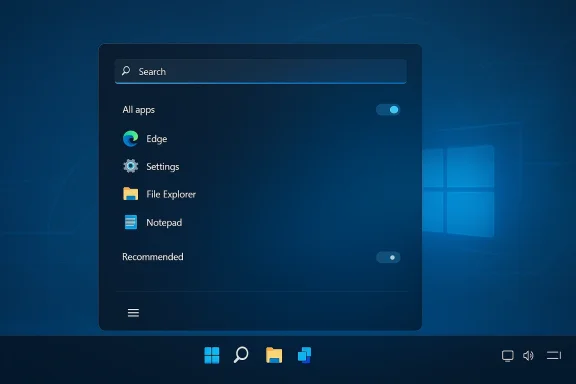
Microsoft is preparing one of the most consequential Start menu revisions Windows 11 has seen since launch, and the significance is bigger than a fresh coat of paint. The new direction points to a native WinUI 3 foundation, more explicit user control over layout, and a clearer attempt to answer years of criticism that the current menu feels rigid, cluttered, and sometimes sluggish. Reporting tied to Microsoft’s broader Windows K2 effort and recent Insider-focused quality messaging suggests the company is trying to make the shell feel faster, more consistent, and less dependent on web-style components ]
Windows 11 launched with a clean, centered Start menu that looked modern but immediately split opinion. Microsoft trimmed away a lot of familiar flexibility in the name of simplicity, and for many longtime users that meant the operating system felt more like a reset than an evoluticsymbol of that philosophy: visually polished, but constrained in ways that frustrated people who wanted the desktop to adapt to them rather than the other way around
The complaint was never just about aesthetics. Users wanted predictable access to pinned apps, more screen-space efficiency, and less emphasis on Microsoft’s Recommended area, which many saw as curated clutter rather than helpful guidance. In practice, tea launcher, an advertising surface, and a productivity hub, and that ambiguity kept the criticism alive long after launch
Microsoft has already acknowledged some of those pain points in official support and Learn documentation. Its support guidance notes that if users unpin everything or turn off all recommended providers, sections can collapse rather than remain visually dominant, which is an important clue that the company understands the demand for a less prescriptive Start experience Still, that is not the same as giving people a fully configurable menu. The current implementation remains far more opinionated than Windows veterans are used to.
What makes the current round of changes notable is that Microsoft seems to be moving beyond incremental patching. Recent Windows quality messaging has emphasized responsiveness, craft, and **latency redsecially Start, Search, and File Explorer. That language is significant because it suggests Microsoft now sees shell quality as a first-class product issue rather than a cosmetic layer on top of the real OS
There is also a larger strategic backdrop. Windows 10 support ended in October 2025, which means Microsoft has far less room to tolerate an experience that feels inferior to the older system people were comfortable with. If the company wants Windows 11 to feel like an upgrade rather than a forced migration, the Start menu is one of the most important places to prove it
The performance angle is just as important. Microsoft has framed the work as part of a push to reduce interaction latency, which should translate into faster menu opening, more reliable search input, and better responsiveness when the system is under load. That matters because Start is one of the few places every Windows user touches repeatedly throughout the day, and even tiny delays are very noticeable there
That perception matters because desktop users are not judging the Start menu like a browser tab. They are judging whether the operating system feels trustworthy. A laggy launcher creates a broader sense that the machine is hesitating, and that feeling spreads across the whole product experience.
There is also a maintenance argument here. A more unified UI framework can help Microsoft modernize the shell more consistently across different device classes and screen sizes. If the company is serious about long-term coherence, that foundation matters as much as the visibleiggest user-facing improvement in the reported redesign is the return of genuine control over how the Start menu is arranged. Instead of letting Windows automatically decide whether to present a smaller or larger layout, users would reportedly be able to choose the size themselves and resize the menu directly. That is a simple idea, but it strikes at one of the most persistent complaints about Windows 11: the menu often feels like it has decided too much in advance
M granular section control, including the ability to turn off entire areas of Start. That could mean hiding Recommended, reducing reliance on the All apps list, or collapsing other surfaces that many users rarely touch. If that lands as described, it would be one of the clearest signs yet that Microsoft is willing to let users tailor the Start experience to their actual workflow rather than to the company’s defaults
The deeper issue is ownership. A good desktop shell should feel like a workspace, not a template. When Microsoft lets users decide how much of Start they want to see, it restores a small but meaningful sense that the desktop belongs to the person using it.
In practical terms, this also helps across device types. A laptop with limited vertical space, a desktop with a large monitor, and a touch de different menu behaviors. A single forced layout rarely satisfies all three equally well.
That creates a broader usability problem. If Start search is unreliable, users fall back to browsing, pinned apps, or File Explorer, all of which add friction. One laggy surface can end up multiplying the amount of effort needed to do simple tasks.
Microsoft’s language around reducing interaction latency is therefore more important than it may sound. It implies the company is focusing on the feel of the desktop, not just feature count. That is the right direction for a shell that is used dozens of timdows K2 Factor
The mention of Windows K2 gives this story a larger engineering context. Rather than treating Start as an isolated interface project, Microsoft appears to be folding it into a broader effort to make the Windows desktop faster, leaner, and more coherent. That kind of umbrella initiative matters because shell problems rarely exist in isolation
Start, Search, File Explorer, and even context menus all contribute to whether Windows feels polished. A slight delay in one area may seem minor, but when several surfaces each carry a bit of friction, the overall experience starts to feel heavier than the sum of its parts. Microsoft seems to be trying to fix that at the platform level rather than with scattered one-off adjustments
That does not guarantee success, of course. But it does suggest that Microsoft understands the reputational damage caused by a shell that looks modern but behaves inconsistently. If Windows K2 is real in the way these reports imply, it may be the clearest sign yet that Microsoft is trying to rehabilitate the desktop experience as a whole.
It also recalls the broader history of Windows shell changes. Microsoft has repeatedly tried to make Start feel more modern, from the classic menu era to live tiles and then back toward a more restrained launcher. The pattern has usually been the same: simplify first, then add flexibility back once users complain loudly enough.
When those familiar behaviors disappear, people do not just notice a new UI. They feel a loss of efficiency, and that emotional reaction often lingers longer than the technical details of the redesign. In that sense, Start has always been a referendum on how much control Microsoft is willing to let users keep.
The current changes may be the first sign that the company is learning that lesson more fully. It is a pragmatic move, not a nostalgic one.
A more configurable Start menu should make Windows 11 feel less prescriptive. If users can hide sections they do not need and resize the menu to fit their screen, the OS becomes easier to live with on shared family PCs, personal laptops, and lightweight devices. That kind of everyday convenience often matters more than splashy feature launches.
There is also a psychological effect. People tend to trust software more when they can change it without wrestling with it. That sense of agency can improve satisfaction even if users never touch the advanced options again.
A less intrusive Start menu can also reduce confusion for households where multiple people use the same PC. If the menu is easier to understand and easier to personalize, the operating system feels more welcoming from the first login onward.
The potential upside is clear. If administrators can standardize a simpler Start layout or hide sections that do not fit corporate policy, support calls may go down. Users spend less time navigating clutter, and help desks spend less time explaining where things moved.
That tension has always defined Windows in business settings. The best version of this change would preserve enterprise control while still letting end users get a better experience. If Microsoft can strike that balance, the redesign could help both adoption and satisfaction.
It may also reduce resistance among organizations still cautious about Windows 11. A shell that feels more predictable and less opinionated is easier to roll out at scale than one that constantly surprises users.
That does not mean Microsoft is in danger of losing its base overnight. But the company does need to defend the perception that Windows is still the most practical general-purpose desktop. If core surfaces feel slow or overly curated, rivals gain a small but real psychological advantage.
That is strategically important because Microsoft is now asking many users to upgrade from Windows 10, whether they are enthusiastic or not. The company needs Windows 11 to feel like a better daily driver, not just the mandatory successor. The Start menu is one of the few places where that argument becomes immediately visible.
The second question is whether this becomes part of a larger shell cleanup. If Start, Search, File Explorer, and taskbar behavior all improve together, Windows 11 could start to feel like a cohesive platform rather than a collection of partially reconciled ideas. That would matter more than any single visual change.
The broader significance is simple: Windows is strongest when it feels like a tool, not a script. A faster, more configurable Start menu would not erase years of frustration overnight, but it would be a meaningful step toward a desktop that feels more respectful, more consistent, and more useful every time the Windows key is pressed.
Source: Pune Mirror Windows 11 Start menu upgrades deliver powerful new control
 Background
Windows 11 launched with a clean, centered Start menu that looked modern but immediately split opinion. Microsoft trimmed away a lot of familiar flexibility in the name of simplicity, and for many longtime users that meant the operating system felt more like a reset than an evoluticsymbol of that philosophy: visually polished, but constrained in ways that frustrated people who wanted the desktop to adapt to them rather than the other way aroundThe complaint was never just about aesthetics. Users wanted predictable access to pinned apps, more screen-space efficiency, and less emphasis on Microsoft’s Recommended area, which many saw as curated clutter rather than helpful guidance. In practice, tea launcher, an advertising surface, and a productivity hub, and that ambiguity kept the criticism alive long after launch
Microsoft has already acknowledged some of those pain points in official support and Learn documentation. Its support guidance notes that if users unpin everything or turn off all recommended providers, sections can collapse rather than remain visually dominant, which is an important clue that the company understands the demand for a less prescriptive Start experience Still, that is not the same as giving people a fully configurable menu. The current implementation remains far more opinionated than Windows veterans are used to.
What makes the current round of changes notable is that Microsoft seems to be moving beyond incremental patching. Recent Windows quality messaging has emphasized responsiveness, craft, and **latency redsecially Start, Search, and File Explorer. That language is significant because it suggests Microsoft now sees shell quality as a first-class product issue rather than a cosmetic layer on top of the real OS
There is also a larger strategic backdrop. Windows 10 support ended in October 2025, which means Microsoft has far less room to tolerate an experience that feels inferior to the older system people were comfortable with. If the company wants Windows 11 to feel like an upgrade rather than a forced migration, the Start menu is one of the most important places to prove it
Overview
The reported shift to WinUI 3 matters because it speaks to both architecture and perception. A large share of the current Start experience has been associated withtyle components, and that has fueled the impression that the menu is not fully native in the way users expect a core Windows surface to be. Rebuilding it on WinUI 3 would not just be an internal engineering choice; it would be a statement that Microsoft wants the menu to behave more like part of Windows itselfThe performance angle is just as important. Microsoft has framed the work as part of a push to reduce interaction latency, which should translate into faster menu opening, more reliable search input, and better responsiveness when the system is under load. That matters because Start is one of the few places every Windows user touches repeatedly throughout the day, and even tiny delays are very noticeable there
Why architecture matters
A shell component like Start lives at the intersection of design, performance, and habit. If the framework is lightweight and consistent, users feel that immediately in the form of quicker reactions and fewer visual stalls. If it is layered, hybrid, or dependent on web-style rendering, people often perceive it as bloated even before they can identify the technical reason.That perception matters because desktop users are not judging the Start menu like a browser tab. They are judging whether the operating system feels trustworthy. A laggy launcher creates a broader sense that the machine is hesitating, and that feeling spreads across the whole product experience.
There is also a maintenance argument here. A more unified UI framework can help Microsoft modernize the shell more consistently across different device classes and screen sizes. If the company is serious about long-term coherence, that foundation matters as much as the visibleiggest user-facing improvement in the reported redesign is the return of genuine control over how the Start menu is arranged. Instead of letting Windows automatically decide whether to present a smaller or larger layout, users would reportedly be able to choose the size themselves and resize the menu directly. That is a simple idea, but it strikes at one of the most persistent complaints about Windows 11: the menu often feels like it has decided too much in advance
M granular section control, including the ability to turn off entire areas of Start. That could mean hiding Recommended, reducing reliance on the All apps list, or collapsing other surfaces that many users rarely touch. If that lands as described, it would be one of the clearest signs yet that Microsoft is willing to let users tailor the Start experience to their actual workflow rather than to the company’s defaults
More than a visual tweak
This is not just about appearance. A configurable Start menu changes the rhythm of daily use. If someone can set the menu to a compact, pinned-apps-only arrangement, that removes clutter and reduces cognitive overhead. If someone prefers a broader, scrollable dashboard, they can have that too.The deeper issue is ownership. A good desktop shell should feel like a workspace, not a template. When Microsoft lets users decide how much of Start they want to see, it restores a small but meaningful sense that the desktop belongs to the person using it.
In practical terms, this also helps across device types. A laptop with limited vertical space, a desktop with a large monitor, and a touch de different menu behaviors. A single forced layout rarely satisfies all three equally well.
Search and Responsiveness
Search is where Start becomes more than a launcher. Many users press the Windows key and start typing without thinking, expecting near-instant feedback and reliable results. If the menu fails to keep up, even briefly, that breaks the trust relationship between the userosoft’s reported goal is to make the Start experience remain responsive even when the CPU is heavily loaded. That is a meaningful promise because some of the most irritating Windows complaints come from exactly that moment: you need the system to react now, and it pauses. The company appears to understand that shell responsiveness is not a luxury feature but a baseline expectationWhy typing latency matters
Typing into Start should feel invisible. Users should not need to wait for the box to wake up, for keystrokes to register, or for results to populate. When those things happen too slowly, people stop trusting search as a primary navigation method.That creates a broader usability problem. If Start search is unreliable, users fall back to browsing, pinned apps, or File Explorer, all of which add friction. One laggy surface can end up multiplying the amount of effort needed to do simple tasks.
Microsoft’s language around reducing interaction latency is therefore more important than it may sound. It implies the company is focusing on the feel of the desktop, not just feature count. That is the right direction for a shell that is used dozens of timdows K2 Factor
The mention of Windows K2 gives this story a larger engineering context. Rather than treating Start as an isolated interface project, Microsoft appears to be folding it into a broader effort to make the Windows desktop faster, leaner, and more coherent. That kind of umbrella initiative matters because shell problems rarely exist in isolation
Start, Search, File Explorer, and even context menus all contribute to whether Windows feels polished. A slight delay in one area may seem minor, but when several surfaces each carry a bit of friction, the overall experience starts to feel heavier than the sum of its parts. Microsoft seems to be trying to fix that at the platform level rather than with scattered one-off adjustments
A wider quality message
That wider messaging is important because it suggests a change in priorities. In earlier Windows 11 cycles, Microsoft often seemed to emphasize new surfaces, visual refinements, or promotional features while users continued to complain about the basics. Now the company is talking about craft, performance, and reliability in a way that feels more grounded in everyday use.That does not guarantee success, of course. But it does suggest that Microsoft understands the reputational damage caused by a shell that looks modern but behaves inconsistently. If Windows K2 is real in the way these reports imply, it may be the clearest sign yet that Microsoft is trying to rehabilitate the desktop experience as a whole.
Historical Comparisons
The renewed flith Windows 10. That menu was not universally beloved, but it offered a level of flexibility that many users came to rely on. Windows 11 removed some of that freedom in pursuit of a cleaner visual identity, and the backlash showed that a lot of people value control more than minimalismIt also recalls the broader history of Windows shell changes. Microsoft has repeatedly tried to make Start feel more modern, from the classic menu era to live tiles and then back toward a more restrained launcher. The pattern has usually been the same: simplify first, then add flexibility back once users complain loudly enough.
Lessons from past missteps
The lesson here is not that Microsoft should never redesign anything. It is that core desktop behaviors are deeply habit-forming, and removing them creates more resistance than many product teams expect. Users build workflows around things like menu size, taskbar placement, and the shape of the app launcher.When those familiar behaviors disappear, people do not just notice a new UI. They feel a loss of efficiency, and that emotional reaction often lingers longer than the technical details of the redesign. In that sense, Start has always been a referendum on how much control Microsoft is willing to let users keep.
The current changes may be the first sign that the company is learning that lesson more fully. It is a pragmatic move, not a nostalgic one.
Consumer Impact
For regular consumers, the most important gain is likelyout rigidity. Most people do not care whether Start is built with React, WinUI 3, or another framework. They care whether their apps are easy to reach, whether the menu behaves predictably, and whether the system gets out of the way when they want to work or browseA more configurable Start menu should make Windows 11 feel less prescriptive. If users can hide sections they do not need and resize the menu to fit their screen, the OS becomes easier to live with on shared family PCs, personal laptops, and lightweight devices. That kind of everyday convenience often matters more than splashy feature launches.
Why casual users benefit too
Casual users are not necessarily less demanding. They just want frictionless defaults. A cleaner Start menu that can be simplified in a few clicks is more approachable than a layout that forces them to understand Microsoft’s priorities before they can get to their apps.There is also a psychological effect. People tend to trust software more when they can change it without wrestling with it. That sense of agency can improve satisfaction even if users never touch the advanced options again.
A less intrusive Start menu can also reduce confusion for households where multiple people use the same PC. If the menu is easier to understand and easier to personalize, the operating system feels more welcoming from the first login onward.
Enterprise and Admin Impact
Enterprise environments will read these changes differently. For IT departme a launcher; it is part of the support burden, the onboarding process, and the broader desktop standard. Microsoft knows that any shell redesign has to work for organizations that care about consistency and manageability as much as convenienceThe potential upside is clear. If administrators can standardize a simpler Start layout or hide sections that do not fit corporate policy, support calls may go down. Users spend less time navigating clutter, and help desks spend less time explaining where things moved.
What admins will watch
The critical question is how much of the redesign will be controllable through policy. Enterprises want flexibility, but they do not want chaos. If Microsoft gives users too much local freedom without adequate management hooks, IT teams may see the new menu as another variable to contain.That tension has always defined Windows in business settings. The best version of this change would preserve enterprise control while still letting end users get a better experience. If Microsoft can strike that balance, the redesign could help both adoption and satisfaction.
It may also reduce resistance among organizations still cautious about Windows 11. A shell that feels more predictable and less opinionated is easier to roll out at scale than one that constantly surprises users.
Competitive Implications
Microsoft’s Start menu rethink matters beyond Windows alone. Desktop oper features, and users compare Windows with macOS, ChromeOS, and Linux desktops every time they hit a frustrating edge. Even small shell improvements can help Windows look more mature and less combativeThat does not mean Microsoft is in danger of losing its base overnight. But the company does need to defend the perception that Windows is still the most practical general-purpose desktop. If core surfaces feel slow or overly curated, rivals gain a small but real psychological advantage.
Why shell quality is strategic
Users rarely switch operating systems because of one menu. They switch because a series of small annoyances slowly make alternatives more attractive. A faster, more flexible Start menu will not solve everything, but it can reduce the sense that Windows is fighting user preference.That is strategically important because Microsoft is now asking many users to upgrade from Windows 10, whether they are enthusiastic or not. The company needs Windows 11 to feel like a better daily driver, not just the mandatory successor. The Start menu is one of the few places where that argument becomes immediately visible.
Strengths and Opportunities
Microsoft’s direction has several clear strengths. The most obvious is that it responds to real criticism instead of pretending the criticism does not exist. The more meaningful opportunity is that the company may finally be aligning the Start menu with how people actually use Windows, which is to say quickly, repeatedly, and with very little patience for clutter.- More direct user control over Start layout
- Better fit for different screen sizes
- Potentially faster shell interactions
- Less reliance on unwanted recommendation surfaces
- A more credible response to years of feedback
- Stronger alignment with enterprise standardization
- A chance to improve Windows 11’s reputation for daily usability
Risks and Concerns
The biggest risk is that Microsoft overpromises and underdelivers. Users have heard “quality” messages before, and they will judge this change by how fast it actually feels, not by how polished the marketing sounds. If the new Start menu arrives slowly, inconsistently, or with hidden caveats, the goodwill could evaporate quickly.- Leaked features may not match final behavior
- Performance gains could be modest in practice
- Enterprise policy support may lag behind consumer options
- Too much flexibility could confuse some users
- A redesign could arrive in stages and feel unfinished
- Microsoft could preserve some of the old clutter in new form
- Users may remain skeptical until broad release proves the gains
Looking Ahead
The most important thing to watch now is how Microsoft packages the rollout. If the company ships the redesigned Start menu first through Insider builds, then gradually expands it to broader audiences, that will give us a good read on how confident it is in the underlying work. It will also show whether the redesign is a genuine strategic shift or just another staged UI experimentThe second question is whether this becomes part of a larger shell cleanup. If Start, Search, File Explorer, and taskbar behavior all improve together, Windows 11 could start to feel like a cohesive platform rather than a collection of partially reconciled ideas. That would matter more than any single visual change.
Key signals to watch
- More WinUI 3 migration in core shell surfaces
- Wider Insider availability of the new Start menu
- Clearer controls for hiding or collapsing Recommended
- Better consistency in Start search and typing response
- Any follow-on changes to File Explorer and the taskbar
The broader significance is simple: Windows is strongest when it feels like a tool, not a script. A faster, more configurable Start menu would not erase years of frustration overnight, but it would be a meaningful step toward a desktop that feels more respectful, more consistent, and more useful every time the Windows key is pressed.
Source: Pune Mirror Windows 11 Start menu upgrades deliver powerful new control
