

Microsoft still ships the old Windows screen saver feature in Windows 11 in 2026, accessible through Settings and the legacy Control Panel, even though its original job of protecting CRT monitors from burn-in largely disappeared with modern display hardware. That survival is not an accident so much as a Windows habit: if a feature is harmless, familiar, scriptable, and still useful to somebody, Microsoft tends to leave it alone. The more interesting story is not that screen savers remain, but that Windows has never turned them into a modern idle experience. A small relic from the 1990s now exposes a larger gap in Windows 11’s design philosophy.
Screen savers made perfect sense when the computer monitor was a heavy glass box, the family PC sat in a den, and static phosphor burn-in was a practical concern rather than a retrocomputing anecdote. If a spreadsheet, menu bar, or login prompt sat unchanged for hours, the screen could retain a permanent shadow of that image. The screen saver was the obvious fix: keep the pixels moving, protect the display, and give users something more charming than a blank screen.
Windows did not invent the idea, but Windows made it part of everyday computing culture. By the Windows 95 and Windows XP eras, screen savers had crossed from maintenance into personality. Flying text, pipes, ribbons, bubbles, starfields, photo slideshows, and third-party oddities were not merely settings; they were a low-stakes form of identity in a time when operating systems felt more tactile and less cloud-managed.
That is why the feature’s persistence in Windows 11 feels so odd. Microsoft has spent years sanding away old surfaces, migrating Control Panel pages into Settings, redesigning core apps, and pushing Windows toward a cleaner, touch-friendlier, account-connected interface. Yet the screen saver dialog still looks and behaves like an artifact from a different operating system era, summoned from a modern Settings page only to drop the user back into a legacy configuration window.
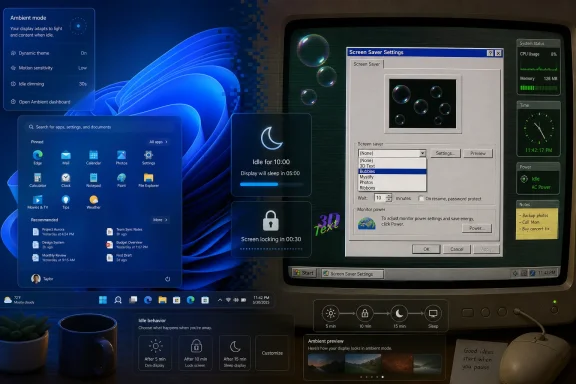
The result is strangely Windows: a modern shell wrapped around a museum drawer. You can open Settings, go to Personalization, visit the Lock screen page, and still end up in a small old-school “Screen Saver Settings” dialog with choices such as 3D Text, Bubbles, Mystify, Photos, and Ribbons. Microsoft has not meaningfully reinvented the feature, but it has not removed it either.
That restraint says something important about Windows 11. For all the talk about modernization, Microsoft still runs the world’s most compatibility-sensitive desktop platform. Features do not disappear simply because designers have lost interest in them. They disappear when the maintenance burden, security risk, or strategic embarrassment becomes greater than the value of leaving them alone.
That tension is not a defect in the abstract. It is the price of being Windows. A clean-sheet desktop operating system can break old assumptions with elegance; Windows has to carry businesses, schools, government agencies, kiosks, labs, point-of-sale systems, manufacturing equipment, and hobbyist rigs through upgrades that often span a decade or more.
The screen saver survives because it is small, familiar, and deeply embedded in expectations. It is not just a nostalgic toy. Administrators have historically used screen saver timeouts and password-on-resume behavior as part of idle security policies. Organizations have deployed branded screen savers on shared machines. Users have relied on photo slideshows, clock utilities, and specialized idle displays long after the original burn-in rationale faded.
Microsoft’s modernization effort therefore moves unevenly. It aggressively updates surfaces that matter to the company’s current strategy: cloud accounts, Microsoft 365 integration, Copilot, passkeys, Windows Hello, Store apps, gaming, security baselines, and energy efficiency. It is much less aggressive with old features that create little daily friction and would cause disproportionate noise if removed.
That explains why screen savers are still here, but it does not explain why they are still so neglected. Windows 11 can ask users to embrace AI assistants, ambient lock screen widgets, cloud-synced themes, dynamic backgrounds, and Microsoft account personalization. Yet when the PC goes idle, the operating system’s dedicated “do something while I’m away” feature remains effectively frozen in time.
Windows 11 already reflects that shift. Power and sleep settings are central to the idle experience, and security-sensitive environments generally care more about automatic locking than animation. If the user steps away, the system should protect the session. If the system remains unused, it should reduce power consumption. From that perspective, the classic screen saver is redundant.
But the screen saver’s original hardware problem was never the whole story. The feature endured because it gave computers a sense of presence when they were idle. The PC did not merely stop; it performed. It showed a family photo album, a company logo, an aquarium, a maze, a constellation, a joke, or a bouncing wordmark that proved the machine was still alive.
That human problem has not gone away. In fact, it may be more relevant now that computers live in more rooms, on more displays, and across more device categories. A desktop monitor may sit in a home office for hours. A laptop may remain open on a kitchen counter. A mini PC may drive a wall-mounted display. A workstation may spend half the day locked but visible.
Modern operating systems have noticed this in other contexts. Smart displays, TV boxes, phones, tablets, and even some desktop environments treat idle time as an opportunity for glanceable information or ambient personalization. Windows, oddly, has the ingredients but not the recipe.
The lock screen, however, is not quite the same thing. It is a gate. Its job is to keep you out until you prove you are you. That makes it a good security surface but a limited ambient surface, because every glance at it carries the subtle implication that the machine is no longer yours until you sign back in.
Classic screen savers occupied a softer space. They were idle but not necessarily locked, decorative but not central, personal but not overbearing. That looseness is part of what made them memorable. They belonged to the PC owner more than to the platform vendor.
Windows 11’s lock screen can look polished, but it often feels like a Microsoft-controlled surface rather than a user-controlled one. Spotlight imagery is attractive, but it is also an editorial feed. Widgets are useful, but they are tied to Microsoft’s current services and design priorities. The old screen saver dialog, crude as it is, still has one virtue: it feels like a setting the user owns.
That distinction matters because personalization has become more centralized over time. Wallpapers sync. Themes are packaged. Widgets arrive through a service. Recommendations appear in surfaces that once felt local. The screen saver is a reminder of a less managed Windows, when customization could be silly, local, and unnecessary.
This does not mean the 1990s screen saver has suddenly become mission-critical again. OLED vendors use their own mitigation systems, including pixel shifting, refresh cycles, brightness management, taskbar dimming, logo detection, and panel maintenance routines. Windows power management remains more effective than letting an animation run indefinitely. Turning the display off is still the cleanest protection when the user is gone.
But OLED changes the conversation from “screen savers solve nothing” to “idle behavior matters again.” A Windows desktop is full of static UI: the taskbar, app chrome, browser tabs, window controls, sidebars, and pinned icons. Users who run bright static layouts for long workdays may reasonably care about reducing unnecessary exposure.
Here, Microsoft has an opportunity to be more intentional. It does not need to revive screen savers as burn-in shields in the old sense. It could instead treat display care as part of a broader idle policy: dim static UI, rotate ambient content, hide persistent elements, trigger panel-friendly dark modes, and coordinate with monitor capabilities where available.
The old screen saver feature cannot do that well. It is too disconnected from the modern display stack, too unaware of device type, too separated from power policy, and too primitive in configuration. But its continued existence hints at a place where such a feature could live if Microsoft chose to modernize it.
Microsoft has already moved in this direction in fragments. Windows can show glanceable information before sign-in. Windows Spotlight can refresh backgrounds. Widgets can present personal and web-based data. Some devices can detect user presence and lock or wake automatically. Photos can manage large local and cloud libraries. None of this requires inventing an entirely new category.
The problem is that these components remain scattered. The lock screen does one thing, the desktop wallpaper another, widgets another, screen timeout another, and screen savers another. Users do not get a single “when this PC is idle” experience that lets them decide whether the machine should become a photo frame, a dashboard, a low-power clock, a blank panel, or a locked security surface.
That absence is especially glaring because Windows now runs on machines that are often physically beautiful. High-refresh OLED monitors, ultrawide displays, all-in-one PCs, mini PCs connected to TVs, and premium laptops deserve a better idle state than a black rectangle or a 1990s animation dialog. The PC industry sells screens as emotional objects; Windows treats idle screens as a power-management afterthought.
A true ambient mode would also let Microsoft resolve the current identity crisis. If the PC is unlocked and idle, it could show purely local content with privacy-conscious defaults. If the PC is locked, it could show only approved glanceable information. If the device is on battery, it could favor sleep. If it is on AC power and attached to an OLED display, it could avoid static elements and reduce brightness.
That is not science fiction. It is product plumbing. The harder question is whether Microsoft sees idle time as a user experience worth owning, or merely as another surface for lock screen content and service integration.
This is not unique. Windows 11 still contains many such trapdoors. Advanced settings, device properties, administrative consoles, credential dialogs, legacy applets, and compatibility tools routinely reveal older interface layers. For enthusiasts, that is part of the charm. For normal users, it can feel like the operating system is arguing with itself.
Screen savers are a particularly visible example because they sit inside Personalization, one of the most consumer-facing areas of Windows. This is where Microsoft wants the OS to feel expressive and contemporary. Instead, it exposes a feature that is neither removed nor renewed.
The charitable reading is that Microsoft is preserving compatibility while prioritizing more important work. The less charitable reading is that Windows modernization remains shallow in places where no executive priority forces the issue. Both readings can be true. Windows is too large to modernize in one sweep, and Microsoft has repeatedly chosen strategic surfaces over cultural ones.
That choice has consequences. The more Windows 11 mixes polished new experiences with neglected old ones, the harder it becomes to argue that the OS has a coherent design direction. Users may not care about screen savers specifically, but they notice when Windows feels like a renovated house with untouched rooms behind every third door.
The old screen saver model is too narrow. It assumes the goal is to run a full-screen visual after a timeout. That made sense when the feature’s job was to prevent a static image. It makes less sense in a world where the PC must balance privacy, energy use, display longevity, notification hygiene, accessibility, and multi-device continuity.
A modern version would need to start from intent. The user should be able to say: when I step away, make this device private, useful, beautiful, or asleep. Those are different goals. A family desktop in a living room may want a photo frame. A corporate laptop may need an immediate lock. A studio workstation may want a low-brightness status board. A gaming OLED monitor may need aggressive panel protection.
That kind of design would also let Microsoft separate local personalization from cloud content. A user’s own photos, local folders, and device state should not require an upsell or a feed. If Microsoft wants to offer Spotlight, widgets, or Copilot-driven summaries, those can be optional layers. The foundation should be trust.
The classic screen saver became beloved because it was modest. It did not pretend to transform productivity. It did not ask users to sign in to a service. It simply made the idle PC less dead. Microsoft would do well to remember that restraint if it ever modernizes the concept.
Classic screen savers survived partly because they could be controlled. Organizations could set timeouts, require a password on resume, and standardize behavior through policy. Even if few users loved the result, administrators understood the model. It was boring, but boring is often what enterprise Windows needs.
A reimagined idle mode would fail quickly if it blurred the line between locked and unlocked states. Calendar details, notifications, widgets, message previews, documents, and personal photos all raise privacy questions on shared or visible displays. Microsoft would need clear defaults: locked means protected, and ambient does not mean leaky.
There is also the question of manageability. IT departments would need policy controls for whether ambient mode is allowed, what data types can appear, whether cloud content is permitted, how quickly devices lock, and how the feature interacts with compliance requirements. Without that, administrators would disable it in managed environments and move on.
This is where Microsoft’s consumer and enterprise instincts often collide. The company likes rich, connected surfaces that make Windows feel alive. Enterprise customers like surfaces that behave exactly as expected and reveal as little as possible. A successful successor to screen savers would have to serve both, which means the security model cannot be an afterthought.
Modern Windows personalization is safer and more constrained. Themes, wallpapers, widgets, and lock screen content are controlled through sanctioned paths. That is understandable in an era of malware, phishing, supply-chain risk, and signed components. A random executable that runs automatically when the PC is idle is not exactly a security team’s dream.
Still, something was lost. The screen saver used to be a small canvas for visual experimentation. It could be art, status, humor, branding, or code. Today’s equivalents are fragmented across live wallpapers, Rainmeter skins, browser dashboards, vendor utilities, and widget panels. Enthusiasts can still customize Windows deeply, but the official platform offers fewer playful hooks.
Microsoft could rebuild that energy without reopening the worst security problems. A modern ambient framework could allow sandboxed modules, declarative layouts, local photo sources, limited system telemetry, and administrator-approved extensions. Developers should not need to ship arbitrary idle executables to make a clock, a system monitor, or a subtle animation.
That may sound niche, but Windows has always benefited from enthusiast culture. The people who customize first often influence what mainstream users later expect. If Microsoft wants Windows 11 to feel personal rather than merely configured, it needs to leave room for harmless weirdness.
Some of that could be useful. A locked desktop that quietly shows the next meeting, commute conditions, or battery status might save a few clicks. A home PC that rotates photos and occasionally surfaces a reminder could feel warm rather than intrusive. A workstation that shows build status, server health, or calendar blocks could be genuinely productive.
But an AI-powered idle screen could also become everything users dislike about modern platform design. It could be noisy. It could leak private context. It could become another recommendation surface. It could turn a quiet monitor into a billboard for Microsoft services. The difference between ambient computing and ambient nagging is thin.
The old screen saver did not demand attention. That was part of its appeal. It moved, shimmered, or displayed photos, but it generally did not try to pull the user into a funnel. If Microsoft modernizes idle time, restraint will matter more than intelligence.
A good ambient mode should be glanceable, dismissible, local-first where possible, and conservative by default. The PC is idle because the user stepped away. That is not automatically an invitation for the operating system to become more talkative.
That broader shift makes Windows 11 look oddly underdeveloped. The PC remains one of the most capable devices in the home or office, attached to some of the best screens users own, yet its idle behavior is often less imaginative than a cheap smart display. Microsoft has the data, the cloud services, the local APIs, and the hardware partnerships to do better.
The challenge is that the PC is also more sensitive. A TV idle screen can show scenic photography with little risk. A phone standby mode is personal but physically close. A Windows desktop may be in an office, conference room, classroom, bedroom, lab, or retail counter. The same feature must adapt across radically different privacy contexts.
That is exactly why the current leftover approach is inadequate. Leaving the old screen saver alone avoids controversy, but it also avoids design. Windows needs a more explicit model for what an idle PC should be in different environments. The answer cannot be one animation list buried behind a legacy dialog.
If Microsoft does not define that model, third parties and OEMs will continue to fill the gap unevenly. Some will do it well. Others will ship bloat, ads, telemetry-heavy dashboards, or fragile utilities. Windows users have seen that movie before.
But preservation should not be confused with success. The old feature remains because Windows is careful, not because the feature is thriving. It is a compatibility layer masquerading as personalization.
Microsoft should keep classic screen savers for as long as they remain useful to some users and manageable for administrators. At the same time, it should stop treating them as the answer to idle personalization. They are not. They are the fossil record of an answer that once made sense.
The real opportunity is to build a successor that understands modern displays, modern security, modern power use, and modern personalization. Call it Ambient Mode, Idle Display, Desk Mode, or something less marketing-polished. The name matters less than the principle: Windows should have a first-class state between active use and blank sleep.
That state should be designed, not inherited. It should know whether the device is locked. It should know whether power matters. It should avoid static OLED-hostile layouts. It should let users choose beauty, utility, privacy, or nothing at all. And it should make the PC feel personal without turning the idle screen into another feed.
Yet small features often reveal platform truths. The survival of screen savers shows Microsoft’s admirable commitment to backward compatibility. Their stagnation shows the limits of Windows 11’s modernization. Their nostalgia shows that users still value personality. Their inadequacy shows that idle computing has moved on.
The concrete lessons are straightforward:
 The Ghost of the CRT Still Lives in the Settings App
Screen savers made perfect sense when the computer monitor was a heavy glass box, the family PC sat in a den, and static phosphor burn-in was a practical concern rather than a retrocomputing anecdote. If a spreadsheet, menu bar, or login prompt sat unchanged for hours, the screen could retain a permanent shadow of that image. The screen saver was the obvious fix: keep the pixels moving, protect the display, and give users something more charming than a blank screen.Windows did not invent the idea, but Windows made it part of everyday computing culture. By the Windows 95 and Windows XP eras, screen savers had crossed from maintenance into personality. Flying text, pipes, ribbons, bubbles, starfields, photo slideshows, and third-party oddities were not merely settings; they were a low-stakes form of identity in a time when operating systems felt more tactile and less cloud-managed.
That is why the feature’s persistence in Windows 11 feels so odd. Microsoft has spent years sanding away old surfaces, migrating Control Panel pages into Settings, redesigning core apps, and pushing Windows toward a cleaner, touch-friendlier, account-connected interface. Yet the screen saver dialog still looks and behaves like an artifact from a different operating system era, summoned from a modern Settings page only to drop the user back into a legacy configuration window.
The result is strangely Windows: a modern shell wrapped around a museum drawer. You can open Settings, go to Personalization, visit the Lock screen page, and still end up in a small old-school “Screen Saver Settings” dialog with choices such as 3D Text, Bubbles, Mystify, Photos, and Ribbons. Microsoft has not meaningfully reinvented the feature, but it has not removed it either.
That restraint says something important about Windows 11. For all the talk about modernization, Microsoft still runs the world’s most compatibility-sensitive desktop platform. Features do not disappear simply because designers have lost interest in them. They disappear when the maintenance burden, security risk, or strategic embarrassment becomes greater than the value of leaving them alone.
Windows Modernization Has Always Had a Long Tail
Windows 11 is often described as a modernized operating system, but that has always been only partly true. The Start menu, taskbar, Settings app, Microsoft Store, File Explorer visuals, and system surfaces have all changed substantially. Underneath, Windows remains a layered city where new interfaces sit atop old foundations, and where features from several decades coexist because millions of workflows still depend on them.That tension is not a defect in the abstract. It is the price of being Windows. A clean-sheet desktop operating system can break old assumptions with elegance; Windows has to carry businesses, schools, government agencies, kiosks, labs, point-of-sale systems, manufacturing equipment, and hobbyist rigs through upgrades that often span a decade or more.
The screen saver survives because it is small, familiar, and deeply embedded in expectations. It is not just a nostalgic toy. Administrators have historically used screen saver timeouts and password-on-resume behavior as part of idle security policies. Organizations have deployed branded screen savers on shared machines. Users have relied on photo slideshows, clock utilities, and specialized idle displays long after the original burn-in rationale faded.
Microsoft’s modernization effort therefore moves unevenly. It aggressively updates surfaces that matter to the company’s current strategy: cloud accounts, Microsoft 365 integration, Copilot, passkeys, Windows Hello, Store apps, gaming, security baselines, and energy efficiency. It is much less aggressive with old features that create little daily friction and would cause disproportionate noise if removed.
That explains why screen savers are still here, but it does not explain why they are still so neglected. Windows 11 can ask users to embrace AI assistants, ambient lock screen widgets, cloud-synced themes, dynamic backgrounds, and Microsoft account personalization. Yet when the PC goes idle, the operating system’s dedicated “do something while I’m away” feature remains effectively frozen in time.
The Original Problem Went Away, but the Human One Did Not
The technical case for classic screen savers collapsed years ago. LCD panels do not behave like CRTs, and the default answer to an idle PC is now simple: dim the display, turn it off, put the machine to sleep, or lock the session. Those behaviors save power, reduce wear, and improve security. A modern laptop running animated ribbons for twenty minutes is not protecting anything important; it is mostly wasting battery.Windows 11 already reflects that shift. Power and sleep settings are central to the idle experience, and security-sensitive environments generally care more about automatic locking than animation. If the user steps away, the system should protect the session. If the system remains unused, it should reduce power consumption. From that perspective, the classic screen saver is redundant.
But the screen saver’s original hardware problem was never the whole story. The feature endured because it gave computers a sense of presence when they were idle. The PC did not merely stop; it performed. It showed a family photo album, a company logo, an aquarium, a maze, a constellation, a joke, or a bouncing wordmark that proved the machine was still alive.
That human problem has not gone away. In fact, it may be more relevant now that computers live in more rooms, on more displays, and across more device categories. A desktop monitor may sit in a home office for hours. A laptop may remain open on a kitchen counter. A mini PC may drive a wall-mounted display. A workstation may spend half the day locked but visible.
Modern operating systems have noticed this in other contexts. Smart displays, TV boxes, phones, tablets, and even some desktop environments treat idle time as an opportunity for glanceable information or ambient personalization. Windows, oddly, has the ingredients but not the recipe.
The Lock Screen Became the New Screen Saver, but It Is a Poor Substitute
Microsoft’s answer to idle personalization has largely been the lock screen. It can show imagery, status indicators, widgets, weather, calendar details, and Windows Spotlight content. It is more secure than a classic screen saver because it belongs to the authentication boundary, not the decorative layer that precedes it. It also fits the company’s broader model of a connected, account-aware operating system.The lock screen, however, is not quite the same thing. It is a gate. Its job is to keep you out until you prove you are you. That makes it a good security surface but a limited ambient surface, because every glance at it carries the subtle implication that the machine is no longer yours until you sign back in.
Classic screen savers occupied a softer space. They were idle but not necessarily locked, decorative but not central, personal but not overbearing. That looseness is part of what made them memorable. They belonged to the PC owner more than to the platform vendor.
Windows 11’s lock screen can look polished, but it often feels like a Microsoft-controlled surface rather than a user-controlled one. Spotlight imagery is attractive, but it is also an editorial feed. Widgets are useful, but they are tied to Microsoft’s current services and design priorities. The old screen saver dialog, crude as it is, still has one virtue: it feels like a setting the user owns.
That distinction matters because personalization has become more centralized over time. Wallpapers sync. Themes are packaged. Widgets arrive through a service. Recommendations appear in surfaces that once felt local. The screen saver is a reminder of a less managed Windows, when customization could be silly, local, and unnecessary.
OLED Complicates the Obituary
It is tempting to say screen savers are obsolete because modern displays do not need them. That is mostly true for the LCD panels that dominated the PC market for years, but it becomes less tidy in the OLED era. OLED monitors and laptop panels are increasingly common in premium Windows machines, and they bring back a version of the old anxiety: static elements can contribute to uneven pixel wear over time.This does not mean the 1990s screen saver has suddenly become mission-critical again. OLED vendors use their own mitigation systems, including pixel shifting, refresh cycles, brightness management, taskbar dimming, logo detection, and panel maintenance routines. Windows power management remains more effective than letting an animation run indefinitely. Turning the display off is still the cleanest protection when the user is gone.
But OLED changes the conversation from “screen savers solve nothing” to “idle behavior matters again.” A Windows desktop is full of static UI: the taskbar, app chrome, browser tabs, window controls, sidebars, and pinned icons. Users who run bright static layouts for long workdays may reasonably care about reducing unnecessary exposure.
Here, Microsoft has an opportunity to be more intentional. It does not need to revive screen savers as burn-in shields in the old sense. It could instead treat display care as part of a broader idle policy: dim static UI, rotate ambient content, hide persistent elements, trigger panel-friendly dark modes, and coordinate with monitor capabilities where available.
The old screen saver feature cannot do that well. It is too disconnected from the modern display stack, too unaware of device type, too separated from power policy, and too primitive in configuration. But its continued existence hints at a place where such a feature could live if Microsoft chose to modernize it.
Windows Has the Parts of an Ambient Mode but Not the Product
A modern Windows ambient mode would not need to be a nostalgic remake of Mystify. It would combine pieces that Windows 11 already has: lock screen imagery, widgets, notification controls, calendar data, photos, weather, focus settings, presence sensing, power policy, Windows Hello, and display management. The missing piece is a coherent product decision.Microsoft has already moved in this direction in fragments. Windows can show glanceable information before sign-in. Windows Spotlight can refresh backgrounds. Widgets can present personal and web-based data. Some devices can detect user presence and lock or wake automatically. Photos can manage large local and cloud libraries. None of this requires inventing an entirely new category.
The problem is that these components remain scattered. The lock screen does one thing, the desktop wallpaper another, widgets another, screen timeout another, and screen savers another. Users do not get a single “when this PC is idle” experience that lets them decide whether the machine should become a photo frame, a dashboard, a low-power clock, a blank panel, or a locked security surface.
That absence is especially glaring because Windows now runs on machines that are often physically beautiful. High-refresh OLED monitors, ultrawide displays, all-in-one PCs, mini PCs connected to TVs, and premium laptops deserve a better idle state than a black rectangle or a 1990s animation dialog. The PC industry sells screens as emotional objects; Windows treats idle screens as a power-management afterthought.
A true ambient mode would also let Microsoft resolve the current identity crisis. If the PC is unlocked and idle, it could show purely local content with privacy-conscious defaults. If the PC is locked, it could show only approved glanceable information. If the device is on battery, it could favor sleep. If it is on AC power and attached to an OLED display, it could avoid static elements and reduce brightness.
That is not science fiction. It is product plumbing. The harder question is whether Microsoft sees idle time as a user experience worth owning, or merely as another surface for lock screen content and service integration.
The Legacy Dialog Is a Symptom of Microsoft’s Split Personality
The persistence of the screen saver dialog is funny because it is so visibly out of place. Windows 11 has rounded corners, softened iconography, new context menus, redesigned system apps, and a Settings interface that tries to feel unified. Then a user clicks “Screen saver” and is transported to a compact dialog that could plausibly have been opened on a PC from another generation.This is not unique. Windows 11 still contains many such trapdoors. Advanced settings, device properties, administrative consoles, credential dialogs, legacy applets, and compatibility tools routinely reveal older interface layers. For enthusiasts, that is part of the charm. For normal users, it can feel like the operating system is arguing with itself.
Screen savers are a particularly visible example because they sit inside Personalization, one of the most consumer-facing areas of Windows. This is where Microsoft wants the OS to feel expressive and contemporary. Instead, it exposes a feature that is neither removed nor renewed.
The charitable reading is that Microsoft is preserving compatibility while prioritizing more important work. The less charitable reading is that Windows modernization remains shallow in places where no executive priority forces the issue. Both readings can be true. Windows is too large to modernize in one sweep, and Microsoft has repeatedly chosen strategic surfaces over cultural ones.
That choice has consequences. The more Windows 11 mixes polished new experiences with neglected old ones, the harder it becomes to argue that the OS has a coherent design direction. Users may not care about screen savers specifically, but they notice when Windows feels like a renovated house with untouched rooms behind every third door.
Nostalgia Is Not a Product Strategy
The wrong answer would be for Microsoft to “bring back screen savers” as a retro feature pack. Nostalgia can generate attention, but it rarely sustains a platform experience. A Windows 95 throwback animation might delight enthusiasts for a week, but it would not solve the modern idle problem.The old screen saver model is too narrow. It assumes the goal is to run a full-screen visual after a timeout. That made sense when the feature’s job was to prevent a static image. It makes less sense in a world where the PC must balance privacy, energy use, display longevity, notification hygiene, accessibility, and multi-device continuity.
A modern version would need to start from intent. The user should be able to say: when I step away, make this device private, useful, beautiful, or asleep. Those are different goals. A family desktop in a living room may want a photo frame. A corporate laptop may need an immediate lock. A studio workstation may want a low-brightness status board. A gaming OLED monitor may need aggressive panel protection.
That kind of design would also let Microsoft separate local personalization from cloud content. A user’s own photos, local folders, and device state should not require an upsell or a feed. If Microsoft wants to offer Spotlight, widgets, or Copilot-driven summaries, those can be optional layers. The foundation should be trust.
The classic screen saver became beloved because it was modest. It did not pretend to transform productivity. It did not ask users to sign in to a service. It simply made the idle PC less dead. Microsoft would do well to remember that restraint if it ever modernizes the concept.
Enterprise IT Will Care About the Boring Parts First
For sysadmins, the most important idle-screen features are rarely the prettiest ones. The priorities are session locking, policy enforcement, predictable behavior, low support burden, accessibility, and avoiding accidental information disclosure. Any modern ambient mode would need to respect that reality from day one.Classic screen savers survived partly because they could be controlled. Organizations could set timeouts, require a password on resume, and standardize behavior through policy. Even if few users loved the result, administrators understood the model. It was boring, but boring is often what enterprise Windows needs.
A reimagined idle mode would fail quickly if it blurred the line between locked and unlocked states. Calendar details, notifications, widgets, message previews, documents, and personal photos all raise privacy questions on shared or visible displays. Microsoft would need clear defaults: locked means protected, and ambient does not mean leaky.
There is also the question of manageability. IT departments would need policy controls for whether ambient mode is allowed, what data types can appear, whether cloud content is permitted, how quickly devices lock, and how the feature interacts with compliance requirements. Without that, administrators would disable it in managed environments and move on.
This is where Microsoft’s consumer and enterprise instincts often collide. The company likes rich, connected surfaces that make Windows feel alive. Enterprise customers like surfaces that behave exactly as expected and reveal as little as possible. A successful successor to screen savers would have to serve both, which means the security model cannot be an afterthought.
Developers and Enthusiasts Lost a Playground
One reason old screen savers still carry emotional weight is that they were part of the broader tinkering culture around Windows. Users could install third-party screen savers, configure odd behaviors, download novelty packages, or build simple ones. That openness was messy, and sometimes risky, but it made the PC feel programmable in a way today’s polished surfaces often do not.Modern Windows personalization is safer and more constrained. Themes, wallpapers, widgets, and lock screen content are controlled through sanctioned paths. That is understandable in an era of malware, phishing, supply-chain risk, and signed components. A random executable that runs automatically when the PC is idle is not exactly a security team’s dream.
Still, something was lost. The screen saver used to be a small canvas for visual experimentation. It could be art, status, humor, branding, or code. Today’s equivalents are fragmented across live wallpapers, Rainmeter skins, browser dashboards, vendor utilities, and widget panels. Enthusiasts can still customize Windows deeply, but the official platform offers fewer playful hooks.
Microsoft could rebuild that energy without reopening the worst security problems. A modern ambient framework could allow sandboxed modules, declarative layouts, local photo sources, limited system telemetry, and administrator-approved extensions. Developers should not need to ship arbitrary idle executables to make a clock, a system monitor, or a subtle animation.
That may sound niche, but Windows has always benefited from enthusiast culture. The people who customize first often influence what mainstream users later expect. If Microsoft wants Windows 11 to feel personal rather than merely configured, it needs to leave room for harmless weirdness.
Microsoft’s AI Push Makes the Idle Screen More Tempting—and More Dangerous
It is impossible to discuss any future Windows surface in 2026 without considering AI. Microsoft has spent the last several years trying to make Copilot and related features part of the Windows experience. An idle mode would be an obvious temptation: summaries, reminders, upcoming meetings, suggested files, weather, traffic, device status, and “continue where you left off” prompts.Some of that could be useful. A locked desktop that quietly shows the next meeting, commute conditions, or battery status might save a few clicks. A home PC that rotates photos and occasionally surfaces a reminder could feel warm rather than intrusive. A workstation that shows build status, server health, or calendar blocks could be genuinely productive.
But an AI-powered idle screen could also become everything users dislike about modern platform design. It could be noisy. It could leak private context. It could become another recommendation surface. It could turn a quiet monitor into a billboard for Microsoft services. The difference between ambient computing and ambient nagging is thin.
The old screen saver did not demand attention. That was part of its appeal. It moved, shimmered, or displayed photos, but it generally did not try to pull the user into a funnel. If Microsoft modernizes idle time, restraint will matter more than intelligence.
A good ambient mode should be glanceable, dismissible, local-first where possible, and conservative by default. The PC is idle because the user stepped away. That is not automatically an invitation for the operating system to become more talkative.
Apple, Google, and the Smart Display World Already Changed Expectations
Windows is not operating in a vacuum. Phones, tablets, TVs, smart speakers with screens, and streaming boxes have trained users to expect idle displays to be useful or beautiful. A device at rest can show photos, time, weather, calendar details, media controls, or subtle motion without feeling like a screensaver in the old sense.That broader shift makes Windows 11 look oddly underdeveloped. The PC remains one of the most capable devices in the home or office, attached to some of the best screens users own, yet its idle behavior is often less imaginative than a cheap smart display. Microsoft has the data, the cloud services, the local APIs, and the hardware partnerships to do better.
The challenge is that the PC is also more sensitive. A TV idle screen can show scenic photography with little risk. A phone standby mode is personal but physically close. A Windows desktop may be in an office, conference room, classroom, bedroom, lab, or retail counter. The same feature must adapt across radically different privacy contexts.
That is exactly why the current leftover approach is inadequate. Leaving the old screen saver alone avoids controversy, but it also avoids design. Windows needs a more explicit model for what an idle PC should be in different environments. The answer cannot be one animation list buried behind a legacy dialog.
If Microsoft does not define that model, third parties and OEMs will continue to fill the gap unevenly. Some will do it well. Others will ship bloat, ads, telemetry-heavy dashboards, or fragile utilities. Windows users have seen that movie before.
The Best Reason to Keep Screen Savers Is Also the Best Reason to Replace Them
There is a practical case for leaving the classic screen saver feature in Windows 11. It costs little, preserves compatibility, satisfies users who still want it, and avoids breaking old expectations. Removal would generate more annoyance than benefit, especially because the feature is tucked away and harmless for most people.But preservation should not be confused with success. The old feature remains because Windows is careful, not because the feature is thriving. It is a compatibility layer masquerading as personalization.
Microsoft should keep classic screen savers for as long as they remain useful to some users and manageable for administrators. At the same time, it should stop treating them as the answer to idle personalization. They are not. They are the fossil record of an answer that once made sense.
The real opportunity is to build a successor that understands modern displays, modern security, modern power use, and modern personalization. Call it Ambient Mode, Idle Display, Desk Mode, or something less marketing-polished. The name matters less than the principle: Windows should have a first-class state between active use and blank sleep.
That state should be designed, not inherited. It should know whether the device is locked. It should know whether power matters. It should avoid static OLED-hostile layouts. It should let users choose beauty, utility, privacy, or nothing at all. And it should make the PC feel personal without turning the idle screen into another feed.
The 1990s Relic Points to a 2026 Design Gap
The screen saver debate is easy to dismiss because the feature itself feels small. Most users probably do not open the settings page. Many have not thought about Mystify or 3D Text in years. In a Windows world dominated by security updates, AI features, app compatibility, gaming performance, and hardware transitions, screen savers sound like trivia.Yet small features often reveal platform truths. The survival of screen savers shows Microsoft’s admirable commitment to backward compatibility. Their stagnation shows the limits of Windows 11’s modernization. Their nostalgia shows that users still value personality. Their inadequacy shows that idle computing has moved on.
The concrete lessons are straightforward:
- Windows 11 still includes classic screen savers, but the feature is effectively a legacy component rather than a modern personalization system.
- Modern LCD-era power management made traditional screen savers unnecessary for most users, while OLED panels have reintroduced a narrower concern around static content and display care.
- The lock screen has absorbed some of the old screen saver’s role, but it feels more like a security and services surface than a personal idle canvas.
- Microsoft already has many of the pieces needed for a true ambient mode, including widgets, Spotlight, Photos, presence sensing, authentication, and power controls.
- Any modern replacement must put privacy, enterprise policy, power efficiency, and user control ahead of novelty.
- The best future for screen savers is not a retro revival, but a compatibility-preserving transition toward a more intentional idle experience.
References
- Primary source: Windows Central
Published: Wed, 17 Jun 2026 13:00:00 GMT
I went digging through Windows 11’s settings and found a 90s feature Microsoft never bothered to remove | Windows Central
A classic Windows feature from the 90s is still alive in Windows 11 — and most people forgot it ever existed.www.windowscentral.com - Official source: support.microsoft.com
Power settings in Windows 11 - Microsoft Support
You can use Screen and sleep settings to save energy and make your battery last longer.support.microsoft.com - Related coverage: makeuseof.com
How to Customize Windows 11's Default Screensavers
Customize your Windows 11 screensavers to make them look and feel just the way you like. www.makeuseof.com
- Related coverage: howtogeek.com
How to Use a Screen Saver in Windows 11
Protect your screen from burn-in and automatically lock it. www.howtogeek.com
- Official source: learn.microsoft.com
- Official source: download.microsoft.com
