

Microsoft’s latest Windows 11 Insider build is a clear signal that the company is not backing away from AI on the desktop; it is simply changing how that AI shows up. Instead of pushing Copilot deeper into basic inbox apps, Microsoft is now moving toward a more platform-style model where agents can appear in the taskbar, track long-running work, and even come from third-party developers. The shift matters because it turns the taskbar from a passive launcher into an agent surface that can monitor, invoke, and coordinate AI-driven tasks across apps.
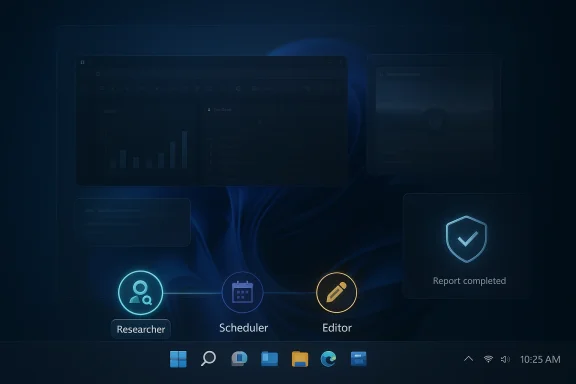
The timing is important. Microsoft’s Windows Insider release notes for builds 26100.8313 and 26200.8313 explicitly introduce “Agents on Taskbar”, describing a new way to monitor agents directly from the taskbar and noting that the experience supports both first-party and third-party apps. The first named adopter is Researcher in the Microsoft 365 Copilot app, and Microsoft says users will see progress updates, hover states, and notifications when the work finishes.
That is a meaningful evolution from the earlier “Ask Copilot” taskbar concept Microsoft began testing in 2025. In those earlier previews, the taskbar was mostly a quicker entry point into Copilot chat, search-like results, and guided assistance. Now the company is framing the taskbar as a place where long-running, action-oriented agents can live, not just a place where a user asks a question and gets an answer.
The distinction matters because Microsoft is increasingly separating three ideas that used to blur together: chat, search, and agency. Chat is conversational. Search is retrieval. Agency means the software can take steps on the user’s behalf, often across multiple apps, while preserving enough transparency for the user to follow along. Microsoft’s own documentation for Agent Launchers on Windows says these agents are “interactive,” “task-oriented,” “contextually aware,” and “action-capable,” which is a much bigger claim than a simple assistant pane.
At the same time, Microsoft is trying to avoid the backlash that comes from shoving AI into every corner of Windows. The company already walked back the idea of expanding Copilot-style features into simple apps like Notepad, Snipping Tool, Photos, and Widgets after criticism from users who felt the OS was becoming too noisy and too AI-heavy. That retreat does not mean Microsoft is abandoning AI; it means the company is concentrating the effort around higher-value surfaces where AI feels more justifiable, especially productivity, settings, and task orchestration.
This progression reflects a deeper platform ambition. Microsoft is no longer just adding a chatbot to Windows; it is building a discovery and invocation layer for AI workloads. The Agent Launchers framework explains that without a standardized mechanism, every app or Windows surface would need custom integration for every agent, whether via Model Context Protocol, App Actions, or proprietary APIs. Microsoft’s answer is to define a common registration system so agents can be invoked across supporting experiences.
There is also a visual story here. Microsoft says users will be able to hover over the Microsoft 365 Copilot icon to see progress and receive a notification when the report is ready. That suggests a workflow where the taskbar doubles as a status bar for autonomous work. In practical terms, that is a subtle but important shift from prompt-and-response to delegate-and-monitor.
Microsoft also distinguishes agentic experiences from background services. The documentation says Agent Launchers are designed for interactive experiences where users and AI collaborate, not for silent automation. That is an important qualifier, because it frames the feature as something users should observe and guide rather than something that quietly runs away with system privileges.
That said, the productivity case is strongest in environments where users already trust Microsoft 365 and its identity controls. For a business user, an AI agent that can keep a report moving while they switch between Outlook, Teams, Excel, and browser tabs can save time. For a consumer, the value may be less obvious unless the agent reliably reduces friction instead of adding another layer of interface chrome.
Microsoft has been careful to state that these features are still preview-oriented and permission-based. The agent in Windows Settings, for example, can recommend and automate changes only with user permission, and the settings experience is specifically documented as something the user can control or disable through policy. That is reassuring, but caution is still warranted because the underlying trend is clear: Windows is becoming more agent-aware and more action-oriented.
Microsoft’s Agent Launchers model says developers can register an agent statically at install time or dynamically at runtime, depending on authentication, subscriptions, or other conditions. That means a developer can theoretically make an agent available only to paid users, enterprise users, or users signed into a specific service tier. The flexibility is obvious, but so is the complexity.
This is also a strategic hedge for Microsoft. If third-party AI tools become a meaningful part of Windows usage, Microsoft does not want them confined to browsers or standalone desktop apps. It wants them discoverable through Windows itself. That lets Microsoft remain the broker of desktop attention even when the AI assistant is not Microsoft-made. That is classic platform power.
But there is a less flattering possibility too. If too many apps register too many agents, the taskbar could become a cluttered marketplace of quasi-intelligent helpers competing for attention. Microsoft will need to balance discoverability with restraint, or else the feature could become another source of interface noise. The success of this model may depend as much on curation as on capability.
Enterprise customers will evaluate it differently. They will care about controls, policy enforcement, identity, and whether the feature can be managed at scale without introducing new support headaches. Microsoft already documents policy controls for the agent in Settings, which is a good sign that the company understands how important admin manageability is for anything agentic in Windows.
That segmentation is not accidental. Microsoft has spent years turning OS-level intelligence into a subscription lever, and this move continues that pattern. The taskbar may look universal, but the best agent experiences will likely remain tied to Microsoft accounts, Microsoft 365, and approved partner ecosystems. The icon may be on every PC, but the capability will not be.
Microsoft is also leaning into Windows backup and enterprise roaming improvements in the same release cycle, which suggests the company wants AI to be part of a broader managed-device story rather than a consumer-only gimmick. The challenge is making sure that agent features do not outpace the controls enterprises need to govern them.
The broader concern is that a more capable agent surface can blur the line between assistance and control. Even if the AI is not directly changing system state without approval, it may still interpret context, access data, and orchestrate actions in ways that require new trust assumptions from users. That kind of trust is hard to earn and easy to lose.
There is also the issue of user comprehension. Most people can understand a file browser or a settings page. Fewer can accurately reason about what an AI agent may do when asked to “summarize,” “extract,” or “act” across multiple applications. Microsoft will need clear language and visible progress states if it wants people to trust these features on a daily basis.
At the same time, some of the most interesting AI features in Windows are explicitly tied to local or on-device models. The Settings agent, for example, uses a lightweight model called Settings Mu on the device itself. That is a smart move because local inference can reduce latency and ease some privacy concerns, but it does not eliminate the need for good governance around what the model sees and does.
That ladder is visible in the way Microsoft talks about its features. In Settings, AI helps you find and change system options. In File Explorer, it can expose file-related actions. In Ask Copilot, it can surface apps, files, and settings. In Taskbar Agents, it can monitor long-running work. Each step adds more context and more ambition.
This is exactly how Microsoft has usually approached major Windows shifts: create a platform baseline, then layer richer capabilities on top for the newest devices. The pattern is familiar from security, TPM, virtualization, and now AI. The difference is that AI features are much more visible and much easier for users to compare across machines.
For rivals, that means the competition is not only against Copilot chat anymore. It is against Windows itself as an AI orchestration layer. If Microsoft succeeds, users may increasingly expect AI tools to register with the OS rather than merely run inside it. That would be a very Microsoft outcome: the operating system becomes the gravity well.
We should also watch how Microsoft balances rollout scope. The company has been careful to stage features by channel, region, language, device class, and subscription tier. That is prudent, but it also means the experience may look different depending on who you are and what hardware you own. For a platform that wants to feel ubiquitous, selective availability can be both a feature and a frustration.
Microsoft is clearly betting that the future of Windows is not just a smarter assistant, but a smarter operating system that can coordinate work across apps while keeping the user in the loop. That is a compelling vision, especially for enterprise and productivity users, but it will only succeed if the agents are reliable, the permissions are transparent, and the experience stays useful under pressure. For now, the taskbar is no longer just where Windows lives; it is where Windows may begin to act.
Source: Wccftech Microsoft Is Quietly Opening the Windows 11 Taskbar To Third-Party AI Agents That Can Act On Your Desktop
 Overview
The timing is important. Microsoft’s Windows Insider release notes for builds 26100.8313 and 26200.8313 explicitly introduce “Agents on Taskbar”, describing a new way to monitor agents directly from the taskbar and noting that the experience supports both first-party and third-party apps. The first named adopter is Researcher in the Microsoft 365 Copilot app, and Microsoft says users will see progress updates, hover states, and notifications when the work finishes.That is a meaningful evolution from the earlier “Ask Copilot” taskbar concept Microsoft began testing in 2025. In those earlier previews, the taskbar was mostly a quicker entry point into Copilot chat, search-like results, and guided assistance. Now the company is framing the taskbar as a place where long-running, action-oriented agents can live, not just a place where a user asks a question and gets an answer.
The distinction matters because Microsoft is increasingly separating three ideas that used to blur together: chat, search, and agency. Chat is conversational. Search is retrieval. Agency means the software can take steps on the user’s behalf, often across multiple apps, while preserving enough transparency for the user to follow along. Microsoft’s own documentation for Agent Launchers on Windows says these agents are “interactive,” “task-oriented,” “contextually aware,” and “action-capable,” which is a much bigger claim than a simple assistant pane.
At the same time, Microsoft is trying to avoid the backlash that comes from shoving AI into every corner of Windows. The company already walked back the idea of expanding Copilot-style features into simple apps like Notepad, Snipping Tool, Photos, and Widgets after criticism from users who felt the OS was becoming too noisy and too AI-heavy. That retreat does not mean Microsoft is abandoning AI; it means the company is concentrating the effort around higher-value surfaces where AI feels more justifiable, especially productivity, settings, and task orchestration.
From Copilot Buttons to Agent Infrastructure
Windows has already gone through several AI identity phases. First it was Windows Copilot, which appeared as a sidebar-style helper in 2023. Then it became a broader Copilot experience with voice, search, and system-level hooks. Now Microsoft is pushing toward a more modular ecosystem where agents can be registered once and surfaced in many places, including the taskbar.This progression reflects a deeper platform ambition. Microsoft is no longer just adding a chatbot to Windows; it is building a discovery and invocation layer for AI workloads. The Agent Launchers framework explains that without a standardized mechanism, every app or Windows surface would need custom integration for every agent, whether via Model Context Protocol, App Actions, or proprietary APIs. Microsoft’s answer is to define a common registration system so agents can be invoked across supporting experiences.
Why this is different from a sidebar
A sidebar is something you open, use, and dismiss. A taskbar agent, by contrast, can become part of the operating rhythm of the system. Microsoft is signaling that users should be able to launch an agent, let it work in the background, and then monitor its status without losing their place. That is closer to task management than to casual assistant use.There is also a visual story here. Microsoft says users will be able to hover over the Microsoft 365 Copilot icon to see progress and receive a notification when the report is ready. That suggests a workflow where the taskbar doubles as a status bar for autonomous work. In practical terms, that is a subtle but important shift from prompt-and-response to delegate-and-monitor.
- The taskbar becomes a status surface, not just a launcher.
- Agents can be tracked while they work.
- The design favors long-running tasks over instant answers.
- Microsoft is laying groundwork for cross-app agent discovery.
- Third-party developers get a standardized path into the same surface.
What Microsoft Means by “Acting” on Your Desktop
The word “agent” is doing a lot of work here, and Microsoft is using it deliberately. In its documentation, the company describes agents as tools that do more than chat: they can ask clarifying questions, maintain context, and take actions to complete a goal. That places them in a different category from the classic assistant model most Windows users know from earlier Copilot previews.Microsoft also distinguishes agentic experiences from background services. The documentation says Agent Launchers are designed for interactive experiences where users and AI collaborate, not for silent automation. That is an important qualifier, because it frames the feature as something users should observe and guide rather than something that quietly runs away with system privileges.
The productivity case
The strongest argument for these agents is straightforward: some work really does benefit from a persistent, multi-step helper. Researching a topic, compiling data, drafting a report, or gathering evidence from multiple apps are the kinds of tasks that benefit from context retention and visible progress. Microsoft’s own example of Researcher fits that mold neatly.That said, the productivity case is strongest in environments where users already trust Microsoft 365 and its identity controls. For a business user, an AI agent that can keep a report moving while they switch between Outlook, Teams, Excel, and browser tabs can save time. For a consumer, the value may be less obvious unless the agent reliably reduces friction instead of adding another layer of interface chrome.
The desktop automation angle
The more ambitious claim is that these agents can interact with the desktop environment itself. That is where the story becomes both powerful and controversial. Desktop action implies the ability to summarize on-screen content, extract data, and potentially use app context in ways that cross the line from helper to operator.Microsoft has been careful to state that these features are still preview-oriented and permission-based. The agent in Windows Settings, for example, can recommend and automate changes only with user permission, and the settings experience is specifically documented as something the user can control or disable through policy. That is reassuring, but caution is still warranted because the underlying trend is clear: Windows is becoming more agent-aware and more action-oriented.
- The user is no longer just typing prompts.
- The system is increasingly expected to coordinate tasks.
- Agent visibility is being used as a trust mechanism.
- Microsoft is trying to preserve human approval for changes.
- Desktop automation remains the most sensitive part of the strategy.
Third-Party Support Could Be the Real Story
The headline feature is not just that Microsoft is adding agents to the taskbar. It is that the system is being opened to third-party agents. That turns this from a single-product feature into a platform bet, and platform bets are always more consequential than UI tweaks.Microsoft’s Agent Launchers model says developers can register an agent statically at install time or dynamically at runtime, depending on authentication, subscriptions, or other conditions. That means a developer can theoretically make an agent available only to paid users, enterprise users, or users signed into a specific service tier. The flexibility is obvious, but so is the complexity.
What developers gain
For developers, the promise is simple: register once, surface everywhere. If the taskbar, Start menu, search, and other Windows surfaces all understand the same agent registration model, the distribution problem becomes much easier. That could encourage a wave of productivity apps, enterprise tools, and vertical software vendors to expose dedicated agents instead of building one-off integrations.This is also a strategic hedge for Microsoft. If third-party AI tools become a meaningful part of Windows usage, Microsoft does not want them confined to browsers or standalone desktop apps. It wants them discoverable through Windows itself. That lets Microsoft remain the broker of desktop attention even when the AI assistant is not Microsoft-made. That is classic platform power.
What users may gain
For users, third-party support could reduce the need to jump between different assistants that each know one app or one service. A taskbar that knows how to surface a finance agent, a project-management agent, or a document-analysis agent could, in theory, make Windows feel more connected and less fragmented. The best case is a more useful operating system.But there is a less flattering possibility too. If too many apps register too many agents, the taskbar could become a cluttered marketplace of quasi-intelligent helpers competing for attention. Microsoft will need to balance discoverability with restraint, or else the feature could become another source of interface noise. The success of this model may depend as much on curation as on capability.
- Third-party support can broaden the ecosystem quickly.
- Static and dynamic registration create flexible deployment options.
- Discovery across Windows surfaces could reduce app switching.
- Poor curation could make the taskbar feel crowded.
- Microsoft will need strong trust signals for non-Microsoft agents.
Consumer Impact vs. Enterprise Reality
For consumers, the new taskbar agent model will mostly be judged on convenience and annoyance. If a user can delegate a task and see progress without opening multiple apps, the feature will feel helpful. If it intrudes, consumes attention, or requires subscriptions for the most interesting functions, it will feel like yet another Microsoft prompt to pay for AI.Enterprise customers will evaluate it differently. They will care about controls, policy enforcement, identity, and whether the feature can be managed at scale without introducing new support headaches. Microsoft already documents policy controls for the agent in Settings, which is a good sign that the company understands how important admin manageability is for anything agentic in Windows.
Licensing and segmentation
Microsoft 365 Researcher is part of Microsoft 365 Copilot, which means a subscription is required. That is an important warning flag for consumers who assume every new AI feature in Windows 11 is broadly available. The feature may be visible on the taskbar, but the actual functionality can still be gated behind Microsoft 365 licensing and sign-in status.That segmentation is not accidental. Microsoft has spent years turning OS-level intelligence into a subscription lever, and this move continues that pattern. The taskbar may look universal, but the best agent experiences will likely remain tied to Microsoft accounts, Microsoft 365, and approved partner ecosystems. The icon may be on every PC, but the capability will not be.
IT administration and policy
The enterprise story is more encouraging. Microsoft’s documentation for Settings agents says administrators can enable or disable the experience with policy, and that the feature is limited to Windows 11, Copilot+ PCs, and specific languages and geographies. That kind of gating is exactly what IT departments expect when a feature can potentially change settings or interact with user workflows.Microsoft is also leaning into Windows backup and enterprise roaming improvements in the same release cycle, which suggests the company wants AI to be part of a broader managed-device story rather than a consumer-only gimmick. The challenge is making sure that agent features do not outpace the controls enterprises need to govern them.
- Consumers will focus on convenience and subscription value.
- Enterprises will focus on policy, identity, and supportability.
- Microsoft 365 licensing will shape the real feature set.
- Admin controls are essential for trust.
- The agent story is strongest when it fits managed workflows.
Security, Privacy, and Trust Questions
Any time software can “act” on your desktop, the security conversation becomes central. Microsoft knows this, and its documentation repeatedly tries to frame agent behavior as permissioned, transparent, and bounded. The company says the agent in Settings uses on-device AI, gives recommendations, and only makes changes when the user explicitly requests them. That is reassuring, but it is only one piece of the puzzle.The broader concern is that a more capable agent surface can blur the line between assistance and control. Even if the AI is not directly changing system state without approval, it may still interpret context, access data, and orchestrate actions in ways that require new trust assumptions from users. That kind of trust is hard to earn and easy to lose.
A larger attack surface
Third-party agent support creates an ecosystem opportunity, but it also creates a larger attack surface. Every agent that can be registered, launched, and tracked on the system is another implementation to secure, another identity flow to validate, and another place where permissions can go wrong. Microsoft’s own documentation acknowledges that dynamic registration depends on conditions such as authentication and subscriptions, which means the security model has to stay consistent even when availability is not.There is also the issue of user comprehension. Most people can understand a file browser or a settings page. Fewer can accurately reason about what an AI agent may do when asked to “summarize,” “extract,” or “act” across multiple applications. Microsoft will need clear language and visible progress states if it wants people to trust these features on a daily basis.
The privacy balancing act
Microsoft has tried to reassure users in prior Copilot taskbar previews that Ask Copilot uses existing Windows APIs for apps, files, and settings and does not gain access to personal content simply by being present. That framing will matter even more as the system moves from search-like guidance into task-executing agents. The company must convince users that visibility does not equal surveillance.At the same time, some of the most interesting AI features in Windows are explicitly tied to local or on-device models. The Settings agent, for example, uses a lightweight model called Settings Mu on the device itself. That is a smart move because local inference can reduce latency and ease some privacy concerns, but it does not eliminate the need for good governance around what the model sees and does.
- More agents mean more possible points of failure.
- Permission models must remain understandable.
- Transparency is essential for trust.
- On-device AI helps, but it is not a complete solution.
- Third-party support raises the governance bar significantly.
How This Fits Microsoft’s Broader Windows AI Strategy
Microsoft’s strategy is now more coherent than it may have looked a year ago. The company is building AI into specific workflows where it can be useful and measurable: Settings, Click to Do, File Explorer, taskbar search, and now agent monitoring. Rather than turning every app into an AI showcase, Microsoft is trying to create a structured ladder of experiences from simple guidance to action.That ladder is visible in the way Microsoft talks about its features. In Settings, AI helps you find and change system options. In File Explorer, it can expose file-related actions. In Ask Copilot, it can surface apps, files, and settings. In Taskbar Agents, it can monitor long-running work. Each step adds more context and more ambition.
The Copilot+ PC layer
Copilot+ PCs remain an important part of the picture because many of the more advanced experiences depend on hardware and local AI acceleration. Microsoft’s Settings agent, for instance, is documented as available on Copilot+ PCs with specific language and geography requirements. That means the AI story on Windows is still partially a hardware segmentation story.This is exactly how Microsoft has usually approached major Windows shifts: create a platform baseline, then layer richer capabilities on top for the newest devices. The pattern is familiar from security, TPM, virtualization, and now AI. The difference is that AI features are much more visible and much easier for users to compare across machines.
A platform, not a feature
The most interesting takeaway is that Microsoft no longer appears to think of AI as a single feature. It is treating AI as a platform capability with discovery, permissions, progress reporting, and app extensibility. That is why the taskbar matters so much: it is not merely a visual placement, but a sign that Microsoft wants agents to become part of the Windows interaction model.For rivals, that means the competition is not only against Copilot chat anymore. It is against Windows itself as an AI orchestration layer. If Microsoft succeeds, users may increasingly expect AI tools to register with the OS rather than merely run inside it. That would be a very Microsoft outcome: the operating system becomes the gravity well.
- AI is being distributed across multiple Windows surfaces.
- The taskbar is becoming a workflow monitor.
- Copilot+ hardware remains important.
- Microsoft is favoring platform integration over isolated features.
- The OS itself is becoming the agent broker.
Strengths and Opportunities
Microsoft’s approach has several genuine strengths, and if executed well, it could make Windows 11 feel more modern without forcing users into a single rigid assistant experience. The best part is that the company is not relying on one gimmick; it is building a layered model where discovery, action, and progress tracking can work together. That creates room for both consumer convenience and enterprise value.- Unified discovery for agents across apps and Windows surfaces.
- Visible progress tracking for long-running AI work.
- Third-party extensibility that can expand the ecosystem.
- Policy controls that give IT administrators a governance path.
- On-device AI in some experiences, which helps with responsiveness and trust.
- Flexible registration for static and dynamic availability.
- Potential productivity gains for research, reporting, and workflow automation.
Risks and Concerns
The risks are equally real. The first is overreach: users who already resisted Copilot spreading into basic apps may see taskbar agents as another sign that Microsoft is trying to force AI into every interaction. If the feature feels intrusive or redundant, it could damage goodwill rather than build it.- UI clutter if too many agents compete for attention.
- Confusing licensing if the taskbar shows features users cannot actually use.
- Security exposure from third-party agent registration.
- Trust issues around desktop action and context awareness.
- Enterprise friction if policy controls lag behind feature growth.
- User fatigue if AI appears in too many Windows surfaces.
- Inconsistent value if the agents are not reliable enough to matter.
Looking Ahead
The next phase will tell us whether Microsoft is building a genuinely useful agent platform or just layering new labels onto the same Copilot push. The strongest sign to watch is whether third-party developers actually adopt Agent Launchers in meaningful numbers. If they do, the Windows taskbar could become a real control plane for desktop AI rather than a novelty strip at the bottom of the screen.We should also watch how Microsoft balances rollout scope. The company has been careful to stage features by channel, region, language, device class, and subscription tier. That is prudent, but it also means the experience may look different depending on who you are and what hardware you own. For a platform that wants to feel ubiquitous, selective availability can be both a feature and a frustration.
What to watch next
- Whether more Microsoft 365 Copilot agents join the taskbar model.
- Whether third-party agents gain visible launch slots in Windows.
- Whether Microsoft expands the feature beyond Insider and preview channels.
- Whether enterprises get deeper policy and auditing controls.
- Whether users accept taskbar progress tracking as helpful rather than intrusive.
Microsoft is clearly betting that the future of Windows is not just a smarter assistant, but a smarter operating system that can coordinate work across apps while keeping the user in the loop. That is a compelling vision, especially for enterprise and productivity users, but it will only succeed if the agents are reliable, the permissions are transparent, and the experience stays useful under pressure. For now, the taskbar is no longer just where Windows lives; it is where Windows may begin to act.
Source: Wccftech Microsoft Is Quietly Opening the Windows 11 Taskbar To Third-Party AI Agents That Can Act On Your Desktop
