

Microsoft began rolling out Xbox mode for Windows 11 PCs on April 30, 2026, in select markets, bringing a controller-optimized full-screen Xbox interface to laptops, desktops, tablets, and handhelds through Windows Update, the Xbox app, and Game Bar. That sounds like a feature story about convenience, but it is really a strategy story about Microsoft trying to make Windows feel less like Windows when the player picks up a controller. The new mode is not a secret console emulator, nor is it a magic performance switch. It is Microsoft’s most explicit admission yet that the traditional Windows desktop remains the company’s biggest asset and its biggest gaming liability.
For decades, Windows has been the default home of PC gaming because it was open, ubiquitous, and compatible with almost everything. It was also, in living-room terms, deeply awkward. A mouse cursor on a TV, a tiny login box at ten feet, a system tray full of nagging utilities, and a launcher hiding behind another launcher are not the ingredients of a console-like experience.
Xbox mode tries to paper over that friction by giving Windows 11 a dedicated gaming surface. The pitch is simple: install the update, turn on early availability in Windows Update if needed, and use the new Gaming settings, Xbox app, or Game Bar path to enter a full-screen interface built around a controller. Once inside, the user sees a library-forward environment, recent games, app switching, and a cleaner path back to the desktop.
The important word there is path. Microsoft is not replacing Windows with Xbox OS. It is building a more graceful tunnel through Windows for the moments when Windows itself is the problem.
That distinction matters because the hype around “Xbox mode” can easily outrun the feature. This is not a mode that suddenly lets a PC play every Xbox console purchase. It does not turn a $600 mini PC into an Xbox Series X. It does not remove the messy economics of storefronts, launchers, anti-cheat systems, driver packages, overlays, and per-game settings that define PC gaming.
What it does do is give Microsoft a first-party answer to Steam Big Picture, handheld launchers, and the custom shells that hardware vendors have been using to disguise Windows. The company is now saying the quiet part out loud: if Windows wants to compete on handhelds and in the living room, the desktop cannot be the front door.
After the update lands, the Gaming section of Settings should expose the Xbox mode controls. From there, users can choose the preferred home app and decide whether the PC should boot directly into the Xbox experience. The mode can also be entered from Game Bar, the Xbox app, or a controller shortcut depending on the device and configuration.
That boot option is the most interesting part of the setup. Starting directly in Xbox mode can reduce the amount of desktop baggage loaded into the session, which is where some of the early performance-adjacent claims come from. But users should read that carefully: reducing background clutter is not the same thing as rewriting the Windows scheduler, replacing the graphics stack, or guaranteeing higher frame rates.
This is where the guide-style coverage and the product reality begin to diverge. Yes, you can fine-tune the experience by joining the Xbox Insider Hub, enrolling in PC Gaming previews, trimming Game Bar widgets, adding missing executables to the library, and restarting into the mode rather than merely launching it over an already busy desktop session. Those are useful steps. They are also signs that Xbox mode is still a Windows feature layered over a Windows ecosystem.
The setup is easy because Microsoft has made entering the mode easy. The hard part is everything after that: whether your game appears, whether the launcher behaves, whether the controller focus lands where it should, whether the overlay you actually need conflicts with the overlay Microsoft prefers, and whether the experience survives the thousand little edge cases that PC gamers have normalized as the price of freedom.
That is both the promise and the ceiling. A good shell can make a PC feel dramatically better in the living room. It can hide the desktop, aggregate libraries, reduce context switching, and spare users from reaching for a keyboard every time they want to launch something. For a handheld, that difference is not cosmetic; it can determine whether the device feels finished.
But a shell cannot fully solve platform fragmentation. If a game requires a separate launcher login, that launcher still exists. If an anti-cheat system dislikes a configuration, Xbox mode cannot wish the problem away. If a title opens a configuration dialog designed for a mouse, the console illusion breaks in the first thirty seconds.
Microsoft knows this, which is why the language around Xbox mode is careful. The company talks about a console-inspired experience, a controller-optimized interface, and an aggregated game library. It does not promise that Windows has become an Xbox.
That restraint is wise, because the audience most excited by this feature is also the audience most likely to punish overpromising. PC gamers know the difference between a launcher and a platform. Sysadmins know the difference between a mode and an operating environment. Windows enthusiasts know that a new Settings page is not the same thing as a new architecture.
Windows handheld makers have had to compensate with vendor utilities, custom launchers, and increasingly elaborate overlays. Those tools can be clever, but they also make the platform feel fragmented. A ROG handheld, a Lenovo handheld, and an MSI handheld may all run Windows, yet each can feel like its own semi-finished software appliance.
Xbox mode is Microsoft’s attempt to reclaim the top layer. If the operating system vendor provides the controller-first surface, hardware makers can stop reinventing the front end and focus on thermals, controls, displays, battery life, and drivers. That is the theory, at least.
The timing also tells us something about Microsoft’s broader Xbox strategy. The company has spent years moving Xbox away from being just a console brand and toward being an account, subscription, cloud service, developer platform, and PC ecosystem. Xbox mode makes Windows another Xbox endpoint without requiring Windows to stop being Windows.
That is powerful, but it is also politically delicate. Microsoft cannot alienate Steam, Epic, GOG, Nvidia, AMD, OEMs, or the traditional PC gaming audience by turning Windows into a walled Xbox appliance. So the company is trying to have it both ways: a console-like surface over a PC-like foundation.
Some of that expectation is reasonable. If booting directly into the mode avoids loading unnecessary desktop services or background interface components, memory use can improve. If the user cleans up widgets, keeps overlays under control, and launches into a focused session rather than dragging a game through a cluttered desktop, the experience can feel smoother.
But the most honest assessment is that Xbox mode is primarily an experience improvement, not a universal performance upgrade. The graphics driver is still the graphics driver. The CPU and GPU are still bound by power limits, thermals, game engines, and settings. A badly optimized PC port will not become elegant because it was launched from a prettier home screen.
That is not a knock against the feature. Interface friction is real friction. A game that launches easily, resumes cleanly, and can be controlled without a keyboard is meaningfully better for a couch or handheld user even if the benchmark number is unchanged.
The danger is that Microsoft’s branding invites a myth it may later have to manage. “Game Mode” in earlier Windows eras already trained users to be skeptical of toggles that promise optimization without visible explanation. Xbox mode has a better and clearer purpose, but Microsoft should be careful not to let the word “mode” become another container for wishful thinking.
Xbox mode gives Game Bar a more coherent job. In a controller-first gaming session, the overlay becomes the control room: audio controls, performance data, social features, task switching, battery indicators, and access to settings that would otherwise require a trip back to the desktop. The more Xbox mode succeeds, the more Game Bar becomes essential rather than incidental.
That also means users should spend time pruning it. A cluttered Game Bar defeats the point of a streamlined mode. Removing unused widgets, keeping performance and audio controls handy, and avoiding redundant overlays from multiple storefronts will do more for the feel of the experience than many users expect.
The task switcher is another quiet but important piece. A console-like PC session only works if users can move between games, apps, chats, browsers, and media without falling back into desktop chaos. Microsoft’s built-in switcher moves in that direction, though behavior will vary depending on the application and game.
The caveat is obvious: some games pause gracefully when focus changes, and some do not. A true console platform can impose more consistent lifecycle rules. Windows, because it remains Windows, has to negotiate with decades of application behavior.
Manual addition of games is therefore not a side feature. It is a pressure valve. If Xbox mode fails to detect a game, users can add an executable from an internal or external drive, which helps the interface become a real home rather than just a Microsoft-approved catalog.
This matters because PC gamers do not organize their libraries the way console makers wish they did. They have ancient installers, modded games, itch.io experiments, emulators, private builds, launchers-within-launchers, and titles scattered across drives that were named in a moment of impatience three motherboard upgrades ago. A gaming shell that cannot handle that disorder is not a PC gaming shell.
Microsoft’s challenge is to welcome the mess without drowning in it. If Xbox mode becomes too curated, PC gamers will dismiss it as a Game Pass kiosk. If it becomes too permissive without good management tools, it risks becoming another launcher grid full of broken tiles and duplicate entries.
The winning version will need to be opinionated but not paternalistic. It should make common gaming paths frictionless while still letting power users bend the interface to their libraries. That balance is hard, but Windows has no choice if it wants to live comfortably on devices that look and feel like consoles.
The obvious enterprise reaction is to disable or ignore it. In many managed environments, that will be the correct answer. A full-screen gaming surface, Game Bar integration, Xbox app dependencies, and consumer storefront hooks are not exactly what most admins want on a corporate image.
But the broader lesson is more interesting. Xbox mode is another example of Windows becoming more context-sensitive. The OS is increasingly a substrate for specialized experiences: developer environments, cloud PCs, AI surfaces, kiosk workflows, gaming shells, and device-specific modes. That makes Windows more flexible, but it also makes the default image feel less like a fixed thing.
For IT, the question is not simply whether Xbox mode should be allowed. It is whether Microsoft will expose enough policy clarity around these experiences as they multiply. Admins need predictable controls, clean documentation, and update behavior that does not surprise help desks after Patch Tuesday.
Consumer Windows can move fast and delight gamers. Managed Windows has to move carefully and avoid becoming a support lottery. Microsoft often wants both audiences on the same codebase, which is efficient for Microsoft and occasionally exhausting for everyone else.
But the guide format naturally makes the feature look more finished than it is. Step-by-step instructions imply that the main challenge is finding the switch. With Xbox mode, the switch is only the beginning.
The real question is whether Microsoft can make Xbox mode reliable enough that users stop thinking about it. The gold standard is not a feature people admire in screenshots; it is a mode that becomes muscle memory. Press the controller button, see the games, launch the game, switch apps, adjust audio, go back, shut down. No keyboard hunt, no window focus panic, no “why is this launcher behind the game” ritual.
That is where Microsoft has historically struggled on PC. The company can build powerful frameworks, but the last ten percent of polish often gets outsourced to users, OEMs, or third-party tools. Xbox mode will live or die in that last ten percent.
If Microsoft gets it right, the feature becomes boring in the best possible way. If it gets it wrong, it becomes another icon users click once, evaluate for ten minutes, and then abandon for Steam Big Picture, Playnite, Armoury Crate, Legion Space, or whatever launcher already fits their habits.
For a living-room PC, booting directly into Xbox mode may make sense. That machine probably benefits from reduced desktop presence and a controller-first workflow. For a work-and-play desktop, launching Xbox mode on demand is more realistic, because the same PC still needs to behave like a normal productivity machine the rest of the day.
For handhelds, the calculus is harsher. A handheld has less tolerance for awkward transitions because it lacks the comfortable fallback of a full keyboard and mouse. If Xbox mode cannot handle power, resume, library management, quick settings, and controller focus reliably on handhelds, users will judge it more severely than they would on a desktop.
The Xbox Insider Hub is worth mentioning here, but with a warning. Insider builds are for users willing to trade stability for early access. That is a good bargain for enthusiasts and testers; it is a bad bargain for anyone who wants a family-room PC that simply works every Friday night.
The same caution applies to widgets and overlays. The instinct of a PC gamer is to add tools until every metric is visible. The instinct of a console designer is to remove everything that is not needed in the moment. Xbox mode is better when the console designer wins more often.
This gradual release also gives Microsoft room to react. A controller-first shell touches enough hardware combinations, display arrangements, input devices, launchers, and regional services that a single global blast would be reckless. Windows gaming is too varied for a “ship it everywhere and hope” approach.
Still, the staged rollout creates the familiar Windows frustration: two users can follow the same instructions and see different results. One gets the new section in Settings; another gets nothing. One sees the mode from the Xbox app; another waits for an app update or a server-side enablement. That ambiguity is the tax users pay for Microsoft’s modern feature delivery system.
For journalists, it also complicates the narrative. Xbox mode both exists and may not exist on your PC yet. It is generally rolling out, but not universally available. It is part of Windows, but also tied to app experiences and regional availability. Welcome to Windows in 2026.
That messiness does not invalidate the feature. It does mean anyone writing “just do these steps” should leave room for staggered availability, update rings, app versions, and Microsoft’s fondness for flipping switches gradually.
Windows is central to that plan because it is already installed on the machines where PC gamers spend money. Game Pass, cloud gaming, Play Anywhere, the Xbox app, the Microsoft Store, and now Xbox mode are all pieces of the same argument: Xbox is not just hardware; it is the gaming identity Microsoft wants users to carry across screens.
That argument is stronger if Windows can become less annoying for gaming-first devices. A handheld that boots into a coherent Xbox interface makes the brand feel tangible. A living-room PC that launches Game Pass and Steam games from a controller-friendly library makes the platform feel less fragmented. A tablet that can become a casual gaming station without desktop fiddling expands the audience.
But this strategy also raises expectations. If Microsoft says a Windows PC can feel like an Xbox when you want it to, users will compare it to an Xbox. That means fast startup, clean updates, predictable suspend behavior, controller reliability, easy sign-in, family controls, and a store experience that does not feel like a scavenger hunt.
The PC will always be more complex than a console. Microsoft does not need to eliminate that complexity. It needs to hide it at the right moments and expose it only when users ask for it.
A certain amount of promotion is inevitable. This is an Xbox-branded experience, and Game Pass is one of Xbox’s strongest offerings. But the difference between a useful gaming home and an ad carousel is painfully small.
Users will tolerate recommendations if the mode first respects their library. They will tolerate Game Pass surfacing if their installed games are immediate, their non-Microsoft games behave properly, and the interface feels like it belongs to them. They will not tolerate being dumped into a storefront when they wanted to resume the game they played last night.
This is where Microsoft should learn from the best and worst of console dashboards. A console home screen can be efficient, but it can also become a promotional maze. PC users have less patience for that because they know alternatives exist.
Xbox mode has to win the launch moment. If the first screen feels like a command center, users will come back. If it feels like a marketing surface, they will press the shortcut for something else.
That is why Xbox mode’s task switching and desktop escape hatch are so important. A locked-down console-like mode would be a mistake on PC. Users need to know they can leave the shell instantly when something weird happens, because something weird eventually will happen.
At the same time, needing the escape hatch too often defeats the purpose. The mode should make the desktop available, not necessary. If users constantly drop back to Windows to fix focus, launch a missing game, accept a prompt, update a launcher, or close a background window, the illusion collapses.
Microsoft’s advantage is that it controls Windows, Game Bar, the Xbox app, and a major gaming subscription service. Its disadvantage is that it does not control the whole PC gaming ecosystem and should not try to. The trust problem therefore has to be solved through coordination, APIs, sensible defaults, and relentless polish rather than brute force.
That is less glamorous than a launch announcement, but it is the work that matters. A console-like PC is not created by going full screen. It is created by making the full-screen state boringly dependable.
The concrete takeaways are these:
Microsoft’s April 30 rollout of Xbox mode is not the moment Windows becomes a console; it is the moment Microsoft admits that PC gaming needs a first-class interface for the times when the desktop gets in the way. The feature’s first version will be judged by shortcuts, settings, and library detection, but its real test will come over months of updates, handheld launches, couch setups, and user impatience. If Microsoft can keep the openness of Windows while making the gaming surface feel calm, fast, and trustworthy, Xbox mode could become one of those rare Windows features that matters precisely because it makes Windows less visible.
Source: TwistedVoxel How To Enable & Fine-Tune Xbox Mode On Windows 11 PC
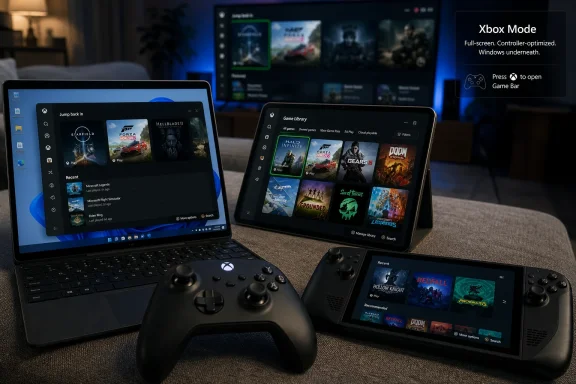 Microsoft Finally Stops Pretending the Desktop Is Good Enough for the Couch
For decades, Windows has been the default home of PC gaming because it was open, ubiquitous, and compatible with almost everything. It was also, in living-room terms, deeply awkward. A mouse cursor on a TV, a tiny login box at ten feet, a system tray full of nagging utilities, and a launcher hiding behind another launcher are not the ingredients of a console-like experience.Xbox mode tries to paper over that friction by giving Windows 11 a dedicated gaming surface. The pitch is simple: install the update, turn on early availability in Windows Update if needed, and use the new Gaming settings, Xbox app, or Game Bar path to enter a full-screen interface built around a controller. Once inside, the user sees a library-forward environment, recent games, app switching, and a cleaner path back to the desktop.
The important word there is path. Microsoft is not replacing Windows with Xbox OS. It is building a more graceful tunnel through Windows for the moments when Windows itself is the problem.
That distinction matters because the hype around “Xbox mode” can easily outrun the feature. This is not a mode that suddenly lets a PC play every Xbox console purchase. It does not turn a $600 mini PC into an Xbox Series X. It does not remove the messy economics of storefronts, launchers, anti-cheat systems, driver packages, overlays, and per-game settings that define PC gaming.
What it does do is give Microsoft a first-party answer to Steam Big Picture, handheld launchers, and the custom shells that hardware vendors have been using to disguise Windows. The company is now saying the quiet part out loud: if Windows wants to compete on handhelds and in the living room, the desktop cannot be the front door.
The Setup Is Easy Because the Hard Part Comes Later
For users, enabling Xbox mode is deliberately mundane. Microsoft wants this to feel like a normal Windows feature, not a registry hack or an Insider-only experiment. The practical path begins in Settings, under Windows Update, where users should enable the option to receive the latest updates as soon as they are available, check for pending updates, install them, and restart if prompted.After the update lands, the Gaming section of Settings should expose the Xbox mode controls. From there, users can choose the preferred home app and decide whether the PC should boot directly into the Xbox experience. The mode can also be entered from Game Bar, the Xbox app, or a controller shortcut depending on the device and configuration.
That boot option is the most interesting part of the setup. Starting directly in Xbox mode can reduce the amount of desktop baggage loaded into the session, which is where some of the early performance-adjacent claims come from. But users should read that carefully: reducing background clutter is not the same thing as rewriting the Windows scheduler, replacing the graphics stack, or guaranteeing higher frame rates.
This is where the guide-style coverage and the product reality begin to diverge. Yes, you can fine-tune the experience by joining the Xbox Insider Hub, enrolling in PC Gaming previews, trimming Game Bar widgets, adding missing executables to the library, and restarting into the mode rather than merely launching it over an already busy desktop session. Those are useful steps. They are also signs that Xbox mode is still a Windows feature layered over a Windows ecosystem.
The setup is easy because Microsoft has made entering the mode easy. The hard part is everything after that: whether your game appears, whether the launcher behaves, whether the controller focus lands where it should, whether the overlay you actually need conflicts with the overlay Microsoft prefers, and whether the experience survives the thousand little edge cases that PC gamers have normalized as the price of freedom.
Xbox Mode Is a Shell, Not a Console Soul Transplant
The most useful way to understand Xbox mode is as a shell. It changes the way the PC presents itself when gaming, especially with a controller, but it does not erase the underlying PC. Your Steam games, Epic games, Battle.net games, Game Pass titles, cloud games, and locally installed Windows apps still exist in their own messy constellation.That is both the promise and the ceiling. A good shell can make a PC feel dramatically better in the living room. It can hide the desktop, aggregate libraries, reduce context switching, and spare users from reaching for a keyboard every time they want to launch something. For a handheld, that difference is not cosmetic; it can determine whether the device feels finished.
But a shell cannot fully solve platform fragmentation. If a game requires a separate launcher login, that launcher still exists. If an anti-cheat system dislikes a configuration, Xbox mode cannot wish the problem away. If a title opens a configuration dialog designed for a mouse, the console illusion breaks in the first thirty seconds.
Microsoft knows this, which is why the language around Xbox mode is careful. The company talks about a console-inspired experience, a controller-optimized interface, and an aggregated game library. It does not promise that Windows has become an Xbox.
That restraint is wise, because the audience most excited by this feature is also the audience most likely to punish overpromising. PC gamers know the difference between a launcher and a platform. Sysadmins know the difference between a mode and an operating environment. Windows enthusiasts know that a new Settings page is not the same thing as a new architecture.
The Handheld War Forced Microsoft’s Hand
Xbox mode did not appear in a vacuum. It is a response to the rise of PC gaming handhelds and the uncomfortable fact that Windows, despite its compatibility advantages, often feels worse than its competitors on small screens. Valve’s Steam Deck succeeded not because Linux magically became easier than Windows for games, but because Valve controlled the entire first-run experience, store experience, update experience, sleep behavior, controller mapping layer, and recovery path.Windows handheld makers have had to compensate with vendor utilities, custom launchers, and increasingly elaborate overlays. Those tools can be clever, but they also make the platform feel fragmented. A ROG handheld, a Lenovo handheld, and an MSI handheld may all run Windows, yet each can feel like its own semi-finished software appliance.
Xbox mode is Microsoft’s attempt to reclaim the top layer. If the operating system vendor provides the controller-first surface, hardware makers can stop reinventing the front end and focus on thermals, controls, displays, battery life, and drivers. That is the theory, at least.
The timing also tells us something about Microsoft’s broader Xbox strategy. The company has spent years moving Xbox away from being just a console brand and toward being an account, subscription, cloud service, developer platform, and PC ecosystem. Xbox mode makes Windows another Xbox endpoint without requiring Windows to stop being Windows.
That is powerful, but it is also politically delicate. Microsoft cannot alienate Steam, Epic, GOG, Nvidia, AMD, OEMs, or the traditional PC gaming audience by turning Windows into a walled Xbox appliance. So the company is trying to have it both ways: a console-like surface over a PC-like foundation.
The Performance Story Is Smaller Than the Branding Suggests
The phrase “Xbox mode” practically begs users to expect performance gains. Console modes sound lean. They sound optimized. They sound like a system that shuts off the nonsense and gives every spare cycle to the game.Some of that expectation is reasonable. If booting directly into the mode avoids loading unnecessary desktop services or background interface components, memory use can improve. If the user cleans up widgets, keeps overlays under control, and launches into a focused session rather than dragging a game through a cluttered desktop, the experience can feel smoother.
But the most honest assessment is that Xbox mode is primarily an experience improvement, not a universal performance upgrade. The graphics driver is still the graphics driver. The CPU and GPU are still bound by power limits, thermals, game engines, and settings. A badly optimized PC port will not become elegant because it was launched from a prettier home screen.
That is not a knock against the feature. Interface friction is real friction. A game that launches easily, resumes cleanly, and can be controlled without a keyboard is meaningfully better for a couch or handheld user even if the benchmark number is unchanged.
The danger is that Microsoft’s branding invites a myth it may later have to manage. “Game Mode” in earlier Windows eras already trained users to be skeptical of toggles that promise optimization without visible explanation. Xbox mode has a better and clearer purpose, but Microsoft should be careful not to let the word “mode” become another container for wishful thinking.
Game Bar Becomes the Control Room Microsoft Always Wanted
Game Bar has long been one of Windows gaming’s stranger pieces. It is useful, sometimes intrusive, occasionally ignored, and always slightly unclear in its identity. Is it an overlay? A capture tool? A social surface? A performance monitor? A widget host? A settings shortcut? The answer has been yes, which is not always a compliment.Xbox mode gives Game Bar a more coherent job. In a controller-first gaming session, the overlay becomes the control room: audio controls, performance data, social features, task switching, battery indicators, and access to settings that would otherwise require a trip back to the desktop. The more Xbox mode succeeds, the more Game Bar becomes essential rather than incidental.
That also means users should spend time pruning it. A cluttered Game Bar defeats the point of a streamlined mode. Removing unused widgets, keeping performance and audio controls handy, and avoiding redundant overlays from multiple storefronts will do more for the feel of the experience than many users expect.
The task switcher is another quiet but important piece. A console-like PC session only works if users can move between games, apps, chats, browsers, and media without falling back into desktop chaos. Microsoft’s built-in switcher moves in that direction, though behavior will vary depending on the application and game.
The caveat is obvious: some games pause gracefully when focus changes, and some do not. A true console platform can impose more consistent lifecycle rules. Windows, because it remains Windows, has to negotiate with decades of application behavior.
The Library Problem Is Where the Dream Meets the Storefronts
The aggregated library is one of Xbox mode’s headline attractions. In principle, users should be able to see Game Pass titles, installed games, and games from major PC storefronts in one place. In practice, library aggregation is always a compromise between discovery, launch reliability, metadata, entitlement checks, and the willingness of storefronts to play nicely.Manual addition of games is therefore not a side feature. It is a pressure valve. If Xbox mode fails to detect a game, users can add an executable from an internal or external drive, which helps the interface become a real home rather than just a Microsoft-approved catalog.
This matters because PC gamers do not organize their libraries the way console makers wish they did. They have ancient installers, modded games, itch.io experiments, emulators, private builds, launchers-within-launchers, and titles scattered across drives that were named in a moment of impatience three motherboard upgrades ago. A gaming shell that cannot handle that disorder is not a PC gaming shell.
Microsoft’s challenge is to welcome the mess without drowning in it. If Xbox mode becomes too curated, PC gamers will dismiss it as a Game Pass kiosk. If it becomes too permissive without good management tools, it risks becoming another launcher grid full of broken tiles and duplicate entries.
The winning version will need to be opinionated but not paternalistic. It should make common gaming paths frictionless while still letting power users bend the interface to their libraries. That balance is hard, but Windows has no choice if it wants to live comfortably on devices that look and feel like consoles.
For Sysadmins, This Is Consumer Tech With Enterprise Echoes
WindowsForum readers know the pattern: a consumer-facing feature arrives with gaming branding, and before long IT has to understand its knobs, policies, update behavior, and support implications. Xbox mode is not an enterprise feature, but it lands on Windows 11 PCs that may also exist in schools, shared workspaces, labs, developer shops, and bring-your-own-device environments.The obvious enterprise reaction is to disable or ignore it. In many managed environments, that will be the correct answer. A full-screen gaming surface, Game Bar integration, Xbox app dependencies, and consumer storefront hooks are not exactly what most admins want on a corporate image.
But the broader lesson is more interesting. Xbox mode is another example of Windows becoming more context-sensitive. The OS is increasingly a substrate for specialized experiences: developer environments, cloud PCs, AI surfaces, kiosk workflows, gaming shells, and device-specific modes. That makes Windows more flexible, but it also makes the default image feel less like a fixed thing.
For IT, the question is not simply whether Xbox mode should be allowed. It is whether Microsoft will expose enough policy clarity around these experiences as they multiply. Admins need predictable controls, clean documentation, and update behavior that does not surprise help desks after Patch Tuesday.
Consumer Windows can move fast and delight gamers. Managed Windows has to move carefully and avoid becoming a support lottery. Microsoft often wants both audiences on the same codebase, which is efficient for Microsoft and occasionally exhausting for everyone else.
The TwistedVoxel Guide Gets the User Path Right, but the Bigger Story Is Microsoft’s Bet
The practical guide making the rounds is useful because it tells users what to do first: update Windows, check the Gaming settings, launch from Game Bar or the Xbox app, and then tune the experience with Insider previews, library additions, widgets, and restart behavior. That is the right near-term advice for enthusiasts who want to try the mode today.But the guide format naturally makes the feature look more finished than it is. Step-by-step instructions imply that the main challenge is finding the switch. With Xbox mode, the switch is only the beginning.
The real question is whether Microsoft can make Xbox mode reliable enough that users stop thinking about it. The gold standard is not a feature people admire in screenshots; it is a mode that becomes muscle memory. Press the controller button, see the games, launch the game, switch apps, adjust audio, go back, shut down. No keyboard hunt, no window focus panic, no “why is this launcher behind the game” ritual.
That is where Microsoft has historically struggled on PC. The company can build powerful frameworks, but the last ten percent of polish often gets outsourced to users, OEMs, or third-party tools. Xbox mode will live or die in that last ten percent.
If Microsoft gets it right, the feature becomes boring in the best possible way. If it gets it wrong, it becomes another icon users click once, evaluate for ten minutes, and then abandon for Steam Big Picture, Playnite, Armoury Crate, Legion Space, or whatever launcher already fits their habits.
The Best Version of Xbox Mode Starts Before You Launch It
Fine-tuning Xbox mode is less about secret settings than about discipline. The best experience starts with a clean update state, current GPU drivers, a sane startup list, and a decision about whether this PC is primarily a desktop, a couch box, or a handheld. Microsoft can provide the shell, but users still shape the machine underneath it.For a living-room PC, booting directly into Xbox mode may make sense. That machine probably benefits from reduced desktop presence and a controller-first workflow. For a work-and-play desktop, launching Xbox mode on demand is more realistic, because the same PC still needs to behave like a normal productivity machine the rest of the day.
For handhelds, the calculus is harsher. A handheld has less tolerance for awkward transitions because it lacks the comfortable fallback of a full keyboard and mouse. If Xbox mode cannot handle power, resume, library management, quick settings, and controller focus reliably on handhelds, users will judge it more severely than they would on a desktop.
The Xbox Insider Hub is worth mentioning here, but with a warning. Insider builds are for users willing to trade stability for early access. That is a good bargain for enthusiasts and testers; it is a bad bargain for anyone who wants a family-room PC that simply works every Friday night.
The same caution applies to widgets and overlays. The instinct of a PC gamer is to add tools until every metric is visible. The instinct of a console designer is to remove everything that is not needed in the moment. Xbox mode is better when the console designer wins more often.
The April 30 Rollout Is a Beginning, Not a Verdict
The early rollout strategy is cautious. Microsoft is making Xbox mode available first in select markets and expanding over the following weeks, which is standard cloud-era deployment language but still worth taking seriously. If the feature does not appear immediately on a fully updated machine, that does not necessarily mean the PC is broken.This gradual release also gives Microsoft room to react. A controller-first shell touches enough hardware combinations, display arrangements, input devices, launchers, and regional services that a single global blast would be reckless. Windows gaming is too varied for a “ship it everywhere and hope” approach.
Still, the staged rollout creates the familiar Windows frustration: two users can follow the same instructions and see different results. One gets the new section in Settings; another gets nothing. One sees the mode from the Xbox app; another waits for an app update or a server-side enablement. That ambiguity is the tax users pay for Microsoft’s modern feature delivery system.
For journalists, it also complicates the narrative. Xbox mode both exists and may not exist on your PC yet. It is generally rolling out, but not universally available. It is part of Windows, but also tied to app experiences and regional availability. Welcome to Windows in 2026.
That messiness does not invalidate the feature. It does mean anyone writing “just do these steps” should leave room for staggered availability, update rings, app versions, and Microsoft’s fondness for flipping switches gradually.
The Console-Like PC Is Now Microsoft’s Main Xbox Hardware Argument
The deeper significance of Xbox mode is not that Windows gained a prettier gaming interface. It is that Microsoft’s hardware story is becoming less dependent on a single box under the TV. The company still sells consoles, but its strategic center of gravity has moved toward making Xbox available wherever Microsoft can own the account relationship and experience layer.Windows is central to that plan because it is already installed on the machines where PC gamers spend money. Game Pass, cloud gaming, Play Anywhere, the Xbox app, the Microsoft Store, and now Xbox mode are all pieces of the same argument: Xbox is not just hardware; it is the gaming identity Microsoft wants users to carry across screens.
That argument is stronger if Windows can become less annoying for gaming-first devices. A handheld that boots into a coherent Xbox interface makes the brand feel tangible. A living-room PC that launches Game Pass and Steam games from a controller-friendly library makes the platform feel less fragmented. A tablet that can become a casual gaming station without desktop fiddling expands the audience.
But this strategy also raises expectations. If Microsoft says a Windows PC can feel like an Xbox when you want it to, users will compare it to an Xbox. That means fast startup, clean updates, predictable suspend behavior, controller reliability, easy sign-in, family controls, and a store experience that does not feel like a scavenger hunt.
The PC will always be more complex than a console. Microsoft does not need to eliminate that complexity. It needs to hide it at the right moments and expose it only when users ask for it.
The Feature Works Best When Microsoft Resists Turning It Into an Ad
There is an obvious failure mode for Xbox mode: it becomes a full-screen billboard for Game Pass. Microsoft will be tempted. The surface is large, the audience is valuable, and subscription growth remains one of the company’s gaming obsessions.A certain amount of promotion is inevitable. This is an Xbox-branded experience, and Game Pass is one of Xbox’s strongest offerings. But the difference between a useful gaming home and an ad carousel is painfully small.
Users will tolerate recommendations if the mode first respects their library. They will tolerate Game Pass surfacing if their installed games are immediate, their non-Microsoft games behave properly, and the interface feels like it belongs to them. They will not tolerate being dumped into a storefront when they wanted to resume the game they played last night.
This is where Microsoft should learn from the best and worst of console dashboards. A console home screen can be efficient, but it can also become a promotional maze. PC users have less patience for that because they know alternatives exist.
Xbox mode has to win the launch moment. If the first screen feels like a command center, users will come back. If it feels like a marketing surface, they will press the shortcut for something else.
The Real Upgrade Is Trust
The most underrated part of any gaming interface is trust. Users need to trust that the controller will work, the game will launch, audio will route correctly, cloud saves will sync, overlays will not collide, and exiting the mode will not leave the desktop in a strange state. Trust is built by small boring successes.That is why Xbox mode’s task switching and desktop escape hatch are so important. A locked-down console-like mode would be a mistake on PC. Users need to know they can leave the shell instantly when something weird happens, because something weird eventually will happen.
At the same time, needing the escape hatch too often defeats the purpose. The mode should make the desktop available, not necessary. If users constantly drop back to Windows to fix focus, launch a missing game, accept a prompt, update a launcher, or close a background window, the illusion collapses.
Microsoft’s advantage is that it controls Windows, Game Bar, the Xbox app, and a major gaming subscription service. Its disadvantage is that it does not control the whole PC gaming ecosystem and should not try to. The trust problem therefore has to be solved through coordination, APIs, sensible defaults, and relentless polish rather than brute force.
That is less glamorous than a launch announcement, but it is the work that matters. A console-like PC is not created by going full screen. It is created by making the full-screen state boringly dependable.
The Settings That Matter Most Are the Ones That Keep Windows Out of the Way
The practical advice for early adopters is straightforward, but it should be framed around intent rather than novelty. Xbox mode is worth enabling if you want a controller-first gaming session, a cleaner living-room interface, or a better handheld front end. It is less compelling if your PC gaming life already revolves around a desk, keyboard, mouse, and a launcher setup you like.The concrete takeaways are these:
- Windows 11 users should first enable the option to receive the latest updates as soon as they are available, then check Windows Update and restart after installation if prompted.
- Xbox mode may appear under Settings in the Gaming area, and it can also be launched through the Xbox app or Game Bar once it is available on the device.
- Booting directly into Xbox mode is most useful for living-room PCs and handhelds, where reducing desktop friction matters more than preserving a normal Windows startup flow.
- Users should manually add missing game executables to the library so the mode reflects their actual PC gaming collection rather than only the titles Microsoft detects automatically.
- Game Bar should be treated as the control layer for Xbox mode, which means removing unnecessary widgets and keeping only the controls that help during play.
- Xbox Insider previews can unlock early features, but they are best reserved for enthusiasts who accept bugs as part of the bargain.
Microsoft’s April 30 rollout of Xbox mode is not the moment Windows becomes a console; it is the moment Microsoft admits that PC gaming needs a first-class interface for the times when the desktop gets in the way. The feature’s first version will be judged by shortcuts, settings, and library detection, but its real test will come over months of updates, handheld launches, couch setups, and user impatience. If Microsoft can keep the openness of Windows while making the gaming surface feel calm, fast, and trustworthy, Xbox mode could become one of those rare Windows features that matters precisely because it makes Windows less visible.
Source: TwistedVoxel How To Enable & Fine-Tune Xbox Mode On Windows 11 PC
