

Microsoft began rolling out Xbox mode to Windows 11 PCs in select markets on May 1, 2026, bringing a controller-first, full-screen Xbox interface to eligible laptops, desktops, tablets, and handhelds through a staged update that expands availability over the next several weeks. The move is not just another launcher skin. It is Microsoft’s clearest admission yet that Windows, for all its gaming dominance, still does not feel like a game machine when the keyboard and mouse leave the room. Xbox mode is the company’s attempt to make the PC less like a desk and more like a console without surrendering the messy openness that made PC gaming powerful in the first place.
For decades, Windows has been the default home of PC gaming and one of its most obvious irritants. The platform runs nearly everything, supports nearly every storefront, and gives hardware makers room to experiment, but it still greets a player with the same desktop metaphors built for spreadsheets, browser tabs, driver updaters, and system trays. Xbox mode is Microsoft’s attempt to hide that machinery when the user simply wants to sit down, pick up a controller, and play.
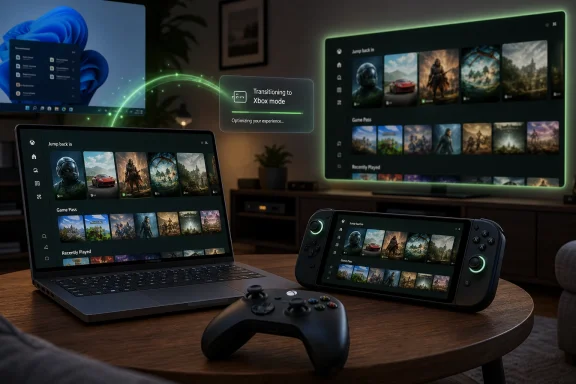
The new experience, previously known as the Xbox Full Screen Experience, gives Windows 11 a console-inspired shell for browsing a game library, launching recently played titles, accessing Game Pass, and moving between games and the Windows desktop. Microsoft says it is rolling out first in select markets and that users should enable “Get the latest updates as soon as they are available” in Windows Update if they want access as soon as their device qualifies. That phrasing matters: this is not a one-click global release so much as a controlled deployment into a large, diverse hardware ecosystem.
The immediate pitch is convenience. Xbox mode gives Windows 11 a controller-optimized interface that makes sense on a handheld, a gaming laptop plugged into a TV, or a desktop tower hiding under an entertainment center. The larger story is strategic. Microsoft wants Xbox to be an experience that follows the player across hardware rather than a box that sits under one television.
That is the right problem to solve, and it is also a difficult one. Steam Big Picture has existed for years because Valve understood that PC gaming needed a couch interface. What Microsoft brings is not just another launcher but the operating system itself, which means Xbox mode can become more deeply integrated than any third-party shell if Microsoft follows through.
Xbox mode tries to split that difference. It does not turn a PC into an Xbox console, and that distinction deserves emphasis. It gives Windows 11 a full-screen, gaming-first interface that can aggregate installed games from multiple PC storefronts while preserving access to the normal desktop when needed. In other words, Microsoft is not walling off the PC. It is building a better front door.
That front door matters most on handhelds. Windows handheld gaming PCs have been one of the industry’s most interesting hardware trends, but they have also exposed the awkwardness of running a desktop OS on a small screen with thumbsticks. Asus, Lenovo, MSI, and others have shown that the hardware can deliver impressive portable PC gaming. The software experience has often been the weak link.
Microsoft’s decision to bring the same idea to laptops, desktops, and tablets suggests it understands the handheld problem is really a Windows problem. A controller-first shell is useful on a seven-inch handheld, but it is also useful on a 65-inch television. The awkwardness is not screen size. The awkwardness is the assumption that every Windows session begins at a desk.
The more interesting detail is that Xbox mode is designed to surface installed games from leading PC storefronts. Microsoft knows it cannot win PC gaming by pretending Steam, Epic Games Store, GOG, Battle.net, and other ecosystems do not exist. A Windows gaming interface that only launches Microsoft Store titles would be irrelevant on arrival.
That is the difference between a platform strategy and a store strategy. A store strategy says, “Come here to buy games.” A platform strategy says, “Start here, even if your games came from somewhere else.” Microsoft has spent years trying to make the Microsoft Store a credible PC gaming destination, with uneven results. Xbox mode sidesteps part of that history by focusing on the session rather than the transaction.
The company still benefits if the Xbox layer becomes the player’s habit. If the first screen after boot is Xbox-branded, Game Pass gains visibility, Microsoft account identity becomes more central, and Xbox services become the connective tissue. But the feature’s usefulness depends on Microsoft resisting the temptation to make that connective tissue feel like a toll booth.
Windows handhelds answered with better compatibility and more hardware variety, but they often arrived with vendor utilities layered on top of Windows rather than a coherent Microsoft-authored experience. Armoury Crate, Legion Space, MSI Center M, and similar tools filled gaps Microsoft left open. They helped, but they also reinforced the sense that Windows was being adapted to handheld gaming rather than designed for it.
Xbox mode is Microsoft’s answer to that embarrassment. It brings the company’s own interface to a category where third parties had been improvising around Windows’ limitations. The old name, Full Screen Experience, sounded like an internal feature flag that escaped into marketing copy. The new name, Xbox mode, is plainer and more ambitious.
The rebrand also signals that Microsoft sees this as broader than a handheld overlay. A “full-screen experience” is a view. An “Xbox mode” is a posture. It implies that Windows can behave like Xbox when the user wants it to, then return to being Windows when the user needs it to.
Microsoft’s advantage is that it owns Windows. It can integrate with sign-in, power states, task switching, update channels, Game Bar, controller support, and device setup in ways Valve cannot fully control on Windows. That gives Xbox mode a theoretical ceiling far above a normal app. It could become the standard gaming shell for Windows machines used in living rooms and handhelds.
Microsoft’s disadvantage is that it owns Windows. The company must support a chaotic range of devices, drivers, overlays, anti-cheat systems, storefronts, launchers, input devices, HDR configurations, and display modes. A console hides complexity because the hardware target is fixed. A Windows mode has to domesticate complexity without pretending it disappeared.
That is why the staged rollout is prudent. If Xbox mode breaks expectations on a niche handheld, a multi-monitor desktop, or a tablet with unusual input behavior, the backlash will not be abstract. PC gamers are tolerant of tinkering when they choose it. They are much less forgiving when a first-party gaming interface adds another layer of inconsistency.
That framing is useful because it lowers the conceptual barrier. A player does not need to understand what shell replacement, launcher aggregation, or controller-first navigation means. They just need to know that the PC has a mode for games. If Microsoft can make the transition fast and reliable, the name will do its job.
The danger is that “Xbox mode” also carries expectations Microsoft may not intend to meet. Some users will assume it means Xbox console compatibility. Others will expect Quick Resume-like behavior, console-level suspend and resume, or a guaranteed no-fuss update model. Windows cannot simply inherit those console traits because it was not built under the same constraints.
Microsoft therefore has to communicate carefully. Xbox mode is a Windows experience inspired by Xbox, not a magic compatibility bridge that turns a PC into a Series X. The more successful the branding becomes, the more important that distinction will be.
But openness is also why Windows gaming is noisy. A player may launch a Steam game that opens a publisher launcher, which asks for credentials, which triggers a browser window, which needs a mouse cursor, which then collides with a controller-first interface. Xbox mode can make the front end cleaner, but it cannot fully sanitize the ecosystem behind it.
This is where Microsoft’s work becomes less glamorous and more important. The difference between a nice demo and a daily habit will be how Xbox mode handles failures: stalled launches, hidden windows, controller focus bugs, update prompts, cloud save conflicts, anti-cheat warnings, and games that assume desktop interaction. A console-like interface is only as convincing as its worst interruption.
The company has one advantage here: it can iterate through Windows Update, Xbox app updates, Game Bar changes, and feedback channels. Microsoft has already framed the rollout as gradual and feedback-driven. That is sensible, but it also means early users should expect evolution rather than perfection.
The more Microsoft integrates Xbox mode into Windows settings and update flows, the more it becomes part of the management surface area. That does not make it dangerous. It does mean the feature should be legible to administrators, especially in education, shared-device, kiosk-adjacent, and bring-your-own-device scenarios.
There is also a reputational issue. Windows 11 has spent years asking users and organizations to accept more cloud hooks, more account integration, more recommendations, and more consumer-facing surfaces. A prominent Xbox-branded mode could be welcomed by gamers while still irritating admins who already think Windows is too eager to advertise Microsoft services.
Microsoft can avoid most of this by making Xbox mode opt-in, transparent, policy-controllable, and easy to exit. The company’s consumer gaming ambitions do not have to conflict with enterprise expectations. But Windows has one brand shared by both worlds, and that is always a balancing act.
That does not mean they are irrational. Staged rollouts exist because Microsoft’s hardware and software ecosystem is too broad to validate perfectly before release. Enthusiasts may want the feature now; cautious users may prefer to wait until others have found the rough edges. Both instincts are reasonable.
For Microsoft, Xbox mode is arriving in a Windows culture shaped by years of update fatigue. The company can ask gamers to turn on early update access, but it has to reward them with stability. A controller-first shell that arrives through Windows Update will be judged not just as an app feature but as part of the operating system’s reliability bargain.
The gradual rollout may soften that risk. It also creates ambiguity. Some users will see articles saying Xbox mode is available and then find nothing on their own machines. Microsoft’s communication needs to be precise about markets, device eligibility, app versions, Windows builds, and timing, because staged deployment without clarity feels like randomness.
That is a high bar. It requires consistent controller focus, sensible text scaling, quick access to settings that matter in games, graceful handling of non-Xbox storefronts, and reliable switching back to the desktop. It also requires restraint. Microsoft must avoid turning Xbox mode into a promotional carousel where the user’s library competes with subscription upsells.
The better model is closer to a dashboard than a storefront. Show the games, show what is installed, show what is playable through Game Pass, show recent activity, and get out of the way. PC gamers are not allergic to commerce, but they are allergic to feeling managed.
If Microsoft gets this right, Xbox mode could become the default environment for a new class of Windows device: not just handhelds, but living-room PCs, compact gaming boxes, and convertible machines that shift between productivity and play. That would make Windows more flexible in a way users can actually feel.
That does not mean the console disappears tomorrow. Consoles still offer simplicity, standardized performance targets, and a purchasing model many players prefer. But the old boundary between Xbox and Windows is becoming porous. The same account, library concepts, services, and interface ideas increasingly span both worlds.
The risk is that convergence produces confusion. If everything is Xbox, then users need to understand what each Xbox-branded thing can and cannot do. A Windows PC in Xbox mode remains a Windows PC. It runs PC games, uses PC storefronts, and inherits PC complexity. Microsoft should celebrate that instead of obscuring it.
The opportunity is larger than branding. If Microsoft can align developer tools, storefront policies, controller expectations, cloud saves, and system UI across Xbox and Windows, it can offer developers and players a continuum that Sony and Nintendo cannot easily match. Xbox mode is a visible piece of that continuum, not the whole machine.
Still, the direction is clear. Microsoft is no longer treating Windows gaming as something that begins and ends with better performance APIs, driver support, and a store app. It is treating the shape of the gaming session as a first-party responsibility. That is overdue.
The move also acknowledges that PC gaming’s future is not confined to the desk. Handhelds, couches, docks, tablets, and compact living-room rigs all demand a different interaction model. Windows can either adapt to those contexts or continue relying on hardware partners and third-party launchers to paper over the gap.
Xbox mode is Microsoft choosing to adapt. Whether it adapts well will depend on execution over months, not the first day of rollout.
Source: GamingTrend Xbox mode coming to select PCs
 Microsoft Is Finally Treating the Living-Room PC as a First-Class Citizen
For decades, Windows has been the default home of PC gaming and one of its most obvious irritants. The platform runs nearly everything, supports nearly every storefront, and gives hardware makers room to experiment, but it still greets a player with the same desktop metaphors built for spreadsheets, browser tabs, driver updaters, and system trays. Xbox mode is Microsoft’s attempt to hide that machinery when the user simply wants to sit down, pick up a controller, and play.The new experience, previously known as the Xbox Full Screen Experience, gives Windows 11 a console-inspired shell for browsing a game library, launching recently played titles, accessing Game Pass, and moving between games and the Windows desktop. Microsoft says it is rolling out first in select markets and that users should enable “Get the latest updates as soon as they are available” in Windows Update if they want access as soon as their device qualifies. That phrasing matters: this is not a one-click global release so much as a controlled deployment into a large, diverse hardware ecosystem.
The immediate pitch is convenience. Xbox mode gives Windows 11 a controller-optimized interface that makes sense on a handheld, a gaming laptop plugged into a TV, or a desktop tower hiding under an entertainment center. The larger story is strategic. Microsoft wants Xbox to be an experience that follows the player across hardware rather than a box that sits under one television.
That is the right problem to solve, and it is also a difficult one. Steam Big Picture has existed for years because Valve understood that PC gaming needed a couch interface. What Microsoft brings is not just another launcher but the operating system itself, which means Xbox mode can become more deeply integrated than any third-party shell if Microsoft follows through.
The Desktop Was Always the Wrong Front Door for Games
The Windows desktop is a magnificent power-user environment and a mediocre gaming lobby. It is flexible, transparent, and endlessly extensible, but it is also full of friction: pop-ups, launchers, overlays, sign-in prompts, update nags, notification banners, and settings panes that assume a mouse pointer is nearby. A console solves those problems by narrowing the user’s choices; Windows historically solved them by giving the user more control and more responsibility.Xbox mode tries to split that difference. It does not turn a PC into an Xbox console, and that distinction deserves emphasis. It gives Windows 11 a full-screen, gaming-first interface that can aggregate installed games from multiple PC storefronts while preserving access to the normal desktop when needed. In other words, Microsoft is not walling off the PC. It is building a better front door.
That front door matters most on handhelds. Windows handheld gaming PCs have been one of the industry’s most interesting hardware trends, but they have also exposed the awkwardness of running a desktop OS on a small screen with thumbsticks. Asus, Lenovo, MSI, and others have shown that the hardware can deliver impressive portable PC gaming. The software experience has often been the weak link.
Microsoft’s decision to bring the same idea to laptops, desktops, and tablets suggests it understands the handheld problem is really a Windows problem. A controller-first shell is useful on a seven-inch handheld, but it is also useful on a 65-inch television. The awkwardness is not screen size. The awkwardness is the assumption that every Windows session begins at a desk.
Xbox Mode Is Less About Game Pass Than It Looks
It would be easy to read Xbox mode as a Game Pass delivery vehicle, because of course it is one. Microsoft’s subscription business benefits when the Xbox app is the player’s starting point, and the mode prominently includes access to the Game Pass catalog. But reducing the feature to subscription funneling misses what Microsoft is trying to do with the Windows gaming stack.The more interesting detail is that Xbox mode is designed to surface installed games from leading PC storefronts. Microsoft knows it cannot win PC gaming by pretending Steam, Epic Games Store, GOG, Battle.net, and other ecosystems do not exist. A Windows gaming interface that only launches Microsoft Store titles would be irrelevant on arrival.
That is the difference between a platform strategy and a store strategy. A store strategy says, “Come here to buy games.” A platform strategy says, “Start here, even if your games came from somewhere else.” Microsoft has spent years trying to make the Microsoft Store a credible PC gaming destination, with uneven results. Xbox mode sidesteps part of that history by focusing on the session rather than the transaction.
The company still benefits if the Xbox layer becomes the player’s habit. If the first screen after boot is Xbox-branded, Game Pass gains visibility, Microsoft account identity becomes more central, and Xbox services become the connective tissue. But the feature’s usefulness depends on Microsoft resisting the temptation to make that connective tissue feel like a toll booth.
The Handheld Wars Forced Microsoft’s Hand
Valve’s Steam Deck did not merely prove demand for handheld PC gaming. It proved that the operating environment could be as important as the silicon. SteamOS feels purpose-built because it is purpose-built: wake the device, see your library, launch a game, suspend, resume, repeat. That simplicity made a Linux-based handheld feel more console-like than many Windows machines with broader game compatibility.Windows handhelds answered with better compatibility and more hardware variety, but they often arrived with vendor utilities layered on top of Windows rather than a coherent Microsoft-authored experience. Armoury Crate, Legion Space, MSI Center M, and similar tools filled gaps Microsoft left open. They helped, but they also reinforced the sense that Windows was being adapted to handheld gaming rather than designed for it.
Xbox mode is Microsoft’s answer to that embarrassment. It brings the company’s own interface to a category where third parties had been improvising around Windows’ limitations. The old name, Full Screen Experience, sounded like an internal feature flag that escaped into marketing copy. The new name, Xbox mode, is plainer and more ambitious.
The rebrand also signals that Microsoft sees this as broader than a handheld overlay. A “full-screen experience” is a view. An “Xbox mode” is a posture. It implies that Windows can behave like Xbox when the user wants it to, then return to being Windows when the user needs it to.
The Real Competition Is Steam Big Picture, Not PlayStation
The console-war frame is tempting but misleading. Xbox mode is not primarily a response to Sony. It is a response to Valve, and to the expectations Valve has set for PC gaming away from the desk. Steam Big Picture, Steam Deck, and SteamOS have shown that a curated front end can make a general-purpose game library feel like a console without requiring the user to buy into a closed console ecosystem.Microsoft’s advantage is that it owns Windows. It can integrate with sign-in, power states, task switching, update channels, Game Bar, controller support, and device setup in ways Valve cannot fully control on Windows. That gives Xbox mode a theoretical ceiling far above a normal app. It could become the standard gaming shell for Windows machines used in living rooms and handhelds.
Microsoft’s disadvantage is that it owns Windows. The company must support a chaotic range of devices, drivers, overlays, anti-cheat systems, storefronts, launchers, input devices, HDR configurations, and display modes. A console hides complexity because the hardware target is fixed. A Windows mode has to domesticate complexity without pretending it disappeared.
That is why the staged rollout is prudent. If Xbox mode breaks expectations on a niche handheld, a multi-monitor desktop, or a tablet with unusual input behavior, the backlash will not be abstract. PC gamers are tolerant of tinkering when they choose it. They are much less forgiving when a first-party gaming interface adds another layer of inconsistency.
The Name Change Says Microsoft Wants This to Become Habit
“Xbox Full Screen Experience” sounded temporary. “Xbox mode” sounds like something that belongs beside sleep mode, tablet mode, and game mode. Naming does not make software better, but it reveals how a company wants users to think about a feature. Microsoft wants this to be an operating state, not a novelty view.That framing is useful because it lowers the conceptual barrier. A player does not need to understand what shell replacement, launcher aggregation, or controller-first navigation means. They just need to know that the PC has a mode for games. If Microsoft can make the transition fast and reliable, the name will do its job.
The danger is that “Xbox mode” also carries expectations Microsoft may not intend to meet. Some users will assume it means Xbox console compatibility. Others will expect Quick Resume-like behavior, console-level suspend and resume, or a guaranteed no-fuss update model. Windows cannot simply inherit those console traits because it was not built under the same constraints.
Microsoft therefore has to communicate carefully. Xbox mode is a Windows experience inspired by Xbox, not a magic compatibility bridge that turns a PC into a Series X. The more successful the branding becomes, the more important that distinction will be.
Openness Is the Selling Point and the Liability
Microsoft’s message leans heavily on the idea that Xbox mode is built on Windows, so players keep the flexibility of PC gaming. That is the correct pitch. PC gamers do not want a console interface if the price is losing mods, storefront choice, custom settings, ultrawide support, input remapping, Discord, capture tools, and the freedom to make a machine behave strangely on purpose.But openness is also why Windows gaming is noisy. A player may launch a Steam game that opens a publisher launcher, which asks for credentials, which triggers a browser window, which needs a mouse cursor, which then collides with a controller-first interface. Xbox mode can make the front end cleaner, but it cannot fully sanitize the ecosystem behind it.
This is where Microsoft’s work becomes less glamorous and more important. The difference between a nice demo and a daily habit will be how Xbox mode handles failures: stalled launches, hidden windows, controller focus bugs, update prompts, cloud save conflicts, anti-cheat warnings, and games that assume desktop interaction. A console-like interface is only as convincing as its worst interruption.
The company has one advantage here: it can iterate through Windows Update, Xbox app updates, Game Bar changes, and feedback channels. Microsoft has already framed the rollout as gradual and feedback-driven. That is sensible, but it also means early users should expect evolution rather than perfection.
Enterprises Will Mostly Ignore It, but IT Will Still Care
For business environments, Xbox mode sounds irrelevant until it is not. Windows 11 runs across consumer and managed devices, and any new shell-like experience raises questions for IT departments that care about policy, app control, user distraction, and support tickets. Most corporate fleets will not suddenly become game consoles, but admins will want clarity on whether the feature can be hidden, blocked, deferred, or controlled.The more Microsoft integrates Xbox mode into Windows settings and update flows, the more it becomes part of the management surface area. That does not make it dangerous. It does mean the feature should be legible to administrators, especially in education, shared-device, kiosk-adjacent, and bring-your-own-device scenarios.
There is also a reputational issue. Windows 11 has spent years asking users and organizations to accept more cloud hooks, more account integration, more recommendations, and more consumer-facing surfaces. A prominent Xbox-branded mode could be welcomed by gamers while still irritating admins who already think Windows is too eager to advertise Microsoft services.
Microsoft can avoid most of this by making Xbox mode opt-in, transparent, policy-controllable, and easy to exit. The company’s consumer gaming ambitions do not have to conflict with enterprise expectations. But Windows has one brand shared by both worlds, and that is always a balancing act.
The Update Path Is a Test of Trust
The instructions for getting Xbox mode are simple: open Settings, go to Windows Update, and enable the option to receive the latest updates as soon as they are available. That simplicity is useful for consumers, but it also ties the feature to a broader trust problem. Many Windows users have learned to be cautious about being first in line for updates.That does not mean they are irrational. Staged rollouts exist because Microsoft’s hardware and software ecosystem is too broad to validate perfectly before release. Enthusiasts may want the feature now; cautious users may prefer to wait until others have found the rough edges. Both instincts are reasonable.
For Microsoft, Xbox mode is arriving in a Windows culture shaped by years of update fatigue. The company can ask gamers to turn on early update access, but it has to reward them with stability. A controller-first shell that arrives through Windows Update will be judged not just as an app feature but as part of the operating system’s reliability bargain.
The gradual rollout may soften that risk. It also creates ambiguity. Some users will see articles saying Xbox mode is available and then find nothing on their own machines. Microsoft’s communication needs to be precise about markets, device eligibility, app versions, Windows builds, and timing, because staged deployment without clarity feels like randomness.
The Best Version of Xbox Mode Makes Windows Disappear
The highest compliment for Xbox mode would be that users forget it is there. Not because the interface is invisible, but because it removes the moments where Windows reminds them they are operating a computer rather than playing a game. The experience succeeds if a controller can carry the user from boot to library to game to shutdown without awkward detours.That is a high bar. It requires consistent controller focus, sensible text scaling, quick access to settings that matter in games, graceful handling of non-Xbox storefronts, and reliable switching back to the desktop. It also requires restraint. Microsoft must avoid turning Xbox mode into a promotional carousel where the user’s library competes with subscription upsells.
The better model is closer to a dashboard than a storefront. Show the games, show what is installed, show what is playable through Game Pass, show recent activity, and get out of the way. PC gamers are not allergic to commerce, but they are allergic to feeling managed.
If Microsoft gets this right, Xbox mode could become the default environment for a new class of Windows device: not just handhelds, but living-room PCs, compact gaming boxes, and convertible machines that shift between productivity and play. That would make Windows more flexible in a way users can actually feel.
The Console and the PC Are Converging, but Not Merging
Xbox mode fits a broader Microsoft pattern: the company is trying to make Xbox less dependent on dedicated console hardware while keeping the Xbox identity meaningful. Game Pass, cloud gaming, Play Anywhere, cross-save, PC releases, and now a Windows Xbox shell all point in the same direction. Xbox is becoming a service layer and interface language as much as a device line.That does not mean the console disappears tomorrow. Consoles still offer simplicity, standardized performance targets, and a purchasing model many players prefer. But the old boundary between Xbox and Windows is becoming porous. The same account, library concepts, services, and interface ideas increasingly span both worlds.
The risk is that convergence produces confusion. If everything is Xbox, then users need to understand what each Xbox-branded thing can and cannot do. A Windows PC in Xbox mode remains a Windows PC. It runs PC games, uses PC storefronts, and inherits PC complexity. Microsoft should celebrate that instead of obscuring it.
The opportunity is larger than branding. If Microsoft can align developer tools, storefront policies, controller expectations, cloud saves, and system UI across Xbox and Windows, it can offer developers and players a continuum that Sony and Nintendo cannot easily match. Xbox mode is a visible piece of that continuum, not the whole machine.
This Rollout Is Small, but the Bet Is Not
The first wave of Xbox mode availability is deliberately limited, and that makes the announcement feel smaller than the strategy behind it. Some players in select markets can download the experience now, with broader availability in those markets over the coming weeks. That is not the language of a finished revolution. It is the language of a platform holder testing a new default.Still, the direction is clear. Microsoft is no longer treating Windows gaming as something that begins and ends with better performance APIs, driver support, and a store app. It is treating the shape of the gaming session as a first-party responsibility. That is overdue.
The move also acknowledges that PC gaming’s future is not confined to the desk. Handhelds, couches, docks, tablets, and compact living-room rigs all demand a different interaction model. Windows can either adapt to those contexts or continue relying on hardware partners and third-party launchers to paper over the gap.
Xbox mode is Microsoft choosing to adapt. Whether it adapts well will depend on execution over months, not the first day of rollout.
The Useful Facts Hiding Behind the Branding
Xbox mode’s launch is easy to overstate and easy to dismiss. It is not a new operating system, and it is not a console emulator. It is a serious interface change because it tries to make Windows 11 behave better in the places where Windows has traditionally felt least comfortable.- Xbox mode is rolling out gradually to eligible Windows 11 PCs in select markets, including laptops, desktops, tablets, and handhelds.
- The experience is controller-optimized and full-screen, with a design inspired by the Xbox console dashboard.
- Microsoft says users can move between Xbox mode and the standard Windows 11 desktop rather than being locked into the gaming interface.
- The library view is meant to aggregate games from Xbox Game Pass and installed titles from major PC storefronts.
- The feature was previously known as the Full Screen Experience and was shaped by Microsoft’s work on Windows gaming handhelds.
- Users who want early access should ensure Windows Update is configured to receive the latest updates as soon as they are available.
Source: GamingTrend Xbox mode coming to select PCs
