

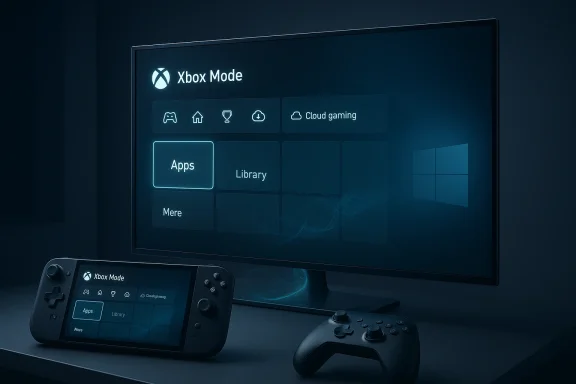
Microsoft is moving Windows 11 closer to the living room with a controller-first, full-screen Xbox Mode that will begin rolling out in April 2026, and the broader significance goes well beyond a simple interface refresh. The feature is part of a longer strategy to make Windows feel more like Xbox across handhelds, laptops, desktops, and tablets, while also setting up Microsoft’s next-generation console roadmap under Project Helix. The result is a more tightly integrated gaming story that could matter as much to OEMs and developers as it does to players.
Microsoft’s Xbox strategy has been drifting toward convergence for years, but 2026 is the moment it becomes unmistakably visible. What began as the Xbox Full Screen Experience on purpose-built handhelds is now being broadened and rebranded into Xbox Mode for Windows 11, with the company positioning it as a console-style layer that sits on top of Windows rather than replacing it. That distinction matters: Microsoft is not trying to make Windows a console OS, but to make it feel like one when gaming is the priority.
The timing is also important. Microsoft used this year’s Game Developers Conference to pair the Windows rollout with its next-console messaging, including Project Helix, a future Xbox platform that the company says is being designed to straddle both console and PC game execution. That makes Xbox Mode more than an experiment in user experience. It becomes the consumer-facing preview of a platform architecture Microsoft wants the market to accept as normal.
This is a meaningful shift for a company that has historically struggled to make Windows gaming feel coherent. For decades, PC gaming on Windows has been powerful but fragmented: launchers, overlay tools, driver utilities, and desktop clutter all compete for attention before the actual game begins. Xbox Mode is Microsoft’s answer to that friction, promising a cleaner front door and a more predictable controller-driven session flow.
The move also reflects a broader market reality. Handheld gaming PCs have become one of the most interesting segments in Windows hardware, and the need for a more console-like UI is obvious there. Microsoft’s challenge is to extend that same simplicity to larger form factors without stripping away the flexibility that makes Windows attractive in the first place. The company appears to be betting that users want both the freedom of a PC and the immediacy of a console.
The Xbox Full Screen Experience was the first real proof of concept. On handhelds, it gave users a console-like landing zone that reduced desktop noise and made the system more appropriate for controller navigation. In practice, that meant booting into a game-oriented surface that prioritized quick access over flexibility, which is exactly what handheld gaming devices need when they are competing with dedicated consoles.
Microsoft then took the next logical step: testing the experience on more than just handheld hardware. Windows Insiders saw preview builds on additional PC form factors, and that widened the significance of the feature from a niche handheld optimization to a general Windows gaming mode. Once the shell can run on desktops and laptops, it is no longer merely a device feature; it becomes a platform statement.
That evolution also aligns with Microsoft’s broader desire to make the Xbox brand feel larger than a box under the television. If Xbox is increasingly a gaming ecosystem rather than a single console, then a Windows-native Xbox Mode is the right software bridge. It teaches users to expect the Xbox identity wherever they play, not just when they power on a living-room device.
It also helps Microsoft unify how it talks about gaming across Windows and console hardware. That matters because the company has often suffered from fragmented naming and overlapping interface concepts. Cleaner terminology can make a feature easier to adopt, easier to sell, and easier to understand in a retail environment. That may sound small, but it is strategically valuable.
For handhelds, that can be transformative. Users no longer have to treat the machine like a compromised laptop that happens to fit in a bag. Instead, the device can behave more like a dedicated portable console with Windows still available in the background when needed. That is exactly the kind of compromise Microsoft needs if it wants Windows handhelds to feel less clumsy than competing dedicated devices.
For desktops and laptops, the value proposition is more selective. A full-screen gaming layer makes less sense for office machines, but it becomes compelling for living-room PCs, mini PCs, and premium gaming laptops that are frequently used with a controller. The feature is not trying to replace the desktop for everyone; it is trying to create a better session mode for a specific type of play.
This “session over system” model is likely the reason Microsoft can stretch the feature across so many form factors. The company does not need every user to want a console interface all the time. It only needs enough users to want it at the moment they launch a game, browse a library, or jump into cloud gaming.
Microsoft’s rollout acknowledges that reality without giving up the PC proposition. Handheld buyers still want access to Steam, Xbox Game Pass, local installs, emulation, and the wider Windows ecosystem. Xbox Mode is therefore not an attempt to turn handheld PCs into closed consoles; it is an attempt to remove enough friction that the devices feel legitimate as gaming appliances.
That matters competitively because handheld PC gaming is one of the few hardware spaces where software experience can still differentiate products. Specs are converging, screens are getting better, and battery improvements are incremental. UI quality, startup speed, and navigation flow increasingly determine whether a device feels premium or merely expensive.
That flexibility could be especially attractive for OEMs building Windows handhelds. They can advertise a more polished out-of-box gaming state without sacrificing the broader Windows value proposition that makes the category possible in the first place. In other words, Xbox Mode helps handhelds feel more console-like without making them less Windows-like.
That said, Microsoft cannot win on branding alone. If Xbox Mode is sluggish, less customizable, or less stable than existing alternatives, players will simply stay where they are. The experience has to be obviously better in the moments that matter: boot time, game launch, library navigation, and switching back to desktop. That is where user loyalty is earned.
There is also a broader platform implication. By tying Xbox Mode to Microsoft’s game development tooling and next-generation console story, the company is nudging developers toward a more unified ecosystem mindset. That could make the Xbox brand harder to ignore across device categories, even when the underlying hardware is not an Xbox console at all.
If Microsoft can make the Xbox app feel as natural as a console dashboard, it can reduce the psychological distance between “PC gaming” and “Xbox gaming.” That could help the company sell more software, more subscriptions, and more hardware partners on the same identity. It is a subtle but powerful platform move.
That convergence matters because it gives developers a more stable story. Rather than treating console and PC as completely separate launch targets, Microsoft wants studios to see a shared platform architecture with fewer discontinuities. That is a powerful pitch, especially if the tooling and runtime assumptions are genuinely aligned.
It also helps Microsoft future-proof the Xbox brand against hardware transitions. If the platform identity lives across Windows, handhelds, and a next-generation console, then the company is less dependent on any one device category to maintain relevance. That is a smarter long game than relying on one box to define the whole ecosystem.
The risk, of course, is that convergence can also blur identity if it is not executed well. If every device is “Xbox” in name but behaves differently in practice, the strategy becomes confusing instead of elegant. That is why Microsoft’s execution quality will matter more than its roadmap language.
This matters because Microsoft is effectively trying to improve the feel of interaction across multiple surfaces. The controller gets a more coherent gaming shell, while mouse and trackpad users receive a more polished desktop sensation. Taken together, these changes suggest an OS strategy centered on quality of interaction, not just features in a checklist.
That is a welcome shift for Windows. Historically, the platform has been brilliant at capability but less consistent at refinement. Features like haptics and full-screen game mode do not individually redefine Windows, but they contribute to a more deliberate and premium-feeling ecosystem.
That is especially important on high-end devices where consumers expect polish. Gaming laptops, premium handhelds, and creator PCs all compete on perceived quality as much as raw performance. The better Microsoft gets at shaping those details, the more its platform improvements feel designed rather than merely patched in.
The opportunity is not just to satisfy existing Xbox fans, but to convert more Windows users into consistent gaming ecosystem participants. If the experience is smooth enough, Microsoft can make Game Pass, the Xbox app, and future Xbox hardware feel like parts of one coherent product family. That is the kind of platform stickiness competitors envy.
There is also a segmentation risk. Casual players, power users, and enterprise Windows customers do not all want the same thing. Microsoft has to avoid making its gaming emphasis feel intrusive on devices that are primarily used for work, especially if the Xbox branding starts showing up in places users do not expect. That balance will be delicate.
The other question is how quickly developers and OEMs respond. If hardware makers lean into the branding and software teams optimize around the new shell, the feature could become one of the defining Windows gaming changes of 2026. If adoption is hesitant, Xbox Mode may still matter — but more as a symbol of Microsoft’s direction than a force that changes behavior at scale.
Source: fakta.co Xbox Wireless Controller Offers Enhanced Comfort and Multi-Device Connectivity
 Overview
Microsoft’s Xbox strategy has been drifting toward convergence for years, but 2026 is the moment it becomes unmistakably visible. What began as the Xbox Full Screen Experience on purpose-built handhelds is now being broadened and rebranded into Xbox Mode for Windows 11, with the company positioning it as a console-style layer that sits on top of Windows rather than replacing it. That distinction matters: Microsoft is not trying to make Windows a console OS, but to make it feel like one when gaming is the priority.The timing is also important. Microsoft used this year’s Game Developers Conference to pair the Windows rollout with its next-console messaging, including Project Helix, a future Xbox platform that the company says is being designed to straddle both console and PC game execution. That makes Xbox Mode more than an experiment in user experience. It becomes the consumer-facing preview of a platform architecture Microsoft wants the market to accept as normal.
This is a meaningful shift for a company that has historically struggled to make Windows gaming feel coherent. For decades, PC gaming on Windows has been powerful but fragmented: launchers, overlay tools, driver utilities, and desktop clutter all compete for attention before the actual game begins. Xbox Mode is Microsoft’s answer to that friction, promising a cleaner front door and a more predictable controller-driven session flow.
The move also reflects a broader market reality. Handheld gaming PCs have become one of the most interesting segments in Windows hardware, and the need for a more console-like UI is obvious there. Microsoft’s challenge is to extend that same simplicity to larger form factors without stripping away the flexibility that makes Windows attractive in the first place. The company appears to be betting that users want both the freedom of a PC and the immediacy of a console.
Background
Microsoft’s push toward a unified gaming identity did not start with Xbox Mode. It started with years of incremental work around the Xbox app, Game Pass, DirectX improvements, and Windows gaming optimizations that gradually made the platform less hostile to gamers. The recent shift is simply the first time Microsoft has packaged those efforts into a visually and operationally distinct shell.The Xbox Full Screen Experience was the first real proof of concept. On handhelds, it gave users a console-like landing zone that reduced desktop noise and made the system more appropriate for controller navigation. In practice, that meant booting into a game-oriented surface that prioritized quick access over flexibility, which is exactly what handheld gaming devices need when they are competing with dedicated consoles.
Microsoft then took the next logical step: testing the experience on more than just handheld hardware. Windows Insiders saw preview builds on additional PC form factors, and that widened the significance of the feature from a niche handheld optimization to a general Windows gaming mode. Once the shell can run on desktops and laptops, it is no longer merely a device feature; it becomes a platform statement.
That evolution also aligns with Microsoft’s broader desire to make the Xbox brand feel larger than a box under the television. If Xbox is increasingly a gaming ecosystem rather than a single console, then a Windows-native Xbox Mode is the right software bridge. It teaches users to expect the Xbox identity wherever they play, not just when they power on a living-room device.
Why the rebrand matters
The move from “Full Screen Experience” to Xbox Mode is not just marketing polish. It is a branding simplification that makes the feature easier to explain to buyers, reviewers, and OEMs. A generic term describes a behavior; a brand name suggests a platform commitment.It also helps Microsoft unify how it talks about gaming across Windows and console hardware. That matters because the company has often suffered from fragmented naming and overlapping interface concepts. Cleaner terminology can make a feature easier to adopt, easier to sell, and easier to understand in a retail environment. That may sound small, but it is strategically valuable.
What Xbox Mode Actually Changes
At the surface level, Xbox Mode is about presentation. But the practical changes are more meaningful: controller-optimized navigation, a full-screen layout, reduced desktop distractions, and an aggregated gaming entry point that prioritizes play over productivity. It is the difference between “Windows with gaming features” and “gaming-first Windows.”For handhelds, that can be transformative. Users no longer have to treat the machine like a compromised laptop that happens to fit in a bag. Instead, the device can behave more like a dedicated portable console with Windows still available in the background when needed. That is exactly the kind of compromise Microsoft needs if it wants Windows handhelds to feel less clumsy than competing dedicated devices.
For desktops and laptops, the value proposition is more selective. A full-screen gaming layer makes less sense for office machines, but it becomes compelling for living-room PCs, mini PCs, and premium gaming laptops that are frequently used with a controller. The feature is not trying to replace the desktop for everyone; it is trying to create a better session mode for a specific type of play.
Session design over system replacement
One of the smartest aspects of the approach is that Microsoft is not asking users to abandon Windows. Instead, it is offering a layered experience that can be entered and exited as needed. That lowers adoption friction because the familiar desktop remains available, even as the gaming surface becomes more polished and focused.This “session over system” model is likely the reason Microsoft can stretch the feature across so many form factors. The company does not need every user to want a console interface all the time. It only needs enough users to want it at the moment they launch a game, browse a library, or jump into cloud gaming.
- Cleaner startup flow for game-first devices
- Less desktop overhead during play sessions
- Better controller navigation on handhelds and TVs
- Flexible return path to normal Windows
- A stronger Xbox brand presence across devices
The Handheld PC Angle
The handheld market is where Xbox Mode makes the most immediate sense. Devices in this category live or die on usability, because players are constantly negotiating battery life, performance settings, launcher clutter, and touch-friendly navigation. A console-style shell solves the most obvious pain point: Windows itself was never designed to be navigated from a sofa with a gamepad.Microsoft’s rollout acknowledges that reality without giving up the PC proposition. Handheld buyers still want access to Steam, Xbox Game Pass, local installs, emulation, and the wider Windows ecosystem. Xbox Mode is therefore not an attempt to turn handheld PCs into closed consoles; it is an attempt to remove enough friction that the devices feel legitimate as gaming appliances.
That matters competitively because handheld PC gaming is one of the few hardware spaces where software experience can still differentiate products. Specs are converging, screens are getting better, and battery improvements are incremental. UI quality, startup speed, and navigation flow increasingly determine whether a device feels premium or merely expensive.
A better fit for portable use
A handheld often moves between scenarios: commute, couch, hotel, docked monitor, and quick desktop use. That means the operating experience has to be adaptable. Xbox Mode gives Microsoft a way to lean into gaming without locking the machine into gaming-only behavior.That flexibility could be especially attractive for OEMs building Windows handhelds. They can advertise a more polished out-of-box gaming state without sacrificing the broader Windows value proposition that makes the category possible in the first place. In other words, Xbox Mode helps handhelds feel more console-like without making them less Windows-like.
- Stronger first impression at boot
- Easier controller-first navigation
- Less need for third-party launcher overlays
- More coherent gaming brand story
- Better chance of mainstream handheld adoption
Competitive Implications
Microsoft is not introducing Xbox Mode into a vacuum. Valve’s Steam Big Picture Mode and SteamOS have long been the benchmark for controller-friendly gaming on PC, and they established the idea that a couch-friendly interface can be a serious product differentiator. Microsoft’s advantage is not novelty; it is distribution and integration. Windows is everywhere, and Xbox branding gives the feature immediate recognition.That said, Microsoft cannot win on branding alone. If Xbox Mode is sluggish, less customizable, or less stable than existing alternatives, players will simply stay where they are. The experience has to be obviously better in the moments that matter: boot time, game launch, library navigation, and switching back to desktop. That is where user loyalty is earned.
There is also a broader platform implication. By tying Xbox Mode to Microsoft’s game development tooling and next-generation console story, the company is nudging developers toward a more unified ecosystem mindset. That could make the Xbox brand harder to ignore across device categories, even when the underlying hardware is not an Xbox console at all.
Steam, Game Pass, and the ecosystem fight
The competition is not only about interface. It is about where users keep their libraries, subscriptions, and habits. Steam still dominates PC game ownership in the minds of many players, while Game Pass remains Microsoft’s strongest reason to pull users into its own ecosystem. Xbox Mode gives Microsoft a more compelling on-ramp for that ecosystem play.If Microsoft can make the Xbox app feel as natural as a console dashboard, it can reduce the psychological distance between “PC gaming” and “Xbox gaming.” That could help the company sell more software, more subscriptions, and more hardware partners on the same identity. It is a subtle but powerful platform move.
- Valve faces a stronger Windows-native rival to Big Picture workflows
- OEMs get a clearer reason to market gaming devices differently
- Game Pass gains a more console-like front door
- Developers see a more unified target surface
- Microsoft strengthens brand continuity across devices
Project Helix and the Bigger Xbox Roadmap
The real strategic backdrop is Project Helix, Microsoft’s next-generation console roadmap. By signaling that the future Xbox is being designed with both console and PC compatibility in mind, Microsoft is revealing a long-term intention to reduce the wall between its hardware families. Xbox Mode on Windows 11 is the visible consumer layer of that effort.That convergence matters because it gives developers a more stable story. Rather than treating console and PC as completely separate launch targets, Microsoft wants studios to see a shared platform architecture with fewer discontinuities. That is a powerful pitch, especially if the tooling and runtime assumptions are genuinely aligned.
It also helps Microsoft future-proof the Xbox brand against hardware transitions. If the platform identity lives across Windows, handhelds, and a next-generation console, then the company is less dependent on any one device category to maintain relevance. That is a smarter long game than relying on one box to define the whole ecosystem.
Platform convergence as a strategy
Platform convergence is not just about convenience. It can also lower friction for content creators, reduce duplication in testing, and make the ecosystem more predictable for publishers. Microsoft has spent years talking about cross-device continuity; Xbox Mode is one of the clearest practical examples of that promise becoming user-visible.The risk, of course, is that convergence can also blur identity if it is not executed well. If every device is “Xbox” in name but behaves differently in practice, the strategy becomes confusing instead of elegant. That is why Microsoft’s execution quality will matter more than its roadmap language.
- Shared developer expectations
- Less confusion between PC and console positioning
- Stronger consumer recognition of the Xbox ecosystem
- Better long-term continuity for Microsoft hardware
- Potentially lower fragmentation in game targeting
The Role of Input and Haptics
Microsoft’s broader Windows gaming work is not happening in isolation. The same period has also brought attention to more subtle interface improvements, including haptic feedback support for compatible mice and trackpads in preview builds. That may seem unrelated, but it says a lot about the company’s direction: Windows is being tuned for a more tactile, device-aware experience.This matters because Microsoft is effectively trying to improve the feel of interaction across multiple surfaces. The controller gets a more coherent gaming shell, while mouse and trackpad users receive a more polished desktop sensation. Taken together, these changes suggest an OS strategy centered on quality of interaction, not just features in a checklist.
That is a welcome shift for Windows. Historically, the platform has been brilliant at capability but less consistent at refinement. Features like haptics and full-screen game mode do not individually redefine Windows, but they contribute to a more deliberate and premium-feeling ecosystem.
Why small interface details matter
Small interface cues often determine whether users trust a system. A subtle vibration on alignment, a slightly more responsive transition, or a cleaner controller path can make a machine feel thoughtfully designed rather than merely functional. Microsoft seems to understand that the modern Windows experience is increasingly judged by these micro-interactions.That is especially important on high-end devices where consumers expect polish. Gaming laptops, premium handhelds, and creator PCs all compete on perceived quality as much as raw performance. The better Microsoft gets at shaping those details, the more its platform improvements feel designed rather than merely patched in.
- Better tactile feedback for supported hardware
- More premium feel on modern Windows devices
- Improved confidence during precise interactions
- A consistent philosophy across gaming and productivity
- Greater emphasis on ergonomics and usability
Strengths and Opportunities
Microsoft’s Xbox Mode rollout has several clear strengths. It addresses a real usability gap, gives OEMs a better story to tell, and strengthens the broader Xbox identity across multiple device classes. It also arrives at a moment when handheld gaming PCs and living-room PC setups are both looking for a more elegant software front end.The opportunity is not just to satisfy existing Xbox fans, but to convert more Windows users into consistent gaming ecosystem participants. If the experience is smooth enough, Microsoft can make Game Pass, the Xbox app, and future Xbox hardware feel like parts of one coherent product family. That is the kind of platform stickiness competitors envy.
- Stronger Xbox brand consistency across devices
- Better controller-first usability for handhelds
- More compelling OEM differentiation
- A clearer Game Pass entry point
- Potential to reduce reliance on third-party launchers
- A more polished living-room PC story
- Longer-term support for Microsoft’s cross-device ecosystem strategy
Risks and Concerns
The biggest risk is execution. A console-style shell only works if it feels faster, cleaner, and more reliable than the messy desktop it is designed to abstract away. If Xbox Mode adds friction, bugs, or confusing edge cases, users will treat it as optional novelty rather than a reason to engage more deeply with the Xbox ecosystem.There is also a segmentation risk. Casual players, power users, and enterprise Windows customers do not all want the same thing. Microsoft has to avoid making its gaming emphasis feel intrusive on devices that are primarily used for work, especially if the Xbox branding starts showing up in places users do not expect. That balance will be delicate.
- Performance regressions if the layer is too heavy
- User confusion if branding outpaces consistency
- Limited adoption on non-gaming Windows PCs
- Launcher fragmentation if third-party ecosystems resist
- Accessibility gaps if controller flow is not robust
- OEM inconsistency across implementations
- Perception risk if the feature feels like marketing more than utility
Looking Ahead
The next few months will determine whether Xbox Mode becomes a meaningful platform shift or just another Windows feature with a gaming label attached. The key question is not whether the idea is sensible; it is whether Microsoft can make the experience feel obviously better than the status quo. If it can, the company will have created a genuine bridge between Windows and Xbox at the user-interface level.The other question is how quickly developers and OEMs respond. If hardware makers lean into the branding and software teams optimize around the new shell, the feature could become one of the defining Windows gaming changes of 2026. If adoption is hesitant, Xbox Mode may still matter — but more as a symbol of Microsoft’s direction than a force that changes behavior at scale.
- Rollout quality across Windows 11 form factors
- OEM adoption in handhelds and mini PCs
- Integration depth with the Xbox app
- User response to controller-first navigation
- Developer reception to the broader Project Helix roadmap
Source: fakta.co Xbox Wireless Controller Offers Enhanced Comfort and Multi-Device Connectivity
Last edited:
