

Microsoft began rolling out Xbox Mode to Windows 11 PCs on April 30, 2026, bringing a controller-first, full-screen Xbox interface to selected laptops, desktops, and tablets after first previewing the experience on handheld gaming PCs. The feature is not a new operating system, and it is not Windows becoming an Xbox overnight. It is something more strategically revealing: Microsoft is trying to make Windows feel less like a workstation when the user’s intent is simply to play. That sounds cosmetic until you remember that PC gaming’s biggest advantage has always been choice, and its biggest weakness has always been friction.
Xbox Mode is best understood as an admission that the Windows desktop is not always the right front door for games. For decades, Microsoft treated Windows as the neutral stage on which every PC experience should begin: Start menu, taskbar, window chrome, notifications, launchers, drivers, tray icons, and all the other ritual clutter of general-purpose computing. That neutrality is powerful for work, modding, multitasking, streaming, and tinkering. It is less powerful when someone is sitting ten feet from a screen with a controller in hand.
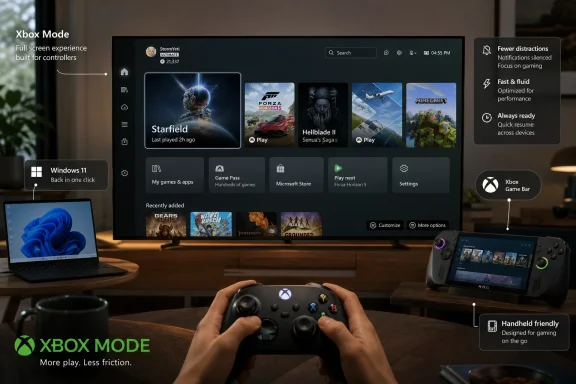
The new mode presents a full-screen Xbox environment designed around gamepad navigation. It aggregates games from Xbox Game Pass and other PC storefronts, lets users launch titles without mousing through the desktop, and keeps Xbox Game Bar close at hand for overlays and app switching. Microsoft says users can leave Xbox Mode and return to the normal Windows 11 experience whenever they want, which matters because the company is not replacing the PC. It is building a gaming foyer in front of it.
That distinction is crucial. Steam’s Big Picture Mode proved long ago that PC players wanted a couch-friendly interface, but Valve could only solve the problem inside its own orbit. Microsoft owns the operating system underneath every launcher, anti-cheat driver, overlay, and graphics control panel, which means its version of the idea can potentially reach deeper than a skin over a store.
The question is whether Microsoft can resist turning that depth into more clutter. Windows users have heard too many promises about “streamlined” experiences that eventually became another layer to manage. Xbox Mode will be judged less by how much it resembles a console dashboard than by how effectively it disappears the parts of Windows that gamers did not ask to see.
That is why Microsoft’s full-screen Xbox experience first made sense on handhelds. It gave Windows a way to boot closer to the player’s intent, not merely to the operating system’s historical assumptions. A handheld gaming PC that opens into a desktop is technically flexible but emotionally clumsy. A handheld that opens into a controller-native gaming hub feels more like a product.
The broader rollout to laptops, desktops, and tablets changes the frame. This is no longer only about catching up to the Steam Deck or improving the out-of-box experience for Windows handheld buyers. It is about giving every Windows 11 machine a second posture: one for computing, one for gaming.
That posture matters because many gaming PCs are already consoles in practice. They sit under TVs, drive big displays, pair with controllers, and spend most of their active life inside games or streaming apps. Yet the user still has to pass through the office-like machinery of Windows to get there. Xbox Mode is Microsoft finally conceding that form factor is not the only thing that defines a device. Context does.
Windows cannot offer that promise across the entire PC ecosystem. It must support ancient peripherals, aggressive overlays, vendor utilities, unsigned tools, exotic display chains, multiple storefronts, and users who rightly expect to alter almost anything. Xbox Mode can make that world feel cleaner, but it cannot make it simple in the same way an Xbox Series X is simple.
That limitation does not make the project pointless. It simply clarifies the job. Xbox Mode should not pretend that a Windows PC is a console; it should give users a console-grade path through the parts of the PC they actually need during a gaming session. If Microsoft gets the boundary right, the desktop remains available without being mandatory.
This is where the ability to jump back and forth between Xbox Mode and regular Windows 11 becomes more than a convenience. It is the philosophical hinge of the feature. Microsoft is not asking PC players to surrender the mess that makes the platform valuable. It is asking whether that mess needs to be visible every time a game launches.
A full-screen Xbox interface gives Game Pass a better stage. It makes Microsoft’s subscription service feel less like one launcher among many and more like the default layer through which PC games are discovered and resumed. That is strategically important at a time when the boundaries between Xbox console, Windows PC, cloud gaming, and handheld gaming continue to blur.
But Microsoft cannot win PC gamers by pretending other stores do not exist. The strength of the announced approach is that the library view is meant to include games from multiple storefronts, not only Microsoft’s own catalog. That is the right posture. PC players do not want another walled garden dressed in console clothing; they want a calmer way to reach the games they already own.
There is still tension here. Every platform holder says it wants openness until the moment openness competes with its monetization strategy. If Xbox Mode becomes a Game Pass billboard with grudging support for Steam, Epic, GOG, Battle.net, and everything else, users will notice immediately. If it becomes a genuinely useful launcher-neutral gaming surface, Microsoft will have built something Windows has needed for years.
This staggered approach is defensible. Microsoft needs telemetry, compatibility data, market-by-market validation, and time to avoid lighting up a feature that might behave differently across GPUs, input devices, display setups, and account configurations. A gaming shell that fails at launch, misidentifies libraries, mishandles focus, or traps users in an awkward controller state would do more damage than a slow rollout.
Still, gradual rollout fatigue is real. Windows users have become accustomed to reading about features they cannot yet access, toggles that may or may not matter, and staged deployments that make the operating system feel less like a product than a lottery. Xbox Mode’s target audience includes enthusiasts who know how to update apps, join Insider rings, and chase feature flags. It also includes ordinary players who will simply wonder why a promised mode is not on their machine.
That uncertainty is especially risky for a feature meant to reduce friction. The first experience of a simplified gaming mode should not be confusion about eligibility. Microsoft can stage the rollout responsibly, but it needs to communicate with more precision than “select users and markets” if it wants Xbox Mode to feel like a platform commitment rather than another experiment.
Microsoft’s answer cannot simply be “we have a full-screen UI too.” It has to leverage what only Microsoft can provide: integration with Windows input systems, Game Bar, driver models, Store entitlements, account identity, display handling, power behavior, and perhaps eventually deeper gaming performance modes. If Xbox Mode is merely an Xbox app stretched across the screen, it will be useful but not transformative.
The more interesting competition is with the idea that Windows is inevitable. For years, the operating system’s enormous game compatibility gave Microsoft a defensive moat. Players tolerated the desktop because the games were there. The Steam Deck challenged that complacency by showing that a different front end, a curated compatibility layer, and a strong suspend-resume experience could make PC gaming feel friendlier without being Windows at all.
That challenge has been good for Microsoft. Xbox Mode looks like the product of a company that finally understands that compatibility alone is not experience. A gaming PC that can run everything but feels annoying to use is vulnerable to a rival that runs less but feels coherent.
In unmanaged consumer environments, Xbox Mode is simply another optional experience. In business or education environments, the calculus changes. IT teams will want to know whether the feature can be disabled, hidden, governed through policy, excluded from provisioned images, or prevented from surfacing on devices that should not present gaming-first affordances. Microsoft’s consumer ambition has a long history of colliding with professional expectations inside Windows.
This is not an argument that Xbox Mode should be kept off Windows 11 Pro or enterprise-capable hardware. The line between work and play devices has dissolved for many users, and a gaming laptop may be both a personal machine and a serious development workstation. But Microsoft needs to treat manageability as part of the product, not as an afterthought documented months later.
The best version of Xbox Mode is context-aware. It should be delightful on a couch PC, natural on a handheld, harmless on a family desktop, and invisible on a managed office machine unless an administrator wants it there. Windows succeeds because it scales across contexts. It also suffers when it forgets that those contexts are not the same.
Xbox Mode attacks that problem from above. By making the shell controller-navigable and by emphasizing Game Bar and task switching, Microsoft is trying to reduce the number of moments when the player must break posture. That is not just a UI preference. It is the difference between a PC that works on a TV and a PC that feels at home on a TV.
The hard part will be everything Xbox Mode does not control. A full-screen shell can launch a game, but it cannot guarantee that a third-party launcher will not demand attention. It can aggregate a library, but it cannot make every installer, patcher, account prompt, and anti-cheat warning controller-friendly. It can smooth the start of the journey without owning every road.
That is why Microsoft’s work with developers and storefronts matters. Xbox Mode’s long-term value depends on whether the wider PC gaming ecosystem treats it as a serious target. If publishers test only the game and ignore the launch path, the experience will remain brittle. If Microsoft can establish expectations for controller-safe flows, cloud save clarity, launcher behavior, and clean app switching, Xbox Mode becomes a platform standard rather than a dashboard.
Windows has long had Game Mode, graphics settings, focus assist features, and assorted performance toggles. The problem is that they feel distributed across the OS, not assembled into a single gaming posture. Xbox Mode could become the place where those capabilities finally make sense together: a visible declaration that the user is playing now, and the system should behave accordingly.
That could matter on low-memory devices, handhelds, and living-room PCs where every background process is more noticeable. It could also matter psychologically. Users should not need to audit tray icons before starting a game. They should be able to trust the platform to quiet itself.
Microsoft will need to be careful, because “optimizing” a Windows session can easily become a source of superstition. PC gamers already live amid performance myths, driver folklore, and tweak guides of varying quality. Xbox Mode should be transparent enough that users understand what it changes, but restrained enough that it does not become another dashboard full of pseudo-performance theater.
That does not mean consoles are disappearing tomorrow. It means the strategic center of Xbox is no longer a black box under the TV. It is an account, a library, a subscription, a developer ecosystem, and increasingly a Windows-adjacent runtime story. In that world, the Windows PC is not a rival to Xbox. It is the largest Xbox-compatible surface Microsoft has.
This is a profound reversal from the old console wars mentality. Microsoft once needed to persuade players to buy Xbox hardware to enter the Xbox ecosystem. Now it wants Xbox to follow players across the hardware they already own. Xbox Mode is the visible interface for that strategy.
The risk is brand dilution. If everything is Xbox, the word can lose its meaning. Microsoft’s task is to make Xbox Mode feel like a coherent gaming experience without flattening the distinction between a console, a handheld, and a general-purpose PC. The common identity should be convenience, not sameness.
PC gamers are allergic to forced simplification. They may want a console-like experience on the couch, but they do not want console-like restrictions when installing mods, changing files, running Discord, adjusting overlays, streaming gameplay, or troubleshooting a stubborn title. A full-screen mode that behaves like a door is welcome. A full-screen mode that behaves like a cage will be rejected.
Microsoft appears to understand this, at least in the product’s first broad rollout. The mode is positioned as an experience users can enter and exit, not a replacement shell imposed on every boot. That gives it room to be useful without becoming ideological.
The real test will come later, when Microsoft is tempted to promote it more aggressively. If setup flows, update prompts, or Xbox app messaging begin nudging users too hard, the goodwill could evaporate. A good gaming mode earns defaults; it does not nag its way into them.
For now, the concrete questions are practical rather than grand. Does it appear on your device? Does it recognize your library accurately? Does it launch games without exposing the seams? Does it handle controllers, overlays, and app switching reliably? Does it make Windows feel quieter when you are playing?
Source: Engadget Microsoft's Xbox mode starts making its way to Windows 11 PCs - Engadget
 Microsoft Turns the Desktop Into the Thing to Escape
Xbox Mode is best understood as an admission that the Windows desktop is not always the right front door for games. For decades, Microsoft treated Windows as the neutral stage on which every PC experience should begin: Start menu, taskbar, window chrome, notifications, launchers, drivers, tray icons, and all the other ritual clutter of general-purpose computing. That neutrality is powerful for work, modding, multitasking, streaming, and tinkering. It is less powerful when someone is sitting ten feet from a screen with a controller in hand.The new mode presents a full-screen Xbox environment designed around gamepad navigation. It aggregates games from Xbox Game Pass and other PC storefronts, lets users launch titles without mousing through the desktop, and keeps Xbox Game Bar close at hand for overlays and app switching. Microsoft says users can leave Xbox Mode and return to the normal Windows 11 experience whenever they want, which matters because the company is not replacing the PC. It is building a gaming foyer in front of it.
That distinction is crucial. Steam’s Big Picture Mode proved long ago that PC players wanted a couch-friendly interface, but Valve could only solve the problem inside its own orbit. Microsoft owns the operating system underneath every launcher, anti-cheat driver, overlay, and graphics control panel, which means its version of the idea can potentially reach deeper than a skin over a store.
The question is whether Microsoft can resist turning that depth into more clutter. Windows users have heard too many promises about “streamlined” experiences that eventually became another layer to manage. Xbox Mode will be judged less by how much it resembles a console dashboard than by how effectively it disappears the parts of Windows that gamers did not ask to see.
The Handheld Was the Prototype, Not the Destination
The first obvious use case for Xbox Mode was the Windows gaming handheld. Devices like the Asus ROG Ally line exposed a long-standing mismatch between Windows and the way portable gaming hardware is actually used. Windows can run the games, drivers, launchers, overlays, and services that players want. But it was never designed to be poked at through a seven-inch screen while the user is balancing battery life, sleep states, controller input, and a library split across half a dozen storefronts.That is why Microsoft’s full-screen Xbox experience first made sense on handhelds. It gave Windows a way to boot closer to the player’s intent, not merely to the operating system’s historical assumptions. A handheld gaming PC that opens into a desktop is technically flexible but emotionally clumsy. A handheld that opens into a controller-native gaming hub feels more like a product.
The broader rollout to laptops, desktops, and tablets changes the frame. This is no longer only about catching up to the Steam Deck or improving the out-of-box experience for Windows handheld buyers. It is about giving every Windows 11 machine a second posture: one for computing, one for gaming.
That posture matters because many gaming PCs are already consoles in practice. They sit under TVs, drive big displays, pair with controllers, and spend most of their active life inside games or streaming apps. Yet the user still has to pass through the office-like machinery of Windows to get there. Xbox Mode is Microsoft finally conceding that form factor is not the only thing that defines a device. Context does.
A Console-Like Shell Cannot Hide a PC Forever
There is a trap in calling Xbox Mode “console-like,” because the phrase invites the wrong comparison. A console is not just a full-screen interface with tiles and controller support. It is a managed hardware target, a predictable update channel, a store model, a certification regime, a suspend-and-resume expectation, and a consumer promise that the game will either work or clearly not be available.Windows cannot offer that promise across the entire PC ecosystem. It must support ancient peripherals, aggressive overlays, vendor utilities, unsigned tools, exotic display chains, multiple storefronts, and users who rightly expect to alter almost anything. Xbox Mode can make that world feel cleaner, but it cannot make it simple in the same way an Xbox Series X is simple.
That limitation does not make the project pointless. It simply clarifies the job. Xbox Mode should not pretend that a Windows PC is a console; it should give users a console-grade path through the parts of the PC they actually need during a gaming session. If Microsoft gets the boundary right, the desktop remains available without being mandatory.
This is where the ability to jump back and forth between Xbox Mode and regular Windows 11 becomes more than a convenience. It is the philosophical hinge of the feature. Microsoft is not asking PC players to surrender the mess that makes the platform valuable. It is asking whether that mess needs to be visible every time a game launches.
Game Pass Needed a Better Front Door on PC
Xbox Mode also serves a business purpose that Microsoft would be foolish to underplay. Game Pass on PC has always had a stronger value proposition than its interface suggested. A subscription library, cloud saves, Xbox Play Anywhere entitlements, achievements, social features, and cross-device identity should add up to a coherent experience. Too often, they have felt like features living inside a Windows app rather than a gaming platform with its own center of gravity.A full-screen Xbox interface gives Game Pass a better stage. It makes Microsoft’s subscription service feel less like one launcher among many and more like the default layer through which PC games are discovered and resumed. That is strategically important at a time when the boundaries between Xbox console, Windows PC, cloud gaming, and handheld gaming continue to blur.
But Microsoft cannot win PC gamers by pretending other stores do not exist. The strength of the announced approach is that the library view is meant to include games from multiple storefronts, not only Microsoft’s own catalog. That is the right posture. PC players do not want another walled garden dressed in console clothing; they want a calmer way to reach the games they already own.
There is still tension here. Every platform holder says it wants openness until the moment openness competes with its monetization strategy. If Xbox Mode becomes a Game Pass billboard with grudging support for Steam, Epic, GOG, Battle.net, and everything else, users will notice immediately. If it becomes a genuinely useful launcher-neutral gaming surface, Microsoft will have built something Windows has needed for years.
The Rollout Strategy Shows Microsoft Still Fears Its Own Scale
Microsoft is rolling out Xbox Mode gradually across select users and markets, and users are being told to enable the Windows Update setting that delivers the latest updates as soon as they are available if they want the feature early. That sounds routine in the Windows era, but it also reveals the awkwardness of shipping consumer experiences through a platform used by hundreds of millions of machines. A console dashboard update can be a platform moment. A Windows feature rollout is often a fog bank.This staggered approach is defensible. Microsoft needs telemetry, compatibility data, market-by-market validation, and time to avoid lighting up a feature that might behave differently across GPUs, input devices, display setups, and account configurations. A gaming shell that fails at launch, misidentifies libraries, mishandles focus, or traps users in an awkward controller state would do more damage than a slow rollout.
Still, gradual rollout fatigue is real. Windows users have become accustomed to reading about features they cannot yet access, toggles that may or may not matter, and staged deployments that make the operating system feel less like a product than a lottery. Xbox Mode’s target audience includes enthusiasts who know how to update apps, join Insider rings, and chase feature flags. It also includes ordinary players who will simply wonder why a promised mode is not on their machine.
That uncertainty is especially risky for a feature meant to reduce friction. The first experience of a simplified gaming mode should not be confusion about eligibility. Microsoft can stage the rollout responsibly, but it needs to communicate with more precision than “select users and markets” if it wants Xbox Mode to feel like a platform commitment rather than another experiment.
The Real Competition Is Not Just Steam Big Picture
It is tempting to frame Xbox Mode as Microsoft’s answer to Steam Big Picture, but that undersells the competitive field. Valve’s advantage is cultural as much as technical. Steam is where many PC gamers already live, and the Steam Deck proved that a Linux-based handheld could feel more appliance-like than Windows while still preserving enough PC flexibility to satisfy enthusiasts.Microsoft’s answer cannot simply be “we have a full-screen UI too.” It has to leverage what only Microsoft can provide: integration with Windows input systems, Game Bar, driver models, Store entitlements, account identity, display handling, power behavior, and perhaps eventually deeper gaming performance modes. If Xbox Mode is merely an Xbox app stretched across the screen, it will be useful but not transformative.
The more interesting competition is with the idea that Windows is inevitable. For years, the operating system’s enormous game compatibility gave Microsoft a defensive moat. Players tolerated the desktop because the games were there. The Steam Deck challenged that complacency by showing that a different front end, a curated compatibility layer, and a strong suspend-resume experience could make PC gaming feel friendlier without being Windows at all.
That challenge has been good for Microsoft. Xbox Mode looks like the product of a company that finally understands that compatibility alone is not experience. A gaming PC that can run everything but feels annoying to use is vulnerable to a rival that runs less but feels coherent.
Enterprise Windows and Living-Room Windows Are Now Uneasy Roommates
For WindowsForum.com readers, the enterprise angle should not be ignored. Windows 11 is already a platform that spans consumer laptops, managed desktops, school devices, kiosks, workstations, and gaming rigs. Adding an Xbox-branded mode to laptops, desktops, and tablets will inevitably raise questions for administrators who care less about couch gaming and more about image control, policy surfaces, and user distraction.In unmanaged consumer environments, Xbox Mode is simply another optional experience. In business or education environments, the calculus changes. IT teams will want to know whether the feature can be disabled, hidden, governed through policy, excluded from provisioned images, or prevented from surfacing on devices that should not present gaming-first affordances. Microsoft’s consumer ambition has a long history of colliding with professional expectations inside Windows.
This is not an argument that Xbox Mode should be kept off Windows 11 Pro or enterprise-capable hardware. The line between work and play devices has dissolved for many users, and a gaming laptop may be both a personal machine and a serious development workstation. But Microsoft needs to treat manageability as part of the product, not as an afterthought documented months later.
The best version of Xbox Mode is context-aware. It should be delightful on a couch PC, natural on a handheld, harmless on a family desktop, and invisible on a managed office machine unless an administrator wants it there. Windows succeeds because it scales across contexts. It also suffers when it forgets that those contexts are not the same.
Controller-First Design Is a Bigger Shift Than It Looks
The PC has spent most of its history assuming a keyboard and mouse are available, even when games themselves do not. Controller support inside games is mature; controller support around games remains uneven. Launchers, sign-in prompts, permission dialogs, mod managers, cloud sync conflicts, graphics settings utilities, and update pop-ups still drag players back into the world of pointers and text fields.Xbox Mode attacks that problem from above. By making the shell controller-navigable and by emphasizing Game Bar and task switching, Microsoft is trying to reduce the number of moments when the player must break posture. That is not just a UI preference. It is the difference between a PC that works on a TV and a PC that feels at home on a TV.
The hard part will be everything Xbox Mode does not control. A full-screen shell can launch a game, but it cannot guarantee that a third-party launcher will not demand attention. It can aggregate a library, but it cannot make every installer, patcher, account prompt, and anti-cheat warning controller-friendly. It can smooth the start of the journey without owning every road.
That is why Microsoft’s work with developers and storefronts matters. Xbox Mode’s long-term value depends on whether the wider PC gaming ecosystem treats it as a serious target. If publishers test only the game and ignore the launch path, the experience will remain brittle. If Microsoft can establish expectations for controller-safe flows, cloud save clarity, launcher behavior, and clean app switching, Xbox Mode becomes a platform standard rather than a dashboard.
The Best Feature May Be the One Users Barely Notice
The most promising part of Xbox Mode is not the visual resemblance to Xbox. It is the possibility that Windows can become more intentional about what runs, appears, and interrupts during a gaming session. Reports around the full-screen experience have emphasized reduced background activity and fewer distractions, which points to a more important ambition than library browsing.Windows has long had Game Mode, graphics settings, focus assist features, and assorted performance toggles. The problem is that they feel distributed across the OS, not assembled into a single gaming posture. Xbox Mode could become the place where those capabilities finally make sense together: a visible declaration that the user is playing now, and the system should behave accordingly.
That could matter on low-memory devices, handhelds, and living-room PCs where every background process is more noticeable. It could also matter psychologically. Users should not need to audit tray icons before starting a game. They should be able to trust the platform to quiet itself.
Microsoft will need to be careful, because “optimizing” a Windows session can easily become a source of superstition. PC gamers already live amid performance myths, driver folklore, and tweak guides of varying quality. Xbox Mode should be transparent enough that users understand what it changes, but restrained enough that it does not become another dashboard full of pseudo-performance theater.
Microsoft Is Rebuilding Xbox Around Windows, Not the Other Way Around
The timing of this rollout matters because Xbox itself is changing. Microsoft has spent years loosening the bond between Xbox as a physical console and Xbox as a service identity spanning console, PC, cloud, mobile, and handheld devices. Bringing Xbox Mode to ordinary Windows 11 PCs is another step in that transition.That does not mean consoles are disappearing tomorrow. It means the strategic center of Xbox is no longer a black box under the TV. It is an account, a library, a subscription, a developer ecosystem, and increasingly a Windows-adjacent runtime story. In that world, the Windows PC is not a rival to Xbox. It is the largest Xbox-compatible surface Microsoft has.
This is a profound reversal from the old console wars mentality. Microsoft once needed to persuade players to buy Xbox hardware to enter the Xbox ecosystem. Now it wants Xbox to follow players across the hardware they already own. Xbox Mode is the visible interface for that strategy.
The risk is brand dilution. If everything is Xbox, the word can lose its meaning. Microsoft’s task is to make Xbox Mode feel like a coherent gaming experience without flattening the distinction between a console, a handheld, and a general-purpose PC. The common identity should be convenience, not sameness.
The Rollout’s Quiet Win Is That It Does Not Demand Loyalty
The smartest part of Xbox Mode, at least as described, is that it does not require users to abandon normal Windows. They can move back and forth. That flexibility sounds mundane, but it is the reason the feature has a chance to survive contact with PC culture.PC gamers are allergic to forced simplification. They may want a console-like experience on the couch, but they do not want console-like restrictions when installing mods, changing files, running Discord, adjusting overlays, streaming gameplay, or troubleshooting a stubborn title. A full-screen mode that behaves like a door is welcome. A full-screen mode that behaves like a cage will be rejected.
Microsoft appears to understand this, at least in the product’s first broad rollout. The mode is positioned as an experience users can enter and exit, not a replacement shell imposed on every boot. That gives it room to be useful without becoming ideological.
The real test will come later, when Microsoft is tempted to promote it more aggressively. If setup flows, update prompts, or Xbox app messaging begin nudging users too hard, the goodwill could evaporate. A good gaming mode earns defaults; it does not nag its way into them.
What Windows Gamers Should Watch as Xbox Mode Arrives
Xbox Mode is not a revolution on day one, and that is fine. Platform shifts in Windows rarely arrive as finished ideas. They arrive as uneven layers, gather feedback, survive or fail through iteration, and only later reveal whether they were cosmetic or structural.For now, the concrete questions are practical rather than grand. Does it appear on your device? Does it recognize your library accurately? Does it launch games without exposing the seams? Does it handle controllers, overlays, and app switching reliably? Does it make Windows feel quieter when you are playing?
- Xbox Mode is rolling out gradually to Windows 11 laptops, desktops, and tablets, so availability will vary by user, region, and update status.
- The mode provides a full-screen, controller-optimized Xbox interface rather than replacing the standard Windows 11 desktop.
- Its most important promise is not visual polish but reduced friction when browsing libraries, launching games, using Game Bar, and switching between apps.
- The feature will be strongest if it treats non-Microsoft storefronts as first-class citizens instead of merely tolerating them.
- Business and education administrators should watch for clear management controls as Xbox-branded consumer features expand across general-purpose Windows devices.
- The long-term test is whether Microsoft can make Windows behave like a gaming appliance when needed without compromising the openness that makes PC gaming valuable.
Source: Engadget Microsoft's Xbox mode starts making its way to Windows 11 PCs - Engadget
