

Windows 7 Windows 7 Ultimate error when saving file

keram617

New Member
Joined
Jul 5, 2010
Messages
8
Hello
I am wondering if anyone else has seen this before where when you try to save a file to a hard drive (not on a network, just local HD - which is not even a Sata Raid) I get the following error"
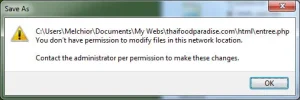
web.webp

And when I click OK, and try to save again, it allows me to save but it also tells me that the file already exists and it is asking me if I would like to override it.

This happens from time to time.

Any help will be appreciated.
Thank you
Mark
 

Saltgrass

Excellent Member
Microsoft Community Contributor
Joined
Oct 16, 2009
Messages
15,155
Why are you saving a file to a network location? Can you save the file to a normal directory?
 

zvit

Honorable Member
Joined
Nov 3, 2009
Messages
2,443
Saltgrass, it looks like a network folder but he most probably has a website and he saves his site files on his local drive.
 

Saltgrass

Excellent Member
Microsoft Community Contributor
Joined
Oct 16, 2009
Messages
15,155
Saltgrass, it looks like a network folder but he most probably has a website and he saves his site files on his local drive.
I am sure you are correctly stating the OP's intentions, but I was wondering if Windows was seeing it differently. Although I am no expert, I have set up a couple of servers for a website just to play. I do not remember any of those setups as having contained a folder with a .com in the name. So perhaps, windows sees the .com and assumes it is a network location and thus throws the error..
 

zvit

Honorable Member
Joined
Nov 3, 2009
Messages
2,443
Perhaps Windows sees it like that. I don't know.
It's common to name your site folders inside wwwroot folders the same name as your domain. I have 4 domains and name them with .com as well on my local drive.
 

Back
Top