

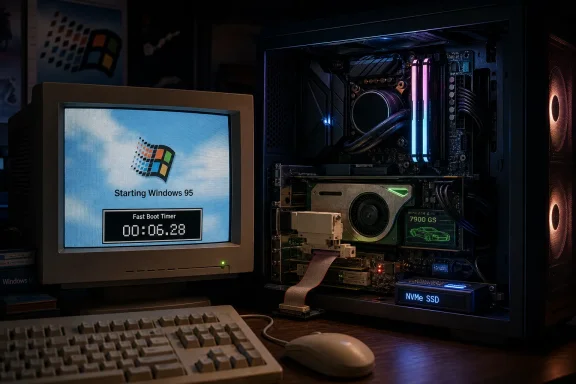
A Redditor known as O_MORES has shown Windows 95 booting on a modern Ryzen 9 9900X gaming PC in roughly six seconds, using contemporary AM5 hardware, DDR5 memory, NVMe storage, legacy PCI adapters, and an older Nvidia GeForce 7900 GS to keep driver support alive. The stunt is funny because it is absurd, but it is interesting because it is not merely emulation theater. It is a reminder that Windows performance has always been as much about hardware assumptions, compatibility layers, and startup baggage as it is about raw silicon. A 30-year-old operating system screaming to life on 2020s hardware tells us less about Windows 95 being “better” than Windows 11, and more about how much computing history still sits underneath the modern desktop.
The headline number is the hook: Windows 95 at the desktop in about six seconds. That is the kind of result that makes every old PC tweaker instinctively sit up, because boot time was once a visible measurement of system virtue. A machine that reached the desktop quickly felt disciplined, clean, almost morally superior.
But the important detail is that this is not a normal retro build. O_MORES reportedly used a Ryzen 9 9900X, 64GB of DDR5-6400, a modern motherboard, and NVMe storage, while bridging the hardware generation gap with legacy expansion cards and adapters. Windows 95 was never designed for this platform, and the fact that it can be made to work at all says as much about PC compatibility culture as it does about the operating system.
The catch, of course, is that this is Windows 95. It is not a secure modern desktop, not a supported gaming platform, and not a system anyone should connect casually to the contemporary internet. It is a museum exhibit wired into a drag racer.
That makes the result more charming, not less. A pure benchmark would be boring; a 1995 operating system bolted onto Zen 5-class hardware is a cultural artifact with a frame counter.
A mid-1990s PC did not need to initialize the same security stack, device ecosystem, firmware negotiation, cloud identity plumbing, update mechanisms, telemetry frameworks, virtualization features, endpoint protection layers, and background services expected today. It also did not need to defend itself against the modern internet. The operating system was lean because the job was smaller.
That does not make today’s bloat imaginary. Windows 11 carries more commercial furniture than many users want, from promotional surfaces to AI-adjacent features to background integrations that feel less like user benefit and more like ecosystem positioning. But it is too easy to flatten every modern subsystem into “bloat” and ignore the legitimate complexity of a machine that must handle secure boot, BitLocker, TPM-backed credentials, Wi-Fi roaming, sleep states, GPU scheduling, high-DPI displays, USB-C docks, Bluetooth audio, cloud sync, and enterprise management.
Windows 95 had the luxury of not knowing what was coming. Windows 11 has the burden of having inherited all of it.
Windows 95 was designed in an era when a fast desktop CPU might be measured in tens or low hundreds of megahertz. A Ryzen 9 9900X is not merely faster; it exists in a different physical universe. Even if the old operating system can only sensibly use a fraction of the machine’s RAM and cannot exploit the CPU like a modern OS, the single-threaded headroom is comical.
That is why this build lands somewhere between engineering and slapstick. The operating system is not gracefully scaling into the future; it is being carried there by a mountain of modern performance and a handful of carefully chosen old parts. The GeForce 7900 GS matters not because it is powerful by current standards, but because it belongs to the last broad era where drivers still gave this kind of experiment a fighting chance.
The PCIe-to-PCI bridge is just as important. Without a way to attach period-friendly expansion cards, the system would be trapped between an old OS that expects legacy devices and a new motherboard that no longer has room for them. The adapter is the translator at a family reunion where half the guests speak ISA, PCI, ACPI, and VxD-era Windows, and the other half arrived with PCIe lanes and UEFI assumptions.
But frame rates at that level are spectacle, not usability. The monitor will not display most of those frames, the input path may not benefit cleanly, and older games can behave strangely when timing assumptions are violated. Some engines tie physics, animation, menu behavior, or input feel to frame timing in ways that modern players only discover when an old title suddenly runs much too fast.
That does not make the benchmark worthless. It demonstrates the huge gulf between late-1990s game workloads and contemporary hardware capability, even when constrained by old drivers and compatibility hacks. It also shows why retro gaming is not simply about “more speed.” Sometimes the authentic experience requires slowing the machine down, capping frames, choosing period-correct APIs, or accepting the limitations that shaped the game in the first place.
There is a reason retro enthusiasts care about CRTs, sound cards, MIDI modules, driver versions, and era-appropriate GPUs. Performance is only one axis of the experience. The rest is timing, compatibility, sound, latency, and the strange texture of a platform behaving exactly as badly as it once did.
Virtualization is useful, safer, and more practical. It is also an abstraction. Bare-metal retrocomputing forces the operating system to confront actual firmware, actual buses, actual interrupt behavior, actual drivers, and actual hardware limitations.
That is where PC history becomes unusually durable. The IBM-compatible lineage is messy, compromised, and full of ghosts, but those ghosts are exactly what make experiments like this possible. The PC survived by layering new standards over old assumptions rather than cleanly replacing everything at once.
Modern systems are finally shedding more of that legacy. UEFI displaced traditional BIOS behavior, secure boot changed the trust model, 64-bit Windows became the norm, legacy ports disappeared, and driver signing hardened. Those changes are sensible. They also mean that every successful “old Windows on new hardware” build is a temporary victory against the direction of travel.
But memory edits aggressively. Windows 95 was also unstable, insecure, driver-sensitive, and prone to the kinds of failures that trained a generation to reinstall the operating system as routine maintenance. Plug and Play was famous partly because it so often became Plug and Pray. A bad driver could ruin an afternoon, and a misbehaving application could take the whole system with it.
The old desktop felt simpler because it exposed fewer ambitions. Microsoft was not yet trying to make the OS a subscription gateway, an advertising surface, an AI launcher, and a cloud identity hub all at once. Windows was still primarily the thing that ran your programs and mediated your hardware.
That distinction matters. The lesson from Windows 95 is not that Microsoft should resurrect a 1995 architecture. The lesson is that users still respond to operating systems that appear to respect their attention.
Still, Windows 11 often feels slower than its hardware because the friction moved. It is not always the boot process; it is the post-boot settling period, the background updates, the account prompts, the search latency, the settings sprawl, and the sense that the operating system has its own agenda. Users may reach the desktop quickly, then spend the next minute watching the machine finish becoming itself.
That is where projects like O_MORES’ build hit a nerve. They remind enthusiasts of a time when the operating system felt like a launchpad rather than a destination. You booted the PC to use applications, play games, explore files, and configure hardware. The OS had personality, but it was not constantly asking to be the main character.
Microsoft cannot simply subtract 30 years of platform responsibility. But it can decide how much commercial and experiential weight it adds on top of that responsibility.
This is why retro builds are so often defined by strange component choices. The fastest part is not always the best part. The best part is the one that still speaks the language of the operating system.
For Windows 95, that language includes old driver models, legacy APIs, and assumptions about memory and devices that modern components do not honor. The builder’s job becomes less like assembling a PC and more like negotiating a treaty. Every working subsystem is a concession extracted from time.
That is also why Windows compatibility remains one of Microsoft’s great strategic assets. The company’s ability to carry old software forward has kept businesses, games, tools, and workflows alive long past their expected expiration dates. But the deeper you go into the stack, the more fragile that promise becomes. Applications survive longer than drivers. Drivers survive longer than buses. Buses survive only as long as motherboard makers keep leaving a door open.
That matters because retro Windows projects often sit at the intersection of curiosity and risk. It is one thing to boot an old OS on isolated hardware, run period games, and enjoy the absurdity. It is another to put that system on a network with modern machines, credentials, and internet access.
The safest way to understand this build is as a contained experiment. It is a performance artwork for PC architecture nerds, not a recommendation. If anything, it underlines why modern Windows carries so much security machinery that users rarely appreciate until something goes wrong.
The irony is sharp. The same missing layers that make Windows 95 feel light are the missing layers that make it dangerous. A door without locks is easy to open.
They show where compatibility ends. They show which motherboard firmware still tolerates old assumptions. They show how much of the PC’s famous openness survives in an age of locked-down devices, soldered components, and security-first boot chains.
They also expose the difference between backward compatibility as marketing and backward compatibility as lived experience. A company may claim support for old software, but a hobbyist trying to make an old sound card work through a bridge adapter discovers what support actually means. The edge cases are where the architecture tells the truth.
For Windows enthusiasts, that truth is bittersweet. The PC is still more open and more historically continuous than most consumer computing platforms. But the window for this kind of hardware archaeology is narrowing.
But Microsoft should pay attention to why the story travels. It travels because many users feel that Windows has become less direct. It travels because the old interface, for all its limitations, looked like it belonged to the person sitting at the keyboard.
That is the emotional payload of the project. A 30-year-old OS on a modern Ryzen box does not prove that Windows was better in 1995. It proves that Windows once felt less encumbered by strategies external to the user’s immediate task.
The company’s challenge is not to become smaller in a literal sense. It is to make Windows feel less like a negotiation. Fewer interruptions, fewer forced surfaces, clearer settings, faster local search, better control over background work, and a cleaner distinction between operating system features and Microsoft services would do more for goodwill than another animated icon in the taskbar.
 The Six-Second Boot Is a Party Trick With a Point
The headline number is the hook: Windows 95 at the desktop in about six seconds. That is the kind of result that makes every old PC tweaker instinctively sit up, because boot time was once a visible measurement of system virtue. A machine that reached the desktop quickly felt disciplined, clean, almost morally superior.But the important detail is that this is not a normal retro build. O_MORES reportedly used a Ryzen 9 9900X, 64GB of DDR5-6400, a modern motherboard, and NVMe storage, while bridging the hardware generation gap with legacy expansion cards and adapters. Windows 95 was never designed for this platform, and the fact that it can be made to work at all says as much about PC compatibility culture as it does about the operating system.
The catch, of course, is that this is Windows 95. It is not a secure modern desktop, not a supported gaming platform, and not a system anyone should connect casually to the contemporary internet. It is a museum exhibit wired into a drag racer.
That makes the result more charming, not less. A pure benchmark would be boring; a 1995 operating system bolted onto Zen 5-class hardware is a cultural artifact with a frame counter.
Windows 95 Was Small Because the World Around It Was Small
It is tempting to look at a six-second Windows 95 boot and use it as a club against Windows 11. That temptation should be resisted, at least partly. Windows 95 was built for a computing environment with radically fewer obligations.A mid-1990s PC did not need to initialize the same security stack, device ecosystem, firmware negotiation, cloud identity plumbing, update mechanisms, telemetry frameworks, virtualization features, endpoint protection layers, and background services expected today. It also did not need to defend itself against the modern internet. The operating system was lean because the job was smaller.
That does not make today’s bloat imaginary. Windows 11 carries more commercial furniture than many users want, from promotional surfaces to AI-adjacent features to background integrations that feel less like user benefit and more like ecosystem positioning. But it is too easy to flatten every modern subsystem into “bloat” and ignore the legitimate complexity of a machine that must handle secure boot, BitLocker, TPM-backed credentials, Wi-Fi roaming, sleep states, GPU scheduling, high-DPI displays, USB-C docks, Bluetooth audio, cloud sync, and enterprise management.
Windows 95 had the luxury of not knowing what was coming. Windows 11 has the burden of having inherited all of it.
The Hardware Is Doing the Heavy Lifting
The six-second figure sounds like a Windows miracle until you remember what changed most between 1995 and 2026: storage latency, CPU frequency, memory bandwidth, and firmware behavior. Old Windows machines often felt slow because mechanical hard drives were slow, drivers were fragile, and startup programs accumulated like dust. A modern NVMe SSD makes even inefficient reads feel instantaneous by 1990s standards.Windows 95 was designed in an era when a fast desktop CPU might be measured in tens or low hundreds of megahertz. A Ryzen 9 9900X is not merely faster; it exists in a different physical universe. Even if the old operating system can only sensibly use a fraction of the machine’s RAM and cannot exploit the CPU like a modern OS, the single-threaded headroom is comical.
That is why this build lands somewhere between engineering and slapstick. The operating system is not gracefully scaling into the future; it is being carried there by a mountain of modern performance and a handful of carefully chosen old parts. The GeForce 7900 GS matters not because it is powerful by current standards, but because it belongs to the last broad era where drivers still gave this kind of experiment a fighting chance.
The PCIe-to-PCI bridge is just as important. Without a way to attach period-friendly expansion cards, the system would be trapped between an old OS that expects legacy devices and a new motherboard that no longer has room for them. The adapter is the translator at a family reunion where half the guests speak ISA, PCI, ACPI, and VxD-era Windows, and the other half arrived with PCIe lanes and UEFI assumptions.
Unreal at 1300fps Is Both Impressive and Meaningless
The other number that grabs attention is Unreal reportedly running at around 1300 frames per second. For anyone who first saw Epic’s 1998 shooter on a beige tower and a CRT, that figure feels like a dispatch from science fiction. Back then, smooth 3D acceleration was still a revelation, and a good graphics card could change the entire character of a PC.But frame rates at that level are spectacle, not usability. The monitor will not display most of those frames, the input path may not benefit cleanly, and older games can behave strangely when timing assumptions are violated. Some engines tie physics, animation, menu behavior, or input feel to frame timing in ways that modern players only discover when an old title suddenly runs much too fast.
That does not make the benchmark worthless. It demonstrates the huge gulf between late-1990s game workloads and contemporary hardware capability, even when constrained by old drivers and compatibility hacks. It also shows why retro gaming is not simply about “more speed.” Sometimes the authentic experience requires slowing the machine down, capping frames, choosing period-correct APIs, or accepting the limitations that shaped the game in the first place.
There is a reason retro enthusiasts care about CRTs, sound cards, MIDI modules, driver versions, and era-appropriate GPUs. Performance is only one axis of the experience. The rest is timing, compatibility, sound, latency, and the strange texture of a platform behaving exactly as badly as it once did.
The Real Achievement Is Bare-Metal Continuity
The most interesting part of this project is not that Windows 95 can be made fast. It is that Windows 95 can be made to run natively on a platform so far removed from its design assumptions. That is a different kind of accomplishment than running it in a virtual machine.Virtualization is useful, safer, and more practical. It is also an abstraction. Bare-metal retrocomputing forces the operating system to confront actual firmware, actual buses, actual interrupt behavior, actual drivers, and actual hardware limitations.
That is where PC history becomes unusually durable. The IBM-compatible lineage is messy, compromised, and full of ghosts, but those ghosts are exactly what make experiments like this possible. The PC survived by layering new standards over old assumptions rather than cleanly replacing everything at once.
Modern systems are finally shedding more of that legacy. UEFI displaced traditional BIOS behavior, secure boot changed the trust model, 64-bit Windows became the norm, legacy ports disappeared, and driver signing hardened. Those changes are sensible. They also mean that every successful “old Windows on new hardware” build is a temporary victory against the direction of travel.
Nostalgia Makes Windows 95 Look Cleaner Than It Was
The sight of Windows 95 on a modern machine can produce a dangerous kind of nostalgia. The interface appears direct, the desktop uncluttered, the Start menu comprehensible. Compared with today’s search boxes, widgets, account prompts, notification panels, OneDrive nudges, and promotional surfaces, the old shell seems almost austere.But memory edits aggressively. Windows 95 was also unstable, insecure, driver-sensitive, and prone to the kinds of failures that trained a generation to reinstall the operating system as routine maintenance. Plug and Play was famous partly because it so often became Plug and Pray. A bad driver could ruin an afternoon, and a misbehaving application could take the whole system with it.
The old desktop felt simpler because it exposed fewer ambitions. Microsoft was not yet trying to make the OS a subscription gateway, an advertising surface, an AI launcher, and a cloud identity hub all at once. Windows was still primarily the thing that ran your programs and mediated your hardware.
That distinction matters. The lesson from Windows 95 is not that Microsoft should resurrect a 1995 architecture. The lesson is that users still respond to operating systems that appear to respect their attention.
Windows 11 Is Faster Than Its Reputation, But Heavier Than It Needs to Be
A modern Windows 11 machine with a good SSD can boot quickly, often quickly enough that most users stop thinking about boot time at all. Fast Startup, improved driver models, firmware optimizations, and NVMe storage have made the old ritual of waiting for the desktop much less painful. In practical terms, the gap between a tuned Windows 95 curiosity and a normal Windows 11 gaming PC is not as dramatic as the headline suggests.Still, Windows 11 often feels slower than its hardware because the friction moved. It is not always the boot process; it is the post-boot settling period, the background updates, the account prompts, the search latency, the settings sprawl, and the sense that the operating system has its own agenda. Users may reach the desktop quickly, then spend the next minute watching the machine finish becoming itself.
That is where projects like O_MORES’ build hit a nerve. They remind enthusiasts of a time when the operating system felt like a launchpad rather than a destination. You booted the PC to use applications, play games, explore files, and configure hardware. The OS had personality, but it was not constantly asking to be the main character.
Microsoft cannot simply subtract 30 years of platform responsibility. But it can decide how much commercial and experiential weight it adds on top of that responsibility.
The Driver Problem Is the Whole Story in Miniature
The choice of an older Nvidia GeForce 7900 GS is a useful reminder that operating systems live or die by drivers. A modern GPU would be useless to Windows 95 in any conventional sense, not because the silicon lacks power, but because the software contract does not exist. Hardware without drivers is just expensive geometry.This is why retro builds are so often defined by strange component choices. The fastest part is not always the best part. The best part is the one that still speaks the language of the operating system.
For Windows 95, that language includes old driver models, legacy APIs, and assumptions about memory and devices that modern components do not honor. The builder’s job becomes less like assembling a PC and more like negotiating a treaty. Every working subsystem is a concession extracted from time.
That is also why Windows compatibility remains one of Microsoft’s great strategic assets. The company’s ability to carry old software forward has kept businesses, games, tools, and workflows alive long past their expected expiration dates. But the deeper you go into the stack, the more fragile that promise becomes. Applications survive longer than drivers. Drivers survive longer than buses. Buses survive only as long as motherboard makers keep leaving a door open.
The Security Trade-Off Is Not a Footnote
No serious reading of this project should treat Windows 95 as a viable daily driver. It is not. It predates the modern threat landscape, lacks contemporary security architecture, and cannot be patched into something trustworthy by enthusiasm alone.That matters because retro Windows projects often sit at the intersection of curiosity and risk. It is one thing to boot an old OS on isolated hardware, run period games, and enjoy the absurdity. It is another to put that system on a network with modern machines, credentials, and internet access.
The safest way to understand this build is as a contained experiment. It is a performance artwork for PC architecture nerds, not a recommendation. If anything, it underlines why modern Windows carries so much security machinery that users rarely appreciate until something goes wrong.
The irony is sharp. The same missing layers that make Windows 95 feel light are the missing layers that make it dangerous. A door without locks is easy to open.
Retrocomputing Keeps Finding the Limits of Modern Progress
There is a broader trend here. Enthusiasts keep installing old Microsoft operating systems on improbably new hardware: Windows 98 on Ryzen systems, Windows 3.x on modern boards, XP-era software on machines that were never meant to host it. These projects are not practical in the normal sense, but they reveal practical truths.They show where compatibility ends. They show which motherboard firmware still tolerates old assumptions. They show how much of the PC’s famous openness survives in an age of locked-down devices, soldered components, and security-first boot chains.
They also expose the difference between backward compatibility as marketing and backward compatibility as lived experience. A company may claim support for old software, but a hobbyist trying to make an old sound card work through a bridge adapter discovers what support actually means. The edge cases are where the architecture tells the truth.
For Windows enthusiasts, that truth is bittersweet. The PC is still more open and more historically continuous than most consumer computing platforms. But the window for this kind of hardware archaeology is narrowing.
Microsoft Should Hear the Joke Behind the Benchmark
Nobody at Microsoft should look at a six-second Windows 95 boot and panic. Nobody should propose a Windows 95 revival branch, a retro shell mode, or some doomed nostalgia SKU. The modern desktop needs modern security, modern driver support, and modern management.But Microsoft should pay attention to why the story travels. It travels because many users feel that Windows has become less direct. It travels because the old interface, for all its limitations, looked like it belonged to the person sitting at the keyboard.
That is the emotional payload of the project. A 30-year-old OS on a modern Ryzen box does not prove that Windows was better in 1995. It proves that Windows once felt less encumbered by strategies external to the user’s immediate task.
The company’s challenge is not to become smaller in a literal sense. It is to make Windows feel less like a negotiation. Fewer interruptions, fewer forced surfaces, clearer settings, faster local search, better control over background work, and a cleaner distinction between operating system features and Microsoft services would do more for goodwill than another animated icon in the taskbar.
The Six-Second Windows 95 Machine Leaves a Practical Trail
The build is a stunt, but good stunts clarify reality. Strip away the nostalgia and the absurd frame rate, and the project says something concrete about where performance, compatibility, and user experience now meet.- A six-second Windows 95 boot on modern hardware is primarily a demonstration of overwhelming storage and CPU advances, not proof that old Windows is inherently superior.
- The project depends on careful legacy hardware choices, especially graphics and PCI-era expansion support, because driver compatibility is the hard boundary.
- Unreal running at around 1300fps is technically delightful, but old games may need frame caps or period-appropriate behavior to play correctly.
- Windows 11 is not slow in the same way old PCs were slow, but it often feels heavy because of post-boot services, prompts, integrations, and background activity.
- The experiment is best treated as isolated retrocomputing, not as a safe or sensible general-purpose Windows environment.
- Microsoft’s real lesson is about restraint: users still notice when an operating system gets out of the way.
References
- Primary source: PCGamesN
Published: 2026-06-11T09:57:12.520304
This gaming PC can boot to Windows in just six seconds, runs Unreal at 1300fps
Armed with a Ryzen 9 9900X and 64GB of DDR5-6400 memory, this powerhouse of a PC takes just moments to boot, but there is a downside.www.pcgamesn.com - Related coverage: tomshardware.com
Enthusiast installs Win 3.1X on bare metal Ryzen 9 9900X and RTX 5060 Ti system using floppy disk drive, OS from 1992 running on 2025 hardware — Asus motherboard’s ‘classic BIOS’ functionality was instrumental to the feat | To
Video shows bare-metal setup of Microsoft’s 1992 OS on a 2025 system, straight from its floppy install pack.www.tomshardware.com - Related coverage: canaltech.com.br
Com muita gambiarra, entusiasta faz Windows 95 funcionar em um Ryzen 9 9900X - Canaltech
Todas as versões de Windows têm exigências específicas de hardware e podem não funcionar se tudo não estiver alinhado. Mcanaltech.com.br
