

Microsoft added an updated Secure Boot status report to Windows Autopatch on May 19, 2026, giving IT administrators device-level visibility into whether managed Windows PCs are ready for the Secure Boot certificate transition now bearing down on enterprise fleets. The timing is not accidental: the original Secure Boot certificates introduced in the Windows 8 era are reaching the end of their planned life in 2026. Microsoft’s new report is less a dashboard flourish than a concession that certificate rotation at firmware level is messy, hardware-dependent, and easy to misunderstand. For administrators, the real story is that Secure Boot readiness has moved from “trust the update pipeline” to “prove the fleet is actually ready.”
Secure Boot has always been one of those Windows security features that works best when nobody has to think about it. It sits beneath the operating system, inside the UEFI trust chain, checking that the boot path has not been tampered with before Windows gets a chance to defend itself. For most users, it is invisible by design.
That invisibility becomes a liability when the certificates underpinning the trust chain need to be replaced. The original Secure Boot certificates date back to 2011, and Microsoft has spent the last year warning customers that the transition to newer 2023 certificates is not merely an ordinary Windows patch. It touches firmware, boot managers, OEM support matrices, virtualization platforms, diagnostic data, and reboot behavior.
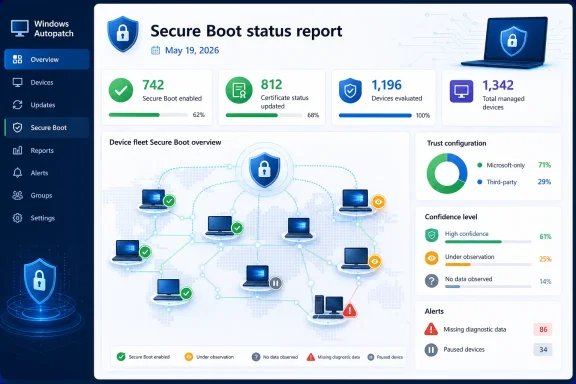
The updated Windows Autopatch report is Microsoft’s attempt to make that complexity legible. Instead of asking administrators to infer readiness from update compliance, policy state, or hand-rolled scripts, the report shows which devices have Secure Boot enabled, whether their relevant certificates are up to date, how their trust configuration is set, and whether Microsoft has enough observed data to recommend automatic deployment.
That sounds like inventory management, but it is more consequential than that. A bad certificate rollout can strand devices in awkward remediation states; a delayed rollout can leave an organization with weakening boot-chain assurance. Microsoft is threading the needle between those risks by giving administrators more signals before the deadline arrives.
A system configured to trust only Microsoft-signed boot components may not need the same certificate set as a device that also trusts third-party UEFI drivers, option ROMs, or non-Windows bootloaders. Older fleet-audit scripts that simply look for the presence or absence of certificates can therefore generate misleading conclusions. They may flag a device as incomplete when the missing certificate is not applicable to that device’s actual boot path.
Microsoft’s report bakes that interpretation into the management plane. The new Secure Boot trust configuration column separates devices that rely only on Microsoft components from those that also allow non-Microsoft components. In practical terms, that helps administrators avoid spraying unnecessary changes across the fleet just because a generic certificate checklist says something is absent.
That is a subtle but important shift. Windows Autopatch is not merely reporting firmware state; it is applying Microsoft’s understanding of how that state should be evaluated. For enterprises with mixed hardware, docks, add-in cards, specialized peripherals, or nonstandard boot requirements, that context is the difference between useful visibility and another noisy compliance spreadsheet.
A high-confidence classification means Microsoft has seen enough from comparable systems to believe the certificate update can proceed safely, assuming policy allows it. If automatic deployment is enabled, those devices can receive the update through Windows Update without extra administrator intervention. If policy blocks high-confidence deployment, the report still identifies the device as a good candidate but leaves the rollout in the administrator’s hands.
The more interesting categories are the ones that say Microsoft does not yet know enough. “Under observation” means the device is not necessarily blocked, but the data set is not mature enough to classify it as a safe automatic candidate. “No data observed” is more serious: Microsoft has not seen enough evidence for that device type or configuration, so the administrator should test carefully rather than assume the automated path will do the right thing.
This is Microsoft turning telemetry into a deployment control surface. That may not satisfy every privacy-minded administrator, but it reflects the reality of firmware-scale servicing. The Windows ecosystem is too broad, too OEM-dependent, and too old in places for Redmond to treat Secure Boot certificate rotation like a cumulative update. Confidence scoring is the company’s way of saying that the same patch can carry different operational risk on different hardware.
There is also a category administrators should treat with particular caution: temporarily paused devices. These are systems affected by known issues where Microsoft and partners have intentionally stopped the automatic path while they work toward a supported resolution. That is not a green light for heroic remediation; it is a warning that firmware or OEM coordination may be required.
The report also depends on diagnostic data. If devices are not configured to share at least required Windows diagnostic data, Secure Boot events may not reach Microsoft’s reporting pipeline. Devices that have been inactive for an extended period, have not restarted, or have broken update mechanisms can show up as unknown or not applicable even when the underlying firmware state is not actually wrong.
That creates a familiar enterprise-management paradox: the tool that tells you whether your fleet is healthy requires a reasonably healthy fleet to report accurately. The updated report tries to mitigate this with alerts and freshness indicators, including the date last reported and flags for missing diagnostic data. Those fields may be just as important as the certificate status itself.
A device that says “not up to date” is a remediation target. A device that says “unknown” may be a telemetry target, a restart target, an inactive asset, or a broken-client target. The report does not eliminate that triage; it gives administrators a better way to sort it.
That matters because many enterprise update strategies are designed to minimize restarts. Hotpatching, extended uptime windows, kiosk-like deployment patterns, and user-hostile restart avoidance can all collide with a change that needs the device to boot again before state becomes visible. In other words, a fleet can look compliant with Windows quality updates while still lagging in Secure Boot certificate readiness.
Hotpatch-heavy environments deserve special attention. If devices are receiving fewer conventional restarts, they may be slower to generate the diagnostic events needed for Microsoft to classify them confidently or reflect their updated state in Autopatch. That does not mean hotpatching is a problem; it means firmware-adjacent servicing still obeys firmware-adjacent rules.
Administrators planning around the certificate deadline should therefore treat restart orchestration as part of the security rollout, not a user-experience afterthought. A certificate transition that waits indefinitely for organic reboots is a transition that will produce surprises.
The Secure Boot report fits that trajectory. It does not simply say whether a device is patched. It says whether Microsoft believes the device is ready for a low-level trust-chain update, whether the administrator’s policy permits automatic action, whether diagnostic data is fresh enough to trust, and whether a device may require manual testing or OEM firmware.
That is a much more sophisticated model than the classic Windows Update compliance report. It acknowledges that modern servicing is not binary. A device can be current on monthly updates and still need a firmware prerequisite. It can be secure by one measurement and unobservable by another. It can be high confidence but blocked by policy, or up to date but backed by limited data coverage for similar devices.
This is where Autopatch becomes less of a patching service and more of an operational risk interface. Microsoft is using it to tell administrators not merely what happened, but what the company thinks should happen next. That has real value, but it also increases the importance of understanding the assumptions behind the signal.
For IT departments, that makes the deadline a test of fleet hygiene rather than a single dramatic cliff. Are devices on supported Windows releases? Are firmware updates being tracked by model and OEM? Are diagnostic policies configured so management tools can see the state they claim to manage? Are long-idle devices still part of the real fleet, or just ghosts in inventory?
The updated Autopatch report is useful precisely because it forces those questions into view. A clean dashboard means more than certificate readiness; it suggests that the organization has a functioning feedback loop between Windows servicing, firmware maintenance, telemetry, and reboot management. A messy dashboard may reveal problems that predate the certificate transition by years.
That is why administrators should resist treating this as a one-time cleanup. Secure Boot certificate readiness is the immediate trigger, but the underlying discipline is broader. The organizations that handle this transition smoothly will be the ones that already know which machines they own, which firmware they run, which update policies are exceptions, and which devices have stopped reporting.
Those fields reflect the reality that Secure Boot problems often cluster by hardware family. If a particular model shows “temporarily paused” or “no data observed,” an administrator needs to identify not just the affected devices but the shared firmware lineage behind them. Model and board-level context can turn a vague compliance issue into a targeted OEM support plan.
The alerts column is equally important because missing data is itself actionable. A device that has not reported diagnostic data may need policy correction. A device that has not restarted may need a maintenance window. A device that remains not up to date after remediation may need investigation into the scheduled task, firmware behavior, or blocked update settings.
In the old model, administrators often had to build this picture from multiple tools: Intune, Windows Update for Business reports, PowerShell scripts, firmware inventory, and OEM advisories. The new Autopatch report does not replace all of that, but it gives the certificate transition a central triage point. That alone should reduce the amount of guesswork in large environments.
But enterprise administrators live in the edge cases. They manage devices that missed firmware updates, laptops that have been in drawers for months, branch-office machines with unreliable connectivity, specialized systems with change-control restrictions, and virtual environments whose Secure Boot behavior depends on platform settings outside the guest OS. For them, “most devices will be fine” is not an operational plan.
The new report acknowledges that reality by making exceptions visible. Not supported, under observation, temporarily paused, unknown, missing diagnostic data — these are not cosmetic states. They are the map of where IT needs to spend attention before a broad rollout becomes a help-desk event.
Microsoft’s challenge is that its own automation depends on trust in Microsoft’s data. Some administrators will be comfortable allowing high-confidence devices to move automatically. Others will use the report as a targeting list for manual rings, pilot groups, and model-by-model validation. Both approaches are rational; the right choice depends on fleet diversity, risk tolerance, and the cost of failed boot remediation.
 Microsoft Turns a Firmware Deadline Into an Autopatch Problem
Secure Boot has always been one of those Windows security features that works best when nobody has to think about it. It sits beneath the operating system, inside the UEFI trust chain, checking that the boot path has not been tampered with before Windows gets a chance to defend itself. For most users, it is invisible by design.That invisibility becomes a liability when the certificates underpinning the trust chain need to be replaced. The original Secure Boot certificates date back to 2011, and Microsoft has spent the last year warning customers that the transition to newer 2023 certificates is not merely an ordinary Windows patch. It touches firmware, boot managers, OEM support matrices, virtualization platforms, diagnostic data, and reboot behavior.
The updated Windows Autopatch report is Microsoft’s attempt to make that complexity legible. Instead of asking administrators to infer readiness from update compliance, policy state, or hand-rolled scripts, the report shows which devices have Secure Boot enabled, whether their relevant certificates are up to date, how their trust configuration is set, and whether Microsoft has enough observed data to recommend automatic deployment.
That sounds like inventory management, but it is more consequential than that. A bad certificate rollout can strand devices in awkward remediation states; a delayed rollout can leave an organization with weakening boot-chain assurance. Microsoft is threading the needle between those risks by giving administrators more signals before the deadline arrives.
The Dashboard Is Really About Trust, Not Just Certificates
The most important addition is not that administrators can now see a certificate status column. It is that the report tries to interpret certificate status in the context of the device’s Secure Boot trust configuration. That distinction matters because Secure Boot readiness is not the same thing as “every possible certificate exists on every device.”A system configured to trust only Microsoft-signed boot components may not need the same certificate set as a device that also trusts third-party UEFI drivers, option ROMs, or non-Windows bootloaders. Older fleet-audit scripts that simply look for the presence or absence of certificates can therefore generate misleading conclusions. They may flag a device as incomplete when the missing certificate is not applicable to that device’s actual boot path.
Microsoft’s report bakes that interpretation into the management plane. The new Secure Boot trust configuration column separates devices that rely only on Microsoft components from those that also allow non-Microsoft components. In practical terms, that helps administrators avoid spraying unnecessary changes across the fleet just because a generic certificate checklist says something is absent.
That is a subtle but important shift. Windows Autopatch is not merely reporting firmware state; it is applying Microsoft’s understanding of how that state should be evaluated. For enterprises with mixed hardware, docks, add-in cards, specialized peripherals, or nonstandard boot requirements, that context is the difference between useful visibility and another noisy compliance spreadsheet.
Confidence Scores Bring Telemetry Into the Rollout Room
The new confidence level indicator is the most revealing part of the feature because it shows how Microsoft wants Secure Boot certificate deployment to work in 2026: not as a blind global push, but as a staged rollout informed by observed behavior across similar devices and firmware configurations.A high-confidence classification means Microsoft has seen enough from comparable systems to believe the certificate update can proceed safely, assuming policy allows it. If automatic deployment is enabled, those devices can receive the update through Windows Update without extra administrator intervention. If policy blocks high-confidence deployment, the report still identifies the device as a good candidate but leaves the rollout in the administrator’s hands.
The more interesting categories are the ones that say Microsoft does not yet know enough. “Under observation” means the device is not necessarily blocked, but the data set is not mature enough to classify it as a safe automatic candidate. “No data observed” is more serious: Microsoft has not seen enough evidence for that device type or configuration, so the administrator should test carefully rather than assume the automated path will do the right thing.
This is Microsoft turning telemetry into a deployment control surface. That may not satisfy every privacy-minded administrator, but it reflects the reality of firmware-scale servicing. The Windows ecosystem is too broad, too OEM-dependent, and too old in places for Redmond to treat Secure Boot certificate rotation like a cumulative update. Confidence scoring is the company’s way of saying that the same patch can carry different operational risk on different hardware.
There is also a category administrators should treat with particular caution: temporarily paused devices. These are systems affected by known issues where Microsoft and partners have intentionally stopped the automatic path while they work toward a supported resolution. That is not a green light for heroic remediation; it is a warning that firmware or OEM coordination may be required.
The Report Solves One Problem by Exposing Three Others
Microsoft’s new visibility is welcome, but it also exposes how many prerequisites must line up before the report itself becomes trustworthy. Secure Boot events are reported after startup, and changes can take time to appear after a certificate update and restart. Administrators looking at a freshly remediated device may see stale or ambiguous status for hours, not minutes.The report also depends on diagnostic data. If devices are not configured to share at least required Windows diagnostic data, Secure Boot events may not reach Microsoft’s reporting pipeline. Devices that have been inactive for an extended period, have not restarted, or have broken update mechanisms can show up as unknown or not applicable even when the underlying firmware state is not actually wrong.
That creates a familiar enterprise-management paradox: the tool that tells you whether your fleet is healthy requires a reasonably healthy fleet to report accurately. The updated report tries to mitigate this with alerts and freshness indicators, including the date last reported and flags for missing diagnostic data. Those fields may be just as important as the certificate status itself.
A device that says “not up to date” is a remediation target. A device that says “unknown” may be a telemetry target, a restart target, an inactive asset, or a broken-client target. The report does not eliminate that triage; it gives administrators a better way to sort it.
Reboots Are the Part Nobody Gets to Wish Away
Secure Boot certificate updates are not just downloaded and declared done. They must be applied through a servicing process that coordinates Windows, firmware, scheduled tasks, registry state, and restart behavior. Microsoft’s own troubleshooting guidance makes clear that the Secure-Boot-Update scheduled task is part of the machinery that advances the certificate update sequence.That matters because many enterprise update strategies are designed to minimize restarts. Hotpatching, extended uptime windows, kiosk-like deployment patterns, and user-hostile restart avoidance can all collide with a change that needs the device to boot again before state becomes visible. In other words, a fleet can look compliant with Windows quality updates while still lagging in Secure Boot certificate readiness.
Hotpatch-heavy environments deserve special attention. If devices are receiving fewer conventional restarts, they may be slower to generate the diagnostic events needed for Microsoft to classify them confidently or reflect their updated state in Autopatch. That does not mean hotpatching is a problem; it means firmware-adjacent servicing still obeys firmware-adjacent rules.
Administrators planning around the certificate deadline should therefore treat restart orchestration as part of the security rollout, not a user-experience afterthought. A certificate transition that waits indefinitely for organic reboots is a transition that will produce surprises.
Autopatch Is Becoming Microsoft’s Enterprise Risk Interface
Windows Autopatch began as a promise to take routine update orchestration off the hands of IT departments. Over time, it has become something more strategically useful to Microsoft: a place where the company can surface risk, policy exceptions, device health, readiness, and telemetry-backed deployment decisions in one workflow.The Secure Boot report fits that trajectory. It does not simply say whether a device is patched. It says whether Microsoft believes the device is ready for a low-level trust-chain update, whether the administrator’s policy permits automatic action, whether diagnostic data is fresh enough to trust, and whether a device may require manual testing or OEM firmware.
That is a much more sophisticated model than the classic Windows Update compliance report. It acknowledges that modern servicing is not binary. A device can be current on monthly updates and still need a firmware prerequisite. It can be secure by one measurement and unobservable by another. It can be high confidence but blocked by policy, or up to date but backed by limited data coverage for similar devices.
This is where Autopatch becomes less of a patching service and more of an operational risk interface. Microsoft is using it to tell administrators not merely what happened, but what the company thinks should happen next. That has real value, but it also increases the importance of understanding the assumptions behind the signal.
The Certificate Deadline Is a Test of Fleet Hygiene
The Secure Boot certificate transition is not a consumer panic story. Microsoft has said that devices do not simply stop booting the moment an old certificate reaches its date. The risk is more gradual and more enterprise-relevant: stale trust anchors can weaken future boot-chain protections, complicate compatibility with newer boot components, and leave unsupported or poorly maintained systems outside the safer update path.For IT departments, that makes the deadline a test of fleet hygiene rather than a single dramatic cliff. Are devices on supported Windows releases? Are firmware updates being tracked by model and OEM? Are diagnostic policies configured so management tools can see the state they claim to manage? Are long-idle devices still part of the real fleet, or just ghosts in inventory?
The updated Autopatch report is useful precisely because it forces those questions into view. A clean dashboard means more than certificate readiness; it suggests that the organization has a functioning feedback loop between Windows servicing, firmware maintenance, telemetry, and reboot management. A messy dashboard may reveal problems that predate the certificate transition by years.
That is why administrators should resist treating this as a one-time cleanup. Secure Boot certificate readiness is the immediate trigger, but the underlying discipline is broader. The organizations that handle this transition smoothly will be the ones that already know which machines they own, which firmware they run, which update policies are exceptions, and which devices have stopped reporting.
The New Columns Tell Admins Where the Real Work Starts
The updated report’s default columns are deliberately practical: device name, OS version, Microsoft Entra device ID, Secure Boot enabled state, device model, certificate status, trust configuration, confidence level, date last reported, and alerts. Optional hardware fields add manufacturer, board, model family, SKU, and related details for deeper troubleshooting.Those fields reflect the reality that Secure Boot problems often cluster by hardware family. If a particular model shows “temporarily paused” or “no data observed,” an administrator needs to identify not just the affected devices but the shared firmware lineage behind them. Model and board-level context can turn a vague compliance issue into a targeted OEM support plan.
The alerts column is equally important because missing data is itself actionable. A device that has not reported diagnostic data may need policy correction. A device that has not restarted may need a maintenance window. A device that remains not up to date after remediation may need investigation into the scheduled task, firmware behavior, or blocked update settings.
In the old model, administrators often had to build this picture from multiple tools: Intune, Windows Update for Business reports, PowerShell scripts, firmware inventory, and OEM advisories. The new Autopatch report does not replace all of that, but it gives the certificate transition a central triage point. That alone should reduce the amount of guesswork in large environments.
Microsoft’s Messaging Is Reassuring, But the Edge Cases Are Real
Microsoft is careful to describe the transition as planned, manageable, and supported by industry collaboration. That is fair. Certificate rotation is a normal part of maintaining a cryptographic trust ecosystem, and letting 2011-era anchors live forever would be a worse security story.But enterprise administrators live in the edge cases. They manage devices that missed firmware updates, laptops that have been in drawers for months, branch-office machines with unreliable connectivity, specialized systems with change-control restrictions, and virtual environments whose Secure Boot behavior depends on platform settings outside the guest OS. For them, “most devices will be fine” is not an operational plan.
The new report acknowledges that reality by making exceptions visible. Not supported, under observation, temporarily paused, unknown, missing diagnostic data — these are not cosmetic states. They are the map of where IT needs to spend attention before a broad rollout becomes a help-desk event.
Microsoft’s challenge is that its own automation depends on trust in Microsoft’s data. Some administrators will be comfortable allowing high-confidence devices to move automatically. Others will use the report as a targeting list for manual rings, pilot groups, and model-by-model validation. Both approaches are rational; the right choice depends on fleet diversity, risk tolerance, and the cost of failed boot remediation.
This Is the Checklist Before the Certificate Clock Runs Out
The updated Secure Boot status report gives Windows administrators a better cockpit, but it does not fly the plane by itself. The organizations that benefit most will be the ones that use the new data to narrow scope, validate assumptions, and schedule the boring work before the calendar forces the issue.- Administrators should use the report to distinguish devices that are genuinely not up to date from devices where Secure Boot is disabled, not applicable, or simply not reporting usable diagnostic data.
- Teams should interpret certificate status alongside Secure Boot trust configuration, because not every device requires the same certificate set.
- High-confidence devices are the best candidates for automated or early staged deployment, while under-observation and no-data devices deserve controlled testing.
- Devices showing stale reporting, missing diagnostic data, or long inactivity should be treated as management-health problems before they are treated as certificate failures.
- Restart planning needs to be part of the rollout, especially in environments that rely heavily on hotpatching, long uptime, or tightly controlled maintenance windows.
- Hardware and firmware patterns should be tracked by model, board, and OEM, because the hardest Secure Boot issues are likely to cluster around platform-specific limitations.
References
- Primary source: Petri IT Knowledgebase
Published: 2026-05-27T15:15:13.735091
Windows Autopatch Adds New Secure Boot Report for Certificate Readiness
Windows Autopatch now adds a Secure Boot report to help IT teams track certificate readiness and identify affected devices. petri.com
- Official source: learn.microsoft.com
Secure Boot status report in Windows Autopatch | Microsoft Learn
Use the Secure Boot status report to see devices that have Secure Boot enabled, those that are up to date, and those that need certificate updates.learn.microsoft.com - Official source: microsoft.com
Prepare your servers for Secure Boot certificate updates | Microsoft Windows Server Blog
The original Secure Boot certificates introduced in 2011 are approaching the end of their planned lifecycle, with expirations beginning in late June 2026.www.microsoft.com - Official source: support.microsoft.com
Secure Boot troubleshooting guide | Microsoft Support
Secure Boot troubleshooting guidesupport.microsoft.com - Official source: techcommunity.microsoft.com
Updated Secure Boot status report in Windows Autopatch - Windows IT Pro Blog
Get clear visibility into Secure Boot readiness with the Secure Boot status report. techcommunity.microsoft.com
- Related coverage: windowscentral.com
Your Windows PC's security foundation could expire in 8 weeks — Here's how to check if you're eligible for a new Secure Boot certificate | Windows Central
The slow decline of outdated Windows versions continues as Microsoft confronts expiring Secure Boot certificates for the first time ever.www.windowscentral.com
- Related coverage: tomshardware.com
Microsoft is refreshing Secure Boot certificates to plug security holes before they happen — if you bought a PC last year, you should be set | Tom's Hardware
Be sure to keep Windows 11 systems updated to get refreshed security certificates.www.tomshardware.com - Related coverage: cisco.com
- Official source: info.microsoft.com
