

Microsoft Azure CTO Mark Russinovich recently used a Microsoft Developer video to explain why Windows still refuses to delete some files with the familiar “file is in use” message, pointing to open handles, network access, antivirus scans, and DLL loading as the usual culprits. The explanation is useful; the fact that it still needs explaining is the indictment. Windows has spent three decades becoming friendlier, more cloud-connected, more AI-branded, and more visually polished, yet one of its most maddening user experiences remains stubbornly primitive. The problem is not that Windows protects files in use — it is that Windows so often makes the user do detective work the operating system should have handled itself.
The “file is in use” dialog is one of those Windows experiences that compresses an entire operating-system philosophy into a single interruption. It is technically defensible, frequently correct, and emotionally infuriating. Windows is not wrong to prevent a delete or overwrite operation when another process still depends on the file, but it often communicates that fact as if the user has asked an unreasonable question.
Russinovich’s involvement gives the story a pleasing circularity. Before he was Azure CTO, before Microsoft absorbed Sysinternals, before Process Explorer became a standard item in every admin’s troubleshooting kit, Russinovich built tools to answer precisely the question Windows declined to answer: who has this thing open? That question is old enough to have survived Windows NT, Windows 2000, XP, Vista, 7, 10, 11, and the current Copilot era.
The persistence matters because this is not a niche irritation for people who enjoy spelunking through kernel objects. It shows up during software installs, source builds, game modding, driver cleanup, USB removal, profile migration, malware remediation, backup failures, and ordinary file housekeeping. When the system says “try again,” it is often really saying, “go find another utility.”
That gap between internal correctness and external helpfulness is where Windows has always struggled. The operating system knows more than it tells you, or at least it knows where to begin looking. But the user interface frequently stops at a generic refusal, leaving the rest to sysadmins, Stack Overflow, Reddit, Sysinternals, PowerToys, or a reboot.
Sysinternals earned its reputation because it exposed the machinery Microsoft’s own interfaces often hid. Process Explorer showed processes, threads, handles, DLLs, signatures, parents, command lines, and loaded modules in ways that Task Manager did not. Handle brought a command-line answer to a deceptively simple operational question: which process is holding this file?
That history is important because it reframes the “file in use” message as more than a UX paper cut. It is a long-running mismatch between the architecture Windows inherited and the diagnostic affordances Windows ships by default. The kernel has rules. The shell has expectations. Users have work to finish. The dialog box stands between them, shrugging.
Russinovich’s current job title also adds a subtle tension. Microsoft’s cloud platform depends on automation, observability, orchestration, and graceful recovery from contention. Azure customers expect telemetry-rich systems that can explain why a resource is busy, who owns it, what dependency chain is involved, and what the safe remediation path looks like. On the desktop, one of Windows’ most common resource-contention failures can still feel like being handed a locked door with no label.
That contrast is not entirely fair, because desktop operating systems face hostile software, legacy APIs, third-party drivers, network shares, shell extensions, scanners, indexers, and compatibility obligations that cloud services can constrain more aggressively. But it is precisely those decades of compatibility that make the error so revealing. Windows has become a museum of still-working promises, and some of those promises make simple things hard to explain.
That distinction is where casual explanations often go wrong. Users think in nouns: a document, a folder, a DLL, a video file. Windows thinks in objects, references, access masks, memory mappings, filter drivers, and sections. The user asks to delete a file; Windows sees an object still referenced by code that may crash, corrupt data, or violate a sharing contract if the operation proceeds.
In the easy cases, this is exactly what Process Explorer and Handle were born to reveal. A media player has the video open. An editor has the project file locked. Explorer has a thumbnail or preview extension involved. A backup agent, sync client, antivirus scanner, database service, or remote user is still touching the path. Find the process, close it, and the file system dispute ends.
The reason the annoyance persists is that “file in use” is not one problem. It is a family of symptoms that converge on the same user-facing refusal. Some involve normal file handles. Some involve memory-mapped files. Some involve SMB activity from another machine. Some involve minifilter drivers that sit below the application layer. Some involve services running as another user or in another session. The shell can collapse all of those into one insultingly small sentence.
That collapse is efficient for the operating system and punishing for the person operating it. A good error message does not need to teach Windows internals, but it should provide a next step. Too often, Windows gives the emotional equivalent of a busy signal.
That is why the usual handle hunt can fail or produce confusing results. The file is not necessarily sitting there as a normal open file handle in the way a user expects. It may be represented through section objects and memory mappings, and the process using it may not show up through the most obvious query. The visible symptom is the same — Windows will not let you delete or replace the file — but the path to an answer is murkier.
Russinovich’s workaround, renaming the blocked file and dropping in a fresh copy under the original name where Windows allows it, sounds like old-school Windows pragmatism because it is. It does not make the underlying state disappear. It sidesteps the name that future opens will resolve while letting the old mapped image live until the process releases it. To administrators, this is familiar territory: not clean in the aesthetic sense, but often clean enough to finish the job without a reboot.
The fact that such advice remains relevant says something uncomfortable about Windows servicing and application deployment. Modern platforms like to talk about containers, immutable images, atomic updates, and app isolation. Windows still carries a vast ecosystem of processes that load shared binaries from familiar paths, keep them mapped longer than users expect, and rely on rules designed for compatibility before today’s deployment expectations existed.
That does not mean the design is foolish. Preventing deletion or replacement of in-use code is often the conservative, safe choice. But Windows’ conservatism transfers the ambiguity to the user, and ambiguity is what turns a protective mechanism into folklore.
That invisible crowd explains why the error so often appears after the user has already closed the obvious application. The document is gone from Word, the archive is closed in 7-Zip, the installer window has exited, and yet the delete operation fails. The user sees a contradiction. Windows sees a race between background components.
Anti-malware scanning is the most defensible member of that crowd. If a file has just appeared, changed, or been extracted from an archive, a security product may briefly hold or inspect it. From a platform-security perspective, that is sensible. From the perspective of someone trying to clean a build directory or remove a suspicious download, it looks like the operating system is protecting the wrong party.
Network access adds another layer of irritation because the process responsible may not even be on the machine where the user is sitting. A shared file can be held by another client, a service account, a remote session, or a stale operation that has not unwound yet. Administrators can usually find that trail, but the default Windows message rarely reflects the topology of the problem.
Then there are shell extensions and preview handlers, the classic suspects in file deletion weirdness. Explorer is both the user’s file manager and a host for other people’s code. When that code misbehaves, the person trying to delete a folder does not perceive a third-party extension model. They perceive Windows refusing to obey.
This is why the “file in use” dialog feels less like an unsolved computer science problem and more like an integration failure. The diagnostic ecosystem exists, but it remains scattered across expert tools, optional downloads, admin consoles, and context menus most users will never see. Windows can tell you which app is draining battery, which process is using the GPU, which startup item slowed boot, and whether a driver is blocking memory integrity. But file contention still too often emerges as a dead end.
There are reasonable objections to making the dialog more aggressive. Killing the wrong process can cause data loss. Closing a handle behind an application’s back can destabilize it. Revealing process details may create security or privacy complications on multi-user systems. Network locks and kernel-mode filter activity are not always simple to attribute cleanly.
But those objections argue for careful design, not for silence. Windows does not have to present a giant “force unlock” button to every home user. It could offer a graduated path: identify the likely process, explain whether it is local or remote, distinguish a normal handle from a loaded module where possible, offer to close a foreground app when safe, and point administrators toward deeper tools when it cannot know enough.
The current model treats explanation as an advanced feature. That is backwards. In a mature operating system, explanation is part of the product.
For home users, that is annoying. For administrators, it can be operationally expensive. A reboot may interrupt workstations, delay deployments, break remote sessions, disrupt lab machines, postpone maintenance windows, or turn a simple file cleanup into a ticket with business impact. The problem is not that rebooting never makes sense; it is that Windows still nudges users toward rebooting when the system could have helped them resolve a narrower conflict.
This is one reason the error feels archaic even when the underlying mechanism is rational. Modern systems aspire to be live-service platforms. Browsers update in the background. Mobile apps replace themselves seamlessly. Cloud services roll through deployments without users noticing. Windows itself has spent years trying to reduce update pain, stage changes more intelligently, and schedule restarts more politely.
Yet the desktop file system remains a place where the user can be transported back to the 1990s by a single locked DLL. That time-travel effect is not merely nostalgic. It undercuts confidence in Windows as a modern platform, especially for developers who bounce between Linux, macOS, containers, WSL, and Windows-native tooling.
To be clear, Unix-like systems solve this differently, not magically. They can unlink a file while processes continue using the old inode, which often produces a smoother user experience but brings its own conceptual traps. Windows’ stricter name-and-object semantics have benefits. The problem is that Windows exposes the strictness without enough context.
The result is not just annoyance; it is friction in the feedback loop. A failed clean build because a file is locked can cost only seconds, but repeated enough times it teaches developers to distrust the environment. They add exclusions, kill processes, disable preview panes, restart IDEs, reboot machines, or move work into WSL or containers where the behavior feels more predictable.
Game developers, .NET developers, native Windows developers, and anyone building plug-in systems know the DLL problem particularly well. Once code is loaded into a process, replacing it is harder than replacing a text file. Hot reload, shadow copying, app domains, isolated processes, and modern packaging systems are all attempts, in different ways, to route around the same fundamental problem: code in motion does not like being swapped underneath a running process.
Windows’ backward compatibility makes this harder to fix universally. Too much software expects old behavior. Too many installers and updaters have evolved around rename-on-reboot operations, service stops, and private conventions. A dramatic change in file replacement semantics would break the ecosystem Microsoft is paid, culturally and commercially, not to break.
But developers are also the audience most likely to appreciate a precise explanation. Tell them the path is blocked by a mapped image section in a specific process, and they will know what to do. Tell them “file is open in another program,” and they will reach for Process Explorer while muttering that the machine already knows more than it admits.
The support burden often falls on technicians who must translate a vague user complaint into a process-level diagnosis. They remote in, run tools, check open files on a server, search handles, stop services, or schedule a restart. The fix may be simple, but the path to confidence is not.
This is where Windows’ consumer and enterprise identities collide. A home user wants the error to name the app and offer a safe close button. An enterprise admin wants auditability, remote attribution, scripting, policy control, and a reliable way to distinguish “user has Excel open” from “security tool is doing its job” from “unknown process is behaving suspiciously.” The same generic dialog serves neither audience well.
A better Windows would not need to solve every case at the shell level. It would provide richer plumbing for callers and management tools. File Explorer, PowerToys, Windows Terminal, Dev Home, Endpoint Manager, and third-party deployment systems could all benefit from a more consistent contention model. The issue is not merely what the dialog says; it is what the platform makes easy to ask.
The fact that third-party utilities and Sysinternals tools remain the canonical answer is both a compliment and a critique. Microsoft owns the best flashlight. It still makes too many users stand in the dark until they know where to download it.
The “file in use” problem sits directly inside that bargain. Windows protects processes, honors sharing modes, supports deep shell integration, allows filter drivers, enables networked file access, and keeps decades of Win32 expectations alive. Those choices made the ecosystem enormous. They also made certain errors difficult to simplify.
It is tempting to frame this as Microsoft negligence, but the reality is more interesting. Microsoft has repeatedly built advanced answers around the problem rather than fully absorbing them into the everyday experience. Sysinternals, Restart Manager, Resource Monitor, PowerToys, Windows Installer conventions, and administrative consoles all nibble at the edges. The center remains oddly underdesigned.
That pattern appears elsewhere in Windows. The platform often has the capability, but the capability lives one layer away from where ordinary users encounter the pain. Enthusiasts know the path. Administrators script around it. Developers write tools. Everyone else reboots.
Russinovich’s annoyance lands because it names a truth Windows experts already know: the operating system is not failing because it lacks sophistication. It is failing because the sophistication is poorly surfaced at the moment of need.
For WindowsForum readers, the concrete lessons are straightforward:
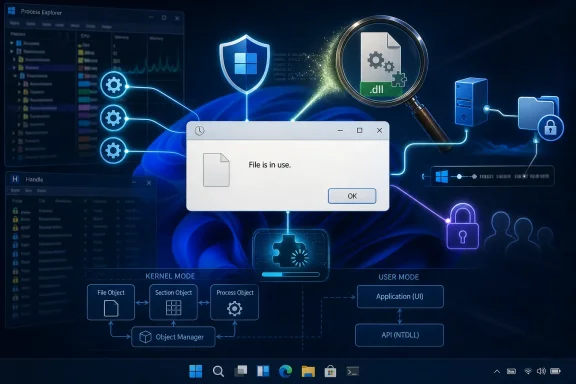 Windows Still Makes the User Investigate Its Own Crime Scene
The “file is in use” dialog is one of those Windows experiences that compresses an entire operating-system philosophy into a single interruption. It is technically defensible, frequently correct, and emotionally infuriating. Windows is not wrong to prevent a delete or overwrite operation when another process still depends on the file, but it often communicates that fact as if the user has asked an unreasonable question.Russinovich’s involvement gives the story a pleasing circularity. Before he was Azure CTO, before Microsoft absorbed Sysinternals, before Process Explorer became a standard item in every admin’s troubleshooting kit, Russinovich built tools to answer precisely the question Windows declined to answer: who has this thing open? That question is old enough to have survived Windows NT, Windows 2000, XP, Vista, 7, 10, 11, and the current Copilot era.
The persistence matters because this is not a niche irritation for people who enjoy spelunking through kernel objects. It shows up during software installs, source builds, game modding, driver cleanup, USB removal, profile migration, malware remediation, backup failures, and ordinary file housekeeping. When the system says “try again,” it is often really saying, “go find another utility.”
That gap between internal correctness and external helpfulness is where Windows has always struggled. The operating system knows more than it tells you, or at least it knows where to begin looking. But the user interface frequently stops at a generic refusal, leaving the rest to sysadmins, Stack Overflow, Reddit, Sysinternals, PowerToys, or a reboot.
Russinovich Is Not Complaining From the Cheap Seats
There is a reason this particular explainer resonates more than a random Windows tip video. Russinovich is not an influencer discovering Process Explorer in 2026. He is one of the people who made Windows intelligible to generations of administrators.Sysinternals earned its reputation because it exposed the machinery Microsoft’s own interfaces often hid. Process Explorer showed processes, threads, handles, DLLs, signatures, parents, command lines, and loaded modules in ways that Task Manager did not. Handle brought a command-line answer to a deceptively simple operational question: which process is holding this file?
That history is important because it reframes the “file in use” message as more than a UX paper cut. It is a long-running mismatch between the architecture Windows inherited and the diagnostic affordances Windows ships by default. The kernel has rules. The shell has expectations. Users have work to finish. The dialog box stands between them, shrugging.
Russinovich’s current job title also adds a subtle tension. Microsoft’s cloud platform depends on automation, observability, orchestration, and graceful recovery from contention. Azure customers expect telemetry-rich systems that can explain why a resource is busy, who owns it, what dependency chain is involved, and what the safe remediation path looks like. On the desktop, one of Windows’ most common resource-contention failures can still feel like being handed a locked door with no label.
That contrast is not entirely fair, because desktop operating systems face hostile software, legacy APIs, third-party drivers, network shares, shell extensions, scanners, indexers, and compatibility obligations that cloud services can constrain more aggressively. But it is precisely those decades of compatibility that make the error so revealing. Windows has become a museum of still-working promises, and some of those promises make simple things hard to explain.
The Handle Is the Clue, Not the Whole Mystery
At the center of the issue is the handle, an abstract reference a process uses to talk to an operating-system object. A file handle is not the file itself. It is a negotiated relationship between a process and the kernel, with access rights, sharing modes, and lifetime rules attached.That distinction is where casual explanations often go wrong. Users think in nouns: a document, a folder, a DLL, a video file. Windows thinks in objects, references, access masks, memory mappings, filter drivers, and sections. The user asks to delete a file; Windows sees an object still referenced by code that may crash, corrupt data, or violate a sharing contract if the operation proceeds.
In the easy cases, this is exactly what Process Explorer and Handle were born to reveal. A media player has the video open. An editor has the project file locked. Explorer has a thumbnail or preview extension involved. A backup agent, sync client, antivirus scanner, database service, or remote user is still touching the path. Find the process, close it, and the file system dispute ends.
The reason the annoyance persists is that “file in use” is not one problem. It is a family of symptoms that converge on the same user-facing refusal. Some involve normal file handles. Some involve memory-mapped files. Some involve SMB activity from another machine. Some involve minifilter drivers that sit below the application layer. Some involve services running as another user or in another session. The shell can collapse all of those into one insultingly small sentence.
That collapse is efficient for the operating system and punishing for the person operating it. A good error message does not need to teach Windows internals, but it should provide a next step. Too often, Windows gives the emotional equivalent of a busy signal.
The DLL Case Exposes the Age of the Contract
The most interesting part of Russinovich’s explanation is the DLL scenario, because it shows why this problem has resisted a simple fix. A file can be involved in a process not merely as an open document but as loaded executable code. Once a DLL is mapped into a process, the relationship between the file, the memory manager, and the process is different from the everyday mental model of “an app has this file open.”That is why the usual handle hunt can fail or produce confusing results. The file is not necessarily sitting there as a normal open file handle in the way a user expects. It may be represented through section objects and memory mappings, and the process using it may not show up through the most obvious query. The visible symptom is the same — Windows will not let you delete or replace the file — but the path to an answer is murkier.
Russinovich’s workaround, renaming the blocked file and dropping in a fresh copy under the original name where Windows allows it, sounds like old-school Windows pragmatism because it is. It does not make the underlying state disappear. It sidesteps the name that future opens will resolve while letting the old mapped image live until the process releases it. To administrators, this is familiar territory: not clean in the aesthetic sense, but often clean enough to finish the job without a reboot.
The fact that such advice remains relevant says something uncomfortable about Windows servicing and application deployment. Modern platforms like to talk about containers, immutable images, atomic updates, and app isolation. Windows still carries a vast ecosystem of processes that load shared binaries from familiar paths, keep them mapped longer than users expect, and rely on rules designed for compatibility before today’s deployment expectations existed.
That does not mean the design is foolish. Preventing deletion or replacement of in-use code is often the conservative, safe choice. But Windows’ conservatism transfers the ambiguity to the user, and ambiguity is what turns a protective mechanism into folklore.
Antivirus, Indexers, Sync Clients, and the Invisible Crowd Around Every File
The modern Windows desktop is crowded. A file is rarely touched only by the application the user thinks is using it. Security tools inspect it, cloud sync clients hash it, search components index it, thumbnail handlers parse it, backup agents snapshot it, development tools watch it, and enterprise management software may inventory it.That invisible crowd explains why the error so often appears after the user has already closed the obvious application. The document is gone from Word, the archive is closed in 7-Zip, the installer window has exited, and yet the delete operation fails. The user sees a contradiction. Windows sees a race between background components.
Anti-malware scanning is the most defensible member of that crowd. If a file has just appeared, changed, or been extracted from an archive, a security product may briefly hold or inspect it. From a platform-security perspective, that is sensible. From the perspective of someone trying to clean a build directory or remove a suspicious download, it looks like the operating system is protecting the wrong party.
Network access adds another layer of irritation because the process responsible may not even be on the machine where the user is sitting. A shared file can be held by another client, a service account, a remote session, or a stale operation that has not unwound yet. Administrators can usually find that trail, but the default Windows message rarely reflects the topology of the problem.
Then there are shell extensions and preview handlers, the classic suspects in file deletion weirdness. Explorer is both the user’s file manager and a host for other people’s code. When that code misbehaves, the person trying to delete a folder does not perceive a third-party extension model. They perceive Windows refusing to obey.
Microsoft Has Built the Tools, Just Not the Default Conversation
The maddening part is that Microsoft has many of the ingredients needed for a better experience. Sysinternals can search handles and DLLs. Resource Monitor can expose associated handles in some cases. PowerToys includes File Locksmith, a more user-friendly way to identify processes using a file. Windows Installer and the Restart Manager API exist to reduce reboot requirements by coordinating application shutdown and restart during servicing.This is why the “file in use” dialog feels less like an unsolved computer science problem and more like an integration failure. The diagnostic ecosystem exists, but it remains scattered across expert tools, optional downloads, admin consoles, and context menus most users will never see. Windows can tell you which app is draining battery, which process is using the GPU, which startup item slowed boot, and whether a driver is blocking memory integrity. But file contention still too often emerges as a dead end.
There are reasonable objections to making the dialog more aggressive. Killing the wrong process can cause data loss. Closing a handle behind an application’s back can destabilize it. Revealing process details may create security or privacy complications on multi-user systems. Network locks and kernel-mode filter activity are not always simple to attribute cleanly.
But those objections argue for careful design, not for silence. Windows does not have to present a giant “force unlock” button to every home user. It could offer a graduated path: identify the likely process, explain whether it is local or remote, distinguish a normal handle from a loaded module where possible, offer to close a foreground app when safe, and point administrators toward deeper tools when it cannot know enough.
The current model treats explanation as an advanced feature. That is backwards. In a mature operating system, explanation is part of the product.
Reboot Culture Is the Tax Windows Users Still Pay
The oldest workaround for a stubborn locked file is also the most damning: reboot. It works because it destroys the state the user cannot identify. Handles close, mappings vanish, services restart, shell extensions reload, and whatever held the file usually releases its grip.For home users, that is annoying. For administrators, it can be operationally expensive. A reboot may interrupt workstations, delay deployments, break remote sessions, disrupt lab machines, postpone maintenance windows, or turn a simple file cleanup into a ticket with business impact. The problem is not that rebooting never makes sense; it is that Windows still nudges users toward rebooting when the system could have helped them resolve a narrower conflict.
This is one reason the error feels archaic even when the underlying mechanism is rational. Modern systems aspire to be live-service platforms. Browsers update in the background. Mobile apps replace themselves seamlessly. Cloud services roll through deployments without users noticing. Windows itself has spent years trying to reduce update pain, stage changes more intelligently, and schedule restarts more politely.
Yet the desktop file system remains a place where the user can be transported back to the 1990s by a single locked DLL. That time-travel effect is not merely nostalgic. It undercuts confidence in Windows as a modern platform, especially for developers who bounce between Linux, macOS, containers, WSL, and Windows-native tooling.
To be clear, Unix-like systems solve this differently, not magically. They can unlink a file while processes continue using the old inode, which often produces a smoother user experience but brings its own conceptual traps. Windows’ stricter name-and-object semantics have benefits. The problem is that Windows exposes the strictness without enough context.
Developers Feel the Sharp Edge First
Developers run into this problem constantly because development workflows create exactly the kind of churn Windows finds stressful. Build outputs are created, loaded, tested, watched, scanned, indexed, and deleted in rapid succession. A test runner holds a DLL. A language server watches a directory. An antivirus scanner inspects a freshly compiled binary. A terminal remains in a folder. A local web server keeps a log open. A package manager tries to replace files that a running process still maps.The result is not just annoyance; it is friction in the feedback loop. A failed clean build because a file is locked can cost only seconds, but repeated enough times it teaches developers to distrust the environment. They add exclusions, kill processes, disable preview panes, restart IDEs, reboot machines, or move work into WSL or containers where the behavior feels more predictable.
Game developers, .NET developers, native Windows developers, and anyone building plug-in systems know the DLL problem particularly well. Once code is loaded into a process, replacing it is harder than replacing a text file. Hot reload, shadow copying, app domains, isolated processes, and modern packaging systems are all attempts, in different ways, to route around the same fundamental problem: code in motion does not like being swapped underneath a running process.
Windows’ backward compatibility makes this harder to fix universally. Too much software expects old behavior. Too many installers and updaters have evolved around rename-on-reboot operations, service stops, and private conventions. A dramatic change in file replacement semantics would break the ecosystem Microsoft is paid, culturally and commercially, not to break.
But developers are also the audience most likely to appreciate a precise explanation. Tell them the path is blocked by a mapped image section in a specific process, and they will know what to do. Tell them “file is open in another program,” and they will reach for Process Explorer while muttering that the machine already knows more than it admits.
Enterprise IT Sees a Support Pattern, Not a Popup
In enterprise environments, the “file in use” error is not a single-user annoyance. It is a recurring support pattern with compliance, security, and deployment consequences. Software distribution fails because an app is open. Endpoint protection delays file operations. Profile cleanup scripts stall. VDI images accumulate leftovers. Shared folders retain files nobody thinks they are using. Patching workflows require reboots that business units resist.The support burden often falls on technicians who must translate a vague user complaint into a process-level diagnosis. They remote in, run tools, check open files on a server, search handles, stop services, or schedule a restart. The fix may be simple, but the path to confidence is not.
This is where Windows’ consumer and enterprise identities collide. A home user wants the error to name the app and offer a safe close button. An enterprise admin wants auditability, remote attribution, scripting, policy control, and a reliable way to distinguish “user has Excel open” from “security tool is doing its job” from “unknown process is behaving suspiciously.” The same generic dialog serves neither audience well.
A better Windows would not need to solve every case at the shell level. It would provide richer plumbing for callers and management tools. File Explorer, PowerToys, Windows Terminal, Dev Home, Endpoint Manager, and third-party deployment systems could all benefit from a more consistent contention model. The issue is not merely what the dialog says; it is what the platform makes easy to ask.
The fact that third-party utilities and Sysinternals tools remain the canonical answer is both a compliment and a critique. Microsoft owns the best flashlight. It still makes too many users stand in the dark until they know where to download it.
The Error Message Is a Symptom of Windows’ Grand Bargain
Windows endures because it refuses to abandon old software casually. That is its superpower and its curse. The same compatibility culture that lets ancient line-of-business applications survive also preserves user experiences that feel frozen in amber.The “file in use” problem sits directly inside that bargain. Windows protects processes, honors sharing modes, supports deep shell integration, allows filter drivers, enables networked file access, and keeps decades of Win32 expectations alive. Those choices made the ecosystem enormous. They also made certain errors difficult to simplify.
It is tempting to frame this as Microsoft negligence, but the reality is more interesting. Microsoft has repeatedly built advanced answers around the problem rather than fully absorbing them into the everyday experience. Sysinternals, Restart Manager, Resource Monitor, PowerToys, Windows Installer conventions, and administrative consoles all nibble at the edges. The center remains oddly underdesigned.
That pattern appears elsewhere in Windows. The platform often has the capability, but the capability lives one layer away from where ordinary users encounter the pain. Enthusiasts know the path. Administrators script around it. Developers write tools. Everyone else reboots.
Russinovich’s annoyance lands because it names a truth Windows experts already know: the operating system is not failing because it lacks sophistication. It is failing because the sophistication is poorly surfaced at the moment of need.
The File-Lock Lesson Microsoft Keeps Relearning
The practical advice remains familiar: use Process Explorer, Handle, Resource Monitor, PowerToys File Locksmith, or administrative share tools to identify the owner; close the relevant app or service when safe; rename and replace in specific DLL cases where Windows allows it; reboot only when the state cannot be unwound cleanly. That advice works, but it should not feel like secret knowledge.For WindowsForum readers, the concrete lessons are straightforward:
- A “file in use” message usually means another process, service, scanner, remote client, or loaded module still has a relationship with the file.
- Process Explorer and Handle remain the most reliable expert tools for finding ordinary open handles and many loaded-module cases.
- Antivirus, sync, indexing, backup, and shell-preview components can briefly hold files after the obvious application has closed.
- DLLs and memory-mapped files can make the culprit harder to identify because the file may not appear like a normal open document handle.
- Renaming a blocked file and placing a fresh copy under the original name can work in some cases, but it should be treated as an operational workaround rather than a universal fix.
- A reboot often clears the condition, but it is the blunt instrument Windows users reach for when the platform withholds a sharper explanation.
References
- Primary source: TechSpot
Published: Tue, 30 Jun 2026 16:05:00 GMT
Microsoft's own Azure CTO is still annoyed by Windows' "file in use" error | TechSpot
In a recent video published on the "Microsoft Developer" YouTube channel, Russinovich offered a concise explanation of what the "file is in use" error message means when...www.techspot.com - Official source: learn.microsoft.com
Process Explorer - Sysinternals | Microsoft Learn
Find out what files, registry keys and other objects processes have open, which DLLs they have loaded, and more.learn.microsoft.com - Official source: microsoft.com
Inside Azure innovations with Mark Russinovich | Microsoft Build 2025 - Microsoft Research
Join Mark Russinovich, CTO, Deputy CISO, Technical Fellow of Microsoft Azure. Mark will take you on a tour of the latest innovations in Azure architecture and explain how Azure enables intelligent, modern, and innovative applications at scale in the cloud, on-premises, and on the edge. The AOC...www.microsoft.com - Related coverage: tomshardware.com
Microsoft CTO confesses that 30-year-old code from the mid-90s still forms the bedrock of Windows 11 — ancient Win32 API still the backbone, but CTO says it's 'more relevant than ever in 2026' | Tom's Hardware
Instead of 'flying cars and moon stations' in 2026, we still have Windows 11 using '90s code, admits Mark Russinovich.www.tomshardware.com - Official source: azure.microsoft.com
- Related coverage: windowsforum.com
Why Win32 Still Powers Windows 11: Azure CTO Mark Russinovich Explains | Windows Forum
Microsoft Azure CTO Mark Russinovich said in a Microsoft developer video posted in early May 2026 that Win32, the Windows programming interface born in the...windowsforum.com
- Related coverage: community.sap.com
File in use on Windows - how to find the responsib... - SAP Community
This is a well known problem on Windows: You want to delete a file, rename a file, you start a SAP upgrade, or database upgrade ... and in any case you just get thecommunity.sap.com - Related coverage: geekwire.com
Reality check: Microsoft Azure CTO pushes back on AI vibe coding hype, sees 'upper limit' – GeekWire
Microsoft Azure CTO Mark Russinovich challenges AI coding hype, warning that current tools can't handle complex software projects and suffer from reliability issues.www.geekwire.com - Official source: techcommunity.microsoft.com
- Related coverage: ceppek.com
- Related coverage: windowsnews.ai
Microsoft Azure CTO Confirms Win32 API Is a 'First-Class Citizen' in Windows 11 - Windows News
Mark Russinovich says Win32—the API from Windows 95/NT—remains a first-class citizen in Windows 11. What this means for legacy apps, enterprise IT, and...windowsnews.ai - Related coverage: empyreal96.github.io
- Related coverage: tecbiblio.com
- Official source: learn.microsoft.com.mcas.ms

Continue
learn.microsoft.com.mcas.ms
- Official source: support.microsoft.com
You cannot prevent applications or services from being shut down or restarted by using the msiexec command in Windows - Microsoft Support
Fixes an issue in which the msiexec command together with the MSIRMSHUTDOWN=2 parameter does not work correctly in Windows 8.1, Windows RT 8.1, Windows Server 2012 R2, Windows 8, Windows RT, or Windows Server 2012.support.microsoft.com - Related coverage: powershellgallery.com
PowerShell Gallery | Functions/GenXdev.Windows/Get-OpenedFileHandleProcesses.ps1 1.212.2025
www.powershellgallery.com
