

Microsoft’s latest Windows 11 Insider preview has pushed handheld Windows gaming into a new, console‑like direction — and the MSI Claw 8 AI is one of the first devices to show what that future looks like in practice.
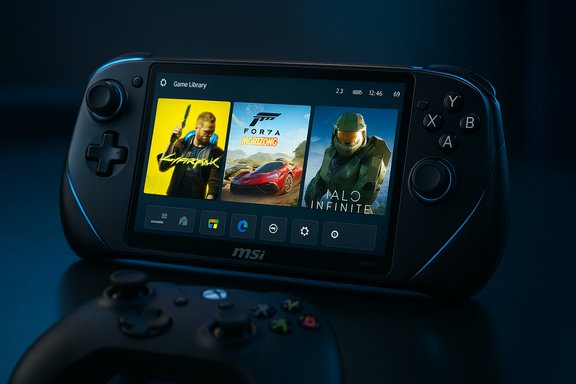
Microsoft introduced a purpose‑built, controller‑first session posture for Windows — the Xbox Full Screen Experience (FSE) — as part of its ongoing work to make handheld Windows PCs feel more like dedicated consoles when you want to play. The feature is not a fork of Windows: it’s a layered, full‑screen shell that runs a chosen “home app” (typically the Xbox PC app) as the active launcher while deferring many desktop subsystems and background tasks. That design reduces runtime overhead and creates a thumb‑friendly launcher optimized for small screens and gamepads. The most recent Insider cumulative — shipped as Build 26220.7051 (KB5067115) in Microsoft’s 25H2 preview wave — expands the FSE preview to MSI’s Claw family. Early hands‑on testing and independent media coverage confirm measurable resource savings and modest performance gains on Claw hardware when the mode is active.
Microsoft’s Full Screen Experience on the MSI Claw is not magic — it’s a carefully scoped session posture with practical, verifiable benefits and typical preview caveats. The Claw 8 AI’s hardware — robust cooling, modern APUs and configurable TDP — makes it an ideal showcase for what targeted OS‑level trimming can deliver. If Microsoft and partners continue to iron out integration and discovery gaps, the day when a Windows handheld truly “feels” like a console is much closer than it was a year ago.
Source: NoobFeed Top 5 Windows 11 Updates that Transform the MSI Claw 8 AI into a True Console | NoobFeed
 Background / Overview
Microsoft introduced a purpose‑built, controller‑first session posture for Windows — the Xbox Full Screen Experience (FSE) — as part of its ongoing work to make handheld Windows PCs feel more like dedicated consoles when you want to play. The feature is not a fork of Windows: it’s a layered, full‑screen shell that runs a chosen “home app” (typically the Xbox PC app) as the active launcher while deferring many desktop subsystems and background tasks. That design reduces runtime overhead and creates a thumb‑friendly launcher optimized for small screens and gamepads. The most recent Insider cumulative — shipped as Build 26220.7051 (KB5067115) in Microsoft’s 25H2 preview wave — expands the FSE preview to MSI’s Claw family. Early hands‑on testing and independent media coverage confirm measurable resource savings and modest performance gains on Claw hardware when the mode is active. What changed: The five updates that matter (and why they make the Claw feel like a console)
Microsoft’s build and subsequent testing expose five practical changes that together transform the MSI Claw experience from “small PC” to “pocketable console.” Each item below is examined, verified where possible, and placed into the real‑world context owners will care about.1) Console‑like boot and launcher: Xbox Full Screen Experience becomes the home screen
- What it is: Enable Full Screen Experience under Settings → Gaming → Full screen experience and pick Xbox (or another supported home app) as the device home app. Once set, the device can boot directly into a full‑screen, controller‑first launcher that aggregates Game Pass, Xbox purchases, and many installed PC titles into a unified grid.
- Why this matters: The Claw can now behave like a console out of the box — no keyboard, no desktop, immediate access to games with thumb navigation. This significant UX shift removes the cognitive and ergonomic friction that has long made Windows handhelds feel like desktop PCs squeezed into a smaller chassis. Independent coverage describes the launcher and boot option exactly in this way.
2) OS‑level performance trimming and measurable memory reclamation
- The mechanics: FSE is a session posture that deliberately defers or suppresses non‑essential startup apps and Explorer ornamentation, trimming background CPU wakeups and reclaiming RAM so the runtime state is cleaner and less noisy while gaming. This is a user‑space optimization rather than a kernel or driver rewrite.
- The numbers: Hands‑on testing reproduced by multiple outlets shows background memory usage dropping from roughly 7.3 GB to ~6.2 GB on an MSI Claw 8 AI+ when switching from standard desktop mode to FSE — a runtime saving of about 1.1 GB in that test and nearly matching Microsoft’s messaging that FSE can free “up to” about 2 GB in some scenarios. Those measurements were observed during community benchmarking sessions led by independent creators and reported across technical press outlets.
- The real impact: On 16 GB systems the freed RAM matters; on 32 GB configurations it’s less impactful but still useful for reclaiming VRAM headroom and reducing background CPU jitter. NotebookCheck and other hands‑on reports track the same memory deltas found by community testers.
3) Small but consistent FPS gains in demanding titles
- Observed results: Benchmarks run by independent testers show modest but repeatable FPS increases in taxing games with identical TDP/power settings. For instance, Cyberpunk 2077 at 1200p, medium presets, and a 30W TDP moved from ~55.3 FPS to ~61.2 FPS in one set of tests — roughly a 10–11% uplift. Similar smaller gains were recorded in other AAA titles, while battery life did not materially change in those runs.
- Why this happens: The gains come from having more memory available for the game process and fewer background wakeups stealing small amounts of CPU time, which is especially important on thermally constrained handheld APUs where frame‑time variance shows up as micro‑stutters.
- Caveat: These are software‑only optimizations at the shell/session level. They are not driver or scheduler changes, and performance outcomes will vary by game, driver version, background workload and the specific APU/TDP profile. Some titles show no change.
4) Deeper OEM tooling integration — MSI Center M meets the Game Bar
- Integration behavior: The Xbox FSE on the Claw is designed to remain interoperable with MSI’s utility stack. MSI Center M and the Claw’s Quick Settings can surface inside the controller‑first workflow (for example, via Game Bar widgets or quick toggles), enabling in‑game TDP changes, fan curve adjustments, and brightness controls without leaving the fullscreen launcher. Independent hands‑on coverage confirms that MSI’s utilities continue to work and that the Game Bar is the primary conduit for in‑session performance tweaking.
- Practical benefit: That integration removes one of the biggest awkwardnesses in prior handheld workflows — having to alt‑tab or reach for a keyboard to tune power and thermal settings mid‑game. For players who tweak TDP profiles for different titles, this is a meaningful usability win.
- Early friction: Users on community forums report intermittent instability between MSI Center M and FSE (overlay glitches, quick settings double‑press behavior), indicating MSI and Microsoft still have edge‑case polish to deliver. Those are common with a preview rollout and are being actively discussed by testers.
5) A roadmap for broader OEM support and a new handheld ecosystem posture
- Microsoft’s stated direction: The FSE rollout is being gated as a controlled preview (entitlement + server flags) and Microsoft explicitly signals additional OEMs will enable the mode in the coming months. That move turns FSE into a platform capability OEMs can adopt rather than a single‑vendor gimmick.
- Market implications: If manufacturers like Lenovo, ROG, and others ship FSE as an available posture on their handhelds, developers gain a more predictable, console‑like entrypoint to handheld Windows PCs — making it easier to test and tune for handheld runtime constraints.
- Important caveat: Public timelines and “will” statements are always prospective; specific OEM rollouts and firmware dependencies mean availability will be staggered and region/gating will continue to matter. Treat announced OEM intent as strategy rather than a guaranteed device list on a fixed date.
How the Full Screen Experience works (technical snapshot)
A session posture, not a kernel rewrite
FSE operates by changing what Windows initializes at session start and which userland elements remain active. It runs the selected home app as the primary shell and applies session‑level policies that:- defer or suspend many auto‑starting background tasks,
- hide Explorer ornamentation and desktop cosmetics,
- adapt Game Bar and Task View for gamepad navigation,
- provide a boot option to start the device directly into the full‑screen launcher.
What FSE does not do (and why that distinction matters)
- It does not change GPU drivers, kernel scheduling, or anti‑cheat kernel modules.
- It does not automatically convert every Windows experience into a console—compatibility with third‑party launchers, overlays, or emulators depends on how those apps register with the system and the Xbox app’s discovery logic.
- It does not remove Windows’ openness; Steam, Epic, GOG and many other storefronts still work, but their integration into the Xbox library depends on the storefront’s visibility to the Xbox PC app.
Benchmarks and verification: What independent testing shows
Several independent outlets and creators ran hands‑on tests with the Claw and reported similar trends:- Memory usage: In repeated profiling, system background memory went from ~7.3 GB down to ~6.2 GB after entering FSE in one widely cited test. This mirrors Microsoft’s guidance that session trimming can free a meaningful chunk of RAM on constrained devices.
- FPS gains: Tests on Cyberpunk 2077 (1200p, medium settings, 30W) recorded average FPS moving from ~55.3 to ~61.2 in FSE — a practical, single‑digit to low double‑digit percentage improvement on one platform and configuration. Other titles showed smaller or negligible uplifts, and battery life remained roughly the same in the measured scenarios.
- Corroboration: Multiple independent technical publications repeated these results and credited the same tester videos and community benchmarks, which strengthens confidence that the measurements reflect real, reproducible effects on the tested hardware.
Early flaws, limitations and the real‑world tradeoffs
No early preview is perfect. The rollout exposes concrete limitations that users and enterprise teams should consider.- Detection limits: The Xbox launcher currently auto‑discovers large storefronts and native game clients (Xbox, Steam, Epic). Emulators, niche launchers, modifications and certain third‑party overlays may not be found automatically and must be added manually (for example via Steam’s non‑Steam game shortcut flow). This reduces the out‑of‑the‑box convenience for retro and emulation communities that rely on non‑standard launchers.
- Limited customization: Early FSE UIs do not yet support tile movement, deep theming or the level of home‑screen customization console users might expect. Microsoft appears to be prioritizing reliability and performance first, with cosmetic polish scheduled later in the preview cycle.
- Integration glitches: Community reports document intermittent issues between MSI Center M quick settings and the Game Bar overlay (double‑press behavior, blocked widgets, or startup white overlays). These are active preview bugs being triaged by vendors and Insiders.
- Rollout gating: FSE is being delivered via controlled feature rollout and OEM entitlements — not everyone on the same Insider build will see it immediately. That means availability is uneven and may require firmware, driver, or Xbox app preview enrollment to surface.
Practical guidance: how to try this on an MSI Claw (Insider preview caveats)
- Join the Windows Insider Program and pick the Dev or Beta channel that contains the 25H2 preview with build 26220.7051 (KB5067115).
- Update the Xbox PC app to the latest preview release.
- Go to Settings → Gaming → Full screen experience and set Xbox as your home app. Optionally enable “Enter Full Screen Experience on startup.”
- Update MSI Center M and your BIOS/firmware before running performance comparisons.
- Run controlled benchmarks (same TDP, same game settings, launch cold) and measure memory and frame times to validate benefits on your unit.
Broader implications: what this means for handheld Windows gaming
- For consumers: This is the clearest attempt yet to combine the ease of a console launcher with the flexibility of Windows. If Microsoft and OEMs polish the launcher and reduce friction for non‑storefront content (emulators, overlays), Windows handhelds could finally close the UX gap with SteamOS.
- For developers: A standardized, console‑like launcher and consistent session posture will make it simpler to test for handheld performance boundaries and to tune input/overlay flows for controller‑first navigation.
- For OEMs: FSE is a platform capability they can adopt to turn Windows into a more attractive, purpose‑built handheld experience without shipping a forked OS — but success depends on firmware, driver cadence and close coordination with Microsoft.
- For IT and enterprise: While consumer handheld gaming is the focus, the presence of session‑level policies and controlled feature rollouts highlights the importance of testing preview bits in managed fleets — features that change boot posture and background services require new operational checks.
Strengths, risks and final assessment
Strengths
- Cleaner runtime: Measurable memory reclamation and reduced background wakeups lead to smoother gameplay in many titles.
- Console‑like UX: Booting to a controller‑first launcher eliminates the desktop friction that previously weakened the handheld use case.
- Vendor interoperability: MSI Center M and other tools remain usable in FSE, allowing real‑time tuning without leaving the launcher.
Risks and downsides
- Preview instability: Overlay glitches and inconsistent quick‑settings behavior have been reported; early adopters should expect troubleshooting.
- Compatibility gaps: Emulators, niche launchers and certain overlays still require manual handling; the Xbox library auto‑discovery is optimized for major storefronts.
- Rollout variability: Controlled feature flags mean identical hardware may show different behavior depending on entitlements and region.
Microsoft’s Full Screen Experience on the MSI Claw is not magic — it’s a carefully scoped session posture with practical, verifiable benefits and typical preview caveats. The Claw 8 AI’s hardware — robust cooling, modern APUs and configurable TDP — makes it an ideal showcase for what targeted OS‑level trimming can deliver. If Microsoft and partners continue to iron out integration and discovery gaps, the day when a Windows handheld truly “feels” like a console is much closer than it was a year ago.
Source: NoobFeed Top 5 Windows 11 Updates that Transform the MSI Claw 8 AI into a True Console | NoobFeed
