

Microsoft’s latest Windows Insider changes are less about flashy new toys and more about rebuilding trust in how Windows changes reach users. The big story is that Microsoft is giving Insiders clearer channel choices, a built-in way to toggle specific preview features, and a much friendlier Windows Update pause experience that can be pushed out in 35-day chunks without a hard ceiling. Those are not merely interface tweaks; they are a direct response to years of complaints that Windows preview and servicing behavior felt opaque, inconsistent, and too often arbitrary. The timing matters too, because Microsoft has now tied these changes to its broader Windows quality push and its promise to make the Insider Program easier to understand and more useful.
For a long time, the Windows Insider Program has been both one of Microsoft’s most valuable engineering tools and one of its most confusing public-facing systems. It gave enthusiasts, IT pros, OEMs, and developers early access to Windows features, but the channel structure gradually became hard to explain even to seasoned testers. Microsoft’s own April 2026 messaging acknowledges that problem directly, saying the program needed clearer channel definitions, easier access to new features, and better visibility into how feedback shapes Windows.
That confusion did not come from nowhere. Microsoft layered Controlled Feature Rollout logic on top of already complicated Insider paths, which meant two people on the same build could have different experiences. One tester might get a feature immediately, while another would see nothing at all, even though the release notes described the same build. Microsoft’s April 10 explanation makes clear that this mismatch between announcement and reality was a major source of frustration, and the company is now trying to fix it by separating early experimentation from near-term validation more cleanly.
The timing of the reset also says a lot about where Microsoft thinks Windows needs help. In March, Pavan Davuluri publicly framed Windows quality as a company priority and promised improvements in reliability, transparency, and update behavior. That was not a throwaway remark. It was an explicit acknowledgment that users were tired of ambiguity and disruption, and that Microsoft needed to show visible progress rather than simply talk about future polish.
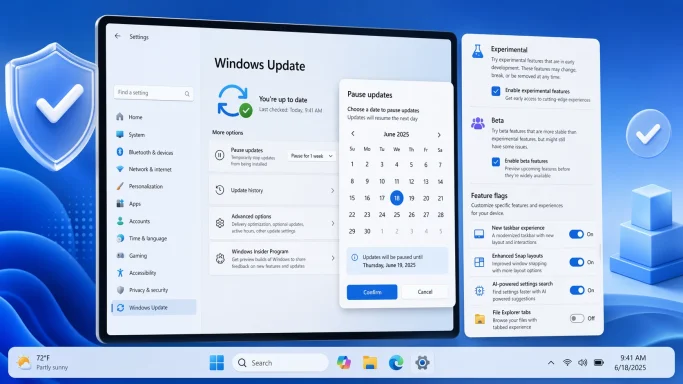
At the same time, Microsoft has been trying to reduce the friction of Windows Update itself. The company has made it clear that it wants to be secure by default, but it also understands that users do not like being ambushed by restarts, forced installs, or update prompts during inconvenient moments. The new calendar-based pause system is part of that broader response, and the Insider Program changes around channels and feature flags fit the same philosophy: more user control, less mystery.
In practical terms, Microsoft is trying to rebuild Windows servicing around a more legible contract. The Insider Program becomes easier to explain, the preview pipeline becomes more predictable, and Windows Update becomes less about arbitrary intervals and more about actual scheduling. That is a subtle but important shift. It does not eliminate automation; it simply gives people a stronger sense that they are participating in maintenance, not being subjected to it.
The practical benefit is obvious: less ambiguity and fewer false expectations. If you want the bleeding edge, Experimental is where you go. If you want a preview that feels much closer to a production release, Beta is the safer bet. Microsoft is basically admitting that one-size-fits-all preview logic no longer works for a platform with this many audiences and this much feature complexity.
That change is also a credibility play. Insiders have long complained that the program asked them to install builds while still hiding features behind invisible rollout gates. Microsoft is now saying, in effect, that Beta should be the place where the preview is real and observable, not partially hidden behind the company’s own internal experimentation system. That is healthier for feedback and healthier for trust.
There is a clear upside to that approach. Feedback becomes cleaner because testers can deliberately enable the thing they are evaluating. Support becomes easier because there is a documented control path. And Microsoft can watch how people respond when features are no longer buried behind opaque rollout logic.
The important distinction is that this is not a free-for-all. It is a controlled way of making hidden features visible to those who want to test them. In other words, Microsoft is not removing guardrails; it is moving them closer to the user and making them easier to understand.
That distinction matters more than it looks like on paper. When the UI lets users pick a specific date, it turns update timing from a vague deferral into a deliberate decision. That alone can reduce frustration, even for users who do not change their default habits very often. The presence of choice changes the relationship.
This is exactly the kind of “best case scenario” many users had hoped for when Microsoft first started talking about longer update pauses. The company did not just vaguely promise more flexibility; it delivered a mechanism that can fit around real-world schedules without entirely abandoning the security model.
The Insider overhaul and the update pause changes both attack that problem from different angles. One makes preview behavior more legible. The other makes maintenance timing more negotiable. Together, they suggest Microsoft is trying to make Windows feel less like an operating system that happens to you and more like one you can actually steer.
That does not mean the work is finished. But it does mean Microsoft is now willing to change the shape of its own update and preview machinery to support the quality story. That is significant because companies often talk about quality in abstract terms; fewer are willing to redesign the plumbing to make it real.
The Insider channel changes matter too, even if they are aimed at more advanced users. Consumers who like testing new features will have an easier time understanding what they are signing up for. The labels are clearer, the expectations are cleaner, and the feature exposure is less mysterious.
That matters for commercial pilots, help desk preparation, and app compatibility checks. Enterprises do not just want access to new features; they want a stable way to understand when those features are ready to test. Cleaner channel definitions support that workflow.
There is also the issue of education. If the Insider Program becomes easier for enthusiasts to understand, it may also become more attractive to power users who sit in smaller organizations without deep IT support. That is good for adoption, but it could also increase the number of people asking whether preview builds belong on a work machine at all.
The other thing to watch is how Microsoft handles rollout discipline. The company wants more predictability in Beta and more direct control in Experimental, but it must avoid creating a new kind of confusion in which users understand the labels yet still do not understand the consequences. That will require clear documentation, consistent behavior, and a willingness to keep iterating on the experience after launch.
What to watch next:
Source: Thurrott.com Hands-On: The New Windows Insider Program and Windows Update
 Background
For a long time, the Windows Insider Program has been both one of Microsoft’s most valuable engineering tools and one of its most confusing public-facing systems. It gave enthusiasts, IT pros, OEMs, and developers early access to Windows features, but the channel structure gradually became hard to explain even to seasoned testers. Microsoft’s own April 2026 messaging acknowledges that problem directly, saying the program needed clearer channel definitions, easier access to new features, and better visibility into how feedback shapes Windows.That confusion did not come from nowhere. Microsoft layered Controlled Feature Rollout logic on top of already complicated Insider paths, which meant two people on the same build could have different experiences. One tester might get a feature immediately, while another would see nothing at all, even though the release notes described the same build. Microsoft’s April 10 explanation makes clear that this mismatch between announcement and reality was a major source of frustration, and the company is now trying to fix it by separating early experimentation from near-term validation more cleanly.
The timing of the reset also says a lot about where Microsoft thinks Windows needs help. In March, Pavan Davuluri publicly framed Windows quality as a company priority and promised improvements in reliability, transparency, and update behavior. That was not a throwaway remark. It was an explicit acknowledgment that users were tired of ambiguity and disruption, and that Microsoft needed to show visible progress rather than simply talk about future polish.
At the same time, Microsoft has been trying to reduce the friction of Windows Update itself. The company has made it clear that it wants to be secure by default, but it also understands that users do not like being ambushed by restarts, forced installs, or update prompts during inconvenient moments. The new calendar-based pause system is part of that broader response, and the Insider Program changes around channels and feature flags fit the same philosophy: more user control, less mystery.
In practical terms, Microsoft is trying to rebuild Windows servicing around a more legible contract. The Insider Program becomes easier to explain, the preview pipeline becomes more predictable, and Windows Update becomes less about arbitrary intervals and more about actual scheduling. That is a subtle but important shift. It does not eliminate automation; it simply gives people a stronger sense that they are participating in maintenance, not being subjected to it.
The New Insider Structure
The most visible part of the refresh is the new Insider experience itself. Microsoft is moving toward a model centered on Experimental and Beta channels, with clearer expectations for what each one means. The goal is to make the program feel less like a maze of technical labels and more like a ladder with obvious rungs. That matters because channel naming is not just branding; it shapes how people think about risk, stability, and what they should expect to see after an update.Experimental vs. Beta
Microsoft’s new language is refreshingly blunt. Experimental is for the earliest work, the stuff that can still change, disappear, or never ship at all. Beta is meant to be closer to what will actually ship in the coming weeks. That distinction sounds simple, but it is a major correction to years of channel drift, where users often had to guess how “real” a feature really was.The practical benefit is obvious: less ambiguity and fewer false expectations. If you want the bleeding edge, Experimental is where you go. If you want a preview that feels much closer to a production release, Beta is the safer bet. Microsoft is basically admitting that one-size-fits-all preview logic no longer works for a platform with this many audiences and this much feature complexity.
Why the Rename Matters
A rename alone would not matter much, but the rename is paired with behavioral changes. Microsoft is ending gradual rollout in Beta, which means features announced in that channel should actually be present when you install the build. That is a big deal because it restores a basic expectation of preview software: if the company says a feature is there, users should be able to test it without wondering whether they lost the feature lottery.That change is also a credibility play. Insiders have long complained that the program asked them to install builds while still hiding features behind invisible rollout gates. Microsoft is now saying, in effect, that Beta should be the place where the preview is real and observable, not partially hidden behind the company’s own internal experimentation system. That is healthier for feedback and healthier for trust.
The Advanced Options Layer
Microsoft is also adding more explicit control over where a device sits in the preview hierarchy, including an advanced option for version selection. That gives the company more room to separate platform experimentation from feature testing, which is important as Windows branches become more specialized. The Insider stack was getting harder to explain because it mixed too many concepts together; these changes begin to separate them.- Experimental is the early innovation lane.
- Beta is the near-term validation lane.
- Release Preview remains the production-adjacent lane.
- Feature flags give testers more direct feature control.
- Version selection makes the underlying build target more explicit.
Feature Flags Bring Hidden Controls Into the Open
One of the biggest philosophical shifts is the new Feature flags page. For years, power users have relied on unofficial tools and buried switches to surface features Microsoft had already seeded in preview builds. Now the company is formalizing that behavior inside Settings instead of forcing users to reverse-engineer it. That is both a usability improvement and an admission that hidden features had become part of the Insider culture.From Workarounds to Built-In Control
This matters because preview software is supposed to be a test environment, not a scavenger hunt. When users had to wait for feature exposure or use external tools to surface functionality, the experience became uneven and frustrating. Microsoft is trying to make that process more honest by letting Insiders switch certain experiences on or off directly from the Windows Insider Program settings page.There is a clear upside to that approach. Feedback becomes cleaner because testers can deliberately enable the thing they are evaluating. Support becomes easier because there is a documented control path. And Microsoft can watch how people respond when features are no longer buried behind opaque rollout logic.
The Risk of Exposing More Experiments
The downside is equally obvious: more people will turn on unfinished or fragile features. That can increase noise in feedback and create more instability in daily-use devices. Microsoft seems willing to accept that tradeoff because it wants the test environment to feel more intentional, even if that means more edge cases and more support complexity.The important distinction is that this is not a free-for-all. It is a controlled way of making hidden features visible to those who want to test them. In other words, Microsoft is not removing guardrails; it is moving them closer to the user and making them easier to understand.
A Better Contract With Insiders
The deeper value here is contractual. Microsoft is saying that Insider participation should produce visible change, not uncertainty. That may sound minor, but in a preview program, predictability is everything. If testers cannot reliably tell what a build is supposed to do, they stop being effective testers and start becoming unpaid detectives.- Built-in feature control replaces some unofficial workaround culture.
- Testers can focus on validating behavior rather than finding hidden switches.
- Microsoft gets clearer telemetry on intentional usage.
- The Insider Program becomes easier to explain to newcomers.
- The downside is more exposure to rough edges and unfinished code.
Windows Update Finally Feels More Human
The second major change is the new Pause updates experience, and this one may be the most immediately useful for everyday users. Instead of offering only fixed one-week increments, Windows Update now includes a Pick a date calendar interface. You can choose a specific day up to 35 days away, and when that time runs out, you can re-pause for another 35 days as many times as needed. In practice, that makes pause behavior feel far more flexible than before.The Calendar Is the Point
This is a small interface change with a big psychological effect. A calendar is a human planning tool, while a dropdown of week-long increments is a system administrator’s compromise. Microsoft is finally acknowledging that people organize their lives around actual dates: travel, conferences, payroll, exams, product launches, deadlines, and long weekends.That distinction matters more than it looks like on paper. When the UI lets users pick a specific date, it turns update timing from a vague deferral into a deliberate decision. That alone can reduce frustration, even for users who do not change their default habits very often. The presence of choice changes the relationship.
Indefinite in Practice, Not in Name
Microsoft is careful not to say the pause is unlimited in one single stretch. It is still capped at 35 days at a time. But because you can re-pause as many times as you need, the practical effect is close to indefinite for anyone willing to keep extending the date. That is a clever compromise between user control and Microsoft’s need to keep devices reasonably current.This is exactly the kind of “best case scenario” many users had hoped for when Microsoft first started talking about longer update pauses. The company did not just vaguely promise more flexibility; it delivered a mechanism that can fit around real-world schedules without entirely abandoning the security model.
Why This Is Bigger Than Convenience
The significance goes beyond convenience. Windows updates sit at the crossroads of reliability, security, and user autonomy. If Microsoft can make the process feel more negotiable without weakening protection, it changes the emotional tone of the platform. Windows becomes less of a bossy machine and more of a managed system.- Users can plan around real-life commitments.
- The UI is more intuitive than fixed pause intervals.
- The 35-day cap still preserves Microsoft’s servicing logic.
- Re-pausing extends control without requiring enterprise tooling.
- The feature reduces the sense of being ambushed by maintenance.
What Microsoft Is Really Fixing
The deeper story is not just “new buttons appeared.” Microsoft is trying to fix a long-standing trust problem in how Windows communicates change. The company has spent years optimizing the mechanics of servicing, but many users still experience updates as interruption first and maintenance second. These changes are aimed squarely at that perception.Trust, Not Just Telemetry
Microsoft obviously cares about telemetry, rollback rates, and staged deployment risk. But the company also knows that users judge Windows by how it feels in the moment. If features appear inconsistently, or updates restart machines at awkward times, the platform starts to feel adversarial even when the technical logic is sound.The Insider overhaul and the update pause changes both attack that problem from different angles. One makes preview behavior more legible. The other makes maintenance timing more negotiable. Together, they suggest Microsoft is trying to make Windows feel less like an operating system that happens to you and more like one you can actually steer.
The Quality Campaign Behind the Curtain
This is also part of a bigger Windows quality campaign. Microsoft has been saying publicly that it wants to improve reliability, reduce disruption, and make the update experience simpler. The April 2026 changes are the first meaningful proof that those promises are not just marketing language.That does not mean the work is finished. But it does mean Microsoft is now willing to change the shape of its own update and preview machinery to support the quality story. That is significant because companies often talk about quality in abstract terms; fewer are willing to redesign the plumbing to make it real.
Why the Timing Matters
The timing is especially interesting because Microsoft has already been under pressure to show that Windows 11 is improving in tangible ways. Users have grown tired of cosmetic churn and AI-first messaging that seems disconnected from basic reliability. Changes like these are more grounded. They tell users that Microsoft is listening to the complaints that matter in everyday use.- The focus is on predictability rather than novelty.
- Microsoft is simplifying instead of adding another layer of complexity.
- The update system is being reframed as a user-negotiated process.
- Insider trust is being treated as a product requirement.
- Quality messaging is finally being matched with visible product behavior.
Consumer Impact
For consumers, the most obvious win is control. Being able to pick a date instead of a one-week chunk makes update management more intuitive, especially for people who work around travel, school, or family schedules. The change is modest in UI terms, but it meaningfully reduces the feeling that Windows is dictating maintenance on its own timetable.Less Surprise, More Planning
Consumer Windows users have long lived with the assumption that updates are necessary but inconvenient. This new model does not erase the inconvenience, but it gives people a better way to plan around it. That is a real quality-of-life improvement, and one that should be easy for ordinary users to understand immediately.The Insider channel changes matter too, even if they are aimed at more advanced users. Consumers who like testing new features will have an easier time understanding what they are signing up for. The labels are clearer, the expectations are cleaner, and the feature exposure is less mysterious.
A Better Daily Rhythm
If Microsoft executes this well, Windows should feel less disruptive in day-to-day use. The calendar pause experience, the ability to avoid forced installs at awkward moments, and the reduction in feature ambiguity all help the operating system fit into the user’s schedule instead of hijacking it. That is exactly the kind of change people notice even when they do not consciously celebrate it.Practical Consumer Takeaways
- Updates become easier to plan around real dates.
- Insider participation becomes less confusing.
- Preview features are easier to identify and test.
- Restart pressure should feel less aggressive over time.
- Windows Update starts to feel more like a tool and less like an interruption.
Enterprise Impact
For enterprise users, the implications are more nuanced. On one hand, Microsoft’s clearer channel structure could help IT teams explain preview behavior to pilots and validation groups. On the other hand, the feature flags model and more flexible pause logic can create policy questions about how much control should remain user-facing versus centrally managed.Better Testing, Cleaner Expectations
The biggest enterprise benefit is predictability. When Microsoft says Beta should actually reflect what was announced, IT teams get a more reliable staging environment for validation. That reduces the time spent figuring out whether a feature is missing because of rollout logic or because of a real problem.That matters for commercial pilots, help desk preparation, and app compatibility checks. Enterprises do not just want access to new features; they want a stable way to understand when those features are ready to test. Cleaner channel definitions support that workflow.
Policy and Governance Questions
The more interesting enterprise question is how Microsoft will balance user control against administrative control. A calendar-based pause system is great for individuals, but organizations still need policy enforcement, compliance windows, and patch deadlines. Microsoft will need to make sure that consumer-friendly flexibility does not accidentally complicate managed-device governance.There is also the issue of education. If the Insider Program becomes easier for enthusiasts to understand, it may also become more attractive to power users who sit in smaller organizations without deep IT support. That is good for adoption, but it could also increase the number of people asking whether preview builds belong on a work machine at all.
Enterprise Takeaways
- Pilot groups should get a more legible preview path.
- Validation should be easier when announced features are actually present.
- Managed policy will still matter for update discipline.
- User-facing pause controls may need clearer guidance in corporate environments.
- The new model could improve communication between Microsoft and enterprise admins.
Strengths and Opportunities
Microsoft’s approach has real strengths because it attacks one of Windows’ oldest pain points from several directions at once. It simplifies the preview pipeline, makes feature visibility more explicit, and gives users better control over maintenance timing. That combination could improve how people feel about Windows even before any major new feature arrives.- Clearer Insider channels reduce confusion about what is being tested.
- Feature flags make hidden experiments more accessible without external tools.
- Calendar-based pausing matches how people actually schedule their lives.
- Longer pause flexibility reduces update fatigue without fully disabling security discipline.
- Better preview predictability should improve feedback quality.
- More transparent wording should make the platform easier to explain.
- Quality-first messaging now has visible product changes behind it.
Risks and Concerns
The risks are real, and Microsoft is not out of the woods just because the UI looks better. More direct control can mean more user confusion if the company does not explain the tradeoffs well. And any system that makes previews easier to manipulate can also make unstable behavior more common on daily-use machines.- More controls can still confuse casual users if the labels are not crystal clear.
- Feature flags may expose unstable experiments to people who underestimate the risk.
- Long pause flexibility could tempt users to delay patches longer than is wise.
- Enterprise policy conflicts may emerge if consumer UI and managed rules diverge too much.
- Beta predictability has to hold up in practice or the credibility gain disappears.
- Microsoft will need to maintain momentum so these changes do not feel like one-off PR fixes.
- Security expectations still matter even when user control improves.
Looking Ahead
The next few months will tell us whether this is a genuine reset or simply a polished pilot. The key question is whether Microsoft can carry these ideas from Insider builds into stable Windows 11 releases without watering them down. If it can, this may become one of the most practically important Windows UX improvements in years.The other thing to watch is how Microsoft handles rollout discipline. The company wants more predictability in Beta and more direct control in Experimental, but it must avoid creating a new kind of confusion in which users understand the labels yet still do not understand the consequences. That will require clear documentation, consistent behavior, and a willingness to keep iterating on the experience after launch.
What to watch next:
- Whether the new Insider model expands beyond current preview builds.
- Whether Beta really becomes fully deterministic for announced features.
- Whether the pause calendar reaches stable Windows 11 broadly.
- Whether Microsoft adds more clarity around enterprise policy behavior.
- Whether the Feature flags page becomes a core part of the preview workflow.
Source: Thurrott.com Hands-On: The New Windows Insider Program and Windows Update
