

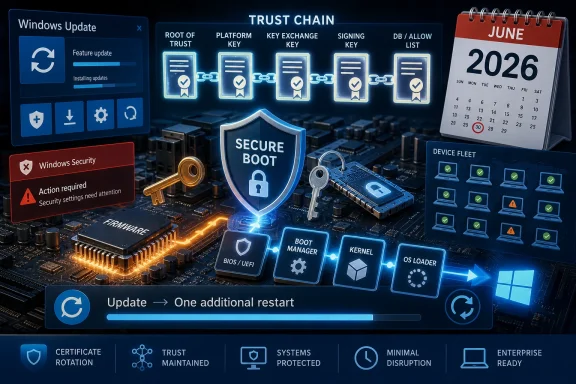
Microsoft is preparing Windows PCs for the first expiration of the original Secure Boot certificates issued in 2011, with the affected certificates beginning to age out in June 2026 and Windows Update now delivering replacement 2023-era trust material to supported devices. The visible symptom for many users will be mundane: one extra restart during an update cycle. The deeper story is less mundane, because it exposes how much of the modern Windows experience still depends on old decisions, old firmware contracts, and Microsoft’s ability to move a billion-device ecosystem without breaking it.
The phrase “one-time restart” makes this sound like the sort of housekeeping Windows users have learned to tolerate. A reboot here, a percentage counter there, a few minutes lost to the operating system’s endless appetite for self-maintenance. But Secure Boot is not a cosmetic feature, and certificate rotation is not an ordinary monthly patch.
Secure Boot exists to make sure the earliest code loaded by the machine is trusted before Windows itself starts. That chain of trust runs through firmware, boot managers, certificates, and operating-system loaders. If that sounds abstract, the practical version is simple: it is supposed to make it harder for bootkits and other low-level malware to wedge themselves underneath the OS, where antivirus tools and normal Windows defenses are least effective.
The uncomfortable detail is that much of this trust chain has been anchored to certificates that date back to the Windows 8 era. Microsoft and the PC industry have had more than a decade of relative quiet from that foundation. Now the clock is no longer theoretical. The original Secure Boot certificates begin expiring in June 2026, with other related expirations stretching later into the year.
That turns an invisible platform dependency into an operational event. Microsoft has to refresh the roots of trust across an enormous variety of PCs, firmware versions, deployment styles, and administrative policies. For home users, the desired experience is barely an experience at all: install normal cumulative updates, reboot when asked, and let Windows do the rest. For IT departments, the same process becomes a fleet-readiness project.
That is why Secure Boot certificate rotation is being pushed through the familiar Windows Update plumbing where possible. The replacement certificates are not just another file in System32. They are part of the trust relationship between Windows and the machine’s firmware. In supported configurations, Microsoft’s update process can stage the necessary material and use scheduled tasks and update sequencing to move systems toward the newer certificate set.
The extra restart matters because some boot-related updates cannot be safely completed entirely inside a running Windows session. A system may need to restart naturally before Windows can update the boot manager or complete the trust-chain transition. Microsoft’s warning that some devices may see an additional restart is therefore not a sign of failure; it is a sign that Windows is crossing one of the few boundaries it cannot simply paper over with a background service.
This is also why the rollout is being described in cautious language. Some devices may already have the newer certificates, especially newer PCs shipped in the last couple of years. Others may receive them through April or May update flows. Still others may depend on OEM firmware support, management configuration, or enterprise approval of the relevant update path.
The result is classic Windows: a huge platform migration disguised as a monthly patch footnote.
For consumers, the safest interpretation is blunt: keep Windows updated, do not indefinitely postpone restarts, and check the Windows Security app if Secure Boot warnings appear. If a PC is relatively recent and fully supported, the process should be mostly automatic. If the machine is older, has unusual firmware settings, dual-boots Linux, uses custom Secure Boot keys, or has fallen behind on firmware updates, the margin for surprise is larger.
For enterprise administrators, the story is more serious. This is not merely a helpdesk script about rebooting laptops. Organizations need to know which machines have Secure Boot enabled, which certificate authorities are present, which devices have received firmware updates, and which systems are blocked by policy, servicing status, or unsupported hardware. The risk is not that every unprepared system suddenly bricks in June; the risk is that the organization discovers too late that its assumed trust posture was never actually current.
The deadline also lands in the same year that Windows 10’s post-mainstream reality is becoming harder to ignore. Windows 10 reached the end of standard consumer support in October 2025, and the Extended Security Updates program is now the practical route for many users and organizations that cannot move to Windows 11 immediately. Microsoft’s Secure Boot guidance applies to supported devices eligible for the relevant security updates. That caveat matters.
If a Windows 10 system is out of support and not enrolled in ESU where applicable, the owner should not assume that the normal update channel will keep delivering everything needed for a safe 2026 trust transition. This is where Microsoft’s security model becomes inseparable from its lifecycle policy. The boot chain may be technical, but the fix is gated by support status.
Microsoft sees a different machine. It sees a device outside the default security servicing stream, often lacking newer hardware requirements, and increasingly expensive to keep inside the modern Windows trust envelope. The Secure Boot certificate transition gives that argument sharper edges. A PC can be perfectly usable and still be drifting away from the update assumptions that Microsoft’s security architecture now depends on.
That does not make Microsoft blameless. The company made Windows 11’s hardware requirements stricter than many users expected, especially around TPM 2.0 and supported CPU generations. It also spent years treating Windows 10 as the “last version of Windows” in public messaging, only to later reframe Windows as a more aggressively versioned platform again. Users who feel whiplash have a point.
But the security engineering side is not imaginary. Secure Boot, TPM-backed identity, virtualization-based security, driver signing, firmware measurements, and device health attestation are all part of Microsoft’s answer to a threat landscape that has moved below and around the traditional operating system. The company’s position is that modern Windows security needs modern platform assumptions. The user’s position is often that their computer still turns on and should not become a compliance problem because a certificate minted in 2011 is aging out.
Both things can be true. That is why the certificate story is bigger than one restart. It is another reminder that Windows is no longer just software installed on a PC. It is an ecosystem contract, and the small print is getting harder for casual users to ignore.
On paper, this is not scandalous. Modern operating systems and hardware already perform countless power-management tricks to balance responsiveness, battery life, thermals, and performance. Phones do it. Macs do it. Linux systems do it. CPUs have been racing between low-power and high-performance states for years.
The backlash is less about the mechanism than the diagnosis. Critics hear “Windows will boost the CPU to open the Start menu faster” and translate it as “Windows has become so bloated that it needs a turbo button for basic UI.” That reaction is not entirely fair, but it is emotionally predictable. Windows 11 has spent years fighting the perception that it is prettier, heavier, and less respectful of user control than Windows 10.
Microsoft’s defenders argue that responsiveness is the metric users actually feel. If a short CPU burst makes menus appear faster without meaningful battery or thermal cost, it is good engineering. The operating system’s job is to make the machine feel immediate when the user asks for something, not to win a purity contest about which code path woke which core.
Still, Microsoft has earned some of the skepticism. Windows 11’s shell has moved through layers of modernization, including new frameworks, redesigned surfaces, web-adjacent app models, and rewritten components. Some of those transitions have improved consistency and accessibility. Others have made Windows feel like a product still renovating itself while people are trying to live inside it.
Low Latency Profile may be a smart optimization. It may also become a symbol of the wrong thing: a visible performance bandage over architectural heaviness that users have complained about since Windows 11 launched.
The Secure Boot certificates lasted this long because stability matters. The PC industry cannot casually rotate foundational trust anchors every few years without risking chaos for recovery media, bootloaders, enterprise imaging systems, and specialized hardware. Long-lived certificates were a practical compromise, not necessarily negligence.
The Windows shell has its own version of the same bargain. Microsoft wants a modern UI stack, fluid animations, cloud-connected services, accessibility improvements, and cross-device consistency. It also wants old Win32 applications, old control panels, old management tools, old drivers, old deployment assumptions, and old user muscle memory to keep working. Every Windows release carries the sediment of the last one.
That sediment is why Windows remains dominant on desktops and inside enterprises. It is also why it can feel haunted. When users joke that thirty-year-old code still lurks under Windows 11, they are usually exaggerating, but they are pointing at a real architectural inheritance. Microsoft cannot simply delete the past without damaging the present.
The question is whether Microsoft can keep converting that inheritance into compatibility rather than drag. Secure Boot certificate rotation is a necessary lifecycle operation. Low Latency Profile is reportedly a responsiveness optimization. Both are defensible. But both also ask users to trust that Microsoft’s invisible machinery is under control.
Trust is the scarce resource here. Not CPU cycles. Not update bandwidth. Trust.
The most mature organizations will not wait for users to report red warnings. They will query device state, correlate it with hardware models and firmware versions, and test the update path on representative systems. They will also check recovery media, deployment images, and any bootable tools that depend on older Secure Boot trust assumptions.
This is especially important in environments with dual-boot systems, endpoint encryption, anti-cheat requirements, specialized drivers, or regulated device-control policies. Secure Boot touches more workflows than many organizations remember. A forgotten imaging USB or a niche vendor appliance can become the awkward exception that turns a routine rollout into an outage meeting.
The good news is that Microsoft has been signaling this transition well before the June 2026 date. This is not a zero-day scramble. The bad news is that the Windows installed base is full of machines that only get attention after something fails. The difference between those two realities is exactly where IT departments earn their keep.
The phrase “one additional restart” should not be read as Microsoft sneaking in some dramatic change without consent. Secure Boot certificate rotation has to happen. The alternative is allowing foundational trust material to age past its planned lifecycle while attackers continue targeting the pre-OS environment.
But users should also understand what Microsoft’s lifecycle language means in practice. “Supported” is doing a lot of work. A device that cannot receive security updates cannot be assumed to receive security-maintenance work merely because it still runs Windows. That is a hard message for households, small businesses, and schools with older PCs.
This is where Microsoft should communicate with unusual clarity. Red warnings without clear action steps will create panic. Vague references to certificates will cause users to search forums and land in worst-case speculation. The company needs to say, in plain Windows Update language, whether the device is ready, what action is required, and whether the machine is unsupported.
A security architecture that depends on user action must be understandable by users who did not ask to become firmware administrators.
The Low Latency Profile controversy is the mirror image. Everyone can feel a slow Start menu. Everyone can judge whether a right-click menu appears instantly or hesitates. Microsoft’s challenge is that users judge the visible parts emotionally and the invisible parts only when they fail.
That imbalance is why these two stories belong together. Microsoft is asking users to accept invisible security maintenance and visible performance tricks at the same time. The company wants credit for keeping the platform safe and fast, but it is operating in an environment where Windows 11 adoption pressure, advertising surfaces, account nudges, and hardware cutoffs have made users suspicious of even reasonable engineering decisions.
The company’s best defense is not rhetoric. It is execution. If the Secure Boot transition lands without widespread boot problems, and if the performance work makes Windows 11 feel faster without draining batteries or cooking thin laptops, complaints will fade. If either effort creates confusion or regressions, it will reinforce the belief that Microsoft keeps solving Windows complexity by adding more complexity.
Source: Forbes ‘One Time Restart’—Microsoft Changes Windows After 15 Years
 Microsoft’s Small Restart Is Covering a Very Large Trust Migration
The phrase “one-time restart” makes this sound like the sort of housekeeping Windows users have learned to tolerate. A reboot here, a percentage counter there, a few minutes lost to the operating system’s endless appetite for self-maintenance. But Secure Boot is not a cosmetic feature, and certificate rotation is not an ordinary monthly patch.Secure Boot exists to make sure the earliest code loaded by the machine is trusted before Windows itself starts. That chain of trust runs through firmware, boot managers, certificates, and operating-system loaders. If that sounds abstract, the practical version is simple: it is supposed to make it harder for bootkits and other low-level malware to wedge themselves underneath the OS, where antivirus tools and normal Windows defenses are least effective.
The uncomfortable detail is that much of this trust chain has been anchored to certificates that date back to the Windows 8 era. Microsoft and the PC industry have had more than a decade of relative quiet from that foundation. Now the clock is no longer theoretical. The original Secure Boot certificates begin expiring in June 2026, with other related expirations stretching later into the year.
That turns an invisible platform dependency into an operational event. Microsoft has to refresh the roots of trust across an enormous variety of PCs, firmware versions, deployment styles, and administrative policies. For home users, the desired experience is barely an experience at all: install normal cumulative updates, reboot when asked, and let Windows do the rest. For IT departments, the same process becomes a fleet-readiness project.
The Windows Update Machine Is Doing What Firmware Never Made Easy
The PC ecosystem’s great strength has always been its variety. It is also the reason apparently simple platform transitions become sprawling exercises in compatibility management. Apple can move the firmware, hardware, operating system, and user experience as one stack. Microsoft has to coordinate with OEMs, firmware vendors, silicon suppliers, enterprise administrators, and consumers who may not know what firmware is and do not want to learn.That is why Secure Boot certificate rotation is being pushed through the familiar Windows Update plumbing where possible. The replacement certificates are not just another file in System32. They are part of the trust relationship between Windows and the machine’s firmware. In supported configurations, Microsoft’s update process can stage the necessary material and use scheduled tasks and update sequencing to move systems toward the newer certificate set.
The extra restart matters because some boot-related updates cannot be safely completed entirely inside a running Windows session. A system may need to restart naturally before Windows can update the boot manager or complete the trust-chain transition. Microsoft’s warning that some devices may see an additional restart is therefore not a sign of failure; it is a sign that Windows is crossing one of the few boundaries it cannot simply paper over with a background service.
This is also why the rollout is being described in cautious language. Some devices may already have the newer certificates, especially newer PCs shipped in the last couple of years. Others may receive them through April or May update flows. Still others may depend on OEM firmware support, management configuration, or enterprise approval of the relevant update path.
The result is classic Windows: a huge platform migration disguised as a monthly patch footnote.
The Red Warning Will Be Less About Panic Than Inventory
Microsoft’s Windows Security app and Windows Update messaging are expected to surface Secure Boot readiness more visibly as the deadline approaches. That is a good thing, but it will also create confusion. A red warning in Windows Security feels like an immediate failure to ordinary users, even when the requested action is “install updates and reboot.”For consumers, the safest interpretation is blunt: keep Windows updated, do not indefinitely postpone restarts, and check the Windows Security app if Secure Boot warnings appear. If a PC is relatively recent and fully supported, the process should be mostly automatic. If the machine is older, has unusual firmware settings, dual-boots Linux, uses custom Secure Boot keys, or has fallen behind on firmware updates, the margin for surprise is larger.
For enterprise administrators, the story is more serious. This is not merely a helpdesk script about rebooting laptops. Organizations need to know which machines have Secure Boot enabled, which certificate authorities are present, which devices have received firmware updates, and which systems are blocked by policy, servicing status, or unsupported hardware. The risk is not that every unprepared system suddenly bricks in June; the risk is that the organization discovers too late that its assumed trust posture was never actually current.
The deadline also lands in the same year that Windows 10’s post-mainstream reality is becoming harder to ignore. Windows 10 reached the end of standard consumer support in October 2025, and the Extended Security Updates program is now the practical route for many users and organizations that cannot move to Windows 11 immediately. Microsoft’s Secure Boot guidance applies to supported devices eligible for the relevant security updates. That caveat matters.
If a Windows 10 system is out of support and not enrolled in ESU where applicable, the owner should not assume that the normal update channel will keep delivering everything needed for a safe 2026 trust transition. This is where Microsoft’s security model becomes inseparable from its lifecycle policy. The boot chain may be technical, but the fix is gated by support status.
Windows 10 Users Are Discovering That “Still Works” Is Not the Same as “Still Serviced”
The most politically charged part of this story is not the certificate date. It is the collision between that date and Microsoft’s pressure campaign around Windows 11. Millions of Windows 10 PCs still run well enough for email, browsing, Office, gaming, and line-of-business software. Many users see little functional reason to replace them.Microsoft sees a different machine. It sees a device outside the default security servicing stream, often lacking newer hardware requirements, and increasingly expensive to keep inside the modern Windows trust envelope. The Secure Boot certificate transition gives that argument sharper edges. A PC can be perfectly usable and still be drifting away from the update assumptions that Microsoft’s security architecture now depends on.
That does not make Microsoft blameless. The company made Windows 11’s hardware requirements stricter than many users expected, especially around TPM 2.0 and supported CPU generations. It also spent years treating Windows 10 as the “last version of Windows” in public messaging, only to later reframe Windows as a more aggressively versioned platform again. Users who feel whiplash have a point.
But the security engineering side is not imaginary. Secure Boot, TPM-backed identity, virtualization-based security, driver signing, firmware measurements, and device health attestation are all part of Microsoft’s answer to a threat landscape that has moved below and around the traditional operating system. The company’s position is that modern Windows security needs modern platform assumptions. The user’s position is often that their computer still turns on and should not become a compliance problem because a certificate minted in 2011 is aging out.
Both things can be true. That is why the certificate story is bigger than one restart. It is another reminder that Windows is no longer just software installed on a PC. It is an ecosystem contract, and the small print is getting harder for casual users to ignore.
The Low-Latency Profile Fight Is Really About Trust in Windows 11
The Secure Boot story arrived alongside a separate controversy over Windows 11 performance, and the pairing is revealing. Reports say Microsoft is testing a “Low Latency Profile” that briefly ramps CPU frequency when users perform high-priority actions such as opening the Start menu, launching apps, or invoking system flyouts. Early reporting has described notable improvements in perceived responsiveness, especially for built-in apps and common shell interactions.On paper, this is not scandalous. Modern operating systems and hardware already perform countless power-management tricks to balance responsiveness, battery life, thermals, and performance. Phones do it. Macs do it. Linux systems do it. CPUs have been racing between low-power and high-performance states for years.
The backlash is less about the mechanism than the diagnosis. Critics hear “Windows will boost the CPU to open the Start menu faster” and translate it as “Windows has become so bloated that it needs a turbo button for basic UI.” That reaction is not entirely fair, but it is emotionally predictable. Windows 11 has spent years fighting the perception that it is prettier, heavier, and less respectful of user control than Windows 10.
Microsoft’s defenders argue that responsiveness is the metric users actually feel. If a short CPU burst makes menus appear faster without meaningful battery or thermal cost, it is good engineering. The operating system’s job is to make the machine feel immediate when the user asks for something, not to win a purity contest about which code path woke which core.
Still, Microsoft has earned some of the skepticism. Windows 11’s shell has moved through layers of modernization, including new frameworks, redesigned surfaces, web-adjacent app models, and rewritten components. Some of those transitions have improved consistency and accessibility. Others have made Windows feel like a product still renovating itself while people are trying to live inside it.
Low Latency Profile may be a smart optimization. It may also become a symbol of the wrong thing: a visible performance bandage over architectural heaviness that users have complained about since Windows 11 launched.
The 2011 Problem and the Start Menu Problem Share the Same Root
At first glance, Secure Boot certificate rotation and Start menu CPU boosting are unrelated. One is cryptographic plumbing at boot time; the other is interface responsiveness after login. But both stories expose the same core tension in Windows: Microsoft is trying to modernize a platform whose value is inseparable from its backward compatibility.The Secure Boot certificates lasted this long because stability matters. The PC industry cannot casually rotate foundational trust anchors every few years without risking chaos for recovery media, bootloaders, enterprise imaging systems, and specialized hardware. Long-lived certificates were a practical compromise, not necessarily negligence.
The Windows shell has its own version of the same bargain. Microsoft wants a modern UI stack, fluid animations, cloud-connected services, accessibility improvements, and cross-device consistency. It also wants old Win32 applications, old control panels, old management tools, old drivers, old deployment assumptions, and old user muscle memory to keep working. Every Windows release carries the sediment of the last one.
That sediment is why Windows remains dominant on desktops and inside enterprises. It is also why it can feel haunted. When users joke that thirty-year-old code still lurks under Windows 11, they are usually exaggerating, but they are pointing at a real architectural inheritance. Microsoft cannot simply delete the past without damaging the present.
The question is whether Microsoft can keep converting that inheritance into compatibility rather than drag. Secure Boot certificate rotation is a necessary lifecycle operation. Low Latency Profile is reportedly a responsiveness optimization. Both are defensible. But both also ask users to trust that Microsoft’s invisible machinery is under control.
Trust is the scarce resource here. Not CPU cycles. Not update bandwidth. Trust.
Enterprise IT Will Treat June as a Change Window, Not a News Story
For administrators, the Secure Boot deadline should be handled like any other platform-risk event: inventory first, remediation second, exceptions third. The danger is not the certificate expiration in isolation. The danger is finding out in June that a subset of laptops, kiosks, lab machines, or branch-office systems cannot take the expected update path because firmware is stale, Windows servicing is blocked, or a custom boot configuration was never documented.The most mature organizations will not wait for users to report red warnings. They will query device state, correlate it with hardware models and firmware versions, and test the update path on representative systems. They will also check recovery media, deployment images, and any bootable tools that depend on older Secure Boot trust assumptions.
This is especially important in environments with dual-boot systems, endpoint encryption, anti-cheat requirements, specialized drivers, or regulated device-control policies. Secure Boot touches more workflows than many organizations remember. A forgotten imaging USB or a niche vendor appliance can become the awkward exception that turns a routine rollout into an outage meeting.
The good news is that Microsoft has been signaling this transition well before the June 2026 date. This is not a zero-day scramble. The bad news is that the Windows installed base is full of machines that only get attention after something fails. The difference between those two realities is exactly where IT departments earn their keep.
The Consumer Advice Is Boring Because the Risk Is Not
For ordinary Windows users, the advice is almost comically plain: install updates, allow restarts, and do not ignore Windows Security warnings about Secure Boot. If your PC is newer, supported, and not heavily customized, the transition should be routine. If your PC is older or running Windows 10 outside normal support, the boring advice becomes more consequential.The phrase “one additional restart” should not be read as Microsoft sneaking in some dramatic change without consent. Secure Boot certificate rotation has to happen. The alternative is allowing foundational trust material to age past its planned lifecycle while attackers continue targeting the pre-OS environment.
But users should also understand what Microsoft’s lifecycle language means in practice. “Supported” is doing a lot of work. A device that cannot receive security updates cannot be assumed to receive security-maintenance work merely because it still runs Windows. That is a hard message for households, small businesses, and schools with older PCs.
This is where Microsoft should communicate with unusual clarity. Red warnings without clear action steps will create panic. Vague references to certificates will cause users to search forums and land in worst-case speculation. The company needs to say, in plain Windows Update language, whether the device is ready, what action is required, and whether the machine is unsupported.
A security architecture that depends on user action must be understandable by users who did not ask to become firmware administrators.
The Real Deadline Is the One Users Cannot See
The Secure Boot certificate transition is a reminder that some of the most important Windows updates are the least visible. Nobody buys a PC because its boot trust store is current. Nobody posts screenshots of a successfully updated Key Exchange Key. Yet those details determine whether the device can participate in the modern Windows security model.The Low Latency Profile controversy is the mirror image. Everyone can feel a slow Start menu. Everyone can judge whether a right-click menu appears instantly or hesitates. Microsoft’s challenge is that users judge the visible parts emotionally and the invisible parts only when they fail.
That imbalance is why these two stories belong together. Microsoft is asking users to accept invisible security maintenance and visible performance tricks at the same time. The company wants credit for keeping the platform safe and fast, but it is operating in an environment where Windows 11 adoption pressure, advertising surfaces, account nudges, and hardware cutoffs have made users suspicious of even reasonable engineering decisions.
The company’s best defense is not rhetoric. It is execution. If the Secure Boot transition lands without widespread boot problems, and if the performance work makes Windows 11 feel faster without draining batteries or cooking thin laptops, complaints will fade. If either effort creates confusion or regressions, it will reinforce the belief that Microsoft keeps solving Windows complexity by adding more complexity.
The June Reboot Is a Test of Microsoft’s Windows Bargain
The practical lessons are narrow, but the implications are broad. Microsoft has to rotate old trust anchors, keep unsupported systems from becoming a silent security liability, and make Windows 11 feel modern enough that users stop treating every optimization as an admission of bloat.- Windows devices using the original 2011 Secure Boot certificates need to move to newer certificates before the 2026 expiration window creates avoidable security risk.
- Supported PCs should receive the relevant Secure Boot certificate updates through normal Windows servicing, though some systems may require an additional restart.
- Newer PCs are more likely to already include the updated certificate chain, while older systems deserve closer inspection through Windows Security, Windows Update, firmware updates, or management tooling.
- Windows 10 machines outside normal support should not be assumed safe merely because they still function, especially if they are not enrolled in an applicable Extended Security Updates path.
- Microsoft’s reported Low Latency Profile may make Windows 11 feel faster, but it will not erase broader user frustration with perceived shell bloat and forced modernization.
- IT teams should treat this as a fleet-readiness issue, not a last-minute Patch Tuesday annoyance.
Source: Forbes ‘One Time Restart’—Microsoft Changes Windows After 15 Years
