

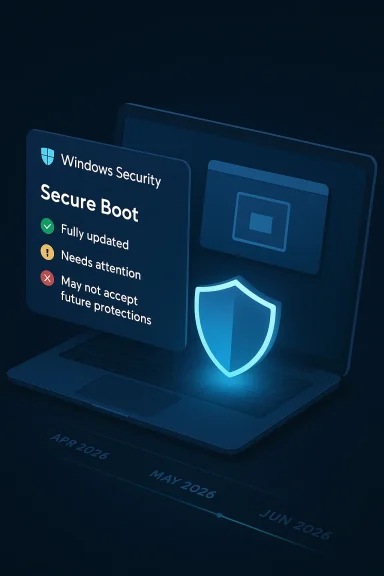
Microsoft is using the Windows Security app to surface a deadline that has been quietly building for years: the original Secure Boot certificates issued in 2011 are now approaching expiration, and some devices will begin losing the ability to receive new boot-chain protections as early as June 2026. The new status view adds color-coded warnings inside Device security > Secure Boot, with green, yellow, and red states that tell users whether their PC is fully updated, needs attention, or may no longer be able to accept future boot-level security fixes. Microsoft says the rollout starts in April 2026, with additional system alerts appearing in May 2026 to catch users who never open the Security app.
The Secure Boot story begins with a simple promise: when a PC starts, it should only run software that has been cryptographically trusted. That mechanism is part of the UEFI firmware model and has been a cornerstone of Windows startup security for more than a decade. Microsoft’s original Secure Boot certificates, issued in 2011, were designed for a long life, but not an infinite one. They are now reaching the end of that lifecycle, and Microsoft is trying to avoid a situation where users discover the problem only after a security incident or a blocked update.
This is not a sudden patch Tuesday change. Microsoft has been warning administrators and OEM partners for months, with formal guidance, FAQs, and rollout plans published across support and Tech Community pages. The company has also repeatedly emphasized that most devices will update automatically through Windows Update, but that some machines will need firmware cooperation, newer boot components, or in some cases manual intervention from the manufacturer or IT department.
The key distinction is that expiration does not mean Windows instantly stops booting. Microsoft says affected PCs should still start and continue receiving ordinary Windows updates. What changes is the ability to receive new protections for the early boot process, including updates to Windows Boot Manager, Secure Boot databases, revocation lists, and mitigations for newly discovered boot-chain vulnerabilities. That makes the issue more subtle than an outage, but also more dangerous because users can remain unaware while their protection quietly degrades.
Microsoft’s answer is visibility. The Windows Security app now exposes the Secure Boot certificate state in plain language, which matters because the old checking process was far too technical for most users. Instead of asking people to inspect firmware settings or read registry keys, Microsoft is placing a visible badge in a place users already associate with security health. That is a small UI change on paper, but it is a meaningful change in security operations.
The wording matters. Microsoft is not saying that every yellow device is broken, nor that every red device is dead in the water. It is saying that the trust chain is drifting away from the newest security baseline. That distinction will be important for consumers, because they may interpret “warning” as “my PC is about to fail,” when in practice the more likely outcome is reduced future protection rather than immediate failure.
There is also an important caveat: some Secure Boot messages can appear for reasons unrelated to the 2026 certificate rollover. Microsoft notes that the app may also reflect situations such as Secure Boot being turned off entirely. That makes the feature useful, but not perfectly self-explanatory, which is why the surrounding guidance and support links matter almost as much as the colored badge itself.
It also reduces support friction. A visible, in-product status reduces the likelihood that users will first learn about the issue from a forum post, a retailer article, or an OEM support page. In security work, time to awareness is often the biggest hidden variable, and Microsoft appears to be betting that the app can shorten it.
Microsoft’s documentation is careful to say that normal Windows updates will continue. That is reassuring, but only up to a point. The boot path is the first line of defense, and once that line starts to age out of the update pipeline, the machine becomes progressively less protected against low-level persistence techniques such as bootkits and pre-OS tampering. For enterprises, that is a compliance issue; for consumers, it is a trust issue.
The company is also warning users not to disable Secure Boot as a workaround. That is an important message because a frustrated user might assume that turning the feature off resolves the warning. In reality, it eliminates the protection entirely and makes the machine easier to compromise at the very layer Microsoft is trying to defend. That would be the wrong fix to the right anxiety.
This is why Microsoft has described the rollout as a coordinated effort rather than a single update. The company needs Windows Update, firmware support, OEM cooperation, admin guidance, and user education to work together. If any one of those pieces lags, the result is a system that technically has the fix available but practically still leaves users in the dark.
If a device lands in yellow or red, the user experience becomes more annoying than alarming, at least at first. Microsoft says additional system notifications will begin appearing in May 2026, which suggests the company knows the Security app alone will miss some owners. That is a sensible move because casual users rarely open security dashboards unless something is already broken.
A likely benefit of the new messaging is fewer mysteries around “why my PC seems fine but keeps warning me.” The change should help explain that the machine is not necessarily compromised; rather, it is behind on a trust-chain upgrade. That distinction should reduce unnecessary panic while still encouraging action.
This is where the quality of Microsoft’s wording will matter. If the message reads as a technical footnote, users will ignore it. If it reads as a serious but understandable readiness check, users are more likely to accept the update and move on. In other words, the success of the rollout depends as much on phrasing as on code.
The enterprise risk is not just that one machine remains out of date. It is that a small subset of unpatched endpoints can become the weak point in an otherwise healthy fleet. Boot-level security gaps are particularly uncomfortable because they sit below most endpoint detection tools, making visibility harder and remediation more delicate. That is why Microsoft has separately published IT-focused guidance and playbooks.
The warning also matters for server environments, where reboot windows, driver compatibility, and firmware update processes are already tightly managed. A red state on a server is not the same as a red state on a home laptop; it may imply a change-control project, not just a patch. That is another reason Microsoft has split its consumer guidance from its admin guidance.
It also creates a bridge between user-facing and admin-facing messaging. If an employee sees a warning in Windows Security, they can now tell IT something more precise than “my PC feels weird.” That improves triage and should reduce back-and-forth in help desks, especially in organizations that support thousands of endpoints. That alone is not a cure, but it is a meaningful reduction in friction.
This approach also lowers the risk of a support flood. If Microsoft had launched system-wide alerts first, many users would have been startled without context. By putting the state inside Windows Security before expanding the alert surface, Microsoft gives itself a chance to explain the issue before the system starts interrupting people more broadly.
The timeline also reveals that Microsoft is treating the event as a campaign, not a patch. That matters because the certificate transition is not a one-day deadline in the real world. It is a window of opportunity, and Microsoft appears to be using April and May as lead-up months before the June expiration pressure becomes more acute.
For users, the immediate task is not to tinker with firmware settings. It is to make sure the device is up to date, online, and not blocked from normal servicing. For IT teams, the task is to audit where the automatic path fails and to identify models that require special handling. That division of labor is one reason Microsoft’s guidance is split between consumer and managed-device documentation.
There is also a broader precedent here. If Microsoft succeeds in making certificate state understandable, it may encourage more security features to move into visible health dashboards rather than hidden settings panels. That could improve adoption for other infrastructure-level protections as well. The long-term lesson may be that security only scales when the UX is honest about risk.
At the same time, visibility can be double-edged. More alerts mean more opportunities for alert fatigue, and more clarity can also reveal how many older machines remain in service. In that sense, the feature doubles as a telemetry-lite pressure point: it makes aging hardware harder to ignore, which may accelerate replacement decisions in both homes and businesses.
For Microsoft, the upside is that it owns the operating-system layer where the warning lives. It can coordinate messaging, remediation, and future notifications without waiting for third-party tools to catch up. For rivals and partners, the challenge is to keep pace with a lifecycle event that is as much about ecosystem logistics as it is about cryptography.
The opportunity is bigger than the Secure Boot rollover itself. If Microsoft gets this right, it can improve how Windows communicates other complex security states in the future. A visible, understandable status model could become a template for future hardware-rooted protections, especially in enterprise environments where compliance and user awareness often diverge.
Another concern is uneven hardware support. Microsoft acknowledges that some devices cannot receive the automated update because of firmware or hardware limitations. That means the burden will fall unevenly, with some owners needing OEM help while others enjoy a smooth background update. In a mixed fleet, those differences can become operationally painful very quickly.
The third risk is complacency. Because Windows will still boot and ordinary updates will keep flowing, many users may decide the warning is not urgent. That is exactly how security debt accumulates: quietly, without obvious failure, until the next vulnerability makes the gap impossible to ignore. A system can look healthy and still be drifting into a weaker trust state.
A final concern is notification fatigue. If Microsoft pushes too many alerts too aggressively, users will learn to dismiss them reflexively. If it pushes too softly, the message will never reach the people who need it. That balance is delicate, and the success of this rollout will depend on whether Microsoft can keep the warnings meaningful rather than merely noisy.
Enterprises should also watch for how the guidance lands across managed environments. If the new indicators align well with existing inventory and compliance tools, the feature could become a useful operational signal. If they do not, then organizations will need to rely even more heavily on Microsoft’s IT playbooks and their own device-management telemetry.
The broader signal is that Microsoft is not treating Secure Boot as a background detail anymore. It is turning certificate maintenance into a visible part of Windows health, which suggests future security features may be presented in the same way. That would be a notable shift for a platform that has historically hidden too much of its deepest security plumbing from the people who depend on it.
Source: Technobezz Microsoft Adds Secure Boot Status Alerts to Windows Security App
 Background
The Secure Boot story begins with a simple promise: when a PC starts, it should only run software that has been cryptographically trusted. That mechanism is part of the UEFI firmware model and has been a cornerstone of Windows startup security for more than a decade. Microsoft’s original Secure Boot certificates, issued in 2011, were designed for a long life, but not an infinite one. They are now reaching the end of that lifecycle, and Microsoft is trying to avoid a situation where users discover the problem only after a security incident or a blocked update.This is not a sudden patch Tuesday change. Microsoft has been warning administrators and OEM partners for months, with formal guidance, FAQs, and rollout plans published across support and Tech Community pages. The company has also repeatedly emphasized that most devices will update automatically through Windows Update, but that some machines will need firmware cooperation, newer boot components, or in some cases manual intervention from the manufacturer or IT department.
The key distinction is that expiration does not mean Windows instantly stops booting. Microsoft says affected PCs should still start and continue receiving ordinary Windows updates. What changes is the ability to receive new protections for the early boot process, including updates to Windows Boot Manager, Secure Boot databases, revocation lists, and mitigations for newly discovered boot-chain vulnerabilities. That makes the issue more subtle than an outage, but also more dangerous because users can remain unaware while their protection quietly degrades.
Microsoft’s answer is visibility. The Windows Security app now exposes the Secure Boot certificate state in plain language, which matters because the old checking process was far too technical for most users. Instead of asking people to inspect firmware settings or read registry keys, Microsoft is placing a visible badge in a place users already associate with security health. That is a small UI change on paper, but it is a meaningful change in security operations.
What Microsoft Changed
The most visible change is the new Secure Boot panel inside the Windows Security app. Microsoft says the app now shows whether the device is fully updated, not yet updated, or requires action, with green, yellow, and red indicators respectively. The design is intentionally blunt: the company wants non-specialists to recognize the meaning immediately without decoding a firmware transcript.The Three Statuses
A Fully updated device has received the required Secure Boot certificate updates and the updated Boot Manager. Microsoft says no action is needed in this case, which is the outcome most users should eventually reach. A Not yet updated device is still running an older certificate, but Microsoft expects the update to arrive automatically through Windows Update if the machine is connected and current. A Requires action device is the most serious category, and Microsoft says that state can appear when a boot-related vulnerability exists but the device’s current configuration cannot receive the needed fix.The wording matters. Microsoft is not saying that every yellow device is broken, nor that every red device is dead in the water. It is saying that the trust chain is drifting away from the newest security baseline. That distinction will be important for consumers, because they may interpret “warning” as “my PC is about to fail,” when in practice the more likely outcome is reduced future protection rather than immediate failure.
There is also an important caveat: some Secure Boot messages can appear for reasons unrelated to the 2026 certificate rollover. Microsoft notes that the app may also reflect situations such as Secure Boot being turned off entirely. That makes the feature useful, but not perfectly self-explanatory, which is why the surrounding guidance and support links matter almost as much as the colored badge itself.
Why the App Matters
The average Windows user is not thinking about firmware trust anchors, certificate authorities, or boot loaders. They are thinking about whether their laptop turns on, whether Windows Update is working, and whether security tools are quiet. By moving the warning into the Security app, Microsoft is acknowledging that a problem which began in the BIOS/UEFI layer needs a consumer-facing layer of explanation. That is smart product design and, frankly, overdue.It also reduces support friction. A visible, in-product status reduces the likelihood that users will first learn about the issue from a forum post, a retailer article, or an OEM support page. In security work, time to awareness is often the biggest hidden variable, and Microsoft appears to be betting that the app can shorten it.
- Green means the device has the updates and the updated Boot Manager.
- Yellow means the device is behind and should be checked.
- Red means the machine may not be able to accept future boot protections.
- Some alerts can also reflect non-certificate Secure Boot issues.
- The new view lives under Device security > Secure Boot.
The Certificate Expiration Problem
At the heart of this announcement is a mundane but consequential fact: the 2011 Microsoft Secure Boot certificates are aging out. Microsoft says they begin expiring in June 2026, with some of the current certificate chain reaching the end of life later in the year as part of the broader transition. That means the trust infrastructure that underpins boot validation is being refreshed after roughly 15 years of service.Why Expiration Is a Security Issue
Secure Boot depends on trusted signatures during startup. If the system cannot validate new boot components against a current trust chain, then Microsoft cannot keep extending the same startup protections into the future. The result is not necessarily an immediate exploit, but it does create a widening window where newly discovered vulnerabilities may not be serviceable on machines that remain stuck on the old certificates. That is the real risk, and it is more serious than a simple expiration banner suggests.Microsoft’s documentation is careful to say that normal Windows updates will continue. That is reassuring, but only up to a point. The boot path is the first line of defense, and once that line starts to age out of the update pipeline, the machine becomes progressively less protected against low-level persistence techniques such as bootkits and pre-OS tampering. For enterprises, that is a compliance issue; for consumers, it is a trust issue.
The company is also warning users not to disable Secure Boot as a workaround. That is an important message because a frustrated user might assume that turning the feature off resolves the warning. In reality, it eliminates the protection entirely and makes the machine easier to compromise at the very layer Microsoft is trying to defend. That would be the wrong fix to the right anxiety.
The 15-Year Lifecycle
The 15-year lifecycle helps explain why this moment is arriving now. Certificates are supposed to expire; that is part of the security model, not a defect in it. The problem is scale. Millions of devices were built around assumptions made in the Windows 8 era, and now that trust root is being renewed across a vast ecosystem of consumer PCs, managed endpoints, servers, and OEM-specific firmware configurations.This is why Microsoft has described the rollout as a coordinated effort rather than a single update. The company needs Windows Update, firmware support, OEM cooperation, admin guidance, and user education to work together. If any one of those pieces lags, the result is a system that technically has the fix available but practically still leaves users in the dark.
- The original certificates were issued in 2011.
- Expiration begins in June 2026.
- The update path is meant to be largely automatic.
- Some systems may need firmware or OEM help.
- Expiration affects future boot protections more than everyday usage.
Consumer Impact
For home users, the biggest practical change is simple: there is now a place in Windows where they can see whether their machine is ready. Most users will not need to understand the cryptographic detail to benefit from the warning, and that is exactly the point. Microsoft is translating a deeply technical risk into a status indicator that can be acted on without a support ticket.What Home Users Should Expect
If a device is up to date, the experience should be mostly invisible. A green badge in Windows Security is not something users will need to manage obsessively. If the machine is not yet updated, Microsoft says the remedy is usually to keep the device online and current with Windows Update, which means the ordinary update habit remains the most important behavior.If a device lands in yellow or red, the user experience becomes more annoying than alarming, at least at first. Microsoft says additional system notifications will begin appearing in May 2026, which suggests the company knows the Security app alone will miss some owners. That is a sensible move because casual users rarely open security dashboards unless something is already broken.
A likely benefit of the new messaging is fewer mysteries around “why my PC seems fine but keeps warning me.” The change should help explain that the machine is not necessarily compromised; rather, it is behind on a trust-chain upgrade. That distinction should reduce unnecessary panic while still encouraging action.
The Dismissal Problem
Microsoft does allow warnings to be dismissed, but it explicitly warns against doing so if the certificates have not yet been updated. That is a reasonable compromise for noisy notifications, though it also creates a human-factors risk: users may silence the warning because they do not understand it, then forget about it until the next incident. The company is trying to balance urgency against alert fatigue, and that is always a difficult tradeoff.This is where the quality of Microsoft’s wording will matter. If the message reads as a technical footnote, users will ignore it. If it reads as a serious but understandable readiness check, users are more likely to accept the update and move on. In other words, the success of the rollout depends as much on phrasing as on code.
- Most home users should see the change automatically.
- A green status means no action is needed.
- Yellow suggests the device should be reviewed.
- Red means the device may be unable to receive future boot fixes.
- Dismissing warnings is possible, but not recommended.
Enterprise Impact
For IT departments, this is less about a single badge and more about fleet hygiene. Microsoft says the Device security enhancements are disabled by default on enterprise-managed Windows 10 and Windows 11 clients and on Windows Server, which means organizations must decide whether to enable the experience and how to integrate it into their own monitoring flow. That default-off posture makes sense because enterprises already have inventory, compliance, and remediation tooling.Why Enterprises Should Care Early
Enterprises are more likely than consumers to have mixed hardware vintages, nonstandard firmware settings, and managed devices that do not all share the same update path. Some systems may already have the new certificates, while others may be blocked by firmware limitations or by restricted diagnostic configurations. Microsoft’s guidance notes that these conditions can prevent automatic delivery, which is exactly why the company is surfacing the state more explicitly now.The enterprise risk is not just that one machine remains out of date. It is that a small subset of unpatched endpoints can become the weak point in an otherwise healthy fleet. Boot-level security gaps are particularly uncomfortable because they sit below most endpoint detection tools, making visibility harder and remediation more delicate. That is why Microsoft has separately published IT-focused guidance and playbooks.
The warning also matters for server environments, where reboot windows, driver compatibility, and firmware update processes are already tightly managed. A red state on a server is not the same as a red state on a home laptop; it may imply a change-control project, not just a patch. That is another reason Microsoft has split its consumer guidance from its admin guidance.
Management and Compliance
From a policy standpoint, the new status exposure gives enterprises a new compliance data point. Security teams can use it to identify machines that are behind before the deadline turns into an incident response problem. In practical terms, this is a readiness dashboard for an aging trust anchor.It also creates a bridge between user-facing and admin-facing messaging. If an employee sees a warning in Windows Security, they can now tell IT something more precise than “my PC feels weird.” That improves triage and should reduce back-and-forth in help desks, especially in organizations that support thousands of endpoints. That alone is not a cure, but it is a meaningful reduction in friction.
- Managed devices may need admin-driven rollout decisions.
- Enterprise visibility is still essential even with Microsoft-managed updates.
- Mixed hardware fleets will be harder to normalize.
- Server environments may need careful change planning.
- Diagnostic and firmware limitations can block automatic delivery.
How the Rollout Works
Microsoft says the feature enhancements begin rolling out automatically in April 2026, with broader notifications and additional guidance starting in May 2026. That staggered timeline is telling. It suggests the company wants to give devices time to surface their state in-app before escalating to more disruptive alerts outside the app.Timeline and Escalation
The first phase is informational. Users open Windows Security and see the Secure Boot state more clearly. The second phase is more assertive: notifications may appear outside the app, including system alerts, so that the warning reaches users who are unlikely to inspect security settings on their own. That progression mirrors a classic security rollout strategy: first visibility, then urgency.This approach also lowers the risk of a support flood. If Microsoft had launched system-wide alerts first, many users would have been startled without context. By putting the state inside Windows Security before expanding the alert surface, Microsoft gives itself a chance to explain the issue before the system starts interrupting people more broadly.
The timeline also reveals that Microsoft is treating the event as a campaign, not a patch. That matters because the certificate transition is not a one-day deadline in the real world. It is a window of opportunity, and Microsoft appears to be using April and May as lead-up months before the June expiration pressure becomes more acute.
What “Automatic” Really Means
Automatic does not mean universal. Microsoft says most devices should receive the certificates through Windows Update, but it also says some systems may require additional firmware updates, and some may be unable to take the automated path due to hardware or firmware limitations. That is an important caveat because “automatic” often gets interpreted as “nothing to worry about.” In this case, that would be a mistake.For users, the immediate task is not to tinker with firmware settings. It is to make sure the device is up to date, online, and not blocked from normal servicing. For IT teams, the task is to audit where the automatic path fails and to identify models that require special handling. That division of labor is one reason Microsoft’s guidance is split between consumer and managed-device documentation.
- April 2026: the app shows Secure Boot certificate status.
- May 2026: system alerts and extra guidance begin.
- June 2026: the original certificates start expiring.
- Some expirations continue into October 2026.
- Not every device will follow the same update path.
Security Design Implications
This update is a reminder that modern PC security is not just about antivirus and firewalls. A substantial part of the trust model lives before Windows ever loads, in a chain of signatures and firmware checks that most users never see. Microsoft is effectively asking the ecosystem to pay attention to the layer beneath the operating system, which is where some of the most stubborn malware and persistence techniques operate.Boot Security Is Becoming User-Facing
That shift has design consequences. Once a low-level trust issue becomes visible to consumers, the software must explain itself in a way that is accurate, actionable, and not panic-inducing. The Windows Security app is now doing more than showing settings; it is becoming a translation layer between firmware reality and human understanding.There is also a broader precedent here. If Microsoft succeeds in making certificate state understandable, it may encourage more security features to move into visible health dashboards rather than hidden settings panels. That could improve adoption for other infrastructure-level protections as well. The long-term lesson may be that security only scales when the UX is honest about risk.
At the same time, visibility can be double-edged. More alerts mean more opportunities for alert fatigue, and more clarity can also reveal how many older machines remain in service. In that sense, the feature doubles as a telemetry-lite pressure point: it makes aging hardware harder to ignore, which may accelerate replacement decisions in both homes and businesses.
The Competitive Angle
Microsoft’s move also has competitive implications. PC makers, OEM firmware teams, and even alternative platform ecosystems will now be judged partly on how smoothly they handle a certificate transition that users can see. If one vendor’s machines update cleanly while another vendor’s devices linger in yellow or red, that difference will be visible in a consumer-facing app. That is a reputation issue, not just an engineering one.For Microsoft, the upside is that it owns the operating-system layer where the warning lives. It can coordinate messaging, remediation, and future notifications without waiting for third-party tools to catch up. For rivals and partners, the challenge is to keep pace with a lifecycle event that is as much about ecosystem logistics as it is about cryptography.
- Security is moving closer to the user interface.
- Firmware trust is becoming something users can see.
- OEM update quality will be more visible.
- Older devices may stand out more clearly.
- Visibility may drive replacement and refresh cycles.
Strengths and Opportunities
Microsoft’s approach has several strengths. It is early enough to educate users before the deadline, it is integrated into a trusted system app, and it gives administrators a common language for remediation. Just as importantly, it avoids the trap of treating a boot-chain issue like a one-off security advisory. This is a lifecycle management problem, and the company is finally presenting it that way.The opportunity is bigger than the Secure Boot rollover itself. If Microsoft gets this right, it can improve how Windows communicates other complex security states in the future. A visible, understandable status model could become a template for future hardware-rooted protections, especially in enterprise environments where compliance and user awareness often diverge.
- Makes a technical issue visible to ordinary users.
- Reduces reliance on hidden settings and manual checks.
- Gives IT teams a shared readiness signal.
- Encourages timely updates before the deadline.
- Could become a template for other security rollouts.
- Supports better security communication across OEMs and Windows versions.
- Helps reduce the gap between “patched” and “actually protected.”
Risks and Concerns
The biggest risk is misinterpretation. Users may see a warning and assume the PC is already compromised or about to stop booting, when the real issue is that future boot protections may not arrive automatically. That confusion could cause either panic or indifference, and both outcomes are undesirable. Microsoft’s language will need to stay precise as the rollout broadens.Another concern is uneven hardware support. Microsoft acknowledges that some devices cannot receive the automated update because of firmware or hardware limitations. That means the burden will fall unevenly, with some owners needing OEM help while others enjoy a smooth background update. In a mixed fleet, those differences can become operationally painful very quickly.
The third risk is complacency. Because Windows will still boot and ordinary updates will keep flowing, many users may decide the warning is not urgent. That is exactly how security debt accumulates: quietly, without obvious failure, until the next vulnerability makes the gap impossible to ignore. A system can look healthy and still be drifting into a weaker trust state.
A final concern is notification fatigue. If Microsoft pushes too many alerts too aggressively, users will learn to dismiss them reflexively. If it pushes too softly, the message will never reach the people who need it. That balance is delicate, and the success of this rollout will depend on whether Microsoft can keep the warnings meaningful rather than merely noisy.
- Users may misunderstand what the warning means.
- Some hardware cannot be updated automatically.
- Dismissal could lead to ignored risks.
- Alert fatigue may reduce the impact of the warnings.
- Mixed fleets may face uneven remediation effort.
- Old machines may remain quietly underprotected.
- Firmware compatibility remains the wild card.
What to Watch Next
The next few months will show whether Microsoft’s new status system can do what the company clearly wants it to do: turn a specialized certificate migration into a visible, manageable, and mostly automated event. The most important test will be whether users actually check the warning, understand it, and let Windows Update do the rest. The second test will be how many devices end up in yellow or red despite Microsoft’s best efforts.Enterprises should also watch for how the guidance lands across managed environments. If the new indicators align well with existing inventory and compliance tools, the feature could become a useful operational signal. If they do not, then organizations will need to rely even more heavily on Microsoft’s IT playbooks and their own device-management telemetry.
The broader signal is that Microsoft is not treating Secure Boot as a background detail anymore. It is turning certificate maintenance into a visible part of Windows health, which suggests future security features may be presented in the same way. That would be a notable shift for a platform that has historically hidden too much of its deepest security plumbing from the people who depend on it.
- Whether April’s in-app rollout reaches most Windows 10 and Windows 11 devices.
- Whether May’s external notifications improve compliance or trigger annoyance.
- How many PCs remain in yellow status as June approaches.
- Which OEMs handle firmware-dependent cases best.
- How enterprises choose to expose or suppress the new experience.
- Whether Microsoft expands similar visibility to other trust-chain events.
- How users respond when the app says the machine is still on old certificates.
Source: Technobezz Microsoft Adds Secure Boot Status Alerts to Windows Security App
Last edited:
