

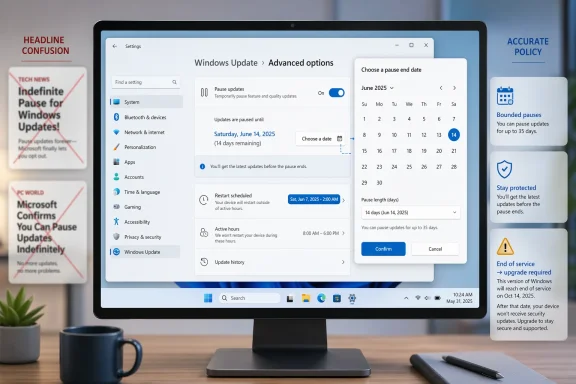
Microsoft is not, in fact, giving Windows users an unlimited way to freeze updates forever. The reporting that sparked this discussion points to a much narrower reality: Windows Update pauses are still bounded, and Microsoft’s own documentation continues to describe them as temporary controls with hard limits. The real change is that the company is moving toward a more flexible, more user-aware update experience, especially around timing, restarts, and the frustration of being interrupted at the wrong moment. That distinction matters, because it separates a genuine usability improvement from a misleading headline.
Windows updates have been a recurring pain point for years because they sit at the intersection of security, reliability, and user control. Microsoft has long insisted that updates are necessary to keep devices protected, but users have often experienced the update system as something that happens to them rather than with them. The tension has only become more obvious as Windows 11 has become more central to Microsoft’s platform strategy and as Windows 10 has moved into the rearview mirror.
The current debate is being framed by two different truths at once. On one hand, Microsoft has already given consumers some control, including pause options and restart scheduling. On the other hand, those controls are not open-ended, and Microsoft’s documentation still says that users eventually have to install updates before pausing again. In other words, the model is still built around enforcement, even if the company is trying to soften the edges.
That matters more now because Windows 10 reached end of support on October 14, 2025, and Microsoft has shifted its energy toward getting users onto supported versions and keeping them there. The company’s own support materials make clear that once a device is out of servicing, Windows Update can automatically move it forward to a supported release. This is not a cosmetic policy; it is the backbone of Microsoft’s servicing philosophy.
Microsoft’s broader update strategy has also evolved. For consumers, the company has repeatedly tried to reduce the frustration of surprise reboots, while for managed enterprise environments it has leaned into policy controls, deadlines, and deferrals. That split is important because it shows that Microsoft does not treat all Windows devices the same. A home PC, an unmanaged small-business laptop, and a centrally managed enterprise fleet are governed by different rules.
The latest wave of reporting, then, should be read as part of a gradual recalibration rather than a revolution. Microsoft is not abandoning Windows Update discipline. It is trying to make that discipline feel less punitive, less arbitrary, and more aligned with actual user schedules. That is a meaningful shift, even if the headlines oversell it.
The more accurate interpretation is that Microsoft is working toward longer, more flexible pauses and more predictable restart handling. In the material reviewed, there is repeated emphasis on user control, scheduling, and reducing surprise rather than eliminating servicing altogether. That nuance is easy to miss, but it is the difference between a UI refinement and a policy reversal.
This is why the wording in some reports can be misleading. “Pause indefinitely” suggests a user can remain frozen on a comfortable version forever, but Microsoft’s lifecycle and servicing model does not allow that. The company has explicitly tied update behavior to support status, and unsupported systems are pushed forward rather than left to drift.
A more predictable update system also makes strategic sense. Microsoft has spent years trying to strengthen trust in Windows 11 while positioning it as the future path after Windows 10. If users feel ambushed by updates, that undermines the broader message that Windows 11 is modern, stable, and worth adopting. A friendlier servicing experience helps reinforce the pitch.
That is why the newer messaging around update control is important. It suggests Microsoft understands that “security first” does not have to mean “user second.” A platform can enforce servicing requirements while still respecting the realities of meetings, deadlines, travel, and gaming sessions.
This is where the frustration often comes from. A pause feature can feel empowering at first, but if it is tied to a countdown, it becomes less like control and more like a grace period. That can be useful for travel or deadlines, but it does not satisfy users who want true ownership over maintenance timing.
The new direction appears aimed at reducing that tension without breaking the servicing model. If users can choose more natural resume dates, reschedule more easily, or avoid forced reboots at awkward times, the experience becomes less adversarial. That is a real improvement, even if the underlying policy remains intact.
Even there, however, the limits are not infinite. The files show that pauses are still measured in days, and even extensions reset a pause period rather than abolish it. That means enterprise admins get more flexibility, but not the ability to suspend servicing forever.
At the same time, the enterprise model reflects Microsoft’s larger trust relationship with customers. The company is effectively saying: you may defer, pause, and stage updates, but you may not abandon them. That keeps fleets compliant and reduces the number of unmanaged versions in the wild.
In practice, Microsoft is continuing to split Windows into two experiences. One is optimized for convenience and trust on personal devices. The other is optimized for governance and compliance in managed environments. The update story only makes sense when those two tracks are kept separate.
That is the key reason “indefinite pause” is such a misleading phrase. Even if a user can delay a patch for a while, the broader servicing clock is still running in the background. When support ends, the system’s behavior changes.
The upside is obvious: fewer abandoned machines, fewer unpatched endpoints, and a cleaner support story. The downside is that users with older habits or specialized workflows lose some ability to freeze their systems in place. That is a tradeoff Microsoft seems willing to make.
Microsoft appears to be responding by making the update experience less abrupt. The files point to more flexible pause behavior, more explicit scheduling, and a stronger emphasis on allowing users to handle updates at convenient moments. That would not remove the pressure of servicing, but it would reduce the sense that Windows is constantly springing a trap.
This is why the promise of more direct control has resonance. Users do not necessarily object to updating. They object to being told that Microsoft’s schedule matters more than theirs. A better pause and restart model acknowledges that modern PCs are used for work, play, and creation in ways that make timing critical.
That said, the market implication is real. If Microsoft can make Windows Update less annoying without weakening security posture, it strengthens one of Windows’ weakest reputational points. That could matter for both consumer loyalty and enterprise confidence.
It also puts pressure on the wider ecosystem to match Microsoft’s improved usability without sacrificing patch discipline. OEMs, software vendors, and managed-service providers all benefit when the platform’s maintenance model is clearer and less adversarial. A calmer Windows Update experience could reduce friction across the stack.
It also gives Microsoft a cleaner narrative for Windows 11 at a time when the company needs one. If the operating system feels more considerate and less interruptive, that supports broader efforts to position Windows as modern, reliable, and trustworthy.
There is also a security risk in perception, even if not in practice. Any loosening of update timing can encourage some users to delay too long or ignore maintenance warnings, which could leave systems exposed longer than intended. Microsoft’s lifecycle enforcement is designed to limit that, but user behavior is not always rational.
There is also a messaging problem. Headlines that oversimplify the change can make Microsoft look either more generous than it is or more inconsistent than it intends. In both cases, the company risks confusion around what users can actually expect.
If the company executes well, the change could quietly reshape how people think about Windows maintenance. Users may never love updates, but they may start to trust them a little more if the OS stops acting like it owns the calendar. That alone would be a meaningful win.
Source: The Verge Microsoft will let you pause Windows Updates indefinitely, 35 days at a time
Source: The Tech Buzz https://www.techbuzz.ai/articles/microsoft-finally-lets-you-pause-windows-updates-indefinitely/
 Background
Windows updates have been a recurring pain point for years because they sit at the intersection of security, reliability, and user control. Microsoft has long insisted that updates are necessary to keep devices protected, but users have often experienced the update system as something that happens to them rather than with them. The tension has only become more obvious as Windows 11 has become more central to Microsoft’s platform strategy and as Windows 10 has moved into the rearview mirror.The current debate is being framed by two different truths at once. On one hand, Microsoft has already given consumers some control, including pause options and restart scheduling. On the other hand, those controls are not open-ended, and Microsoft’s documentation still says that users eventually have to install updates before pausing again. In other words, the model is still built around enforcement, even if the company is trying to soften the edges.
That matters more now because Windows 10 reached end of support on October 14, 2025, and Microsoft has shifted its energy toward getting users onto supported versions and keeping them there. The company’s own support materials make clear that once a device is out of servicing, Windows Update can automatically move it forward to a supported release. This is not a cosmetic policy; it is the backbone of Microsoft’s servicing philosophy.
Microsoft’s broader update strategy has also evolved. For consumers, the company has repeatedly tried to reduce the frustration of surprise reboots, while for managed enterprise environments it has leaned into policy controls, deadlines, and deferrals. That split is important because it shows that Microsoft does not treat all Windows devices the same. A home PC, an unmanaged small-business laptop, and a centrally managed enterprise fleet are governed by different rules.
The latest wave of reporting, then, should be read as part of a gradual recalibration rather than a revolution. Microsoft is not abandoning Windows Update discipline. It is trying to make that discipline feel less punitive, less arbitrary, and more aligned with actual user schedules. That is a meaningful shift, even if the headlines oversell it.
What the Headlines Got Wrong
The phrase “indefinitely pause Windows Updates” is attractive because it sounds liberating, but it does not match Microsoft’s documented behavior. The file evidence here is clear: pause controls are temporary by design, and Microsoft still requires users to install the latest updates before they can pause again. That is the opposite of a true indefinite hold.The more accurate interpretation is that Microsoft is working toward longer, more flexible pauses and more predictable restart handling. In the material reviewed, there is repeated emphasis on user control, scheduling, and reducing surprise rather than eliminating servicing altogether. That nuance is easy to miss, but it is the difference between a UI refinement and a policy reversal.
Pause is not the same as opt-out
A pause is a timeout, not a cancellation. Microsoft’s own support language says pauses eventually expire, and the system then expects the user to catch up with pending updates before pausing again. That means the operating system is still asserting its authority over servicing, even if it gives the user more breathing room.This is why the wording in some reports can be misleading. “Pause indefinitely” suggests a user can remain frozen on a comfortable version forever, but Microsoft’s lifecycle and servicing model does not allow that. The company has explicitly tied update behavior to support status, and unsupported systems are pushed forward rather than left to drift.
- Pause means delay.
- Deferral means later.
- Deadline means comply by a certain point.
- End of servicing means the device may be moved automatically.
- Indefinite control is not what Microsoft’s documentation describes.
Why Microsoft Is Changing Course
Microsoft has been under steady pressure to make Windows feel less like an overbearing administrator and more like a dependable assistant. That pressure comes from everyday frustration: surprise reboots during work, awkward prompts during shutdown, and the feeling that the OS is always one step away from interrupting something important. The company appears to have decided that this is no longer a minor annoyance but a product-quality issue.A more predictable update system also makes strategic sense. Microsoft has spent years trying to strengthen trust in Windows 11 while positioning it as the future path after Windows 10. If users feel ambushed by updates, that undermines the broader message that Windows 11 is modern, stable, and worth adopting. A friendlier servicing experience helps reinforce the pitch.
Trust is now part of the platform story
Windows updates are not just about patches anymore. They shape user perception of the operating system itself. If a laptop restarts at the wrong time, the user does not blame a single update; they blame Windows. Microsoft seems increasingly aware that reliability is as much about perceived control as it is about technical correctness.That is why the newer messaging around update control is important. It suggests Microsoft understands that “security first” does not have to mean “user second.” A platform can enforce servicing requirements while still respecting the realities of meetings, deadlines, travel, and gaming sessions.
- Reducing surprise improves trust.
- Better timing reduces frustration.
- Clearer controls reduce support noise.
- Fewer coercive moments improve the Windows brand.
- Predictability matters as much as patch speed.
How Consumer Windows Update Really Works
For consumer devices, Windows Update is still mostly a guided system rather than a fully user-directed one. Users can pause updates for a limited time, extend active hours, or schedule restarts, but those choices exist within Microsoft’s framework rather than outside it. The support documentation is explicit that pauses are temporary and that installation eventually has to happen.This is where the frustration often comes from. A pause feature can feel empowering at first, but if it is tied to a countdown, it becomes less like control and more like a grace period. That can be useful for travel or deadlines, but it does not satisfy users who want true ownership over maintenance timing.
The difference between control and convenience
Microsoft’s current system gives consumers convenience controls, not absolute authority. That means users can usually avoid a bad moment, but they cannot indefinitely veto servicing. From Microsoft’s perspective, that is a reasonable tradeoff because it prevents devices from drifting too far behind. From the user’s perspective, it can still feel coercive.The new direction appears aimed at reducing that tension without breaking the servicing model. If users can choose more natural resume dates, reschedule more easily, or avoid forced reboots at awkward times, the experience becomes less adversarial. That is a real improvement, even if the underlying policy remains intact.
- Consumers want fewer interruptions.
- Microsoft wants devices to stay supported.
- The compromise is bounded pause and restart control.
- Better scheduling does not mean no enforcement.
- The balance is shifting toward usability without surrendering security.
Enterprise Control vs Consumer Control
Enterprise Windows management has always been more sophisticated than consumer update handling, and that difference is getting even more visible. Microsoft’s policy documentation and management tooling provide IT admins with pause, deferral, deadline, and enforcement controls that ordinary users simply do not get. Those controls are meant for operational planning, compliance, and risk management.Even there, however, the limits are not infinite. The files show that pauses are still measured in days, and even extensions reset a pause period rather than abolish it. That means enterprise admins get more flexibility, but not the ability to suspend servicing forever.
Why IT teams care so much
For IT administrators, update timing is not just a convenience issue; it is an uptime and supportability issue. A poorly timed quality update can trigger help-desk calls, break workflows, or force emergency validation work. A more adjustable pause system helps teams align patches with maintenance windows and business cycles.At the same time, the enterprise model reflects Microsoft’s larger trust relationship with customers. The company is effectively saying: you may defer, pause, and stage updates, but you may not abandon them. That keeps fleets compliant and reduces the number of unmanaged versions in the wild.
Consumer and enterprise are not the same product
This distinction matters because some of the public discussion blurs the line between the two. A consumer reading “pause indefinitely” may imagine a home PC staying frozen for years. An enterprise admin reading Microsoft policy docs sees something very different: controlled deferral windows, managed enforcement, and support windows that still have to be honored.In practice, Microsoft is continuing to split Windows into two experiences. One is optimized for convenience and trust on personal devices. The other is optimized for governance and compliance in managed environments. The update story only makes sense when those two tracks are kept separate.
- Enterprises need predictability.
- Consumers need fewer surprise restarts.
- Admins get policy tools.
- Home users get simpler controls.
- Both groups remain inside Microsoft’s servicing envelope.
The Role of Lifecycle Enforcement
The most important backstop in Microsoft’s model is lifecycle enforcement. Once a Windows version reaches end of servicing, Microsoft no longer treats staying on that version as a stable long-term choice. The files reviewed say that Windows Update can automatically start a feature update on consumer and unmanaged business devices to keep them supported and productive.That is the key reason “indefinite pause” is such a misleading phrase. Even if a user can delay a patch for a while, the broader servicing clock is still running in the background. When support ends, the system’s behavior changes.
Supportability is now the real policy goal
Microsoft has clearly aligned Windows Update with supportability rather than raw user preference. The company wants devices on supported releases so it can continue delivering security fixes, compatibility updates, and ecosystem reliability. That is a business necessity as much as a technical one.The upside is obvious: fewer abandoned machines, fewer unpatched endpoints, and a cleaner support story. The downside is that users with older habits or specialized workflows lose some ability to freeze their systems in place. That is a tradeoff Microsoft seems willing to make.
- Supported versions receive full servicing.
- Unsupported versions are pushed toward upgrades.
- Pause controls do not override lifecycle rules.
- Automatic feature updates may appear at end of service.
- Supportability now drives update behavior.
The UX Problem Microsoft Is Trying to Fix
The biggest complaint about Windows Update has never simply been that updates exist. It is that they appear at the wrong time, in the wrong context, and with too little sensitivity to what the user is doing. That is why so many people resent restart prompts more than the updates themselves.Microsoft appears to be responding by making the update experience less abrupt. The files point to more flexible pause behavior, more explicit scheduling, and a stronger emphasis on allowing users to handle updates at convenient moments. That would not remove the pressure of servicing, but it would reduce the sense that Windows is constantly springing a trap.
Timing is the product
A Windows update that lands after a workday ends is usually tolerated. The same update that forces a reboot during a presentation, game, or call becomes an instant source of frustration. Microsoft’s challenge is not just technical delivery; it is timing design.This is why the promise of more direct control has resonance. Users do not necessarily object to updating. They object to being told that Microsoft’s schedule matters more than theirs. A better pause and restart model acknowledges that modern PCs are used for work, play, and creation in ways that make timing critical.
- Updates should be predictable.
- Reboots should be scheduled, not ambushed.
- Pauses should feel intentional.
- Setup should not trap users in unwanted servicing.
- The interface should reflect real-world workflows.
How the Market Should Read This
Rivals should not interpret this as Microsoft surrendering its automatic-update strategy. The company is still committed to keeping devices patched, compliant, and supported. What is changing is the presentation layer and, potentially, the amount of breathing room users get before enforcement kicks in.That said, the market implication is real. If Microsoft can make Windows Update less annoying without weakening security posture, it strengthens one of Windows’ weakest reputational points. That could matter for both consumer loyalty and enterprise confidence.
Competitive implications for PC platforms
A better update experience can influence purchasing behavior more than people assume. If one platform is perceived as less disruptive, less coercive, and easier to trust, that can become part of the product’s overall appeal. In the PC world, trust is sticky.It also puts pressure on the wider ecosystem to match Microsoft’s improved usability without sacrificing patch discipline. OEMs, software vendors, and managed-service providers all benefit when the platform’s maintenance model is clearer and less adversarial. A calmer Windows Update experience could reduce friction across the stack.
- Better update UX can improve platform loyalty.
- Fewer surprise reboots reduce user resentment.
- Managed fleets gain clearer maintenance planning.
- Consumers may perceive Windows 11 as less intrusive.
- Competitors will be judged against Windows’ evolving baseline.
Strengths and Opportunities
Microsoft’s approach has several clear advantages if it delivers as promised. The strongest one is that it could reduce one of Windows’ most visible sources of irritation without weakening the company’s security model. That combination is rare and valuable.It also gives Microsoft a cleaner narrative for Windows 11 at a time when the company needs one. If the operating system feels more considerate and less interruptive, that supports broader efforts to position Windows as modern, reliable, and trustworthy.
- Better trust: users may feel Windows is respecting their time.
- Fewer interruptions: more control over restarts and pauses.
- Stronger support story: Microsoft keeps devices on supported versions.
- Improved enterprise planning: admins can align updates with business cycles.
- Consumer goodwill: less resentment around surprise reboots.
- Brand lift: Windows 11 can feel more polished and humane.
- Security preserved: flexibility does not necessarily mean weaker patching.
Risks and Concerns
The biggest risk is expectation mismatch. If users hear “indefinite pause” and then discover the actual behavior is still bounded, disappointment will follow. Microsoft has to avoid creating the impression that it is offering something it does not intend to deliver.There is also a security risk in perception, even if not in practice. Any loosening of update timing can encourage some users to delay too long or ignore maintenance warnings, which could leave systems exposed longer than intended. Microsoft’s lifecycle enforcement is designed to limit that, but user behavior is not always rational.
The balancing act is fragile
If Microsoft goes too far, it could create fragmentation and support headaches. If it does too little, it will continue to be seen as coercive. That makes update UX one of the trickiest areas in Windows product design.There is also a messaging problem. Headlines that oversimplify the change can make Microsoft look either more generous than it is or more inconsistent than it intends. In both cases, the company risks confusion around what users can actually expect.
- Confused expectations: “indefinite” sounds more permissive than reality.
- Delayed patching: longer pauses may tempt users to defer too much.
- Support complexity: more scheduling options can add edge cases.
- Reputation risk: partial fixes may not satisfy frustrated users.
- Fragmentation pressure: too much delay can widen version spread.
- Message drift: media shorthand may outpace official policy.
- Policy backlash: users may feel control is still limited in practice.
Looking Ahead
The most likely outcome is not a dramatic policy reversal but a gradual refinement of Windows Update behavior. Microsoft appears to be moving toward more intuitive pause tools, clearer scheduling, and less aggressive interruption around restarts and shutdowns. That would be consistent with the evidence in the files, and it would make sense strategically.If the company executes well, the change could quietly reshape how people think about Windows maintenance. Users may never love updates, but they may start to trust them a little more if the OS stops acting like it owns the calendar. That alone would be a meaningful win.
What to watch
- Whether Microsoft exposes longer pause windows in consumer Windows 11.
- Whether the UI shifts from rigid durations to date-based scheduling.
- Whether restarts can be skipped or deferred more naturally.
- Whether enterprise policy tools gain even more granular controls.
- Whether Microsoft’s messaging stays accurate and avoids “indefinite” language.
Source: The Verge Microsoft will let you pause Windows Updates indefinitely, 35 days at a time
Source: The Tech Buzz https://www.techbuzz.ai/articles/microsoft-finally-lets-you-pause-windows-updates-indefinitely/
