

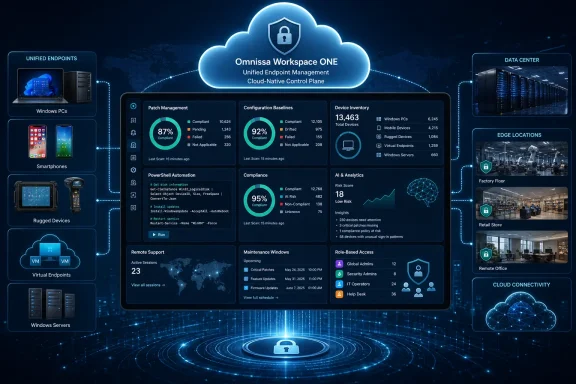
Omnissa is extending Workspace ONE Unified Endpoint Management beyond its traditional end-user computing territory by bringing Windows Server into the same cloud-native console used for PCs, phones, rugged hardware, virtual endpoints, and other managed devices. The capability, which became generally available on May 6, 2026, gives enterprises a new way to configure, patch, inventory, automate, and remotely support Windows servers without operating a separate management stack for every device category. Although fresh coverage has described the move as a new unveiling on July 20, the underlying release is already available to customers and represents something more consequential than a routine feature addition: Omnissa wants UEM to become an enterprise-wide control plane spanning both user endpoints and server infrastructure.
Workspace ONE has a long history in mobile device and endpoint management. Its roots trace back to AirWatch, whose technology became part of VMware and evolved from mobile device management into a broader platform covering applications, identity, desktops, rugged equipment, and digital employee experience monitoring.
The product later became central to VMware’s end-user computing portfolio. Following Broadcom’s acquisition of VMware and the separation of the end-user computing business, Workspace ONE and Horizon moved under the newly independent Omnissa brand in 2024.
Servers remained largely outside that model. They were normally managed through a mixture of Microsoft Configuration Manager, Windows Server Update Services, Group Policy, PowerShell, monitoring products, vulnerability platforms, remote administration tools, and purpose-built configuration systems.
Omnissa’s Windows Server support attempts to erase that architectural boundary. Instead of defining UEM as management for devices used directly by employees, Workspace ONE now treats a server as another persistent computing endpoint requiring identity, inventory, configuration, software, security, telemetry, and lifecycle controls.
Meanwhile, servers increasingly support virtual desktops, private artificial intelligence services, data-processing pipelines, application delivery, automation, and security infrastructure. A configuration error on one of these systems can affect thousands of users even if the server itself has no interactive end user.
That makes the management gap between servers and endpoints harder to justify. Omnissa is betting that organizations will prefer a common operating model, provided that it offers the controls, segregation, reliability, and auditability expected in the data center.
Support requires Workspace ONE UEM SaaS version 2604 or later, an enabled Server Essentials license, and Windows Server 2016 or newer. Both Server Core and Desktop Experience installations are supported, making the feature relevant to conventional graphical installations as well as leaner, command-line-oriented deployments.
This desired-state approach is important because configuration drift rarely announces itself. A temporary troubleshooting change, manually edited registry value, disabled service, altered security control, or inconsistent local policy can remain in production long after the original incident has ended.
Continuous assessment changes the management objective from simply sending a setting to verifying that the setting remains applied. That distinction is central to modern infrastructure management and can reduce the gap between documented policy and the environment’s true condition.
Sensors collect custom telemetry such as:
Omnissa therefore manages Windows Server through its Intelligent Hub agent. The Hub provides the communication, policy, application, telemetry, automation, and command channel between the server and Workspace ONE UEM.
Windows Server operates in an Intelligent Hub-managed mode without that native MDM dependency. This provides several benefits, including command-line enrollment, operation without an interactive user, and coexistence with some existing management products.
It also creates limitations. Server administrators should not assume that every Windows desktop profile, action, conditional-access scenario, or OMA-DM-backed capability automatically applies to Windows Server.
The enrolled server needs outbound connectivity to the Workspace ONE service, either directly or through a supported proxy. Enterprises must permit the required service endpoints through firewalls and filtering systems, which means deployment still requires careful network planning.
This is not “agentless” cloud management. Administrators must maintain the Intelligent Hub software, monitor enrollment health, validate certificate and proxy behavior, and establish what should happen if communication with the cloud service is interrupted.
Workspace ONE UEM version 2604 introduced granular patch controls designed for these server scenarios. Administrators can search for individual updates, select which patches should be deployed, target defined server groups, schedule installation, and prepare content ahead of an approved maintenance period.
Targeting must still reflect application architecture rather than only operating-system attributes. A three-tier service, for example, may require its web nodes, application servers, and database systems to be updated in a controlled sequence.
A responsible rollout normally follows these stages:
Using a common software-distribution service for PCs and servers may simplify packaging standards and reporting. An application team could use the same basic publishing process for a desktop utility and its supporting server component while still assigning them to separate administrative groups.
However, server application deployment is rarely identical to desktop software installation. Services may need to stop, clustered roles may require coordination, configuration files may contain secrets, and database schema changes may be irreversible. The convenience of a shared repository should not encourage administrators to treat production servers as oversized laptops.
This can improve consistency across environments where administrators currently use different combinations of Group Policy, scripts, gold images, and manual build documents. It may also make security reporting easier by placing endpoint and server posture data in a shared system.
The benefit is not merely stronger initial provisioning. Continuous enforcement reduces the chance that emergency changes, administrator experimentation, inherited images, or inconsistent build processes leave servers in contradictory states.
Yet automated remediation should be applied selectively. A baseline that disables a protocol, changes a service account right, or modifies authentication settings may break a legacy workload. Organizations should test server-specific policies separately from desktop baselines, even when both derive from the same security standard.
Workspace ONE does not make an organization compliant by itself. Compliance depends on policy design, scope, evidence retention, separation of duties, exception handling, and the surrounding operational process.
The most useful role for UEM is to turn high-level control requirements into repeatable technical checks. If a requirement calls for supported software, timely security updates, restricted configuration, and traceable administrative activity, the platform can help produce and enforce the underlying evidence.
Role inventory is particularly useful because the presence of components such as Internet Information Services, Hyper-V, Active Directory-related services, file services, or failover clustering changes both the server’s risk profile and its maintenance requirements.
Centralized inventory lets teams search for unexpected components across the fleet. This can reveal unnecessary attack surface, licensing questions, unsupported software, and systems that no longer match their declared purpose.
Workspace ONE’s role and feature view is primarily an inventory mechanism rather than a complete dependency map. It can show that a component exists, but application owners must still determine why it exists and whether removing it is safe.
For example, an organization could detect that a certificate will expire within 30 days, create an alert, distribute a replacement, restart only the necessary service, and verify that the new certificate is active. The same architecture could detect a stopped agent, repair it, and collect logs if the repair fails.
This is where Omnissa’s larger “autonomous workspace” strategy begins to intersect with infrastructure operations. The goal is not simply to display more dashboards but to reduce the time between detecting a problem and applying a controlled correction.
For server administrators, the promise is earlier detection of problems that might otherwise be noticed only after an application slows down or users submit support tickets.
False positives on employee laptops are inconvenient. False positives that trigger remediation on authentication servers, databases, virtualization hosts, or production application nodes can become major incidents.
Enterprises should initially treat AI recommendations as advisory. Automated action should be enabled gradually, beginning with low-risk and easily reversible tasks such as gathering diagnostics, clearing approved temporary files, repairing an agent, or notifying an owner.
Reducing routine dependence on directly reachable RDP services can improve security, particularly for servers located outside trusted management networks. Attackers frequently probe remote administration interfaces, and stolen credentials can turn exposed services into an initial access path.
The design does not make remote administration risk-free. If a Workspace ONE administrator account is compromised, an attacker may gain a powerful route to many enrolled systems.
Organizations should protect the console with strong multifactor authentication, tightly scoped administrator roles, short session lifetimes, privileged access procedures, and alerting for unusual remote actions. Server access should be treated as privileged infrastructure administration, not ordinary help-desk support.
That separation is essential. Consolidating management does not mean that every technician who can support a smartphone should also be able to run PowerShell on a domain controller.
The strongest deployment model uses one platform but preserves distinct scopes. Security teams may view compliance, server operators may execute approved actions, application owners may inspect limited inventory, and endpoint administrators may remain excluded from server controls.
Cost, however, cannot be assessed from a license line alone. Configuration Manager deployments carry infrastructure, SQL Server, distribution, maintenance, upgrade, operational skills, and administrative costs, while Workspace ONE introduces SaaS subscriptions, migration work, agents, network requirements, and possible integration expenses.
The proposition may also appeal to companies that want cloud-based management without extending the Microsoft Azure control plane across every server. Omnissa offers a vendor-neutral UEM perspective and supports a broader mix of user devices from one console.
Its strongest arguments include:
Azure Arc can represent Windows and Linux machines outside Azure as cloud resources, apply policy, run commands, collect inventory, and coordinate updates. Microsoft therefore has its own answer to the problem Omnissa is targeting, especially for organizations already committed to Azure governance and Microsoft security services.
The competitive decision is unlikely to be “Workspace ONE versus SCCM” in isolation. Many enterprises will compare Workspace ONE against combinations of Configuration Manager, Intune, Azure Arc, Azure Update Manager, Defender, Group Policy, PowerShell, and third-party operations platforms.
A multinational enterprise could use Workspace ONE to standardize policy across branch servers, edge systems, virtual desktop infrastructure, application nodes, and employee devices. Organization groups could preserve regional or departmental boundaries while central teams retain global reporting.
It may also create organizational friction. Server administrators may resist governance from a platform historically associated with mobile devices, while endpoint teams may lack experience with clustering, databases, identity infrastructure, and high-availability applications.
Successful adoption will require more than installing an agent. Enterprises should define a joint operating model covering ownership, approvals, emergency access, policy creation, service dependencies, incident response, and automation boundaries.
Small and midsize businesses may find it more relevant if they already use Workspace ONE through a service provider or managed IT partner. A provider could manage employee devices and a limited number of business servers through one tenant structure instead of deploying separate infrastructure for each customer.
Smaller businesses must also assess whether they have the operational maturity to use automated remediation safely. Consolidating the console does not replace backups, testing, disaster recovery, monitoring, identity protection, or application-aware maintenance.
The feature is best understood as an efficiency layer for managed environments, not a substitute for server administration expertise.
Omnissa must also demonstrate that its AI and analytics claims produce actionable outcomes rather than another layer of alerts. Administrators will want transparent reasoning, tunable thresholds, reliable integrations, and strong safeguards around automated changes.
Support beyond Windows Server will also matter. Workspace ONE already has Linux management capabilities, but enterprises will judge whether Windows and Linux servers receive similarly mature policy, patching, inventory, remote-support, and automation experiences.
Licensing will be closely watched. Omnissa’s challenge is to price Server Essentials attractively enough to encourage broad enrollment without undermining the consolidation savings it promises.
Customers should therefore measure results in concrete terms: fewer management servers, fewer software packages maintained twice, shorter patch cycles, reduced drift, faster remediation, lower remote-support costs, stronger audit evidence, and fewer administrative consoles. If those outcomes materialize, Workspace ONE’s expansion into Windows Server could become one of Omnissa’s most strategically important moves since becoming an independent company.
Omnissa is making a persuasive case that servers should no longer sit outside unified endpoint management simply because enterprise tooling evolved that way. Workspace ONE’s new Windows Server support combines cloud-based policy, granular patching, inventory, PowerShell automation, desired-state remediation, analytics, and secure remote administration in a platform many organizations already use for employee devices. The opportunity is substantial, but so is the responsibility: a unified control plane can eliminate silos only if enterprises pair its convenience with disciplined testing, least-privilege administration, application-aware change management, and a clear plan for retiring the legacy tools it is meant to replace.
 Background
Workspace ONE has a long history in mobile device and endpoint management. Its roots trace back to AirWatch, whose technology became part of VMware and evolved from mobile device management into a broader platform covering applications, identity, desktops, rugged equipment, and digital employee experience monitoring.The product later became central to VMware’s end-user computing portfolio. Following Broadcom’s acquisition of VMware and the separation of the end-user computing business, Workspace ONE and Horizon moved under the newly independent Omnissa brand in 2024.
From device management to infrastructure management
Unified endpoint management originally emerged to eliminate separate consoles for smartphones, tablets, and desktop operating systems. The underlying proposition was straightforward: administrators should be able to enroll devices, deploy applications, enforce configuration, assess compliance, and take remote action from one policy framework.Servers remained largely outside that model. They were normally managed through a mixture of Microsoft Configuration Manager, Windows Server Update Services, Group Policy, PowerShell, monitoring products, vulnerability platforms, remote administration tools, and purpose-built configuration systems.
Omnissa’s Windows Server support attempts to erase that architectural boundary. Instead of defining UEM as management for devices used directly by employees, Workspace ONE now treats a server as another persistent computing endpoint requiring identity, inventory, configuration, software, security, telemetry, and lifecycle controls.
The timing is not accidental
Server management is becoming more complex even as enterprises try to reduce the number of administrative platforms they operate. Workloads may run in corporate data centers, edge locations, hosted facilities, public clouds, retail branches, manufacturing sites, and disconnected or tightly filtered networks.Meanwhile, servers increasingly support virtual desktops, private artificial intelligence services, data-processing pipelines, application delivery, automation, and security infrastructure. A configuration error on one of these systems can affect thousands of users even if the server itself has no interactive end user.
That makes the management gap between servers and endpoints harder to justify. Omnissa is betting that organizations will prefer a common operating model, provided that it offers the controls, segregation, reliability, and auditability expected in the data center.
What Workspace ONE Server Management Includes
The new capability places Windows Server records alongside other managed devices in the Workspace ONE UEM console. Administrators can use established Workspace ONE concepts—including organization groups, profiles, baselines, scripts, sensors, applications, workflows, and role-based permissions—to administer the server estate.Support requires Workspace ONE UEM SaaS version 2604 or later, an enabled Server Essentials license, and Windows Server 2016 or newer. Both Server Core and Desktop Experience installations are supported, making the feature relevant to conventional graphical installations as well as leaner, command-line-oriented deployments.
Configuration and desired-state enforcement
Workspace ONE can deliver server configurations over the air rather than depending exclusively on domain connectivity and traditional Group Policy processing. Administrators define the intended configuration, evaluate whether enrolled servers match it, and initiate remediation when the actual state diverges.This desired-state approach is important because configuration drift rarely announces itself. A temporary troubleshooting change, manually edited registry value, disabled service, altered security control, or inconsistent local policy can remain in production long after the original incident has ended.
Continuous assessment changes the management objective from simply sending a setting to verifying that the setting remains applied. That distinction is central to modern infrastructure management and can reduce the gap between documented policy and the environment’s true condition.
Scripts and custom sensors
Workspace ONE applies its existing Windows scripts and sensors model to servers. Administrators can execute PowerShell for service management, registry modifications, diagnostics, application maintenance, and organization-specific remediation.Sensors collect custom telemetry such as:
- A sensor can report available disk capacity before low space disrupts a service.
- A sensor can track certificate expiration dates so administrators can renew certificates before an outage.
- A sensor can verify whether a critical service is running and feed the result into an automated workflow.
- A sensor can collect application versions, configuration values, or other evidence required for security reporting.
Why Windows Server Requires a Different Management Model
Windows desktop and Windows Server share a substantial amount of underlying code, but their built-in management facilities are not identical. The most important technical distinction for Workspace ONE is that Windows Server does not provide the same native OMA Device Management channel used for full mobile-device-style enrollment on Windows PCs.Omnissa therefore manages Windows Server through its Intelligent Hub agent. The Hub provides the communication, policy, application, telemetry, automation, and command channel between the server and Workspace ONE UEM.
Intelligent Hub rather than native OMA-DM
On a Windows client device, Workspace ONE can combine Intelligent Hub with Microsoft’s OMA-DM stack for full MDM management. That enables access to Microsoft configuration service providers, Autopilot-related provisioning, enterprise reset functions, and other controls tied to native Windows MDM enrollment.Windows Server operates in an Intelligent Hub-managed mode without that native MDM dependency. This provides several benefits, including command-line enrollment, operation without an interactive user, and coexistence with some existing management products.
It also creates limitations. Server administrators should not assume that every Windows desktop profile, action, conditional-access scenario, or OMA-DM-backed capability automatically applies to Windows Server.
Agent-based management has practical advantages
An agent can operate independently of whether a machine is connected to a conventional corporate domain at a particular moment. That makes the model useful for servers in perimeter networks, remote offices, edge sites, hosted environments, and cloud networks where opening inbound management ports would be undesirable.The enrolled server needs outbound connectivity to the Workspace ONE service, either directly or through a supported proxy. Enterprises must permit the required service endpoints through firewalls and filtering systems, which means deployment still requires careful network planning.
This is not “agentless” cloud management. Administrators must maintain the Intelligent Hub software, monitor enrollment health, validate certificate and proxy behavior, and establish what should happen if communication with the cloud service is interrupted.
Patching and Software Distribution
Patch management is one of the strongest reasons to consider a centralized server platform, but it is also one of the highest-risk areas to automate. A missed security update can leave a workload exposed, while a poorly sequenced installation can interrupt a business-critical application.Workspace ONE UEM version 2604 introduced granular patch controls designed for these server scenarios. Administrators can search for individual updates, select which patches should be deployed, target defined server groups, schedule installation, and prepare content ahead of an approved maintenance period.
Maintenance windows and deployment control
Pre-downloading an update before a change window reduces the amount of installation time consumed by content transfer. That can be valuable at bandwidth-constrained sites or where production systems have short maintenance windows.Targeting must still reflect application architecture rather than only operating-system attributes. A three-tier service, for example, may require its web nodes, application servers, and database systems to be updated in a controlled sequence.
A responsible rollout normally follows these stages:
- Inventory the affected operating systems, roles, applications, and dependencies.
- Deploy the update to a representative laboratory or development group.
- Advance to a limited production ring with rollback procedures prepared.
- Patch redundant nodes in an order that preserves service availability.
- Validate application health rather than relying solely on a successful installer result.
- Complete the broader rollout and retain evidence for audit and incident review.
Enterprise application delivery
Omnissa says Workspace ONE’s enterprise application repository contains more than 8,000 prepackaged applications that can be distributed through familiar endpoint workflows. Organizations can also package their own MSI, EXE, and script-based installers.Using a common software-distribution service for PCs and servers may simplify packaging standards and reporting. An application team could use the same basic publishing process for a desktop utility and its supporting server component while still assigning them to separate administrative groups.
However, server application deployment is rarely identical to desktop software installation. Services may need to stop, clustered roles may require coordination, configuration files may contain secrets, and database schema changes may be irreversible. The convenience of a shared repository should not encourage administrators to treat production servers as oversized laptops.
Security Baselines and Compliance
Omnissa emphasizes continuous server security as one of the platform’s primary differentiators. Workspace ONE can apply baselines, inspect configuration state, record inventory, and trigger remediation when a server falls outside the intended policy.This can improve consistency across environments where administrators currently use different combinations of Group Policy, scripts, gold images, and manual build documents. It may also make security reporting easier by placing endpoint and server posture data in a shared system.
Baselines as an antidote to configuration drift
Security baselines establish known expectations for items such as authentication behavior, local policies, services, audit settings, protocol configuration, and other operating-system controls. Workspace ONE can use these baselines to identify and correct deviations.The benefit is not merely stronger initial provisioning. Continuous enforcement reduces the chance that emergency changes, administrator experimentation, inherited images, or inconsistent build processes leave servers in contradictory states.
Yet automated remediation should be applied selectively. A baseline that disables a protocol, changes a service account right, or modifies authentication settings may break a legacy workload. Organizations should test server-specific policies separately from desktop baselines, even when both derive from the same security standard.
Evidence for regulatory programs
A unified console can provide auditors and security teams with a more consistent view of configuration, patch status, application inventory, hardware details, server roles, and remediation history. That may help with frameworks requiring organizations to demonstrate that controls are not only documented but actively enforced.Workspace ONE does not make an organization compliant by itself. Compliance depends on policy design, scope, evidence retention, separation of duties, exception handling, and the surrounding operational process.
The most useful role for UEM is to turn high-level control requirements into repeatable technical checks. If a requirement calls for supported software, timely security updates, restricted configuration, and traceable administrative activity, the platform can help produce and enforce the underlying evidence.
Inventory, Roles, and Operational Visibility
Workspace ONE gives administrators remote visibility into hardware and software inventory, logs, installed server roles, and Windows features. This can help teams understand what a server is doing before making a change or responding to an incident.Role inventory is particularly useful because the presence of components such as Internet Information Services, Hyper-V, Active Directory-related services, file services, or failover clustering changes both the server’s risk profile and its maintenance requirements.
Discovering unintended roles and features
Server roles often accumulate over time. An administrator may install a feature temporarily for testing, a legacy application may require an old component, or a decommissioning process may remove the application without removing its supporting role.Centralized inventory lets teams search for unexpected components across the fleet. This can reveal unnecessary attack surface, licensing questions, unsupported software, and systems that no longer match their declared purpose.
Workspace ONE’s role and feature view is primarily an inventory mechanism rather than a complete dependency map. It can show that a component exists, but application owners must still determine why it exists and whether removing it is safe.
Connecting telemetry to remediation
Inventory becomes more valuable when combined with sensors and automation. A server with a particular role, outdated application, expiring certificate, or low disk threshold can be dynamically identified and passed into an appropriate workflow.For example, an organization could detect that a certificate will expire within 30 days, create an alert, distribute a replacement, restart only the necessary service, and verify that the new certificate is active. The same architecture could detect a stopped agent, repair it, and collect logs if the repair fails.
This is where Omnissa’s larger “autonomous workspace” strategy begins to intersect with infrastructure operations. The goal is not simply to display more dashboards but to reduce the time between detecting a problem and applying a controlled correction.
AI, Analytics, and Automated Remediation
Omnissa says Workspace ONE uses AI and machine-learning-driven analytics to identify performance degradation and security risks proactively. In practical terms, the platform can correlate endpoint telemetry, surface abnormal conditions, and invoke automated responses through the wider Workspace ONE ecosystem.For server administrators, the promise is earlier detection of problems that might otherwise be noticed only after an application slows down or users submit support tickets.
AI should assist, not obscure
AI-generated insights are valuable only when administrators can understand the evidence behind them. A recommendation to restart a service, deploy a patch, change a configuration, or alter resource usage must include enough context for a human operator to judge the potential impact.False positives on employee laptops are inconvenient. False positives that trigger remediation on authentication servers, databases, virtualization hosts, or production application nodes can become major incidents.
Enterprises should initially treat AI recommendations as advisory. Automated action should be enabled gradually, beginning with low-risk and easily reversible tasks such as gathering diagnostics, clearing approved temporary files, repairing an agent, or notifying an owner.
Building trustworthy automation
A mature automation policy should answer four questions:- The trigger must be based on reliable, sufficiently recent data.
- The action must be limited to an explicitly defined group of servers.
- The workflow must verify that the correction produced the intended result.
- The platform must preserve a clear record of what changed, when it changed, and who authorized it.
Remote Administration Without Routine RDP Exposure
Workspace ONE Assist is included with the Windows Server licensing and provides remote screen sharing, file browsing, and command-line access through an authenticated Workspace ONE channel. Omnissa presents this as an alternative to exposing Remote Desktop Protocol or buying a separate remote-support product.Reducing routine dependence on directly reachable RDP services can improve security, particularly for servers located outside trusted management networks. Attackers frequently probe remote administration interfaces, and stolen credentials can turn exposed services into an initial access path.
A brokered support channel
Assist gives administrators a way to reach systems through the management platform rather than requiring every server to accept a conventional inbound remote session. This aligns with zero-trust principles by moving access decisions toward authenticated identities, policy, and audited sessions.The design does not make remote administration risk-free. If a Workspace ONE administrator account is compromised, an attacker may gain a powerful route to many enrolled systems.
Organizations should protect the console with strong multifactor authentication, tightly scoped administrator roles, short session lifetimes, privileged access procedures, and alerting for unusual remote actions. Server access should be treated as privileged infrastructure administration, not ordinary help-desk support.
Separation of duties matters
Workspace ONE organization groups and role-based access controls can separate server teams from desktop and mobile administrators. Enterprises can divide responsibility by geography, business unit, environment, device class, or another operational boundary.That separation is essential. Consolidating management does not mean that every technician who can support a smartphone should also be able to run PowerShell on a domain controller.
The strongest deployment model uses one platform but preserves distinct scopes. Security teams may view compliance, server operators may execute approved actions, application owners may inspect limited inventory, and endpoint administrators may remain excluded from server controls.
The Challenge to Microsoft Configuration Manager
Omnissa explicitly positions Workspace ONE server management as a lower-cost alternative to Microsoft System Center Configuration Manager, commonly called SCCM even though Microsoft now generally refers to the product as Configuration Manager. The comparison will attract attention because Configuration Manager remains deeply embedded in large Windows estates.Cost, however, cannot be assessed from a license line alone. Configuration Manager deployments carry infrastructure, SQL Server, distribution, maintenance, upgrade, operational skills, and administrative costs, while Workspace ONE introduces SaaS subscriptions, migration work, agents, network requirements, and possible integration expenses.
Where Omnissa can apply pressure
Workspace ONE is most compelling for organizations already using it across a substantial endpoint fleet. Adding Windows servers may be simpler than maintaining a second platform solely for patching, inventory, scripts, and software distribution.The proposition may also appeal to companies that want cloud-based management without extending the Microsoft Azure control plane across every server. Omnissa offers a vendor-neutral UEM perspective and supports a broader mix of user devices from one console.
Its strongest arguments include:
- Existing Workspace ONE administrators can reuse familiar grouping, policy, application, and automation concepts.
- SaaS delivery can reduce the infrastructure required for a traditional on-premises management hierarchy.
- Intelligent Hub does not depend on Windows Server exposing the native OMA-DM client.
- The product combines server management with remote support and endpoint-oriented automation.
- Organizations can consolidate reporting across servers, PCs, mobile devices, rugged systems, and specialized endpoints.
Microsoft is not standing still
Configuration Manager is only one part of Microsoft’s current server-management portfolio. Microsoft is steering hybrid customers toward Azure Arc, Azure Policy, Azure Update Manager, Defender, and other cloud services while still supporting Configuration Manager and cloud attachment for established environments.Azure Arc can represent Windows and Linux machines outside Azure as cloud resources, apply policy, run commands, collect inventory, and coordinate updates. Microsoft therefore has its own answer to the problem Omnissa is targeting, especially for organizations already committed to Azure governance and Microsoft security services.
The competitive decision is unlikely to be “Workspace ONE versus SCCM” in isolation. Many enterprises will compare Workspace ONE against combinations of Configuration Manager, Intune, Azure Arc, Azure Update Manager, Defender, Group Policy, PowerShell, and third-party operations platforms.
Enterprise Impact
Large organizations may gain the most from tool consolidation because they typically operate the greatest number of overlapping management services. They also face the most difficult migration and governance questions.A multinational enterprise could use Workspace ONE to standardize policy across branch servers, edge systems, virtual desktop infrastructure, application nodes, and employee devices. Organization groups could preserve regional or departmental boundaries while central teams retain global reporting.
Operational convergence
The feature encourages closer collaboration between endpoint engineering, server operations, security, and digital workplace teams. Shared tooling can reduce duplicated packaging, scripting, reporting, and automation work.It may also create organizational friction. Server administrators may resist governance from a platform historically associated with mobile devices, while endpoint teams may lack experience with clustering, databases, identity infrastructure, and high-availability applications.
Successful adoption will require more than installing an agent. Enterprises should define a joint operating model covering ownership, approvals, emergency access, policy creation, service dependencies, incident response, and automation boundaries.
A practical adoption path
Organizations should avoid moving every production server into active enforcement immediately. A phased program is safer:- Begin with inventory-only or low-impact enrollment in a laboratory environment.
- Validate proxy, firewall, certificate, agent-update, and console-access requirements.
- Create dedicated organization groups and server-specific administrative roles.
- Onboard non-production servers and compare reported state with existing tools.
- Test scripts, applications, baselines, patch rings, and remote-access controls.
- Introduce selected production workloads with strong rollback and monitoring.
- Retire legacy capabilities only after Workspace ONE has met functional and audit requirements.
Consumer and Small-Business Relevance
Workspace ONE server management is primarily an enterprise feature, not a consumer product. Home users running Windows Server in a laboratory are unlikely to need a commercial UEM platform designed for organizational policy, fleet automation, compliance, and role separation.Small and midsize businesses may find it more relevant if they already use Workspace ONE through a service provider or managed IT partner. A provider could manage employee devices and a limited number of business servers through one tenant structure instead of deploying separate infrastructure for each customer.
Benefits depend on scale
The economic argument becomes stronger when an organization already pays for Workspace ONE, has trained administrators, and can eliminate another tool. A company buying the platform only to manage a handful of servers may not see the same benefit.Smaller businesses must also assess whether they have the operational maturity to use automated remediation safely. Consolidating the console does not replace backups, testing, disaster recovery, monitoring, identity protection, or application-aware maintenance.
The feature is best understood as an efficiency layer for managed environments, not a substitute for server administration expertise.
Strengths and Opportunities
Workspace ONE’s move into Windows Server management opens a credible path toward broader infrastructure control, particularly for existing Omnissa customers.- The unified console can reduce tool fragmentation. Administrators can manage server and endpoint inventory, applications, policies, scripts, and workflows through a common operating model.
- Cloud-native communication improves reach. Servers outside the conventional domain network can remain manageable through outbound connectivity and proxy support.
- Desired-state enforcement can reduce drift. Continuous assessment is more reliable than assuming a configuration remains intact after initial deployment.
- Granular patching supports controlled maintenance. Administrators can select updates, target groups, schedule deployment, and pre-stage content.
- Workspace ONE Assist adds a practical remote channel. Included remote support may reduce dependence on exposed RDP or separate support products.
- Role-based administration supports organizational separation. One platform can still preserve boundaries among server, endpoint, security, and support teams.
- Scripts and sensors provide extensibility. Enterprises can collect custom data and automate organization-specific tasks that no fixed console could anticipate.
- Existing Workspace ONE customers may achieve favorable economics. Reusing established skills and workflows could lower operational overhead more effectively than a wholesale platform replacement.
Risks and Concerns
The same consolidation that makes Workspace ONE attractive also concentrates operational power and creates new dependencies.- A compromised UEM console could expose a large portion of the infrastructure. Privileged access, multifactor authentication, audit controls, and role separation are mandatory.
- Cloud connectivity becomes part of the management dependency chain. Proxy failures, service disruption, certificate issues, or blocked endpoints could delay policy and administrative action.
- Feature parity should not be assumed. Intelligent Hub management on Windows Server differs from full OMA-DM management on Windows desktops.
- Automated remediation can amplify mistakes. A flawed baseline or script assigned to the wrong group may change hundreds of servers rapidly.
- Application-aware orchestration remains essential. Operating-system patch success does not prove that a business service is healthy.
- Vendor cost comparisons need independent validation. Omnissa’s lower-cost claim will vary according to licensing, scale, existing Microsoft entitlements, migration effort, and retained tools.
- Tool consolidation can create vendor lock-in. Once inventory, scripts, policy, packaging, support, and automation depend on one platform, leaving it may become expensive.
- Server teams may need new skills and governance. Familiar endpoint workflows do not eliminate the architectural complexity of enterprise applications.
- Windows Server 2016 support creates an urgent lifecycle consideration. Microsoft’s extended support for Windows Server 2016 is scheduled to end on January 12, 2027, so management modernization must not become an excuse to postpone operating-system upgrades.
What to Watch Next
The immediate question is how well Workspace ONE performs across large, diverse, and highly available server estates. General availability establishes product readiness, but customer deployments will reveal how the platform behaves under real patch windows, restrictive network designs, complex role separation, and application-dependent automation.Omnissa must also demonstrate that its AI and analytics claims produce actionable outcomes rather than another layer of alerts. Administrators will want transparent reasoning, tunable thresholds, reliable integrations, and strong safeguards around automated changes.
Deeper server-specific capabilities
Future development could expand certificate management, firewall controls, local security policy, application-aware patch sequencing, cluster coordination, maintenance integrations, and richer compliance reporting. Some functions available through full Windows desktop MDM are either different or unavailable in Intelligent Hub-only management, leaving room for Omnissa to narrow the gap through its own agent and orchestration framework.Support beyond Windows Server will also matter. Workspace ONE already has Linux management capabilities, but enterprises will judge whether Windows and Linux servers receive similarly mature policy, patching, inventory, remote-support, and automation experiences.
Competitive responses
Microsoft is likely to keep promoting Azure Arc and Azure Update Manager as its cloud-native answer for hybrid server management. Endpoint vendors, security companies, remote-monitoring providers, and configuration-management platforms may likewise expand their server features as the distinction between endpoints and infrastructure continues to weaken.Licensing will be closely watched. Omnissa’s challenge is to price Server Essentials attractively enough to encourage broad enrollment without undermining the consolidation savings it promises.
Proof through migration
The decisive evidence will come from organizations that retire or materially reduce legacy management infrastructure after adopting Workspace ONE. Running another agent and another dashboard without eliminating anything would add complexity rather than remove it.Customers should therefore measure results in concrete terms: fewer management servers, fewer software packages maintained twice, shorter patch cycles, reduced drift, faster remediation, lower remote-support costs, stronger audit evidence, and fewer administrative consoles. If those outcomes materialize, Workspace ONE’s expansion into Windows Server could become one of Omnissa’s most strategically important moves since becoming an independent company.
Omnissa is making a persuasive case that servers should no longer sit outside unified endpoint management simply because enterprise tooling evolved that way. Workspace ONE’s new Windows Server support combines cloud-based policy, granular patching, inventory, PowerShell automation, desired-state remediation, analytics, and secure remote administration in a platform many organizations already use for employee devices. The opportunity is substantial, but so is the responsibility: a unified control plane can eliminate silos only if enterprises pair its convenience with disciplined testing, least-privilege administration, application-aware change management, and a clear plan for retiring the legacy tools it is meant to replace.
References
- Primary source: thelec.net
Published: 2026-07-20T23:41:44+00:00
Omnissa Unveils Workspace ONE With Unified Windows Server Management - The Elec Inc.
Digital workplace platform provider Omnissa has introduced Workspace ONE, a unified endpoiwww.thelec.net - Related coverage: omnissa.com
- Related coverage: techzone.omnissa.com
- Related coverage: go.omnissa.com
- Related coverage: software-express.de
- Related coverage: tdsynnex.com
1333703173
Beautiful young Asian woman sitting cross-legged by the promenade, against urban city skyline. She is wearing headphones around neck, using smartphone and working on laptop, with a coffee cup by her side. Teenage lifestyle and technologywww.tdsynnex.com
