

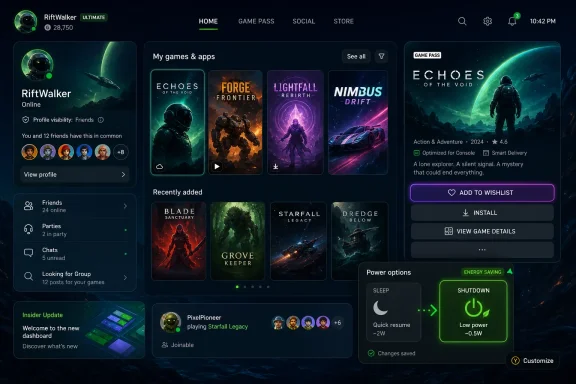
Microsoft began rolling out a new Xbox Insider console update on June 10, 2026, for select Xbox Series X|S and Xbox One testers, adding mutual-friend visibility on profiles, richer library artwork, faster wishlisting, personalization shortcuts, and a broader shift from Sleep mode to Shutdown energy saving. The update is not a blockbuster in the old console-war sense, and that is precisely why it matters. Xbox is trying to prove that its platform can feel more alive through accumulated polish rather than one dramatic dashboard reinvention. For a console business under pressure to justify itself, the small stuff is no longer small.
The most important thing about this update is not any single feature. It is the pattern. Microsoft is treating the Xbox console interface less like a finished appliance shell and more like a live service that needs constant grooming.
That may sound obvious in 2026, when every connected device updates itself into a slightly different product every few weeks. But Xbox has long had a strange split personality: technically modern, commercially ambitious, and yet often slow to fix the everyday frictions that players notice before they notice strategy decks. The new Insider build is Microsoft saying, in effect, that the console experience itself is back on the operating table.
Mutual friends, poster-style library art, visible status-icon controls, Game Card wishlisting, and energy-saving defaults are not the sort of features that win a showcase trailer. They are the sort of features that decide whether a platform feels thoughtful at 11:30 p.m. when a player is trying to figure out who sent a friend request, what to install next, or why the console is using more power than expected.
That is the real story here. Xbox is not merely adding conveniences. It is acknowledging that convenience is now part of platform competitiveness.
On paper, this is standard social-network plumbing. On a game console, it has sharper value. Multiplayer communities are built through a messy blend of real-world friends, party-chat acquaintances, matchmaking strangers, Discord servers, LFG posts, and that one person who carried the team in a ranked match. A mutual-friends signal helps turn an anonymous gamertag into a more legible social object.
It also gives players a lightweight trust cue. Xbox has always had the problem of making social discovery useful without making it creepy. Showing shared connections is one of the least exotic ways to do that, but it works because it mirrors how people already make decisions elsewhere online.
There is a safety angle, too. Any platform that encourages communication between strangers must also help users evaluate those interactions. The mutual-friends feature does not solve harassment, spam, impersonation, or abuse, but it gives players another bit of context before accepting a request or engaging in a party invite.
The caveat is privacy. Microsoft says the feature depends on privacy settings, which is the right condition. Social context is helpful only if users retain control over how much of their network becomes visible to others. Xbox needs the setting to be understandable, discoverable, and conservative enough that players are not surprised by what strangers can infer.
The new poster-style artwork is Microsoft’s attempt to make the library feel less like inventory and more like a gallery. That matters because Xbox increasingly competes not only on what players can buy, but on how effectively it helps them rediscover what they already have. Game Pass, free-to-play titles, backward compatibility, cloud saves, and sale purchases all contribute to the same problem: abundance can become clutter.
The ability to choose which status icons are visible is another example of Microsoft sanding down the interface. Status badges can be useful, but they can also become visual noise. Letting users decide what matters to them is a modest concession to the fact that no single dashboard layout can serve every type of player.
Separating Home and My games & apps personalization settings is similarly unglamorous but sensible. Settings sprawl is one of the diseases of mature software. The more Xbox adds, the more important it becomes to keep configuration from turning into archaeology.
This is where the update feels most like a product-management correction. Microsoft is not throwing away the dashboard again. It is trying to make the existing one more navigable, more personal, and less indifferent to the way people actually use it.
Wishlists are not just consumer conveniences. They are memory systems for platforms. They help players keep track of upcoming releases, help stores target notifications and sales, and help publishers measure interest before launch. Every extra step between discovering a game and saving it is a chance for that intent to disappear.
By letting users wishlist directly from a Game Card, Microsoft reduces the distance between curiosity and action. That is especially important after showcase-heavy events, when players see dozens of trailers in a short window and cannot possibly remember every release window, genre, or studio name later. If Xbox wants its events to convert excitement into engagement, the console UI has to catch the moment while it is still fresh.
There is a business logic here, but it is not inherently sinister. A good wishlist feature benefits the store and the player at the same time. The store gets a signal; the player gets a reminder. The problem begins only if Xbox turns that signal into nagging, dark-pattern notifications, or algorithmic pressure.
For now, this is a practical improvement. It makes the Game Card a more complete object, not merely a gateway to another page. In a platform where games are discovered through store tiles, achievement pages, friends’ activity, and subscription rows, the ability to act immediately is more important than it looks.
This is where Xbox enters the broader world of default-setting politics. Most users do not tune console power modes with the care of a sysadmin building a server rack. They pick what the setup flow recommends, inherit whatever the console already uses, or never touch the setting after launch day. When Microsoft changes the default path, it changes behavior at scale.
The trade-off used to be easy to understand. Sleep meant speed and convenience; shutdown meant savings and patience. Microsoft’s pitch is that the modern energy-saving mode preserves enough of the convenience to make the old distinction less relevant. If updates still arrive overnight and gameplay performance is unaffected, many players will not miss the higher-power standby behavior.
This matters for household electricity bills, corporate sustainability targets, and regulatory scrutiny. It also matters because consoles live in the awkward category of devices that are often “off” in name only. A living-room box that spends more time idle than active should be judged partly by what it does when no one is holding the controller.
The risk is user irritation if the change feels imposed. Microsoft says users can adjust settings at any time, and that flexibility is essential. But the direction is clear: Xbox wants energy saving to become the normal mode, not the virtuous alternative buried in settings.
Still, the Insider Program has become more than a bug-hunting pool. It is now a visible part of Xbox’s product narrative. Microsoft uses it to show momentum, validate direction, and demonstrate that console software is being actively worked on. For enthusiasts, it is a preview channel; for Microsoft, it is a credibility machine.
The company needs that credibility. Xbox has spent years sending mixed signals about the role of the console in its future. The more Microsoft publishes games across platforms and talks about Xbox as an ecosystem rather than a box, the more it must reassure console owners that their hardware is not being neglected.
Frequent console updates help with that reassurance, but only if they address real friction. Cosmetic churn without functional improvement would backfire. This Insider update lands better because the features are concrete and easy to understand.
The challenge is consistency. A single good update does not prove a new era of console care. A steady cadence of meaningful improvements might.
That is a different kind of message. Games sell the dream, but operating systems determine the daily relationship. If the console interface feels stale, confusing, or underloved, even a strong first-party slate cannot fully compensate.
The new Xbox leadership has also inherited a platform identity problem. Xbox is a console, a PC app, a cloud service, a publisher, a subscription, and a brand stretched across devices it does not control. In that environment, the console dashboard becomes one of the few places where Microsoft can still define the complete experience from boot to purchase to play.
That is why these updates carry more symbolic weight than their feature list suggests. They say that Xbox is not abandoning the living room while chasing the everywhere-machine. They say the console still deserves iteration.
But symbols are cheap unless they become habits. Players have heard versions of this promise before. The difference now will be whether Microsoft keeps shipping improvements that feel chosen by people who actually use the product.
But the competition has moved into smaller territory. Players choose ecosystems based on accumulated friction: where their friends are, where their library feels manageable, where purchases are easy to track, where updates do not get in the way, and where the machine behaves predictably. No single friction point decides loyalty, but enough of them can.
Steam’s strength is not just its catalog; it is the density of small conveniences built up over years. PlayStation benefits from brand momentum and a clear console identity. Nintendo wins by making the hardware experience feel inseparable from its software. Xbox, by contrast, has often tried to win with architectural arguments: cloud, subscriptions, cross-platform publishing, backward compatibility, and services.
Those arguments are not wrong. They are incomplete. A platform also has to feel good in the hand, on the home screen, and in the awkward spaces between games. This update is Microsoft working in that friction layer.
That is where Xbox has room to improve fastest. Hardware cycles are slow. Studio pipelines are slower. Dashboard features, social tools, power settings, and library organization can move quickly if the company decides they matter.
Xbox still has unresolved interface complaints that enthusiasts raise constantly: capture tools, store navigation, friend management, achievement presentation, PC app consistency, and the general feeling that too many Xbox surfaces solve adjacent problems in different ways. The console has gained features over time, but not always coherence.
The mutual-friends feature, for example, is useful, but it also highlights how much more Xbox could do to make social history understandable. Players often want to know where they met someone, what they last played together, or why a gamertag in their list looks familiar. Microsoft does not need to turn Xbox into LinkedIn for gamers, but the friends list could be more than a flat roster.
The library changes are welcome, but they raise similar expectations. If Microsoft is willing to make My games & apps prettier and more configurable, users will reasonably ask for deeper sorting, better filtering, clearer ownership labels, and more consistent handling of installed, cloud-playable, Game Pass, trial, and purchased titles.
The energy-saving shift is also not the end of the power-settings story. Microsoft must make sure the promise holds in real homes with real networks, external drives, bandwidth caps, and update quirks. If players wake up to discover that “energy saving” still missed the update they expected, the branding will feel like spin.
If the console feels neglected, the ecosystem message starts to sound like an excuse. If the console keeps improving, the ecosystem message becomes more credible. A player is more likely to accept Xbox across PC, cloud, handhelds, and television apps if the dedicated Xbox hardware still feels like the premium home base.
That is why Microsoft cannot treat console updates as maintenance. They are brand work. They tell loyal users whether Xbox sees them as legacy customers or as the foundation of the next phase.
This update leans toward the latter. It does not scream for attention, but it respects the routines of actual players. It makes accepting friends safer, browsing games richer, wishlisting faster, and idle power use more defensible.
Those are not revolutionary changes. They are adult changes. And Xbox needs more of those.
 Xbox Is Rebuilding Trust One Dashboard Detail at a Time
The most important thing about this update is not any single feature. It is the pattern. Microsoft is treating the Xbox console interface less like a finished appliance shell and more like a live service that needs constant grooming.That may sound obvious in 2026, when every connected device updates itself into a slightly different product every few weeks. But Xbox has long had a strange split personality: technically modern, commercially ambitious, and yet often slow to fix the everyday frictions that players notice before they notice strategy decks. The new Insider build is Microsoft saying, in effect, that the console experience itself is back on the operating table.
Mutual friends, poster-style library art, visible status-icon controls, Game Card wishlisting, and energy-saving defaults are not the sort of features that win a showcase trailer. They are the sort of features that decide whether a platform feels thoughtful at 11:30 p.m. when a player is trying to figure out who sent a friend request, what to install next, or why the console is using more power than expected.
That is the real story here. Xbox is not merely adding conveniences. It is acknowledging that convenience is now part of platform competitiveness.
The Mutual-Friends Feature Is a Small Social Fix With Big Platform Implications
The headline addition is mutual-friend visibility on Xbox profiles. When viewing another player’s profile, users can now see shared friends, subject to privacy settings. If the person is not already on the user’s friends list, Xbox can show how many mutual friends they have in common.On paper, this is standard social-network plumbing. On a game console, it has sharper value. Multiplayer communities are built through a messy blend of real-world friends, party-chat acquaintances, matchmaking strangers, Discord servers, LFG posts, and that one person who carried the team in a ranked match. A mutual-friends signal helps turn an anonymous gamertag into a more legible social object.
It also gives players a lightweight trust cue. Xbox has always had the problem of making social discovery useful without making it creepy. Showing shared connections is one of the least exotic ways to do that, but it works because it mirrors how people already make decisions elsewhere online.
There is a safety angle, too. Any platform that encourages communication between strangers must also help users evaluate those interactions. The mutual-friends feature does not solve harassment, spam, impersonation, or abuse, but it gives players another bit of context before accepting a request or engaging in a party invite.
The caveat is privacy. Microsoft says the feature depends on privacy settings, which is the right condition. Social context is helpful only if users retain control over how much of their network becomes visible to others. Xbox needs the setting to be understandable, discoverable, and conservative enough that players are not surprised by what strangers can infer.
Microsoft’s Library Redesign Treats Owned Games Like a Real Collection
The richer artwork in My games & apps is the sort of visual change that can be dismissed as cosmetic right up until you compare a modern game library with a spreadsheet. Digital ownership has made game collections larger, messier, and less emotionally distinct. A console library full of small square tiles may be efficient, but it often fails at the one thing a physical shelf did well: making the collection feel like it belongs to someone.The new poster-style artwork is Microsoft’s attempt to make the library feel less like inventory and more like a gallery. That matters because Xbox increasingly competes not only on what players can buy, but on how effectively it helps them rediscover what they already have. Game Pass, free-to-play titles, backward compatibility, cloud saves, and sale purchases all contribute to the same problem: abundance can become clutter.
The ability to choose which status icons are visible is another example of Microsoft sanding down the interface. Status badges can be useful, but they can also become visual noise. Letting users decide what matters to them is a modest concession to the fact that no single dashboard layout can serve every type of player.
Separating Home and My games & apps personalization settings is similarly unglamorous but sensible. Settings sprawl is one of the diseases of mature software. The more Xbox adds, the more important it becomes to keep configuration from turning into archaeology.
This is where the update feels most like a product-management correction. Microsoft is not throwing away the dashboard again. It is trying to make the existing one more navigable, more personal, and less indifferent to the way people actually use it.
Wishlisting From Game Cards Turns Hype Into Platform Memory
The new “Add to wishlist” button for upcoming games on Game Cards sounds tiny because it is tiny. It is also exactly the kind of tiny feature a store-driven ecosystem should have had everywhere by now.Wishlists are not just consumer conveniences. They are memory systems for platforms. They help players keep track of upcoming releases, help stores target notifications and sales, and help publishers measure interest before launch. Every extra step between discovering a game and saving it is a chance for that intent to disappear.
By letting users wishlist directly from a Game Card, Microsoft reduces the distance between curiosity and action. That is especially important after showcase-heavy events, when players see dozens of trailers in a short window and cannot possibly remember every release window, genre, or studio name later. If Xbox wants its events to convert excitement into engagement, the console UI has to catch the moment while it is still fresh.
There is a business logic here, but it is not inherently sinister. A good wishlist feature benefits the store and the player at the same time. The store gets a signal; the player gets a reminder. The problem begins only if Xbox turns that signal into nagging, dark-pattern notifications, or algorithmic pressure.
For now, this is a practical improvement. It makes the Game Card a more complete object, not merely a gateway to another page. In a platform where games are discovered through store tiles, achievement pages, friends’ activity, and subscription rows, the ability to act immediately is more important than it looks.
The Energy-Saving Shift Is Microsoft’s Quietest Power Move
The most consequential change may be the least exciting one: Microsoft is moving Xbox Insider consoles set to Sleep mode over to Shutdown energy saving. The company says the energy-saving option can reduce power consumption by up to 20 times while the console is off, while still allowing overnight updates for the system, games, and apps.This is where Xbox enters the broader world of default-setting politics. Most users do not tune console power modes with the care of a sysadmin building a server rack. They pick what the setup flow recommends, inherit whatever the console already uses, or never touch the setting after launch day. When Microsoft changes the default path, it changes behavior at scale.
The trade-off used to be easy to understand. Sleep meant speed and convenience; shutdown meant savings and patience. Microsoft’s pitch is that the modern energy-saving mode preserves enough of the convenience to make the old distinction less relevant. If updates still arrive overnight and gameplay performance is unaffected, many players will not miss the higher-power standby behavior.
This matters for household electricity bills, corporate sustainability targets, and regulatory scrutiny. It also matters because consoles live in the awkward category of devices that are often “off” in name only. A living-room box that spends more time idle than active should be judged partly by what it does when no one is holding the controller.
The risk is user irritation if the change feels imposed. Microsoft says users can adjust settings at any time, and that flexibility is essential. But the direction is clear: Xbox wants energy saving to become the normal mode, not the virtuous alternative buried in settings.
The Insider Program Is Becoming Xbox’s Public Workshop
Because this update is limited to select Xbox Insiders for now, it should be read as a test rather than a universal release. That distinction matters. Insider features can change, slip, expand, or disappear before reaching the general population.Still, the Insider Program has become more than a bug-hunting pool. It is now a visible part of Xbox’s product narrative. Microsoft uses it to show momentum, validate direction, and demonstrate that console software is being actively worked on. For enthusiasts, it is a preview channel; for Microsoft, it is a credibility machine.
The company needs that credibility. Xbox has spent years sending mixed signals about the role of the console in its future. The more Microsoft publishes games across platforms and talks about Xbox as an ecosystem rather than a box, the more it must reassure console owners that their hardware is not being neglected.
Frequent console updates help with that reassurance, but only if they address real friction. Cosmetic churn without functional improvement would backfire. This Insider update lands better because the features are concrete and easy to understand.
The challenge is consistency. A single good update does not prove a new era of console care. A steady cadence of meaningful improvements might.
Xbox’s New Leadership Has Chosen Polish as a Public Test
The timing is not accidental. Microsoft’s gaming leadership has been talking openly about the need to refocus Xbox, improve fundamentals, and make the platform feel worthy of players’ time. After a major showcase, the company could have let trailers carry the week. Instead, it followed with a console update about social context, library polish, store convenience, and power behavior.That is a different kind of message. Games sell the dream, but operating systems determine the daily relationship. If the console interface feels stale, confusing, or underloved, even a strong first-party slate cannot fully compensate.
The new Xbox leadership has also inherited a platform identity problem. Xbox is a console, a PC app, a cloud service, a publisher, a subscription, and a brand stretched across devices it does not control. In that environment, the console dashboard becomes one of the few places where Microsoft can still define the complete experience from boot to purchase to play.
That is why these updates carry more symbolic weight than their feature list suggests. They say that Xbox is not abandoning the living room while chasing the everywhere-machine. They say the console still deserves iteration.
But symbols are cheap unless they become habits. Players have heard versions of this promise before. The difference now will be whether Microsoft keeps shipping improvements that feel chosen by people who actually use the product.
The Console War Has Moved Into the Friction Layer
It is tempting to judge Xbox updates by whether they answer Sony, Steam, Nintendo, or mobile gaming in some dramatic way. This one does not. It will not change hardware sales by itself, and nobody is buying a Series X because mutual friends now show up on profiles.But the competition has moved into smaller territory. Players choose ecosystems based on accumulated friction: where their friends are, where their library feels manageable, where purchases are easy to track, where updates do not get in the way, and where the machine behaves predictably. No single friction point decides loyalty, but enough of them can.
Steam’s strength is not just its catalog; it is the density of small conveniences built up over years. PlayStation benefits from brand momentum and a clear console identity. Nintendo wins by making the hardware experience feel inseparable from its software. Xbox, by contrast, has often tried to win with architectural arguments: cloud, subscriptions, cross-platform publishing, backward compatibility, and services.
Those arguments are not wrong. They are incomplete. A platform also has to feel good in the hand, on the home screen, and in the awkward spaces between games. This update is Microsoft working in that friction layer.
That is where Xbox has room to improve fastest. Hardware cycles are slow. Studio pipelines are slower. Dashboard features, social tools, power settings, and library organization can move quickly if the company decides they matter.
The Update Also Reveals What Xbox Still Has to Fix
A generous reading of the June Insider update is that Microsoft is listening. A less generous reading is that some of these improvements are overdue. Both readings can be true.Xbox still has unresolved interface complaints that enthusiasts raise constantly: capture tools, store navigation, friend management, achievement presentation, PC app consistency, and the general feeling that too many Xbox surfaces solve adjacent problems in different ways. The console has gained features over time, but not always coherence.
The mutual-friends feature, for example, is useful, but it also highlights how much more Xbox could do to make social history understandable. Players often want to know where they met someone, what they last played together, or why a gamertag in their list looks familiar. Microsoft does not need to turn Xbox into LinkedIn for gamers, but the friends list could be more than a flat roster.
The library changes are welcome, but they raise similar expectations. If Microsoft is willing to make My games & apps prettier and more configurable, users will reasonably ask for deeper sorting, better filtering, clearer ownership labels, and more consistent handling of installed, cloud-playable, Game Pass, trial, and purchased titles.
The energy-saving shift is also not the end of the power-settings story. Microsoft must make sure the promise holds in real homes with real networks, external drives, bandwidth caps, and update quirks. If players wake up to discover that “energy saving” still missed the update they expected, the branding will feel like spin.
The Stakes Are Higher Because Xbox Is Selling an Ecosystem
Xbox’s pitch has evolved from “buy this console” to “play where you want.” That makes the console experience both less central and more important. Less central because Microsoft increasingly earns money outside the box; more important because the box remains the most complete expression of what Xbox is supposed to be.If the console feels neglected, the ecosystem message starts to sound like an excuse. If the console keeps improving, the ecosystem message becomes more credible. A player is more likely to accept Xbox across PC, cloud, handhelds, and television apps if the dedicated Xbox hardware still feels like the premium home base.
That is why Microsoft cannot treat console updates as maintenance. They are brand work. They tell loyal users whether Xbox sees them as legacy customers or as the foundation of the next phase.
This update leans toward the latter. It does not scream for attention, but it respects the routines of actual players. It makes accepting friends safer, browsing games richer, wishlisting faster, and idle power use more defensible.
Those are not revolutionary changes. They are adult changes. And Xbox needs more of those.
The June Insider Build Shows Where Microsoft Is Really Applying Pressure
The practical reading is straightforward: this is an Insider-only update today, and general availability will depend on testing, feedback, and Microsoft’s rollout schedule. The strategic reading is more interesting. Xbox is trying to make the console feel tended.- Mutual-friend visibility gives players more context before accepting requests or engaging with unfamiliar profiles.
- Poster-style library artwork and configurable status icons make My games & apps feel less like a warehouse and more like a personal collection.
- The new Game Card wishlist button reduces the number of steps between discovering an upcoming title and saving it for later.
- The move from Sleep mode to Shutdown energy saving signals that Microsoft wants lower-power standby behavior to become the default expectation.
- The Insider-first rollout gives Microsoft room to adjust these features before they reach the broader Xbox One and Xbox Series X|S audience.
- The update fits a larger push to prove that Xbox’s console experience can improve steadily instead of waiting for rare dashboard overhauls.
References
- Primary source: Windows Central
Published: 2026-06-10T17:50:08.215910
Microsoft just gave Xbox a big update after Summer Game Fest and the Xbox Games Showcase — it adds an amazing feature I'll use all the time | Windows Central
The latest Xbox update brings several nifty features and additions to Microsoft's consoles.www.windowscentral.com - Related coverage: news.xbox.com
- Related coverage: thurrott.com
New Xbox Insider Update Shows Mutual Friends on Player Profiles
Select Xbox Insiders will get to test today a new way to discover mutual friends on the Xbox network, bigger game artworks in My games & apps, and more.www.thurrott.com - Related coverage: notebookcheck.net
Xbox Insiders get more groups, custom user colors, and Quick Resume controls - Notebookcheck News
Microsoft has started testing new Xbox Insider console features, including up to 10 Home groups, custom user colors, per-game Quick Resume controls, and profile badges in the Guide. www.notebookcheck.net
- Related coverage: gamesradar.com
Xbox CEO says "we have to reset the business" to "be where the world plays" | GamesRadar+
We're not in a healthy spotwww.gamesradar.com - Related coverage: gamespot.com
Xbox "Must Have Exclusive Content," CEO Says
Asha Sharma looks ahead to her next 100 days as Xbox CEO while addressing exclusivity and the steps needed to make Microsoft's console #1.www.gamespot.com

- Related coverage: fortune.com
‘Not an Allbirds Moment’: Xbox’s CEO says she is grounding the console in gaming roots, not AI | Fortune
Since stepping into the Xbox CEO role, Asha Sharma has preached a "return of Xbox."fortune.com
- Related coverage: purexbox.com
- Related coverage: business-standard.com
Xbox consoles remain central to Microsoft's gaming plans, says new CEO | Tech News - Business Standard
Microsoft Gaming CEO Asha Sharma: In a letter to staff, Asha Sharma said the company will expand across devices but keep the console at the centre of its strategy for players and developerswww.business-standard.com
- Related coverage: tech4gamers.com
Xbox Plans Major Changes To Win Back ‘Frustrated’ Players, Says Asha Sharma
Xbox CEO, Asha Sharma have revealed plans for major changes in the company to win back players frustrated with their lack of quality. tech4gamers.com
- Related coverage: infobae.com
- Related coverage: que.es
Xbox cambia las reglas: Asha Sharma anuncia actualizaciones cada dos semanas y cancela Gaming Copilot
Asha Sharma agita Xbox Series X|S con cambios radicales: adiós a Gaming Copilot, actualizaciones bisemanales y un nuevo rumbo para los exclusivos. www.que.es
- Related coverage: geekwire.com
Microsoft’s new Xbox chief nixes Gaming Copilot for mobile and console, shakes up leadership – GeekWire
New Xbox CEO Asha Sharma is winding down Gaming Copilot on mobile and canceling its console launch, barely a year after Microsoft debuted the AI feature. She's also overhauling the gaming unit's leadership, including new execs from her previous group, CoreAI.www.geekwire.com
