

Microsoft began rolling out Xbox Mode for Windows 11 PCs on April 30, 2026, bringing a full-screen, controller-first Xbox interface to select markets across laptops, desktops, tablets, and handheld gaming PCs. The move is not merely a launcher update; it is Microsoft’s clearest admission yet that Windows, as traditionally presented, is the wrong front door for living-room and handheld gaming. Xbox Mode is Microsoft trying to make the PC feel less like a PC at the exact moment Xbox itself is becoming harder to define. If it works, the console war’s next phase may not be about a box under the TV, but about who controls the first screen after boot.
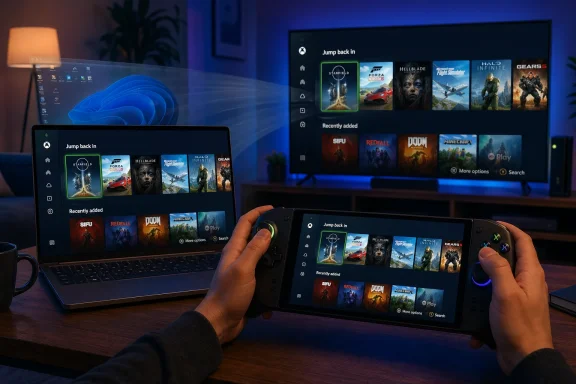
Xbox Mode arrives with a simple promise: put games first, hide the desktop when it gets in the way, and let players navigate with a controller instead of reaching for a mouse, trackpad, or touchscreen. Microsoft describes the experience as console-inspired, with a streamlined interface that surfaces the game library, recently played titles, and a task-switching layer designed for couch or handheld use.
That sounds modest until you remember what Windows gaming usually feels like outside a desk setup. On a laptop, Windows is powerful but cluttered. On a handheld, it is both powerful and faintly absurd: tiny controls, launcher pop-ups, keyboard prompts, notification trays, account dialogs, driver utilities, RGB software, anti-cheat warnings, and the occasional desktop window appearing where a console user expects only a game.
Microsoft has spent years insisting that Windows is the best place to play because it offers the widest library and the fewest platform restrictions. That is true in the way a warehouse is the best place to find everything: technically correct, but not always pleasant. Xbox Mode is an attempt to turn the warehouse into a showroom.
The timing matters. Valve’s Steam Deck proved that PC gaming could be made approachable if the operating system stepped back and the game library stepped forward. Nintendo has shown for years that immediacy matters more than raw configurability for many players. Microsoft, after decades of owning both Windows and Xbox, is now trying to fuse the two without making either audience feel abandoned.
The issue was not that Windows could not run the games. It could run more of them than SteamOS, especially titles dependent on specific anti-cheat systems, launchers, or Xbox services. The issue was that using Windows without a keyboard and mouse often felt like operating a desktop through a keyhole.
Xbox Mode is Microsoft’s concession that compatibility is not the same thing as experience. A handheld that can technically launch a Game Pass title, a Steam game, an EA title, and a Ubisoft installation is impressive. A handheld that makes you fight four launchers, three update prompts, and one invisible cursor before dinner is over is not.
That is why the controller-first interface matters more than any early performance claim. Microsoft’s task is not simply to save a few hundred megabytes of memory or shave a few seconds off startup. Its task is to make Windows stop announcing itself every time a user wants to play.
The company’s earlier Full Screen Experience on Windows handhelds was the prototype for this idea. With the broader Xbox Mode rollout, Microsoft is extending that thinking beyond dedicated handhelds and into ordinary Windows 11 PCs. That includes laptops, desktops, and tablets — devices where the desktop is still available, but no longer has to be the default emotional experience of PC gaming.
That distinction is crucial. Microsoft is not replacing Windows 11 with an Xbox operating system. It is not turning every gaming PC into a locked-down console. It is placing a console-like layer over Windows and trying to make the handoff between gaming and general computing feel intentional rather than accidental.
The aggregated library is the key strategic move. Xbox Mode is not useful if it only launches Microsoft Store and Game Pass titles. PC gamers have libraries scattered across Steam, Epic Games Store, GOG, Battle.net, EA app, Ubisoft Connect, itch.io, and standalone executables. Microsoft’s credibility depends on whether Xbox Mode can treat those libraries as citizens rather than grudging imports.
This is also where Microsoft has an advantage Valve does not fully have. Windows remains the default target for PC game development. If Microsoft can provide a better front end without sacrificing the messy compatibility layer underneath, it can offer a different bargain from SteamOS: less elegance, perhaps, but broader reach.
The danger is that Xbox Mode becomes yet another overlay in a stack already crowded with overlays. PC gaming is full of them: Steam Big Picture, NVIDIA App, AMD Software, Xbox Game Bar, Discord, launcher overlays, OEM utilities, capture tools, and performance monitors. Microsoft has to make Xbox Mode feel like the top-level experience, not one more translucent sheet sitting on the pile.
Early impressions suggest users should keep those expectations sober. A cleaner shell can reduce some overhead, avoid loading unnecessary desktop components, and make startup feel less chaotic. But Xbox Mode is not a magic driver, a new graphics stack, or a replacement for the underlying Windows scheduler, power management model, or GPU architecture.
That does not make the performance angle irrelevant. On low-power handhelds, small gains matter. If a device avoids launching desktop utilities, delays background tasks, and keeps the user out of unnecessary windows, the experience may feel faster even when the benchmark chart barely moves. Console-like smoothness is often about consistency, not peak frame rate.
The more important performance improvement may be cognitive. A player who can wake a device, pick a game, resume play, and adjust settings without touching a desktop is experiencing a kind of speed Windows has historically struggled to deliver. It is the speed of not being interrupted.
That is where Microsoft must be careful with messaging. If Xbox Mode is sold as a frame-rate booster, it will disappoint many users. If it is sold as a better front door for gaming on Windows, it has a much stronger case.
But Microsoft cannot afford to make Xbox Mode feel like a Game Pass billboard. The Windows gaming audience is not the console audience. PC players expect storefront choice, mod support, graphics options, community tools, and the ability to ignore first-party strategy when it gets in the way of their library.
That is why support for third-party storefronts is not a courtesy feature; it is the price of admission. Steam is not merely another launcher on Windows. For many players, Steam is the gaming platform, with friends, achievements, cloud saves, controller profiles, and years of purchases attached. If Xbox Mode mishandles Steam, it mishandles PC gaming.
Microsoft appears to understand this at least in principle. The pitch around Xbox Mode emphasizes libraries across popular PC storefronts, not just Microsoft-owned content. That is the right posture, though the real test will be reliability: whether installed games appear correctly, whether controller navigation remains consistent, whether updates and sign-ins are handled gracefully, and whether the user is dumped into desktop purgatory when something goes wrong.
This is where console-like polish becomes brutally difficult. Consoles hide complexity partly because platform holders control the hardware, storefront, operating system, certification process, and update pipeline. Windows has to reconcile decades of openness with the illusion of simplicity. Xbox Mode is trying to make a bazaar feel like a living room.
That contradiction is not necessarily fatal. In fact, it may be the whole point. A Windows handheld can run games and services that closed consoles cannot. It can accept mods, emulators, non-Microsoft stores, productivity apps, streaming tools, and accessories that would never pass a console certification pipeline.
But users do not buy a handheld so they can admire Windows’ flexibility. They buy it because they want to play games on a couch, train, plane, hotel bed, or docked TV. The ROG Xbox Ally line showed Microsoft that the hardware category was real, but also that the operating system layer needed to stop feeling like a developer kit.
The latest ROG Xbox Ally updates, including a preview of Automatic Super Resolution for Xbox Insiders on the Ally X, show the second half of the strategy. Microsoft is not only changing the interface; it is trying to build gaming-specific features into the Windows experience. Upscaling, docking behavior, Game Bar controls, and display defaults all become part of a broader attempt to make Windows behave more like dedicated gaming hardware.
Still, the Ally story also shows why Microsoft has to move beyond one device family. If Xbox Mode remains best on a specific ASUS handheld, it is an accessory feature. If it works across ordinary Windows 11 machines, it becomes a platform layer.
Xbox Mode gives Microsoft a native answer for that use case. A desktop tower under the TV, a mini PC near the soundbar, or a gaming laptop connected over HDMI can now plausibly boot into something designed for controller use. That matters because the living room is where console expectations are strongest.
This is also where Xbox Mode collides most directly with the future of Xbox hardware. Microsoft has been increasingly open about Xbox as an ecosystem rather than a single console box. Cloud gaming, PC Game Pass, Xbox Play Anywhere, cross-save, and simultaneous PC-console releases have all weakened the old boundary. Xbox Mode weakens it further.
If a Windows PC can present itself like an Xbox, launch Game Pass and Steam titles, use a controller-first shell, and dock cleanly to a TV, then the definition of an Xbox becomes less about silicon and more about identity. That could be liberating for Microsoft. It could also be confusing for customers who still want a simple answer to a simple question: what Xbox should I buy?
The answer may eventually be: the one that fits your tolerance for complexity. A traditional console remains the low-friction option. A Windows Xbox-style PC becomes the high-flexibility option. Xbox Mode is the bridge Microsoft needs if it wants both markets without forcing one to impersonate the other badly.
SteamOS did something Windows had not done: it made PC gaming feel coherent on a handheld. Not universally compatible, not endlessly configurable, not enterprise-ready — coherent. The Steam Deck’s great achievement was not raw power. It was letting users forget, most of the time, that they were using a Linux PC.
Microsoft cannot copy that model exactly because Windows has different responsibilities. It must support an enormous hardware ecosystem, legacy applications, enterprise needs, creative workflows, accessibility tools, peripheral stacks, and driver models. That breadth is Windows’ superpower and its burden.
Xbox Mode is therefore a compromise product by design. It cannot be as clean as a purpose-built console OS or as tightly curated as SteamOS on Valve’s own hardware. Its advantage is reach. If Microsoft can bring a good-enough console interface to millions of existing Windows 11 PCs, the scale changes the competition.
The risk is that “good enough” is not good enough in a category defined by feel. A handheld gaming interface lives or dies on small moments: wake from sleep, controller focus, text entry, failed launches, update prompts, Wi-Fi recovery, Bluetooth pairing, cloud-save conflicts, and battery warnings. Those are not glamorous platform features, but they are where trust is won.
A desktop app can crash and still feel like a desktop app. A console shell that crashes stops feeling like a console. The whole promise of Xbox Mode is that it suppresses the messy parts of Windows long enough for play to feel immediate. Every unexpected window, frozen focus state, or controller dead end breaks that illusion.
This is why Microsoft’s rollout strategy matters. The company says Xbox Mode is beginning in select markets and may take time to reach devices. That staged approach is frustrating for users who want the feature now, but it is rational if Microsoft is watching telemetry and compatibility problems. A bad broad rollout would harm the brand more than a slow one.
The company also has to be careful about settings discoverability. Users should not need to understand Insider rings, Store app versions, Windows feature enablement, OEM utilities, and registry folklore to get a console-like experience. If Xbox Mode is meant for ordinary players, it has to arrive like an ordinary feature.
That does not mean Microsoft should hide the complexity forever. Power users will want to choose default apps, manage startup behavior, configure overlays, disable background services, and decide when Windows Desktop Mode appears. But those controls should feel like customization, not archaeology.
For sysadmins and Windows enthusiasts, that makes Xbox Mode more interesting than a mere Xbox app skin. Microsoft is effectively experimenting with task-specific Windows identities. Today the identity is gaming. Tomorrow it could be education, streaming, creative production, media-center use, or enterprise frontline workflows.
Windows has always been general-purpose. That is why it conquered the PC market. But general-purpose computing has become increasingly awkward on devices built for specific contexts. A handheld gaming PC, a classroom tablet, a point-of-sale terminal, and a living-room mini PC do not need the same first screen, even if they share the same underlying OS.
Xbox Mode suggests Microsoft sees this tension. The company is not abandoning the desktop. It is admitting the desktop should not be sacred. That is a significant philosophical shift from the Windows 8 era, when Microsoft tried to impose a touch-first Start screen across the entire user base and paid dearly for it.
The difference now is optionality. Xbox Mode does not have to replace the Windows desktop for everyone. It has to become the right door for the right moment. That is a more mature approach — and one more likely to survive contact with Windows’ diverse user base.
That would be a profound shift. Traditional consoles are closed appliances: predictable, efficient, easy to support, and tightly governed. Windows PCs are open ecosystems: messy, flexible, powerful, and harder to standardize. Microsoft’s challenge is to combine the economic and compatibility benefits of the latter with enough of the usability of the former.
Xbox Mode is the public rehearsal for that future. It teaches Microsoft how users respond to a controller-first Windows shell. It tests how well third-party stores can coexist inside an Xbox-branded interface. It reveals which background processes can be suppressed, which desktop behaviors must be redesigned, and where the line between console simplicity and PC freedom should be drawn.
If Microsoft gets this right, the next Xbox generation could be less about one device and more about a certified experience across several device classes. There might still be a living-room Xbox console, but it could share more DNA with Windows gaming PCs than with past console generations. OEMs could build Xbox-like PCs. Handhelds could ship with Xbox Mode as their default. Desktops could toggle into a living-room shell when docked or connected to a TV.
If Microsoft gets it wrong, Xbox Mode becomes another half-remembered Windows initiative: useful to enthusiasts, ignored by the mainstream, and eventually buried under inconsistent settings pages. The difference will be execution, not vision.
Xbox Mode changes that relationship. It lets Microsoft say: when you want to play, Windows can become something else. That is a powerful idea, and one that should have arrived years ago.
But the burden now shifts from concept to craft. Microsoft must make sure Xbox Mode respects third-party libraries, avoids launcher chaos, handles controller focus flawlessly, and recovers gracefully when Windows inevitably throws something unexpected onto the screen. It must also communicate clearly which PCs get the feature, how users enable it, and why availability may vary by region or update wave.
The company’s track record here is mixed. Windows feature rollouts often arrive through layered dependencies: OS builds, Store app updates, account flags, region gates, Insider status, OEM packages, and staged deployments. That model may be technically sensible, but it can make users feel like they are chasing a moving target.
For Xbox Mode to become mainstream, Microsoft has to make the path boring. Update Windows, open Settings, choose Xbox Mode, pick your preferences, and play. Anything more complicated weakens the console promise before the first game launches.
That matters because interface models create habits. If players begin to associate the Xbox button with switching tasks, launching games, managing performance features, and returning to a full-screen home, Xbox becomes more than a subscription tab. It becomes the gaming control layer for Windows.
This could strengthen Microsoft’s position even among users who buy most games elsewhere. A Steam-heavy player might still use Xbox Mode if it provides the best couch interface. A Game Pass subscriber might use it as the primary route into Microsoft’s catalog. A handheld owner might treat it as the difference between a hobbyist device and a reliable everyday machine.
The tension, again, is trust. PC gamers are allergic to heavy-handed platform behavior. If Xbox Mode feels like Microsoft quietly steering users away from Steam, burying non-Microsoft games, or turning every session into a Game Pass upsell, it will be rejected. If it feels like Microsoft making Windows less annoying, it has a chance.
That is the central bargain. Microsoft can put Xbox at the center only if it makes the center genuinely useful.
Does the interface still feel fast after ten launchers have updated? Does it survive a GPU driver install? Does it handle a Bluetooth controller that disconnects mid-session? Does it keep focus when a non-Steam game opens a configuration utility? Does sleep and resume behave reliably on handheld hardware? Does the user trust it enough to boot straight into it?
These are mundane questions, but console-like experiences are built from mundane reliability. The console illusion depends on the absence of chores. When a player turns on a PlayStation, Xbox Series console, or Switch, they do not expect to manage a taskbar. Xbox Mode has to narrow that expectation gap without pretending Windows is something it is not.
The best version of Xbox Mode would not be invisible. It would be confidently boring. It would make launching a game from Game Pass, Steam, or another storefront feel consistent. It would keep Windows’ power available one layer down, but stop pushing it into the user’s face.
That is a hard design target, but it is exactly the target Microsoft must hit if it wants Windows to remain the default home of PC gaming as more gaming moves into handhelds, docks, streaming screens, and living rooms.
Source: XDA Microsoft rolls out Xbox Mode, bringing a console-like experience to any PC
 Microsoft Is Turning Windows Into the Console It Could Never Quite Build
Xbox Mode arrives with a simple promise: put games first, hide the desktop when it gets in the way, and let players navigate with a controller instead of reaching for a mouse, trackpad, or touchscreen. Microsoft describes the experience as console-inspired, with a streamlined interface that surfaces the game library, recently played titles, and a task-switching layer designed for couch or handheld use.That sounds modest until you remember what Windows gaming usually feels like outside a desk setup. On a laptop, Windows is powerful but cluttered. On a handheld, it is both powerful and faintly absurd: tiny controls, launcher pop-ups, keyboard prompts, notification trays, account dialogs, driver utilities, RGB software, anti-cheat warnings, and the occasional desktop window appearing where a console user expects only a game.
Microsoft has spent years insisting that Windows is the best place to play because it offers the widest library and the fewest platform restrictions. That is true in the way a warehouse is the best place to find everything: technically correct, but not always pleasant. Xbox Mode is an attempt to turn the warehouse into a showroom.
The timing matters. Valve’s Steam Deck proved that PC gaming could be made approachable if the operating system stepped back and the game library stepped forward. Nintendo has shown for years that immediacy matters more than raw configurability for many players. Microsoft, after decades of owning both Windows and Xbox, is now trying to fuse the two without making either audience feel abandoned.
The Desktop Was Always the Villain in the Handheld Story
The Windows handheld boom exposed a problem Microsoft could once afford to ignore. Devices like the ASUS ROG Ally, Lenovo Legion Go, MSI Claw, and newer Xbox-branded ROG Ally hardware brought serious PC gaming into a Switch-like shape, but they also dragged the Windows desktop into places it was never designed to go.The issue was not that Windows could not run the games. It could run more of them than SteamOS, especially titles dependent on specific anti-cheat systems, launchers, or Xbox services. The issue was that using Windows without a keyboard and mouse often felt like operating a desktop through a keyhole.
Xbox Mode is Microsoft’s concession that compatibility is not the same thing as experience. A handheld that can technically launch a Game Pass title, a Steam game, an EA title, and a Ubisoft installation is impressive. A handheld that makes you fight four launchers, three update prompts, and one invisible cursor before dinner is over is not.
That is why the controller-first interface matters more than any early performance claim. Microsoft’s task is not simply to save a few hundred megabytes of memory or shave a few seconds off startup. Its task is to make Windows stop announcing itself every time a user wants to play.
The company’s earlier Full Screen Experience on Windows handhelds was the prototype for this idea. With the broader Xbox Mode rollout, Microsoft is extending that thinking beyond dedicated handhelds and into ordinary Windows 11 PCs. That includes laptops, desktops, and tablets — devices where the desktop is still available, but no longer has to be the default emotional experience of PC gaming.
Xbox Mode Is a Shell Game, in the Most Literal Sense
What Microsoft is really changing is the shell. Traditional Windows boots into a general-purpose desktop built around files, windows, taskbars, system trays, and overlapping app models. Xbox Mode pushes a gaming shell to the foreground, presenting Windows less like an operating system and more like an appliance.That distinction is crucial. Microsoft is not replacing Windows 11 with an Xbox operating system. It is not turning every gaming PC into a locked-down console. It is placing a console-like layer over Windows and trying to make the handoff between gaming and general computing feel intentional rather than accidental.
The aggregated library is the key strategic move. Xbox Mode is not useful if it only launches Microsoft Store and Game Pass titles. PC gamers have libraries scattered across Steam, Epic Games Store, GOG, Battle.net, EA app, Ubisoft Connect, itch.io, and standalone executables. Microsoft’s credibility depends on whether Xbox Mode can treat those libraries as citizens rather than grudging imports.
This is also where Microsoft has an advantage Valve does not fully have. Windows remains the default target for PC game development. If Microsoft can provide a better front end without sacrificing the messy compatibility layer underneath, it can offer a different bargain from SteamOS: less elegance, perhaps, but broader reach.
The danger is that Xbox Mode becomes yet another overlay in a stack already crowded with overlays. PC gaming is full of them: Steam Big Picture, NVIDIA App, AMD Software, Xbox Game Bar, Discord, launcher overlays, OEM utilities, capture tools, and performance monitors. Microsoft has to make Xbox Mode feel like the top-level experience, not one more translucent sheet sitting on the pile.
The Performance Story Is Smaller Than the Platform Story
Microsoft says Xbox Mode is designed to minimize background distractions and focus system resources on play. That has understandably encouraged hopes that it might improve frame rates, battery life, responsiveness, or thermal behavior, especially on handheld PCs where every watt matters.Early impressions suggest users should keep those expectations sober. A cleaner shell can reduce some overhead, avoid loading unnecessary desktop components, and make startup feel less chaotic. But Xbox Mode is not a magic driver, a new graphics stack, or a replacement for the underlying Windows scheduler, power management model, or GPU architecture.
That does not make the performance angle irrelevant. On low-power handhelds, small gains matter. If a device avoids launching desktop utilities, delays background tasks, and keeps the user out of unnecessary windows, the experience may feel faster even when the benchmark chart barely moves. Console-like smoothness is often about consistency, not peak frame rate.
The more important performance improvement may be cognitive. A player who can wake a device, pick a game, resume play, and adjust settings without touching a desktop is experiencing a kind of speed Windows has historically struggled to deliver. It is the speed of not being interrupted.
That is where Microsoft must be careful with messaging. If Xbox Mode is sold as a frame-rate booster, it will disappoint many users. If it is sold as a better front door for gaming on Windows, it has a much stronger case.
Game Pass Gets a Better Storefront, but Steam Gets a Seat at the Table
The obvious business benefit for Microsoft is Game Pass. Xbox Mode gives the subscription service a more prominent place on Windows, where discovery has often been split between the Microsoft Store, Xbox app, browser pages, and third-party launchers. A full-screen interface lets Microsoft present Game Pass less like an app and more like the home screen of a gaming device.But Microsoft cannot afford to make Xbox Mode feel like a Game Pass billboard. The Windows gaming audience is not the console audience. PC players expect storefront choice, mod support, graphics options, community tools, and the ability to ignore first-party strategy when it gets in the way of their library.
That is why support for third-party storefronts is not a courtesy feature; it is the price of admission. Steam is not merely another launcher on Windows. For many players, Steam is the gaming platform, with friends, achievements, cloud saves, controller profiles, and years of purchases attached. If Xbox Mode mishandles Steam, it mishandles PC gaming.
Microsoft appears to understand this at least in principle. The pitch around Xbox Mode emphasizes libraries across popular PC storefronts, not just Microsoft-owned content. That is the right posture, though the real test will be reliability: whether installed games appear correctly, whether controller navigation remains consistent, whether updates and sign-ins are handled gracefully, and whether the user is dumped into desktop purgatory when something goes wrong.
This is where console-like polish becomes brutally difficult. Consoles hide complexity partly because platform holders control the hardware, storefront, operating system, certification process, and update pipeline. Windows has to reconcile decades of openness with the illusion of simplicity. Xbox Mode is trying to make a bazaar feel like a living room.
The ROG Xbox Ally Was the Test Bed, Not the Destination
The ROG Xbox Ally and ROG Xbox Ally X gave Microsoft a controlled proving ground. Those devices married ASUS hardware with Xbox branding and Windows 11, making them the first obvious public expression of Microsoft’s handheld ambitions. They also revealed the contradiction at the center of the project: the machines looked like consoles, but behaved like PCs.That contradiction is not necessarily fatal. In fact, it may be the whole point. A Windows handheld can run games and services that closed consoles cannot. It can accept mods, emulators, non-Microsoft stores, productivity apps, streaming tools, and accessories that would never pass a console certification pipeline.
But users do not buy a handheld so they can admire Windows’ flexibility. They buy it because they want to play games on a couch, train, plane, hotel bed, or docked TV. The ROG Xbox Ally line showed Microsoft that the hardware category was real, but also that the operating system layer needed to stop feeling like a developer kit.
The latest ROG Xbox Ally updates, including a preview of Automatic Super Resolution for Xbox Insiders on the Ally X, show the second half of the strategy. Microsoft is not only changing the interface; it is trying to build gaming-specific features into the Windows experience. Upscaling, docking behavior, Game Bar controls, and display defaults all become part of a broader attempt to make Windows behave more like dedicated gaming hardware.
Still, the Ally story also shows why Microsoft has to move beyond one device family. If Xbox Mode remains best on a specific ASUS handheld, it is an accessory feature. If it works across ordinary Windows 11 machines, it becomes a platform layer.
The Living Room PC Finally Gets a Native Argument
For years, the living-room PC has been a niche enthusiast project. People built small-form-factor rigs, installed Steam Big Picture, mapped controller shortcuts, configured wake behavior, and tried to make Windows behave politely on a television. It worked, often brilliantly, but it always felt like a workaround.Xbox Mode gives Microsoft a native answer for that use case. A desktop tower under the TV, a mini PC near the soundbar, or a gaming laptop connected over HDMI can now plausibly boot into something designed for controller use. That matters because the living room is where console expectations are strongest.
This is also where Xbox Mode collides most directly with the future of Xbox hardware. Microsoft has been increasingly open about Xbox as an ecosystem rather than a single console box. Cloud gaming, PC Game Pass, Xbox Play Anywhere, cross-save, and simultaneous PC-console releases have all weakened the old boundary. Xbox Mode weakens it further.
If a Windows PC can present itself like an Xbox, launch Game Pass and Steam titles, use a controller-first shell, and dock cleanly to a TV, then the definition of an Xbox becomes less about silicon and more about identity. That could be liberating for Microsoft. It could also be confusing for customers who still want a simple answer to a simple question: what Xbox should I buy?
The answer may eventually be: the one that fits your tolerance for complexity. A traditional console remains the low-friction option. A Windows Xbox-style PC becomes the high-flexibility option. Xbox Mode is the bridge Microsoft needs if it wants both markets without forcing one to impersonate the other badly.
Microsoft’s Hardest Rival Is Not Sony — It Is SteamOS
It is tempting to frame Xbox Mode as another move in the Microsoft-versus-Sony contest. That misses the more immediate pressure. Sony’s PlayStation business competes with Xbox for attention, software revenue, and living-room loyalty, but it is Valve that forced the industry to rethink what PC gaming could look like in a console-like form.SteamOS did something Windows had not done: it made PC gaming feel coherent on a handheld. Not universally compatible, not endlessly configurable, not enterprise-ready — coherent. The Steam Deck’s great achievement was not raw power. It was letting users forget, most of the time, that they were using a Linux PC.
Microsoft cannot copy that model exactly because Windows has different responsibilities. It must support an enormous hardware ecosystem, legacy applications, enterprise needs, creative workflows, accessibility tools, peripheral stacks, and driver models. That breadth is Windows’ superpower and its burden.
Xbox Mode is therefore a compromise product by design. It cannot be as clean as a purpose-built console OS or as tightly curated as SteamOS on Valve’s own hardware. Its advantage is reach. If Microsoft can bring a good-enough console interface to millions of existing Windows 11 PCs, the scale changes the competition.
The risk is that “good enough” is not good enough in a category defined by feel. A handheld gaming interface lives or dies on small moments: wake from sleep, controller focus, text entry, failed launches, update prompts, Wi-Fi recovery, Bluetooth pairing, cloud-save conflicts, and battery warnings. Those are not glamorous platform features, but they are where trust is won.
The Glitches Matter Because They Break the Spell
Reports from early users and reviewers have described Xbox Mode and the related full-screen experience as promising but still imperfect. Glitches, navigation oddities, crashes, and awkward transitions are not surprising for a system trying to tame Windows into a console-like posture. But they are more damaging here than they would be in a normal desktop app.A desktop app can crash and still feel like a desktop app. A console shell that crashes stops feeling like a console. The whole promise of Xbox Mode is that it suppresses the messy parts of Windows long enough for play to feel immediate. Every unexpected window, frozen focus state, or controller dead end breaks that illusion.
This is why Microsoft’s rollout strategy matters. The company says Xbox Mode is beginning in select markets and may take time to reach devices. That staged approach is frustrating for users who want the feature now, but it is rational if Microsoft is watching telemetry and compatibility problems. A bad broad rollout would harm the brand more than a slow one.
The company also has to be careful about settings discoverability. Users should not need to understand Insider rings, Store app versions, Windows feature enablement, OEM utilities, and registry folklore to get a console-like experience. If Xbox Mode is meant for ordinary players, it has to arrive like an ordinary feature.
That does not mean Microsoft should hide the complexity forever. Power users will want to choose default apps, manage startup behavior, configure overlays, disable background services, and decide when Windows Desktop Mode appears. But those controls should feel like customization, not archaeology.
Enterprise Windows Lessons Are Sneaking Into Consumer Gaming
There is an amusing historical twist here. Xbox Mode borrows ideas that resemble kiosk mode, assigned access, shell replacement, and managed-device thinking — concepts long familiar to IT administrators. The consumer pitch is fun and games, but the underlying design problem is old: how do you make Windows present only the experience needed for a specific task?For sysadmins and Windows enthusiasts, that makes Xbox Mode more interesting than a mere Xbox app skin. Microsoft is effectively experimenting with task-specific Windows identities. Today the identity is gaming. Tomorrow it could be education, streaming, creative production, media-center use, or enterprise frontline workflows.
Windows has always been general-purpose. That is why it conquered the PC market. But general-purpose computing has become increasingly awkward on devices built for specific contexts. A handheld gaming PC, a classroom tablet, a point-of-sale terminal, and a living-room mini PC do not need the same first screen, even if they share the same underlying OS.
Xbox Mode suggests Microsoft sees this tension. The company is not abandoning the desktop. It is admitting the desktop should not be sacred. That is a significant philosophical shift from the Windows 8 era, when Microsoft tried to impose a touch-first Start screen across the entire user base and paid dearly for it.
The difference now is optionality. Xbox Mode does not have to replace the Windows desktop for everyone. It has to become the right door for the right moment. That is a more mature approach — and one more likely to survive contact with Windows’ diverse user base.
The Next Xbox May Be a Windows Strategy Wearing Console Clothes
The broader strategic question is what Xbox hardware becomes after Xbox Mode. Microsoft has already blurred the line between console and PC through cross-platform releases, Game Pass, cloud gaming, and Windows-first development tools. A future Xbox that is essentially a Windows-based gaming device with a console shell no longer sounds far-fetched.That would be a profound shift. Traditional consoles are closed appliances: predictable, efficient, easy to support, and tightly governed. Windows PCs are open ecosystems: messy, flexible, powerful, and harder to standardize. Microsoft’s challenge is to combine the economic and compatibility benefits of the latter with enough of the usability of the former.
Xbox Mode is the public rehearsal for that future. It teaches Microsoft how users respond to a controller-first Windows shell. It tests how well third-party stores can coexist inside an Xbox-branded interface. It reveals which background processes can be suppressed, which desktop behaviors must be redesigned, and where the line between console simplicity and PC freedom should be drawn.
If Microsoft gets this right, the next Xbox generation could be less about one device and more about a certified experience across several device classes. There might still be a living-room Xbox console, but it could share more DNA with Windows gaming PCs than with past console generations. OEMs could build Xbox-like PCs. Handhelds could ship with Xbox Mode as their default. Desktops could toggle into a living-room shell when docked or connected to a TV.
If Microsoft gets it wrong, Xbox Mode becomes another half-remembered Windows initiative: useful to enthusiasts, ignored by the mainstream, and eventually buried under inconsistent settings pages. The difference will be execution, not vision.
The April Rollout Puts the Burden Back on Microsoft
The most concrete lesson from this rollout is that Microsoft has finally stopped treating the Xbox app as sufficient. The Xbox app on PC has improved over the years, but it was never a complete answer to the experience problem. It lived inside Windows rather than reshaping the user’s route through Windows.Xbox Mode changes that relationship. It lets Microsoft say: when you want to play, Windows can become something else. That is a powerful idea, and one that should have arrived years ago.
But the burden now shifts from concept to craft. Microsoft must make sure Xbox Mode respects third-party libraries, avoids launcher chaos, handles controller focus flawlessly, and recovers gracefully when Windows inevitably throws something unexpected onto the screen. It must also communicate clearly which PCs get the feature, how users enable it, and why availability may vary by region or update wave.
The company’s track record here is mixed. Windows feature rollouts often arrive through layered dependencies: OS builds, Store app updates, account flags, region gates, Insider status, OEM packages, and staged deployments. That model may be technically sensible, but it can make users feel like they are chasing a moving target.
For Xbox Mode to become mainstream, Microsoft has to make the path boring. Update Windows, open Settings, choose Xbox Mode, pick your preferences, and play. Anything more complicated weakens the console promise before the first game launches.
The New Xbox Button Is a Windows Button in Disguise
Xbox Mode also changes the meaning of the Xbox brand on PC. For years, Xbox on Windows mostly meant services: Game Pass, achievements, friends, captures, cloud saves, and Microsoft Store distribution. Now it increasingly means a user interface model.That matters because interface models create habits. If players begin to associate the Xbox button with switching tasks, launching games, managing performance features, and returning to a full-screen home, Xbox becomes more than a subscription tab. It becomes the gaming control layer for Windows.
This could strengthen Microsoft’s position even among users who buy most games elsewhere. A Steam-heavy player might still use Xbox Mode if it provides the best couch interface. A Game Pass subscriber might use it as the primary route into Microsoft’s catalog. A handheld owner might treat it as the difference between a hobbyist device and a reliable everyday machine.
The tension, again, is trust. PC gamers are allergic to heavy-handed platform behavior. If Xbox Mode feels like Microsoft quietly steering users away from Steam, burying non-Microsoft games, or turning every session into a Game Pass upsell, it will be rejected. If it feels like Microsoft making Windows less annoying, it has a chance.
That is the central bargain. Microsoft can put Xbox at the center only if it makes the center genuinely useful.
The Real Test Begins After the Novelty Wears Off
The first wave of Xbox Mode coverage will focus on screenshots, settings paths, storefront aggregation, and whether performance changes show up in quick tests. Those are useful first impressions, but they will not decide the feature’s fate. The fate will be decided over weeks of ordinary use.Does the interface still feel fast after ten launchers have updated? Does it survive a GPU driver install? Does it handle a Bluetooth controller that disconnects mid-session? Does it keep focus when a non-Steam game opens a configuration utility? Does sleep and resume behave reliably on handheld hardware? Does the user trust it enough to boot straight into it?
These are mundane questions, but console-like experiences are built from mundane reliability. The console illusion depends on the absence of chores. When a player turns on a PlayStation, Xbox Series console, or Switch, they do not expect to manage a taskbar. Xbox Mode has to narrow that expectation gap without pretending Windows is something it is not.
The best version of Xbox Mode would not be invisible. It would be confidently boring. It would make launching a game from Game Pass, Steam, or another storefront feel consistent. It would keep Windows’ power available one layer down, but stop pushing it into the user’s face.
That is a hard design target, but it is exactly the target Microsoft must hit if it wants Windows to remain the default home of PC gaming as more gaming moves into handhelds, docks, streaming screens, and living rooms.
The Xbox Shell Has Five Jobs Now
Microsoft’s rollout gives Windows gamers something new to try, but it also gives Microsoft a sharper checklist than the company may publicly admit. Xbox Mode does not need to solve every Windows problem immediately. It does need to prove, quickly, that it understands which problems matter.- Xbox Mode must make controller navigation reliable enough that users do not keep a mouse nearby as a safety device.
- The interface must treat Steam and other PC storefronts as first-class library sources, not as awkward exits from the Xbox world.
- Performance gains should be understood as secondary to reduced friction, faster access, and fewer desktop interruptions.
- Microsoft needs to simplify availability so users are not left guessing whether they need a Windows update, Store update, regional rollout, or Insider setting.
- The ROG Xbox Ally X remains the showcase hardware, but Xbox Mode only becomes strategically important if ordinary Windows 11 PCs can use it well.
- The feature’s long-term importance is not the April 2026 rollout itself, but what it implies about a future Xbox platform built more openly on Windows.
Source: XDA Microsoft rolls out Xbox Mode, bringing a console-like experience to any PC
