

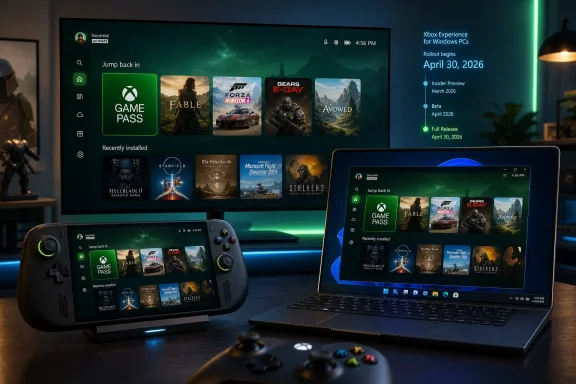
Microsoft began rolling out Xbox Mode for Windows 11 PCs on April 30, 2026, bringing a controller-first, console-style gaming interface to selected markets across desktops, laptops, tablets, and handheld gaming PCs through a phased Windows Update deployment. The feature is not a new operating system, and it is not yet Microsoft’s SteamOS moment. But it is the clearest sign yet that Redmond understands the problem Windows has created for modern PC gaming: the desktop is powerful, flexible, and increasingly in the way.
The old Windows bargain was simple. You tolerated the clutter because the compatibility was worth it. Xbox Mode is Microsoft’s attempt to keep the compatibility while hiding the clutter, and that makes it more strategically important than its modest interface changes might suggest.
For decades, Windows has treated games as just another class of application. That worked when the PC was a desk-bound machine with a mouse, keyboard, monitor, and a user who expected to manage drivers, launchers, tray icons, and update prompts. It works less well when the PC is a seven-inch handheld with thumbsticks, a sleep button, and a battery gauge that feels like a countdown timer.
Xbox Mode is Microsoft’s answer to that mismatch. It presents a full-screen Xbox-style shell for browsing and launching games, including Game Pass titles and installed games from supported PC storefronts. It is designed to be navigated with a controller, and on supported systems it can be configured to launch at startup instead of dumping the user into the regular Windows 11 desktop.
That sounds simple because, conceptually, it is. Steam’s Big Picture Mode has offered a similar promise for years: turn the PC into something that behaves more like a living-room appliance. The difference is that Microsoft owns the operating system underneath, the Xbox brand on top, and the update machinery in between.
That ownership gives Microsoft a unique advantage, but also a unique embarrassment. If anyone should be able to make Windows feel natural on a gaming handheld or a couch-connected PC, it is Microsoft. The fact that Xbox Mode feels overdue tells you how long Windows gaming has been optimized for breadth rather than elegance.
A desktop operating system wants attention. It wants sign-ins, permissions, notifications, background services, driver panels, launchers, overlays, and window focus. On a tower PC, that friction is annoying. On a handheld, it is existential.
Valve understood this first at scale with the Steam Deck. SteamOS does not run every Windows game perfectly, and Proton compatibility remains a moving target, but the device succeeds because the experience is coherent. You press a button, pick a game, suspend, resume, update, and manage the library without feeling like you are operating a tiny office PC.
Microsoft’s problem was that Windows handhelds could often run more games, but SteamOS handhelds could feel more like game machines. Xbox Mode is an attempt to close that perception gap without giving up Windows’ biggest advantage: the enormous, messy, launcher-fragmented, anti-cheat-dependent PC gaming ecosystem.
That is why the rollout matters even for users who have no interest in handhelds. Handheld gaming exposed a weakness that was already present everywhere. Windows is excellent at running games, but not always excellent at being a gaming environment.
That distinction matters because front ends can improve the first five minutes of an experience without fixing the next five hours. If a game needs a third-party launcher, the launcher still exists. If a driver update causes trouble, Xbox Mode does not magically make it disappear. If anti-cheat support varies by title, the full-screen interface is not the deciding factor.
Still, interfaces are not superficial. A shell can change what a machine feels like, and feeling is part of product reality. The Windows desktop tells users they are managing a computer. A console-style interface tells them they are choosing entertainment.
That shift is especially useful on devices shared between roles. A living-room PC, a gaming laptop plugged into a television, or a tablet with a controller attached can all benefit from a mode that says, “for now, this machine is for games.” Windows has long been good at multitasking. Xbox Mode is Microsoft experimenting with single-tasking as a feature.
But this is where expectations need discipline. Xbox Mode is not a magic performance patch. It will not turn a low-end APU into a discrete GPU, and it will not fix poor optimization in individual games. The biggest gains are likely to come from reducing background overhead and keeping the system focused, not from rewriting how Windows schedules graphics workloads.
That still matters because modern PC gaming is increasingly sensitive to overhead. Launchers, overlays, capture tools, RGB utilities, cloud sync clients, updaters, and telemetry agents all nibble at memory and attention. Microsoft cannot control every third-party process, but it can create a more disciplined default state for gaming.
The more subtle benefit may be consistency. A handheld that boots directly into a gaming interface and suppresses desktop noise feels more predictable, even if the frame-rate gain is modest. For many users, fewer interruptions will matter more than a benchmark chart.
There are good engineering reasons for staged rollouts. Microsoft has to account for regional availability, device classes, drivers, app versions, account features, and telemetry from early deployments. A global switch-flip would be bold, but also reckless.
The downside is that Windows users have been trained to experience feature launches as rumors confirmed by other people’s screenshots. A feature can be “available” and still not available to you. For enthusiasts, that produces registry spelunking, Insider channel hopping, and unofficial enablement tools. For normal users, it produces confusion.
Xbox Mode is particularly vulnerable to that confusion because it is supposed to make Windows feel less fiddly. A console-style experience that begins with “maybe your region, maybe your build, maybe your app version” is still very much a Windows experience. Microsoft can smooth the front end, but the rollout machinery remains unmistakably PC.
The console is no longer the only place where Xbox lives. It is one endpoint among many. Microsoft has been saying this in various forms for years, but Xbox Mode gives the idea a more concrete expression on Windows PCs.
That strategy is both logical and risky. It is logical because Microsoft’s strongest position is not necessarily selling a particular box under the television. It is owning the account, subscription, store relationship, social graph, and cloud hooks across devices. If the user thinks “Xbox” when launching a game on a Windows handheld, Microsoft has extended the brand without selling a console.
The risk is that Xbox becomes less distinct. If everything is Xbox, the word can lose the clarity it once had. A console is simple: buy the box, plug it in, play the game. A Windows PC in Xbox Mode is more flexible, but it is also more contingent. Microsoft is trying to borrow the emotional simplicity of the console without surrendering the complexity of the PC.
Microsoft has a larger compatibility base, but Valve has the cleaner product story. The Steam Deck boots into Steam, manages the library, resumes games elegantly, and treats controller navigation as native rather than adapted. Desktop mode exists, but it is secondary. The device knows what it wants to be.
Windows handhelds have often lacked that confidence. They can be wonderful machines in the hands of enthusiasts, but they ask users to tolerate too many seams. Xbox Mode reduces those seams, yet it still sits on an operating system designed for general-purpose computing.
That does not make Microsoft’s approach doomed. In fact, a polished Windows gaming mode could appeal to users who want Game Pass, anti-cheat compatibility, multiple storefronts, and fewer Linux caveats. But Microsoft cannot win this fight by saying “Windows runs more stuff” forever. It has to make running that stuff feel less like maintenance.
Yet aggregation is not the same as unification. Steam, Epic, EA, Ubisoft, Battle.net, GOG, and Microsoft’s own store all have their own account systems, update logic, entitlements, overlays, and social features. Xbox Mode can present a friendlier doorway, but it cannot erase the rooms behind it.
This matters because the console experience is not just full-screen navigation. It is also a unified commerce and entitlement model. You buy or download a game, it appears, it updates, it launches. PC gaming’s strength is that it is not locked to one storefront, but that freedom has user-experience costs.
Microsoft is trying to make peace with that reality rather than defeat it. That is the correct approach. A Windows gaming shell that only privileged the Microsoft Store would be strategically tidy and practically useless. The value of Xbox Mode depends on how generously it embraces the messy PC ecosystem.
Gaming laptops are common personal machines. Tablets and mini PCs move between roles. BYOD environments already live with consumer Windows features appearing in business-adjacent contexts. A mode that changes startup behavior and foregrounds a gaming shell will be something administrators may want to understand, if only to disable or document it.
There is also a broader management lesson here. Microsoft is increasingly comfortable shipping Windows experiences that are role-specific rather than purely device-specific. Copilot experiences, gaming modes, dev workflows, and cloud-linked features all point toward Windows becoming more contextual.
For IT pros, that means the operating system will continue to accrete optional personalities. Some will be useful. Some will be distractions. The administrative challenge is not just patching Windows, but deciding which Windows experience an organization wants its users to see.
That matters because Microsoft naming often reveals internal ambition. “Full Screen Experience” could be a feature inside the Xbox app. “Xbox Mode” suggests a Windows posture, a way for the PC to temporarily become something else. It is shorter, more marketable, and much easier to imagine in settings menus, OEM spec sheets, and retail demos.
It also invites bigger expectations. A mode implies more than a skin. Users will expect controller-first navigation, sensible sleep and resume behavior, lower overhead, launcher cooperation, consistent input handling, and fewer desktop interruptions. If Microsoft calls it Xbox Mode, it is implicitly promising that Windows can behave like an Xbox when asked.
That promise will be tested quickly. Enthusiasts are forgiving of preview labels and hidden settings. Mainstream users are less forgiving when a “console-like” mode drops them into a mouse-driven launcher or a Windows permission prompt.
That could reduce duplication. ASUS Armoury Crate, Lenovo Legion Space, MSI Center M, and similar layers exist partly because Windows did not provide a native handheld gaming environment. Some of those tools will remain necessary for power profiles, fan curves, firmware updates, and device-specific controls. But the primary game-launching experience can increasingly become Microsoft’s responsibility.
The danger is overlap. If a handheld boots into an OEM launcher that points to Xbox Mode that points to Steam that opens another launcher, the user has not escaped complexity. They have merely moved through it in full screen.
The best version of this future is one where OEM tools become hardware control panels rather than competing home screens. Microsoft should own the general gaming shell. Device makers should expose device-specific knobs. Users should not need to learn three interfaces before launching one game.
The market looks different now. Handhelds have normalized the idea that a gaming PC can be an appliance-shaped object. Cloud saves and cross-progression have made device switching less painful. Game Pass has given Microsoft a reason to care about experiences beyond the traditional desktop. And Valve has proved that a console-style PC can be commercially and culturally meaningful.
Xbox Mode lands in that context. It is not creating the category from scratch; it is Microsoft acknowledging that the category has arrived without waiting for permission.
This is why the rollout should not be judged only by today’s feature list. The first version may feel incomplete, and in places it almost certainly will. But the strategic direction is now visible: Windows must become more adaptable not just in window layouts and settings panels, but in identity.
If Microsoft wants Xbox Mode to matter, it needs to keep pushing below the surface. Startup integration is a start. Lower background resource use is a start. Aggregated libraries are a start. But users will judge the experience by the moments where PC complexity leaks through.
Those leaks are familiar. A game opens behind the shell. A launcher demands a mouse. A Windows notification steals focus. Bluetooth audio misbehaves. A driver utility wants attention. A storefront update blocks play. None of these problems is new, but Xbox Mode makes them more visible because it frames the PC as a console.
That is the paradox Microsoft now faces. The better Xbox Mode gets, the less tolerance users will have for the Windows behaviors it cannot yet hide.
The harder test is whether users keep it enabled. A mode that is launched occasionally is a novelty. A mode that becomes the default startup experience on gaming machines is a platform shift.
For that to happen, Microsoft needs reliability more than flash. The interface does not need to be radical; it needs to be dependable. It needs to let users sit down, pick up a controller, and start playing without remembering that Windows is underneath.
That is a high bar because Windows’ value has always come from the fact that users can remember Windows is underneath. The operating system’s power is its openness. Xbox Mode’s job is to make that openness feel optional.
The practical points are straightforward:
Source: Pokde.Net Microsoft Begins Rollout of Xbox Mode For Windows 11 PCs - Pokde.Net
The old Windows bargain was simple. You tolerated the clutter because the compatibility was worth it. Xbox Mode is Microsoft’s attempt to keep the compatibility while hiding the clutter, and that makes it more strategically important than its modest interface changes might suggest.
 Microsoft Finally Admits the Desktop Is Bad at Being a Console
For decades, Windows has treated games as just another class of application. That worked when the PC was a desk-bound machine with a mouse, keyboard, monitor, and a user who expected to manage drivers, launchers, tray icons, and update prompts. It works less well when the PC is a seven-inch handheld with thumbsticks, a sleep button, and a battery gauge that feels like a countdown timer.Xbox Mode is Microsoft’s answer to that mismatch. It presents a full-screen Xbox-style shell for browsing and launching games, including Game Pass titles and installed games from supported PC storefronts. It is designed to be navigated with a controller, and on supported systems it can be configured to launch at startup instead of dumping the user into the regular Windows 11 desktop.
That sounds simple because, conceptually, it is. Steam’s Big Picture Mode has offered a similar promise for years: turn the PC into something that behaves more like a living-room appliance. The difference is that Microsoft owns the operating system underneath, the Xbox brand on top, and the update machinery in between.
That ownership gives Microsoft a unique advantage, but also a unique embarrassment. If anyone should be able to make Windows feel natural on a gaming handheld or a couch-connected PC, it is Microsoft. The fact that Xbox Mode feels overdue tells you how long Windows gaming has been optimized for breadth rather than elegance.
The Handheld PC Forced Microsoft’s Hand
The immediate pressure did not come from living-room desktops. It came from handheld gaming PCs, where Windows has always looked a little ridiculous. Devices like the ASUS ROG Ally, Lenovo Legion Go, MSI Claw, and other Windows-based handhelds deliver access to the vast PC library, but they also inherit Windows’ least console-like habits.A desktop operating system wants attention. It wants sign-ins, permissions, notifications, background services, driver panels, launchers, overlays, and window focus. On a tower PC, that friction is annoying. On a handheld, it is existential.
Valve understood this first at scale with the Steam Deck. SteamOS does not run every Windows game perfectly, and Proton compatibility remains a moving target, but the device succeeds because the experience is coherent. You press a button, pick a game, suspend, resume, update, and manage the library without feeling like you are operating a tiny office PC.
Microsoft’s problem was that Windows handhelds could often run more games, but SteamOS handhelds could feel more like game machines. Xbox Mode is an attempt to close that perception gap without giving up Windows’ biggest advantage: the enormous, messy, launcher-fragmented, anti-cheat-dependent PC gaming ecosystem.
That is why the rollout matters even for users who have no interest in handhelds. Handheld gaming exposed a weakness that was already present everywhere. Windows is excellent at running games, but not always excellent at being a gaming environment.
A Full-Screen Shell Is Not an Xbox OS
The temptation is to overstate what Microsoft has launched. Xbox Mode is not a stripped-down Xbox operating system for PCs. It is not a replacement for Windows Explorer, the Win32 app model, the Windows Store, Steam, Epic Games Store, Battle.net, or the driver stack. It is a front end.That distinction matters because front ends can improve the first five minutes of an experience without fixing the next five hours. If a game needs a third-party launcher, the launcher still exists. If a driver update causes trouble, Xbox Mode does not magically make it disappear. If anti-cheat support varies by title, the full-screen interface is not the deciding factor.
Still, interfaces are not superficial. A shell can change what a machine feels like, and feeling is part of product reality. The Windows desktop tells users they are managing a computer. A console-style interface tells them they are choosing entertainment.
That shift is especially useful on devices shared between roles. A living-room PC, a gaming laptop plugged into a television, or a tablet with a controller attached can all benefit from a mode that says, “for now, this machine is for games.” Windows has long been good at multitasking. Xbox Mode is Microsoft experimenting with single-tasking as a feature.
The Performance Story Is Real, but Easy to Oversell
One of the more interesting claims around Xbox Mode is that it can reduce memory usage compared with the standard Windows desktop experience, with reports from handheld testing suggesting savings in the range of roughly 1GB to 2GB in some scenarios. On low-memory systems, that is not trivial. Integrated graphics often share system RAM, and every gigabyte clawed back from the environment is a gigabyte that can help a game breathe.But this is where expectations need discipline. Xbox Mode is not a magic performance patch. It will not turn a low-end APU into a discrete GPU, and it will not fix poor optimization in individual games. The biggest gains are likely to come from reducing background overhead and keeping the system focused, not from rewriting how Windows schedules graphics workloads.
That still matters because modern PC gaming is increasingly sensitive to overhead. Launchers, overlays, capture tools, RGB utilities, cloud sync clients, updaters, and telemetry agents all nibble at memory and attention. Microsoft cannot control every third-party process, but it can create a more disciplined default state for gaming.
The more subtle benefit may be consistency. A handheld that boots directly into a gaming interface and suppresses desktop noise feels more predictable, even if the frame-rate gain is modest. For many users, fewer interruptions will matter more than a benchmark chart.
The Staggered Rollout Is Classic Microsoft
The rollout itself is pure modern Windows. Xbox Mode is arriving through a phased deployment in selected markets, and users are being told to check Windows Update and enable the option to receive the latest updates as soon as they are available. Some will get it immediately. Others will wait days or weeks with no obvious explanation.There are good engineering reasons for staged rollouts. Microsoft has to account for regional availability, device classes, drivers, app versions, account features, and telemetry from early deployments. A global switch-flip would be bold, but also reckless.
The downside is that Windows users have been trained to experience feature launches as rumors confirmed by other people’s screenshots. A feature can be “available” and still not available to you. For enthusiasts, that produces registry spelunking, Insider channel hopping, and unofficial enablement tools. For normal users, it produces confusion.
Xbox Mode is particularly vulnerable to that confusion because it is supposed to make Windows feel less fiddly. A console-style experience that begins with “maybe your region, maybe your build, maybe your app version” is still very much a Windows experience. Microsoft can smooth the front end, but the rollout machinery remains unmistakably PC.
Microsoft Is Building a Bridge Between Xbox and Windows
The deeper story is not simply that Windows 11 got a gaming shell. It is that Microsoft is continuing to blur the line between Xbox as a console brand and Xbox as a services layer. Game Pass, cloud gaming, cross-device libraries, Xbox app integration, and now Xbox Mode all point in the same direction.The console is no longer the only place where Xbox lives. It is one endpoint among many. Microsoft has been saying this in various forms for years, but Xbox Mode gives the idea a more concrete expression on Windows PCs.
That strategy is both logical and risky. It is logical because Microsoft’s strongest position is not necessarily selling a particular box under the television. It is owning the account, subscription, store relationship, social graph, and cloud hooks across devices. If the user thinks “Xbox” when launching a game on a Windows handheld, Microsoft has extended the brand without selling a console.
The risk is that Xbox becomes less distinct. If everything is Xbox, the word can lose the clarity it once had. A console is simple: buy the box, plug it in, play the game. A Windows PC in Xbox Mode is more flexible, but it is also more contingent. Microsoft is trying to borrow the emotional simplicity of the console without surrendering the complexity of the PC.
SteamOS Remains the Benchmark Microsoft Cannot Ignore
The unavoidable comparison is SteamOS. Valve did not merely create a launcher. It created an appliance-like Linux gaming environment that hides much of the underlying complexity until the user asks for it. That is the standard Xbox Mode will be measured against, especially on handhelds.Microsoft has a larger compatibility base, but Valve has the cleaner product story. The Steam Deck boots into Steam, manages the library, resumes games elegantly, and treats controller navigation as native rather than adapted. Desktop mode exists, but it is secondary. The device knows what it wants to be.
Windows handhelds have often lacked that confidence. They can be wonderful machines in the hands of enthusiasts, but they ask users to tolerate too many seams. Xbox Mode reduces those seams, yet it still sits on an operating system designed for general-purpose computing.
That does not make Microsoft’s approach doomed. In fact, a polished Windows gaming mode could appeal to users who want Game Pass, anti-cheat compatibility, multiple storefronts, and fewer Linux caveats. But Microsoft cannot win this fight by saying “Windows runs more stuff” forever. It has to make running that stuff feel less like maintenance.
The PC Storefront Problem Has Not Gone Away
One of Xbox Mode’s most useful promises is aggregation. A single gaming interface that can show Game Pass and installed titles from supported storefronts is exactly what PC gaming needs. The average Windows gaming library is no longer in one place, and the launcher sprawl has become a tax on attention.Yet aggregation is not the same as unification. Steam, Epic, EA, Ubisoft, Battle.net, GOG, and Microsoft’s own store all have their own account systems, update logic, entitlements, overlays, and social features. Xbox Mode can present a friendlier doorway, but it cannot erase the rooms behind it.
This matters because the console experience is not just full-screen navigation. It is also a unified commerce and entitlement model. You buy or download a game, it appears, it updates, it launches. PC gaming’s strength is that it is not locked to one storefront, but that freedom has user-experience costs.
Microsoft is trying to make peace with that reality rather than defeat it. That is the correct approach. A Windows gaming shell that only privileged the Microsoft Store would be strategically tidy and practically useless. The value of Xbox Mode depends on how generously it embraces the messy PC ecosystem.
Enterprise IT Will See a Consumer Feature With Familiar Implications
At first glance, Xbox Mode is irrelevant to sysadmins. It is a gaming feature, aimed at consumers and enthusiasts. But Windows features have a way of crossing boundaries, especially on devices that are not cleanly separated between home and work.Gaming laptops are common personal machines. Tablets and mini PCs move between roles. BYOD environments already live with consumer Windows features appearing in business-adjacent contexts. A mode that changes startup behavior and foregrounds a gaming shell will be something administrators may want to understand, if only to disable or document it.
There is also a broader management lesson here. Microsoft is increasingly comfortable shipping Windows experiences that are role-specific rather than purely device-specific. Copilot experiences, gaming modes, dev workflows, and cloud-linked features all point toward Windows becoming more contextual.
For IT pros, that means the operating system will continue to accrete optional personalities. Some will be useful. Some will be distractions. The administrative challenge is not just patching Windows, but deciding which Windows experience an organization wants its users to see.
The Naming Change Says More Than It Should
The feature’s evolution from “Xbox Full Screen Experience” to “Xbox Mode” is not just cosmetic. The old name sounded like a UI state. The new name sounds like a product concept.That matters because Microsoft naming often reveals internal ambition. “Full Screen Experience” could be a feature inside the Xbox app. “Xbox Mode” suggests a Windows posture, a way for the PC to temporarily become something else. It is shorter, more marketable, and much easier to imagine in settings menus, OEM spec sheets, and retail demos.
It also invites bigger expectations. A mode implies more than a skin. Users will expect controller-first navigation, sensible sleep and resume behavior, lower overhead, launcher cooperation, consistent input handling, and fewer desktop interruptions. If Microsoft calls it Xbox Mode, it is implicitly promising that Windows can behave like an Xbox when asked.
That promise will be tested quickly. Enthusiasts are forgiving of preview labels and hidden settings. Mainstream users are less forgiving when a “console-like” mode drops them into a mouse-driven launcher or a Windows permission prompt.
OEMs Now Have a Better Story to Sell
For PC makers, Xbox Mode is a gift. The Windows handheld market has needed a clearer out-of-box story, and “runs Windows” has always been both a selling point and a warning label. OEMs can now point to an official Microsoft gaming interface rather than relying entirely on their own utilities.That could reduce duplication. ASUS Armoury Crate, Lenovo Legion Space, MSI Center M, and similar layers exist partly because Windows did not provide a native handheld gaming environment. Some of those tools will remain necessary for power profiles, fan curves, firmware updates, and device-specific controls. But the primary game-launching experience can increasingly become Microsoft’s responsibility.
The danger is overlap. If a handheld boots into an OEM launcher that points to Xbox Mode that points to Steam that opens another launcher, the user has not escaped complexity. They have merely moved through it in full screen.
The best version of this future is one where OEM tools become hardware control panels rather than competing home screens. Microsoft should own the general gaming shell. Device makers should expose device-specific knobs. Users should not need to learn three interfaces before launching one game.
The Console-Style PC Is Becoming a Real Category
For years, the “console PC” was a niche hobby: small-form-factor boxes, Steam Machines, living-room builds, and various attempts to make Windows behave on a television. Most failed because they were either too PC-like for console users or too constrained for PC users.The market looks different now. Handhelds have normalized the idea that a gaming PC can be an appliance-shaped object. Cloud saves and cross-progression have made device switching less painful. Game Pass has given Microsoft a reason to care about experiences beyond the traditional desktop. And Valve has proved that a console-style PC can be commercially and culturally meaningful.
Xbox Mode lands in that context. It is not creating the category from scratch; it is Microsoft acknowledging that the category has arrived without waiting for permission.
This is why the rollout should not be judged only by today’s feature list. The first version may feel incomplete, and in places it almost certainly will. But the strategic direction is now visible: Windows must become more adaptable not just in window layouts and settings panels, but in identity.
The First Build Is a Signal, Not the Destination
The most important thing Microsoft can do next is treat Xbox Mode as a system experience rather than an app view. The difference is crucial. An app can show games. A system experience can manage power, input, performance, notifications, updates, overlays, and recovery in a coherent way.If Microsoft wants Xbox Mode to matter, it needs to keep pushing below the surface. Startup integration is a start. Lower background resource use is a start. Aggregated libraries are a start. But users will judge the experience by the moments where PC complexity leaks through.
Those leaks are familiar. A game opens behind the shell. A launcher demands a mouse. A Windows notification steals focus. Bluetooth audio misbehaves. A driver utility wants attention. A storefront update blocks play. None of these problems is new, but Xbox Mode makes them more visible because it frames the PC as a console.
That is the paradox Microsoft now faces. The better Xbox Mode gets, the less tolerance users will have for the Windows behaviors it cannot yet hide.
The Real Test Comes After the Novelty Fades
Early adopters will try Xbox Mode because it is new. Handheld owners will try it because it promises relief from desktop awkwardness. Enthusiasts will benchmark memory usage, test startup behavior, compare it with Steam Big Picture, and figure out which storefronts behave well.The harder test is whether users keep it enabled. A mode that is launched occasionally is a novelty. A mode that becomes the default startup experience on gaming machines is a platform shift.
For that to happen, Microsoft needs reliability more than flash. The interface does not need to be radical; it needs to be dependable. It needs to let users sit down, pick up a controller, and start playing without remembering that Windows is underneath.
That is a high bar because Windows’ value has always come from the fact that users can remember Windows is underneath. The operating system’s power is its openness. Xbox Mode’s job is to make that openness feel optional.
The Windows Gaming PC Gets Its First Real Disguise
Xbox Mode is not the end of Windows’ gaming problem, but it changes the nature of the conversation. Microsoft is no longer pretending that the standard desktop is good enough for every gaming context, and that admission is more important than any single UI panel.The practical points are straightforward:
- Xbox Mode began rolling out to Windows 11 PCs in selected markets on April 30, 2026, with broader availability expected through a phased deployment.
- The mode brings a controller-first, Xbox-style full-screen interface to laptops, desktops, tablets, and handheld gaming PCs.
- The experience can aggregate Game Pass titles and installed games from supported PC storefronts, but it does not eliminate the underlying launcher ecosystem.
- Some systems may see reduced background memory usage compared with the standard desktop, though users should not expect a universal performance transformation.
- The feature is best understood as a strategic bridge between Windows PC gaming and Xbox-style console simplicity, not as a standalone Xbox operating system.
- SteamOS remains the benchmark for a cohesive handheld gaming experience, and Microsoft still has to prove that Windows can feel equally intentional.
Source: Pokde.Net Microsoft Begins Rollout of Xbox Mode For Windows 11 PCs - Pokde.Net
