

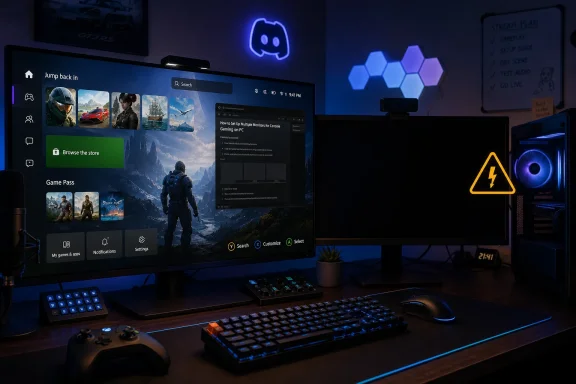
Microsoft’s Xbox Mode for Windows 11, now rolling out as a console-style full-screen gaming interface for supported PCs and handhelds, can blank secondary displays while it runs, leaving multi-monitor players without Discord, video, guides, stream controls, or other apps on additional screens.
That is not a small edge case in PC gaming culture. It is the collision between Microsoft’s console ambition and the reality of how Windows users actually play. Xbox Mode may be trying to make Windows feel less like Windows, but the cost is that it also makes a gaming PC behave less like a PC.
Xbox Mode is Microsoft’s latest attempt to make Windows 11 feel credible in the living room, on handhelds, and on gaming-first PCs. The idea is straightforward: replace the normal desktop-first experience with a controller-friendly Xbox interface, launch games full screen, and limit background activity to improve battery life or performance.
That pitch makes sense on a handheld. A seven- or eight-inch Windows device is not where the Start menu, taskbar, notification area, and floating windows shine. Anyone who has tried to dismiss a desktop dialog box with thumbsticks understands why Microsoft wants an Xbox-shaped layer over Windows.
But the feature becomes more complicated when it leaves the handheld and lands on a desktop tower with two or three monitors attached. Windows Central reports that Xbox Mode can leave secondary displays black while the primary display runs the Xbox interface. In other words, the mode does not merely prioritize the main gaming screen; it effectively treats the rest of the setup as irrelevant.
That behavior is defensible if Microsoft is designing for a couch, a TV, and a controller. It is much harder to defend if Xbox Mode is also supposed to be a serious answer for PC gamers, streamers, modders, Discord users, and anyone whose gaming routine depends on more than one pane of glass.
The company says Xbox Mode can limit background processes when configured to start in that environment, which could help performance, battery life, or system responsiveness. On handhelds, that matters. Windows was built as a general-purpose operating system, and general-purpose operating systems have a way of spending power and attention on things the player did not ask for.
The problem is that the real-world value of those optimizations is still being debated. Reports so far suggest that performance gains are not dramatic enough to make the trade-off obvious on every machine. If a user gets a cleaner launcher and a slightly leaner background process profile, that is useful; if the same user loses a second monitor, it becomes a much harder sell.
PC gaming is full of compromises, but players usually expect to choose them. Lower shadow quality for higher frame rates is a choice. Closing Chrome before launching a demanding game is a choice. Giving up an entire monitor because the operating system has entered a console persona feels less like tuning and more like surrendering control.
This is where Xbox Mode risks looking like a feature designed around a product category rather than a user base. Handheld gaming PCs need simplification. Desktop gaming PCs often need orchestration. Microsoft is trying to solve the former problem with a mode that may disrupt the latter workflow.
For many Windows gamers, the main display is where the game happens, while the second display is where the rest of the session lives. Discord sits there. A browser guide sits there. OBS sits there. Hardware monitoring tools sit there. YouTube, Twitch, Spotify, walkthroughs, patch notes, maps, wikis, and chat windows all sit there.
That arrangement is not incidental to PC gaming; it is one of the reasons people choose PC gaming. A console is meant to be focused. A PC is meant to be porous. The player is not just playing the game, but also talking, watching, tweaking, streaming, browsing, and occasionally troubleshooting in real time.
Blanking extra monitors does not merely hide distractions. It removes capability. A streamer loses glanceable controls. A raid leader loses Discord visibility. A player following a build guide loses the guide. A user monitoring thermals on a new GPU loses the gauges that tell them whether the system is behaving.
Microsoft may consider those scenarios outside the clean console experience it wants Xbox Mode to provide. But if Xbox Mode is available on desktops and laptops, those scenarios are not outside the product. They are the product’s audience.
Steam Big Picture also tries to make a PC usable from a couch. It also favors a controller-first interface. It also makes a sprawling game library feel more like a console dashboard. But it does not generally require the rest of the PC to pretend the other monitors do not exist.
That distinction matters because it shows this is not a law of nature. A console-style launcher does not have to mean a single-display lockdown. A full-screen interface can be immersive on one monitor while leaving other monitors available for normal desktop use.
Microsoft’s counterargument may be that Xbox Mode is not just a launcher. It is also a system state that changes app behavior, startup behavior, and windowing expectations. Microsoft’s own support material describes an environment where only one window is displayed at a time, apps run full screen where possible, some shortcuts are disabled, and desktop behaviors are intentionally constrained.
That explains the design, but it does not absolve it. If anything, it clarifies the strategic bet: Microsoft is not merely skinning Windows with an Xbox app. It is experimenting with a more appliance-like version of Windows gaming. The question is whether PC users want that appliance to take over the whole machine.
Tiny touch targets, desktop pop-ups, launchers fighting launchers, sleep behavior, controller focus, update prompts, and keyboard summons all chip away at the fantasy of a seamless portable PC console. Xbox Mode is a rational response to that mess. It gives Microsoft a way to hide the desktop until the user actually needs it.
On a handheld, sacrificing traditional multi-window behavior is often acceptable. There is usually one built-in screen. The user is likely holding the device with both hands. The priority is getting from power-on to game launch with as little Windows friction as possible.
A desktop setup is the inverse. The user has a keyboard and mouse nearby, multiple displays connected, more thermal headroom, more background apps, and more reason to keep Windows visible around the game. The “distraction-free” promise becomes less attractive when the so-called distractions are part of the player’s normal control surface.
Microsoft is trying to stretch one interface across handhelds, laptops, desktops, tablets, and living-room PCs. That may be efficient for branding, but it is risky for design. The same full-screen shell that saves a handheld from desktop awkwardness can make a desktop feel artificially hobbled.
For decades, Windows gaming won because it was open, flexible, messy, and endlessly configurable. It supported strange hardware, multiple storefronts, mods, overlays, capture tools, fan utilities, emulators, and workflows Microsoft did not centrally design. That chaos was the moat.
The console business runs on a different theory. Consoles win by reducing variables. One interface, one store-centered experience, one primary display, one controller-first flow, one clear path from the sofa to the game. The user gives up some flexibility in exchange for predictability.
Xbox Mode tries to graft the console theory onto Windows without fully abandoning the Windows theory. That is a difficult balance. If it remains just an app shell, it may not go far enough to improve handheld performance and usability. If it becomes too controlling, it risks alienating the very PC users Microsoft needs to persuade.
The blank secondary monitor is a small symptom of that larger tension. Microsoft wants Windows gaming to feel simpler, but PC gamers often experience simplicity as a loss of agency. The company wants Xbox to be the friendly front door to PC gaming, but many users already built their own front doors with Steam, Discord, Playnite, OBS, browser tabs, and hardware tools.
Xbox Mode could offer a “single-display console mode” for handhelds and TVs, where secondary monitors are blanked or ignored by default. It could also offer a “multi-display PC mode” where the Xbox interface owns the primary display while secondary displays continue to show selected desktop apps. That would preserve the console-like launcher without pretending every gaming PC is plugged into one television.
There are harder implementation questions underneath that idea. Focus management, controller navigation, overlays, HDR behavior, variable refresh rate, capture hooks, anti-cheat compatibility, and window placement all become more complicated when the desktop remains partially alive. But those are precisely the sorts of complications Windows exists to handle.
Microsoft could also give users more granular control over background-process optimization. Some players may want the reduced startup activity but not the display lockdown. Some may want Xbox Mode only at boot on handhelds. Others may want a quick launcher on a desktop without any system-wide behavioral changes.
The important distinction is between an interface and a regime. Users are more likely to accept Xbox Mode as an interface they can enter and exit freely. They will be more suspicious if it feels like a regime that takes away parts of their setup for their own good.
That does not make Xbox Mode a failure. It makes it unfinished as a PC feature. Microsoft is trying to solve a real Windows gaming problem, but the first test of any PC gaming feature is whether it respects the PC part.
Source: Mezha Xbox mode in Windows 11 turns off additional monitors
That is not a small edge case in PC gaming culture. It is the collision between Microsoft’s console ambition and the reality of how Windows users actually play. Xbox Mode may be trying to make Windows feel less like Windows, but the cost is that it also makes a gaming PC behave less like a PC.
 Microsoft’s Console Dream Runs Into the Second Monitor
Xbox Mode is Microsoft’s latest attempt to make Windows 11 feel credible in the living room, on handhelds, and on gaming-first PCs. The idea is straightforward: replace the normal desktop-first experience with a controller-friendly Xbox interface, launch games full screen, and limit background activity to improve battery life or performance.That pitch makes sense on a handheld. A seven- or eight-inch Windows device is not where the Start menu, taskbar, notification area, and floating windows shine. Anyone who has tried to dismiss a desktop dialog box with thumbsticks understands why Microsoft wants an Xbox-shaped layer over Windows.
But the feature becomes more complicated when it leaves the handheld and lands on a desktop tower with two or three monitors attached. Windows Central reports that Xbox Mode can leave secondary displays black while the primary display runs the Xbox interface. In other words, the mode does not merely prioritize the main gaming screen; it effectively treats the rest of the setup as irrelevant.
That behavior is defensible if Microsoft is designing for a couch, a TV, and a controller. It is much harder to defend if Xbox Mode is also supposed to be a serious answer for PC gamers, streamers, modders, Discord users, and anyone whose gaming routine depends on more than one pane of glass.
The Performance Pitch Is Weaker Than the Productivity Cost
Microsoft’s best argument for Xbox Mode is not the interface. It is the promise that Windows can get out of the way.The company says Xbox Mode can limit background processes when configured to start in that environment, which could help performance, battery life, or system responsiveness. On handhelds, that matters. Windows was built as a general-purpose operating system, and general-purpose operating systems have a way of spending power and attention on things the player did not ask for.
The problem is that the real-world value of those optimizations is still being debated. Reports so far suggest that performance gains are not dramatic enough to make the trade-off obvious on every machine. If a user gets a cleaner launcher and a slightly leaner background process profile, that is useful; if the same user loses a second monitor, it becomes a much harder sell.
PC gaming is full of compromises, but players usually expect to choose them. Lower shadow quality for higher frame rates is a choice. Closing Chrome before launching a demanding game is a choice. Giving up an entire monitor because the operating system has entered a console persona feels less like tuning and more like surrendering control.
This is where Xbox Mode risks looking like a feature designed around a product category rather than a user base. Handheld gaming PCs need simplification. Desktop gaming PCs often need orchestration. Microsoft is trying to solve the former problem with a mode that may disrupt the latter workflow.
The PC Gamer’s Second Screen Is Not a Luxury
The second monitor used to be a power-user indulgence. Now it is closer to furniture.For many Windows gamers, the main display is where the game happens, while the second display is where the rest of the session lives. Discord sits there. A browser guide sits there. OBS sits there. Hardware monitoring tools sit there. YouTube, Twitch, Spotify, walkthroughs, patch notes, maps, wikis, and chat windows all sit there.
That arrangement is not incidental to PC gaming; it is one of the reasons people choose PC gaming. A console is meant to be focused. A PC is meant to be porous. The player is not just playing the game, but also talking, watching, tweaking, streaming, browsing, and occasionally troubleshooting in real time.
Blanking extra monitors does not merely hide distractions. It removes capability. A streamer loses glanceable controls. A raid leader loses Discord visibility. A player following a build guide loses the guide. A user monitoring thermals on a new GPU loses the gauges that tell them whether the system is behaving.
Microsoft may consider those scenarios outside the clean console experience it wants Xbox Mode to provide. But if Xbox Mode is available on desktops and laptops, those scenarios are not outside the product. They are the product’s audience.
Steam’s Big Picture Shows Why This Feels Unforced
The obvious comparison is Steam Big Picture Mode, and that comparison is not kind to Microsoft.Steam Big Picture also tries to make a PC usable from a couch. It also favors a controller-first interface. It also makes a sprawling game library feel more like a console dashboard. But it does not generally require the rest of the PC to pretend the other monitors do not exist.
That distinction matters because it shows this is not a law of nature. A console-style launcher does not have to mean a single-display lockdown. A full-screen interface can be immersive on one monitor while leaving other monitors available for normal desktop use.
Microsoft’s counterargument may be that Xbox Mode is not just a launcher. It is also a system state that changes app behavior, startup behavior, and windowing expectations. Microsoft’s own support material describes an environment where only one window is displayed at a time, apps run full screen where possible, some shortcuts are disabled, and desktop behaviors are intentionally constrained.
That explains the design, but it does not absolve it. If anything, it clarifies the strategic bet: Microsoft is not merely skinning Windows with an Xbox app. It is experimenting with a more appliance-like version of Windows gaming. The question is whether PC users want that appliance to take over the whole machine.
The Handheld Problem Is Real, But It Is Not the Desktop Problem
Microsoft deserves some credit for acknowledging that Windows on handhelds needs work. The ROG Ally, Legion Go, MSI Claw, and similar devices have made one thing painfully clear: Windows can run the games, but it does not always feel built for the device.Tiny touch targets, desktop pop-ups, launchers fighting launchers, sleep behavior, controller focus, update prompts, and keyboard summons all chip away at the fantasy of a seamless portable PC console. Xbox Mode is a rational response to that mess. It gives Microsoft a way to hide the desktop until the user actually needs it.
On a handheld, sacrificing traditional multi-window behavior is often acceptable. There is usually one built-in screen. The user is likely holding the device with both hands. The priority is getting from power-on to game launch with as little Windows friction as possible.
A desktop setup is the inverse. The user has a keyboard and mouse nearby, multiple displays connected, more thermal headroom, more background apps, and more reason to keep Windows visible around the game. The “distraction-free” promise becomes less attractive when the so-called distractions are part of the player’s normal control surface.
Microsoft is trying to stretch one interface across handhelds, laptops, desktops, tablets, and living-room PCs. That may be efficient for branding, but it is risky for design. The same full-screen shell that saves a handheld from desktop awkwardness can make a desktop feel artificially hobbled.
Xbox Mode Reveals Microsoft’s Bigger Windows Gaming Tension
The deeper story is not that a new gaming mode has an annoying monitor quirk. The deeper story is that Microsoft still has not resolved what Windows is supposed to be when it competes with consoles.For decades, Windows gaming won because it was open, flexible, messy, and endlessly configurable. It supported strange hardware, multiple storefronts, mods, overlays, capture tools, fan utilities, emulators, and workflows Microsoft did not centrally design. That chaos was the moat.
The console business runs on a different theory. Consoles win by reducing variables. One interface, one store-centered experience, one primary display, one controller-first flow, one clear path from the sofa to the game. The user gives up some flexibility in exchange for predictability.
Xbox Mode tries to graft the console theory onto Windows without fully abandoning the Windows theory. That is a difficult balance. If it remains just an app shell, it may not go far enough to improve handheld performance and usability. If it becomes too controlling, it risks alienating the very PC users Microsoft needs to persuade.
The blank secondary monitor is a small symptom of that larger tension. Microsoft wants Windows gaming to feel simpler, but PC gamers often experience simplicity as a loss of agency. The company wants Xbox to be the friendly front door to PC gaming, but many users already built their own front doors with Steam, Discord, Playnite, OBS, browser tabs, and hardware tools.
A Better Xbox Mode Would Let Users Choose the Shape of the Room
The fix does not have to be complicated conceptually. Microsoft should treat display behavior as a policy choice, not a fixed identity.Xbox Mode could offer a “single-display console mode” for handhelds and TVs, where secondary monitors are blanked or ignored by default. It could also offer a “multi-display PC mode” where the Xbox interface owns the primary display while secondary displays continue to show selected desktop apps. That would preserve the console-like launcher without pretending every gaming PC is plugged into one television.
There are harder implementation questions underneath that idea. Focus management, controller navigation, overlays, HDR behavior, variable refresh rate, capture hooks, anti-cheat compatibility, and window placement all become more complicated when the desktop remains partially alive. But those are precisely the sorts of complications Windows exists to handle.
Microsoft could also give users more granular control over background-process optimization. Some players may want the reduced startup activity but not the display lockdown. Some may want Xbox Mode only at boot on handhelds. Others may want a quick launcher on a desktop without any system-wide behavioral changes.
The important distinction is between an interface and a regime. Users are more likely to accept Xbox Mode as an interface they can enter and exit freely. They will be more suspicious if it feels like a regime that takes away parts of their setup for their own good.
The Blacked-Out Monitor Is the Warning Light Microsoft Should Not Ignore
The practical advice for now is simple: multi-monitor users should test Xbox Mode before building a gaming routine around it. If your second screen is essential, this may not be the mode you want enabled during normal desktop play. The feature is better matched to handhelds, TVs, and couch setups than to battlestations built around constant multitasking.That does not make Xbox Mode a failure. It makes it unfinished as a PC feature. Microsoft is trying to solve a real Windows gaming problem, but the first test of any PC gaming feature is whether it respects the PC part.
- Xbox Mode gives Windows 11 a console-style, controller-first interface intended to reduce desktop friction and streamline game launching.
- Microsoft’s performance argument depends partly on limiting background activity, but early impressions do not make the gains look universally compelling.
- Secondary displays going black is especially disruptive for users who rely on Discord, browsers, video, streaming tools, or hardware monitors while gaming.
- The behavior is understandable for handhelds and TV setups, but it fits poorly with the multi-monitor desktop culture that defines much of PC gaming.
- Microsoft should separate Xbox Mode’s launcher, performance optimizations, startup behavior, and monitor policy so users can choose the trade-offs they actually want.
Source: Mezha Xbox mode in Windows 11 turns off additional monitors
