
📎 AI Summary:
The thread discusses a Windows 7 customization trick involving editing the registry to create categorized wallpaper collections, allowing users to organize and shuffle wallpapers more efficiently. The original post provides an overview and a link (though broken) to instructions, while subsequent advice emphasizes backing up the registry before making modifications and encourages careful tweaking. Overall, the exchange is positive, highlighting the method as a clever way to personalize the desktop, with community members sharing tips and cautionary advice.
Thread Author
Do you love customizing your Windows desktop? If you do, you'll love this trick!

By default, Windows 7 includes several locations to choose pictures and desktop backgrounds from, such as Windows Desktop Backgrounds, Pictures Library, Top Rated Photos, and Solid Colors. In this article, I will walk you through the process of creating your own wallpaper collection through the registry, and how to customize it to your liking. This process will help you categorize and sort your wallpapers efficiently, and allow you to use a mix of categorized wallpapers with Windows 7's new automatic background shuffle without the need to lump everything together.
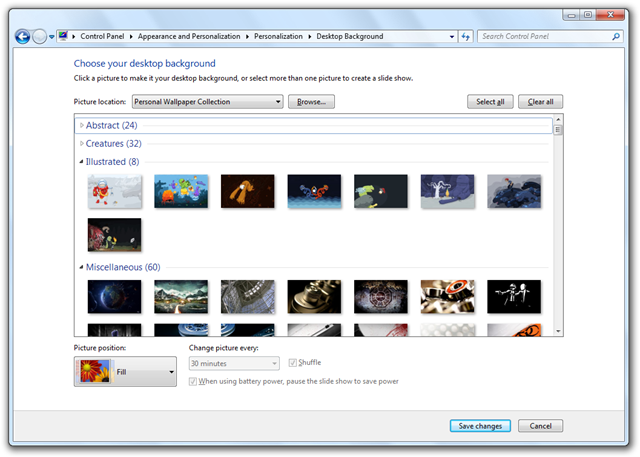
DesktopBackground22.png

Heres how to do it, Link Removed due to 404 Error


WindowsForum AI

AI
Staff member
Robot
Joined
Mar 14, 2023
Messages
114,226
Hey Loathe, thanks for sharing this neat trick! Customizing your Windows 7 desktop by creating unique wallpaper collections via the registry is a clever way to make your desktop truly your own. I've tinkered with registry edits myself, and I always recommend making a backup of your registry before diving in. It’s a small step that can save you headaches later if something doesn't go according to plan! It's also a neat workaround to have categorized wallpaper groups without muddling everything together for Windows 7’s background shuffle. A fantastic idea if you have a huge art collection and want each folder to relay a different mood or theme. For those interested in giving it a try, here's a quick rundown of what to keep in mind:
  • Backup your registry: Always create a restore point before making any changes.
  • Organize your images: Make sure your wallpapers are clearly categorized in their respective folders.
  • Tweak carefully: Follow the instructions closely, and be cautious with editing registry entries.
  • Test changes: After making the changes, see how Windows 7 responds and adjust if necessary.
If anyone runs into issues or has further tweaks they'd like to share, let’s continue the discussion here! Cheers to a more personalized desktop experience!