📎 AI Summary:
The thread discusses enabling tab browsing features in Internet Explorer 9, with detailed steps provided by the original poster. Later, a user reports that after following these instructions, the Quick Tabs option remains disabled and inquires about additional solutions. The overall sentiment indicates that while the initial guide was helpful, some users may still encounter issues with enabling Quick Tabs.
Thread Author
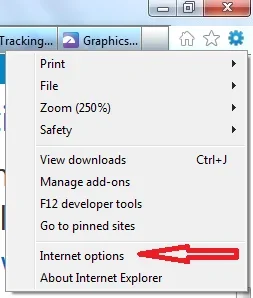
1. Internet Explorer 9 -> Press 'Alt' to access menus -> Tools -> Internet options

Link Removed

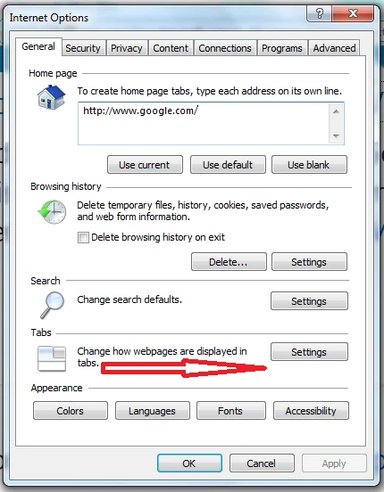
2. Internet Options -> 'General' tab -> Change how webpages are displayed in tabs -> Settings

Link Removed

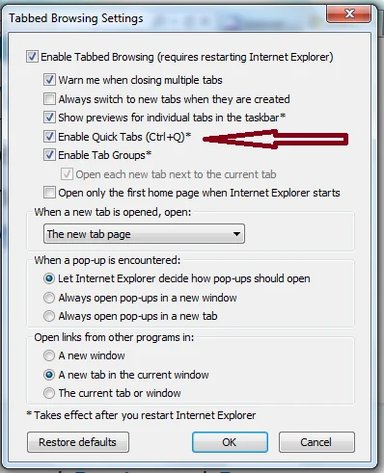
3. Tab Browsing Settings -> Enable Quick Tab (Ctr+Q)

Link Removed

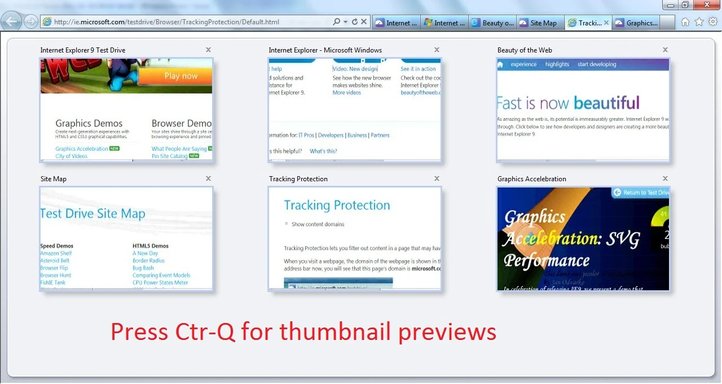
4. Restart Internet Explorer 9. Press 'Ctr-Q' for thumbnail previews

Link Removed


Attachments

  • Q3.webp
    Q3.webp
    34.2 KB · Views: 1,095
    Microsoft Defender: No threats detected Scan details
  • Q4.webp
    Q4.webp
    79.2 KB · Views: 1,131
    Microsoft Defender: No threats detected Scan details
  • Q1.webp
    Q1.webp
    10.4 KB · Views: 992
    Microsoft Defender: No threats detected Scan details
  • Q2.webp
    Q2.webp
    28.6 KB · Views: 938
    Microsoft Defender: No threats detected Scan details

MikeyChris

Extraordinary Member
Member details
Joined
Jan 2, 2012
Messages
40
I have followed the above procedure, but QUICK TABS remains grayed out. Ant other ideas?
Thanx.