

Link Removed
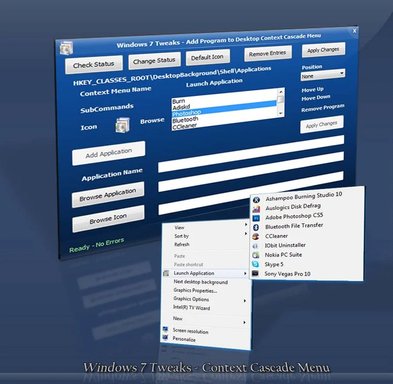
This Application Helps you to Add Programs Shortcuts to Windows 7 Desktop Context Cascade Menu Easily.
You need to Check the Status first, if Applications key is not available it creates the key automatically. Then Create the Application Shortcuts to Windows 7 Desktop Cascade Context Menu.
Browse Windows Application Execution File and Enter a Name and Simply Press Apply Changes. Its thats Simple.
For More information Visit: Manual Windows Solutions and Informations
Link Removed - Invalid URL
Updates:
*Fixed x64 Program Support.
*Remove Entries for x64 and x86
*Fixed Some Bugs
*Fixed 64bit Bugs
*Fixed Remove Entries Bugs
*Fixed Start Up Bugs
NB: - Inspired by AskVG.com
Attachments
-
Microsoft Defender: No threats detected Scan detailsFavSofts1.2b.zip292.4 KB · Views: 416
-
 Microsoft Defender: No threats detected Scan detailswindows_7_desktop_context_menu_by_rmgrms-d3c9wza.webp77.4 KB · Views: 1,082
Last edited: