
📎 AI Summary:
The thread discusses ongoing issues with Windows 7 users encountering the Bing Desktop app repeatedly appearing in Windows Updates, despite attempts to hide it. The original poster seeks solutions, but others share similar frustrations, with some giving up on finding a fix and simply hiding or removing it manually. Overall, the sentiment reflects annoyance and resignation towards Microsoft's persistent reappearance of Bing Desktop, with no definitive resolution provided.

davidhk129

Essential Member
Joined
May 19, 2012
Messages
1,315
Thread Author #1
Win 7 Home Premium 64-bit SP1, IE10
Windows Update is set on Manual.

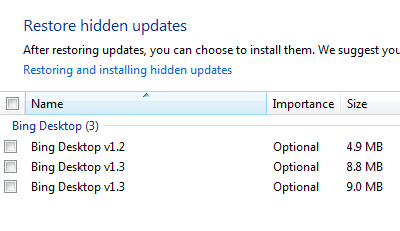
I hid the Bing Desktop v1.3 last time it appeared.
Today, it pops up in Windows Updates again.
I googled and apparently a lot of people are having the same issue.
I cannot find a resolution from the net.
Anyone has an idea?

bing-png.5719
 

Solution
Reminds me of the basic Linux comment, Who owns your computer?

I only see the way to manually reject it. And if it should get there, remove it from Tools/Manage Add-ons. I don't use IE, I use Google Chrome... but it has had some problems lately. Seems like the price of and competition of our souls has gone higher.

Jimbo22

Essential Member
Joined
Aug 27, 2008
Messages
5,036
I quit looking for a fix for it....I just curse at it and keep hiding the damn thing...
 

Pauli

Fantastic Member
Premium Supporter
Joined
Mar 1, 2012
Messages
2,484
Reminds me of the basic Linux comment, Who owns your computer?

I only see the way to manually reject it. And if it should get there, remove it from Tools/Manage Add-ons. I don't use IE, I use Google Chrome... but it has had some problems lately. Seems like the price of and competition of our souls has gone higher.
 

Solution

Medico

Essential Member
Joined
Sep 20, 2011
Messages
1,144
I also just hide it each time. MS really wants us to use Bing Desktop.