

📎 AI Summary:
The thread discusses an unusual startup message appearing on a Windows laptop, with the original poster seeking help to identify and eliminate it. Several users suggest checking system logs, running cleanup tools like CCleaner, and reviewing startup programs to troubleshoot the issue. The overall sentiment indicates a collaborative effort to diagnose the problem, primarily focusing on software cleanup and startup management.
The thread discusses an unusual startup message appearing on a Windows laptop, with the original poster seeking help to identify and eliminate it. Several users suggest checking system logs, running cleanup tools like CCleaner, and reviewing startup programs to troubleshoot the issue. The overall sentiment indicates a collaborative effort to diagnose the problem, primarily focusing on software cleanup and startup management.
Solution

I would urge you to run Malwarebytes, AdwCleaner, and Junkware Removal Tool. Remove anything they find. Your system most likely has malware and unwanted programs on it.

helpifIcan
Fantastic Member
Member details
- Joined
- Jun 20, 2009
- Messages
- 932
Probably some program either running in the background or a program in the background that failed to complete.
If you have not installed anything recently hard to pin down. If something was installed recently or updated remove or try a restore to a date before this started.
Obviously if everything is running fine more a PITA than a problem
If you have not installed anything recently hard to pin down. If something was installed recently or updated remove or try a restore to a date before this started.
Obviously if everything is running fine more a PITA than a problem

Summers
New Member
Member details
- Joined
- Jun 20, 2015
- Messages
- 5
Thanks. I've stalled quite a lot recently as it's a new laptop. I've also done a lot of uninstalling too (after discovering loads of software advertised as FREE when they're not!). I can't pinpoint the date this started so restoring back to before then won't be possible. I guess if there's no solution, then, (hard to believe) I will have to put up with it! Cheers.
helpifIcan
Fantastic Member
Member details
- Joined
- Jun 20, 2009
- Messages
- 932
You could check and see if there is anything in the error logs that helps you pin done the problem.
helpifIcan
Fantastic Member
Member details
- Joined
- Jun 20, 2009
- Messages
- 932
If you do not know how to do this I'm afraid the information there would not be helpful to you.

Member details
- Joined
- May 25, 2009
- Messages
- 6,684
Hi
You could try running CCleaner and see it some of the software you uninstalled left something behind.
My guess is that's what is happening.
Something that your computer thinks should start isn't there anymore so the window pops up.
Run both the normal and the registry scans.
If you don't have CCleaner (and you should) you can get it here...
http://filehippo.com/download_ccleaner/59127/
CCleaner also has an interface that lets you decide what starts at boot.
You can disable things easily and re-enable them quickly as well.
If you can find what is trying to start you can just stop it from trying to load.
You can avoid issues like this in the future by running another free program called Revo Uninstaller.
It looks for all the leftover stuff when it does the uninstall.
Mike
You could try running CCleaner and see it some of the software you uninstalled left something behind.
My guess is that's what is happening.
Something that your computer thinks should start isn't there anymore so the window pops up.
Run both the normal and the registry scans.
If you don't have CCleaner (and you should) you can get it here...
http://filehippo.com/download_ccleaner/59127/
CCleaner also has an interface that lets you decide what starts at boot.
You can disable things easily and re-enable them quickly as well.
If you can find what is trying to start you can just stop it from trying to load.
You can avoid issues like this in the future by running another free program called Revo Uninstaller.
It looks for all the leftover stuff when it does the uninstall.
Mike

Member details
- Joined
- May 22, 2012
- Messages
- 4,599
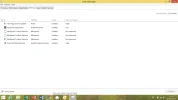
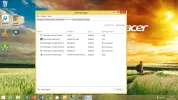
Another option is to post your startup list as a screenshot... its a safe bet the cause is one of them as it always happens at boot time.
press [windows key] + [x] then press [t] and select "start up" tab.

press [windows key] + [x] then press [t] and select "start up" tab.
Last edited by a moderator:

Member details
- Joined
- Aug 3, 2010
- Messages
- 1,284
I would urge you to run Malwarebytes, AdwCleaner, and Junkware Removal Tool. Remove anything they find. Your system most likely has malware and unwanted programs on it.

OTT
Active Member
Member details
- Joined
- Apr 2, 2015
- Messages
- 94
"Mindspark Toolbar Platform" + "gb-installer-core" + "Pokki" are all Adware/PUP
First make a restore point !
Try to locate and un-install anything related to the above "programs" via Control Panel-Programs (and Features).
After that do a full scan with Malwarebytes Anti-Malware and let it remove/quarantine everything it finds.
Report back if you have any problems and if these boxes/windows still appear.
OTT
First make a restore point !
Try to locate and un-install anything related to the above "programs" via Control Panel-Programs (and Features).
After that do a full scan with Malwarebytes Anti-Malware and let it remove/quarantine everything it finds.
Report back if you have any problems and if these boxes/windows still appear.
OTT
Member details
- Joined
- May 25, 2009
- Messages
- 6,684
Hi
Yes, run Malwarebytes.
If you still have issues after that we can go from there.
Mike
Yes, run Malwarebytes.
If you still have issues after that we can go from there.
Mike
Member details
- Joined
- May 22, 2012
- Messages
- 4,599
I'd disable both red and green but the red is 1st priority.

FWIW Agreed.
Not sure Malwarebytes would be enough, I will still urge ADW and JRT as well.
FWIW Agreed.
Last edited by a moderator:


