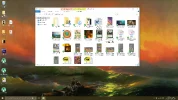
I turned on my PC this morning and it seems like my computer language turned into some weird boxes and other hieroglyphics. This only affects my computer and not any other applications. I took a screenshot of my PC to give you an example of what it looks like, unfortunately, I can't post it in here because of the rules for first time posters.
Another thing, which may or may not have anything to do with the issue. I did use this tutorial I found to remove the quick access category from my file explorer window. I'll post a link to the tutorial in another comment. I'm not sure how it would affect it, but I thought I might mention it. Yesterday it was fine, but when I booted it up today, everything was wonky looking.
Help?
EDIT: The tutorial is from Beta News and it is called, "Remove 'Quick Access' from File Explorer in Windows 10"
Another thing, which may or may not have anything to do with the issue. I did use this tutorial I found to remove the quick access category from my file explorer window. I'll post a link to the tutorial in another comment. I'm not sure how it would affect it, but I thought I might mention it. Yesterday it was fine, but when I booted it up today, everything was wonky looking.
Help?
EDIT: The tutorial is from Beta News and it is called, "Remove 'Quick Access' from File Explorer in Windows 10"
Last edited: