

📎 AI Summary:
The thread discusses a user experiencing high HDD and CPU usage on their Windows PC, with suggestions to check running processes via Task Manager. The responder identifies ekrn.exe, associated with Eset Smart Security, as a potential culprit and notes possible conflicts with Malwarebytes and Steam. The overall advice encourages troubleshooting by closing specific applications to identify the source of the resource usage.
The thread discusses a user experiencing high HDD and CPU usage on their Windows PC, with suggestions to check running processes via Task Manager. The responder identifies ekrn.exe, associated with Eset Smart Security, as a potential culprit and notes possible conflicts with Malwarebytes and Steam. The overall advice encourages troubleshooting by closing specific applications to identify the source of the resource usage.
Solution

ekrn.exe may be the problem. http://www.processlibrary.com/en/directory/files/ekrn/400651/
Even if doesn't use that much power, it may react with Malwarebytes, which seemingly takes a lot, mbamservice.exe. Both are connected to Steam --- hard to tell what the root of the problem is.
Seems possible that Eset Smart Security + Malwarebytes + Steam collide. Close one down, to check... close another down, to check...
Hopefully you'll find the path. And do reboot! 😉
Even if doesn't use that much power, it may react with Malwarebytes, which seemingly takes a lot, mbamservice.exe. Both are connected to Steam --- hard to tell what the root of the problem is.
Seems possible that Eset Smart Security + Malwarebytes + Steam collide. Close one down, to check... close another down, to check...
Hopefully you'll find the path. And do reboot! 😉

Member details
- Joined
- Mar 1, 2012
- Messages
- 2,484
You can check what you have running, in Task Manager, press Ctrl+Alt+Del, choose Task Manager. Most probably you have something running, of which you may not know. The main source could be Applications.
Not uncommon, you may have installed something that came with an add-on. They are the common nuisance today. Make some screenshots, post them here.
Best wishes.
Not uncommon, you may have installed something that came with an add-on. They are the common nuisance today. Make some screenshots, post them here.
Best wishes.

Sokaz
New Member
Member details
- Joined
- Sep 10, 2014
- Messages
- 2
You can check what you have running, in Task Manager, press Ctrl+Alt+Del, choose Task Manager. Most probably you have something running, of which you may not know. The main source could be Applications.
Not uncommon, you may have installed something that came with an add-on. They are the common nuisance today. Make some screenshots, post them here.
Best wishes.
Whatever this is, It's also using a quite a bit of my cpu.
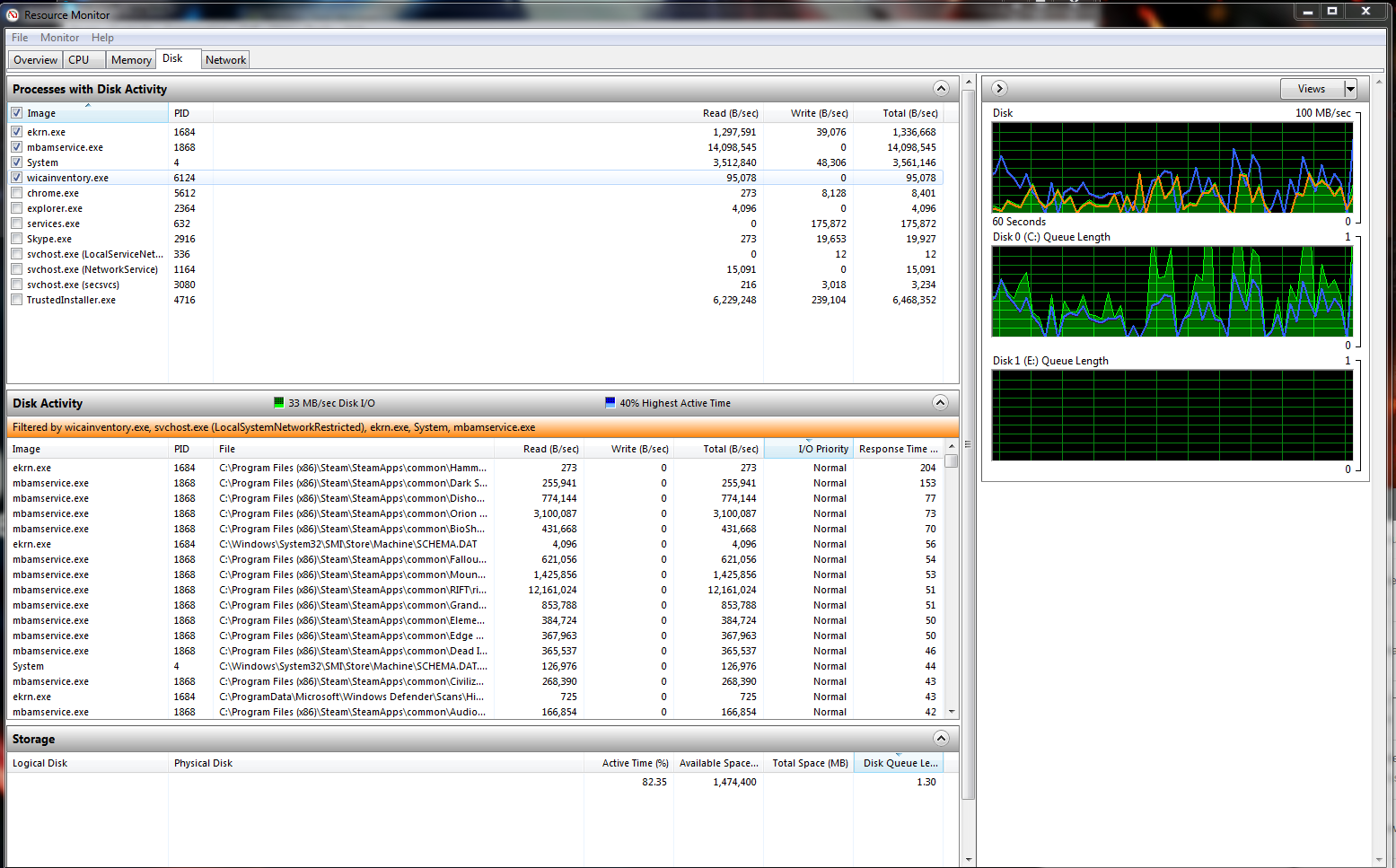
Here is a image of system monitor.
Member details
- Joined
- Mar 1, 2012
- Messages
- 2,484
ekrn.exe may be the problem. http://www.processlibrary.com/en/directory/files/ekrn/400651/
Even if doesn't use that much power, it may react with Malwarebytes, which seemingly takes a lot, mbamservice.exe. Both are connected to Steam --- hard to tell what the root of the problem is.
Seems possible that Eset Smart Security + Malwarebytes + Steam collide. Close one down, to check... close another down, to check...
Hopefully you'll find the path. And do reboot! 😉
Even if doesn't use that much power, it may react with Malwarebytes, which seemingly takes a lot, mbamservice.exe. Both are connected to Steam --- hard to tell what the root of the problem is.
Seems possible that Eset Smart Security + Malwarebytes + Steam collide. Close one down, to check... close another down, to check...
Hopefully you'll find the path. And do reboot! 😉
