

I have Windows 10 and a VPN which uses OpenVPN, and that is installed. I want to check which version of OpenVPN is installed as I would ungrade to version 2.4 if the current version is older. How can I check?
📎 AI Summary:
The thread discusses how to determine the installed version of OpenVPN on Windows, with initial advice suggesting checking the "Help - About" menu. However, later contributors clarify that OpenVPN often doesn't have a GUI, so users should check the version via the Control Panel or examine the executable's properties. Additional guidance is provided for those using VPN services that utilize OpenVPN binaries, including how to locate, verify, and manually update the OpenVPN version by replacing the binary files.
The thread discusses how to determine the installed version of OpenVPN on Windows, with initial advice suggesting checking the "Help - About" menu. However, later contributors clarify that OpenVPN often doesn't have a GUI, so users should check the version via the Control Panel or examine the executable's properties. Additional guidance is provided for those using VPN services that utilize OpenVPN binaries, including how to locate, verify, and manually update the OpenVPN version by replacing the binary files.
Solution

Open VPN doesn't have a GUI so you can't just look in "Help -About" as you normally would. There's the "Open VPN GUI" but that's separate software app on top of OpenVPN.
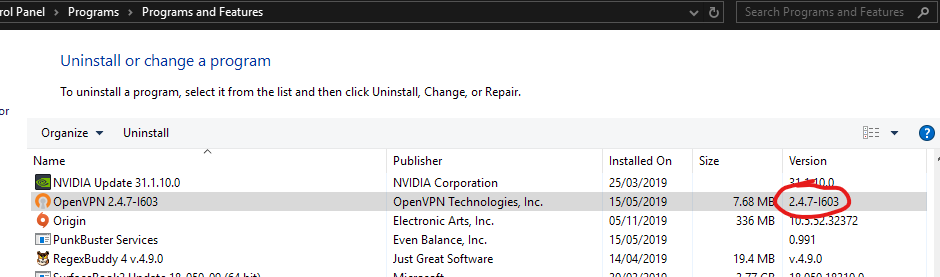
To get the currently installed version go to Control Panel - Programs, Uninstall and check the version number in the column. Here's a screenshot
To get the currently installed version go to Control Panel - Programs, Uninstall and check the version number in the column. Here's a screenshot

Member details
- Joined
- Jan 28, 2013
- Messages
- 2,423
Try opening your program and find a File Menu; or a Help Menu. Click on either and look for an ABOUT item on the subsequent Task Menu dropdown. Most programs in Windows, or Linux have this. It's been a convention in all windows programs for 25 years or so.
<<<BIGBEARJEDI>>>
<<<BIGBEARJEDI>>>

alexj
New Member
Member details
- Joined
- Nov 6, 2019
- Messages
- 1
Open VPN doesn't have a GUI so you can't just look in "Help -About" as you normally would. There's the "Open VPN GUI" but that's separate software app on top of OpenVPN.
To get the currently installed version go to Control Panel - Programs, Uninstall and check the version number in the column. Here's a screenshot
To get the currently installed version go to Control Panel - Programs, Uninstall and check the version number in the column. Here's a screenshot

Member details
- Joined
- Aug 3, 2010
- Messages
- 1,284
I think the OP means he uses a VPN service such as NordVPN, PureVPN, etc that uses OpenVPN as it's connection software.
In this case it depends on the program but for PureVPN for instance you can find the OpenVPN binaries here:
C:\Program Files (x86)\PureVPN\ovpn
However if you manually update the binaries the program may lose its ability to work with OpenVPN, so I recommend backing up the files before you replace them to do your manual update. If your having trouble locating where it's placed OpenVPN try doing a search for openvpn.exe or openssl.exe and that may lead you to the right path.
In this case it depends on the program but for PureVPN for instance you can find the OpenVPN binaries here:
C:\Program Files (x86)\PureVPN\ovpn
However if you manually update the binaries the program may lose its ability to work with OpenVPN, so I recommend backing up the files before you replace them to do your manual update. If your having trouble locating where it's placed OpenVPN try doing a search for openvpn.exe or openssl.exe and that may lead you to the right path.
Member details
- Joined
- Aug 3, 2010
- Messages
- 1,284
Also to manually update the binaries you will have to find the latest OpenVPN binaries (2.4.8 as of time of this post), then copy them manually to overwrite your VPN software's version. Hopefully that is pretty straightforward. You can right click, properties your openvpn.exe file to see which version it is.

