📎 AI Summary:
The forum thread centers on how to capture screenshots of the Windows 8 start screen and metro interface, which standard tools like Snip, Fraps, or Print Screen struggle to do effectively. Participants share their methods, including resizing the screen and stitching multiple images together using Photoshop or Paint, and discuss features like auto-saved screenshots in Windows 8. Overall, users exchange tips, with some success stories, and conclude that combining different tools and techniques is necessary to get comprehensive screenshots of the start menu and full-screen content.

MikeHawthorne

Essential Member
Microsoft Community Contributor
Member details
Joined
May 25, 2009
Messages
6,684
Thread Author #1
Hi

I know there must be a way but I can't do it with Snip, Fraps, or Print Screen.
None of them will work on the start screen.

I wanted to show that I haven't completely ignored my start menu. LOL

I think I asked this before and got an answer but I looked through my old posts and can't find it.

How do you do it?

Mike
 

Solution
I would imagine their are several options, Mike. But, the problem is that the full screen needs to be scrolled sideways. There may be a screen copying program that can do this.
What I did was shrunk the Metro with the minus icon and then made a straightforward Prntscrn. This truncates any text but gives a good representation of your particular set up.
My second choice was to take two picture. I actually did mine with a time delay on a program called "Snagit", and stitch then together with a graphics program - Paint is good enough.
But after a little hit and miss, I took a Prntscrn of each end (My Metro screen could be taken in two swoops) I then pasted both into "Paint" and stitched them. The I made a further "Snip" of the whole thing...

davehc

Essential Member
Premium Supporter
Member details
Joined
May 1, 2008
Messages
5,546
I would imagine their are several options, Mike. But, the problem is that the full screen needs to be scrolled sideways. There may be a screen copying program that can do this.
What I did was shrunk the Metro with the minus icon and then made a straightforward Prntscrn. This truncates any text but gives a good representation of your particular set up.
My second choice was to take two picture. I actually did mine with a time delay on a program called "Snagit", and stitch then together with a graphics program - Paint is good enough.
But after a little hit and miss, I took a Prntscrn of each end (My Metro screen could be taken in two swoops) I then pasted both into "Paint" and stitched them. The I made a further "Snip" of the whole thing. This is my amateur result:

Link Removed
 

Last edited by a moderator:
Solution

Trouble

Noob Whisperer
Member details
Joined
Nov 30, 2009
Messages
13,723
Last edited by a moderator:

kemical

Essential Member
Member details
Joined
Aug 28, 2007
Messages
36,163
I use that feature a lot especially in answering posts that need screenshots of this and that etc.. Not tried it whilst playing any games yet though (printscreen would never work like that so not sure this feature will)
 

kemical

Essential Member
Member details
Joined
Aug 28, 2007
Messages
36,163
I just tested gaming wise using a Windows 8 Backgammon app and Crysis 2. I got a screenshot of the Backgammon game but not of Crysis 2... Oh well..
 

davehc

Essential Member
Premium Supporter
Member details
Joined
May 1, 2008
Messages
5,546
I didn't get any further than when I tried it in the previous thread. It only captured the portion of the screen which was actually on the monitor. I see from that thread, though, that Mike was successful!! wierd.
 

MikeHawthorne

Essential Member
Microsoft Community Contributor
Member details
Joined
May 25, 2009
Messages
6,684
Thread Author #7
Hi

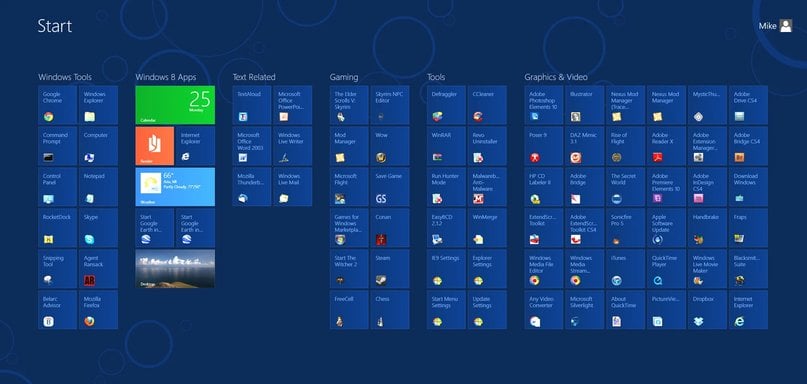
Well I finally found that it was making a screen shot when I hit the print screen button.
I just wasn't looking in the correct place for them.

I put the pieces together in Photoshop.

Link Removed

Mike
 

MikeHawthorne

Essential Member
Microsoft Community Contributor
Member details
Joined
May 25, 2009
Messages
6,684
Thread Author #8
Hi

I put the pieces together in Photoshop!

I don't think that Print Screen will work in any 3D games.
I use Fraps for that, but it wouldn't take an image of the Start Page.

For everything else except games I use the Snipping Tool.
But if you click on it in the Start Page the it drops out to the Desktop.

Mike
 

Last edited by a moderator:

davehc

Essential Member
Premium Supporter
Member details
Joined
May 1, 2008
Messages
5,546
Nice stitch job, Mike. Better than mine. I bow to you!