

📎 AI Summary:
The thread discusses changing the color of unread emails in Outlook 2016. The original poster wants to switch the unread email color from turquoise to black and clarifies they are referring to the bold, unread message appearance. A contributor responds with a step-by-step method to modify the font style for unread messages folder-by-folder using the conditional formatting settings. The overall tone is helpful and solution-oriented.
The thread discusses changing the color of unread emails in Outlook 2016. The original poster wants to switch the unread email color from turquoise to black and clarifies they are referring to the bold, unread message appearance. A contributor responds with a step-by-step method to modify the font style for unread messages folder-by-folder using the conditional formatting settings. The overall tone is helpful and solution-oriented.
Solution

You'll have to change it per folder.
- For example click Inbox
- Click View
- View Settings
- Conditional Formatting
- Edit the 'Unread Messages' formatting rule font

Curious
Excellent Member
Member details
- Joined
- Mar 2, 2010
- Messages
- 150
Hello Kemical,
Thank you for your answer.
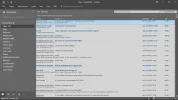
But what i really wants is to change the color that new mail appear (turquoise Bold) when unread.
Because after reading it appears as black regular as you can see.
I send you a screenshot.
Thank and best regards
José Paiva
Thank you for your answer.
But what i really wants is to change the color that new mail appear (turquoise Bold) when unread.
Because after reading it appears as black regular as you can see.
I send you a screenshot.
Thank and best regards
José Paiva
Attachments
-
 Microsoft Defender: No threats detected Scan detailsScreenshot (25).webp93 KB · Views: 290

