RobertWiltshire

New Member
Joined
Sep 13, 2010
Messages
18
I am sure you have heard this before but how do I get windows to
open maximised?

IE opens normally from the desktop as do installed programmes.

However shortcuts to web pages open minimised

Driving me nuts! :confused:
 

Solution
Try this way, works for me:

1. Open IE, search something with google.
2. Open a link in New Window. Do not maximize it, but instead resize this new window to fill the screen, dragging by its borders.
3. Switch to the first IE window and close it through File>>Close.
4. Close the second resized window, File>>Close.
5. Click an IE shortcut now.

reghakr

Essential Member
Joined
Jan 26, 2009
Messages
14,186
Hello,

Drag the left side, right side, top, and bottom with the mouse, then choose Close.

The next time you open it,it should start maximized.

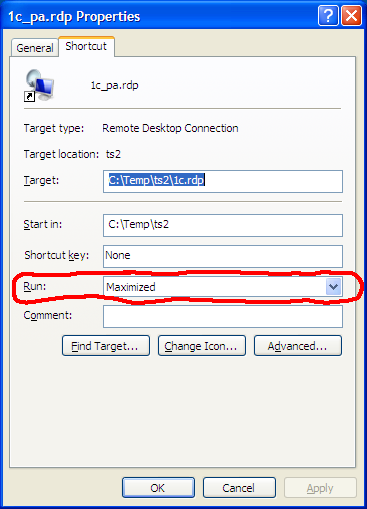
If this doesn't work, right-click on the shortcut, choose properties and under the Run section, choose Maximized.
 

cybercore

New Member
Joined
Jul 7, 2009
Messages
15,641
Create a shortcut, then its properties>>shortcut>>Run>>Maximized.

Like this:

ts2_12.png
 

RobertWiltshire

New Member
Joined
Sep 13, 2010
Messages
18
Drag the left side, right side, top, and bottom with the mouse, then choose Close.

The next time you open it,it should start maximized.

Thanks for replying that used to work with XP but doesn't want to work with 7
 

cybercore

New Member
Joined
Jul 7, 2009
Messages
15,641
Try this way, works for me:

1. Open IE, search something with google.
2. Open a link in New Window. Do not maximize it, but instead resize this new window to fill the screen, dragging by its borders.
3. Switch to the first IE window and close it through File>>Close.
4. Close the second resized window, File>>Close.
5. Click an IE shortcut now.
 

Solution

RobertWiltshire

New Member
Joined
Sep 13, 2010
Messages
18
Thanks for the replies, none work.

reghakr,

IE opens maximised from the desktop as does everything I click on, links, favourites etc.

If I click a web page icon on the desktop that opens with IE it opens just filling about 3 quarters of the screen from the top down.

Google Chrome worked fine but I had to dump that because it was changing all of my desktop icons!!
 

reghakr

Essential Member
Joined
Jan 26, 2009
Messages
14,186
This might sound ridiculous, but the same thing happened to me.

Just keep dragging the bottom border down until it's fullscreen until IE finally "gets" it.

Other than that, you could try changing resolutions (back & forth) to get it to "stick"
 

cybercore

New Member
Joined
Jul 7, 2009
Messages
15,641
As reghackr shows, it is important to resize IE so it appears the size of a maximized window but is in fact only resized - not maximized.
 

RobertWiltshire

New Member
Joined
Sep 13, 2010
Messages
18
No! nothing sounds ridiculous where Windows is concerned.

Will just have to persist.

Thanks for the replies