

so today I discovered something majorly wrong with my win10 PC. I tried something simple like accessing Task Manager from the task bar only to receive the following message - "
turns out I cant access anyting but the folders and the internet....any administrative function, device manager, system restore, system reset, trying to run a download froma browser, the list goes on and on..... I get an error message after a post-click delay of a minute or two that so and so path doesn't exist.
How can this be resolved, if at all?
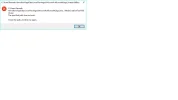
Screenshot below is trying to run Media Creation Tool
turns out I cant access anyting but the folders and the internet....any administrative function, device manager, system restore, system reset, trying to run a download froma browser, the list goes on and on..... I get an error message after a post-click delay of a minute or two that so and so path doesn't exist.
How can this be resolved, if at all?
Screenshot below is trying to run Media Creation Tool
Attachments
-
 Microsoft Defender: No threats detected Scan detailsUntitled.webp15.8 KB · Views: 456

