
Chris Boyd

New Member
Joined
Mar 7, 2012
Messages
2
i tried burning an ISO file, and im using my Windows 7 Toshiba L655D laptop, and it wont burn.

i get this error code
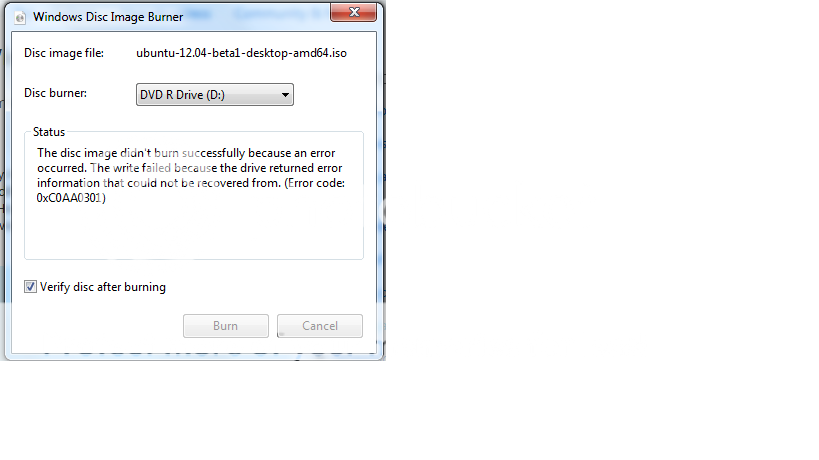
error.png


so i dont know whats going on, i dont know if im missing a driver or what, so if someone could please help me.
 

Solution
The error you had, there are possibilities to deal w/ it.

1. Is that drivers/firmware need updating from the optical drive manufacture's site
2. Using different media (different type of blank DVD) solves it
and lastly
3. A hardware problem w/ the ROM.

I was able to find a quite a bit referring to said error.

I have never had any problem using the native image burn of Windows7.

Drew

Elmer

Extraordinary Member
Joined
Mar 5, 2010
Messages
3,862
Hi Chris and Welcome to The Forum.

I think you'd be far better off using the free ImgBurn. Far more easier to use and if you make a "mistake" it corrects you in quite a humorous way.

Did I mention that it's free?
 

Joe S

Excellent Member
Joined
Jan 12, 2009
Messages
3,781
I second the ImgBurn and set the write speed to 4X. Burning faster frequently causes problems
Joe
 

Saltgrass

Excellent Member
Microsoft Community Contributor
Joined
Oct 16, 2009
Messages
15,152
Different burning software might help, although I have never have a Windows 7 or 8 image not burn correctly -- Except when I was using 4x DVD media..using a 16x one solved that problem and the burn succeeded. But media does matter, and the other burning software might be more forgiving.

There is always a chance the download might have problems.
 

Drew

Banned
Joined
Mar 25, 2006
Messages
3,560
The error you had, there are possibilities to deal w/ it.

1. Is that drivers/firmware need updating from the optical drive manufacture's site
2. Using different media (different type of blank DVD) solves it
and lastly
3. A hardware problem w/ the ROM.

I was able to find a quite a bit referring to said error.

I have never had any problem using the native image burn of Windows7.

Drew
 

Solution

catilley1092

Extraordinary Member
Joined
Nov 19, 2010
Messages
1,038
The error you had, there are possibilities to deal w/ it.

1. Is that drivers/firmware need updating from the optical drive manufacture's site
2. Using different media (different type of blank DVD) solves it
and lastly
3. A hardware problem w/ the ROM.

I was able to find a quite a bit referring to said error.

I have never had any problem using the native image burn of Windows7.

Drew
Neither have I. On my MSI, I use the Windows Disc Image Burner a lot, and never had problems burning Windows & Linux OS's, as well as backup/partitioning boot disks.

Sometimes the brand of disks does make a difference. I often use the ones that comes in 100 pack sleeves (Magnavox) for $14.99 for DVD-R, $12.99 for CD-R. Every now & then I'll get a bad disk, I just toss them and go on. The reason that I use this brand for this price is because I use a sleeve of each twice a year.

If I were to burn a set of recovery disks, I have some Sony brand DVD-R on hand for these type of tasks. They cost more, they're $14.99 for 25 of them.

There's one other thing (that Drew hasn't covered) that comes to mind, that's the registry values becoming corrupt somehow. I used the Microsoft Fix-It-Center to repair it, it was good to go. Don't know how they got out of whack, but I was glad to have that tool handy. The Microsoft Fix-It-Center can be found here, it diagnoses many issues & repairs them as you're watching.

Link Removed

Cat
 

davehc

Essential Member
Premium Supporter
Joined
May 1, 2008
Messages
5,546
There is an old remedy for this, dating back to XP, but still working through Windows 7.
Try this:
(Back up your registry before trying this!)

Open Regedit

Navigate to these two keys. (I think the second one will be the more succesful)

HKEY_LOCAL_MACHINE\SYSTEM\CurrentControlSet\Control\Class\{4D36E965-E325-11­CE-BFC1-08002BE10318}

If you see subkeys named: UpperFilters or LowerFilters, right click to delete them
Reboot and see if you can now burn.
 

catilley1092

Extraordinary Member
Joined
Nov 19, 2010
Messages
1,038
davehc, that's what I meant, the filters is what MS Fix-It-All corrected. In my case, what I believe happened, was that I had removed some unwanted burning software (some of that Ashampoo crap) using Revo Uninstaller. I used the most aggressive option, I noticed a few days later that my optical drive wouldn't install MS Office.

Tried to watch a regular movie DVD, no good. Fortunately, I had the Fix-It-Center on my PC. It repaired all in 2 minutes.

That simple tool can do a lot of good things, not everything, but it's good to have on hand.

Cat
 

davehc

Essential Member
Premium Supporter
Joined
May 1, 2008
Messages
5,546
Ah Well, looks like the op solved his problem, one way or another.