📎 AI Summary:
The forum thread discusses difficulty in locating the sign-out icon for Yahoo email on a Windows device, with the original poster seeking assistance. Contributors suggest checking the interface elements and provide instructions for taking screenshots to clarify the issue, while the original poster later suspects a possible incorrect Yahoo setup on their Windows 8 laptop. Overall, the thread highlights user frustration with Yahoo's interface and offers solutions like re-installing the app or capturing visuals for further help.

silver fox

New Member
Joined
Jan 19, 2013
Messages
6
Thread Author #1
i cannot find the icon to sign out of my email account which is yahoo.com
can some one help please
 

kemical

Essential Member
Joined
Aug 28, 2007
Messages
36,163
Hi,

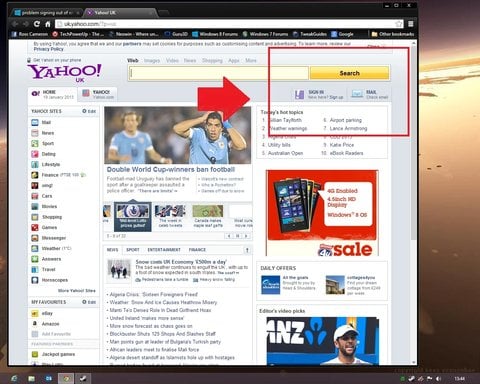
usually the sign out icon is found in area highlighted:

Link Removed

You'll notice I'm using Chrome, perhaps, if your using IE10 you need to press the compatibility tab in the address bar? It looks like a rectangle with a slash going through it diagonally.

It might also interest you to know that you can have your email directed to the mail app in the Modern UI screen or Metro. If this is something that might interest you then please let us know and we can set you on the right path.
 

Last edited by a moderator:

silver fox

New Member
Joined
Jan 19, 2013
Messages
6
Thread Author #3
Hi Kemical
many thanks for your reply but I cannot find any highlighted areas that state sign out
and also there is no compatability tab in the address bar
on my tablet and other laptop there is the log out sign but nothing on this
Regards
Silver Fox
 

kemical

Essential Member
Joined
Aug 28, 2007
Messages
36,163
Hi,

could you take a screenshot for me? This can easily be done by holding down the windows key and then pressing the 'print screen' key. You'll find a folder in your pictures library entitled screenshots, your screenshot can be found here. Use windows paint to then save it as a jpeg and post it in the forum.
 

Sonny

Fantastic Member
Joined
Nov 17, 2009
Messages
1,386
Try clicking on your name at the top. Should be a drop down with the option to sign out.
 

Solution

Jimbo22

Essential Member
Joined
Aug 27, 2008
Messages
5,036
This is why I hate Yahoo...it always been so hard to navigate and it's never been truly user friendly. Then came the new mail...what a joke that was.

Anyway, like kemical asked, post a screen shot so we can see what you see.
 

silver fox

New Member
Joined
Jan 19, 2013
Messages
6
Thread Author #7
hi kemical,
i think i have loaded yahoo on my windows eight laptop wrong because there is no sign in icon either so i am going to
take it off and start again
regards
silver fox