📎 AI Summary:
The thread discusses an issue where a computer experiences slow program performance upon startup, which temporarily resolves after a restart. The original poster is seeking help to identify the specific process causing the lag, despite attempting to disable AutoCAD-related processes. Responses suggest general troubleshooting steps, including running cleaning and security tools, managing startup programs, checking disk space, and running system scans, with some sharing personal experiences and tips.

jaypaul978

New Member
Member details
Joined
Apr 28, 2016
Messages
1
Thread Author #1
For some odd reason, when I boot up my computer, all programs will be slow (for example, video games might have low framerate or typing into the internet bar is delayed) until I restart the computer. Then it's fine until the next day.

Programs I recently installed include AutoCAD, but I tried turning off all AutoCAD related processes using the task manager already and that doesn't fix it.

How can I figure out which process is causing this issue?
 

Solution
Hi

My process is to run, CCleaner, Malwarebytes, Defraggler, and SuperAntiSpyware to start with.

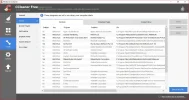
Then I use the tools in CCleaner to turn off anything that I don't need to have start at boot.

Make sure you have plenty of free disk space for your swap file.

And you can run...

SFC /scannow

...from the command prompt to see if it finds any problems.

Mike

MikeHawthorne

Essential Member
Microsoft Community Contributor
Member details
Joined
May 25, 2009
Messages
6,684
Hi

My process is to run, CCleaner, Malwarebytes, Defraggler, and SuperAntiSpyware to start with.

Then I use the tools in CCleaner to turn off anything that I don't need to have start at boot.

Make sure you have plenty of free disk space for your swap file.

And you can run...

SFC /scannow

...from the command prompt to see if it finds any problems.

Mike
 
Solution

holdum333

Banned
Member details
Joined
Mar 27, 2016
Messages
1,242
Good advice Mike! Here's my start-ups! I have 4!
 

Attachments

  • Capture48.webp
    Capture48.webp
    137.5 KB · Views: 353