
📎 AI Summary:
The user Safal Piya asked how to clear recent files that appear in Windows 10 Build 10130 across various apps and browsers. Moderator davehc suggested disabling the "Store and display recently opened items" option in Settings > Personalization. Safal Piya confirmed that turning off this setting successfully cleared the recent file list, expressing thanks. The overall tone is of a helpful technical Q&A focused on privacy and interface customization.

Safal Piya

Active Member
Joined
Jun 16, 2014
Messages
26
Thread Author #1
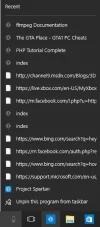
I have Windows 10 Build 10130 and I get my recent files as I open the sites from the spartan browser and also from my music and video apps. I want to clear those recent file list. So, if anyone can help me, please give me an solution to clear those list from my all apps.
Please take a look at the screenshot, given below:
 

Attachments

  • Untitled.webp
    Untitled.webp
    16.6 KB · Views: 453

davehc

Essential Member
Premium Supporter
Joined
May 1, 2008
Messages
5,546
Settings - Personalisation. Click Start and you will see the options for these functions. I have all of mine turned off.
 

Safal Piya

Active Member
Joined
Jun 16, 2014
Messages
26
Thread Author #3
Settings - Personalisation. Click Start and you will see the options for these functions. I have all of mine turned off.
I turned off "Store and display recently opened items in Start and the taskbar" and it seems to work :) Thanks
 

Solution